

 4.9 (400+
reviews)
4.9 (400+
reviews)
Kareo X Emitrr Integration
Connect Kareo with Emitrr to handle patient texting from one shared inbox. Automate confirmations and reminders, keep patient contact details in sync, and reduce daily follow-up work for your front desk.

Planning to integrate Emitrr with Kareo? Review a quick checklist to understand what’s required before integration.
Why Connect Kareo with Emitrr?

Faster Replies to Patient Texts
All patient messages come into one inbox, so staff can respond on time without switching tools or missing texts.

Less Manual Follow-Up for Staff
Routine messages go out automatically, cutting down on reminder calls and repetitive texting.

Lower Front Desk Workload
Automated confirmations and reminders reduce forgotten visits and last-minute no-shows.
Cleaner, More Reliable Patient Data
Contact sync keeps phone numbers updated, reducing failed messages and wrong-number issues.
Features You Get With the Kareo + Emitrr Integration

Two-Way Patient Texting

Send and receive texts using your existing clinic number
Shared inbox for multiple staff members
Conversation history linked to patient records
Automated Appointment Messaging
Automated confirmations
Follow-ups for missed appointments
Consistent communication without manual sending

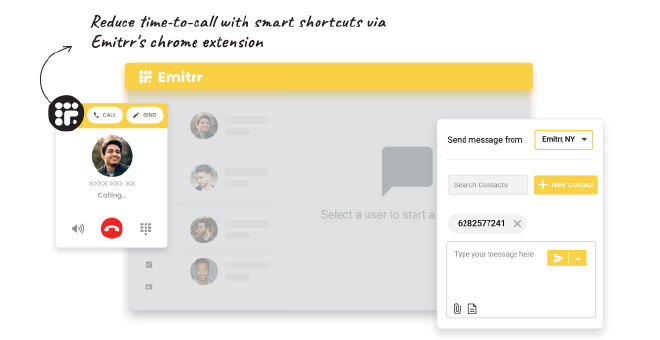
Click-to-Text (Chrome Extension)
Start a text from any phone number in Tebra or the browser
No copying or switching tabs
Faster replies for scheduling questions
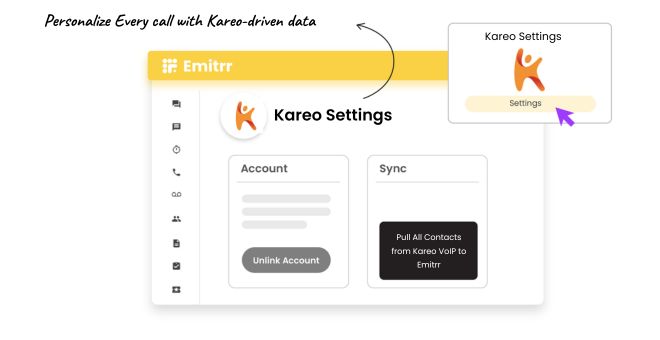
Contact Sync From Kareo
Sync patient contact details from Kareo
Keep phone numbers up to date
Fewer duplicate records and failed messages
Key Use Cases Across Teams
Front Desk Team
Practice Owners & Managers
Customer Support Team
Frequently Asked Questions
Ready to Integrate Emitrr with Kareo?
Simplify patient texting, automate reminders and confirmations, and reduce daily follow-up work for your front desk.