
Introduction
Although faxing may seem outdated, it is still a common practice in the medical field. Medical records, insurance documents, lab results, and referrals are frequently sent by fax. When these faxes are misdirected, staff time is los,t and patient care is slowed down.
Athenahealth’s smart fax routing feature assists practices in automatically allocating incoming faxes to the appropriate team, provider, or patient record without requiring ongoing manual labor.
This blog describes what smart fax routing means, when it’s necessary, and how to activate it within Athenahealth.
How to Enable Smart Fax Routing in Athenahealth?
- Ensure All Incoming Faxes Are Received in Athenahealth
- Locate Where Incoming Faxes Appear in the System
- Create Clear Document Categories for Incoming Faxes
- Use a Standard Fax Cover Sheet for All Faxes
- Set Up Separate Fax Inboxes for Different Teams
- Automatically Sort and Route Faxes to the Right Inbox
- Keep a General Inbox for Faxes That Need Manual Review
- Limit Access and Regularly Review Fax Routing Settings
What Smart Fax Routing Means in Athenahealth
The process of automatically directing incoming faxes to the appropriate document type, department, or patient chart based on predetermined rules is known as smart fax routing.
Rather than each fax ending up in a shared inbox for employees to examine and organize, routing rules make use of information such as the type of document, details of the sender, identifiers for patients to send faxes where they belong, and use the fax cover sheet fields. The objective is straightforward: minimize manual sorting and avoid missing crucial documents.

How Fax Routing Works in Athenahealth Today
By default, incoming faxes in Athenahealth typically arrive in a central fax or document queue. From there, staff:
- Open the fax
- Identify what kind of document it is
- Attach it to the correct patient (if applicable)
- Assign it to the right document class or department
This process works at low volumes, but as fax traffic increases, it often leads to delays, backlogs, and misrouted documents, especially in multi-provider or multi-location practices.
Requirements Before Setting Up Faxing in Athenahealth
Before enabling smart fax routing in Athenahealth, a few basics need to be in place:
- User access and permissions: Only authorized users should configure routing rules and access routed documents.
- Document classes and queues: Document types must be clearly defined so faxes can be categorized correctly.
- Standard fax cover sheets: Consistent cover sheets help routing rules identify document type, provider, or patient.
- Clear internal rules: Teams should agree on where different types of faxes should go before automation is applied.
How to Enable Smart Fax Routing in Athenahealth
Athenahealth does not offer one-click “smart fax routing.” Instead, you can enable routing by configuring queues, document classes, and intake workflows around athenaFax.
Follow these steps to set it up correctly.
Step 1: Make sure all faxes come into Athenahealth.
First, check that your practice is using athenaFax to receive faxes. All faxes must come into Athenahealth for routing to work. If you still use a local fax number, have it forwarded to your athenaFax number so everything arrives in one place.
Step 2: Find where incoming faxes show up.
Look for the main fax or document inbox where new faxes appear. This is usually a general queue that staff check first. This inbox is where fax sorting begins.
Step 3: Set up clear document types.
In Athenahealth, document types are called document classes. Create simple and clear options like referrals, lab results, medical records, or billing documents. These labels help decide where each fax should go next.
Step 4: Use the same fax cover sheet every time
Ask senders to include a fax cover sheet with the document type, patient name, and date of birth (or record number), and the department or provider. You will be able to route faxes more smartly when this information is clear.
Step 5: Create inboxes for each team
Set up separate queues for different teams, be it clinical staff, referrals, billing team, etc. Make sure each inbox has someone responsible for checking it regularly.
Step 6: Sort and route faxes as they arrive
When a fax comes in, staff open it, choose the correct document type, attach it to the right patient if needed, and send it to the correct team’s inbox. This will reduce manual forwarding and guessing.
Step 7: Keep a general inbox for unclear faxes
Some faxes will be missing information or be hard to read. These should go into a general or backup inbox so they can be reviewed and fixed later instead of being lost.
Step 8: Limit access and check routing often
Only allow the right staff to see fax inboxes. Make sure to review whether faxes are going to the right places and update the setup if workflows change.
Common Fax Routing Challenges in Athenahealth
In real-world scenarios, most especially in busy practices with high volumes of faxes, the fax workflow still breaks down despite the routing rules. Here are some of the most common fax routing challenges that Athenahealth users or healthcare practitioners in general face:
Poor fax organization
Incoming faxes are often received into a shared inbox, then have to be reviewed and forwarded manually by staff. This slows down refills, referrals, and authorizations.
No intelligent prioritization of faxes
Another problem with faxing inside Athena is that urgent faxes, such as those regarding STAT orders or lab results, fall into the same heap as routine paperwork, hence increasing delays in response.
Faxes not linked to patient records
Few systems automatically attach the incoming faxes to the right profile. Staff must search for the patient and perform a document upload manually, which is very time-consuming and may lead to misplaced files.
Staff Time Lost on Administrative Work
Manual fax handling is time-consuming and takes time away from higher-value tasks. Instead of focusing on patient care, staff spend hours each week opening, reading, routing, and re-routing faxes.
How Emitrr Is Building Smarter Fax Routing for Athenahealth
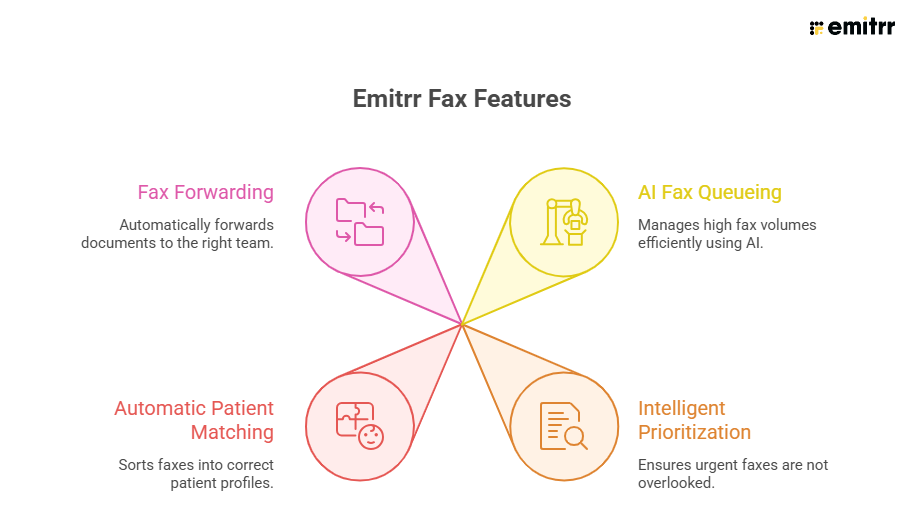
Emitrr is working on enhanced fax features that target the remaining gaps in current fax capabilities with Athenahealth, including:
- AI-based fax queueing to be able to manage high fax volumes more efficiently.
- Intelligent prioritization of faxes so that urgent faxes don’t get buried.
- Automatic patient matching, where incoming faxes are sorted into the correct patient profile based on patient details like name.
- Fax forwarding inside Athena, to make sure that documents reach the right team without manual work.
See how faxing inside Emitrr works and experience our native integration with Athenahealth to make your work and life that much easier.
Best Practices for Smart Fax Routing in Athenahealth
Follow these best practices to save time in routing faxes in Athenahealth.
- Avoid making too many categories and stick to basic document types. Staff can route faxes more quickly and accurately when document classes are clear and constrained.
- Maintain uniform fax cover sheets for each sender. It is easier to identify the document type, patient, and department when the cover sheet is more uniform. Whenever possible, let referral partners know what format you prefer.
- Patient identifiers should always be included on incoming faxes. Ask for the patient’s name and birthdate, at the very least. One of the most frequent causes of fax delays or misrouting is missing patient information.
- Give each fax queue a distinct owner. There should be a designated team or individual in charge of monitoring each inbox. This keeps papers from being left unattended.
- Establish and keep an eye on a general or exception queue. Not every fax will be flawless. Uncertain or incomplete faxes are reviewed rather than lost thanks to a backup inbox.
- Routing should be reviewed frequently. Check for misrouted or unassigned faxes on a regular basis, and make any necessary adjustments to document classes or workflows. Recurring problems can be avoided with minor updates.
- Restrict fax access according to roles. Permit employees to view fax queues only if they require access to sensitive documents. This aids in maintaining compliance and safeguarding patient data.
Frequently Asked Questions
Yes, Athenahealth offers native faxing through athenaFax, which allows practices to send and receive faxes directly inside the platform without needing a separate fax service.
No, fax routing in Athenahealth is not fully automatic. Routing is done using document classes, queues, and staff review during intake, rather than AI-based auto-classification.
Faxes with missing or unclear patient details should be sent to a general or exception queue, where staff can review and correct the information before attaching the document to the correct patient or department.
Conclusion
Smart fax routing in Athenahealth can help practices organize incoming faxes, reduce errors, and save staff time. By setting up clear document classes, standardized cover sheets, and department-specific queues, faxes can be quickly routed to the right patient record or team. While Athenahealth doesn’t fully automate routing, following these steps and best practices ensures a smoother workflow, faster processing, and better compliance.


 4.9 (400+
reviews)
4.9 (400+
reviews)