
Introduction
Imagine this: it’s 8:00 AM, and a provider calls in sick. Twenty patients are scheduled for that morning, and the front desk scrambles to notify them: calls, voicemails, texts. Some patients don’t answer, some show up anyway, and open slots sit empty.
Athenahealth’s real-time online scheduling makes booking appointments fast and convenient for patients via the portal or athenaPatient app. But when schedules change, confirmations, cancellations, and reschedules can quickly overwhelm staff.
Emitrr helps bridge that gap. How? Keep reading to find out how you can enable real-time online scheduling in Athenahealth more smartly and efficiently.
How to Enable Real-Time Online Scheduling in Athenahealth?
- Confirm That Your Practice Has Access to Online Scheduling in Athenahealth
- Log In to Athenahealth With Admin-Level Permissions
- Set Up the Appointment Types Patients Can Book Online
- Configure Provider Availability and Scheduling Rules
- Enable Patient Self-Scheduling in the System Settings
- Test the Online Scheduling Setup Before Going Live
What Native Online Scheduling Options are Offered By Athena?
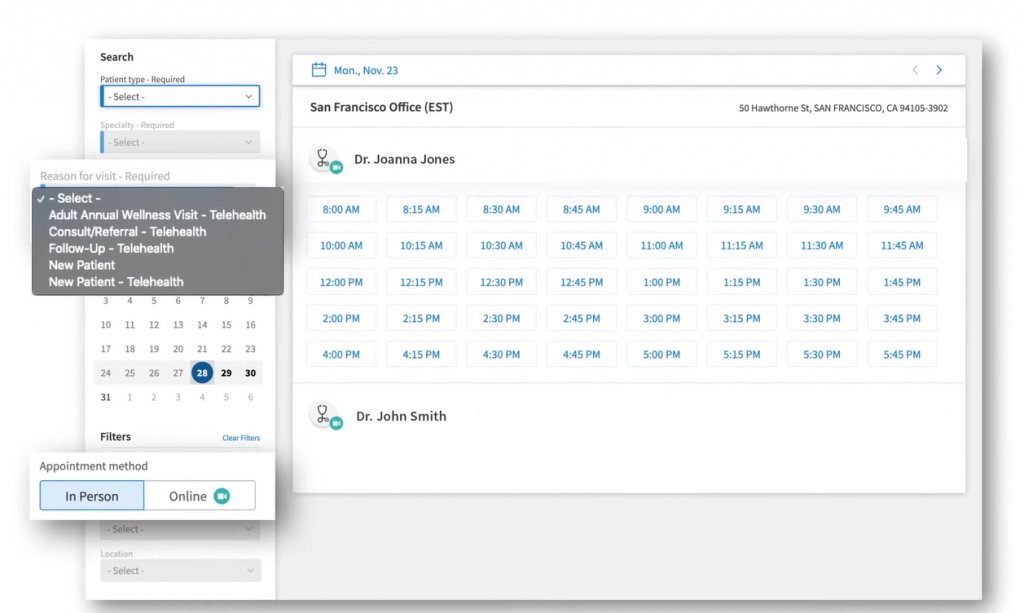
Athenahealth provides patient self-scheduling as part of its patient portal or athenaPatient app. This allows patients to book appointments without calling the practice, as long as the feature is enabled and properly configured. Or else you can always schedule appointment yourself on Athena.
Key Capabilities
- Real-time availability: Patients see open slots based on provider schedules.
- Self-scheduling via portal or app: Booking can be made inside the Athena patient portal or athenaPatient mobile app. Many practices also combine online scheduling with digital intake forms in Athenahealth to collect patient information before the visit, helping reduce administrative work and streamline the check-in experience.
- Appointment-type controls: Practices get to decide which visit types can be booked online.
- Language-friendly booking flow: Patients can complete the scheduling flow in their preferred language.
- Automated confirmations and reminders: Basic appointment notifications can be sent via email or SMS.
This setup may work well for standard, predictable appointments such as follow-ups, routine visits, or primary care consultations. But in clinics where provider schedules are unpredictable, scheduling queries come in even after hours, Athena alone is definitely not enough.
How to Enable Real-Time Online Scheduling in Athenahealth
Here’s a step-by-step guide on how you can enable real-time scheduling in Athenahealth directly, working with the minimum features it has:
Step 1: Confirm Eligibility & Access
Before anything else, check that your practice has patient self-scheduling activated. This is important to allow your patients to book appointments online via the patient portal or athenaPatient app.
Step 2. Log In With Admin-Level Permissions
Only users with admin access can configure scheduling settings. So log in to Athenahealth as an administrator to ensure you have the necessary permissions. This step is important to enable more scheduling settings.
Step 3: Configure Appointment Types
This is where you will decide which visit types should be bookable online. Here, you can:
- Set duration, buffers, and booking windows.
- Exclude complex or high-risk visit types if needed.
- Align templates with real provider workflows.
Step 4: Set Provider Availability Rules
Next, set up the working hours, breaks, and blockouts of your providers. Make sure that the provider calendars are accurate and up to date to avoid cancellations or empty slots.
Step 5: Enable Patient Self-Scheduling
Now go to Athenahealth’s patient engagement or scheduling settings and turn on real-time online scheduling for the portal and athenaPatient app.
Step 6: Test Before Going Live
Before going live, test appointment self-scheduling as a patient. Cross-check if the appointments appear correctly on staff schedules, and also verify confirmations and reminders are triggered accordingly. Once live, your patients will be able to book appointments in real time without calling your front desk.
Limitations of Athenahealth’s Native Scheduling
Scheduling is not just about allowing your patients to book appointments on their own. What about after-hour appointment queries, reminders, follow-ups, smart notifications, and two-way conversations with patients? Athenahealth is a great EHR, but when it comes to scheduling, there are many limitations to it. Let’s take a deeper look at it:
Schedule Changes Are Hard to Communicate at Scale
If a provider is running late or calls in sick, there is no way in Athena to communicate schedule changes to patients at once. Your front desk needs to make calls or send text messages to patients manually, which can be so time-consuming.
No Native Schedule-Based Outreach
Athenahealth doesn’t allow you to pull a full schedule and message patients by date range. Nor does it allow you to notify only specific patients affected by a specific provider or day.
Basically, there is no way to quickly handle bulk schedule disruptions inside Athena.
Appointment Reminders Come From a Different Number
Athena allows you to send appointment reminders, but the reminders are sent from system-generated or shared numbers, not the clinic’s primary phone number. As a result, your patient might not recognize the number and ignore the text, which can also lead to lower trust and response rate.
Limited Two-Way Communication
Reminders sent inside Athena are largely one-way. What if the patient wants to reschedule or cancel? There is no way for your patients to confirm with a simple reply, cancel, or reschedule via SMS, or ask quick questions without calling. This leads to high call volume, eating away at your front desk time.
Learn more about how to text patients inside Athena:
No Intelligent Recall Automation
Athenahealth supports recall workflows, but they typically rely on standard outreach or predefined rules rather than smart automation. Athena does not offer any smart way to automate recall reminders based on the patient’s history and data inside the EHR. It alone can’t automatically analyse when the patient is due for a prescription refill or a check-up and send those reminders.
Lacks Proactive Scheduling
Athenahealth allows patients to book available slots, but it doesn’t actively help fill your schedule. It does not allow you to do automated outreach when slots appear, nor does it send smart nudges to overdue patients. As a result, empty slots are never utilised properly, unless your front desk makes manual calls.
No After-Hours Appointment Handling
With Athena, your patients can book after hours, but if they need to cancel, reschedule or ask a quick question after hours? All this is taken care of after the clinic opens, creating morning call spikes, front-desk bottlenecks, and delayed scheduling.
Reduce call volumes and manual workload of your front desk. Talk to our experts to learn more.

How Emitrr Extends Athenahealth’s Online Scheduling Capabilities
Thankfully, all the above limitations can be easily overcome by adding a tool like Emitrr to Athenahealth. Emitrr offers native integration with Athenahealth and allows you to automate repetitive tasks, reduce call volume by 40%, improve communication with patients, and so much more. Here’s how:
Schedule-Based Texting
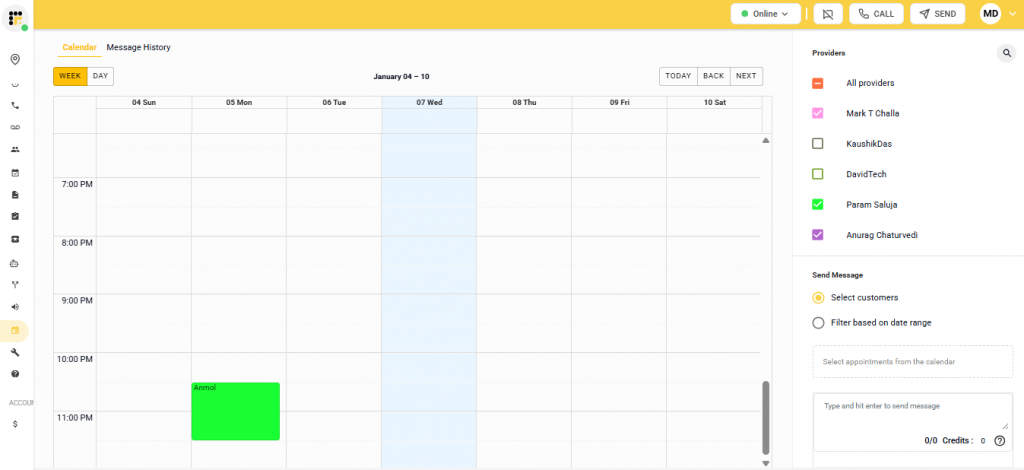
This feature is a game-changer. So, Emitrr pulls your entire live schedule from Athenahealth into its platform. Using which, you can:
- See all upcoming appointments across providers
- Instantly inform one or hundreds of patients about schedule changes
- Avoid manual filtering or spreadsheet exports
Within this, there are two powerful ways to message patients. You can either:
- Hand-pick patients
- Select specific appointments
- Send personalized messages instantly
Or, message by date range
- Example: message all patients booked between Jan 4–6
- Filter by a specific provider or include all providers
- Ideal for provider PTO, delays, or emergency closures
AI Agent That Handles Appointments 24/7
Emitrr offers a smart AI agent that works 24/7 to:
- Confirm appointments automatically
- Handle cancellations and rescheduling via text or call
- Respond instantly to appointment-related questions
- Update changes back into Athenahealth
- Onboard new patients automatically inside Athena
This way, your team does not need to check after-hours messages or voicemails in the morning and respond to them manually.
Learn more about what AI can do for your practice as an Athena user:
True Two-Way SMS
By adding Emitrr to Athenahealth, you can enable two-way communication. With regards to scheduling, it means, your patients can reply with simple responses like: CONFIRM, CANCEL, RESCHEDULE, and the calendar will automatically be updated inside athena. There is absolutely no need for your staff to get involved.
Smart Patient Recalls
Emitrr’s smart AI can automatically identify patients overdue for annual visits, chronic care check-ups, labs, etc., and launch cadence-based recall campaigns (30/60/90 days or custom intervals). Furthermore, AI can handle booking when patients respond and sync every outcome: booked, canceled, or no response, directly into the patient record.
Automated Reminders
Emitrr sends HIPAA-compliant confirmations and reminders via text or voice, to which patients can respond instantly, and their status gets updated automatically. This results in a fuller calendar and fewer empty slots.
Messages From Your Clinic’s Existing Number
No need to send reminders or messages from a number that your patients can’t even recognise. With Emitrr, you can send messages from your clinic’s existing number.
Stop managing your schedule manually. See how Emitrr automates recalls, handles reschedules, and fills last-minute gaps in real time inside Athenahealth. Book a free demo!
Step-by-Step: Enabling Emitrr with Athenahealth
Here’s a quick view at how you can enable smarter scheduling with Emitrr inside Athenahealth:
- Connect Emitrr with Athenahealth using secure credentials or API access.
- Sync appointment schedules, providers, and patient data.
- Configure workflows for confirmations, cancellations, and reschedules.
- Set up reminder cadence and language preferences.
- Enable schedule-based texting views.
- Test end-to-end booking → reminder → response → sync.
- Go live and monitor engagement metrics.
Frequently Asked Questions
Yes. Athenahealth supports real-time self-scheduling via the patient portal and athenaPatient app when enabled.
Native reminders are mostly one-way. Two-way SMS requires an engagement platform like Emitrr.
Not natively. Emitrr enables schedule-based texting using live Athena schedules.
No. Emitrr enhances Athenahealth scheduling by automating communication, confirmations, and schedule changes.
Conclusion
Athenahealth makes real-time online scheduling convenient for patients and reduces call volume for staff, but booking alone doesn’t prevent no-shows, scheduling gaps, or last-minute hiccups. Practices need smarter automation to keep schedules full.
Emitrr extends Athena with AI appointment handling, smart recalls, and proactive schedule-based texting, helping you fill gaps faster, reduce front-desk workload, and deliver a seamless patient experience. If you want your schedule to run efficiently, then Emitrr is the upgrade that gets you there. Book a free demo to see how it works with Athena.


 4.9 (400+
reviews)
4.9 (400+
reviews)