

Introduction to Medical Scheduling
Picture this: it’s 9 a.m. on a Monday. Your clinic phone is ringing nonstop. A patient is waiting at the front desk to book a follow-up. Another is calling to cancel. Your assistant is flipping through a paper calendar, trying to find an open slot. Sound familiar? That’s exactly where medical scheduling comes in.
Medical appointment scheduling is the way you plan patient visits so everything runs smoothly. It’s what keeps your day on track, like the rhythm of a well-run clinic. A good schedule makes sure doctors see patients on time, no one’s double-booked, and the waiting room isn’t overflowing.
Not too long ago, scheduling meant phone calls, notepads, and a lot of back and forth. Patients had to call during working hours. Staff had to chase down no-shows or spend time rescheduling over the phone. But now, things have changed. Online scheduling lets patients book appointments whenever they want, from their phone or laptop, just like they book a cab or a dinner table. And this shift isn’t just about using new tech. It’s about giving patients control. It’s about saving your staff time. Most importantly, it’s about creating a better experience for everyone involved.
When your scheduling system works well, your whole practice breathes easier. Patients show up on time. Doctors stay on schedule. Your team is less stressed. And your day flows better. So, let’s deep dive into what makes a great medical scheduling system and how you can choose one that works best for your office.
Importance of Scheduling for a Medical Office
Scheduling may seem like a small part of a medical office’s day but it’s actually one of the most important parts. If it doesn’t run smoothly, everything else starts to feel off. Patients feel it. Your staff feels it. And over time, it can affect both care and the clinic’s performance. So let’s break down why scheduling matters so much, for both your patients and your practice.
Why it matters for your patients
For many people, booking an appointment still means calling the clinic during working hours, being put on hold, or going back and forth just to find a slot that fits. It can be frustrating. Reaching out to schedule a visit might feel like a task, especially for someone who’s busy, anxious, or just not feeling well. If it’s not easy, patients may delay or even switch to another medical office.
In fact, 61% of consumers say being able to book appointments online is extremely important. That’s why offering a simple, convenient scheduling experience matters. When it’s easy to book, patients are more likely to come in for check-ups, follow-ups, or vaccines, not just when they’re sick, but for preventive care too. It helps them stay on track with their health.
Why it matters for your medical office
Now let’s look at things from the clinic’s side. Good scheduling keeps your day on track. It helps balance the doctor’s time with patient demand. You avoid long wait times, last-minute gaps, or double bookings. That means happier patients and a more productive team.
It also helps reduce no-shows. Every missed appointment is lost money. Experts say no-shows cost the U.S. healthcare system over $150 billion every year! But here’s the good news, most patients today want to book online. Nearly 80% say they’d use digital tools if they had the option. So by offering online scheduling, your office isn’t just saving time. You’re meeting patients where they are, and giving them the kind of access they expect.
Make scheduling calls quick and hassle-free. Download professional online scheduling SMS templates for medical offices.
Types of Scheduling for a Medical Office
Every clinic handles scheduling differently. Some let patients walk in. Others take appointments only. Many do a bit of both. There’s no one “best” way. What matters is what works for your team and your patients. Let’s go over the most common types of scheduling.
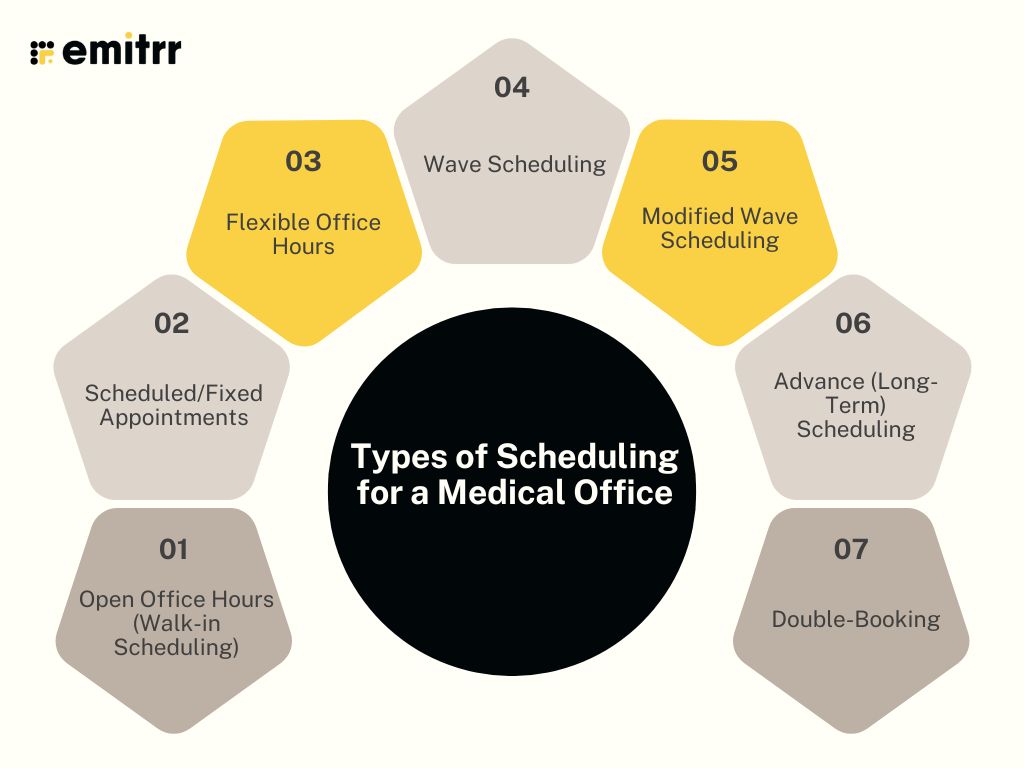
Open Office Hours (Walk-in Scheduling)
Patients don’t need an appointment. They just show up during clinic hours. Whoever comes first gets seen first. This works well for urgent care or walk-in clinics. It’s easy for patients with busy or changing schedules. But it can get messy. Some hours are packed. Others are empty. Your team won’t always know what to expect.
Scheduled/Fixed Appointments
This is the standard way most clinics operate. Patients book a time, like 10:30 AM, with Dr. James. Each visit gets a set time block. Maybe 15 minutes for a follow-up. Or 30 minutes for a new patient. It keeps the day organized. Doctors stay on track. Patients don’t have to wait too long.
Flexible Office Hours
Some clinics stay open in the evenings or on weekends. This helps people who can’t come during normal hours. It’s great for working professionals or parents. It also brings in new patients who want more flexible options.
Wave Scheduling
Here, several patients are booked at the same time, say 4 people at 9:00 AM. The doctor sees them in the order they arrive. It works when some visits are short or if someone shows up late. But if everyone shows up on time, some people may end up waiting. So, clear communication is important.
Modified Wave Scheduling
This is a calmer version of wave scheduling. Instead of booking everyone at once, you space them out. Maybe two patients at the start of the hour and one halfway through. It keeps things flexible but less rushed. It’s a nice balance between structure and flow.
Advance (Long-Term) Scheduling
This means booking visits months ahead, sometimes a full year. It’s common for routine check-ups or specialist appointments. For example, a patient might book next year’s physical tests before leaving today’s. It helps patients stay consistent with care. But reminders are key. People forget appointments made that far in advance. Most clinics send texts, emails, or calls a few days before.
Double-Booking
This means booking two patients for the same time slot. It’s used when one visit will be quick. Or when the provider can see two people at once, like while one gets an X-ray. It saves time when done right. But if both patients need more attention, it can lead to delays.
Most clinics use a mix of these methods. Having said that, cancellations are common. Last-minute emergencies might pop up. That’s why many clinics leave a few open slots each day. These can be used to fit in urgent visits or fill gaps from no-shows. It helps keep the day running without falling behind.
As you can see factoring in all of these cases can be quite a task. But with today’s medical scheduling software, blending methods is easy. You can offer online booking, hold back emergency slots, and set up reminders, all in one place.

Use Cases of Medical Appointment Scheduling
Online scheduling is more than just picking a date and time. It solves real problems for real people, patients and staff alike. Let’s walk through a few everyday scenarios where it truly makes a difference.
After-hours self-booking
It’s 10 PM. A mom just tucked her kids into bed. That’s when she remembers her youngest is due for a vaccine next week. She doesn’t want to wait till morning to call. She’s not sure she’ll even remember. So she opens the clinic’s website, checks available slots, and books it right there. Online scheduling gives patients the power to book on their own time, even after hours. And for your clinic, that’s an appointment secured without a single phone call.
Filling cancellations with waitlists
A patient cancels their dermatology appointment last-minute. The 3 PM slot is now open. But instead of that time going to waste, your system checks the waitlist. Someone who asked for an earlier slot gets a quick text: “3 PM today just opened up. Reply YES to book.” They reply instantly. Done. The spot is filled in minutes, no staff needed. That’s the power of automated waitlist management.
Fewer no-shows with reminders
Picture this. A community clinic was struggling with missed appointments. Almost one in five patients simply didn’t show up. There were no calls, no warnings, just empty slots and wasted time.
Now, things are different. The clinic uses an online scheduling system that sends automatic reminders two days before each visit. Patients can confirm or reschedule directly from the message. Like Amanda, who got a reminder, realised she had a work conflict, and quickly rebooked for Saturday instead. The result? No lost time and no confusion at the front desk. Just smoother days, fewer no-shows, and a calendar that stays full.
Booking telehealth with ease
John, a college student, wakes up with a sore throat. He doesn’t want to miss class, but he needs to talk to a doctor. He books a virtual visit online for lunch hour. The confirmation email sends him a video link with no extra steps. At 1 PM, he logs in, sees the provider, and gets a prescription.
All done before his next lecture. This kind of setup makes telehealth easy for patients and for your team, too.
Coordinating multi-provider visits
Maria needs an X-ray, a check-up with her ortho, and a follow-up with a physio. Three visits. One day. Instead of juggling calls and appointments, your AI-powered smart scheduling software handles it all. It books the X-ray first, then the consult, then the physio, back to back. No confusion. No overlaps. Just a smooth experience for Maria and no extra work for your staff.
Starting patient intake during scheduling
Jason is a new patient booking online for the first time. As soon as he confirms his slot, he gets a link to fill out intake forms. He finishes them on his phone that evening. When he walks into the clinic two days later, everything is already done. The front desk doesn’t need to hand him a clipboard. The doctor sees his medical history ahead of time. Everyone’s happy and the day stays on schedule.
Connecting scheduling to texting
Tina books her annual blood work. A few minutes later, she gets a text: “Your appointment is confirmed for 8:30 AM on Thursday. Do not eat for 10 hours before.” She replies: “Thanks! Can I take my meds before the test?” The clinic replies right away. This makes Tina feel reassured. She’s ready for the test.
By linking your scheduler with an AI-powered texting app, you can answer questions fast and keep patients informed. That means fewer calls, fewer mistakes, and happier patients.
Every clinic faces these situations. A parent is making bookings late. A slot opening up. A patient unsure about prep. Online scheduling helps handle it all smoothly without wasting time. It also builds a better, easier experience for everyone.
Best Practices for Medical Appointment Scheduling
Great scheduling doesn’t happen by accident. It takes a few smart habits, the right tools, and a good understanding of what your patients and staff actually need. Here are some simple, proven practices that can help your clinic stay on top of its schedule and keep everyone happy.
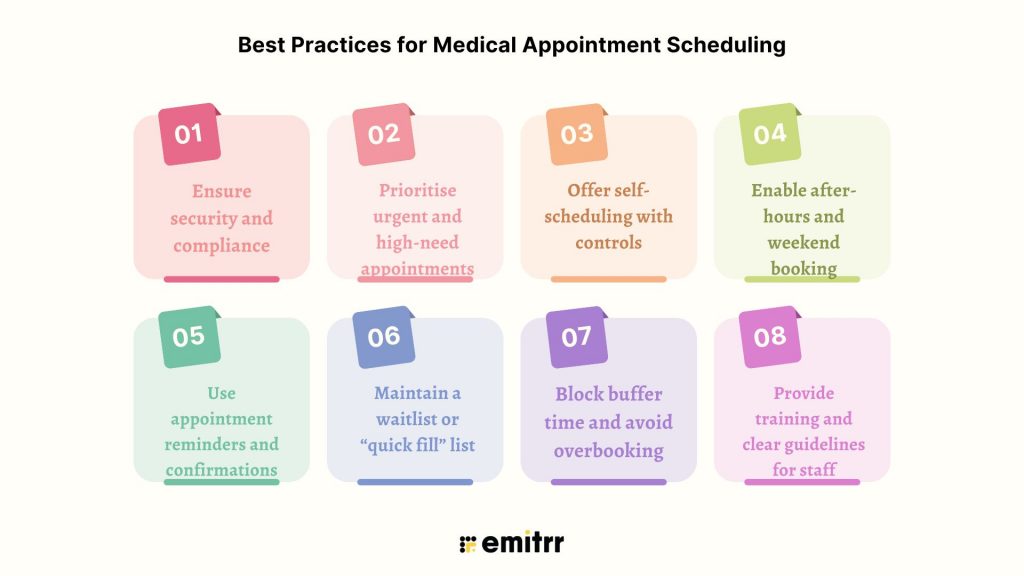
Ensure security and compliance
Patient data must be protected. Always. Use a HIPAA-compliant system that encrypts data and limits access to authorised staff only. Staff should log out when stepping away from their desks. And be careful with what goes into reminders or texts, never include sensitive medical info. Before sending any texts or emails, make sure the patient has given permission. Most modern tools handle the security part well, but it’s still up to your team to use them correctly.
Prioritise urgent and high-need appointments
Not all appointments are equal. Someone with chest pain shouldn’t wait as long as someone needing a routine blood pressure check. That’s why it helps to keep a few same-day or next-day slots open for urgent visits. Try building a system to spot patients who need to be seen sooner. Maybe they haven’t come in for a while or have complex symptoms. It shows patients you care and helps them get timely treatment.
Offer self-scheduling with controls
Letting patients book online is a huge time-saver. But it works best when there are a few rules in place. For example, allow self-booking for regular visits, but ask patients to call for complex procedures. This helps avoid mistakes and makes sure the right amount of time is booked. Online booking is quick, most people can schedule in under a minute. And that’s a big win compared to phone calls that take much longer.
Enable after-hours and weekend booking
Not everyone can call between 9 and 5. Some patients only remember to book appointments late at night or on weekends. Even if your clinic isn’t open, your scheduling system should be. That way, patients can book whenever it’s convenient for them. If you’re able to offer evening or weekend slots, even better. This is one of the best ways to stay competitive and patient-friendly.
Use appointment reminders and confirmations
Reminders help reduce no-shows. A lot. Try sending a text or email reminder 48 hours before the visit, and maybe a second one 24 hours before. Make it easy for patients to reply and confirm. Also, give them a quick way to cancel or reschedule if needed. That way, your team knows in advance and can adjust the schedule. Clinics that use reminders often cut no-show rates by 30% or more. Which is great for keeping the day on track.
Maintain a waitlist or “quick fill” list
Sometimes patients cancel at the last minute. Don’t let those slots go to waste. Keep a list of people who’d love an earlier appointment if something opens up. Your system can even send out automatic texts when a slot becomes available. First person to reply gets it. This simple move can help keep your calendar full and your patients happy.
Block buffer time and avoid overbooking
Things don’t always run exactly on time. That’s why it helps to add small buffer slots into the day, like 10 minutes every couple of hours, to catch up. This gives your team breathing room and helps avoid a snowball of delays. As for overbooking, use it carefully. It might help if you often get no-shows, but if everyone turns up, your schedule can fall apart. Check your reports and only double-book when it makes sense, like a quick shot visit paired with a longer check-up.
Provide training and clear guidelines for staff
Even the best system can fall apart if your staff isn’t on the same page. Train your team on how to use the software, handle special requests, and enforce scheduling policies. Make sure they know what to do when someone walks in without an appointment or needs an urgent slot. Also, let staff mark repeat no-shows in the system. Over time, this helps shape better scheduling habits. Don’t forget to ask your team for feedback. They often have the best ideas for fixing little things that slow the process down.
Following these simple practices can make a huge difference.
Challenges in Scheduling for a Medical Office
Scheduling in a medical office isn’t always smooth. It comes with a lot of moving parts, and even small issues can cause big headaches. Here are some of the most common challenges clinics face on a daily basis:
- No-shows and last-minute cancellations: Patients forget, feel better, or face transport issues. These missed visits leave gaps and lost income. Even reminders don’t stop all no-shows.
- Balancing supply and demand: Some days are overbooked, while others have empty slots. Matching appointments with actual demand is tricky, especially without data or good tools.
- Limited scheduling access: If booking is only by phone during working hours, it becomes a hassle for patients. Many give up if they can’t reach you easily, especially if they’re redirected from a website to a phone or the other way around.
- Complex appointments and coordination: Some visits involve multiple providers or steps. Scheduling these in the right order without mistakes is time-consuming and easy to mess up.
- Avoiding scheduling errors: Mistakes like double-booking or wrong time slots can happen fast. Even a small typo in contact details means missed reminders or lost patients.
- Patient compliance and preferences: Some patients won’t show up for early slots or only want one doctor. Working around these habits while keeping the schedule full is a constant juggle.
- Technology and integration issues: Some systems don’t sync well with EHRs or communication tools. This can lead to double entries, missed updates, and more manual work.
The good news? Most of these problems can be fixed or at least made easier with the right setup. A smart scheduling platform like Emitrr can help automate routine tasks and keep your day running smoothly.
How to Set Up Scheduling for a Medical Office Using Emitrr
Step 1: Create your Emitrr account
Sign up and add basic info like your clinic name, timings, and provider list. Emitrr’s team can help with setup if needed.
Step 2: Add providers and services
Enter each doctor’s schedule and what appointments they handle. Set durations for new visits, follow-ups, and telehealth.
Step 3: Set booking rules
Choose how early patients can book, allow or block same-day appointments, and add time buffers if needed.
Step 4: Sync with your tools
Connect Emitrr with your EHR, Google Calendar, or practice software so everything updates in real time.
Step 5: Turn on reminders
Automate texts or emails for confirmations and appointment reminders. Staff can get alerts too.
Once you’re live, Emitrr handles the rest, bookings, reminders, updates like a smart digital receptionist for your clinic!
Frequently Asked Questions
Yes. With online scheduling, patients don’t have to wait until your office opens. They can hop online at 10 PM and grab a slot that works. It’s convenient for them and efficient for you.
Absolutely. Emitrr is built for healthcare. Every appointment, message, and patient interaction is encrypted and handled according to HIPAA rules. You also get user access controls and audit logs to stay on top of compliance.
Yes. If someone cancels, Emitrr can alert waitlisted patients automatically. The slot gets filled fast, without staff needing to call around. That means fewer gaps in your schedule.
It’s actually pretty simple. You sign up, enter your office hours and services, and set a few preferences. Emitrr’s team can guide you through setup, and once you’re live, it runs quietly in the background, like a digital receptionist.
Conclusion
Managing a busy medical practice involves balancing many tasks, but scheduling shouldn’t add to the stress. The right scheduling solution can reduce phone calls, prevent double bookings, and keep your calendar full, offering better access for patients and more breathing room for your staff.
Emitrr is designed to simplify your scheduling process. Acting as a digital assistant, it seamlessly adapts to your workflow, whether you’re a solo provider or managing multiple locations, saving you time each week and enabling your team to focus on delivering care.
Want to discover a more efficient scheduling experience? Book a free demo with Emitrr and see the difference!


 4.9 (400+
reviews)
4.9 (400+
reviews)