
You know how running a podiatry practice can get a little hectic? Something or the other always needs more attention, like seeing patients, managing appointments, or just important follow ups.
And we all will agree that individually calling every patient just to confirm appointments or send reminders isn’t really the best use of anyone’s time, at least in today’s day and age.
That’s why you need a healthcare communication software i.e solid texting tool to integrate into your podiatry practice. A quick text can go a long way. Faster for the staff, easier for patients, and way more efficient than phone calls, a total win-win.
Aren’t we all more comfortable with texts than phone calls? It makes communication so much more smoother. So it doesn’t matter if it’s a simple reminder, a follow-up message, or even answering a quick question, let your text do its thing.
A patient messaging software sounds like a great investment, right? So, let’s talk about what to look for in good texting software as a podiatrist, how it helps with day-to-day workflows, and some of the best options out there right now.
So, if you’ve ever thought, “There’s got to be a better way to handle all this patient communication,” you’re in the right place!

Overview Of Texting Service for Podiatrists
Appointments, patient follow-ups, no-shows, billing reminders, and the never-ending phone calls. That could be you, if you’re a podiatrist, juggling so much and wondering if there’s a better way to do it.
Well, yes. There is: using a patient texting software
Texting makes communication with patients faster and easier. Most people read a text within minutes, about 98% of text messages are opened, compared to only 20% of emails.
With a good patient messaging software, you can:
- Remind patients about appointments
- Answer quick questions
- Send follow-up care instructions
- Share office updates like holiday hours or rescheduling
- Reduce the number of calls your front desk handles
More importantly, texting feels natural to patients (just like everyone). So comfortable, like you’re talking to friends or family.
When used right, texting can help you stay close to patients without really adding to your workload.
And, of course, since this is healthcare, privacy matters. A LOT! That’s why podiatrists cannot miss HIPAA-compliant as a feature when figuring out a texting solution.
Let’s look at the features you can’t miss in detail.
Features To Look For In Podiatrist Texting Software

Not all healthcare communication softwares is made the same. It is important to look for features that actually help you with your podiatry practice’s day-to-day tasks. For your help, we’ve listed some crucial features that definitely shouldn’t be missed:
Automated Appointment Reminders & Follow-Ups
Manually calling patients to remind them of their appointment days is a thing of the past. Pick a patient texting software that automates reminders that can save hours every week, and help reduce no-shows.
Fact: Appointment reminder texts can reduce no-show rates by up to 38%.
And yes, follow-ups are important. So, with that texting tool, you should also be able to schedule follow-up messages like post-visit care instructions or just review requests in general.
Two-Way HIPAA-Compliant Messaging
Let’s be real and not robots. Two-way texting lets patients respond easily, whether they’re confirming appointments, asking questions, or rescheduling.
And since you’re dealing with such crucial health information, HIPAA compliance becomes non-negotiable. That means data encryption, access controls, and audit logs should be built into the patient messaging software you’re choosing.
Integration With EHR/EMR Systems
Patient texting software works best when it talks to your EHR or EMR. That way, patient contact info, appointment dates, and medical context are all in one place.
Copy-pasting data between systems can be very hectic. Look for the feature that lets you sync data automatically.
Mass Patient Notifications & Broadcast Messaging
Closing the clinic early today? Want to send flu shot reminders or share holiday hours? All this can be done with the feature of mass messaging. It helps you reach everyone at once, without writing dozens of individual texts and saving the anxiety of not missing anyone.
And yes, you should be able to segment your audience too. Example: Sending messages only to diabetic patients or patients who have visited recently.
Customizable Message Templates
Templates save time and keep things consistent. Right? The biggest benefit of reusable templates is that no matter whether it’s appointment confirmations, intake form links, or payment reminders, all of these can be done very easily in seconds.
Well, a bonus if your healthcare communication software lets you personalize message templates with patient names and appointment details.
Read Receipts and Message Delivery Tracking
Wondering if a patient saw your message? Having shown delivery status and read receipts, so you’re not left with any second thoughts would be great!
This way you follow up more confidently and give your staff peace of mind that the message got through.
Consent Management and Opt-Out Controls
Texting patients without permission is a bad idea. Both legally and professionally. Your patient texting software should make it easy to:
- Collect opt-ins
- Manage consent records
- Offer a simple opt-out option for patients who change their mind anytime
Staying compliant with TCPA and HIPAA rules isn’t just about avoiding fines, it’s about respecting your patients’ preferences.

Security & Compliance Requirements For Podiatrist Texting App
When it comes to doctor-patient communication, convenience can’t come at the cost of privacy. Any healthcare texting software used in a podiatry or any practice, for that matter, must follow strict rules to protect sensitive health information.
Here we have listed some key compliance and security requirements:
HIPAA-Compliant Messaging Encryption
Encryption is the core of secure messaging EVERYWHERE. This means that any sent or stored message sent is scrambled and unreadable to anyone else.
HIPAA (Health Insurance Portability and Accountability Act) requires that protected health information (PHI) is safeguarded from end to end. So whether you’re sending an appointment reminder or discussing post-surgery care, the software should use strong encryption protocols like AES-256 and TLS 1.2 or higher.
Without this level of encryption, your practice could be at risk of a data breach…and potential HIPAA penalties.
Business Associate Agreement (BAA) Availability
If you’re using any third-party service to handle PHI, including a texting platform, they’re legally considered a Business Associate under HIPAA.
Before finalizing any texting software, make sure they offer a Business Associate Agreement (BAA). This is just to make sure that the vendor understands and accepts their responsibilities under HIPAA.
No BAA? Ignore the option. That’s a red flag. You ask why? Well, without it, your practice could be held liable if anything goes wrong.
Secure Access Controls & User Authentication
It’s not enough for messages to be encrypted, access to the texting system must also be restricted.
The platform should include:
- Role-based access (e.g., front desk vs. clinical staff)
- Multi-factor authentication (MFA)
- Automatic timeouts after periods of inactivity
- Audit trails that track who accessed what and when
These measures help prevent unauthorized access, whether from inside the clinic or outside.
Patient Consent Documentation and Management
Before you text a patient, you need their permission.
HIPAA requires informed consent before sending PHI via text. That means patients must be made aware of potential risks and agree to communicate via text.
Your patient texting software should make it easy to:
- Collect and store signed consent forms (digitally or in the EHR)
- Log the date and time of opt-in
- Track changes or revocations of consent
More than just about compliance, it is also a healthy patient communication practice.
TCPA (Telephone Consumer Protection Act) Compliance
With HIPAA, the TCPA also regulates how and when you can contact patients via phone or text. It applies to both marketing and non-marketing messages.
To stay compliant, your healthcare texting platform should:
- Get prior express consent before sending any messages
- Include clear opt-out instructions (e.g., “Reply STOP to unsubscribe”)
- Maintain do-not-contact lists for patients who have opted out
- Avoid sending messages during restricted hours (typically before 8 a.m. or after 9 p.m. in the patient’s time zone)
Violating TCPA can result in fines of $500 to $1,500 per message, so it’s critical to choose software that has these safeguards built in.
Integrations Required For Podiatrist Texting Platform
A patient messaging software on its own is very helpful. But it becomes even more powerful when it connects smoothly with the other tools you already use in your practice.
Integrations save a lot of time, reduce manual work (and headaches), and keep patient data consistent across systems.

Let’s look at some must-not-miss integrations a podiatrist should look for:
EHR/EMR System Integration
This is one of the most important integrations for any podiatry practice. Your Electronic Health Record (EHR) or Electronic Medical Record (EMR) stores patient information like contact details, medical history, upcoming appointments, and more.
When your texting platform integrates with your EHR:
- Patient information syncs automatically
- You can pull patient names, appointment dates, or medical details into text templates
- Conversations can be logged directly into the patient’s record
What this does is reduce duplicate data entry and ensure that your communication stays accurate and documented in one place.
Appointment Scheduling Software
Many podiatry practices use separate scheduling tools to manage appointments. When you integrate your patient texting software with scheduling systems, you can:
- Automatically send appointment reminders
- Confirm or reschedule visits via text
- Notify staff instantly when a patient cancels
This helps keep your schedule full and minimizes gaps from last-minute no-shows.
Fact: Doctors using automated reminders for their practice see no-show rates drop by around 30–40%.
Billing and Payment Processing Systems
Billing is one area where clear communication matters. A texting platform integrated with your billing software lets you:
- Send payment reminders
- Share links for online payment portals
- Notify patients of outstanding balances
This makes the payment process simpler for patients and can help reduce accounts receivable days for your practice.
VoIP and Telehealth Platforms
Nowadays, Telehealth has become a core part of so many health practices. Integrating texting with your VoIP (Voice over Internet Protocol) or telehealth software lets you:
- Share secure links for virtual visits
- Remind patients of upcoming telehealth sessions
- Troubleshoot connection issues via quick texts
This can definitely improve patient engagement and ensure your virtual visits run smoothly like butter.
CRM and Patient Relationship Management Tools
A Customer Relationship Management (CRM) system, or in healthcare as they say PRM (Patient Relationship Management), helps you track patient interactions and engagement over the course of time.
When integrated with texting software, you can:
- Segment patients for targeted messaging (e.g., diabetic foot care reminders)
- Track patient responses and communication history
- Personalize outreach for patient retention or reviews
This helps build stronger patient relationships and supports proactive care.
How Texting Software Helps Podiatrists
Dr. Patel, a podiatrist running a busy clinic. She loves helping patients, but sometimes she feels buried under calls, ai voicemails, and paperwork. So much to do!
Same tiring routine every morning.
- The desk phones rang nonstop.
- Some patients forget their appointments or show up late.
- Staff spend hours calling people for reminders or follow-ups.
One day, Dr. Patel was fed up with this system and thought there has to be a better way. She tries a patient texting software designed for healthcare.
And, to her surprise, suddenly, things change… for good!
Appointments Run More Smoothly
Instead of making dozens of phone calls, the software system automatically sends reminders a few days before each appointment. Patients can also confirm with a simple “Yes” or reschedule by replying.
No-shows drop dramatically.
Patients Feel More Connected
One afternoon, a patient texts a question about post-surgery foot care. Dr. Patel’s staff responds quickly and shares a link to aftercare instructions.
The patient feels cared for and avoids a return visit just for this simple question.
Communication Stays Private and Compliant
Dr. Patel worries about HIPAA compliance. But the texting software she chose encrypts every message and keeps logs of conversations. It also stores patient consent forms, so she knows who has agreed to receive texts.
Now she can communicate confidently, without worrying about any privacy breaches.
Staff Workload Lightens
Instead of typing the same messages repeatedly, Dr. Patel’s staff uses templates for things like:
- Appointment reminders
- Pre-visit instructions
- Payment reminders
Everything takes seconds. Amazing right?
Dr. Patel realizes patient texting software is such a MUST-HAVE practical tool that saves time, reduces stress, and improves patient care.
And to answer the initial question, that’s how texting software helps podiatrists. It makes running a practice smoother, for doctors, staff, and patients alike.
How To Choose the Right Texting Software for Podiatrists
You might think choosing patient texting software for your podiatry practice is not a big deal and such a tiny decision. Well, you see, it’s not just about sending messages, with that, it’s about protecting patient privacy, saving time for your staff, and improving how you connect with patients.
Here’s what to look for as you evaluate your options:
HIPAA Compliance and BAA Support
As we’ve mentioned before, we’ll say it again. Any patient texting tool you’re considering must be HIPAA compliant. No second thoughts on this because protecting patient information isn’t optional. It is a legal and ethical responsibility.
Look for features like:
- End-to-end encryption for all messages
- Secure storage of message history
- Audit logs showing who accessed communication data
- Role-based permissions for different staff members
Equally important is the Business Associate Agreement (BAA). Your vendor should be willing to sign it. This agreement confirms that they understand and accept their responsibilities under HIPAA. If a vendor refuses to sign a BAA, that’s a signal to walk away.
Easy Integration with EHR/EMR and Scheduling Systems
A patient texting platform works best when it talks to your other software. Without integrations, your staff could end up duplicating data or manually copying information between systems. Results? Hours wasted fixing errors.
Look for texting software that integrates with:
- Your EHR or EMR, so patient details, and message history stay connected to clinical records
- Appointment scheduling software, to automate reminders and confirmations
- Billing systems, so you can send payment reminders and updates seamlessly
Smooth integration reduces administrative work and helps your team stay efficient.
Automation and Two-Way Messaging Capabilities
Your healthcare communication software should reduce your work load and help you work smarter. Automation features save your team tonnes of hours on repetitive tasks like:
- Appointment reminders
- No-show follow-ups
- Pre-visit instructions
- Post-care check-ins
But automation alone isn’t enough. Two-way texting is important because patients also need a way to reply as well. Isn’t it? What if they have any questions or looking for some support? So, two-way texting lets patients confirm, reschedule, or ask any questions, all without ringing the bell to the office.
The right balance between automated workflows and real human conversations shouldn’t be overlooked.
Ease of Use and Staff Adoption
No matter how many features a platform has, it is all useless if your staff finds it too complicated to use.
Consider:
- Is the interface intuitive and easy to navigate?
- Can new team members learn it quickly?
- Does it work well on both desktop and mobile devices?
- Are there training resources or support available from the vendor?
Ease of use directly affects whether your team will actually adopt the software, and whether it delivers the benefits you’re looking for.
Analytics, Reporting, and Engagement Tracking
Finally, look for patient texting software that gives you data-driven insights. Understanding how patients interact with your messages helps you improve communication over time.
Good platforms provide reports showing:
- Delivery and read rates for messages
- Response rates to specific campaigns or reminders
- Trends in no-show reduction or patient engagement
- Opt-out and consent tracking
These insights help you see what’s working and where you can adjust your approach.
Top Texting Services For Podiatrists
There’s no shortage of healthcare communication softwares out there, but not all of them are built for the unique needs of a podiatry practice.
To make it easier, here are some worth-considering options that we’ve compiled for you:
1. Emitrr : Best Texting Competitor
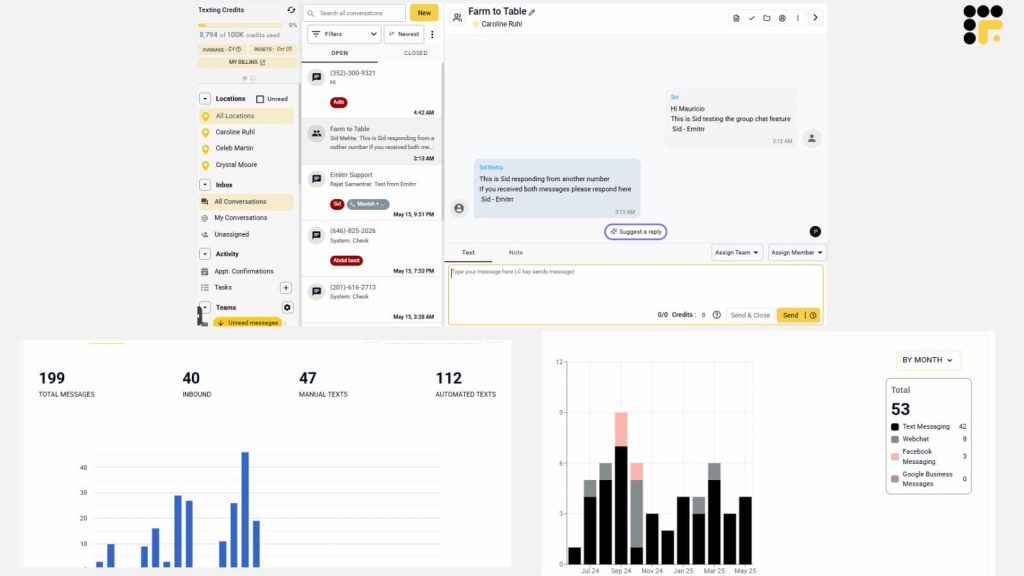
Emitrr is an all-in-one business communication tool that helps local businesses, including podiatry practices, connect with patients through text messaging and smart automation. It’s designed to simplify daily tasks like appointment reminders, patient follow-ups, and broadcasting updates, all through easy-to-use messaging tools.
Recently, Emitrr introduced AI-powered text enhancements to make communication even smoother. These features help craft clear, empathetic, and well-structured messages, saving time for busy staff while maintaining a human touch in patient conversations.
For podiatrists, Emitrr can be a practical solution to reduce no-shows, manage patient engagement, and keep communication organized without overwhelming front-desk staff.
Emitrr features
- Two-way texting for patient communication
- Automated appointment reminders and follow-ups
- Broadcast messaging for mass patient updates
- AI-powered text enhancements:
- Help Me Write – generate messages from a prompt
- Make it Crisp – shorten and clarify messages
- Make it Empathetic – add warmth and empathy to messages
- Suggest a Reply – offers suggestions for quick responses
- Help Me Write – generate messages from a prompt
- Templates for frequent messages
- HIPAA-compliant messaging security
- Call tracking and voicemail management
- Customizable consent management tools
Emitrr pros
- Very easy for both staff and patients to use
- Helps reduce no-shows with automated reminders
- Boosts patient engagement through texting, calling, and automation
- New AI tools save time and improve message quality
Take a look at what Emitrr’s AI can do:
Emitrr cons
- EHR integrations are more limited compared to larger platforms
- Primarily focused on communication, not a full telehealth suite
Emitrr support channels
- Live chat with Emitrr representatives
- Phone support at +1 (210) 941-4696
- Email support via support@emitrr.com
- Knowledge base with guides, FAQs, and tutorials
Emitrr pricing
Emitrr uses a custom pricing model based on your practice’s size and needs. You’ll need to reach out to their team for a personalized quote.
Emitrr Reviews
Users often highlight how easy Emitrr is to navigate and how much time it saves at the front desk. Many say it’s a game-changer for reducing missed appointments and keeping patients informed without overwhelming the staff.
Emitrr Integrations
- Google Calendar (native sync for scheduling)
- Limited EHR integrations (contact Emitrr directly for details)
2. TigerConnect

TigerConnect is a secure communication platform built specifically for healthcare. It’s designed to help doctors, nurses, and administrative staff collaborate quickly and safely, whether they’re in the same facility or working remotely.
Podiatry practices can use TigerConnect to share updates, discuss patient care, and keep everyone on the same page…all while staying HIPAA compliant.
Beyond secure texting, TigerConnect includes voice and video calling, so providers can connect in the way that works best for each situation.
It’s used widely in hospitals, clinics, and specialty practices, and aims to reduce delays in care by helping teams communicate more efficiently.
TigerConnect Features
- Secure Messaging – Send encrypted messages, images, or documents without risking patient privacy.
- Video and Voice Calling – Connect instantly through high-quality voice or video calls, useful for virtual consultations or quick discussions among staff.
- Patient Communication Tools – Communicate securely with patients for follow-ups, care instructions, and appointment reminders.
- Care Team Collaboration – Organize conversations into groups or threads, making it easier to coordinate care across multiple providers.
- Document Sharing – Share lab results, treatment plans, or patient photos securely within the app.
- Task Management – Assign and track tasks so nothing falls through the cracks in patient care workflows.
- Shift Scheduling – Manage staff schedules and quickly notify team members about shift changes or coverage needs.
TigerConnect Pros
- Provides secure, HIPAA-compliant communication across text, voice, and video
- Helps streamline clinical workflows and reduce delays in care
- Makes collaboration across care teams faster and more organized
- Integrates with many healthcare tools and systems
TigerConnect Cons
- Some users find the platform slightly cumbersome or complex, especially during initial setup
- Occasional issues with notifications or auto-correct functionality reported by users
TigerConnect Support Channels
- Knowledge base with user guides and FAQs
- Live chat support for real-time assistance
- Phone support for direct help
- Email support for non-urgent queries
- Community forum where users and the TigerConnect team share insights and solutions
TigerConnect Pricing
TigerConnect does not publicly list its pricing. Instead, it offers customized quotes based on factors like the number of beds in a facility, desired features, and contract length. To get accurate pricing for your podiatry practice, you’ll need to reach out to their sales team for a tailored proposal.
TigerConnect Reviews
TigerConnect generally receives strong reviews from users who appreciate its security, ease of use, and the way it improves communication in healthcare settings. Many note it’s helped reduce delays in care and made coordinating across teams much simpler. However, some mention occasional technical hiccups or a learning curve for new users.
TigerConnect Integrations
- Electronic Health Records (EHR) systems
- Nurse call systems
- Physiological monitors
- Physician scheduling solutions like QGenda and Amion
- File-sharing platforms such as OneDrive, ShareFile, Dropbox, and Box
3. OhMD

OhMD is a HIPAA-compliant communication platform built for healthcare practices looking to improve how they connect with patients. It focuses on simplifying secure communication, whether through texting, video visits, or website chat.
For podiatrists, OhMD offers a convenient way to manage patient outreach, send appointment reminders, and even conduct virtual consultations, all while staying compliant. It’s especially useful for practices that want to streamline their communication without adopting a complex, full-scale system.
OhMD Features
- Two-Way Secure Texting – Message patients securely without requiring them to download an app.
- Video Visits – Host virtual appointments directly through the platform.
- Live Website Chat – Let patients reach your office through a chat widget on your website.
- Automated Workflows – Set up automated responses, reminders, or follow-ups based on triggers.
- Broadcast Messaging – Send bulk messages to groups of patients for updates or announcements.
- Appointment Reminders – Reduce no-shows with automated, customizable reminders.
- Referral Management – Manage and track referrals more efficiently within the platform.
- EHR Integration – Sync communication with your electronic records for better workflow alignment.
OhMD Pros
- HIPAA-compliant across all communication channels
- Very easy to set up and use for both staff and patients
- Offers video visits and live website chat in addition to texting
- Free plan available for smaller practices or light usage
OhMD Cons
- Some features are limited or unavailable in the free Basic plan
- A few users have reported issues with uploading pictures or file attachments
OhMD Support Channels
- Email support
- Live chat on their website
OhMD Pricing
OhMD offers two plans:
- Basic Plan – Free, with limited features
- Reach Plan – $250/month, includes advanced messaging, automation, and integrations
OhMD Reviews
Users generally praise OhMD for being easy to use and a big help in keeping patient communication simple and compliant. Reviews often mention that texting patients without needing a separate app is a major plus. Some users say it has improved follow-ups and patient response times significantly, although a few mention occasional bugs with attachments.
OhMD Integrations
- AdvancedMD
- Allscripts
- eClinicalWorks
- Greenway
- Agile EMR
- Dentrix
4. DrChrono
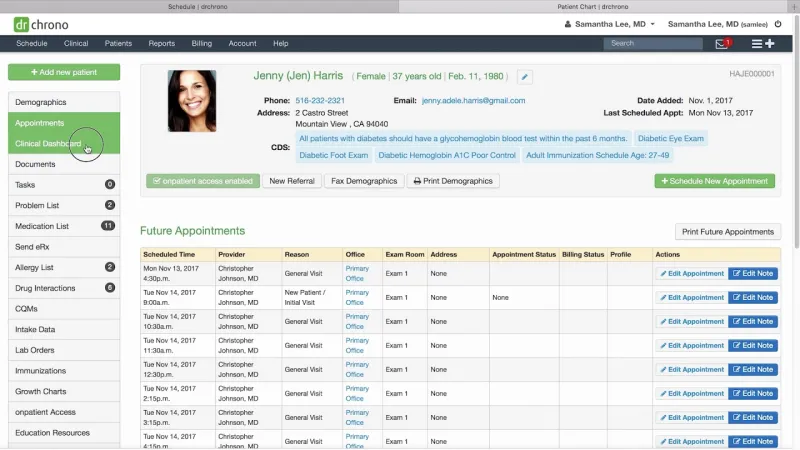
DrChrono is a cloud-based platform that combines Electronic Health Records (EHR), practice management tools, and medical billing into one system. It’s designed to help medical practices manage everything from scheduling and documentation to telehealth and billing, all in one place. For podiatrists, it offers flexibility and tools to streamline both clinical and administrative work.
One of DrChrono’s standout qualities is its strong focus on mobility and Apple device integration. Many practices like using it on iPads or iPhones, allowing doctors to chart, check schedules, and handle patient communications from anywhere. While feature-rich, some users note that it can feel complex to navigate, and support responsiveness can sometimes be hit or miss.
DrChrono Features
- Appointment Scheduling – Manage patient bookings, reminders, and calendar views to reduce no-shows.
- Billing Management – Handle claims, coding, and revenue cycle tasks directly within the platform.
- Clinical Workflow Tools – Customize templates, chart quickly, and document patient encounters efficiently.
- Lab Integration – Connect directly with labs like Labcorp and Quest for ordering and results.
- Telehealth – Conduct virtual visits with patients through secure video sessions.
- Patient Portal – Give patients access to their records, communication tools, and forms.
- Revenue Cycle Management (RCM) – Use built-in tools or DrChrono’s services to manage billing and collections.
- Apple Device Integration – Optimized for iPad and iPhone, allowing mobile charting and patient management.
DrChrono Pros
- Highly customizable templates and workflows
- Strong integration with Apple devices, great for mobile-friendly practices
- Comprehensive feature set covering both clinical and administrative needs
- Cloud-based, accessible anywhere with internet access
DrChrono Cons
- Some users report slow or inconsistent support response times
- Can be complex to navigate, especially for new users
- Higher pricing may be challenging for small practices
DrChrono Support Channels
- Live chat within the DrChrono application
- Support ticket system for submitting issues
- Knowledge base with guides, articles, and video tutorials
DrChrono Pricing
DrChrono offers four subscription plans, but they don’t list prices publicly. Plans include:
- Prometheus
- Hippocrates
- Apollo
- Apollo Plus
You’ll need to contact their sales team to get quotes tailored to your practice size and needs.
DrChrono Reviews
Reviews for DrChrono are mixed. Many users appreciate its wide range of features, customization options, and how seamlessly it works on Apple devices. However, some mention frustrations with customer support, billing processes, and occasional glitches or software reliability issues.
DrChrono Integrations
- Labcorp
- Quest Diagnostics
- Health Gorilla
- Lifepoint
- Acronis
- Apollo-plus
- CoverMyMeds
- FIGmd
- Ambra Health
- Square
- DemandForce
- NextPatient
5. Luma Health

Luma Health is a patient engagement platform focused on helping healthcare practices connect better with their patients. It’s built to handle everything from scheduling and reminders to patient messaging and feedback collection. For podiatrists, Luma can help reduce no-shows, improve communication, and keep schedules running smoothly.
One of Luma’s strengths is how many patient touchpoints it covers. Patients can book appointments, receive reminders, complete intake forms, and even pay bills, all without needing separate apps. While many practices praise how much it boosts engagement, some users have found the system a bit rigid in certain areas, like customizing scheduling workflows.
Luma Health Features
- Appointment Scheduling – Let patients book appointments online and manage their own scheduling needs.
- Automated Reminders – Reduce no-shows by sending reminders via text, email, or voice calls.
- Patient Communication Tools – Two-way texting, chatbot support, and secure messaging for better patient interaction.
- Telehealth Integration – Conduct virtual visits directly through the platform.
- Billing and Payment Processing – Allow patients to pay bills online or through mobile devices.
- Patient Intake – Collect digital forms and medical histories ahead of visits.
- Referral Management – Track referrals and streamline follow-up processes.
- Feedback Collection – Gather patient feedback to improve services and patient satisfaction.
Luma Health Pros
- Helps reduce no-show rates and improve patient confirmation rates
- Centralizes multiple patient communication and engagement tools
- Offers effective waitlist management to keep schedules full
- Integrates with major EHR systems for smoother workflows
Luma Health Cons
- Some users find scheduling options less flexible than desired
- Customization of certain workflows can feel limited
- Occasional issues with customer support responsiveness
Luma Health Support Channels
- Online Help Center with articles and documentation
- Ability to submit support tickets directly to Luma Support
Luma Health Pricing
Luma Health does not publicly list its pricing. Instead, they customize pricing based on the size of your practice and the features you need. Interested practices need to contact Luma’s sales team for a tailored quote.
Luma Health Reviews
Reviews for Luma Health are generally positive. Many practices highlight how it’s helped reduce no-show rates, improve patient communication, and make scheduling easier for both staff and patients. Users often mention the platform’s impact on keeping patients engaged and helping practices run more smoothly, though a few note that customization options could be broader.
Luma Health Integrations
- MEDITECH
- Oracle Health
- Epic
- NextGen
- Nextech
- eClinicalWorks
- Athenahealth
6. ClinicSense
ClinicSense is a practice management software designed mainly for health and wellness professionals, but it’s versatile enough to support podiatrists and similar practices looking to simplify daily operations. It brings together essential tools like online booking, client records, appointment reminders, and payment processing into one platform.
A big appeal of ClinicSense is how user-friendly it is, especially for solo practitioners or small clinics. It’s built to help manage appointments, keep track of patient notes (including SOAP notes), and handle payments without a lot of technical hassle. However, it’s worth noting that some users in healthcare fields outside wellness, like podiatry, might find certain features less tailored to medical workflows.
ClinicSense Features
- Online Booking – Patients can schedule appointments through your website or social media pages, helping reduce front-desk calls.
- Client Management – Maintain records, track patient history, and store SOAP notes securely.
- SOAP Notes – Document sessions with structured notes that are easy to customize and retrieve.
- Appointment Reminders – Automatically send reminders via email or text to lower no-show rates.
- Payment Processing – Accept payments through integrations with Square and Stripe.
- Marketing Tools – Send newsletters, request reviews, and manage promotions.
- Customizable Forms – Build intake or consent forms specific to your practice’s needs.
- Reporting and Analytics – Gain insights into bookings, revenue, and client trends.
ClinicSense Pros
- Very user-friendly interface, easy for staff and patients to navigate
- Affordable pricing for small practices
- Efficient appointment reminders help reduce no-shows
- Strong customer support, especially for those new to practice management software
ClinicSense Cons
- Mobile app can feel less intuitive than the desktop version
- Limited customization options in the Lite plan
- May be more focused on wellness/massage use cases rather than full medical workflows
ClinicSense Support Channels
- Email support
- Live chat support
- Phone support (available for Premium plan subscribers)
- Knowledge base with FAQs and how-to guides
ClinicSense Pricing
ClinicSense offers three pricing tiers:
- Lite – $39/month
- Standard – $69/month
- Premium – $99/month
Each plan includes different levels of features and support, allowing practices to choose what best fits their size and needs.
ClinicSense Reviews
ClinicSense is generally well-reviewed for its simplicity, fair pricing, and how smoothly it helps manage bookings and client communication. Users often mention that patients appreciate how easy it is to book appointments online and receive reminders. Some feedback points to the mobile experience needing improvement and limited customization on the lower plans.
ClinicSense Integrations
- Square (payment processing)
- Stripe (payment processing)
- Facebook (online booking and marketing)
- Instagram (online booking and marketing)
- Birdeye (reviews and reputation management)
7. SolutionReach
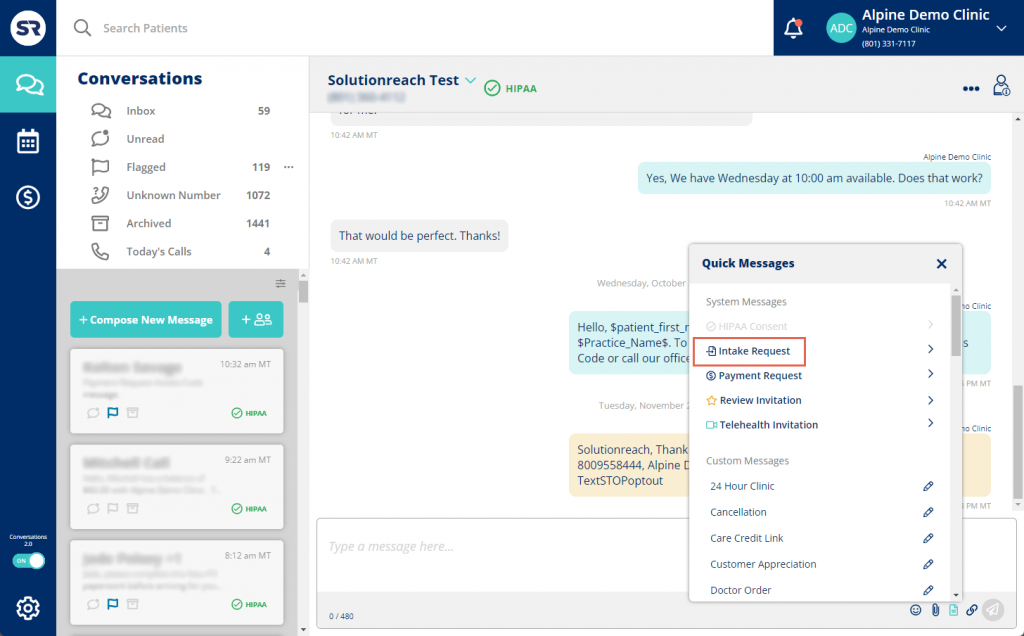
Solutionreach (often called SR) is a patient relationship management (PRM) platform that helps healthcare practices keep in touch with patients and improve the patient experience. For podiatrists, it’s a way to manage communication, reduce no-shows, and keep patients more engaged without adding a lot of manual work for staff.
SR includes tools like automated reminders, two-way texting, online scheduling, patient surveys, and reputation management features. It also offers batch messaging, insurance verification, and payment processing options, making it more than just a simple texting tool. While many practices find it helpful for improving communication and managing large patient volumes, some users have raised concerns about customer support and how billing issues are handled.
SolutionReach Features
- Appointment Reminders – Automated reminders via text, email, or voice to help lower no-shows.
- Two-Way Texting – Secure messaging that allows real-time conversations between staff and patients.
- Online Scheduling – Patients can book their own appointments online, reducing front-desk workload.
- Patient Surveys – Gather feedback to improve service quality and patient satisfaction.
- Reputation Management – Tools to request and manage online reviews for your practice.
- Batch Messaging – Send bulk messages to notify patients about office updates or promotions.
- Insurance Verification – Helps practices confirm patient insurance details ahead of appointments.
- Payment Processing – Enable patients to pay bills online or via mobile.
SolutionReach Pros
- Helps reduce no-show rates through consistent reminders
- Supports robust patient engagement with multiple communication tools
- Reputation management tools can boost your online presence
- Works well for practices managing a large patient base
SolutionReach Cons
- Users report challenges with reaching responsive customer support
- Some billing practices and contract terms have caused frustration
- Occasional technical issues and system glitches reported by users
SolutionReach Support Channels
- Email support
- Phone support
- Live chat support
- Knowledge base with articles and tutorials
- Help desk for submitting support tickets
SolutionReach Pricing
Solutionreach does not publish its pricing publicly. Instead, it offers three customizable plans:
- Essentials – Focuses on core patient communication tools
- Plus – Adds more patient retention capabilities
- Enterprise – Designed for large practices with 50+ locations
There’s also an optional add-on package for revenue cycle messaging, which carries additional costs. To get pricing details, you’ll need to reach out to Solutionreach directly for a quote tailored to your practice’s needs.
SolutionReach Reviews
Reviews for Solutionreach are mixed. Many practices appreciate its effectiveness in managing patient reminders, communication, and engagement. However, others note frustration with customer support responsiveness, occasional technical issues, and concerns about billing practices. Overall, it’s seen as a strong platform for patient communication, especially for high-volume practices, but one that may come with some operational challenges.
SolutionReach Integrations
- EHR/EMR Systems (supports integration with various platforms for smoother data syncing and workflow automation)
8. Weave

Weave is an all-in-one communication platform built for small and medium-sized healthcare practices, including podiatry clinics. It’s designed to bring together different tools under one roof…so instead of juggling multiple apps for calling, texting, scheduling, and payments, practices can manage everything from one place.
Beyond basic communication, Weave packs in features like online reviews, email marketing, team chat, and payment processing. It also offers AI-powered tools to help write emails, craft personalized replies to patient reviews, and even transcribe voicemails automatically. For many practices, it’s a solid way to simplify daily operations and enhance patient interactions, though some users have mentioned hiccups with support and occasional software bugs.
Weave Features
- Phone Services – Cloud-based phone system with call analytics and advanced call routing.
- Text Messaging – Two-way texting to keep in touch with patients easily.
- Appointment Reminders – Automated texts or calls to reduce no-shows.
- Online Scheduling – Let patients book appointments online, anytime.
- Team Chat – Internal chat feature for staff communication.
- Payment Processing – Accept payments via text or online links.
- Online Review Management – Request and manage patient reviews to improve online reputation.
- Email Marketing – Tools for sending promotional or informational emails.
- Insurance Verification – Helps check patient insurance details quickly.
- AI Tools – Assist with writing responses, tagging messages, and transcribing voicemails automatically.
Weave Pros
- Simplifies daily operations by combining multiple tools into one platform
- User-friendly interface makes it easy for staff to adopt
- Strong suite of features for patient engagement and communication
- AI-powered features help save time on repetitive tasks
Weave Cons
- Some users report inconsistent technical support
- Occasional glitches or bugs in the software
- Certain features, like email blasting or patient check-in, feel limited for some practices
Weave Support Channels
- Phone support
- Live chat support
- Email support
- Knowledge base with articles and guides
- FAQs section for quick answers
Weave Pricing
Weave does not list its pricing publicly on its website. It offers three tiers:
- Essentials
- Pro
- Elite
Each plan includes different features and capabilities. Practices must contact Weave directly to get a customized quote based on their size and needs.
Weave Reviews
Reviews for Weave generally highlight how easy the platform is to use and how convenient it is to have phone, texting, payments, and scheduling all in one place. Many users say it saves staff time and improves patient communication. However, some practices have experienced challenges with initial setup, delays in support response, and wish for more advanced features in areas like mass email campaigns or patient check-in.
Weave Integrations
- Athenahealth (medical groups and health systems)
- ezyVet (veterinary practices)
- Practice Fusion
- InfiniteVT
- Shepherd
- eClinicalWorks
- Prompt (for physical therapy practices)
9. Klara

Klara is a patient engagement platform built to help healthcare practices, like podiatry clinics, simplify how they communicate with patients and manage daily workflows. Instead of relying on phone calls and voicemails, practices can use Klara’s HIPAA-compliant messaging system to chat with patients securely and efficiently.
Beyond messaging, Klara includes tools like appointment scheduling, automated reminders, video visits, and even virtual waiting rooms. It’s designed to cut down phone volume and keep both staff and patients on the same page. While many users love how easy it is to use, some mention issues like higher pricing, limited support channels, and occasional tech hiccups.
Klara Features
- HIPAA-Compliant Messaging – Secure, two-way chat with patients and staff.
- Appointment Scheduling – Lets patients book or manage appointments online.
- Automated Reminders – Sends texts or messages to remind patients about appointments.
- Video Visits – Provides telehealth services directly within the platform.
- Virtual Waiting Room – Helps manage patient flow during virtual visits.
- File Sharing – Exchange documents, forms, and images securely with patients.
Klara Pros
- Very user-friendly and easy for staff to learn
- Reduces phone calls and improves communication efficiency
- Helps streamline appointment management and follow-ups
- Offers secure messaging that’s HIPAA-compliant
- Integrates well with many EHR systems
Klara Cons
- Pricing can be higher than some competitors, especially for smaller practices
- Some users mention limited support options outside of email and in-app help
- Occasional technical glitches, such as patient login issues
- More language support could improve accessibility
Klara Support Channels
- In-app support for quick assistance
- Email support
- Community forum for sharing tips and experiences
- FAQs and help articles
Klara Pricing
Klara doesn’t publicly list its pricing. Practices can request a personalized quote based on their size and requirements. Both monthly and annual billing options are available.
Klara Reviews
Reviews for Klara are generally positive, with many practices praising how it simplifies patient communication and cuts down on phone traffic. Users often highlight how intuitive the platform is and how it helps save time. However, some feedback mentions minor technical issues, patient login problems, and the need for expanded language options to better serve diverse patient populations.
Klara Integrations
- Popular Electronic Health Record (EHR) systems
- Other communication tools used in healthcare settings
- Phone systems for smoother patient interactions
10. MessageDesk

MessageDesk is a business texting platform built to help teams communicate quickly and stay organized. It’s used across different industries, including healthcare practices like podiatry clinics, for sending appointment reminders, handling patient inquiries, and running messaging campaigns. The platform focuses on making texting a team effort, so staff can manage conversations together instead of juggling messages individually.
MessageDesk’s tools include two-way texting, a shared inbox for teams, bulk messaging with personalization, scheduled texts, and automated replies. It’s great for practices wanting to engage patients without always being on the phone. Still, it’s worth noting that MessageDesk is purely text-based, so no calls or video, and some users find costs can add up if sending lots of messages.
MessageDesk Features
- Two-Way Texting – Have real-time conversations with patients through SMS.
- Shared Team SMS Inbox – Lets multiple staff members manage patient messages in one place.
- Broadcast Messaging – Send bulk messages for updates, reminders, or announcements.
- Scheduled Messages – Plan texts to go out at specific times.
- Automated Responses – Set up auto-replies for common questions or after-hours communication.
MessageDesk Pros
- User-friendly interface that’s easy for teams to adopt
- Helps keep conversations organized with a shared inbox
- Supports personalized bulk messaging for patient outreach
- Integrates with various CRM systems for better workflow
- Automation tools reduce manual texting tasks
MessageDesk Cons
- Limited strictly to text messaging; no voice or video features
- Costs can become high for practices sending large volumes of messages
- Dependent on carrier approval processes, which can slow setup
- Lacks integration with some sales or telehealth platforms
MessageDesk Support Channels
- Email support for assistance with questions or technical issues
MessageDesk Pricing
MessageDesk doesn’t publicly list its pricing. Practices need to request a custom quote to get specific details based on their size and needs.
MessageDesk Reviews
MessageDesk receives good feedback for being easy to use and helping teams manage text conversations efficiently. Users appreciate how it keeps patient communication organized and how responsive the support team is. Some reviews mention gaps in integrations with sales platforms or the absence of VoIP features as areas for improvement.
MessageDesk Integrations
- Various CRM systems
- Marketing automation tools
- Other business applications for better patient relationship management and personalized messaging campaigns
Why Emitrr Is The Best Podiatrist Texting Software
When it comes to running a podiatry practice, time and patient attention are two things you can’t afford to waste. Between back-and-forth appointment calls, follow-up reminders, and missed visits, communication alone can become a full-time job. That’s exactly where Emitrr stands out.
Emitrr isn’t just another patient messaging software, it’s a focused communication platform designed to support practices like yours.
What makes it different?
It keeps patient engagement simple, organized, and secure without piling on unnecessary complexity. Emitrr helps your team stay on top of communication, reduce no-shows, and respond faster, all while being fully HIPAA compliant.
Purpose-Built for Healthcare, Built for Podiatrists
Emitrr helps podiatry clinics send appointment reminders, confirmations, follow-ups, and even post-treatment instructions via automated text. It also supports two-way messaging, so patients can reply, reschedule, or ask a quick question without needing to call in. The software is simple for staff to learn and even easier for patients to use…no apps or logins required.
Smart AI Features That Save Time
With the newly launched AI Text Enhancement features, Emitrr goes a step further. Writing messages becomes faster and smarter.
Here’s how:
- Help Me Write lets staff generate entire messages using just a prompt.
- Make it Crisp and Make it Empathetic options help adjust the tone of a message instantly.
- Suggest a Reply recommends responses to incoming patient texts, reducing reply time.
These AI tools are available on the Professional Plan and make day-to-day communication feel a lot less repetitive and more patient-friendly.
HIPAA-Compliant and Built for Trust
Emitrr takes security seriously. Conversations are fully encrypted and protected. It’s also HIPAA-compliant, which means it handles sensitive patient information the right way. You also get features like opt-out controls and consent tracking, essentials in today’s healthcare landscape.
Flexible Yet Focused
Emitrr supports essential integrations like Google Calendar for scheduling and is actively expanding EHR integrations. While it doesn’t offer a full telehealth suite, it shines in what it’s meant to do: help podiatrists communicate with patients clearly, reliably, and at scale.
If you’re looking for a platform that’s easy to set up, simple for staff to use, and highly effective in reducing no-shows and improving patient communication, Emitrr is a strong fit for your podiatry practice.
Conclusion
Texting has become an essential part of patient communication, especially for podiatrists who need to keep appointments on track and ensure patients stay engaged with their treatment plans.
From reducing no-shows to improving follow-ups, the right texting software can save time, cut down on administrative work, and create a better experience for both patients and staff.
While there are several excellent healthcare communication software available, choosing the best one for your practice comes down to finding a platform that’s simple, secure, and built for healthcare.
Emitrr stands out for its ease of use, smart automation features, and new AI-powered tools that help craft the perfect message every time. It’s an ideal choice for podiatrists who want to modernize communication without overwhelming their team.
If you’re ready to see how seamless patient communication can be, book a free demo with Emitrr today and discover how it can transform your podiatry practice.
Frequently Asked Questions
Look for HIPAA compliance, two-way messaging, automated reminders, patient consent management, EHR/EMR integrations, and easy-to-use interfaces for both staff and patients.
Texting software sends automated reminders and confirmations, making it easier for patients to remember and keep appointments or reschedule if needed, reducing last-minute no-shows.
Reputable texting platforms for podiatry are HIPAA-compliant, ensuring patient information stays secure and private. Always confirm compliance before choosing a service.
Many texting solutions offer integrations with popular EMR and practice management systems, helping keep patient records and communication in sync without double data entry.
Texting makes communication faster and more convenient for patients. It helps them feel informed, supported, and valued, which leads to higher satisfaction and loyalty.
Yes! Many texting platforms allow you to send automated or manual review requests, helping you collect valuable feedback and boost your online reputation.


 4.9 (400+
reviews)
4.9 (400+
reviews)