
Texting has become one of the most effective ways for doctors and medical practices to communicate with patients. From appointment reminders to follow-ups and refill notifications, medical texting improves response rates, reduces no-shows, and saves staff hours.
However, texting for doctors is not the same as casual SMS. Physicians must follow strict HIPAA guidelines, obtain patient consent, and use secure messaging workflows to avoid compliance risks.
This guide explains what texting for doctors really means, what’s allowed under HIPAA, best practices, real-world use cases, templates, and how to choose the right texting software.
What Is Texting for Doctors?
Texting for doctors refers to the use of secure, HIPAA-compliant messaging systems that allow physicians and medical staff to communicate with patients via SMS or secure text-based channels.
Unlike regular SMS:
- Messages are encrypted
- Patient consent is documented
- Access is role-based
- Communication is logged and auditable
Note: Texting is typically used for non-emergency, administrative, and care-related communication, not urgent medical advice.
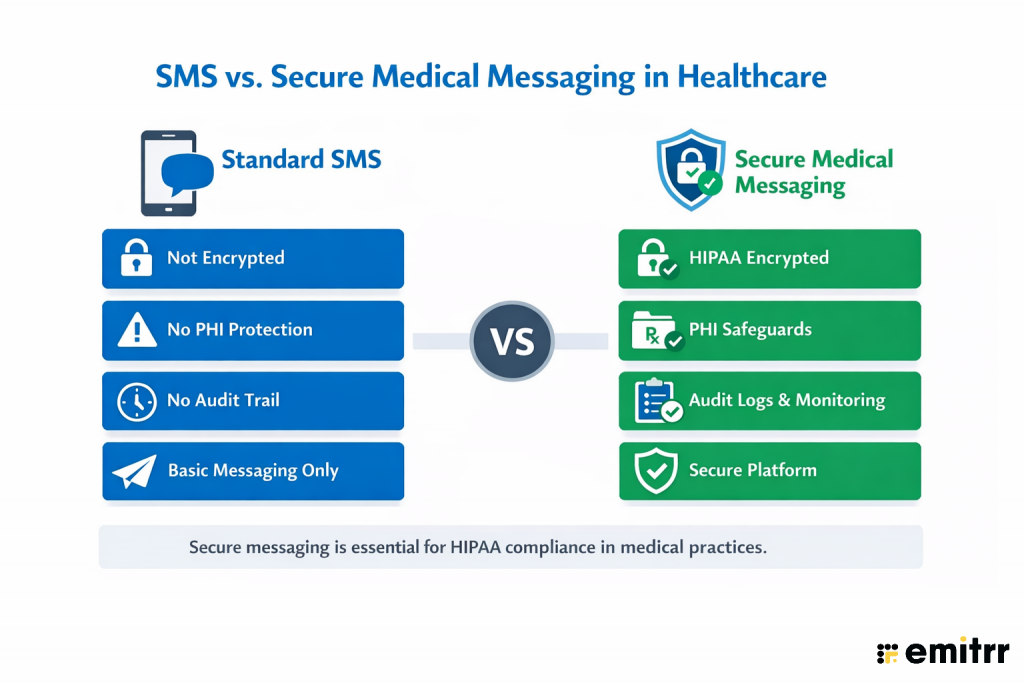
Texting vs Regular SMS: What’s the Difference?
| Regular SMS | HIPAA-Compliant Texting |
| Not encrypted | Encrypted in transit & at rest |
| No audit trail | Full message logging |
| No consent tracking | Documented patient consent |
| No access controls | Role-based access |
| HIPAA risk | HIPAA-aligned safeguards |
Learn more about HIPAA compliant texting:
Is Texting Patients Legal for Doctors? What HIPAA Actually Allows
HIPAA does not ban texting, but it requires safeguards to protect patient data.
Doctors can text patients if:
- The patient has given explicit consent
- The platform uses encryption
- PHI is minimized
- Access is restricted
- Business Associate Agreements (BAAs) are in place
What Doctors Can Text Patients:
- Appointment reminders
- Prescription pickup notifications
- Follow-up instructions (non-sensitive)
- Billing reminders
- Care coordination updates
What Doctors Should Not Text:
- Diagnoses with sensitive details
- Full lab reports without secure portals
- Emergency instructions
- Highly confidential medical history
Best practice: If the message contains detailed PHI, use a secure messaging link or patient portal instead of plain SMS.
Patient Consent and Documentation Requirements
There are ways to stay compliant, before texting patients, practices should document consent that covers:
- Permission to receive texts
- Types of messages allowed
- Acknowledgment of potential risks
- Opt-out instructions
Consent may be captured:
- During intake
- Via digital forms
- Through patient portals
Best practice is to log consent within the patient record and automatically apply messaging rules based on consent status.
Texting Patients: Rules of the Road for Doctors
Texting can improve patient communication, but it must follow clear boundaries. Most medical practices that text successfully follow a simple rule set:
Texting is appropriate when communication is:
- Non-emergency
- Time-sensitive but not clinically complex
- Administrative or instructional
- Initiated or consented to by the patient
Texting should not replace:
- Emergency care
- Diagnostic conversations
- Detailed medical counseling
- Sensitive disclosures
Many practices define internal policies specifying what can be texted, who can respond, and how messages are escalated. This reduces compliance risk and ensures consistent patient experiences.
Tone, Clarity, and Expectations
Messages should be written assuming they may be read quickly and out of context. Good medical texts should:
- Use clear, professional language
- Avoid medical jargon when possible
- Set expectations for response times
- Include guidance on what to do for urgent issues
Response Timing and Availability
Patients should understand:
- When texts are monitored
- Whether replies are reviewed after hours
- How quickly they can expect a response
Protecting Patient Privacy in Everyday Messaging
Even when physician texting is permitted, practices should:
- Minimize the amount of PHI included
- Avoid sending detailed medical information
- Use secure links or portals for sensitive content
Explore more dos and don’ts of patient texting
Common Mistakes Doctors Make When Texting Patients
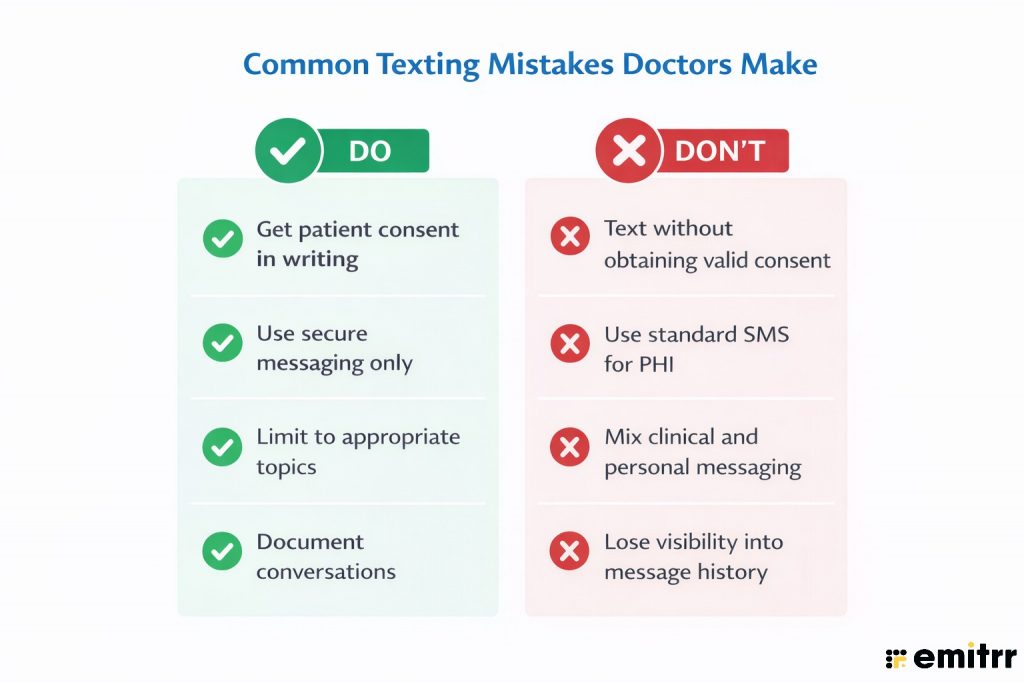
Even with secure systems in place, many compliance issues arise from how texting is used, not the technology itself. Avoid these mistakes when texting patients:
Risks of Non-Compliant Texting in Healthcare
Using personal phones or regular SMS apps exposes practices to serious risks:
- HIPAA violations and fines
- Data breaches
- Loss of patient trust
- Legal liability
- No audit or documentation
This is why most healthcare organizations adopt HIPAA-compliant texting platforms instead of consumer messaging apps.
Need to text patients fast? Download ready-to-send doctor SMS templates now.
How Doctors Implement Secure Texting in Practice (Without Increasing Risk)
Implementing secure text messaging in a medical practice is less about technology and more about process, boundaries, and accountability. Practices that succeed with patient texting typically follow a structured approach that prioritizes compliance and operational clarity before volume or automation.
Step 1: Define What Texting Will Be Used For
Before enabling texting, practices should clearly define approved use cases, such as:
- Appointment confirmations and reminders
- Prescription and refill notifications
- Post-visit follow-ups
- Billing or administrative updates
Texting should not be positioned as a replacement for clinical consultations or emergency communication.
Step 2: Establish Patient Consent and Message Scope
Patients should explicitly consent to receive text messages and understand:
- What types of messages they may receive
- That texting is not monitored for emergencies
- How to opt out at any time
Consent should be documented and tied to the patient record so messaging rules can be followed consistently.
Step 3: Assign Ownership and Response Roles
Texting workflows should clearly define:
- Who monitors incoming messages
- Which staff members respond to administrative questions
- When messages are escalated to clinical staff
- When physician involvement is required
Clear ownership can help in reducing delayed responses and also the risk of inappropriate disclosures.
Step 4: Set Escalation and Exception Rules
Practices should plan for scenarios where patients reply with:
- Urgent symptoms
- Clinical questions
- Requests outside texting scope
In these cases, workflows should automatically route patients to appropriate channels such as phone calls or secure portals.
Step 5: Monitor, Audit, and Refine
Secure texting should include:
- Logged message histories
- Oversight of response times
- Periodic audits for compliance
Regular review helps ensure texting remains safe, effective, and aligned with evolving practice needs.
Learn about choosing the right texting app for doctors
Benefits of Text Messaging for Doctors
When implemented with the right safeguards, texting delivers impactful operational and patient experience benefits.
1. Improved Patient Engagement and Communication
Text a doctor, and you’d know how effortless it gets to remain connected. As seen in all these years, patients are far more likely to respond to a short message than dig through email or pick up a call. A simple check-in after an appointment often opens the door to helpful conversations. It keeps care flowing between visits and shows patients you’re present, even outside the exam room.
2. Enhanced Appointment Management and Reduced No-Shows
No-shows are costly, but also preventable. Automated reminders via text help patients remember their appointments and make it easier to reschedule if needed. Two-way texting means patients don’t have to call in, wait on hold, or explain themselves. They just reply with a quick message. It keeps the schedule tight, fills open slots faster, reduces no-shows, and gives the front desk some breathing room.
3. Faster Response Times and Real-Time Communication
Healthcare texting helps care teams handle the little things quickly. Those quick questions about a prescription refill, a lab result, or what to expect before a procedure get read almost immediately, and staff can respond on the go.
4. Increased Healthcare Accessibility and Convenience
Not everyone is able, or comfortable, making a phone call. For many patients, texting feels easier. It works well for people managing busy schedules, caregiving duties, or language differences. It also helps reach patients who may have hearing impairments or anxiety around phone conversations.
5. Cost-Effective Communication Solution
Running a front desk takes time and money. And a lot of that time is spent on repeat calls and reminders. With texting, you cut down significantly on those tasks. Automated messages handle the basics without anyone having to pick up the phone.
6. Better Medication Adherence and Health Monitoring
Patient texting sticks to their medication schedules, refills on time, and keeps tabs on vital signs or symptoms. It could be a simple nudge, or a prompt to log a blood pressure reading. These small touches encourage consistency and give you better visibility into how patients are doing between appointments.
7. Streamlined Workflow and Administrative Efficiency
Texting gives your staff time back. Intake forms, consent documents, post-visit surveys: all of it can be sent ahead via text. Patients arrive more prepared, and your team isn’t scrambling to collect paperwork last minute. It also cuts down on repeat calls for the same questions.

SMS vs Secure Messaging: Why the Difference Matters
Not all texting is equal in healthcare. Standard SMS lacks encryption and audit controls, while secure medical messaging includes safeguards required for HIPAA compliance.
How Appointment Texting Works in Medical Practices
Doctors commonly use text messaging to confirm appointments, send reminders, and handle rescheduling without relying on phone calls. These messages are typically automated, allow patients to respond, and route exceptions back to staff when manual follow-up is needed.
This workflow illustrates how appointment texting operates in real clinical settings while keeping staff oversight in place.
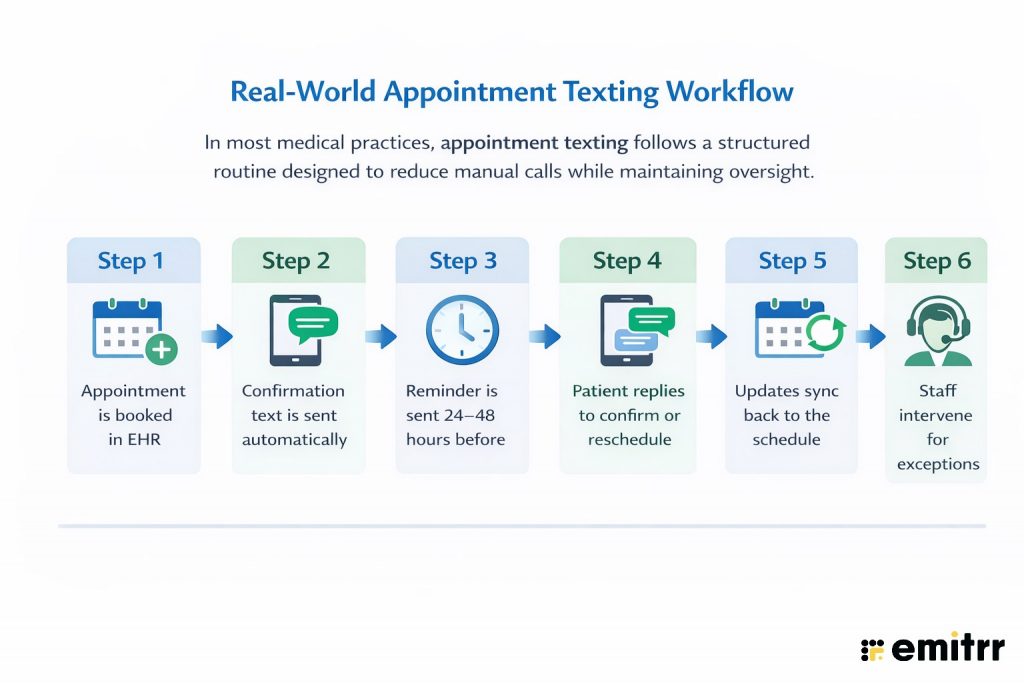
Check out this Real-World Appointment Texting Workflow:
Texting Use Cases in Medical Practices
Here’s a quick low-down on how providers are using healthcare messaging to elevate patient care:
1. Appointment Scheduling and Confirmations
Sending SMS reminders and confirmations considerably improves scheduling efficiency. Texting about upcoming visits lets patients reply with confirmations or cancellations, which fills empty slots and reduces last-minute no-shows. For instance, a patient can cancel via text and the office can quickly reassign the opening. These automations cut administrative work and keep appointment books more reliable.
2. Lab Results and Test Follow-Ups
Providers use texting to alert patients about test results and follow-up needs. An SMS can tell a patient their lab results are ready to view on a secure portal or prompt them to call for details. This quick notice encourages timely follow-ups. Similarly, doctors can text patients reminders to schedule any needed follow-up visit after a test. These reminders ensure no critical results or next steps are missed, improving continuity of care.
3. Medication Reminders and Refill Notifications
Text alerts help patients stick to medication plans. Clinics often schedule SMS reminders telling patients to take their prescriptions on time, which has been shown to improve adherence and treatment outcomes. Providers can also text refill notifications when a prescription is running low or automatically send e-prescriptions via link. These medication reminders make it less likely that doses are missed and help patients manage chronic conditions.
4. Post-Treatment Care Instructions
After a procedure or discharge, providers can use texting to send care instructions and follow-up guidance. SMS is the quickest way to reach out with post-procedure messages, ensuring patients follow their care plan. Texts can include reminders about wound care, medication schedules, and symptom checks. These personal follow-ups help patients heal properly and feel.
5. Patient Information Verification and Updates
Keeping patient records current is essential, and texting simplifies it. Practices often send SMS prompts asking patients to verify or update their contact details (address, insurance info, etc.) before appointments. For example, a clinic might text to confirm your current home address and insurance carrier. These quick checks ensure the patient’s profile is accurate, reducing errors at check-in and improving future communication.
6. Billing Alerts and Payment Processing
Text messaging can speed up billing and payments. Clinics use SMS to send payment reminders or invoice notifications to patients. For instance, a patient might receive a text stating their balance is due. Such billing alerts gently prompt patients to settle outstanding balances. When linked to secure payment portals, these messages help practices get paid faster and keep accounts up to date.
7. Health Education and Wellness Tips
Providers also use SMS to deliver brief health tips and education. A practice might send weekly wellness texts like “It’s flu season – remember to wash hands frequently!.” These messages reinforce healthy behaviors between visits. By providing bite-sized advice and links to reliable resources, texting keeps patients engaged in self-care and boosts overall health awareness.
8. Patient Check-In and Registration
Text messages can streamline check-in and registration. Clinics often send secure links via SMS for patients to pre-register or complete intake forms before arrival. For example, after booking, a patient might get a text to update their account information. Filling out paperwork on a phone reduces front-desk wait times and paperwork. This mobile check-in process speeds up appointments and improves the patient experience.
9. Follow-Up Care and Recovery Monitoring
Following discharge or treatment, doctors check on patients via text to monitor recovery. A brief SMS to “check in” shows the patient you care and lets them report any issues. Subsequent texts can remind patients to schedule follow-up appointments or to watch for warning signs. Texts also reinforce longer-term instructions: sending info on when to schedule the next visit or providing symptom monitoring tips. These messages keep the care team informed and encourage patients to stay on track with their recovery plan.
10. Preventive Care Reminders
Clinics use SMS to nudge patients about preventive services. Text reminders for flu shots, vaccinations, and age-specific screenings (like mammograms) boost adherence to these services. Studies show these reminders improve uptake: a meta-analysis found that text notifications significantly increased vaccination rates compared to no reminder. In practice, timely SMS prompts lead patients to act on important preventive care they might otherwise miss.
Who Should Respond to Patient Texts?
Texting does not mean doctors must personally respond to every message.
Most practices:
- Route administrative texts to front desk staff
- Escalate clinical questions to nurses
- Reserve physician involvement for exceptions
You can set clear response rules to prevent overload while also ensuring patient safety.
25+ Text Message Templates for Doctors for Different Scenarios
Smartphones are ubiquitous, making texting a golden opportunity to connect with customers. Below are 25+ concise SMS templates for doctors for each of the key healthcare use cases curated to engage customers swiftly and effectively.
Appointment Management
Efficient appointment handling builds patient trust and keeps operations smooth.
- “Hi [Patient Name], your appointment with Dr. [Last Name] is confirmed for [Date, Time]. Reply YES to confirm or NO to reschedule.”
- “Reminder: Your appointment is scheduled for tomorrow at [Time]. Please arrive 10 mins early. Need to cancel? Text CANCEL.”
- “We noticed you missed today’s appointment. Let us know if you’d like to reschedule—just reply RESCHEDULE.”
- “It’s time to book your next check-up with [Provider Name]. Text BOOK to schedule or call [Clinic Number].”
- “Running late? Let us know by replying to this message and we’ll inform the front desk.”
Medication Adherence & Refill Reminders
Text nudges help patients stay on track with prescriptions and routine meds.
- “Hi [Patient Name], it’s time for your evening dose of [Medication Name]. Text DONE once you’ve taken it.”
- “Refill Alert: Your prescription for [Medication Name] is due for a refill. Need help? Text REFILL.”
- “Reminder: Start your antibiotics today as prescribed. Text any concerns to [Clinic Number].”
- “Don’t forget to take your [Time] meds today. If you’ve run out, reply MED HELP.”
- “Hi [Patient Name], how’s the new medication going? Reply OK if all’s well, or TEXT US to share concerns.”
Follow-Up Care & Recovery Monitoring
Check in with patients post-discharge or after minor procedures.
- “Hi [Patient Name], just checking in after your visit. How are you feeling today? Reply BETTER or NEED HELP.”
- “Reminder: Change your wound dressing tonight. Text DONE when completed.”
- “Please rate your pain level from 1–10 and reply. We’ll reach out if needed.”
- “It’s day 3 of your post-op plan. Any fever, swelling, or pain? Text SYMPTOMS if yes.”
- “Your next follow-up is in 2 weeks. We’ll text you a reminder closer to the date.”
Preventive and Chronic Care Check-Ins
Ongoing outreach helps with long-term care plans.
- “Hi [Patient Name], time to check your blood pressure today. Reply with the reading.”
- “Don’t forget to log your glucose reading this morning. Need help? Text NURSE.”
- “It’s flu season. If you haven’t had your shot yet, text FLU to book an appointment.”
- “How’s your asthma been this week? Any issues? Reply YES or NO.”
- “Reminder: Your annual screening is due. Text SCREEN to schedule.”
Lab Results & Health Updates
Keep patients informed without having them call in.
- “Your lab results from [Date] are available. Text VIEW to receive them securely.”
- “Dr. [Last Name] has reviewed your test results. All looks good. Text us if you have questions.”
- “Your HbA1c is slightly elevated. Please follow your care plan closely. Call us for adjustments.”
- “We’ve sent your results to your specialist. Let us know if you need the contact info again.”
- “Hi [Patient Name], your cholesterol levels have improved since your last test. Great job!”
New Patient Inquiries and Intake Follow-Ups
Speed wins in sales: firms that respond first capture 35–50% of deals and engage prospects quickly. Use helpful follow-up texts like:
- “Hi [Name], this is [YourName] from [Company]. Thanks for your interest in [Product]. When would be a good time to chat?”
- “Hello [Name], just checking if you saw my last message about [Solution]. I’m here to answer any questions!”
- “Hey [Name], following up after [Event/Meeting]. Would you like to schedule a quick demo of [Product]?”
- “Hi [Name], great talking at [Conference]! Here’s the info I promised on [Topic]: [Link]. Let me know if you’d like more details.”
- “Hello [Name], hope you’re well! Our special offer on [Product] ends soon. Interested? Call me or reply “Yes” for details.”
- “Hi [Name], we spoke about [Service] last week. I’d love to help get you started. What’s a good time for a brief call?”
Each template is crafted for clarity and engagement. Personalize with names and details, keep messages concise, and include an easy opt-out if applicable.
Short on time? Download these ready-to-use texting templates for doctors.
Try Emitrr: A Trusted, Expert-Backed Healthcare Messaging Platform
Emitrr is an AI-backed, HIPAA-compliant messaging solution used by hundreds of clinics and small practices nationwide. The platform is well-regarded for its ease of use and support and powers communication for over 150 local businesses – from solo clinics to larger practices).
You might be looking for one reason to try Emitrr as your go-to medical texting platform. We’ll give you more than five.
1. AI-Powered Text Messaging for Smarter Patient Interactions
Emitrr’s AI-powered texting streamlines patient communication by automating responses to routine questions like scheduling, clinic hours, and insurance queries. Available 24/7, the AI ensures instant replies, even outside office hours, reducing phone calls and staff workload. It understands context, handles intent-based requests, and routes complex queries to the right team.
With multi-language support and healthcare-specific training, Emitrr’s AI delivers fast, human-like conversations that improve patient experience and operational efficiency.
Learn more about what Emitrr AI SMS agent can do:
2. HIPAA-Compliant Encrypted Messaging with PHI Protection
Emitrr ensures patient privacy with end-to-end encryption and strict access controls. All messages (texts, images, documents) are encrypted in transit and at rest, and the platform operates under a signed HIPAA Business Associate Agreement.
Extra safeguards like OTP-based patient verification and audit logs help prevent unauthorized access. Because it meets HIPAA and TCPA rules, Emitrr protects all PHI by default – for example, it encrypts texts and even integrates with 500+ electronic health record (EHR) systems for seamless workflows.
In fact, Emitrr’s secure messaging app is designed for healthcare: it supports encrypted chatting, two-way texting, and secure media/file attachments so medical data stays private.
3. Automated Appointment Reminders and Scheduling Management
With Emitrr, you can automate reminders and scheduling to keep your calendar full. The system sends HIPAA-compliant appointment confirmations and reminders by text (or voice) using encrypted messages.
Patients can self-confirm, cancel, or request to reschedule directly through the message, or even book new visits online via Emitrr’s 24/7 virtual booking assistant. These automated reminders dramatically cut no-shows and help fill open slots – for example, Emitrr’s reminders use timezone awareness and smart routing to automatically reassign cancelled slots to other patients.
All scheduling updates are synced back into your practice management system (EMR/EHR), so your appointment book stays accurate without extra phone calls or manual updates.
4. Secure Document Sharing and EHR Integration
Emitrr’s platform is built to handle medical documents securely. Providers can send lab reports, x-rays, intake forms or any patient file through the encrypted chat interface – even e-signatures are supported for consent forms or agreements.
Files shared this way remain end-to-end encrypted and are automatically linked to the correct patient record. Because Emitrr integrates with hundreds of EMR/EHR systems, any messages or attachments can be saved directly into the patient’s record. This deep integration means patient data flows seamlessly from texting threads into charts, eliminating double-entry and keeping PHI in one secure system.
5. Virtual Consultation and Real-Time Emergency Alerts
Emitrr extends care beyond the clinic by enabling encrypted virtual check-ins and alerts. Doctors can text or chat with patients for quick telehealth-style consultations when an in-person visit isn’t possible.
The platform also allows instant broadcast alerts: practices can send real-time notifications to patients (like public health updates or emergency notices) via encrypted messages or group alerts. These features keep patients informed and engaged – for instance, one study notes secure texting can deliver vital alerts to patients immediately without compromising privacy.
In short, Emitrr’s secure messaging makes virtual care and emergency communication both easy and safe.
6. Bulk SMS/MMS Capabilities and Group Messaging
Emitrr supports large-scale messaging campaigns and rich group chats. You can send SMS or MMS to hundreds or thousands of patients at once – either immediately or scheduled for later. Campaigns can be personalized by segment (using templates or merge fields) to improve relevance.
Multimedia (MMS) group texting is fully supported: for example, a practice can send a group photo, video, or PDF to a patient list, and all replies and engagement metrics (opens, clicks) are tracked in one dashboard. Team members can add notes or tags to each conversation thread and assign messages as needed, so group texts are managed just like individual chats.
FAQs
Yes – as long as HIPAA rules are followed. Providers may text patients when proper safeguards are in place. For example, the HIPAA Privacy Rule allows texting if the physician uses encryption or limits content to non-sensitive details, confirms phone numbers, and alerts patients to any risks.
Yes, but only via a secure (HIPAA-compliant) messaging service like Emitrr. Lab and test results are considered protected health information. Sending them via ordinary SMS is highly discouraged because it is not encrypted. Instead, providers use secure text platforms that encrypt data and require patient authentication. Test results can be shared over text only through a compliant, encrypted channel – not by plain texting.
Several dedicated apps are designed for HIPAA-safe patient texting. Popular examples include Emitrr itself, among others. These platforms all offer encryption, audit trails, and business associate agreements to safeguard PHI. General-purpose apps like WhatsApp or standard iMessage are not HIPAA-compliant unless used with an approved BAA and encryption.
Most practices today provide a secure patient portal or a dedicated messaging number. To text your doctor, first check with the office: they may have an official texting system (like Emitrr) or a portal login that supports messaging. If so, use that channel to send your question (patient portals typically notify the provider securely). If no portal is available, call the clinic to ask if they allow text inquiries and which number to use. Never assume you can text a doctor from your personal phone without their consent; always use the recommended secure channel.
Generally, doctors can safely text non-sensitive information without PHI. This includes things like appointment dates, times, or general instructions. For example, sending an appointment reminder or asking a patient to confirm a time is fine. However, any information that reveals medical details, diagnoses, or test results is PHI and must only go over an encrypted channel.
Sending PHI via ordinary SMS is considered a HIPAA violation unless the patient consented and was warned of the risks. If a clinic or staff member transmits PHI in an unencrypted text, it can lead to serious penalties. The HIPAA Security Rule requires encryption to prevent unauthorized access. Violations can result in fines ranging from thousands to millions of dollars.
The key difference is security and compliance. Secure messaging apps are built to meet HIPAA’s standards: they use end-to-end encryption, require user authentication, maintain audit logs, and operate under a Business Associate Agreement. Regular SMS (cellular texting) is not encrypted and bypasses those safeguards. As noted above, SMS cannot be encrypted on its own, so it only may be used with explicit patient permission. In contrast, a secure app like Emitrr treats every text as protected data – it encrypts content in transit, controls who can read it, and ensures only authorized users see PHI.
Yes, patient consent is required before sending medical text messages. Patients should be informed about what types of messages they will receive, response expectations, and how to opt out. Consent should be documented and tied to the patient record.
Regular SMS is not designed for healthcare compliance because it lacks encryption, access controls, and audit trails. For this reason, many practices use HIPAA-compliant texting platforms that add security, logging, and role-based access while preserving the convenience of texting.
Texting offers faster, more accessible communication for short updates, while patient portals are better suited for detailed records and clinical documentation. Many practices use texting alongside portals to improve responsiveness without replacing secure medical records systems.
Conclusion
Texting can significantly improve how doctors communicate with patients, but only when it’s implemented with clear boundaries, documented consent, and HIPAA-compliant workflows. When treated as a governed communication channel, secure texting reduces call volume, improves responsiveness, and protects patient trust.
For practices looking to implement patient texting without increasing compliance risk, Emitrr helps teams put these safeguards and workflows in place. You can see how it works in real clinical settings by booking a demo.


 4.9 (400+
reviews)
4.9 (400+
reviews)