
Overview of Online Scheduling for Pediatric Clinics
What do most parents want when they call your clinic? To book quickly. And get answers fast. But if your front desk is already juggling ten things, that’s tough.
This is where patient appointment scheduling software tools can really help. Parents can book appointments in a few taps, whether it’s for a sudden fever or just a regular vaccine. No waiting on hold. No back-and-forth calls!
The right scheduling software makes your day easier, too. It can cut down phone calls, send reminders on its own, and keep your calendar full without all the stress. And yes, it’s safe. If you’re using a HIPAA compliant scheduling software, all parent and patient info stays private and protected. Whether you run a solo practice or manage the pediatric office across locations, these tools are game-changers.
In this blog, we’ll go over the top 10 scheduling tools made for pediatricians. Simple, secure, and designed to fit the way your clinic works. So, ready to make booking easier for everyone? Let’s get started!
Must-Have Features in Pediatric Scheduling Software
There’s no shortage of scheduling software for medical office out there. But when it comes to the pediatric office, your needs are a little more specific. Let’s walk through the must-have features that actually help your team, not just sound fancy on paper.
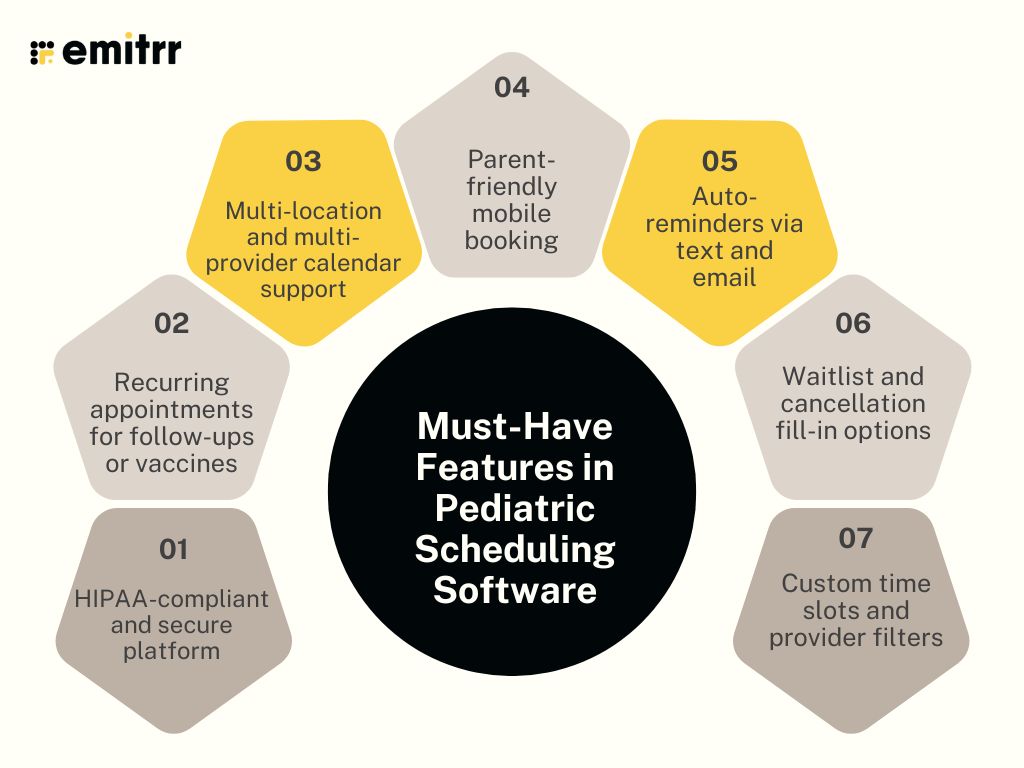
HIPAA-compliant and secure platform
Let’s start with the non-negotiable – Security. Since you’re handling sensitive patient data, your software has to be HIPAA compliant. That means everything, bookings, contact info, and health records, stay encrypted and safe. Only the right people in your team can access it. And if something goes wrong, you have logs to track what happened. It’s not just about ticking a box. It’s about keeping families’ trust intact. Think of it as a digital lock on your scheduling desk. And yes, it matters as much as handwashing protocols.
Recurring appointments for follow-ups or vaccines
We all know that kids don’t stop at one check-up. There’s always a vaccine coming up, or a follow-up after a cold or allergy flare-up. That’s why automated appointment reminders are such a lifesaver. With just a few clicks, you can schedule future visits in one go. Parents don’t have to remember to book again, and you don’t have to chase them. Everyone wins. It also keeps your calendar more predictable and makes follow-through way easier. Especially during busy seasons like back-to-school or flu time.
Multi-location and multi-provider calendar support
If your clinic has more than one doctor, or more than one location, this one’s key. Your scheduling software should make it easy to juggle multiple calendars without losing your mind. Parents should be able to choose the doctor they want and the location that’s closest to them, all in one place. And your front desk shouldn’t need a giant spreadsheet to make it all work. A good scheduling software setup keeps things colour-coded, organized, and easy to update. Whether you’re running two exam rooms or two branches, everything stays in sync.
Parent-friendly mobile booking
Most parents are booking between meetings, in school pick-up lines, or after bedtime. So your software needs to work beautifully on mobile. That means big buttons, simple steps, and no need to log in every time. A good tool makes online pediatric doctor consultation easy to book in under a minute. If they can order dinner in 3 taps, they should be able to book a check-up the same way. Bonus points if it remembers past appointments and preferences.
Auto-reminders via text and email
Reminders are the unsung heroes of low no-show rates. A gentle nudge the day before an appointment via text or email can make all the difference. And with good patient appointment scheduling software, you don’t have to send those manually. Just set it once, and the system takes care of the rest. You can even personalise the messages. Like “Hi Mia’s parent, just a reminder about your 3 PM appointment tomorrow!” It feels warm and helpful, without taking up your staff’s time.
Looking for ready-to-use HIPAA-compliant SMS templates for healthcare scheduling and reminders? Then here are the best ones, Download the templates now!
Waitlist and cancellation fill-in options
Let’s say a parent cancels last minute. Now you’ve got an empty slot. With the right system, you can automatically notify families on your waitlist. That way, someone else can grab the spot, and your schedule stays full. This is especially helpful during busy months, when it’s hard to get an opening. Plus, it shows parents that you’re doing everything you can to get them in sooner. It’s a small feature that brings big wins for both your clinic and your patients.
Custom time slots and provider filters
Every clinic works a bit differently. Some doctors might only see babies. Others might handle older kids or teens. Some appointments need more time, like first visits or vaccine counselling. That’s where custom time slots and filters come in. You should be able to control what kind of appointments are offered, when, and with whom. And parents should only see what’s relevant to them. This keeps things efficient and avoids double-booking or confusion at the front desk.

Security & Privacy Compliance for Pediatric Scheduling
When you’re dealing with kids’ health info, there’s no room for error. It’s not just about having a system that works. It has to be safe too. Families need to know their data is protected. Let’s talk about what that actually means in a clinic setting.
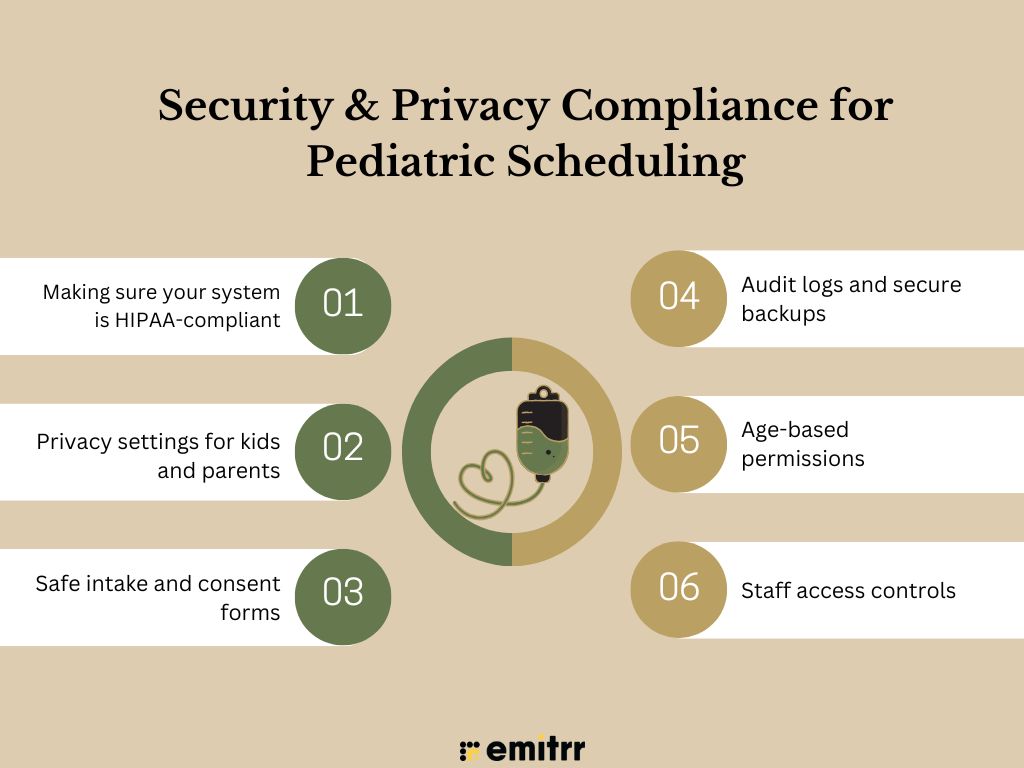
Making sure your system is HIPAA-compliant
If you use any kind of software in your clinic, it has to follow HIPAA rules. That’s the law that protects patient health info. Your system should be able to handle bookings, reminders, and messages, all without putting that data at risk. Think secure logins, encrypted text messages, and strong user access settings. If your platform is HIPAA-compliant, you’re not just being careful. You’re showing parents they can trust you.
Privacy settings for kids and parents
Each child’s info is usually managed by a parent. But not everything needs to be visible to everyone. A good scheduler lets you choose who sees what. Maybe a parent can see visit dates, but not the provider notes. These settings help avoid unnecessary confusion and awkward situations.
Safe intake and consent forms
Paper forms get lost. Or forgotten. A better way? Let parents fill them out online before the visit. Whether it’s a new patient form or a vaccine consent, they can sign and submit everything from their phone. The system should save it right to the child’s record. That way, nothing gets missed and your front desk stays on track.
Audit logs and secure backups
Ever wonder who changed a phone number or deleted a visit? That’s where audit logs help. They track everything that happens in the system. If something looks off, you’ll know who did what. And if there’s ever a tech issue or crash, encrypted backups make sure you don’t lose anything important. It’s like having a safety net for your records.
Age-based permissions
As kids get older, things shift. A toddler’s records are fully managed by their parent. But a teen? Depending on where you are, they might have the right to see or manage part of their info. Your scheduler should let you adjust access based on age. It helps you stay compliant and makes sure families get the right setup.
Staff access controls
Not everyone on your team needs to see everything. Your front desk doesn’t need vaccine history. Your billing person doesn’t need to read provider notes. Your system should let you set roles for each job. That keeps things safer and cleaner. And it makes sure only the right people see the right info.
Offering online scheduling is only useful if parents can find it. Our audit of 20 Pediatric practice website homepages uncovered the biggest booking experience gaps. Review your own homepage with the checklist below.
Key Integrations for Scheduling Software in Pediatric Clinics
Your scheduling system works best when it connects with the tools you already use. It’s not just about booking. It’s about making sure everything behind the scenes is in sync, too. That’s what keeps your day running smoothly, without the back-and-forth. Here are the integrations that really matter:
Syncing with your EHR or EMR
Your scheduling tool should work hand-in-hand with your EHR or EMR. When someone books an appointment, it should automatically show up in their chart. No copy-pasting, no logging into two systems. This keeps records clean and cuts down on errors. It also saves your staff from extra steps. Everything stays updated in real time, which is a big win during busy hours.
Integration with telehealth tools for virtual visits
If you offer video visits, your scheduling system should be set up to handle them. Parents should see telehealth as a booking option, just like an in-person visit. Once they choose it, the system should handle the rest. Sending out the video link, appointment time, and any info they need. No manual follow-ups required. It’s simple for families and saves time for your team.
Connecting billing and insurance software
Dealing with insurance can get messy. But when your scheduler talks to your billing software, it’s a lot easier. You can pull in coverage details, check eligibility, or even estimate costs ahead of time. This helps avoid surprises for families and makes checkout faster. It also means fewer calls later asking, “Why did I get this bill?”
Google and Outlook calendar integrations
If your team uses Google or Outlook to track schedules, that’s totally fine, as long as your scheduler syncs with it. Appointments should show up right away, no matter where you’re looking. That way, your staff isn’t missing things or double-booking by accident. It’s a small thing, but it makes daily coordination way easier.
Texting and calling tools
Sometimes, parents just want a quick update or a simple reminder. Your scheduling system should let you text them directly, no need to call for every little thing. If you do need to call, it should work from inside the same platform. This keeps communication quick, easy, and in one place.
Automated patient intake form systems
Nobody likes clipboards. Let families fill out forms before they even walk in. Whether it’s a new patient form or a vaccine consent, they can do it from their phone or computer. Once submitted, the forms should be attached right to the patient’s record. That way, your front desk isn’t chasing down paperwork at the last minute.
Reporting tools for appointments and cancellations
You need to know what’s working and what’s not. Your scheduler should give you simple, helpful reports, like how many no-shows you had, which days are busiest, or what times get booked the fastest. These insights help you make better decisions, adjust your schedule, and plan for what’s ahead.
How Scheduling Software Helps Pediatricians
Let’s be honest, running a pediatric clinic is non-stop. Good scheduling software won’t solve everything, but it does take a lot off your plate. Here’s how it helps in real life.
Lower front-desk burden and call volume
The phones never stop, right? Parents call to book, cancel, reschedule, over and over. With online scheduling, a lot of those calls just don’t happen. Parents can do it all themselves. That means fewer interruptions for your front desk and more time to help families who are actually in the office. Way less chaos.
Higher patient satisfaction among busy parents
Most parents don’t have time to call during clinic hours. They remember at night or on the weekend. If they can just pull up your site and book in two minutes, they’re going to love that. It makes their lives easier, and they’ll notice. It’s the kind of thing that makes them stick with your clinic.
Reduced no-shows with gentle auto-reminders
Sometimes parents forget. Not because they don’t care, they’re just juggling a lot. A quick reminder the day before (or even a couple of hours ahead) can go a long way. The right software sends these automatically, so your staff doesn’t have to make extra calls. And parents can confirm or cancel with one tap. Some platforms even come with ready-to-use reminder templates. You don’t need to write messages from scratch. Just pick one, schedule it, and you’re set. It’s one of the easiest ways to cut down on no-shows without adding more to your team’s plate.
Easier follow-ups for vaccines and check-ups
You know what’s due at 9 months, 12 months, and so on. But parents might not. With the right system, you can send a quick reminder when it’s time for their next visit. Add a booking link and they can grab a slot in seconds. No calls, no missed milestones. Just smoother follow-ups.
Flexibility for last-minute or urgent appointments
Not every appointment can be planned in advance. Maybe a kid wakes up with a fever or a weird rash. When you hold a few open slots for same-day visits, you can help without scrambling. Your team doesn’t have to move the whole day around. And parents really appreciate being seen quickly when their child isn’t feeling well.
Easier time management for pediatricians
Let’s face it, a messy schedule makes your whole day harder. You’re rushing, skipping breaks, and constantly trying to catch up. Scheduling software lets you plan your day the way that works for you. Maybe long visits in the morning, short ones later. It’s simple, but it makes a big difference.
Support for multiple doctors and age groups
If you’ve got more than one provider or a wide mix of patient ages, things can get complicated fast. A smart scheduler helps with that. You can let parents choose a specific doctor, or route appointments by age or visit type. It keeps everyone in the right slot and makes the day run more smoothly.
How To Choose the Right Scheduling Software for Your Clinic
There are a lot of scheduling tools out there, but not all of them are built for pediatric care. The right one should make life easier for your staff and your patients. Here’s how to figure out what’s actually going to work for your clinic:
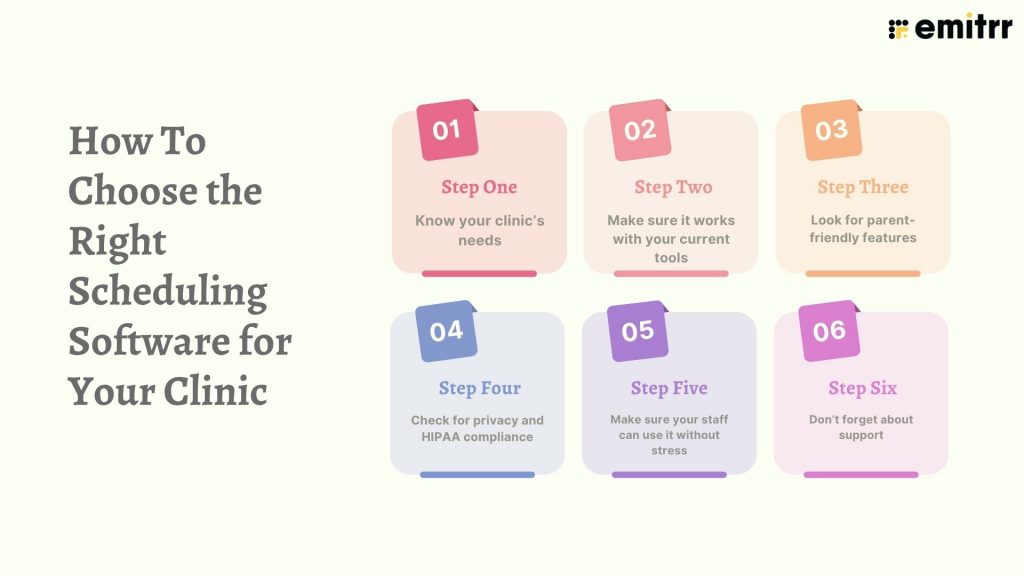
Step 1: Know your clinic’s needs
Start by looking at where things feel messy right now. Are your phones constantly ringing? Are no-shows a problem? Maybe it’s hard to manage follow-ups, or you’re wasting time entering the same info in two systems. Make a quick list of your top struggles. That’ll help you focus on tools that solve your problems, not just the flashiest features.
Step 2: Make sure it works with your current tools
You don’t want to juggle five different platforms. So check if the scheduling tool connects with your EHR, billing software, and telehealth system. If it integrates smoothly, things like appointment updates, payments, and visit notes can all stay in sync. No extra data entry, no switching tabs. That saves your team a ton of time and reduces errors too.
Step 3: Look for parent-friendly features
At the end of the day, you’re building this for families. So it has to be easy for them to use. Can they book appointments from their phone in a couple of taps? Do they get a clear confirmation? What about reminder texts or a reschedule link? If it’s simple and convenient, they’re more likely to show up and come back.
Step 4: Check for privacy and HIPAA compliance
You’re handling sensitive patient info, so security can’t be an afterthought. Your system should be HIPAA-compliant, with encrypted messages and strong access controls. It should also let you manage who can see what, especially for parent-child or teen accounts. A tool that protects privacy builds trust, and trust keeps families coming back.
Step 5: Make sure your staff can use it without stress
Even the best software won’t help if your team finds it confusing. Choose something that’s easy to learn and doesn’t require hours of training. Ask for a demo where your front desk can actually try booking or cancelling a visit. If they’re saying, “Oh, this is easy,” that’s a good sign.
Step 6: Don’t forget about support
Things will go wrong sometimes, tech bugs, syncing issues, login trouble. When that happens, you need support that’s fast and actually helpful. Look for a company that offers phone, chat, or email support with real people behind it. It’ll save you a lot of stress down the road.
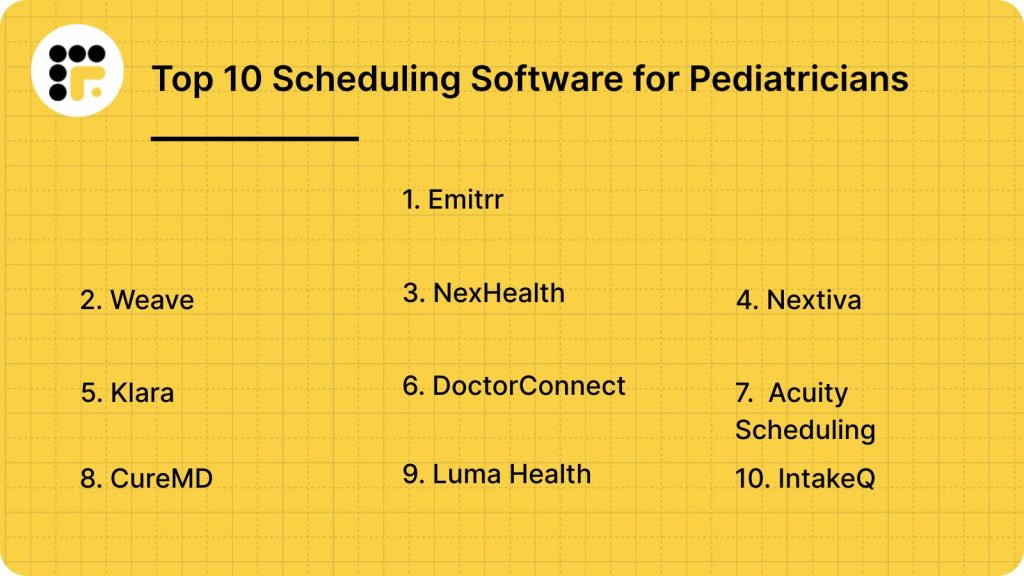
Top 10 Scheduling Software for Pediatricians
If you’re looking for the best tools to simplify booking, cut down on calls, and keep your schedule running smoothly, you’re in the right place.
Here’s a list of the top 10 appointment scheduling software options made specifically with pediatricians in mind.
Let’s look at each scheduling tool in detail
1. Emitrr
What is Emitrr?
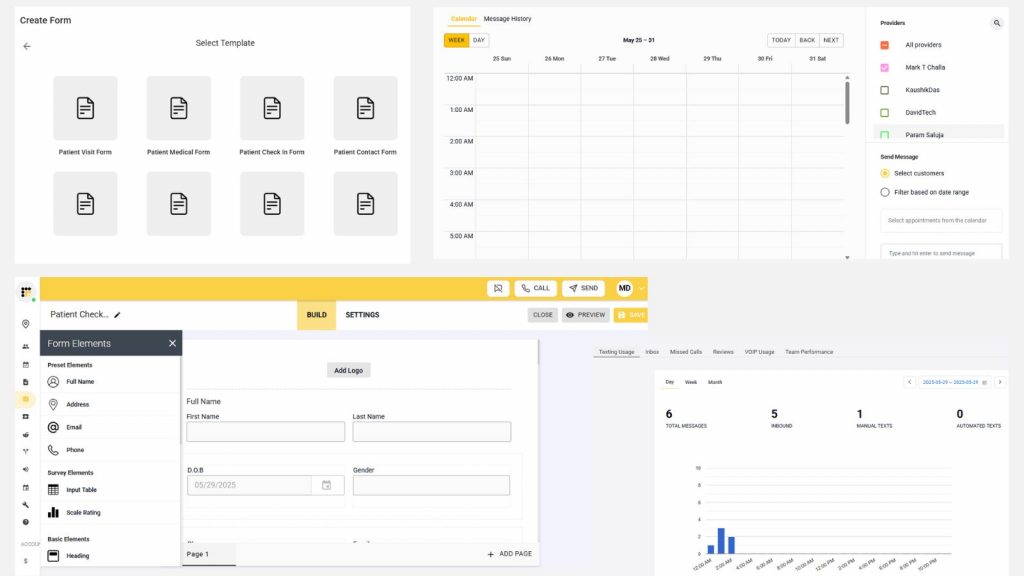
Emitrr is a HIPAA-compliant scheduling and communication platform built specifically for healthcare clinics, including pediatric practices. It handles everything from appointment booking to automated reminders, two-way texting, voicemail follow-ups, intake forms, and more, all in one place. It’s designed to reduce staff workload and improve the parent experience.
Key features of Emitrr
- 24/7 online scheduling: Let’s parents book appointments anytime, from any device.
- Automated reminders: Sends appointment reminders via text, email, or voice.
- Two-way HIPAA-compliant texting: Secure texting for confirmations, updates, and quick questions.
- Missed-call follow-up text: Automatically texts parents when a call is missed.
- Telehealth support: Includes virtual appointment booking with built-in video link sharing.
- Multi-location scheduling: Manage schedules for multiple clinics or providers on one dashboard.
- Waitlist automation: Fills open slots fast by notifying waitlisted families.
- Digital intake and consent forms: Collects forms ahead of time, fully digital, no paperwork.
- Real-time analytics and reports: Tracks no-shows, call volume, and parent response times.
- Custom booking rules: Add provider preferences, time buffers, visit types, and more.
Watch the video below to see the Emitrr AI Scheduling Assistant in action:
Emitrr pros
- Mobile-friendly for parents: Works great on phones with no app required.
- Made for pediatrics: Designed around parent-child booking needs and workflows.
- Time-saving for staff: Cuts down manual calls, voicemails, and data entry.
- Fully HIPAA-compliant: Keeps all communication and data secure.
- Scalable solution: Works for both solo providers and multi-location practices.
Emitrr cons
A few advanced AI features are still rolling out, but regular updates are happening.
Emitrr integrations
- EHR/PMS systems: Epic, Dentrix, DrChrono, eClinicalWorks, Kareo, Athenahealth, AdvancedMD
- Telehealth platforms: Zoom, Doxy.me, and other video visit tools
- Calendar apps: Google Calendar, Microsoft Outlook
- Communication tools: VoIP systems, Google Voice, Emitrr voice/text platform
- Form tools: Jotform, Typeform for secure intake form syncing
- CRM and marketing tools: Salesforce, HubSpot (for larger clinics)
Emitrr pricing
Plans start at $30 per month.
Emitrr ratings
- Capterra: 4.9/5
- G2: 4.7/5
Emitrr customer reviews
“I like the platform and also how easy it is to reach out to the team and work with them about any questions.”
“We’ve been using Emitrr for both businesses for over a year now – it’s AMAZING!! Was super easy to set-up, the few times we’ve needed customer support was quickly addressed!!”
Source: Capterra
Emitrr support channels
- Email: support@emitrr.com
- Phone: +1 (210) 941-4696
- Live chat: Available on the Emitrr website
- Knowledge base: Includes guides, FAQs, and walkthroughs
- SMS support: Text the support number for help anytime
2. Weave
What is Weave?
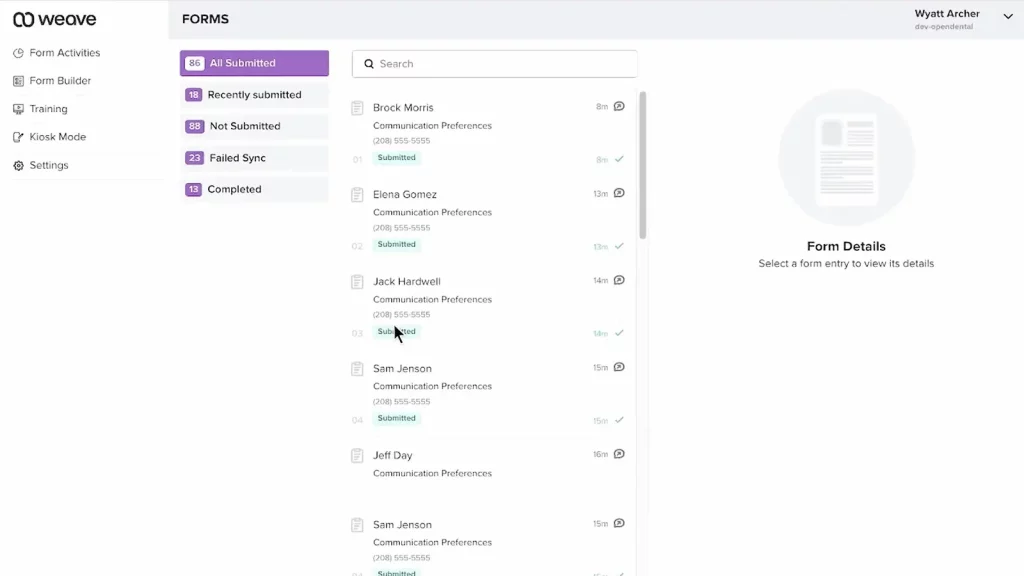
Weave is a communication-focused platform that combines scheduling, texting, calling, and patient engagement tools in one place. It’s designed for medical and dental offices, helping clinics manage everything from phone calls to online booking and payment reminders.
Key features of Weave
- Online appointment scheduling: Let patients book visits based on real-time availability.
- VoIP phone system: Make and receive calls using your clinic number, from anywhere.
- Two-way texting: Securely text patients for confirmations, reschedules, or follow-ups.
- Payment reminders and billing: Send payment links via text to reduce billing delays.
- Automated review requests: Request Google reviews after appointments to boost your rating.
Weave pros
- All-in-one communication: Phone, text, scheduling, and reviews all in one platform.
- Improves patient follow-through: Automates reminders and payments to reduce no-shows and billing delays.
- Great for front-desk teams: Caller ID pop-ups help staff personalise conversations.
- Easy review collection: Helps grow your clinic’s online presence fast.
Weave cons
- Not pediatric-specific: Built for general healthcare, so lacks some child-parent features.
- Learning curve for staff: Has lots of features, can feel overwhelming at first.
- VoIP quality varies: Few reviews about the call quality dropping occasionally. Also, this depends heavily on your internet connection.
Weave integrations
- EHR/PMS systems: Open Dental, Dentrix, Eaglesoft, and other popular tools
- Google Reviews: Direct integration for review requests
- Calendars: Google Calendar sync
- Payment tools: Credit card and ACH processing built in
Weave ratings
- Capterra: 4.3/5
- G2: 4.4/5
Weave pricing
Custom plans are available. Pricing varies based on feature selection.
Weave customer reviews
“With Weave, it’s just a nightmare with the customer service and support. And guess what, any settings or setup you want to change, you only have to go through their customer support because whenever you make changes from their web portal, none of it gets actually reflected.”
“Everything. Multiple people lied about being integrated with my software. They didn’t tell me there were additional charges that i would need to pay. They stated it would be much more user friendly”
Source: Capterra
Weave support channels
- Phone and email support
- Live chat
- Online Help Center
- Onboarding and setup training
3. NexHealth
What is NexHealth?
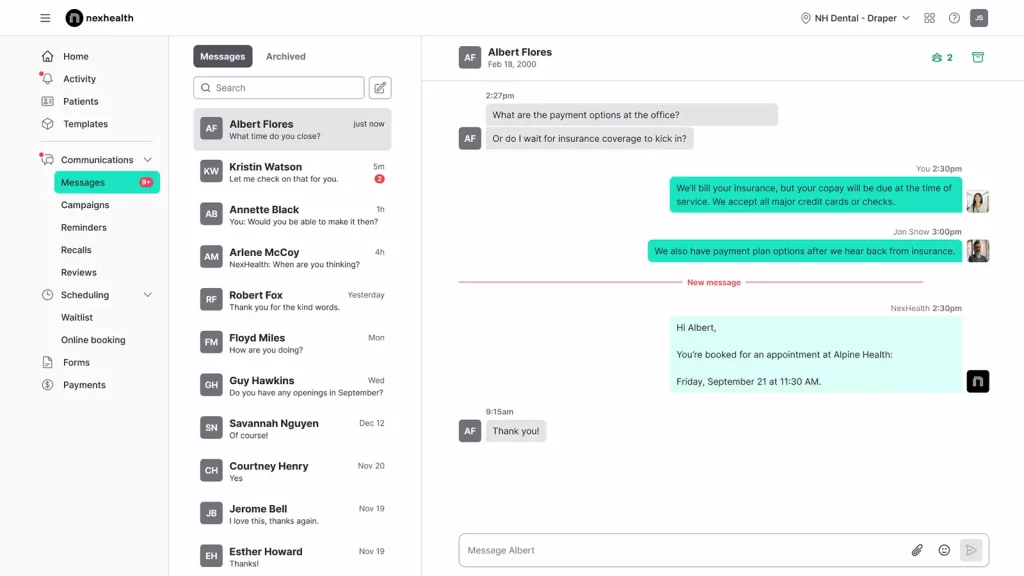
NexHealth is a modern scheduling and patient experience platform built to automate front-desk workflows. It’s popular among medical and dental practices for online booking, digital forms, and fast integrations with EHRs.
Key features of NexHealth
- Online self-scheduling: Patients can choose and book time slots directly through your website.
- Instant calendar sync: Updates availability in real time, reducing double-bookings.
- Automated reminders: Sends appointment confirmations and reminder texts.
- Patient messaging: Enables secure two-way text communication.
- Digital forms: Collect intake, consent, and health history before the visit.
NexHealth pros
- Fast EHR syncing: Connects instantly with top systems like Epic and Dentrix.
- Clean user interface: Easy for staff and patients to use.
- Modern design: Feels intuitive and mobile-friendly for families booking on the go.
- Strong digital forms: Replaces paperwork with seamless pre-visit submissions.
NexHealth cons
- Limited phone tools: Doesn’t include calling or VoIP features.
- Pricing not transparent: Requires sales call to get a custom quote.
- Best for mid-to-large clinics: May be more than smaller practices need.
NexHealth integrations
- EHRs: Epic, Dentrix, OpenDental, Eaglesoft, and dozens more
- Calendars: Real-time Google Calendar and iCal sync
- Form tools: Fully native digital intake forms—no third-party plugins needed
- Web tools: Website widget for booking directly from your homepage
NexHealth pricing
Plans start from $350. It can vary based on your practice size and features.
NexHealth ratings
- Capterra: 4.7/5
- G2: 4.6/5
NexHealth customer reviews
“They make changes without adequate/any notification. They change workflow and functionality on the fly and expect the office to adapt. They placate, but do not listen to customers. LIMITED support hours. WEST coast centric mentality – east coast starts at 8 am, but west coast support starts at 5 am, so they can fix issues before they impact the day.”
“I’d like patients to be able to pay partial payments without needing to go through me to resend the patient request, and some bulk options/autofilling features would make the feature even more helpful.”
Source: Capterra
NexHealth support channels
- Live chat on website
- Email support
- Help Center with articles and guides
- Dedicated onboarding assistance
4. Nextiva

What is Nextiva?
Nextiva is a business communication platform with VoIP calling, texting, and scheduling features. While not built only for healthcare, many pediatric offices use it to simplify their phone systems and improve how they handle patient calls and reminders.
Key features of Nextiva
- Appointment scheduling add-ons: Set up basic scheduling links or integrate with third-party calendars to help families book faster.
- Cloud-based phone system: Make and receive calls from anywhere with your clinic number.
- Call routing and auto-attendants: Send calls to the right team or location automatically.
- SMS and texting tools: Text parents directly with appointment info or quick updates.
- Mobile and desktop apps: Staff can take calls or respond to texts even while working remotely.
Nextiva pros
- Basic scheduling support: Allows integration with scheduling tools so parents can book appointments more easily.
- Flexible setup: Works well for remote teams or multi-location practices.
- All-in-one communication: Combine calls, voicemail, text, and video in one place.
- Good for high-volume clinics: Handles large numbers of calls without breakdowns.
Nextiva cons
- Not built just for healthcare: Lacks pediatric-specific or EHR integrations.
- Learning curve: May feel tech-heavy for smaller teams at first.
- Scheduling is limited: More focused on communication than full appointment booking.
Nextiva integrations
- CRM tools: Salesforce, HubSpot, Zoho
- Productivity platforms: Microsoft Teams, Google Workspace
- APIs for custom tools: Allows connection to scheduling or patient systems (manual setup)
Nextiva pricing
Starting at $25.95 per user/month.
Nextiva customer reviews
“Lack of follow up for every issue. I would have to reach out to them multiple times to get a response.”
“Their approach to business appears to be: lure the customer in, demand a 3-year contract, hide the part about auto renewal, provide just average level service, hire less than competent support staff to handle customer complaints, and hope the customer doesn’t become aware of the auto renewal gimmick before the end of the contract term.”
Source: Capterra
Nextiva support channels
- Phone
- Live chat
- Guides and blogs
5. Klara
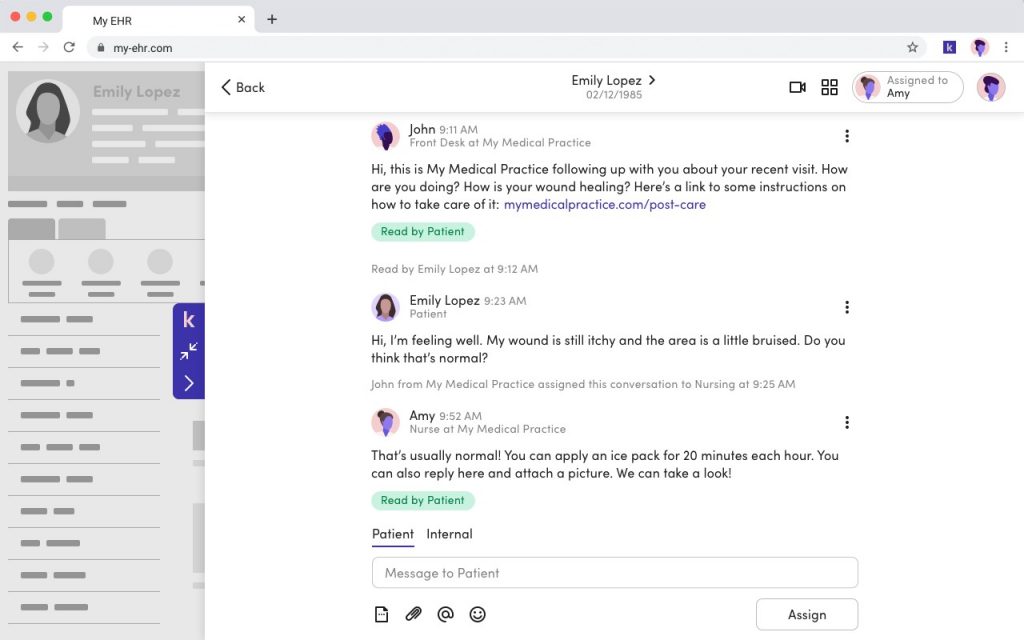
What is Klara?
Klara is a HIPAA-compliant messaging and scheduling platform built specifically for healthcare practices. It’s best known for making patient communication easier via text, web chat, and reminders, all in one inbox for your team.
Key features of Klara
- Secure patient texting: Message families without them downloading an app.
- Unified message inbox: Combine emails, texts, and web messages in one view.
- Appointment requests and confirmations: Let parents request visits through your website or text.
- Automated reminders: Send pre-set reminders to reduce no-shows.
Klara pros
- Made for healthcare: Built with HIPAA and patient flow in mind.
- Great for messaging: Helps staff keep track of patient questions without jumping between tools.
- Web chat boosts new bookings: Let families reach you right from your site.
- Clean, simple interface: Easy to use, even for non-techy staff.
Klara cons
- Limited scheduling tools: Lacks deep customization for appointment types.
- Best with an EHR: Needs integration for full scheduling automation.
- Limited phone tools: No voice or VoIP system included.
Klara integrations
- EHR platforms: DrChrono, ModMed, Greenway, and others
- Web tools: Website chat, email-to-text
- Task management: Internal task assignment for follow-ups
Klara pricing
Custom pricing based on size and features.
Klara ratings
- Capterra: 4.6/5
- G2: 4.5/5
Klara customer reviews
“The online booking feature is a complete failure. The customer care between Klara and our practice was practically non existent. The AI aspect was not very accurate or helpful.”
“Wish it had more languages, we are a diverse clinic with many languages.”
Source: Capterra
Klara support channels
- Email support
- Chat via website
- Resource library with guides and videos
- Dedicated onboarding support for new users
6. DoctorConnect
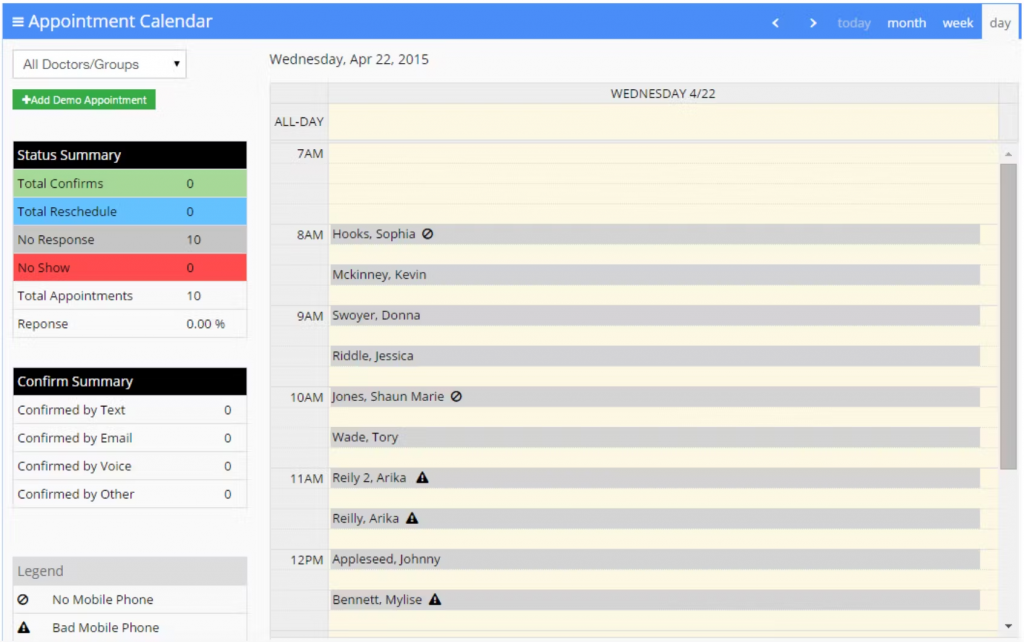
What is DoctorConnect?
DoctorConnect is a healthcare-focused communication and scheduling tool that helps pediatric offices manage appointments, reminders, cancellations, and patient messaging all in one place. It’s known for its user-friendly interface and strong automation features.
Key features of DoctorConnect
- Automated appointment reminders: Send SMS, email, or voice messages ahead of time.
- Online scheduling portal: Parents can view open slots and book directly.
- Two-way texting: Communicate easily with families about changes or questions.
- No-show tracking and waitlists: Refill cancelled spots with patients from your waitlist.
- Patient satisfaction surveys: Collect post-visit feedback automatically.
DoctorConnect pros
- Built for healthcare: Works well with the pediatric office flow.
- Reduces no-shows: Automated reminders really help busy families stay on track.
- Boosts patient communication: Texting makes it easier to connect without calls.
DoctorConnect cons
- Older interface: The dashboard feels slightly outdated compared to newer platforms.
- Limited EHR integrations: Syncing may require manual setup or API help.
- Pricing on the higher side: The pricing can be steep for smaller practices.
DoctorConnect integrations
- EHR platforms: AthenaHealth, eMDs, AdvancedMD
- Telehealth tools: Compatible with third-party video platforms
- Email and text providers: Twilio, SendGrid
DoctorConnect pricing
Plans start at $210, which vary based on practice size and usage.
DoctorConnect ratings
- Capterra: 4.8/5
- G2: 4.7/5
DoctorConnect customer reviews
“Patients get calls on Sunday’s after 7:00 pm Example P Ross apt 4-13-18 received two calls on a Sunday after 7:00 pm. Please remove calls after 3:00 on Sundays”
“Did not integrate into my existing EHR, though the Sales Rep assured me it would. I have had the software for 3 days and never used it. The sales rep refuses to issue a refund. He states I am locked in a 1 year contract.”
Source: Capterra
DoctorConnect support channels
- Email and phone support
- Live chat
- Help center with FAQs
- Onboarding support for new clinics
7. Acuity Scheduling
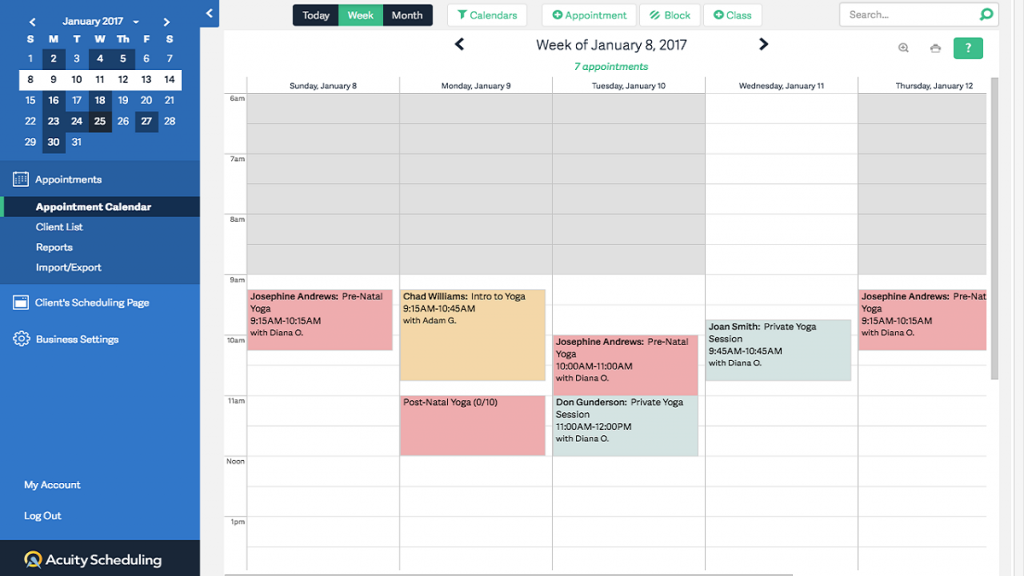
What is Acuity Scheduling?
Acuity Scheduling is an online booking tool that helps clinics simplify how appointments get scheduled. It’s widely used by healthcare professionals, including pediatricians who want to give parents more control over when they book. With Acuity, families can grab a time that works for them, pay if needed, and get automatic reminders, all without calling the front desk.
Key features of Acuity Scheduling
- Parent self-booking: Parents can book directly from your clinic’s website or shared link, no extra logins needed.
- Automated reminders: Sends emails and texts so families remember upcoming visits, helping cut down no-shows.
- Built-in payment processing tools: Lets you collect co-pays or deposits during booking through Stripe, PayPal, or Square.
- Custom time blocks: Block out provider lunch hours, nurse-only slots, or admin breaks to avoid overbooking.
Acuity Scheduling pros
- Very easy for parents: Booking feels simple and quick, even for first-time users.
- Clinic branding support: Add your logo and colours to make the experience feel more like your pediatric office.
- Good for virtual visits: Automatically detects time zones—handy if you offer online pediatric consults.
- Works with calendars: Syncs with Google Calendar, iCal, Outlook, and Office 365 for smoother scheduling.
Acuity Scheduling cons
- Not built just for pediatrics: More general-purpose, so it may lack features tailored to pediatric needs.
- Limited texting features: Doesn’t include built-in HIPAA-compliant two-way texting like Emitrr does.
- Takes time to set up: Customising settings and flows might take a bit longer for solo or first-time users.
Acuity Scheduling integrations
- Calendars: Google Calendar, Outlook
- CRMs: Salesforce, HubSpot
- Zapier and APIs: For connecting to EHRs or schedulers
Acuity Scheduling pricing
Plans start at $20 per month.
Acuity Scheduling ratings
- Capterra: 4.8/5
- G2: 4.7/5
Acuity Scheduling customer reviews
“Acuity does not make using it easy to learn, navigate or figure out. Their help features really stink. They have all this writing you can put into your availability type. I thought this was emailed to the client when they received their link. So I put all this time into writing up my parameters etc. and no one was following them. Finally I figured out that it is only shown when someone is scheduling and since I schedule in my coaching clients they never even see it!”
“The same applies to setting availability. It can be a bit confusing when blocking off times by day.”
Source: Capterra
Acuity Scheduling support channels
- Email support via help desk
- Help Center with guides and video tutorials
- Community forum for user questions
8. CureMD
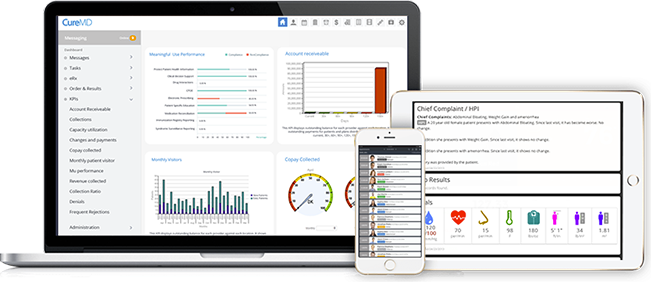
What is CureMD?
CureMD is a cloud-based EHR and practice management software that comes with built-in scheduling tools. It’s made for clinics that want everything, from appointments to charts, in one place. Pediatricians often choose it for its custom templates and strong billing tools.
Key features of CureMD
- Integrated appointment calendar: Manage bookings, no-shows, and recurring visits all in one view.
- Custom visit types: Separate slots for well visits, vaccinations, or urgent care.
- One-click patient check-in: Speed up intake with kiosk or online check-in.
- Built-in EHR and billing: No switching between tools—everything connects.
CureMD pros
- All-in-one platform: EHR, scheduling, billing—everything’s under one roof.
- Made for healthcare: Strong focus on practice workflows.
- Customisable templates: Tailor visit types for pediatric needs.
- Efficient patient flow: Speeds up everything from check-in to claims.
CureMD cons
- Learning curve: More features means more training upfront.
- Mobile version is basic: Some providers want a smoother mobile experience.
- Pricing on the higher side: Best for medium to large clinics.
CureMD integrations
- Billing software: Integrated with in-house CureMD billing
- Labs and imaging: LabCorp, Quest, and other diagnostic tools
- Pharmacies: Electronic prescriptions via SureScripts
CureMD pricing
Plans start from $195.
CureMD ratings
- Capterra: 3.5/5
- G2: 3.4/5
CureMD customer reviews
“Hidden fees, confusing contracts, outdated website design, constant system errors, and unreliable customer support.”
“For a medical practice that relies heavily on speed and efficiency of an electronic software, CureMD did not deliver. I found myself and my staff spending extended amount of time completing clinic notes. For a 20 patient or so daily encounter, I spent at least 3-4 hours a day or more completing notes.”
Source: Capterra
CureMD support channels
- 24/7 phone and email support
- Live chat for current users
- Training videos and resource center
- Dedicated account manager for larger clinics
9. Luma Health
What is Luma Health?
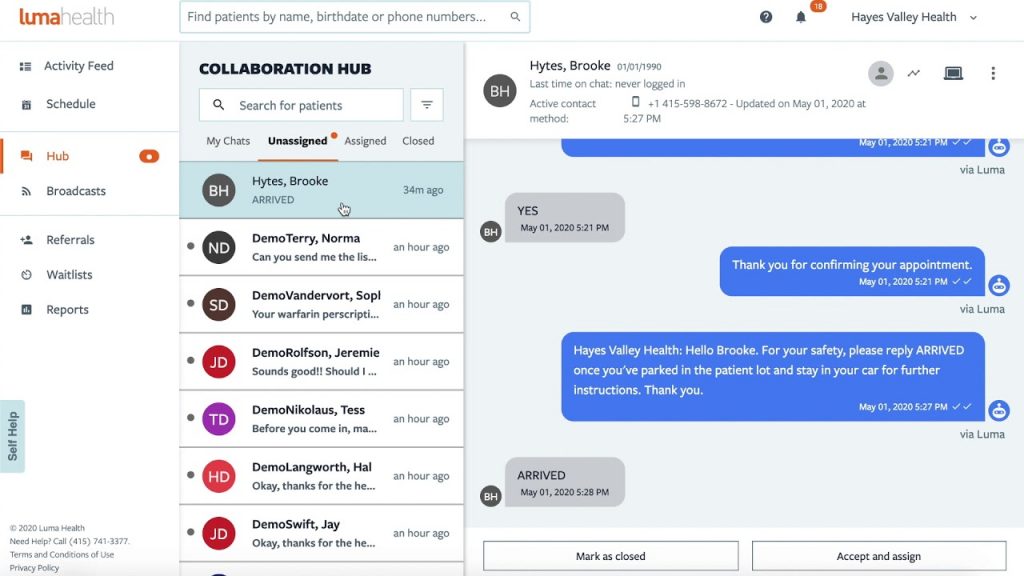
Luma Health is a patient engagement platform built for modern medical practices. It focuses on making the patient experience smoother, starting from online booking all the way to post-visit follow-ups. Pediatric clinics use it to reduce no-shows and stay connected with busy parents.
Key features of Luma Health
- Smart online scheduling: Parents can see real-time availability and book instantly.
- Automated waitlist offers: Refill cancelled slots without lifting a finger.
- Pre-visit forms and consents: Send and collect forms before the appointment.
- Group messaging: Notify multiple patients at once—great for flu shot reminders.
Luma Health pros
- Very parent-friendly: Simple and clear booking experience.
- Helps fill your schedule: Waitlist automation really works.
- Strong mobile features: Designed for today’s smartphone users.
- Great for multi-location clinics: Helps teams stay in sync.
Luma Health cons
- May be overkill for small practices: Better suited for mid-size or large groups.
- Requires some setup time: Needs proper onboarding to work smoothly.
Luma Health integrations
- EHR systems: Epic, AthenaHealth, Allscripts
- Telehealth platforms: Zoom for Healthcare
- CRM and messaging tools: Salesforce, Twilio
Luma Health pricing
They follow a custom pricing model. It’s basically based on provider count and feature set.
Luma Health ratings
- Capterra: 4.6/5
- G2: 4.5/5
Luma Health customer reviews
“The constant changes of my account representatives really made it difficult to build relationships. Overtime Luma’s account representatives stopped contacting the practice and as result we had to figure out solutions on our own. Additionally, they changed their payment terms to where if we didn’t pay them upfront then they would drop us as a customer.”
Source: Capterra
Luma Health support channels
- Phone
- Onboarding specialists
- Help center
- Dedicated account manager for larger clinics
10. IntakeQ
What is IntakeQ?
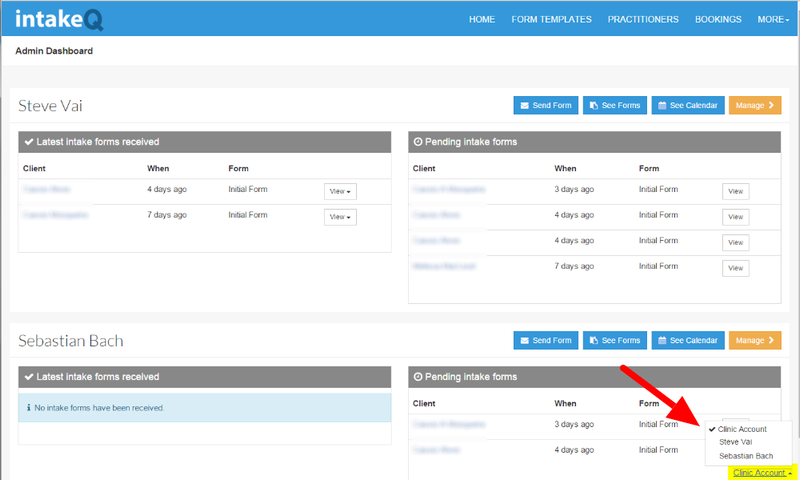
IntakeQ started as a digital forms platform but has grown into a full appointment scheduling and patient communication solution. It’s especially useful for pediatric clinics that want to keep intake forms, bookings, reminders, and payments in one neat system.
Key features of IntakeQ
- Online appointment booking: Parents can view available slots and book on their own time.
- Customisable digital intake forms: Share vaccine consents, new patient forms, and questionnaires, no printing needed.
- Secure messaging: Chat with parents securely while staying HIPAA-compliant.
- Automated appointment reminders: Reduce no-shows with email, SMS, or in-app alerts.
- Recurring appointments: Great for monthly checkups or series-based care plans.
IntakeQ pros
- Great for form-heavy clinics: Saves time on paperwork and scanning.
- Very customisable: Tailor almost every step to your clinic’s needs.
- All-in-one tool: From scheduling to billing to forms, no switching platforms.
IntakeQ cons
- Form setup takes time: Lots of options mean setup can feel overwhelming at first.
- Not a full EHR: You may need to integrate with your main system.
- Some advanced features cost extra: Pricing varies by what you use.
IntakeQ integrations
- EHR systems: Compatible with systems like Practice Fusion, ChARM, and DrChrono
- Payment gateways: Stripe, Square
- Calendar tools: Google Calendar, Outlook
IntakeQ pricing
Plans start at $49/month with add-ons for telehealth and advanced features.
IntakeQ ratings
- Capterra: 4.7/5
- G2: 4.6/5
IntakeQ customer reviews
“Not enough flexibility for processing intakes in bulk. Would like the ability to transfer in bulk between providers, link custom template office use fields with client custom fields so certain notes are pulled into the client’s record.”
“It just cannot do many of the things that they promise it can do.”
Source: Capterra
IntakeQ support channels
- Email support
- Chat available for paid users
- Help docs and video tutorials
- Setup support included with subscription
Why Emitrr Is the Best Scheduling Software for Pediatricians
Emitrr is designed to take the stress out of scheduling, for your team and the families you serve. Here’s what makes it such a great fit for pediatric clinics:
- 24/7 booking access: Parents can schedule appointments anytime, even after your clinic closes for the day. No need to wait until morning.
- Mobile-friendly interface: Works perfectly on phones, so parents can book on the go without downloading any app.
- Smart appointment reminders: Automatically sends texts and emails so families don’t forget their visit. You choose the timing.
- Easy rescheduling: Parents can cancel or change a booking with just a few taps. No phone call needed.
- Telehealth visit setup: Offers virtual appointment slots just like in-person ones, with automatic video link sharing.
- EHR and PMS sync: Connects with over 500 EHR systems, so everything stays updated across your clinic without double entry.
- HIPAA-compliant messaging: Keeps patient data protected with encrypted communication and secure storage built in.
- Built-in two-way texting: Lets your team respond to questions or send updates right from the platform, quick and simple.
- Custom visit types: Easily set up separate slots for vaccines, physicals, sick visits, telehealth, and more.
- No missed forms: Send intake, consent, or insurance forms ahead of the visit, so everything’s ready when the family walks in.
- Role-based access: Control who sees what, your front desk doesn’t need access to private notes, and billing won’t see clinical details.
- Real-time calendar updates: Everyone on your team sees the same up-to-date schedule, so there’s no confusion or overlap.
- Multi-location support: Running more than one clinic? Manage them all from one dashboard without switching systems.
- Waitlist notifications: Got a last-minute cancellation? Emitrr can notify families on the waitlist and fill the spot fast.
- Recurring appointment support: Great for patient follow-ups or multi-dose vaccines, parents can book ahead without extra effort.
- Quick follow-up booking: Send a booking link after the visit so parents can lock in their next appointment right away.
- Parent-friendly experience: The whole platform is designed to be super easy for families, no passwords, no friction, just quick booking.
- Custom booking rules: You control provider availability, visit lengths, buffers between slots, and more, it fits your workflow.
- Reliable support team: Whether it’s setup help or a quick fix, Emitrr’s team is responsive via chat, phone, or email.
- Transparent pricing: No hidden costs, no surprises. Just clear, predictable pricing that grows with your clinic.
FAQs
No problem! Emitrr’s booking is open 24/7. Parents can schedule whenever it’s convenient, even at night or on weekends.
Start with your clinic’s biggest scheduling headaches. Then look for a tool that solves those issues, is easy for staff to use, and makes things simpler for parents.
Yes! Emitrr does it all – Scheduling, texting, reminders, and follow-ups. It keeps everything in one place so nothing slips through the cracks.
Absolutely! All communication and patient info are protected with HIPAA-compliant encryption and user permissions.
Yes. You can easily set up recurring slots for follow-ups, vaccine series, or milestone checkups without extra work.
Conclusion
Maybe the phones at your pediatric clinic never stop ringing. Maybe your staff is burned out from all the back-and-forth. Or maybe parents are frustrated because they can’t find a convenient time to book. Whatever the case, it doesn’t have to stay that way!
Emitrr is built to solve exactly these problems for pediatric clinics just like yours. It gives you a clean, parent-friendly way to handle appointments, reminders, cancellations, follow-ups, and even texts, all from one simple dashboard.
So, do you want to cut down the chaos at your front desk? Want fewer no-shows and happier families? Want to give parents the freedom to book anytime, anywhere? Then it might be time to see Emitrr in action. Book a free demo today!


 4.9 (400+
reviews)
4.9 (400+
reviews)