
Introduction
Operating an optometry clinic is a daily exercise in multitasking. You are not only examining patients and prescribing corrective lenses; you are also managing a busy front desk, juggling appointment calendars, coordinating with labs, handling insurance follow-ups, and making sure patients receive timely updates about everything from prescriptions to follow-up visits.
The instant communication fails, whether slightly or not, it has the potential to cascade throughout your entire process. One missed call can be a no-show appointment. A logged-in rescheduling request could be a double booking. A lagged voicemail response could put a long-standing patient off getting a new pair of lenses.
That is why more and more optometrists are looking to VoIP phone systems designed with healthcare in mind. These are not black-box tech gizmos. They are becoming the vital communication infrastructure for clinics that need to operate smoothly, safeguard patient information, and provide a better experience without taxing staff or blowing up the budget.
VoIP takes the outdated concept of a phone line and reinvents it as something wiser, quicker, and much more practical for an up-to-date clinic.
Why VoIP Is Important for Eye-Care Clinics
Let’s dissect it. VoIP, or Voice over Internet Protocol, is just a system that lets you place phone calls over the internet rather than copper phone lines. Sure, that does sound high-tech, but the advantages are very real and simple to observe once you make use of it.
For starters, VoIP often leads to clearer audio and fewer dropped calls. You are also not tied to bulky hardware. Calls can be made and received from a desk phone, a computer, or even your mobile device. This flexibility is a game-changer for staff who move between rooms or even work remotely.
What particularly sets VoIP apart for clinics is the number of features that are built into it and extend far beyond the capabilities of standard landlines.
Your evening patient calls. Rather than hitting voicemail and waiting for a reply the following day, your system automatically sends them a text: “We missed your call, how can we help?” The patient now has an easy way to follow up.
Or consider appointment reminders. With properly configured VoIP, your patients get individualized texts or automated phone calls ahead of their visit, cutting down on the number of individuals who forget or cancel at the last minute.
Even some phones allow you to transcribe voicemails into words, so rather than listening to a message multiple times to write down the phone number, you can simply read it and reply. They may be tiny on the surface, but they make a big difference over time.
For optometrists, when time is of the essence and follow-up is crucial, VoIP phones erase communication gaps and enhance patient experience right from the initial call.
Recommended to watch –
The Must-Have Features for Optometry Clinics
Not all VoIP providers share the same features. Just because a system functions effectively in a corporate office does not necessarily mean it will benefit a healthcare practice. When deciding on a VoIP provider, it’s crucial to prioritize features that truly enable the way your clinic functions.
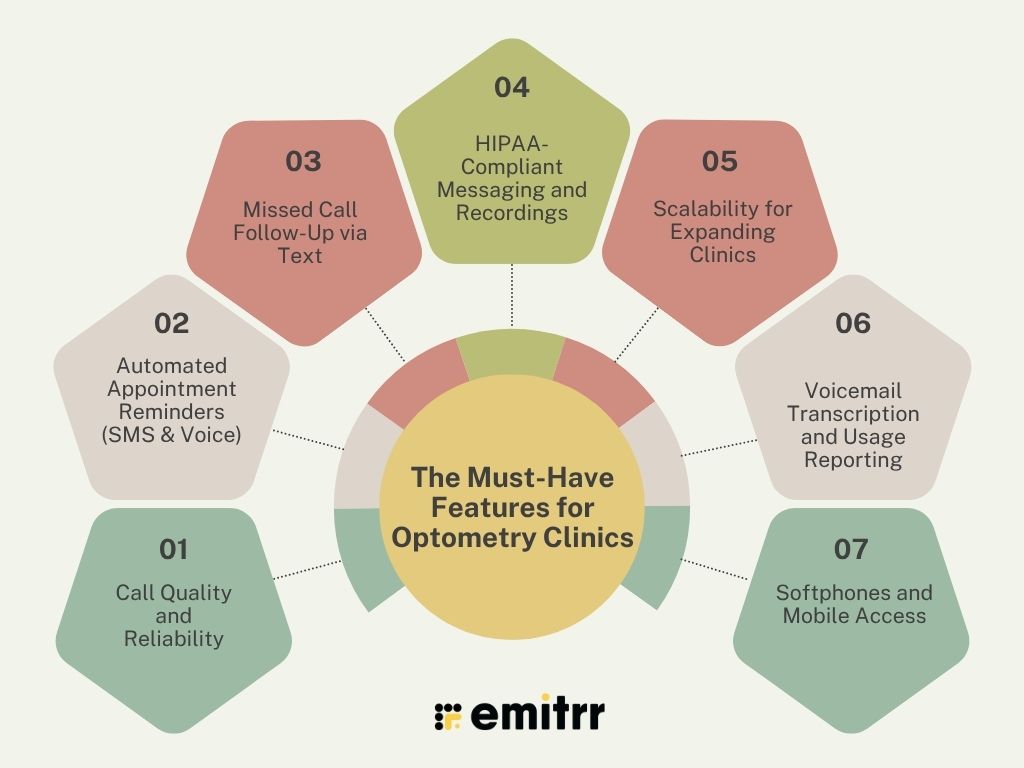
1. Call Quality and Reliability
You can not risk your phones going dead, say, on a busy clinic day. Good sound and reliable uptime are not luxuries; they are essentials. Select a provider with a reputation for solid infrastructure and aggressive support. A few even come with service-level warranties, evidence that they’re so sure their system will not fail you.
2. Automated Appointment Reminders (SMS and Voice)
Few things upset the rhythm of a clinic more than last-minute cancellations or forgotten visits. With automatic reminders, you can remind patients a day in advance; they can choose to receive this reminder by text or by a recorded voice call. Some patients like the personal touch of a telephone reminder, while others like the ease of a brief message they can access on the move. A good system allows you to do both.
3. Missed Call Follow-Up via Text
When a patient attempts a call and no one picks up, during lunch hour or after hours, you will lose them to another office. One that immediately sends an “We missed your call, can we help?” text message indicates responsiveness. It also recovers those potential visits without making your staff have to pursue them by hand.
4. HIPAA-Compliant Messaging and Recordings
Any communication that contains patient data must be secure. Your VoIP solution must encrypt calls and messages, provide secure storage of voicemails and texts, and enable secure call recordings that are compliance-friendly. This keeps your patients and your practice safe from privacy compromise or compliance issues.
5. Scalability for Expanding Clinics
If you are running a small office now but see expansion in your future, whether that means opening another branch or hiring additional staff, your communication system should be ready to grow with you. Look for features like extension dialing, central call routing, and shared voicemail access across locations.
6. Voicemail Transcription and Usage Reporting
Playing back voicemails isn’t always effective, particularly on busy days. Transcription allows your staff to read messages rather than playing them back. Add that to call analytics, such as peak calling times and average hold times, and you receive rich insight into the performance of your front desk.
7. Softphones and Mobile Access
Your clinic phone does not need to be anchored to a wall. Thanks to softphone applications, you and your team can answer the phone from a laptop or smartphone, whether you are working remotely, at an off-site function, or just traversing rooms. It provides flexibility without sacrificing a professional face.
Don’t Forget Security and Compliance
VoIP systems designed for typical businesses may not be prepared for the security requirements of a healthcare environment. Optometrists work with sensitive patient information daily, and whatever phone system you have in place must regard that responsibility carefully.
Here’s what to make certain your VoIP provider provides:
HIPAA Compliance
At the very least, your VoIP service must employ end-to-end encryption to secure voice and data communications. It must also store call recordings, voicemail transcriptions, and text logs in a HIPAA-compliant, secure environment. Don’t forget to ask for a Business Associate Agreement (BAA), which is required by law when handling protected health information.
Audit Trails
When an audit occurs or even when you must investigate a communication problem, having a clear record of who viewed what and when can be a lifesaver. Your VoIP system should monitor and record this information for internal auditing or compliance verification.
Role-Based Access Control
Not all staff require access to all. Be it call logs, voicemail messages, or system configurations, you must be able to implement permissions according to roles in your clinic. This keeps sensitive data in the proper hands.
Reliable Backup Systems
Technology is never 100% immune to errors. Power outages, human error, or technical issues can result in lost data. Look for systems that offer automated backups and fast recovery options, so you are never left scrambling to recover critical information.
Patient Consent Tracking
If you are sending automated SMS reminders, call recording, or using any of the automated messaging tools, you must document patient consent. Opt for a provider that assists you in recording and tracking opt-ins prominently so you can safeguard both your patients’ rights and your legal position.
Integrations That Make VoIP a Practice Powerhouse
Having a VoIP phone system is nice, but when it integrates completely with the software your clinic already depends on, that’s where the magic happens. Smooth integration is what turns your technology into a team player instead of something you have to keep track of in addition to everything else. Rather than toggling through tabs or manually syncing systems, everything begins to communicate with one another.
This is where integrations come into greatest use for optometry clinics:
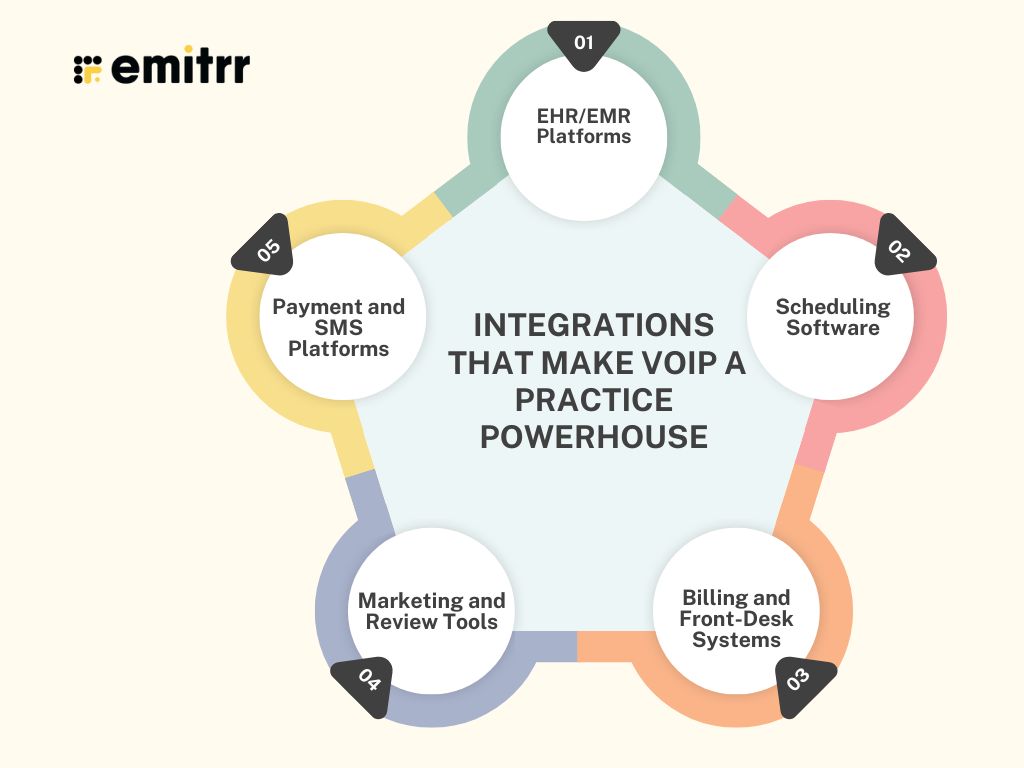
EHR/EMR Platforms
If your VoIP integrates with software such as Crystal PM, RevolutionEHR, or Eyefinity, you are already gaining time. Calls can automatically retrieve a patient’s chart. You can add call notes right into their records. Even appointment reminders and follow-ups can be synced to their medical history, so your staff is always in context.
Scheduling Software
Your front desk already exists within your calendar. By syncing your VoIP with applications such as Google Calendar, Calendly, or your native scheduler, you have all appointment confirmations, reschedules, and reminders synchronized. It also prevents double bookings, last-minute cancellations, or filling in scheduling holes, without all that phone tag.
Billing and Front-Desk Systems
A glance at the patient’s billing info during a call can be a game-changer. If your VoIP system integrates with billing software, your receptionist can confirm outstanding balances, send automated receipts, or remind patients about co-pays, all in one conversation. No need to follow up later or open another system.
Marketing and Review Tools
Satisfied patients forget to leave reviews unless reminded. A VoIP solution that connects to your reputation tool can send out a gentle “How was your visit?” message or review link automatically after the call or visit. Better still, you can include a brief survey in voicemail messages for those who did not answer your call. That simple gesture can go a long way toward establishing trust and new patient acquisition.
Payment and SMS Platforms
Certain services even integrate with your payment processor. This means, for example, that if you have a patient with a past-due invoice, your system can send a friendly reminder by SMS. Others will auto-create digital receipts immediately after a phone call or visit, which can save you on paperwork and late payments.
How VoIP Makes Your Clinic Better
This is not merely bells and whistles. A properly aligned VoIP impacts nearly every aspect of your clinic’s daily cadence and long-term productivity. Here’s how it makes an actual difference:
More Accurate Appointment Management
By reminding and confirming automatically, you are heavily reducing no-shows. When patients are reminded a day or two ahead of time, by phone, by text, or both, they are much more likely to appear or at least notify you that they must reschedule. That keeps your schedule busy and predictable.
Increased Patient Trust
Prompt communication informs patients that you respect their time and are concerned about their experience. When they receive reminder calls, quick call-backs on missed calls, or a courtesy text with directions, those little things earn loyalty. And loyal patients remain, refer, and post.
Optimized Staff Time
Your front desk staff does a great job. Let your VoIP system take some of the burden off. Whether it’s sending reminders, transcribing voicemails, or texting follow-up messages, automation frees your staff to do what they are best at, things like greeting patients, answering critical calls, and running the day smoothly.
A More Professional Front Desk Experience
VoIP capabilities such as IVR (interactive voice response), call queues, or personalized on-hold messages present your clinic with a professional, organized face. Rather than the usual “Please hold,” patients are presented with choices such as, “Press 1 to make an appointment, 2 for refills…” This makes even small clinics appear large and coherent.
Support for Remote and Mobile Work
Whether you’re conducting school screenings, in-office vision camps, or simply need the freedom to answer calls while on the move, a VoIP system with desktop or mobile apps allows this. You can answer calls from home on your laptop or forward them to your phone hassle-free, without sacrificing professionalism.

How to Select the Best VoIP Partner for Your Optometry Clinic
There is no one-size-fits-all solution with VoIP systems. What’s best for a high-volume urban clinic may not be best for a rural solo practice. Before you sign on the dotted line, ask these questions:
1. What is the size and makeup of your practice?
An independent optometrist and one assistant don’t require the same functionality as a multi-provider and multi-location clinic. Small clinics need to find platforms that are easy to use with only the tools that are necessary. Large practices require call routing, multi-line capabilities, and dashboards.
2. Are the features healthcare-grade?
HIPAA compliance is not negotiable. But beyond that, does the provider have healthcare-specific features, such as automated appointment flows, call recording consent features, or interfaces to your EHR? Technically, generic business VoIP might work, but operationally, it won’t.
3. Does it integrate with your existing systems?
If the VoIP solution doesn’t sync with your EHR or scheduling software, you will end up doing double work. The best platforms reduce clicks, not add them. Ask the sales team for a demo of how their integrations work in a real clinical workflow.
4. What’s the pricing model, and is support included?
VoIP costs can be confusing. Don’t just look at the monthly cost they quote. Are there additional user charges? SMS or reminder charges? Training or setup fees? Furthermore, how fast can you get support when something is not working? Quick, competent support is worth every cent.
5. What do other eye-care professionals have to say?
Online reviews are useful, but hearing from another optometrist is more valuable. Ask colleagues in your network what they are using. Find providers who are already trusted by eye-care clinics and know your particular communication pain points.
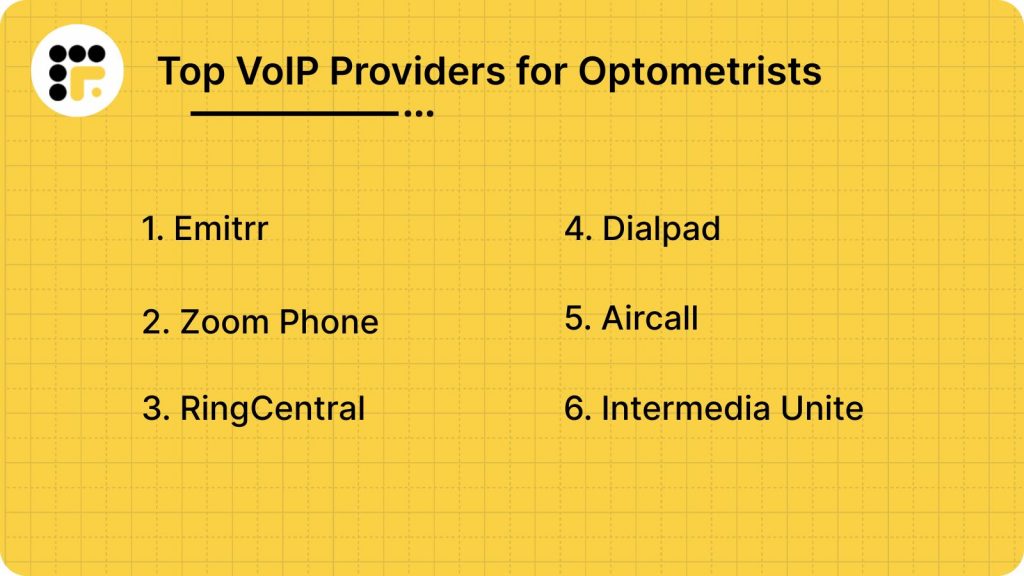
Top VoIP Providers for Optometrists
1. Emitrr : Best VoIP Competitor
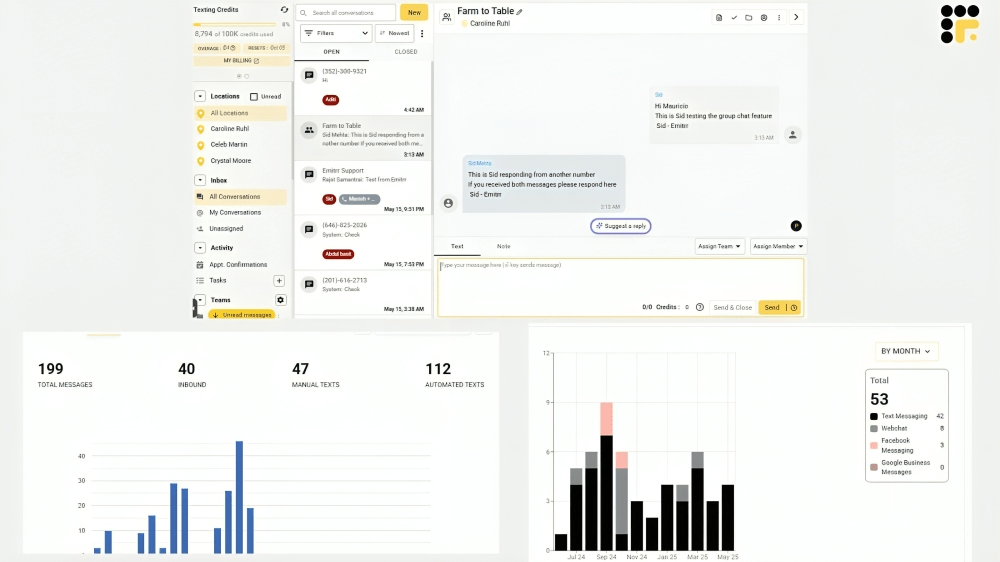
Emitrr is built from the ground up for healthcare professionals, and it shows in every feature. Designed to reduce missed appointments, streamline front desk operations, and boost patient satisfaction, Emitrr focuses heavily on automation and seamless communication. Whether you’re a solo optometrist or managing a multi-location practice, the platform adapts to your workflow without needing a steep learning curve. One of the biggest advantages? Its patient engagement tools don’t come across as so much technology and more as another extension of your front desk staff. From appointment reminders to post-visit review requests, Emitrr keeps you connected with patients and compliance on track. The HIPAA-approved platform is easy to implement, fast to deploy, and trusted by hundreds of eye-care practices. It’s most popular with practices looking to silence phone tag and reduce staff fatigue through intelligent automation.
Emitrr Features
- HIPAA-Compliant Texting: Safe patient messaging through SMS with complete encryption. You can send appointment details or reminders safely without violating privacy rules.
- Automated Voice and SMS Reminders: Sends reminders before each appointment to reduce no-shows. It supports personalized scheduling as well as multiple message types.
- Missed Call Text Follow-Ups: It automatically follows up with text messages to patients who call and fail to connect. Does not equate to leads lost, but it is quicker.
- Two-Way Texting: Patients are able to answer reminders or questions directly. Keeps the conversation going without a phone call being necessary.
- Online Review Requests: It requests patients to review following a visit. Boosts your reputation with reduced staff effort.
- Voicemail Transcription: It converts voicemails to text. Allows message capture to become faster and easier during high-volume calling hours.
- Call Tracking and Analytics: It allows you to view missed calls, call length, and conversion rates. Allows for optimization of front-desk operations.
- Centralized Dashboard: It has all communication tools on a single dashboard. Employees can manage texts, calls, and voicemails from one panel.
- Mobile App Access: It allows providers and staff to screen calls and texts remotely. Ideal for remote or after-hours communication.
- Smart Routing and Auto Replies: It routes calls to the right team member and broadcasts automatic responses when staff are not around.
Emitrr Pros
- Designed especially for healthcare and optometry
- Simple to use with excellent support
Emitrr Cons
- Limited international calling features
- Not necessarily designed for non-healthcare businesses
Emitrr Pricing
- It starts at $149 per month per user.
Emitrr Ratings and Reviews
- G2: 4.8/5
- Capterra: 4.8/5
“Working with Emitrr has been a pleasure. Love the features it offers and how easy it is to use.“
“Overall the communication has been awesome and everyone is super helpful. The app I’m on the fence about.”
Emitrr Integrations
- Crystal PM
- RevolutionEHR
- Eyefinity
- Google Calendar
- QuickBooks
- And more
2. Zoom Phone
Zoom Phone is an efficient option for practices already utilizing Zoom for telemedicine visits. It allows you to handle video and voice calls from a single platform, which makes care-at-a-distance seem effortless. If your practice already has faith in Zoom for conferences, this add-on keeps everything within one umbrella.
Zoom Phone Features
- HD Voice Quality: It has calls that are clear and crisp, reducing miscommunication with patients. Audio is dependable, even when your clinic is hectic.
- Call Routing Rules: With this, you can tailor the way calls are routed based on the time of day or employee shifts. This means patients always connect with someone who can assist.
- Zoom Meeting Integration: It helps in transition from a phone call to a video consult in seconds. This is great when a rapid visual check-in is better than a voice call.
- Mobile App Access: You are able to take calls on your smartphone while you are not at your desk. It’s a savior for busy optometrists on the go.
- Cloud-Based System: It does not have a complex hardware setup. All works via the internet, making this easy to set up and maintain.
Zoom Phone Pros
- Ideal for clinics already on Zoom
- Seamless transitions of video and voice
Zoom Phone Cons
- Requires a robust internet connection
- Not designed specifically for healthcare compliance
Zoom Phone Pricing
- It starts at $10 per user per month.
Zoom Phone Ratings and Reviews
- G2: 4.3/5
- Capterra: 4.2/5
“Not all of our agents are familiar with Zoom, and sometimes they are still confused about using existing features. And I also had trouble sending files to our agent so I had to use email to do it.”
“It sometimes lags on my computer (that is not new at all, but this doesn’t happen on Google Meet or Skype for Business).”
Zoom Phone Integrations
- Zoom
- Salesforce
- Microsoft Teams
3. RingCentral
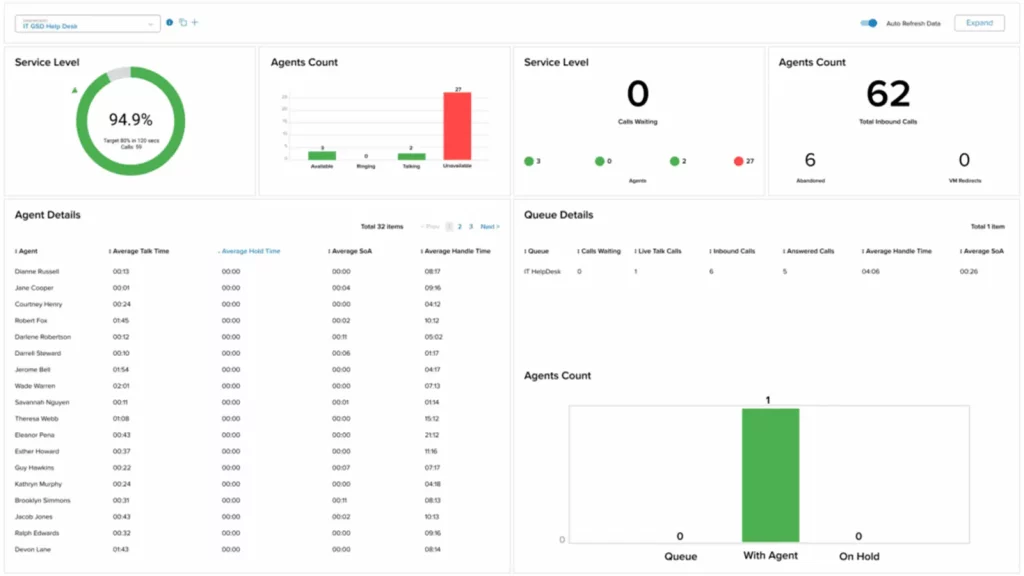
RingCentral is a behemoth for practices that desire to have it all: calls, messaging, fax, and video, under one roof. It would be ideal for bigger or expanding practices with a need to communicate effectively between departments and locations.
RingCentral Features
- Phone & Video Calls: With this, you are able to quickly toggle from voice to video. It comes in handy if the call becomes something that requires face-to-face care.
- Team Messaging: It allows instant chat with staff without ever having to leave the platform. It keeps internal communication quick and tidy.
- Fax Integration: It can send and receive faxes electronically, no paper needed. Convenient for referrals or prescription requests.
- Advanced Call Routing: With this, you can establish rules so calls go precisely where they need to. Patients don’t have to explain themselves twice or be passed around.
- Analytics Dashboard: It also lets you watch how many calls are missed or resolved quickly. These statistics enable clinics to enhance patient response times.
RingCentral Pros
- Ideal for big or multi-location practices
- Extensive analytics and management tools
RingCentral Cons
- It could be costly to small clinics
- Has a learning curve before becoming familiar with the system
RingCentral Pricing
- It starts at $24 per user per month.
RingCentral Ratings and Reviews
- G2: 4.5/5
- Capterra: 4.4/5
“Some reviewers find RingCentral Video’s pricing confusing and expensive for businesses with multiple users.”
“Most users report file sharing is straightforward, with features like attachment previews, annotations, and easy access to shared documents.”
RingCentral Integrations
- Salesforce
- Microsoft 365
- Google Workspace
4. Dialpad

Dialpad blends intelligent features and clean design to put your clinic ahead of the rest. If your staff is tech-friendly and willing to embrace AI assistance tools, it can make each call a bit wiser.
Dialpad Features
- AI Call Summaries: It listens and drafts a quick summary for you. No more writing notes during a call.
- Voice Intelligence: It listens for keywords and tone to determine how the call went. This assists with training or finding problems.
- Two-Way SMS: Texting patients is a more natural approach than calling at times. With two-way texting, conversations remain continuous.
- Custom Call Routing: You can choose who receives which calls and when. It’s similar to implementing traffic laws for your phone lines.
- Mobile App: Have your clinic number in your pocket. When you are on break or out on errands, you won’t miss any patient calls.
Dialpad Pros
- Time-saving smart features.
- Modern-looking and feeling.
Dialpad Cons
- Requires some tweaking in order to become HIPAA compliant.
- The AI features may be overkill for small teams.
Dialpad Pricing
- It starts at $27 per user per month.
Dialpad Ratings and Reviews
- G2: 4.2/5
- Capterra: 4.3/5
“I immediately requested a refund and cancellation of the web chat services, and they have spent another 2 months beating around the bush before telling me that can’t do that, and I’m stuck with their contract for web chat.”
“We constantly have dropped calls, and when I do connect, it takes up to 45 seconds to hear the customer and for them to hear me.”
Dialpad Integrations
- Google Workspace
- Salesforce
- Zendesk
5. Aircall

Aircall is a go-to for teams that depend on CRM software and need to collaborate more effectively. It excels in settings where care and front-desk teams must be synchronized.
Aircall Features
- CRM Integration: It integrates with tools, such as HubSpot, so your calls are automatically logged. This keeps records clean and current.
- Tagging & Notes: It can provide context to calls with notes and tags. Whoever takes up the thread afterwards knows what’s happening.
- Call Analytics: Have you ever wondered how fast your team is answering the phone? The insights are simple to follow and respond to.
- Shared Call Inbox: Everybody can see which calls are missed or pending. It’s similar to a shared task list for communication.
- Voicemail Transcription: No need to replay voicemails multiple times. Read them like an email and respond quicker.
Aircall Pros
- Simple to learn and use.
- Perfect for teamwork.
Aircall Cons
- Full SMS features require additional payment.
- More costly than some of its rivals.
Aircall Pricing
- It starts at a flat rate of $40 per month.
Aircall Ratings and Reviews
- G2: 4.1/5
- Capterra: 4.1/5
“The service is quite expensive, and you will be charged additional add-ons for further in-depth analytics.”
“The recording quality is incredible, we leverage this for our internal training and audit activities.”
Aircall Integration
- Salesforce
- HubSpot
- Intercom
6. Intermedia Unite
If stability and security are most important to your clinic, Intermedia Unite gets the job done. It’s designed to keep running, even when other systems crash.
Intermedia Unite Features
- Voice & Video Calls: It can help you make calls, conduct meetings with the team, or consult. Everything is well-conducted from one location.
- Business SMS: It can send speedy appointment reminders or confirmations by SMS. It’s easy to use, efficient, and professional.
- Screen Sharing: Whether training new employees or viewing files, this function keeps everyone in sync while working.
- Call Recording: It allows you to save calls securely to review for quality or reference. Especially useful for sensitive or complex cases.
- Cloud-Based PBX: It grows as your practice does, without expensive upgrades. All you need is an internet connection.
Intermedia Unite Pros
- Very stable and secure.
- Helpful for backup and compliance.
Intermedia Unite Cons
- The design feels a bit outdated.
- Fewer customization options.
Intermedia Unite Pricing
- It has a flat rate of $27.99.
Intermedia Unite Ratings and Reviews
- G2: 4.0/5
- Capterra: 4.0/5
“In some cases, the implementation can be difficult, and I see that sometimes my contacts start to disappear.”
“Getting a call history, incoming and outgoing, are two separate functions and not at all efficient uses of time. I have wasted many hours on Intermedia website needlessly.”
Intermedia Unite Integrations
- Microsoft 365
- Google Workspace
Why Emitrr Is Your Best Option?
Emitrr isn’t some generic VoIP system with some extra healthcare features bolted on; it’s designed from the ground up with clinics in mind. For optometrists with a whole day of appointments, follow-ups, and admin to attend to, that’s a huge difference. It’s obvious Emitrr gets the beat of a real-world clinic, where a missed call can mean a lost opportunity, and an extra response time can cost patient satisfaction.
One of Emitrr’s biggest selling points is its seamless integration into a healthcare environment. It has HIPAA-compliant texting capabilities, so your team can communicate with patients without fear of violating patient privacy. More significantly, it doesn’t merely substitute for your phone; it takes work off your front desk. From automatically sending appointment reminders to texting patients back when a call is missed, Emitrr makes sure communication continues even when your staff is busy.
The platform also exceeds basics with considerate analytics. You can view how many reminders were opened or how long it took your team to answer a missed call. That sort of information can assist optometry clinics in enhancing workflows without having to use a different tracking tool.
What makes it even more convenient is that it can be integrated into mainstream eye-care EHR platforms such as Crystal PM, RevolutionEHR, and Eyefinity. What that means is call logs, appointment reminders, and patient communication don’t exist in a vacuum; they are available where your team needs them.
Emitrr doesn’t stop at technology. Its support team is known for being quick, helpful, and genuinely knowledgeable about healthcare practices. You are not stuck explaining what a patient handoff is or why a follow-up message matters, and they get it.
Best of all, Emitrr is low enough in cost for individual optometrists but robust enough to handle multi-location practices. It scales with your clinic’s growth, without committing you to convoluted price tiers or forcing you to shell out extra just to do the fundamentals well.
When you put it all together, healthcare-native capabilities, live support, intelligent integrations, and straightforward pricing, it’s no wonder Emitrr is the front-runner for optometry clinics seeking to bring their communication into the modern era.
FAQs
Absolutely, just be sure you are with a provider that has great uptime. Most current VoIP systems provide call quality that’s every bit as clear (if not clearer) than the old-fashioned landline, provided your internet connection is solid.
No. For the most part, you can just use devices you already have, such as your desktops, laptops, or smartphones. Some clinics do opt to include VoIP-enabled desk phones, but they are not necessary if your internet setup is good.
Not if you go with the right provider. Quality VoIP solutions, such as Emitrr, include onboarding assistance and guide you through the process. Most even integrate into your current EHR and scheduling software, so the transition doesn’t feel like a disruption but rather an intelligent upgrade.
Yes, as long as your provider is designed with healthcare in mind and provides HIPAA-compliant texting. Emitrr, for instance, allows you to send secure messages and tracks a log, so you’re within compliance while enhancing the way you are interacting with patients.
For most small clinics, it is between $20 and $40 per user monthly. That typically covers key features like texting, voicemail transcription, and appointment reminders, so you get a good return without surprise charges.
Conclusion
Finding the right VoIP system isn’t about picking the flashiest tool; it’s about choosing what works for your clinic. You know your team, your patients, and the daily chaos better than anyone. So, whether you are a solo optometrist or managing a busy multi-site practice, look for something that helps, not hinders your workflow.
Secure messaging and easy EHR integration aren’t optional anymore; they are part of delivering good care. Platforms like Zoom Phone and RingCentral are great for general use, but if you’re looking for something that truly gets the needs of an eye-care clinic, Emitrr rises above. It doesn’t just help you talk to patients; it helps you connect with them in a way that is efficient, compliant, and meaningful.
You don’t need every bell and whistle. You need a system that shows up every day and makes your staff’s lives easier. That is the kind of investment that pays off, not just in time saved, but in happier patients and smoother operations.
Still weighing your options? Try before you commit. Emitrr offers demos. Spend an afternoon testing it out, and you will know quickly how right it feels for your practice.


 4.9 (400+
reviews)
4.9 (400+
reviews)