
For optometry practices, patient care doesn’t stop at the door. How you follow up, remind, and maintain contact can play a huge role in influencing patient satisfaction, and that’s where texting software is paying dividends. It’s quick, immediate, and doesn’t get stuck in an inbox like email tends to.
Texting for optometrists allows office staff to exchange two-way messages without ever lifting the telephone. Patients can verify appointments, pose brief questions, or even order reschedules, all without the normal call-and-answer exchange. It seems convenient for the patient, and it saves your staff a tremendous amount of time.
As more practices go digital, mobile-first communication-supporting tools are becoming more and more necessary. Texting also naturally integrates with the way patients already communicate in everyday life, and, done correctly, it reinforces the patient-provider trust during their care experience.
Features to Look for in Optometrist Texting Software
Here are some of the top features to look for in an optometrist texting and software:
When bringing texting into your practice, it’s important to choose a platform designed for clinical use, not just a generic messaging tool. The right features can improve patient flow, reduce stress for your front desk, and make your daily operations smoother.
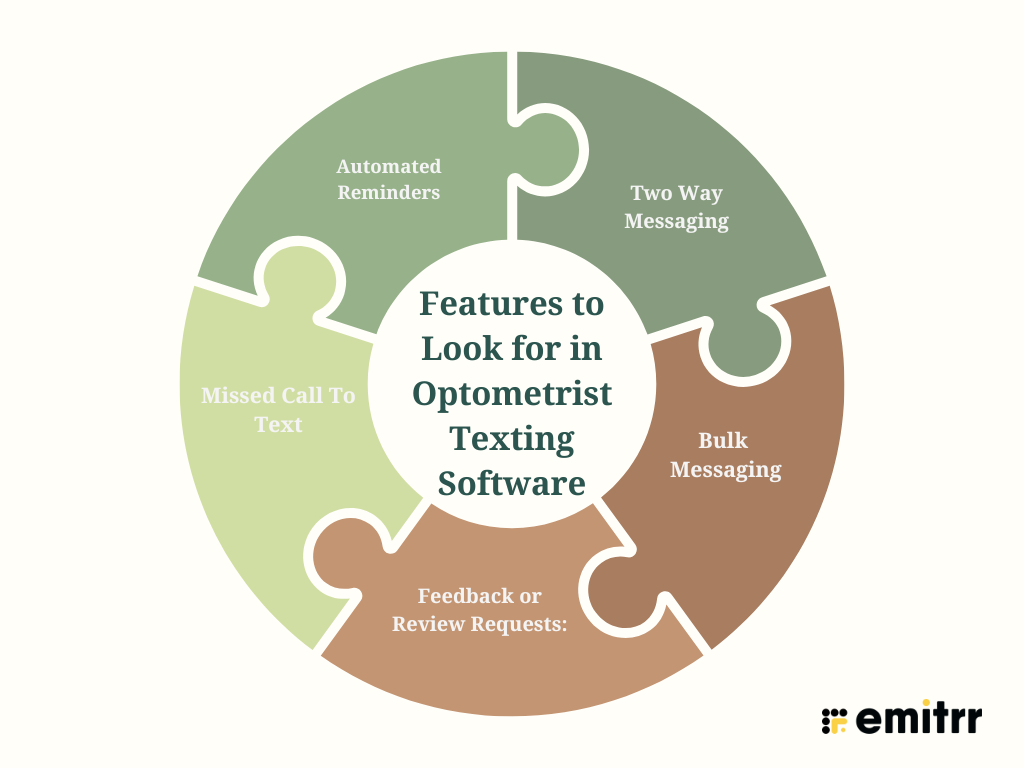
- Automated Reminders: Begin with automated reminders. They reduce no-shows and provide patients with a useful reminder without your staff having to do anything manually. Consider software that allows you to customize messages to your tone and branding.
- Two Way Messaging: Two-way messaging is equally critical. If a patient sends a text reply with a question, your staff should be able to reply comfortably, and the system should be HIPAA-compliant so that they can safeguard private health information. That way, even confidential discussions can happen securely via text.
- Bulk Messaging: Bulk or broadcast messaging is useful for notifying patients of schedule changes, future promotions, or holiday schedules. It is convenient and updates your entire patient list with a couple of clicks.
- Feedback or Review Requests: You will also need a system to request feedback following an appointment. These polite reminders invite satisfied patients to review you, and aside from boosting your online presence, they provide you with crucial feedback on their experience as well.
- Missed Call To Text: Finally, a missed call text-back feature can be transformative. If a patient calls and nobody’s around to take the call, they get an immediate text informing them you’ll call them back. It’s a little detail, but it demonstrates to patients that you are on it, even when you’re in the middle of seeing patients.
Security and Compliance Requirements for Optometrist Texting Platforms
Here are some of the top security and compliance requirements for optometrist texting platforms:
- Patient confidentiality isn’t merely best healthcare practice; it’s the law. Whatever text tool you choose must operate to the industry’s data security standards, beginning with HIPAA compliance.
- That means encrypted messaging both when messages are being sent and when they’re stored. Your system must also employ secure cloud-based storage with robust protections against data breaches.
- In addition to that, it’s a good idea to opt for a platform with audit trails. This allows you to see who sent or received a message and when by team member. You’ll have total control over how patient conversations are managed, which is great for team accountability as well as in case of any compliance audits.
- Access controls are another important component. Only designated staff should be permitted to read or send messages related to the patient. With proper permissions, you minimize risk and preserve communications securely without complicating the process for your staff.
- When security is woven into the fabric of the platform, your clinic can operate freely without concern about compliance problems. And your patients can have faith that their data is in responsible hands.
- A texting platform must never be an independent system that lingers uncomfortably on the periphery of your current workflow. The ideal tools get along with the systems you’re already working with, making everything operate as one integrated experience.
- Start with your EHR or practice management software. Whether you’re using RevolutionEHR, DrChrono, or another tool, your texting platform should be able to pull and sync data automatically. That means appointment details, patient records, and even communication logs are always up to date and in the right place. No duplicate entries. No messy spreadsheets.
- Integration with your patient portal or CRM is another huge one. It lets you tailor your messages to patient preferences, care history, or even future treatment plans. So rather than sending the same generic message to everybody, your system can communicate directly to where a patient is in their experience.
Don’t miss the benefit of integrating your texting platform with your phone system and email system. With all communication flowing through one dashboard, your staff isn’t spending their days juggling windows or switching between programs just to answer a question. It minimizes delays, reduces response times, and makes patient interaction seem seamless on your side as well.
How Texting Software Assists Optometrists
A robust texting platform does more than simply send reminders. It changes how you control time, eliminate friction, and engage with your patients daily.
- Let’s discuss no-shows. Each missed appointment is lost business and lost time. Reminder texts automate those numbers by reminding patients without your staff having to call patients individually. Confirmation messages also make it easier for patients to follow up or reschedule if necessary.
- Texting also enhances the way patients feel about your clinic. Not everybody wants to call for the little stuff. By offering them the choice to send a brief message, be it to confirm the time of their appointment or ask a second question, it makes them feel more in charge and taken care of.
- And it’s not only the patients. Your staff gets a benefit too. Rather than wasting hours on the phone every day, they can concentrate on more significant tasks within the clinic. That translates into fewer interruptions, less stress, and smoother operations overall.
Free PDF: Text Templates to Boost Patient Communication in Eye Clinics
How to Choose the Right Texting Software for Optometrists
Identifying the appropriate platform begins with a clear understanding of what your clinic needs. Each practice has its unique flow and rhythm, so a single size fits model doesn’t work.
- Begin by making a list of the fundamental features important to you. Do you require appointment automation? Two-way messaging? Bulk updates? Then consider the cost. Not the top-line number, but what’s included, what’s additional, and what level of support you can anticipate.
- The platform needs to be easy to use as well. If your employees shudder at opening the dashboard or getting lost when they do, it’s going to hold things up, not hurry them along. The simpler the interface, the quicker your team can come up to speed and remain there.
- And don’t forget to check how well it plays with your current setup. If it integrates smoothly with your existing EHR, CRM, and phone system, you’ll avoid a lot of frustration down the line.
Reading reviews from other optometry clinics can provide you with a better understanding of what works in the field. Search for honest and authentic reviews that give comments on performance, usability, and customer support. A site that has been tested and proven reliable by other clinics is generally an indication that you’re on the right track.
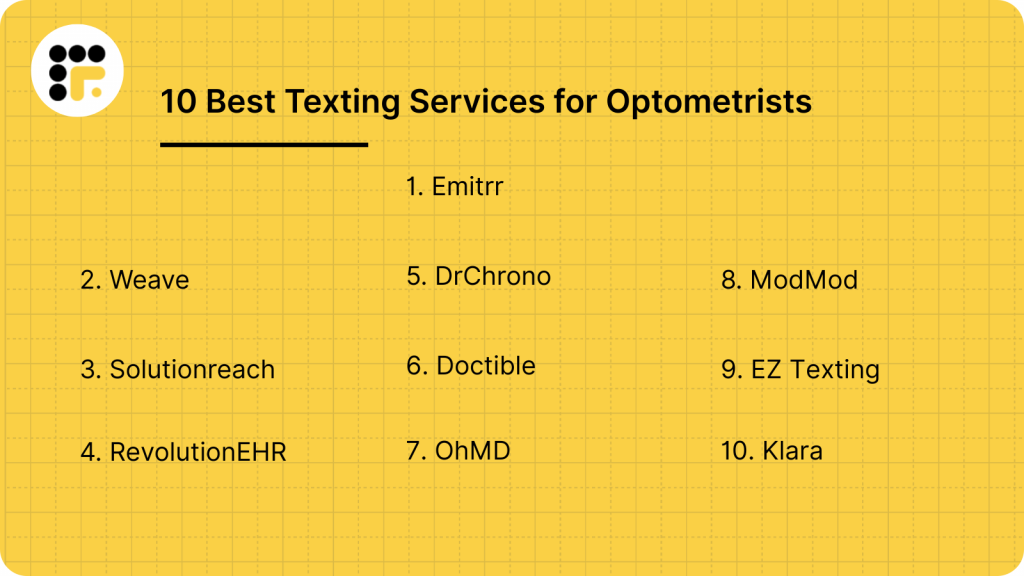
Best Texting Services for Optometrists
1. Emitrr : Best Texting Competitor
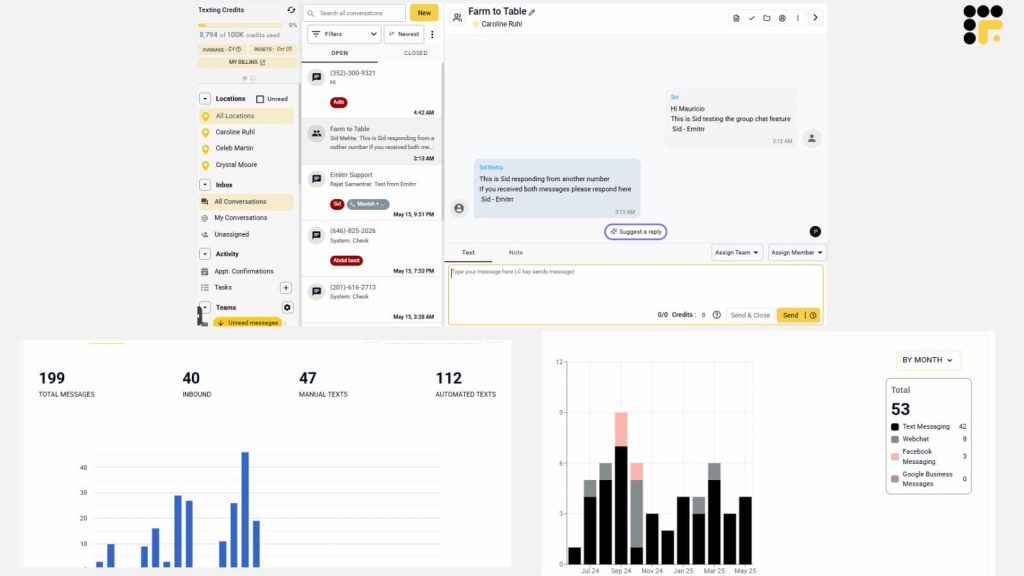
Emitrr is designed with healthcare businesses in mind and functions very well for optometrist clinics. It’s meant to streamline communication, take care of the repetitive tasks, and keep your team on top of each message. With a clutter-free interface and intelligent features, it manages everything from appointment reminders to follow-ups without so much as a hitch. It’s ideal for practices that want to save time, reduce missed calls, and improve how they connect with patients. Since it was developed specifically for medical settings, Emitrr comes packed with built-in compliance and privacy features, making it a practical and reliable solution.
Emitrr Features
- Two-Way Texting: Staff can chat with patients in real-time, helping them reschedule, ask questions, or confirm appointments. It’s fast, convenient, and cuts down on call volume.
- Automated Appointment Reminders: The system provides customized reminders to keep patients on schedule with their appointments. You can tailor the message to your clinic’s voice and personality.
- Missed Call Text-Back: When a call is not answered, Emitrr fires off a brief text to let the patient know you will follow up. It keeps the communication alive even during hectic moments.
- Review Requests: Once they are appointed, the patients receive a soft invitation to review. It’s a clever solution to increase your clinic’s visibility and collect feedback.
- Team Inbox: All messages are gathered in a single shared inbox that all the team can view. In this way, nothing falls through the gaps and responses remain timely.
- HIPAA-Compliant Messaging: All communications sent over the platform comply with HIPAA standards. Patient information is secured end-to-end.
- Custom Workflows: You can design automatic message paths initiated by certain activities, such as cancellations or new arrivals. It allows you to communicate more effectively without sounding automated.
- Smart Scheduling Integration: Appointment information syncs directly from your EHR, so the system always has the most up-to-date information. It streamlines scheduling for all parties involved.
- Campaign Management: Want to send out an offer or notice? Emitrr allows you to address groups of patients with minimal clicks.
- Multi-Location Management: If you have multiple offices, you can manage all communication in one location. This allows you to easily be consistent across the board.
Emitrr Pros
- Excellent customization features and intelligent automation.
- Responsive support team and easy setup.
Emitrr Cons
- Still building momentum in comparison to well-established platforms.
- Some tools will take a little time to get used to at first.
Emitrr Ratings and Reviews
- G2: 4.9/5
- Capterra: 4.9/5
“Working with Emitrr has been a pleasure. Love the features it offers and how easy it is to use.”
“Overall the communication has been awesome and everyone is super helpful. The app I’m on the fence about.”
Emitrr Integrations
- RevolutionEHR
- DrChrono
- OpenDental
- AthenaHealth

2. Weave
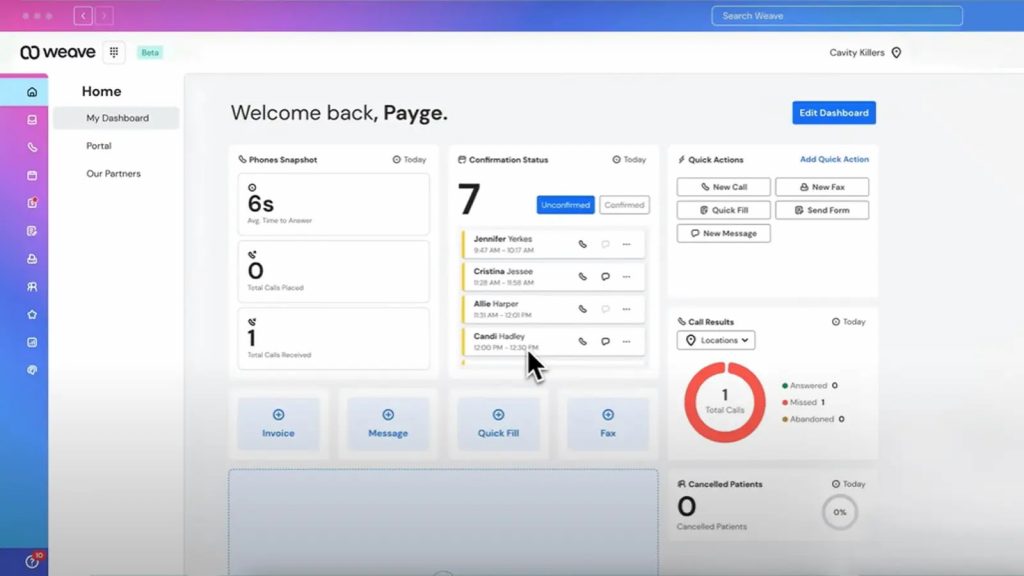
Weave integrates phones, texting, and other equipment into a single system, enabling clinics to make it easier to communicate with patients. It’s for teams who want everything in one place without having to toggle between applications.
Weave Features
- Texting enables you to reply quickly and easily to patients.
- Voicemail drop leaves recorded messages when you’re not picking up.
- Video call features enable you to consult with patients remotely.
- You can even accept payments on the platform, which is handy.
- Smart reminders make patients arrive on time.
Weave Pros
- Simple interface and comprehensive set of features.
- Perfect for clinics that want one solution.
Weave Cons
- The price may be too steep for small practices.
- Some features may be underutilized if you don’t need the full suite.
Weave Ratings and Reviews
- G2: 4.5/5
- Capterra: 4.6/5
“I don’t like how when we 1st installed it things went very smoothly it did what it was supposed to do however as time has gone on there have been more updates With significantly more issues and glitches”.
“Have to wait on hold for IT support for long period of time. If you have multi locations the set up can be confusing”.
Weave Integrations
- Open Dental
- Dentrix
- Eaglesoft
3. SolutionReach
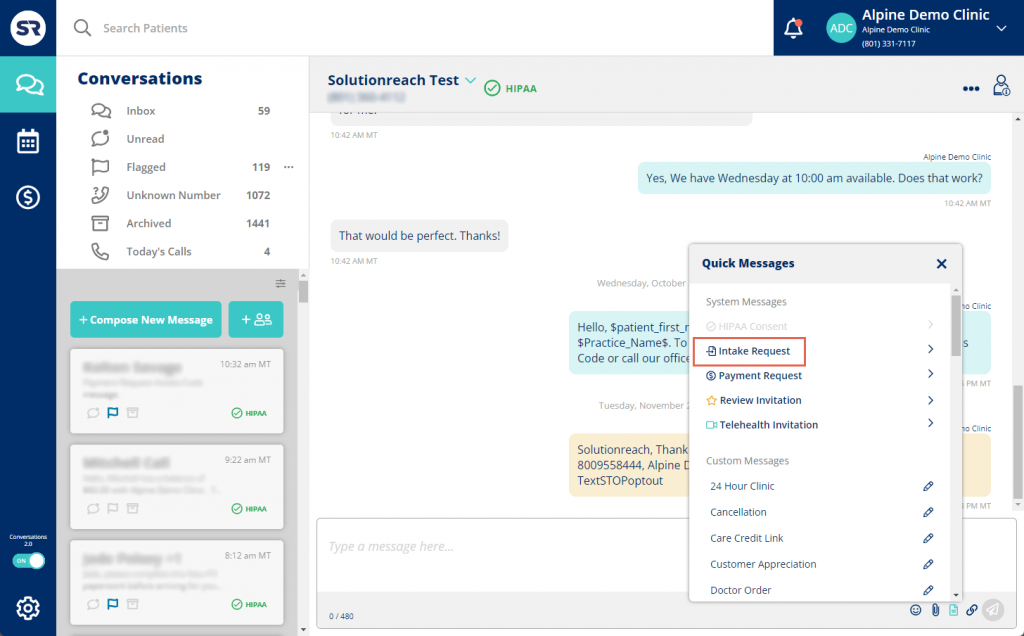
SolutionReach works to keep patients engaged with consistent communication and smart marketing solutions. It is used heavily by healthcare professionals who want to reduce attrition and enjoy better relationships.
SolutionReach Features
- Reactivation messages give reminders to patients who have been inactive for some time.
- Two-way texting allows staff to immediately answer questions.
- Surveys and feedback questionnaires help gauge patient satisfaction.
- Templates make marketing messages easy to send.
- Educational content helps patients better understand their care.
SolutionReach Pros
- Strong outreach and engagement toolkit.
- Great for collecting and organizing patient feedback.
SolutionReach Cons
- The look can be perceived as old-fashioned.
- Premium capabilities can be pricey.
SolutionReach Ratings and Reviews
- G2: 4.2/5
- Capterra: 4.3/5
“They have the worst customer service, they auto renew your contract without notifying you, they tell you and the business [sensitive content hidden] that you’re liars (but using other words) they give you the run around and you can never get anywhere with them.”
“Since the platform isn’t too developed yet, you run into a lot of issues where you have to reach out for help.”
SolutionReach Integrations
- EHR
- Practice management software.
4. RevolutionEHR
RevolutionEHR is a cloud-based system intended specifically for optometrists, featuring both clinical capabilities and messaging. It keeps practices in order and enables them to communicate more effectively with patients.
RevolutionEHRFeatures
- You can send secure messages to patients directly from within their file.
- Appointment tools make it easy to manage schedules.
- It is cloud-based, making it accessible from any location.
- Documentation tools make charting easy.
- Add-ons extend messaging capabilities when needed.
RevolutionEHR Pros
- Tailored to the needs of eye care clinics.
- Seamless integration with other messaging software.
RevolutionEHR Cons
- Certain communication software requires additional software.
- Limited customization.
RevolutionEHR Ratings and Reviews
- G2: 4.4/5
- Capterra: 4.5/5
“Sometimes information gets lost if you are clicking too quickly or if there are two people in a chart.”
“Inability to integrate with other software‘s easily (optos, zeiss, online intake forms).”
RevolutionEHR Integrations
- Emitrr
- LensFerry
5. DrChrono
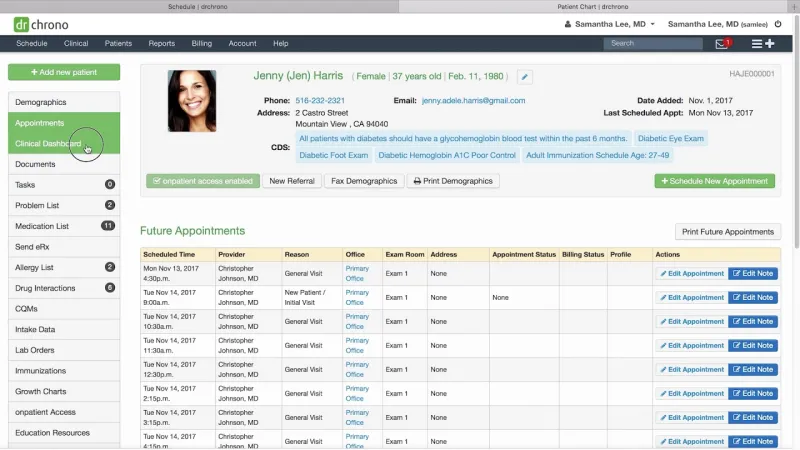
DrChrono is an adaptable EHR that grants practices the liberty to add texting and communication features through integrations. It’s cloud-based and ideal for clinics that want to personalize their setup.
DrChrono Features
- Forms are customizable to fit your workflow.
- Scheduling is native and connects with messaging applications.
- Billing features are adequate and well-organized.
- Telehealth is enabled with native video calls.
- Messaging is enabled through third-party apps like Emitrr.
DrChrono Pros
- Easy to shape into your practice’s needs.
- Available on any device.
DrChrono Cons
- No texting features integration.
- No additional setup needed for messaging functionalities.
DrChrono Ratings and Reviews
- G2: 4.1/5
- Capterra: 4.2/5
“It takes weeks to get a response. And their staff is incredibly uneducated in claims billing.”
Most users comment on the absence of direct phone support, leading to frustration and delays.
DrChrono Integrations
- Emitrr
- Twilio
- Salesforce
6. Doctible

Doctible is best suited for practices that want simple, effective communication tools with minimal learning. It’s best for small clinics with growth and online reputation in mind.
Doctible Features
- Patients can easily text back and forth with staff members.
- Texted booking links fill your calendar.
- Surveys track how patients feel after they have seen a doctor.
- Review prompts help build your reputation online.
- The dashboard puts everything in one place.
Doctible Pros
- Simple to set up and easy to use.
- Low price for small practices.
Doctible Cons
- Not much advanced features.
Doctible Ratings and Reviews
- G2: 4.6/5
- Capterra: 4.6/5
“The lack of sync with our PMS–we are having to send doctible notices manually.”
“This company offers poor integration with practice management software.”
Doctible Integrations
- Dentrix
- Eaglesoft.
7. OhMD

OhMD is a secure messaging system that’s ideal for serious clinics that care about privacy and team collaboration. It’s simple, intuitive, and ideal for building internal and patient communications.
OhMD Features
- HIPAA-compliant texting keeps things under wraps.
- Video chat allows virtual visits.
- Intake forms can be sent and filled out via text.
- Staff can communicate internally using the same system.
- Auto-responses help with after-hours messages.
OhMD Pros
- Clean, intuitive interface.
- Hard emphasis on protecting patient data.
OhMD Cons
- Does not offer complex automation.
- No integrated marketing functionality.
OhMD Ratings and Reviews
- G2: 4.7/5
- Capterra: 4.8/5
“Some users do not like it because it is a separate app. I can’t figure out a way to delete old clients from my records. At times it seems to freeze. I then just sign out and sign back in which fixes it. I was told that I need to upgrade to a newer version, so that may be my problem.”
“It was HIPAA compliant and free. No one else I found compared to that.”
OhMD Integrations:
- Integrates with EHRs using HL7 and FHIR protocols.
8. ModMod
ModMod Overview
ModMod combines a specialty-specific EHR with strong messaging features, making it a great choice for specialties like ophthalmology. It’s designed to simplify complex workflows and communication.
ModMod Features
- Messaging is integrated with the EHR so everything stays connected.
- Analytics give insight into the way patients engage.
- Video visits are supported for remote care.
- Auto alerts help handle follow-ups.
- Mobile accessibility is perfect for remote teams.
ModMod Pros
- Specialty care-oriented.
- Excellent mobile accessibility.
ModMod Cons
- For some practices, the cost may be high
- Custom settings may require extra support.
ModMod Integrations:
- Offers integrated tools and has an open API for broader connections.
ModMod Integrations
- Offers integrated tools and has an open API for broader connections.
ModMod Rating and Review
- G2: 4.3/5
- Capterra: 4.3/5
“They also do not include tax on the contract so when budgeting/ making financial decisions to switch this is a bit misleading.”
“Mod Meds billing team never answers emails promptly, no direct number for the billing department and we keep getting billed for downgraded services.”
9. EZ Texting

EZ Texting Overview
EZ Texting is a popular messaging application that is effective across a broad range of industries, including healthcare. Optometrists seeking a hassle-free system that can expand with their practice will appreciate its clean, simple approach and just the right level of flexibility.
EZ Texting Features
- Mass texting makes it easy to reach a large number of patients at once with reminders, specials, or critical updates.
- Two-way text messaging allows your employees and patients to text each other back and forth in real time.
- Scheduled text messaging allows you to schedule and send messages at a specific time later.
- Keyword opt-ins allow patients to enroll in alerts or updates in an instant.
- Templates allow your staff to send standard messages without having to create them from scratch each time.
EZ Texting Pros
- Does not take much time at all to learn and implement.
- Works well whether you’re an individual optometrist or running an expanding clinic.
EZ Texting Cons
- Doesn’t include features specifically geared towards eye care or healthcare.
- You will have to use third-party software to interface it with your EHR or patient records.
EZ Texting Pricing
Ez Texting pricing has four plans:
- Launch: $20 per month, suitable for up to 500 contacts.
- Boost: $60 per month, designed for 500 to 2,000 contacts.
- Scale: $100 per month, accommodating 2,000 to 50,000 contacts.
- Enterprise: $3,000 per month for businesses with over 50,000 contacts.
EZ Texting Integrations
Ez Texting offers integrations with a wide range of software. Here is the list of software:
- HubSpot
- Zapier
- SquareSpace
- Mailchimp
- Salesforce
- Vortext
- CustomerX
- QuickDesk
- And more..
EZ Texting Reviews & Ratings
EZ Texting has a rating of 4.3/5 stars on Capterra and on G2 has a rating of 4.5/5. Here is what customers are saying about EZ Texting:
“Money RIPPERS…extravagant expensive.. Really BAD .. THEY WILL RIP YOU.. “
“The platform is constantly pushing for increasing expense. And pricing displays are misleading to say the least.”
Source: Capterra
EZ Texting Support Channels
- Knowledge base
- FAQs
- Chat
- Phone
10. Klara
Klara Overview
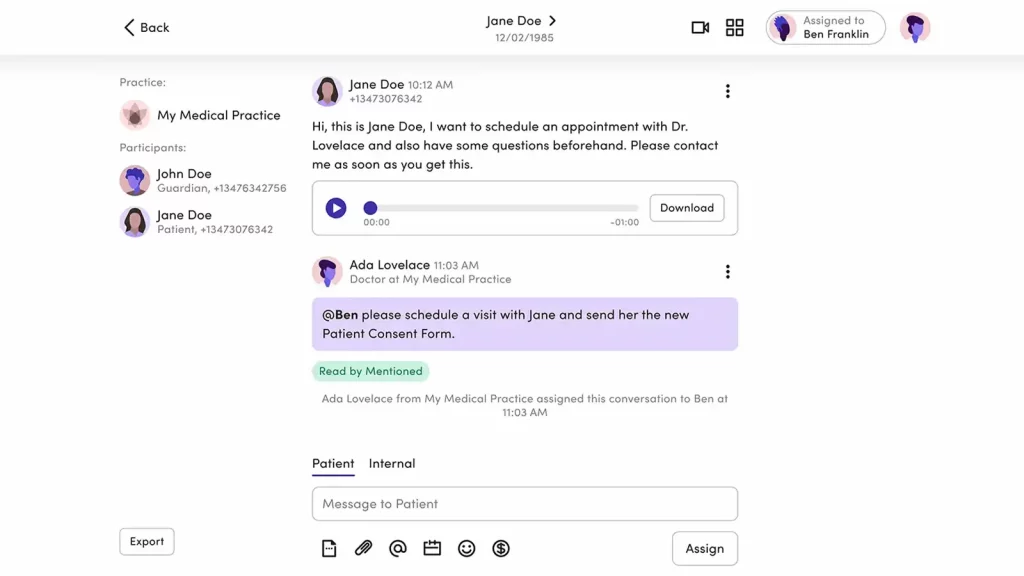
Klara is an all-in-one texting platform for patient communication, which is also HIPAA-compliant. This robust platform is not only limited to texting but goes beyond basic communication and offers review management as well. Here’s a quick look at this texting software:
Key Reputation Features of Klara
- Call-to-Chat Review Redirection: Turn incoming scheduling or support calls into seamless feedback conversations. Automatically trigger a digital thread to capture insights without disrupting the workflow.
- Voicemail-Based Review Prompts: Don’t let missed calls go silent—follow up with personalized prompts to collect feedback. Capture valuable input directly from voicemail interactions.
- Secure Feedback Logs: Maintain a fully traceable record of every review-related exchange. Ensure compliance and clarity with audit-ready communication logs.
Pros of Klara
- App-free experience: Users don’t need to take a load of managing applications; it can be directly used by simply signing up for the platform.
- Centralized communication and review platform: Easy to take reviews from customers.
Cons of Klara
- Customisation limits: Templates are fixed in some plans.
- Higher cost for smaller practices: It may be pricey for solo psychiatrists.
Klara Pricing
- For Klara pricing, you need to contact the customer support..
Klara Integration
- Athenahealth
- AdvancedMD
- Greenway Health
- NextGen Healthcare
- ModMed
- Veradigm
- Meditab
Klara Reviews & Ratings
Klara customer ratings is & 4.5/5 on G2 and 4.3/5 on Capterra, and here’s what users are saying about it:
“What I like most about the Klara app is the simplicity of getting around the app. It’s very easy to use and you can speak with your provider with ease, as well as send and receive documents/forms.”
“The way the messages are labeled or assigned needs to improve. My suggestion is to bump up the screening of the type of msgs. Improvement is needed in picking up certain filtered words to help categorize the msgs.”
Source: Capterra
Klara Customer Support Channels
- LiveChat
- Knowledge Base
Why Emitrr Is the Top Optometrist Texting Software of Choice
Emitrr is effective for optometry clinics because it was created with healthcare in mind. It’s not merely a texting tool; it’s specifically made to address the day-to-day communication requirements of medical practices. From sending appointment reminders, requesting reviews, to following up on missed calls, the platform keeps you connected with patients without adding unnecessary complexity to your workflow.
One of its greatest advantages is automation. You can create personalized message flows so patients are hearing from you at the right moment, without someone on your staff having to send it. It reduces no-shows and simplifies follow-ups, a bonus for both the clinic and your patients.
Emitrr also integrates nicely with EHR systems such as RevolutionEHR and DrChrono. That translates to fewer steps for your staff and no back-and-forth between systems. What also makes Emitrr a fan favorite is its friendly support staff and intuitive interface that’s not too difficult even for the less tech-savvy. It’s an intelligent choice for clinics seeking a secure, adaptable means of managing communication without overcomplicating things.
FAQs
Yes, optometrists can text patients as long as the platform is HIPAA-compliant and patient consent is obtained. Compliance ensures all communication is secure and private.
You can send appointment reminders, confirmations, reschedule options, follow-ups, review requests, and even quick updates about office hours or promotions.
Yes. Most texting platforms, like Emitrr, support two-way messaging, so patients can confirm appointments, ask questions, or reschedule, all without calling.
Many platforms integrate with major optometry EHRs like RevolutionEHR, DrChrono, or OpenDental, keeping everything synced and saving staff time on manual entry.
Texting is fast, convenient, and preferred by many patients. It saves time, reduces missed calls, and gives patients a smoother way to stay in touch with your office.
Conclusion
Effective communication is the foundation of any bustling optometry practice. With text messaging software, staff can reduce phone calls, send reminder notifications on time, and engage patients more actively in their care. Of the numerous choices on the market, Emitrr offers a solid combination of healthcare-centric features, intelligent automation, and EHR integration. For clinics looking to level up the way they communicate with patients, without compromising compliance, Emitrr is a solid place to begin.


 4.9 (400+
reviews)
4.9 (400+
reviews)