
Introduction
In the healthcare industry, timing is everything, and if you rely on typing each message manually, that means you are spending a lot of time and effort on tasks that you can automate. Missed appointments in healthcare also cost not only valuable time but also disrupt schedules and impact patient outcomes. And patients, on the other hand, like quick and clear responses. That is the main reason why healthcare providers these days are relying heavily on SMS for appointment management.
SMS is a fast, personal, and also has 98% open rate, which makes it one of the best ways for patient communication. So whether you are a medical clinic, dental practice, or any other healthcare provider, having the right set of SMS templates can significantly improve patient engagement and also reduce no-shows. So this blog gives you exactly that, 60+ ready-to-use Healthcare Scheduling SMS Templates designed for booking appointments, confirming visits, reminding patients, rescheduling, and more!!
So let’s get started!!
Free Downloadable SMS Templates for Healthcare
Appointment Booking SMS Templates
Sending appointment scheduling SMS messages is very important because it helps customers stay informed about their appointments. Here are a few HIPAA-compliant appointment booking SMS templates for healthcare:
Template 1
“Hello! You can now book your appointment with us by replying with your preferred date and time. We’ll confirm shortly.”
Template 2
“Hi! Please use the link below to schedule your appointment at your convenience. Looking forward to seeing you soon.”
Template 3
“Welcome to our clinic! Reply with your full name and preferred time to book your first appointment.”
Template 4
“Welcome back! Let us know your preferred day and time, and we’ll schedule your appointment right away.”
Template 5
“Thank you for contacting our clinic. Please share a preferred appointment time, and we’ll get you scheduled.”
Template 6
“To schedule your appointment, please share your insurance details or send a picture of your insurance card.”
Template 7
“Hello! To book your appointment with our specialist, reply with the reason for the visit and preferred time slot.”
Template 8
“Good news! We have same-day appointments available. Reply ‘YES’ to book now.”
Template 9
“We tried calling you earlier. Reply to this text with your preferred appointment time, and we’ll book it for you.”
Template 10
“Thanks for reaching out! Our office is closed, but you can text your preferred appointment time here, and we’ll confirm once we’re back.”
Appointment Confirmation Templates
Appointment confirmation templates help businesses quickly verify scheduled appointments with customers. They ensure clarity, reduce no-shows, and keep communication consistent. Here are a few quick appointment confirmation SMS templates:
Template 11
“Your appointment is confirmed for [Date] at [Time]. Reply YES to confirm or NO to reschedule.”
Template 12
“Your appointment is scheduled for [Date] at [Time] at our clinic. Reply YES to confirm.”
Template 13
“Your appointment is confirmed for [Date] at [Time]. Please arrive 10 minutes early with your ID and insurance card.”
Template 14
“Your telehealth appointment is confirmed for [Date] at [Time]. A secure link will be shared before the visit.”
Template 15
“Please complete your pre-check-in forms before your appointment: [Link]. Appointment: [Date], [Time].”
Template 16
“Your appointment is confirmed for [Date] at [Time]. Please verify your insurance before your visit.”
Template 17
“Your appointment with our specialist is confirmed for [Date] at [Time]. Reply YES to confirm.”
Template 18
“Your appointment with [Provider Name] is confirmed for [Date] at [Time]. Let us know if you need help preparing.”
Appointment Reminder Templates
Appointment reminder SMS templates help businesses send timely alerts before an upcoming appointment. They reduce no-shows and keep customers prepared. Below are a few ready-to-use SMS templates:
Template 19
“Friendly reminder: Your appointment is tomorrow at [Time]. Reply YES to confirm or RESCHEDULE if needed.”
Template 20
“Reminder: You have an appointment today at [Time]. See you soon!”
Template 21
“Hi! Your appointment is coming up in about 2 hours at [Time]. Drive safe!”
Template 22
“Reminder: Your first appointment with us is on [Date] at [Time]. Please arrive a few minutes early for paperwork.”
Template 23
“Reminder: Your appointment is on [Date] at [Time]. Please follow these prep steps: [Instructions].”
Template 24
“Reminder: Your appointment is tomorrow at [Time]. Please remember to fast for [X] hours before your visit.”
Template 25
“Reminder: Your lab appointment is on [Date] at [Time]. Bring your requisition form and ID.”
Template 26
“Reminder: Your imaging appointment is scheduled for [Date] at [Time]. Please arrive 15 minutes early.”
Template 27
“Reminder: Your child’s appointment is on [Date] at [Time]. Bring previous medical records if available.”
Template 28
“Reminder: Your annual checkup is scheduled for [Date] at [Time]. Reply RESCHEDULE if needed.”
Template 29
“Reminder: Your dental appointment is on [Date] at [Time]. Don’t forget to brush before you arrive!”
Rescheduling Templates
Rescheduling templates make it easy to update customers about appointment changes. They keep patient communication clear and help confirm a new time without hassle. Here are a few sample SMS templates.
Template 30
“We’re sorry, but your provider is unavailable. Please reply with a preferred time to reschedule your appointment.”
Template 31
“Due to an unexpected situation, we need to reschedule your appointment. Please share a new time that works for you.”
Template 32
“No problem! Please reply with a new date and time that works for you, and we’ll reschedule your appointment.”
Template 33
“We can reschedule your appointment or place you on our waitlist for an earlier opening. Let us know your preference.”
Template 34
“Our clinic is closed due to [Reason]. Please reply with a new date/time that works for you.”
No-Show / Missed Appointment SMS Templates
No-show or missed appointment templates help businesses follow up with customers who didn’t attend their scheduled visit. Below are a few ready-to-use SMS templates.
Template 35
“We missed you today. Would you like to reschedule your appointment?”
Template 36
“You missed your appointment today. Please reply to schedule a new visit.”
Template 37
“You missed your appointment today. Please use this link to easily rebook: [Link].”
Template 38
“You missed your appointment today. Please contact us to reschedule. A no-show fee may apply.”
Template 39
“We couldn’t reach you today. Please text us to reschedule your missed appointment.”
Appointment Cancellation Templates
Appointment cancellation templates help businesses quickly notify customers when an appointment has been canceled. They ensure clear communication and prevent confusion. Here are a few SMS templates:
Template 40
“Your appointment for [Date] at [Time] has been successfully cancelled. Reply if you’d like to rebook.”
Template 41
“We need to cancel your appointment due to [Reason]. Please reply to schedule a new time.”
Template 42
“Your appointment for [Date] at [Time] has been cancelled due to an emergency. We’ll be happy to rebook you.”
Template 43
“Your appointment is cancelled. Please reply to schedule another date that works for you.”
Post-Appointment Follow-Up SMS Templates
Post-appointment patient follow-up templates provide a structured way to reconnect with customers after their appointment. Below are a few ready-to-use SMS templates:
Template 44
“Thank you for visiting us today! If you have questions or need to book your next appointment, reply here anytime.”
Template 45
“Thanks for your visit! Here are your post-care instructions: [Details].”
Template 46
“Thanks for your visit today. Don’t forget to take your prescribed medication as directed.”
Template 47
“Would you like to schedule your next appointment? Reply with your preferred date and time.”
Template 48
“Your test results are ready. Reply to schedule a review appointment.”
Specialty-Specific SMS Templates
Template 49
“Your dental cleaning appointment is scheduled for [Date] at [Time]. See you soon!”
Template 50
“Reminder: Your dental appointment for fillings is on [Date] at [Time]. Avoid eating 2 hours before if possible.”
Template 51
“Your physiotherapy session is confirmed for [Date] at [Time]. Wear comfortable clothing.”
Template 52
“Reminder: Your child’s checkup is on [Date] at [Time]. Bring vaccination records if available.”
Template 53
“Your appointment is scheduled for [Date] at [Time]. Reply if you have any questions before the visit.”
Template 54
“Reminder: Your chiropractic adjustment is on [Date] at [Time]. Please arrive 5 minutes early.”
Template 55
“Reminder: Your dermatology appointment is on [Date] at [Time]. Avoid using makeup before your visit.”
Template 56
“Reminder: Your eye exam is on [Date] at [Time]. Bring your current glasses/contacts.”
Additional Appointment Scheduling Templates
Here are a few ready-to-use SMS templates:
Template 57
“Your follow-up appointment is due soon. Reply to schedule a time that works for you.”
Template 58
“We received your request. Please share your preferred date and time for the appointment.”
Template 59
“Your wellness visit is coming up. Reply YES to confirm your slot.”
Template 60
“We’re updating our schedule. Would you like to book your routine checkup this week?”
Template 61
“Your refill consultation is due. Reply to book your appointment.”
Template 62
“Need to schedule your next therapy session? Reply with your preferred time.”
Template 63
“Hi! We’ve opened new time slots this week. Want to book an appointment?”
Template 64
“Your consultation request has been received. Tell us when you’d like to come in.”

Tips for Crafting Effective SMS Templates
Keep It Short: When it comes to sending SMS, it has character limits, so you need to get straight to the point. Focus on one main message per SMS to avoid overwhelming the recipient.
Use a Clear and Interactive Call-to-Action (CTA): Using a clear CTA is a must while drafting SMS, hence you need to to exact about what you want them to do. You should use actions like reply, confirm, click, book, visit, and more.
Personalize the Message: Message personalization has become vital these days to make your patients feel heard; hence, in your SMS template, you should include the recipient’s name or specific details like appointment date, order number, or location. Personalized texting also increases the open rates as well as response rates.
Be Direct and Specific: While creating SMS templates, you need to avoid vague messages and mention the purpose of the SMS clearly. Use straightforward and easy-to-understand language. Stay away from technical terms, abbreviations, or slang that could confuse the reader. Clear messages help recipients quickly understand and respond.
Add Shortened URLs: When sending an SMS, you can also use tiny URLs, which not only save space but also make the message look professional, along with making it easier to click on a mobile device.
Ensure HIPAA compliance: In the healthcare industry, you need to make sure your messages are HIPAA-compliant, and hence you should avoid sharing any personal details..
How to Send Text Messages for Healthcare Using Emitrr Templates?
Follow this step-by-step guide to send SMS for various healthcare-related communications using Emitrr’s templates:
1. Log in to Emitrr’s dashboard and go to “Campaigns”, then select “Text Campaigns”.
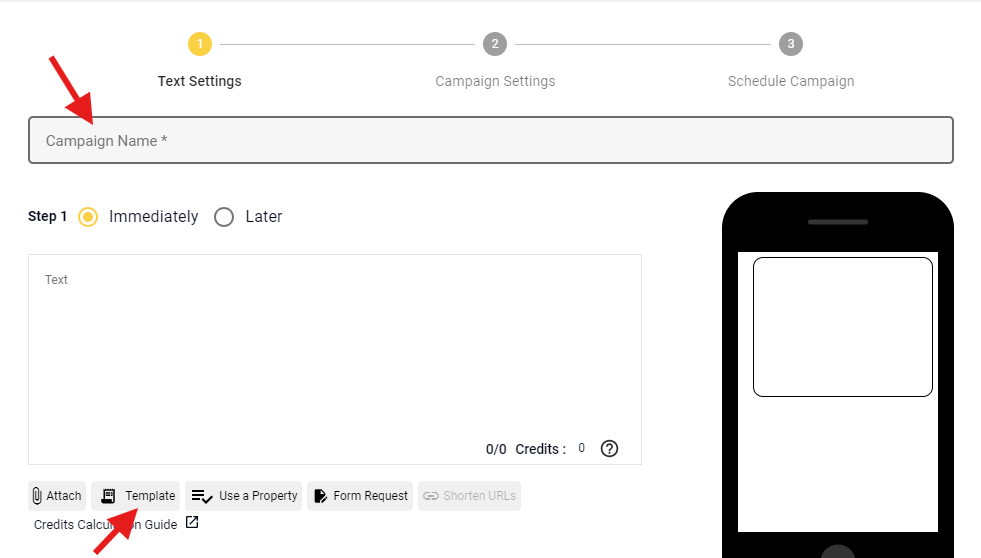
2. Click on the “Create Campaign” option.
3. A new page will open. Enter the campaign name and select the template option at the bottom of the box.
4. Now, you will see the option to either choose a template or create a new one. Select “Create Template” to make a new template.
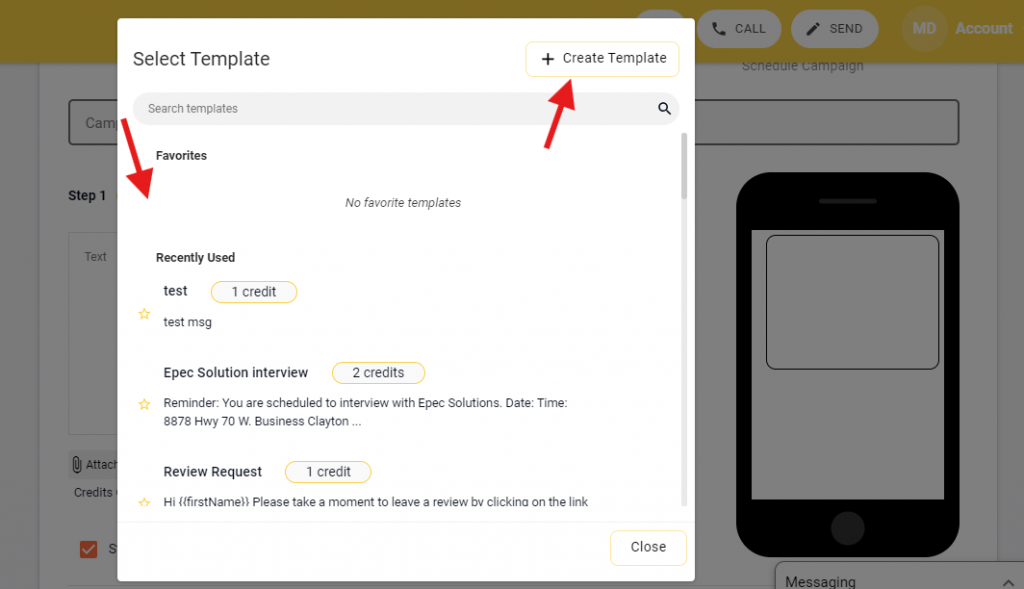
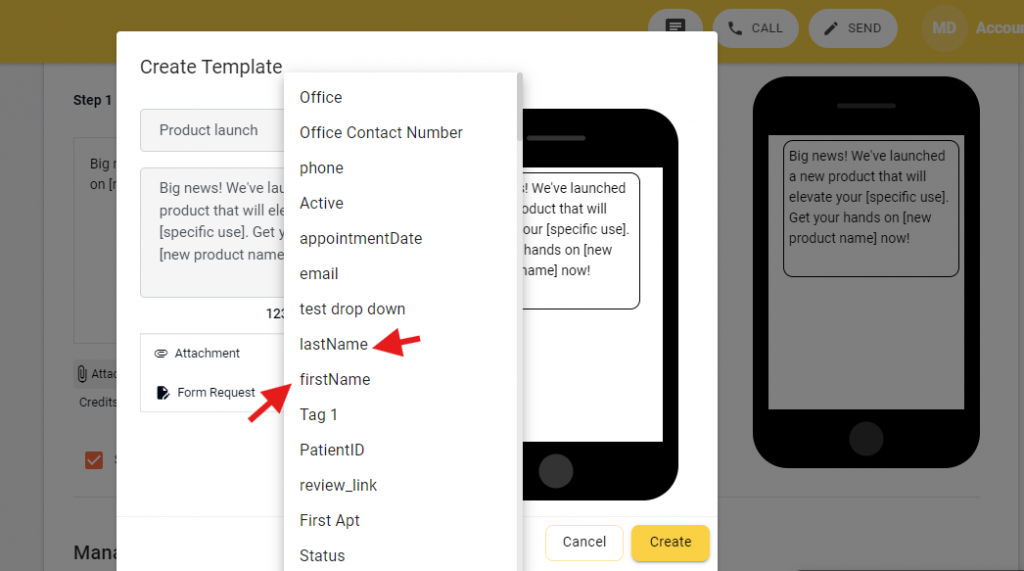
5. Give a name to your patient texting template and paste the message in the box.
6. You can also select the “Use a property” option at the bottom if you want to send customized messages (e.g., patient names, product details) to your recipients. Once done, click on Create, and your template will be saved.
7. In fact, you can even use Emitrr’s AI feature to create messages with simple prompts, or change the tone of the message, make them crisp, etc., with the help of AI.
Check out this quick video to see how the Emitrr AI feature works:
Introducing Sarah: The AI Agent That Makes Texting Effortless
8. Next, select “Immediately” if you want to send the SMS instantly, or choose “Later” to schedule the campaign for later (ideal for delivery updates or follow-up reminders).
9. Scroll down and click on Next. A new page will open where you can upload the contact list to send your medical device-related messages to.
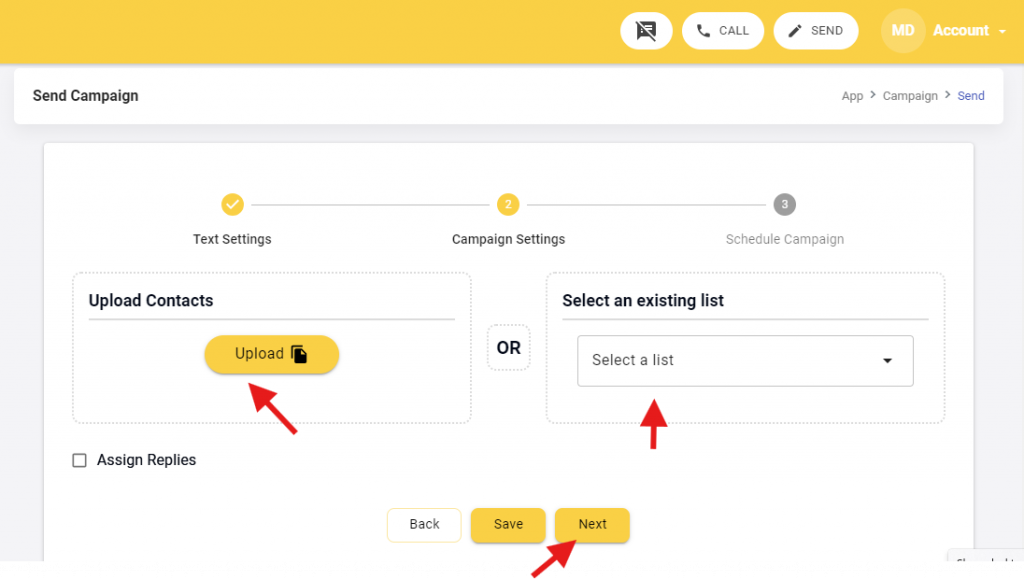
10. Finally, click on “Next” and then “Confirm and Send” to deliver appointment reminders, warranty updates, or training session alerts to your customers.
These steps will guide you through the process of using templates on Emitrr.
Watch our step-by-step video for a visual walkthrough to easily navigate and get your SMS campaigns ready for your healthcare communications
FAQs
Yes, SMS templates can be used under HIPAA as long as no personal health information is shared through any insecure channels.
Here are a few tips that can make an SMS HIPAA-compliant:
No PHI is shared unless the platform provides end-to-end encryption
Patients give consent to receive texts
A Business Associate Agreement (BAA) is in place
Access logs and security controls are maintained
Platforms like Emitrr ensure all these rules are followed.
Yes, with the help of a robust communication platform like Emitrr, you can automate sending appointment reminders in a HIPAA-compliant manner.
Yes, under HIPAA and TCPA compliance, it is necessary for healthcare practices to give their consent, which can be done through intake forms or online scheduling pages.
Yes, if the tool you are using offers two-way communication, then patients can reply to your SMS about appointment confirmation, rescheduling, or follow-ups.
No. Standard texting apps are not HIPAA-compliant. Healthcare providers must use a secure platform designed to handle patient communication safely.
Conclusion
HIPAA-compliant SMS communication is no longer an option; it is essential to offer seamless, secure, and patient-friendly communication. By using HIPAA-compliant SMS templates for healthcare appointment scheduling, practices can reduce no-shows, improve patient management, along streamline front-desk workflows without risking PHI.
If you are also a healthcare business and are looking for a secure, automated, and easy-to-use platform, then Emitrr is your all-in-one solution that is specially designed for healthcare professionals, a complete HIPAA-compliant communication platform that makes patient communication effortless.
Want to modernize your patient communication? Book a demo with Emitrr and see how simple, secure SMS can transform your practice.


 4.9 (400+
reviews)
4.9 (400+
reviews)