

Introduction
On the surface, requesting a prescription refill through Athenahealth looks straightforward. A patient submits a request, the provider reviews it, and the prescription gets sent to the pharmacy. Done.
But if you’ve ever worked the front desk at a healthcare practice, you know that’s not how it actually plays out.
Behind every refill request that comes in, there is a chain of small tasks that quickly add up, slowly consuming considerable time of the day, leading to repetition and burnout. Constant phone calls interrupt scheduling, staff jump between screens, patients call back to check status, and after hours, refill voicemails quietly pile up for the next morning.
Athenahealth handles the clinical part of prescription refills well. What it doesn’t address is the operational workload that it comes with. In this guide, we are going to show you how to manually request prescription refills using Athenahealth and a workaround to automate the entire process.
How to Request Prescription Refills Using Athenahealth?
- Search for the Patient in Athenahealth and Open Their Chart
- Create a New Order Group for the Prescription Refill
- Verify or Add the Patient’s Pharmacy Details
- Select the Medication That Needs to Be Refilled
- Go to the Assessment and Plan Section in the Patient Chart
- Choose the Provider Who Will Approve the Refill
- Add Any Internal Notes Related to the Refill Request
- Save the Request and Submit the Prescription Refill
Requesting Prescription Refills Using Athenahealth
Before we take a look at automating the online prescription refill process within Athenahealth
Here’s how the standard process of requesting prescription refills using Athenahealth looks like:
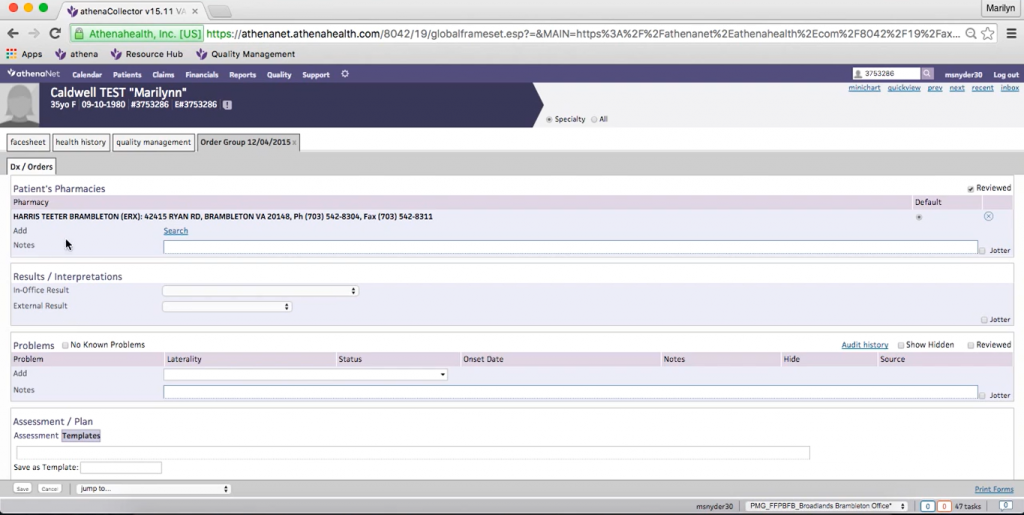
Step 1: Search for Patient in Athenahealth Patient Lookup and open chart
- Start by searching for the patient in Athenahealth.
- Once found, open the patient’s chart to begin the refill process. This ensures all refill actions are tied to the correct patient record.
Step 2: Create a New Order Group
- Inside the patient chart, click on “New Order Group.” This will initiate the prescription refill workflow within Athenahealth.
Step 3: Verify or Add the Patient’s Pharmacy
- Scroll to the Patient’s Pharmacies section and check whether the correct pharmacy is already listed.
If the pharmacy is missing:
- Add the pharmacy (for example, selecting the correct location)
- Click Save
- Athenahealth requires a pharmacy to be on file before a refill can be processed.
Step 4: Select the Medication to Be Refilled
- Navigate to the Medications section.
- Locate the online prescription that needs to be refilled (e.g., Metoprolol).
- Select the medication and click Save. This will link the refill request to the correct medication record.
Step 5: Go to the Assessment & Plan Section
- Scroll down to the Assessment & Plan area.
- Find the medication listed there. This is where the refill request is finalized and routed.
Step 6: Select the Ordering Provider
- Ensure the correct ordering provider is selected.
- This determines which provider will receive and review the refill request.
- This step is critical for proper routing.
Step 7: Add Internal Notes
In the Internal Notes section, document:
- Who requested the refill (patient or pharmacy)
- If patient-requested, include the patient’s phone number
- Any special instructions
If the patient wants the prescription sent to both a local pharmacy and a mail-order pharmacy:
- Select one pharmacy in the system (since Athenahealth allows only one)
- Note the additional pharmacy details in the internal notes
Step 8: Save and Submit the Refill Request
- Click Save to complete the process.
- The emergency prescription refill request is now routed to the provider and appears in their queue for review.
What Happens Next
Once submitted, the provider reviews the refill request. Then, the prescription is approved, modified, or denied based on clinical judgment, and the approved refills are sent to the selected pharmacy.
Also learn: How Athenahealth handles patient billing

The Problem with Creating Manual Refill Requests Using AthenaHealth
When a refill request comes in, whether from a patient or a pharmacy, it typically lands on a staff member first. Although the steps are easy to perform, the volume can be overwhelming, making it feel repetitive and extremely time-consuming for your front desk staff.
Consider this: for the majority of healthcare professionals, 40% of calls are related to prescription refills. For each of these calls, your front desk staff end up spending 1-2 minutes just to ask and verify basic details, such as name, last visit, and dosage. And if this was not enough, there are at least 8 steps to perform just to create a refill request for each patient. You already know how much front-desk time all these steps are taking up on a daily basis. The challenge becomes even more significant for practices managing chronic medications, recurring therapies, and patients who need ongoing prescription renewals. Many healthcare organizations are now looking for ways to streamline prescription renewal workflows while reducing the administrative burden associated with refill requests, patient outreach, and provider approvals.
Thankfully, there is a very simple and effective solution to this.
How Integrating Emitrr AI Simplifies Prescription Refills in Athenahealth
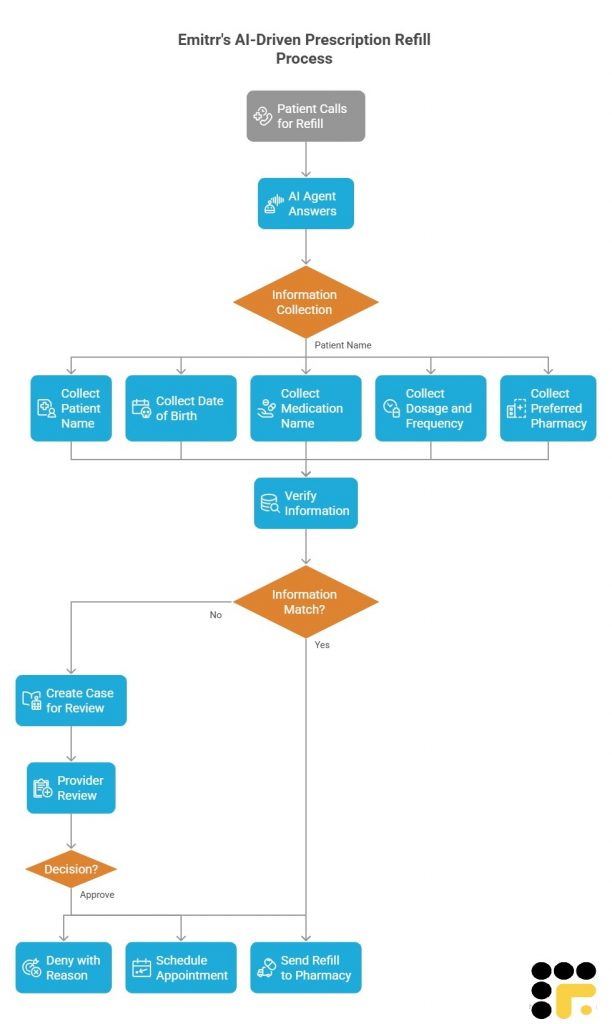
If you look closely at the manual Athena e-prescribing, the challenge is repetition. Staff follow the same steps again and again: collect patient details, verify information, confirm pharmacy preferences, add notes, and route the request.
This is where using Emitrr AI for athenahealth prescription refill fundamentally simplifies the workflow.
Step 1: The AI Agent Becomes the First Point of Contact
Instead of prescription refill calls going straight to the front desk, they’re handled by an AI agent trained specifically for refill requests.
Before going live, the practice can:
- Create its own AI agent
- Trains it to collect required refill information, such as:
- Patient name
- Date of birth
- Medication name
- Dosage and frequency
- Preferred pharmacy
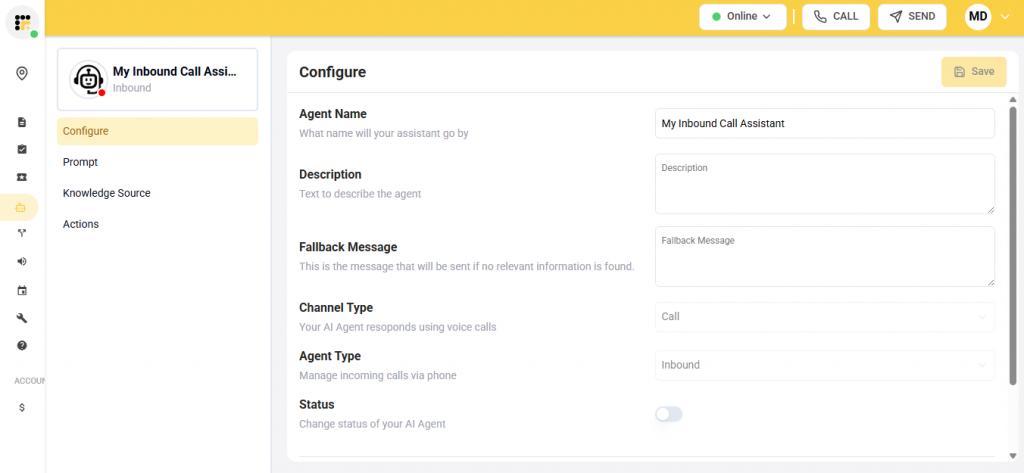
Once live, the AI agent automatically answers refill calls, during business hours, after hours, and even during peak call times, without staff involvement.
Step 2: AI Collects and Verifies Refill Information
When a patient calls for a prescription refill, the AI agent follows the same logic a staff member would:
- Confirms the patient’s identity
- Collects medication and pharmacy details
- Verifies the information in real time against records in Athenahealth
This mirrors what front desk staff manually do today, but without switching screens, typing notes, or interrupting other work.
Step 3: A Case Is Automatically Created in Athenahealth
Once the required information is collected, the AI agent creates a case directly in your EHR
The case includes:
- A complete overview of the patient
- All medication refill-related details
- An AI-generated call summary
- The full call transcript
- A call recording (for reference, if needed)
Instead of staff entering details across multiple sections in Athenahealth, providers receive everything in one structured view.
Step 4: Smart Decisioning
This is where the workflow becomes significantly more efficient.
If the information collected by the AI matches existing records:
- The medication refill request can be sent directly to the pharmacy for processing
- No front desk review required
If the information does not match the records:
- A case is created for staff or provider review. The provider can then review the prescription refill request manually. Upon reviewing it, they can then decide to either approve it, deny it with a reason, or suggest the patient to schedule an appointment.
Take a look at this video to learn more:
Why Automating Prescription Refills Makes a Real Difference
You can keep creating prescription refill requests in Athenahealth, the standard way, or you can choose to reduce 40% of front desk calls and staff burnout by simply adding Emitrr to Athenahealth.
By integrating the two, you can get rid of
- Manual data collection during refill calls
- Repetitive navigation across patient charts
- Typing internal notes
- Sending prescription refill reminders, follow-ups, and more.
This can free up your front desk staff to perform higher-value tasks, reduce refill turnaround time for patients, while also maintaining accuracy and compliance inside Athenahealth.
FAQs
Log in to your Athenahealth patient portal, go to the Medications section, select the prescription you need refilled, and submit the refill request. The request is then sent to your provider for review.
The medication refill option may not appear if the medication requires provider approval, a follow-up visit, or if refills are not enabled by your healthcare provider for that prescription.
Approval times vary by provider and clinic, but most refill requests are reviewed within one to three business days. Delays can occur if additional information or an appointment is required.
Yes. When submitting a refill request, you can select a pharmacy listed in your patient profile. If your preferred pharmacy is not available, you may need to contact your clinic to update your pharmacy information.
If a refill request is denied, it usually means your provider needs to see you for a follow-up appointment or requires additional information. Check your portal messages or contact your clinic for next steps.
The Athenahealth Patient Portal is a secure online platform that allows patients to access their health information and communicate with their healthcare provider. Through the portal, patients can view medications, request emergency prescription refill, schedule appointments, send messages to their care team, and manage bills, all in one place.
Conclusion
Prescription refills aren’t going away. If anything, they increase as practices grow and manage more chronic care patients. The real question is how much staff time you want to spend managing the conversations around them.
By adding Emitrr AI to the Athena refill workflow, clinics can move from a staff-heavy process to a streamlined system where repetition can be smartly dealt with without risking compliance or errors.


 4.9 (400+
reviews)
4.9 (400+
reviews)