
Introduction
Most patients do not plan to run out of their medication. They forget the date, assume the refill is automatic, or put off the call until the weekend. Then the bottle is empty, the pharmacy says the prescription has expired, and the practice gets an urgent call that could have been a calm text two weeks earlier.
Prescription refill reminders fix the timing problem. A reminder that arrives before the supply runs out gives the patient time to act, gives staff time to review, and gives the prescriber time to decide whether a visit is needed first.
The harder questions are practical. Who should send the reminder, the pharmacy or the practice? What data does the system need? When should each message go out? What should the text say, and what happens when the patient replies? This guide answers each of those, including the consent and privacy rules that apply to medication refill reminders.
Who Should Send Refill Reminders: The Pharmacy or the Practice?
Both can, and they see different things. A pharmacy knows when a prescription was last filled and how many days it covered. A practice knows whether the patient is overdue for a visit, whether the prescription has expired, and whether the prescriber will want to see the patient before approving more.
- Pharmacy. Holds fill dates, days’ supply, and refills remaining.
Strength: accurate supply timing, and it can remind patients about pickup.
Blind spot: it does not see visit requirements or clinical context, and it cannot tell when a prescription needs renewal approval. - Practice. Holds visit status, renewal needs, prescription expiry, and the care plan. Strength: it can pair a reminder with a visit prompt and owns the approval workflow. Blind spot: it often lacks fill data unless that data comes from the pharmacy or the EHR.
- Both. Together they give the full picture and fewer surprises for the patient. The risk is duplicate or conflicting messages if nobody coordinates.
A pharmacy refill reminder system is built around fill data and works well for routine refills and pickup. Practice-sent medication refill reminders matter most when a prescription is close to expiring or when a visit is required before the next refill. Patients who receive reminders from both should hear consistent instructions, so it helps to know what the pharmacy already sends before adding your own.
If your practice is still building the request side of the process, start with the basics of prescription refill workflows, because a reminder that triggers a request nobody can route just moves the backlog.
What a Reminder System Needs to Know
A reminder is only as good as the data behind it. Before you send anything, confirm the system can see these points.
- Medication. What the patient takes. This drives which messages apply and which medications are excluded.
- Days’ supply and last fill date. The two numbers that tell you when the patient will run out. These usually come from pharmacy fill data or the EHR medication history.
- Refills remaining. Zero refills means the patient needs a renewal, not a simple refill, and the message should say so.
- Prescription expiry. A prescription can expire before the refills are used. Many reminders miss this.
- Visit-required window. Some practices require a visit every few months before approving more refills. The reminder should flag it early.
- Preferred pharmacy. Lets the system confirm where the order should go and catch pharmacy changes.
- Contact preference. Text, call, email, or portal. Respecting it improves response rates and avoids opt-out complaints.
- Consent status. Whether the patient agreed to receive texts or automated calls. No consent, no message.
Workarounds when fill data isn’t available. Many practices do not get pharmacy fill data in real time. Two common substitutes:
- Use the prescribed quantity and prescription date to estimate the run-out date. A 30-day supply written on March 1 is a reasonable trigger for late March.
- Ask the patient to confirm their dates. A reply such as “Reply with the date of your last fill” fills the gap, though it adds a step for the patient.
Estimated dates will be wrong for some patients. Treat them as a starting point and let replies correct them.

When to Send Medication Refill Reminders: Timing Logic
The right moment depends on how long the patient needs to act and how long the process takes. The table gives starting points, not rules. Tune them using your own refill data: how long approvals take, how often patients refill late, and how many urgent “I’m out” calls you receive.
| Trigger | Example Timing | Message Goal |
| 30-day supply | About 7 days before run-out | Prompt a refill request with time left to review |
| 90-day supply | About 10 to 14 days before run-out | Allow extra time for approvals and mail delivery |
| Mail-order buffer | 14 to 21 days before run-out | Cover shipping delays |
| Renewal needed (no refills left) | 2 to 3 weeks before run-out | Start the renewal request early |
| Visit required | 3 to 4 weeks before run-out | Give the patient time to book an appointment |
| Second reminder | 3 to 4 days after no response | Catch patients who saw the first message and set it aside |
| Lapsed gap | 3 to 7 days after expected run-out | Find out whether the patient stopped, switched, or ran out |
Two practical notes. First, the difference between a refill and a renewal changes the timing, because a renewal usually needs clinician review. Understanding prescription refills vs prescription renewals helps you decide which trigger a patient falls into. Second, cap total reminders so patients do not get several messages in a few days.
Anatomy of an Effective Prescription Refill Reminder Text
A strong refill reminder is short and easy to answer. Include these six elements:
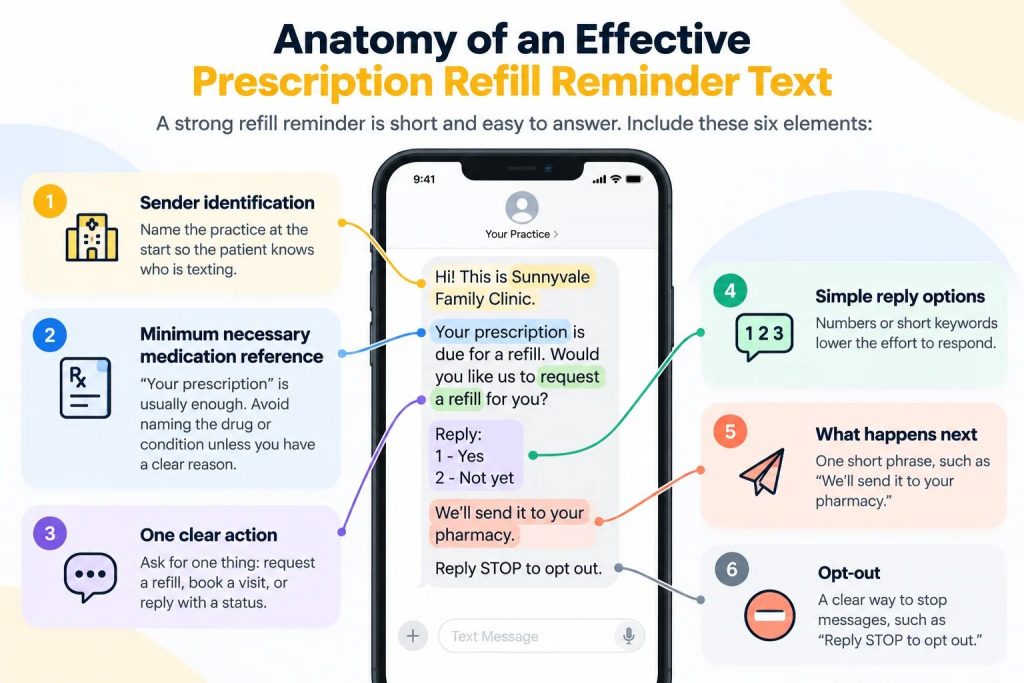
- Sender identification. Name the practice at the start so the patient knows who is texting.
- Minimum necessary medication reference. “Your prescription” is usually enough. Avoid naming the drug or condition unless you have a clear reason.
- One clear action. Ask for one thing: request a refill, book a visit, or reply with a status.
- Simple reply options. Numbers or short keywords lower the effort to respond.
- What happens next. One short phrase, such as “We’ll send it to your pharmacy.”
- Opt-out. A clear way to stop messages, such as “Reply STOP to opt out.”
Healthcare texts work best when they are brief. The FCC’s healthcare exemption for treatment messages points to about 160 characters, so write tight and test templates before launch. For more examples of compliant wording, see these HIPAA-compliant text message templates.
Curious if your prescription refill reminder texts are HIPAA compliant? Watch this video to find out what healthcare providers need to know.
Sample Prescription Refill Reminder Texts by Scenario
Replace the bracketed names with your practice details.
- Standard reminder
“[Practice Name]: Your prescription may need a refill soon. Reply 1 to request it, 2 if already filled, 3 to change pharmacy. Reply STOP to opt out.”
- Renewal needs a visit
“[Practice Name]: Your prescription needs a visit before the next refill. Reply 1 to book, or call [phone]. Reply STOP to opt out.”
- Second reminder
“[Practice Name]: Checking again on your refill. Reply 1 to request it, 2 if you already have it. Reply STOP to opt out.”
- Lapsed supply
“[Practice Name]: Your refill may have run out. Reply 1 for help getting it, 2 if you stopped taking it. Reply STOP to opt out.”
- Pharmacy-ready notification
“[Practice Name]: Your refill was sent to your pharmacy. Reply 1 if you can’t pick it up. Reply STOP to opt out.”
What to Leave Out of the Message
- The medication name, dose, or condition, unless there is a clear need. A text can be seen by anyone who picks up the phone.
- Anything that sounds like marketing, such as promotions, new products, or services. Keep the message about the patient’s current prescription.
- Billing or payment details. Financial content falls outside the healthcare message category.
- Long links or unexplained forms. Patients distrust unfamiliar links. If a link is needed, say what it opens.
- Clinical advice. A text should route a question to a person, not answer it.
- Several asks in one message. One action gets more replies than three.
What Happens When the Patient Replies
The reminder is only half the workflow. If a reply lands in a general inbox, staff have to read it, find the chart, and re-enter the details. That is the same manual work reminders are meant to remove.
| Reply | System Action | Staff Action |
| “Refill” | Open a refill request or case with the patient and medication already attached | Review and route for approval per protocol |
| “Already filled” | Mark the reminder resolved; update the fill date | None, unless the patient reports a problem |
| “Changed pharmacy” | Capture the new pharmacy name and location | Update the pharmacy in the chart |
| “Need appointment” | Offer scheduling options or flag for the front desk | Book the visit |
| “Stop” | Record the opt-out and stop automated messages | Confirm the preference and switch channels |
The goal is to send a reply straight into a refill request or case without a second form. The patient already told you what they want; asking them to repeat it on a portal creates drop-off. Practices that already use SMS-based prescription refill requests know how much call volume this removes.
Some details still need verifying. Real-world intake often involves identity checks and medication details the text cannot safely capture. This is where AI intake helps: it can verify the patient’s identity and collect the medication name, pharmacy, and urgency in a guided conversation before a nurse sees the request. Staff then review a complete request instead of starting from scratch, which is the same logic behind structured refill intake speeding up provider approvals.
Choosing Channels for Patient Medication Reminders
No channel reaches everyone. Choose by reach, cost, and the patient’s stated preference.
- Text. Highest response rates for short, actionable prompts, and the easiest way to let patients reply. Limit: patients can opt out, and texts are unsuitable for sensitive detail.
- Automated voice call. Reaches patients who do not text, including many older patients. Limit: calls are easy to miss, and patients rarely call back.
- Email. Good for longer instructions and links. Limit: lower open rates and slower response.
- Patient portal. Secure and tied to the chart. Limit: many patients never log in, so a portal message alone often goes unseen.
- Pharmacy app. Strong for pickup and fill status. Limit: the practice cannot control the message or see the response.
Patients who opt out of texting. Some patients prefer calls, or have limited texting plans. Record the preference and switch to a voice fallback. Automated or live calls can ask the same short question and capture the response. AI voice agents can handle prescription refill requests and follow-ups when a voice-based approach works better.
EHR reminders vs. an integrated two-way layer. Many EHRs include built-in reminders, but they often send one-way notifications with limited support for replies. An integrated two-way layer lets patients respond, tags the reply, and routes it into a task. Which option fits depends on your EHR and integration, so check what each workflow can read and write. Practices on Epic can see how two-way text messaging works with Epic, and athenahealth users can review the steps to enable two-way SMS texting in athenahealth.
Consent, TCPA, and HIPAA Guardrails
Reminders are routine, but the rules are specific. This section summarizes the main points. Confirm the details with your compliance lead or counsel, because rules and interpretations change.
Consent and opt-out
- Capture consent to receive texts and automated calls at registration, and record the date and method.
- Honor opt-outs promptly and apply them across your reminder workflows. Make sure staff know how to log an opt-out received by phone or in person.
- Keep each patient’s preferred channel up to date.
Healthcare-message conditions under TCPA
The FCC has an exemption for certain healthcare messages, such as prescription notifications, sent to a number the patient provided. The conditions typically include:
- Messages must be free to the patient and not count against their plan limits.
- The sender is identified at the start of the message.
- No marketing, billing, debt collection, or other financial content.
- Short messages, about 160 characters or less for texts.
- Limits on frequency, generally no more than one message per day and three per week.
- A simple opt-out in every message, honored immediately.
Reassigned and wrong numbers are a common risk. If a number changes hands, your reminder can reach someone who never consented. Update numbers at each visit, stop messaging numbers that report a wrong-person reply, and review the broader TCPA SMS compliance rules with counsel.
HIPAA and minimum necessary
HHS treats refill reminders and other communications about a currently prescribed drug as outside the definition of marketing, as long as any payment the practice receives is limited to the reasonable cost of making the communication. Even so, apply the minimum necessary standard to message content, which is why templates avoid naming drugs. A good reference for what staff can and cannot text is this overview of HIPAA-compliant texting rules.
Proving Reminders Work: Metrics and Test Design
If you cannot show that reminders change behavior, they will be hard to defend or improve. Track a small set of metrics:
- Delivery rate. Messages delivered divided by messages sent. A low number points to bad numbers or carrier issues.
- Response rate. Patients who replied divided by messages delivered. It tells you whether the wording invites action.
- Refill-request conversion. Refill requests started divided by messages delivered. It shows whether reminders produce actual requests.
- On-time refill rate. Refills completed before run-out divided by refills due. This is the outcome that matters most.
- Urgent “out of medication” calls. A raw count per week. A drop means patients are acting earlier.
- Opt-out rate. Opt-outs divided by messages delivered. A rising rate signals message fatigue or poor targeting.
Simple test design. Pick one patient group and split it. Send reminders to one half and keep the other half as a control for a set period, such as 60 days. Compare on-time refill rate and urgent calls. To test timing, send the first reminder at 7 days for one group and 14 days for another.
Keep expectations realistic. Research on reminders is mixed. The Community Preventive Services Task Force recommends text messaging to support medication adherence, but a large 2024 JAMA trial of refill-gap texts found no significant improvement in adherence at 12 months. Generic reminders alone may not change long-term behavior for every patient group, which is why reply handling and follow-up matter just as much as the message. The broader role of medication adherence and practical approaches to improve medication adherence using SMS reminders can help put refill reminders in context.
Setting Up Prescription Refill Reminder Software: A Practical Checklist
A good prescription refill reminder software setup should fit into the practice’s existing workflow, not create another process for staff to manage. Start with a small patient group, define clear rules, and make sure reminders, replies, and follow-ups are easy to track.
Follow these steps in order.
- Choose the patient group. Start with one chronic medication group with predictable refill timing.
- Confirm the data feed. Verify that days’ supply, last fill, and expiry data reach the system, or decide on the estimate method.
- Set rules and exclusions. Define triggers, timing, and caps on total messages.
- Write templates. Draft the scenarios above, get clinical and compliance review, and keep each text short.
- Verify consent. Confirm every patient in the group has recorded consent and a valid number.
- Pilot. Run the group for a few weeks with a control group if possible.
- Review. Look at response rate, conversion, on-time refills, and opt-outs. Adjust and expand.
Exclusions to build in from day one:
- Controlled substances, which usually need provider review and stricter handling.
- Discontinued medications, so patients are not prompted to refill something they no longer take.
- Hospitalized patients, who may be receiving medication elsewhere.
What to look for in prescription refill reminder software:
- Data connections. Look for EHR integration, since it affects triggers and write-back. Availability depends on your EHR and setup.
- Two-way messaging. Patients need to reply in the same thread, and replies should become tasks.
- Routing rules. Requests should reach the right queue by medication type, provider, or urgency.
- Consent and opt-out tracking. Automatic handling prevents messages to opted-out patients.
- Audit trail. Every message and response should be recorded in one place.
- Reporting. You should be able to see delivery, response, and conversion without exporting spreadsheets.
Automating Prescription Refill Reminders With Emitrr
Emitrr is a communication and execution layer that works alongside the EHR. It handles outreach, replies, and routing. It does not approve prescriptions or replace clinical judgment, and EHR data access depends on the integration you have in place.
Scheduled Reminders Driven by EHR and Medication Data
Emitrr can send reminders on a schedule tied to supply and prescription expiry. Where medication and refill data are available through the EHR integration, triggers follow that data. Where they are not, practices can use their own lists, prescribed quantities, and dates. Reminders go out through automated texting on your timing rules, with caps on how many messages each patient receives.
Two-Way Replies That Turn Into Refill Requests
Because the conversation runs through two-way texting, the patient answers in the same thread. A “1” or “refill” reply can open a refill request with the patient and medication already attached. Guided digital forms collect structured details such as pharmacy and urgency, so the request reaches the right queue complete. AI can verify identity and gather medication details through an AI SMS agent for healthcare before a nurse reviews it. Practices on athenahealth can also look at athenahealth refill automation for how this connects to that EHR.
AI Call Follow-Up and Escalation for Non-Responders
When a patient does not respond to texts, a voice follow-up can ask the same short question. This uses AI outbound calls where outbound AI is enabled for the practice. Replies that signal a problem, such as running out, side effects, or cost, escalate to staff. Patients who need a visit before a refill can be moved into booking through AI appointment scheduling.
Consent, Opt-Out, and a Documented Message Trail
Opt-outs are recorded and applied across reminder workflows, and every message and reply is kept in the patient’s thread. That gives the team a clear history of what was sent and when, which supports HIPAA-compliant texting practices and makes audits simpler.
What staff still own. Staff and clinicians approve refills, handle exceptions, manage controlled substances, and decide when a patient needs a visit. Automation prompts, collects, routes, and records. People make the clinical calls.
Watch how an AI agent reduces prescription refill call volume by 40%:
Key Takeaways
- Prescription refill reminders work best when they arrive before the supply runs out, with enough time for review and any required visit.
- Pharmacies hold fill data and practices hold visit and expiry data, so a reminder system should use both where possible.
- When fill data is missing, estimate run-out dates from the prescribed quantity and date, and let patient replies correct them.
- Treat timing as a starting point and tune it with your own refill, approval, and urgent-call data.
- A good text names the sender, keeps medication detail minimal, asks for one action, offers simple replies, and includes an opt-out.
- Replies should flow directly into a refill request or case so patients do not fill out a second form.
- Honor consent and opt-outs, keep content free of marketing, and confirm TCPA and HIPAA details with counsel.
- Measure on-time refills and urgent calls against a control group, and expect reminders to work best alongside follow-up.
Frequently Asked Questions
Prescription refill reminders are messages, usually texts or calls, that prompt a patient to request a refill before their medication runs out. They can come from a pharmacy, a practice, or both, and the best ones let the patient reply directly to start the request.
Send the first reminder early enough for review and delivery. A common starting point is about 7 days before run-out for a 30-day supply, and 10 to 14 days or more for 90-day or mail-order prescriptions. Send a second reminder a few days after no response, and adjust timing using your own refill data.
They can be. HHS treats refill reminders about a currently prescribed drug as outside the definition of marketing, provided any payment the practice receives is limited to the reasonable cost of the communication. Practices should also follow the minimum necessary standard, avoid naming medications unnecessarily, and confirm their approach with their compliance team.
Sometimes. Text messaging has support in the research, but a large 2024 trial found that refill-gap texts did not improve adherence at 12 months. Reminders tend to work better when combined with easy reply options and follow-up for patients who report cost, side effects, or confusion.
It should identify the practice, refer to “your prescription” without unnecessary detail, ask for one action, give simple reply options such as 1, 2, or 3, and include an opt-out. Keep it short, ideally around 160 characters.
A pharmacy system uses fill dates and days’ supply to remind patients about routine refills and pickup. Practice-sent reminders can also account for visit requirements, prescription expiry, and renewal needs. Many patients benefit from both, as long as the messages are consistent.
Conclusion
A refill reminder is a small message with a clear job: get the patient to act before the supply runs out. It works when the timing fits the prescription, the text asks for one simple action, and the reply goes straight into a request that staff can review. It falls short when it is a one-way notice that sends the patient back to the phone.
Start with one medication group, set conservative timing, write a few short templates, and compare results with a control group. Add channels, rules, and voice fallbacks as the numbers show where patients need more help.
Send Refill Reminders That Patients Can Answer. See how Emitrr helps your team remind patients early and turn replies into refill requests.

 4.9 (400+
reviews)
4.9 (400+
reviews)