
Introduction
Patient communication has shifted to text. Patients want quick confirmations, easy rescheduling, and simple ways to reach the front desk without waiting on hold. For practices using Athenahealth, texting is no longer a nice-to-have, it’s a core part of offering a better patient experience.
In this guide, we’ll walk through how two-way SMS texting works with Athenahealth, what capabilities matter most when choosing a texting solution, and how practices use automation and AI to reduce missed calls, improve appointment adherence, and streamline front-desk workflows. You’ll also see how two-way messaging, real-time data sync, and intelligent scheduling help practices communicate at scale while keeping everything connected to Athenahealth.
How to Enable Two-Way SMS Texting in Athenahealth?
- Set Up an SMS Platform That Integrates With Athenahealth
- Connect Your Athenahealth Account to the SMS Platform
- Enable Two-Way Text Messaging for Patient Communication
- Configure Messaging Settings and Notification Preferences
- Start Sending and Receiving Text Messages With Patients
Does Athenahealth Support Two-Way SMS Texting?
The short answer is no. Athenahealth does not support two-way text messaging natively, to enable this, you are required to integrate with a third-party texting platform like Emitrr.
Here’s a deeper look at what texting capabilities Athenahealth offers and what it lacks currently.
What Athenahealth support?
- Sending reminders: Athenahealth can send automated appointment reminders via text. However, there is no way to text back patients if they reply.
- One-way SMS: The messages go out, but they’re essentially broadcast notifications. Patients can receive them, but the system isn’t built for back-and-forth communication.
- Templatised SMS: Messages are pre-written and template-based. This works fine for standard reminders, but it doesn’t adapt well to real patient responses or unique situations.
What it lacks?
- Two-way texting: Patients reply all the time with texts like “Can I reschedule?” “I need to cancel.” “I have a question.” Athena does not allow your staff an easy way to respond back via text.
- Sending SMS from your existing business number: Messages sent via Athenhealth come from a different or short code number. Patients don’t recognize it, and you can’t continue the conversation from your clinic’s main number.
- No central conversation view: There’s no shared inbox where your team can see the full conversation history with a patient.
- No automatic workflow updates: Replies from patients don’t automatically confirm/cancel/reschedule appointments or create follow-up tasks, everything needs to be done manually.
- Language barriers: Athena’s native messaging does not fully support multilingual outreach. Clinics that have patients from diverse populations struggle to notify all patients in their preferred language.
- Provider schedule changes: When a provider is unavailable or clinic hours change, staff often must call patients individually. There is no quick way to send targeted SMS to only the affected appointments.
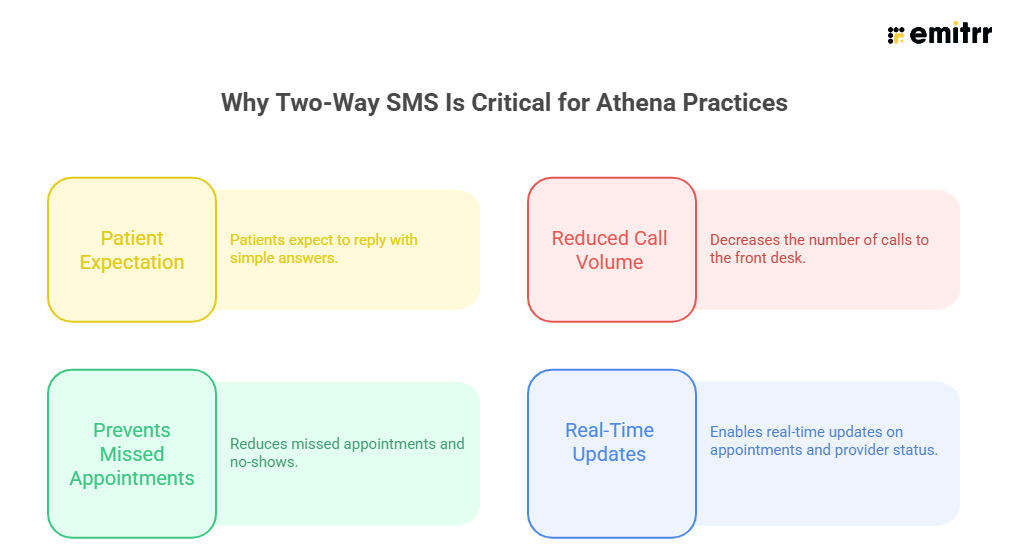
Why Two-Way SMS Is Critical for Athena Practices
What to Look for in an SMS Platform that Integrates with Athenahealth?
Not every SMS tool that claims to work with Athenahealth actually works the way practices need it to. Some tools can send texts, some can sync data. Very few support true two-way SMS in Athenahealth without creating more work for staff.
Here’s what you should look for before choosing an SMS platform for Athenahealth.
Two-way Integration
One of the most important requirements to look for is the ability of the texting platform to integrate two-way with Athenahealth. See if:
- Patients can reply to texts
- Staff can respond back
- Conversations continue naturally
If the platform only sends reminders and stops there, you’ll still end up calling patients back manually.
Text or call directly from Athenahealth
Your staff already lives inside Athenahealth all day. Asking them to jump between systems can slow everything down. The right platform for athena SMS integration should let your team:
- Text patients while working in Athena workflows
- Call or text patients in Athenahealth when needed without switching screens
- See patient context before responding
This feature alone can save hours for your staff while also reducing errors.
Automatic conversation logging
When patients text your practice, those conversations shouldn’t live outside your EHR. An effective Athenahealth patient texting solution automatically logs every text message back into the patient’s Athenahealth record, so staff always have full context. There should be no need to copy messages, add manual notes, or worry about missing information. Anyone on the care team should be able to see the complete conversation history and pick up right where things left off.
Create patient cases
When a patient texts about something like a prescription refill or a follow-up question, the texting system should automatically create a patient case inside Athenahealth. That means the request should be captured immediately and routed correctly, instead of relying on someone to read a text and manually take action. This can reduce delays and keep patient requests moving without adding more work for the front desk.
Call pop
When a patient calls the practice, staff should be able to instantly see who’s calling along with relevant context such as recent appointments and message history. The call pop should appear as soon as the phone rings, allowing staff to answer with confidence and avoid asking repetitive questions.
AI capability
An effective SMS and calling platform should do more than just pass messages to your staff; it should actively reduce their workload. So look for a texting platform like Emitrr that offers an AI that handles routine interactions, incoming calls, book appointments or reschedule them without staff involvement, handle common requests like prescription refills, and create patient cases directly inside your EHR, etc., without tying up the front desk.
Add Emitrr’s HIPAA-compliant AI texting platform to your Athenahealth and make all the above things happen seamlessly.

How Emitrr Enables Two-Way SMS Texting in Athenahealth
Emitrr doesn’t sit outside Athena as another tool your staff has to manage. It works with Athena by pulling the right data in and pushing the right updates back.
Here’s what Athenahealth two-way texting looks like: When a patient is scheduled in Athenahealth, Emitrr automatically syncs:
- Patient name and contact details
- Appointment date, time, and provider
- Visit type and location
Now, when Emitrr sends a text, it’s not a generic blast but rather contextual. Patients can reply to messages like:
- “YES” to confirm
- “NO” or “RESCHEDULE”
- Free-text questions like “Can I come 15 minutes late?”
And instead of those replies going nowhere, they land directly in Emitrr’s shared inbox as part of two-way SMS in Athenahealth, connected to the right patient and appointment. Your staff can reply back instantly, and the conversation doesn’t feel automated or robotic.
Learn more about How to Boost Patient Outreach via SMS in Athenahealth
How to Enable Two-Way SMS Texting in Athenahealth with Emitrr
Enabling two-way texting in Athenahealth using Emitrr doesn’t require ripping out Athena workflows or retraining your staff.
Here’s the step-by-step flow most practices follow.
Step 1: Connect Emitrr to Athenahealth
Emitrr connects directly with Athenahealth and pulls in patients, appointments, and schedules. There’s no CSV upload or manual syncing required.
Step 2: Enable Two-Way Messaging
Once connected, Athenahealth two-way texting is enabled automatically. Patients can reply to texts, and staff can respond right away.
Step 3: Text From Your Existing Business Number
Messages are sent from your clinic’s main phone number, the same number patients already recognize and trust.
Step 4: Respond, Confirm, or Take Action
When patients reply:
- Appointments can be confirmed or canceled
- Questions can be answered by text
- Requests can be escalated if needed
- No phone calls required unless absolutely necessary.
Step 5: Automatic Logging in Athena
Every message is written back into the Athena patient profile, ensuring complete visibility for Athenahealth patient texting. There is absolutely no need for your team to toggle between systems or manually update patient records.
What More You Unlock with Emitrr’s Athenahealth Integration
Take a quick look at what all features you get when you integrate Emitrr with Athenahealth.
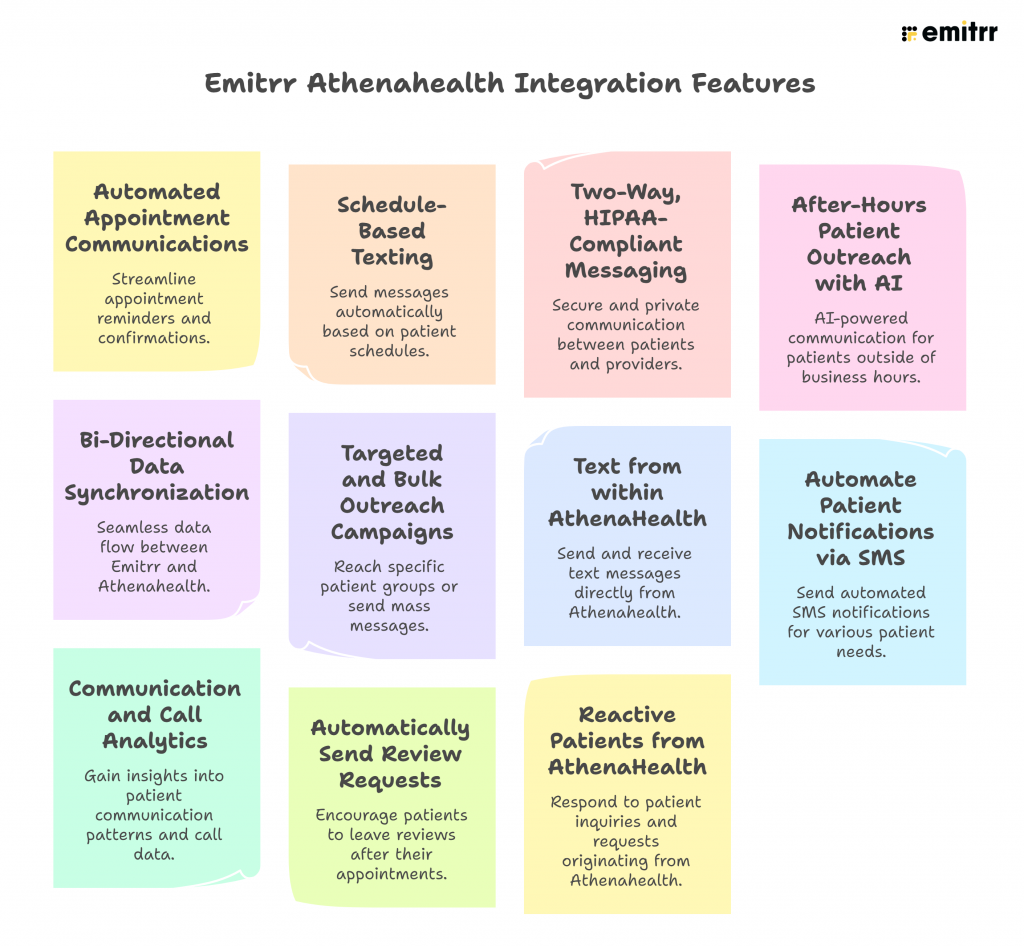
Automated Appointment Communications
Leverage AI-enabled automated SMS, email, and voice reminders triggered from Athenahealth to reduce appointment no-shows and increase schedule adherence. Automate follow-ups post-appointment fully.
Schedule-Based Texting
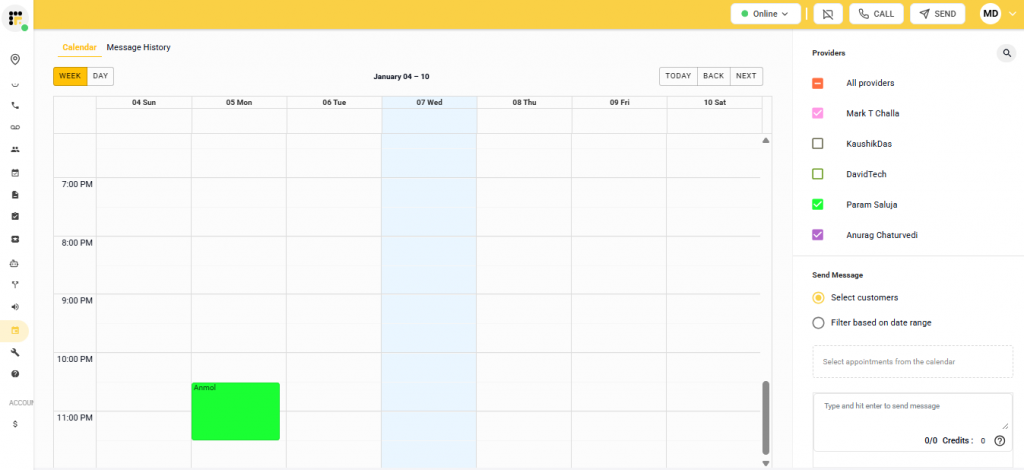
Send messages based on AthenaHealth scheduling data, including provider, visit type, and appointment timing. This enables practices to notify patients of last-minute schedule changes or time-sensitive updates without manual list creation.
Two-Way, HIPAA-Compliant Messaging
Engage patients through real-time, secure text communication. Patients can confirm or reschedule appointments and make inquiries without the need to call.
After-Hours Patient Outreach with AI
When clinics are closed, patients still call, text, and look for answers. Emitrr AI ensures these interactions don’t go unanswered by automatically responding to after-hours inquiries for FAQs, appointment requests, and prescription refills. If the request can be handled immediately, the AI assists the patient; if staff action is needed, it creates a case inside Athena for follow-up the next day. This turns after-hours messages into structured outreach, making sure every patient contact is captured and acknowledged.
Bi-Directional Data Synchronization
Emitrr syncs contact records, appointment data, and custom fields with Athenahealth in real time, making it a reliable Athenahealth SMS integration. This ensures data consistency across platforms and eliminates redundant data entry.
Targeted and Bulk Outreach Campaigns
Run patient outreach initiatives at scale, whether it’s practice-wide updates, care reminders, or educational content. Segment patient lists for targeted communication based on condition, location, or appointment status.
Text from within AthenaHealth
With Emitrr’s Chrome extension, you can ext directly from AthenaHealth EHR hassle-free. Just click the Emitrr logo that appears next to any phone number, and you can start texting without leaving the EHR platform.
Automate Patient Notifications via SMS
Automatically send Patient reminders to AthenaHealth patients via SMS + Email. Do all of this with your current business phone number + customize the reminder by “Appointment Booked Notification
Communication and Call Analytics
Gain visibility into call volumes, unanswered interactions, patient response times, and messaging engagement.
Automatically Send Review Requests
Automatically send review requests on appointment completion in AthenaHealth via SMS and email. Setup your cadence to send reviews one hour later or one day later and more.
Reactive Patients from AthenaHealth
Automatically reactivate patients based on type of visit / insurance or reactivate patients who have not visited the practice since 3, 6, 12 months etc.
Frequently Asked Questions
Two-way SMS is ideal for any practice looking to improve patient communication and reduce front-desk workload. This includes primary care clinics, specialty practices, multi-location organizations, and high-volume scheduling teams.
Yes. When implemented through a HIPAA-compliant platform like Emitrr, two-way SMS with Athenahealth is fully secure. All messages are encrypted, access is controlled, and conversation history is logged directly into Athena’s patient records, ensuring compliance while streamlining communication.
Athenahealth allows appointment reminders and notifications, but you can’t two-way text patients in Athenahealth. To engage patients in real-time SMS conversations, many practices use a native integration like Emitrr, which lets staff send and receive secure texts directly within Athenahealth while logging conversations in the patient record.
To send a portal message in Athenahealth, navigate to the patient’s profile, open the messaging or patient portal section, and compose your message. Portal messages are secure and HIPAA-compliant, but they are typically one-way notifications. For text-based two-way conversations with patients, a connected platform like Emitrr enables messaging via SMS while keeping all interactions synced to Athena.
Yes. athenaOne is Athenahealth’s integrated cloud-based platform that combines EHR, practice management, and patient engagement tools. In short, athenaOne is Athenahealth’s full suite, designed to manage patient records, scheduling, billing, and communications in one platform.
Conclusion
With Emitrr’s native Athenahealth integration, practices can send and receive secure texts, automate reminders, log conversations in the patient record, and even leverage AI to handle routine calls and patient requests. The result is fewer missed calls, reduced no-shows, and smoother workflows while keeping every interaction connected to Athena.
Ready to see how it works in your practice? Book a demo with Emitrr today and experience the difference two-way texting can make.

 4.9 (400+
reviews)
4.9 (400+
reviews)