
Introduction
Are you a healthcare provider looking to streamline your appointment booking process while staying on the right side of the law? In today’s digital age, online scheduling is a game-changer, offering convenience for both patients and staff. But when it comes to handling sensitive patient information, the stakes are incredibly high. This is where HIPAA compliance becomes non-negotiable.
The Health Insurance Portability and Accountability Act (HIPAA) sets strict standards for protecting Protected Health Information (PHI). Failing to comply can result in devastating fines, legal battles, and irreparable damage to your reputation. So, how do you ensure your online scheduling system is not only efficient but also fully HIPAA compliant? This comprehensive checklist will guide you through the essential elements to consider.
Key Takeaways for HIPAA Compliant Scheduling
- Encryption is paramount: Protect data both in transit and at rest.
- Control access: Implement role-based permissions and strong authentication.
- Log everything: Maintain detailed audit trails of system activity.
- Formalize vendor relationships: Always have a signed Business Associate Agreement (BAA).
- Prioritize patient consent: Respect communication preferences and offer opt-out options.
- Train your team: Human error is a significant risk; education is key.
- Plan for the worst: Have a robust breach notification procedure in place.
- Choose wisely: Select scheduling software built with HIPAA compliance as a core feature.

Understanding HIPAA and Its Relevance to Scheduling
Before diving into the checklist, let’s quickly recap what HIPAA is all about. Essentially, HIPAA is a U.S. law enacted in 1996 designed to protect patient health information and ensure it is handled securely and privately. It dictates how healthcare providers, insurance companies, and other covered entities must safeguard PHI, which includes any data that can identify a patient and relates to their health, care, or payment.
For online scheduling, this means every piece of information collected—names, phone numbers, email addresses, appointment details, insurance information, and even notes about the visit—is considered PHI and must be protected. As the U.S. Department of Health and Human Services states, “The HIPAA Security Rule requires covered entities to implement appropriate administrative, physical, and technical safeguards to ensure the confidentiality, integrity, and security of electronic protected health information.”
This is where platforms like Emitrr come into play, offering solutions designed with HIPAA compliance at their core. For instance, implementing online scheduling software for pharmacy requires a deep understanding of these rules.
The HIPAA Compliant Online Scheduling Checklist
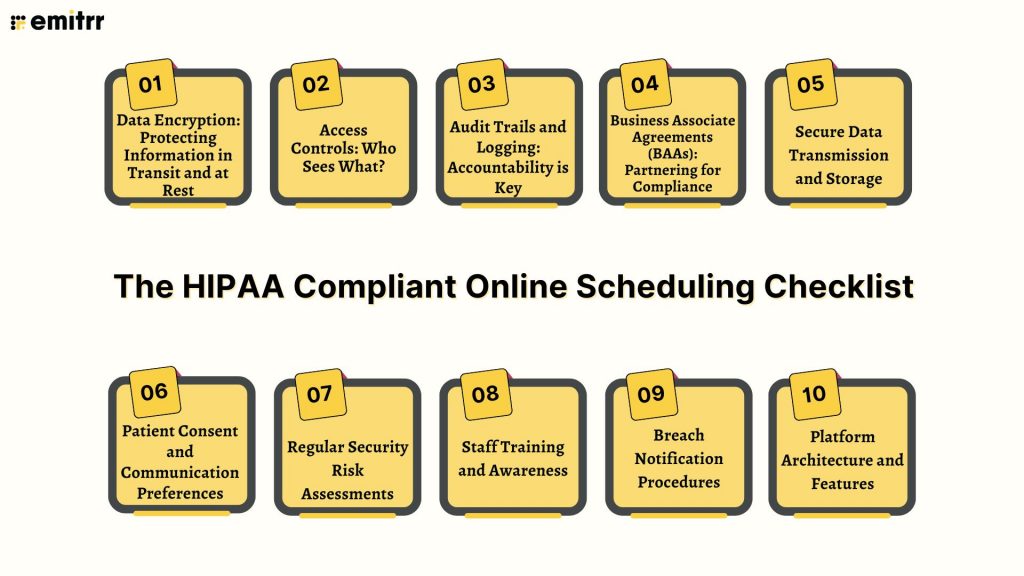
Navigating HIPAA can seem daunting, but by breaking it down into key areas, you can build a robust and compliant system.
1. Data Encryption: Protecting Information in Transit and at Rest
Encryption is the cornerstone of data security. It scrambles data so that only authorized parties can read it.
- In Transit: When a patient books an appointment online, their information travels across the internet. This transmission must be encrypted to prevent interception. Look for systems that use Secure Sockets Layer (SSL) or Transport Layer Security (TLS) protocols.
- At Rest: Once the data is stored in your scheduling system’s database, it must also be encrypted. This protects it from unauthorized access if the database itself is compromised.
Actionable Steps:
- Verify that your chosen scheduling software utilizes robust encryption methods for all data, both during transmission and while stored.
- Ensure any third-party integrations (like payment gateways or EHR systems) also meet stringent encryption standards.
2. Access Controls: Who Sees What?
Not everyone in your organization needs access to all patient information. HIPAA’s Privacy Rule emphasizes the “Minimum Necessary” principle, meaning individuals should only have access to the PHI they need to perform their job functions.
- Role-Based Access: Your scheduling system should allow you to assign different permission levels based on job roles. For example, a front desk receptionist might need access to appointment schedules, while a billing specialist needs access to payment information, and a clinician needs access to specific patient health details related to their appointment.
- User Authentication: Strong password policies, multi-factor authentication (MFA), and regular reviews of user access are crucial.
Actionable Steps:
- Implement role-based access controls within your scheduling software.
- Establish and enforce strong password policies and consider implementing MFA.
- Regularly audit user accounts and permissions, removing access for former employees immediately.
3. Audit Trails and Logging: Accountability is Key
HIPAA requires covered entities to maintain audit logs that record activity within their systems. This helps track who accessed what information, when, and why.
- Comprehensive Logging: Your system should log all access to PHI, including logins, logouts, data modifications, and deletions.
- Log Retention: Establish policies for how long these logs are retained, ensuring they meet HIPAA requirements and your organization’s needs.
Actionable Steps:
- Ensure your scheduling software provides detailed audit logs.
- Configure the system to capture all relevant user activities.
- Develop a clear policy for log retention and review.
4. Business Associate Agreements (BAAs): Partnering for Compliance
If you use any third-party vendors or software that handles PHI on your behalf—including your online scheduling platform—you must have a signed Business Associate Agreement (BAA) with them. This legally binding contract outlines the responsibilities of the vendor in protecting PHI.
- Vendor Due Diligence: Thoroughly vet any potential scheduling software providers. Ask about their HIPAA compliance practices, security measures, and willingness to sign a BAA.
- Clear Responsibilities: The BAA should clearly define how the vendor will protect PHI, report breaches, and cooperate with your compliance efforts.
Actionable Steps:
- Identify all third-party vendors that handle PHI.
- Ensure you have a signed BAA with your online scheduling provider and any other relevant vendors.
- Review BAAs carefully to understand vendor obligations. Platforms like Emitrr offer Business Associate Agreement (BAA) Support as part of their commitment to compliance.
5. Secure Data Transmission and Storage
Beyond encryption, the overall security of data transmission and storage is paramount.
- Secure Servers: Ensure your scheduling data is hosted on secure servers with robust physical and network security measures.
- Regular Backups: Implement a reliable backup and disaster recovery plan to prevent data loss.
Actionable Steps:
- Confirm that your scheduling provider uses secure hosting environments.
- Understand their backup and disaster recovery procedures.
6. Patient Consent and Communication Preferences
HIPAA grants patients rights over their health information, including how it’s communicated.
- Consent Management: Your system should facilitate obtaining and managing patient consent for various communication methods (e.g., appointment reminders via text, email).
- Opt-Out Options: Patients must have a clear and easy way to opt-out of receiving communications. This is a critical aspect for any online scheduling for therapists or similar practices.
- Communication Channels: Ensure that any communication channel used for appointment reminders or follow-ups is secure and HIPAA compliant. Standard SMS messaging is generally not considered secure for transmitting PHI.
Actionable Steps:
- Integrate consent management into your scheduling workflow.
- Provide clear opt-out mechanisms for patients.
- Use secure communication channels for all patient outreach.
7. Regular Security Risk Assessments
HIPAA mandates that covered entities conduct regular risk assessments to identify potential vulnerabilities to PHI.
- Identify Threats: Regularly assess potential threats and vulnerabilities to the confidentiality, integrity, and availability of electronic PHI.
- Mitigate Risks: Develop and implement plans to mitigate identified risks.
Actionable Steps:
- Schedule and conduct periodic security risk assessments of your online scheduling system and related processes.
- Document your assessments and the steps taken to address identified risks.
8. Staff Training and Awareness
Technology is only one part of the equation; your staff plays a crucial role in maintaining HIPAA compliance.
- Comprehensive Training: Ensure all staff members who interact with the scheduling system or patient data receive thorough HIPAA training.
- Policy Understanding: Staff must understand your organization’s policies regarding PHI privacy, security, and breach reporting.
Actionable Steps:
- Implement a mandatory HIPAA training program for all relevant staff.
- Conduct regular refresher training sessions.
- Ensure staff understands how to use the scheduling software securely.
9. Breach Notification Procedures
Despite best efforts, breaches can happen. Having a clear plan for responding to and reporting breaches is a HIPAA requirement.
- Incident Response Plan: Develop a detailed incident response plan that outlines the steps to take in the event of a suspected or confirmed data breach.
- Timely Reporting: Understand the timelines and requirements for notifying affected individuals, the Department of Health and Human Services (HHS), and potentially the media, as mandated by the Breach Notification Rule.
Actionable Steps:
- Create and document a clear breach notification procedure.
- Train staff on what constitutes a breach and how to report it internally.
10. Platform Architecture and Features
The design of the scheduling software itself matters significantly.
- HIPAA-Compliant Design: Choose a platform specifically designed with HIPAA compliance in mind. Features like secure messaging, audit logs, and access controls are fundamental.
- Integration Security: If your scheduling software integrates with other systems (like Electronic Health Records – EHRs or Practice Management Systems – PMS), ensure these integrations are also secure and HIPAA compliant. For example, online scheduling software for medical device companies often requires careful integration planning.
Actionable Steps:
- Select a scheduling solution that explicitly states its HIPAA compliance and offers relevant security features.
- Verify the security of any integrations with other healthcare systems.
Frequently Asked Questions (FAQs)
A1: Generally, no. Standard, non-secure online forms or basic scheduling widgets that transmit data over unencrypted channels or store PHI without proper safeguards are not HIPAA compliant. HIPAA requires specific security measures like encryption and access controls.
A2: A BAA is a contract between a covered entity (like your healthcare practice) and a business associate (a vendor handling PHI on your behalf). You need one for your scheduling software because the software provider is handling your patients’ PHI. The BAA ensures they are legally obligated to protect that information according to HIPAA rules.
A3: It is highly unlikely that a free scheduling tool will meet HIPAA requirements. Free tools often lack the necessary encryption, access controls, audit logging, and the willingness to sign a BAA. Using one would put your practice at significant risk of non-compliance.
A4: Any information that can identify a patient and relates to their health, healthcare, or payment for healthcare is PHI. This includes names, contact information (phone, email), date of birth, appointment type, reason for visit, insurance details, and any medical notes entered.
A5: While HIPAA compliance adds necessary safeguards, a well-implemented system can enhance patient experience. Patients appreciate secure platforms where they can easily book appointments, receive timely reminders, and manage their preferences, all with the assurance that their data is protected. The system should balance ease of use with robust security.
A6: Penalties can be severe, ranging from significant fines (potentially millions of dollars annually, depending on the violation category and culpability) to legal action, criminal charges in cases of intentional misuse, mandatory corrective action plans, and severe reputational damage. The Office for Civil Rights (OCR) enforces these penalties.
Conclusion
Implementing HIPAA-compliant online scheduling is not just a legal obligation; it’s a crucial step in building and maintaining patient trust in the digital age. By diligently following this checklist—focusing on encryption, access controls, BAAs, and ongoing training—you can create a seamless, efficient, and secure scheduling process. Remember, investing in a HIPAA-compliant solution is an investment in the privacy of your patients and the long-term integrity of your practice. Ensure your chosen tools, whether for general practice or specialized fields, prioritize security and compliance above all else.


 4.9 (400+
reviews)
4.9 (400+
reviews)