
 4.9 (400+
reviews)
4.9 (400+
reviews)
Introduction
Imagine you’re running a small business and waiting for an important client call, but you also need to step out for a quick delivery. What do you do? Just use call forwarding to send that call to your mobile, so you don’t miss it.
Now, think of another situation – a customer calls your main line but really needs help from billing. That’s when call transfer steps in. You can connect them to the right person without making them hang up or call again.
And for those late-night or weekend calls when no one’s around? Call diverting has your back. It automatically sends calls to an on-call teammate or voicemail, so every customer still gets attention.
These tools might sound alike, but they each work a little differently. In this blog, we’ll break down call forwarding vs call transfer vs call diverting, how they work, their benefits, and how to pick the best setup for your business.
What Is Call Forwarding?
Call forwarding is basically your “don’t miss this call” button. Instead of letting your desk phone ring endlessly, it sends the call to another number you choose, your mobile, a teammate, or even voicemail. You can set it up ahead of time or switch it on whenever you step out. It’s perfect for those moments when you’re in a meeting, traveling, or just away from your desk but still want to stay connected.
Think of it like a smart assistant for your phone. When someone calls, the system follows your rule and instantly sends the call to the right place. You can turn it on or off anytime, usually with a short call forwarding code like *72 to start and *73 to stop. In VoIP apps, it’s even easier with a quick toggle in settings. It all happens quietly in the background, so your calls always reach someone who can answer.
What Is Call Transfer?
Call transfer helps when you’ve picked up a call, but someone else needs to handle it. It’s like saying, “Let me connect you to the right person.” Instead of asking the caller to call again, you just press a button and send it to your teammate or another department. It’s great when you can’t help but know who can.
There are two kinds. A cold transfer sends the call straight away – fast, but not very personal. A warm transfer is nicer. You talk to your teammate first, explain the situation, and then connect the caller. It feels smoother and saves the customer from repeating themselves. Either way, it makes your business sound organized and easy to reach.
What Is Call Diverting?
Call diverting is like your phone’s backup plan. If you can’t answer, it automatically sends the call somewhere else. Maybe you’re already on another call, away from your desk, or done for the day, it’s got you covered. You set the rules, like “If busy, send to voicemail” or “If I don’t answer in three rings, send it to my assistant.” It’s basically your way of saying, “No call gets left behind.”
Think of call diverting as a smarter version of call forwarding. It only turns on when certain things happen. For example, if a doctor is already talking to one patient, the next call might go straight to a nurse instead of waiting. You can easily turn it off or change where calls go. It’s simple to manage with a quick setting or code. The idea is easy: make sure someone always picks up, even if you can’t!

In-Depth Analysis of Call Management Features
Knowing the terms is step one. Knowing when to use call forwarding vs call transfer vs call diverting is what actually helps your team. Here’s your practical guide to make calls flow better. You’ll see where each one shines, where it struggles, and how to mix them for a smoother caller experience.
Call Forwarding
When you enable call forwarding, you’re essentially telling your phone system: “Whenever a call comes in to this number, instantly route it to another number.” It’s a straightforward feature with one main goal – to keep you reachable. However, like any tool, it has its upsides and downsides.
Benefits of Call Forwarding
- Never miss important calls: You don’t have to worry about missing calls when you’re not at your desk. Just forward them to your mobile, home phone, or wherever you are. This way, customers always reach someone instead of voicemail. It keeps things smooth and shows people you’re always available.
- Flexibility for remote work and travel: Call forwarding moves with you. Whether you’re working from home, on the road, or grabbing lunch, your calls can find you. For example, a salesperson can have office calls ring on their mobile so they never miss a client, even while traveling.
- Coverage after hours: Forwarding helps when the office is closed, too. You can send calls to an on-call teammate or an answering service at night or on weekends. That way, customers still get help, and your business stays responsive around the clock.
- Custom Scheduling and Rules: Many systems allow conditional or scheduled call forwarding. You might forward calls only after a certain number of rings, or only during certain times of day. This means you can tailor how calls are handled. For example, time-based forwarding could send calls to your cell phone only after 5 PM, or forward calls to a colleague whenever you activate “Do Not Disturb.” Such customization helps manage your workload and work-life balance.
- Improved Professional Image: By ensuring that a person answers, call forwarding can make your business appear more professional and responsive. Clients won’t have to chase you down. The call will automatically reach someone who can help. It’s certainly more impressive than having the phone ring endlessly or always going to voicemail. In a customer’s eyes, quick response = good service.
- Use of Single Contact Number: Call forwarding lets you advertise one primary phone number and still reach multiple devices. This is useful for branding. Your customers dial one number, unaware that behind the scenes, you might have it forwarded to your cell or to a partner. It simplifies your contact info and can even facilitate having a local presence in multiple regions (e.g., forwarding a local number in one city to your main office elsewhere). All incoming calls funnel through one gateway, then forward to wherever you need them.
Drawbacks of Call Forwarding
- Easy to forget turning it off: A common mistake is leaving call forwarding on after you’re back. You might still have calls going to a coworker or your mobile without realizing it. For example, you forward calls over the weekend, then on Monday, you’re at your desk wondering why it’s so quiet. It’s an easy mix-up that can cause missed calls. Always remember to turn it off when you’re done or set a quick reminder.
- Extra Costs and Charges: Depending on your phone service, call forwarding can incur additional charges. In many cases, when a call is forwarded to another number (especially to a mobile phone or long-distance number), the person who set up the forward pays for the forwarded leg of the call. For instance, if you forward your office landline to your cell phone, your landline carrier might charge you for each minute of the forwarded call as if you were making the call from the office to your cell. International call forwarding can be even more restricted or costly. For businesses on a tight budget, these costs are something to watch.
- Caller Confusion or Lack of Context: When a call is forwarded, the caller usually isn’t explicitly informed of it. They dialed one number and someone answered, so from their perspective, they reached who they were trying to call (even if it actually rang your cell). However, this can sometimes cause confusion. For example, say you forward your office line to an external call center without telling customers, when they call expecting you and someone from a call service answers with a different tone or greeting, it might throw them off. Also, if you forward to a personal phone, you might answer differently (no formal greeting), which could seem unprofessional if the caller isn’t expecting it. In short, forwarded calls may catch either party off guard if not handled smoothly.
- Reliance on a Single Fallback: Call forwarding usually goes to one predetermined number at a time. Most systems forward to one number, not a list simultaneously, unless you have a multi-ring feature. This means if that one fallback person/number also doesn’t answer, the call could still be missed. Imagine you forward all your calls to a colleague while you’re in a meeting, but that colleague steps away from their desk, now calls might ring out or hit voicemail anyway. Without a more complex setup like sequential forwarding to another backup or a group ring, a single-point forward can become a single point of failure.
- Difficulty Tracking Call Origin: When you receive a forwarded call, some systems will indicate it’s a forwarded call (with a special ring or a notification), but others might not. You could answer thinking it’s a direct call to your phone, only to realize it was forwarded from another line. This may make it tricky to answer appropriately. For example, if you have multiple businesses or lines forwarded to one phone, you might not be sure how to greet (“Which business did they call?”). Without clear labels or separate ringtones, managing forwarded calls from multiple sources can get confusing.
- Setup Complexity for the User: Although turning on basic call forwarding is usually simple, like a code or a quick setting, managing advanced forwarding rules like conditional forwards or schedules can be a bit technical for some users. You might need to log into a phone system portal or remember various star codes for different scenarios. There’s a small chance of setting it up wrong. If you enter the wrong number, your calls might go to someone else or nowhere at all. Some people may also find the setup tricky without help.
Call Transfer
Call transfer is the go-to feature for live call handling in many organizations. It empowers employees to route callers to the appropriate person or department in real-time. As we’ve discussed, it’s all about getting the caller to the right place after the call has started. Here’s what makes call transfers great and what challenges they might bring.
Benefits of Call Transfer
- Connecting Callers to the Right Person Fast: The primary benefit of a call transfer is that the customer can quickly reach the person best suited to assist them, without having to hang up and call a different number themselves. This helps solve issues faster. The first person who answers can quickly send the caller to someone who can actually help, like a tech expert. The result is a faster answer to the customer’s query and less runaround.
- Improved Customer Experience with Warm Transfers: Using warm transfers (where the caller is introduced or context is given to the next agent) means the customer doesn’t have to repeat their issue from scratch. The new agent already has some background by the time they say hello. This personal touch makes the caller feel taken care of and not “passed around” blindly. It’s an excellent way to deliver personalized service, as the conversation continues with context rather than starting over. For example, “Hi, I’ve got John on the line who needs help with his account setup. I’ve told him you’ll take care of him next.” John then speaks to the next rep, who is up to speed. That’s a smoother experience than a cold transfer, where John would have to re-explain everything.
- Streamlined internal workflows: Call transfers help teams work better. Front-line staff handle simple questions and send tricky ones to the right person. Agents aren’t wasting time on issues they can’t resolve. They transfer those calls to someone who can. It’s a form of smart call routing on the fly, often reducing overall handling time since the customer gets to the expert directly rather than bouncing around or waiting.
- No Need for Caller to Redial Different Numbers: In businesses without a transfer feature, you might have to ask a caller to call a different number for a different department. That’s obviously inconvenient for the caller. With call transfer, you eliminate that step entirely, it’s a seamless switch handled internally. From the caller’s perspective, your company is taking responsibility for getting them to the right person. It feels cohesive, like all departments are connected, which they are, through the phone system. This contributes to a more professional and unified image of your business.
- Option for Automated Transfers (IVR/Auto-Attendant): While this strays into related tech, it’s worth noting: many phone systems use an auto-attendant (“Press 1 for Sales, 2 for Support…”) which effectively auto-transfers the call to the chosen department. This is a huge benefit for larger teams, as it gets callers directly to the right group without a human receptionist. In essence, it’s the call transfer feature working in tandem with automation. Customers get self-service routing and quicker access to the right team, which can reduce wait times and lighten the load on reception.
- Better Team Collaboration: When used properly, call transfers encourage a collaborative environment where helping the customer is a shared effort. For instance, an agent can do a consultative transfer, conference in a supervisor for a moment to discuss the issue, then drop off, leaving the supervisor on the call. This not only helps the customer get a resolution but also serves as on-the-job learning for the first agent who hears how the supervisor handles it. In a way, transferring calls can foster teamwork, as colleagues rely on each other’s expertise to resolve issues. Everyone is involved in customer care, not just siloed in their own calls.
Drawbacks of Call Transfer
- Customer Frustration if Overused or Poorly Handled: We’ve all been there – being transferred from one person to another, telling your story over and over, feeling helpless. If a caller gets bounced through multiple transfers, their frustration rises with each hand-off. Too many transfers, or transfers to the wrong person, can greatly irritate customers. In worst-case scenarios, the call might ping-pong between departments. By the time the caller lands in the right spot, they’re understandably upset. Minimizing the number of transfers and ensuring the first transfer is the correct one is important to avoid this. A bad transfer experience can undo the goodwill of an otherwise helpful support call.
- Dropped or Failed Transfers: There’s always a technical risk when transferring a call that something might go wrong. The call could disconnect during the transfer process (due to a mistake dialing the extension, a glitch in the system, etc.), leaving the customer suddenly off the line. This is obviously a bad experience, as they then have to call back and start over. Even if the call doesn’t drop, if the target person doesn’t answer the transferred call, it might go to their voicemail or bounce back to the operator. The caller could end up in limbo, not knowing what’s happening. Proper training and good phone systems mitigate these risks, but they do happen on occasion. It’s always a good practice to confirm that the transfer was successful or have a backup plan.
- Requires Staff Training and Coordination: Call transferring isn’t complicated, but doing it well does require training and coordination. Staff need to know how to transfer on their specific phone system (which buttons to press, etc.), and also when it’s appropriate to transfer versus handle a call themselves. There should be protocols: for example, get the caller’s consent before a transfer, or always provide notes to the next agent in a warm transfer. New employees might fumble with the transfer procedure or forget to announce the call, resulting in awkward silence when the next person answers. Training materials, practice sessions, and clear internal directories are needed to use call transfers effectively. Until everyone is up to speed, there can be a learning curve.
- Burden on Certain Team Members (Burnout Risk): If one or two people are the go-to for transferred calls, they might get overloaded, especially during peak times. For example, imagine a support team where every difficult call gets transferred to that one senior expert. That expert could quickly burn out from constantly taking escalations, and if other team members start relying too heavily on transfers, it might reduce their incentive to learn broader skills. Additionally, some team members might get calls transferred to them even outside their working hours if boundaries aren’t set. It’s important to distribute calls reasonably and ensure people aren’t always in “catch all” mode. Proper scheduling and perhaps an overflow rotation can help avoid straining a single person.
- Perceived “Passing the Buck”: Sometimes, even a necessary transfer can make a customer feel like they’re being shuffled around. If not communicated well, a customer might interpret a transfer as “this person just didn’t want to deal with me.” This is more about perception than the feature itself, but it’s a drawback to be mindful of. Using positive language can help. However, despite best efforts, some callers just hate being transferred at all, perhaps due to past bad experiences. They might become irritated the moment you mention transferring, even if it’s truly in their best interest. It’s a delicate aspect to manage. So do it in a way that the customer doesn’t feel brushed off.
- Limitations with External Transfers: Not all phone systems easily allow transfers to external numbers. If your system doesn’t support that, you may only transfer within your organization’s extension list. This can be a drawback if a situation arises where you’d love to transfer a customer to, say, a partner company or an after-hours service. Some modern cloud phone systems do allow external transfers, but they may essentially perform it as a new outbound call, which could incur costs or have a different caller ID show up to the person receiving it. In any case, there are occasionally technical constraints on where you can transfer calls, which could limit your flexibility in some scenarios.
Call Diverting
Call diverting is like an autopilot for your incoming calls, kicking in when you’re unavailable. It shares a lot of the benefits of call forwarding but is distinguished by its automatic, condition-based nature. Let’s delve into how call diverting can be a boon for business continuity, and also what to watch out for when using it.
Benefits of Call Diverting
- Reduced Hold Times and Immediate Call Routing: In a busy environment, call diverting can drastically cut down how long a caller has to wait for someone to answer. If your line is busy or you’re in a meeting, the call doesn’t sit idle or queue up indefinitely, it’s immediately sent to an alternate destination that can take it. For example, if a receptionist is on one call and a second call comes in, it could automatically divert to a second receptionist or assistant. The caller gets answered faster, without repeatedly hearing rings or hold music. This quick routing keeps customers from getting frustrated by long waits.
- Fewer Missed Calls: Perhaps the biggest advantage of diverting is ensuring that a call is not missed entirely. Rather than a caller getting a busy signal or giving up after no answer, the system will find someone or somewhere to send that call. Even if it ends up being voicemail, it’s better than the call just not being answered at all. In a call center scenario, features like call divert ensure no call falls through the cracks, every call is either answered by an available agent or diverted to a backup option like another team or a message system. This can maintain a high level of service and capture opportunities that otherwise might be lost.
- Automatic Fallbacks for Better Uptime: Think of call diverting as an automatic backup plan. You set it up once, and it works in the background without needing manual intervention for each call. This is great for business continuity. For instance, if an agent forgets to manually forward their phone when stepping out, call divert rules will still rescue the call. It’s a safety mechanism that doesn’t rely on perfect human operation every time. If you have multiple offices or a distributed team, you can divert calls between locations.
- Customization with Prioritization: Modern systems allow intelligent call divert setups. You might prioritize certain calls to divert to specific people. For example, you could set VIP clients’ numbers to divert directly to a manager’s phone if the main line is busy, while other calls divert to a general queue or voicemail if no one’s free. Using a virtual receptionist or AI-driven rules, you can “smart divert” calls based on criteria, like diverting less urgent inquiries to voicemail but immediately sending important ones to an on-call staff. This kind of setup can significantly improve customer satisfaction because important calls get priority attention.
- Great for After-Hours and Emergencies: Call diverting shines when it comes to outside normal schedule scenarios. You can set up diverts for after-hours so that, say, calls automatically go to an answering service or a manager’s mobile. If your business promises 24/7 availability, divert rules can ensure that when the clock hits 5 PM, calls seamlessly reroute to the night team. Similarly, in emergencies, you could activate a divert so calls go elsewhere (maybe to employees’ mobiles or another branch) so that operations continue. It provides resilience, and your callers might not even realize something is amiss because their calls are still being answered one way or another.
- Minimized Need for Manual Monitoring: Because call diverting is set-it-and-forget-it, it frees you from having to constantly monitor and manually forward calls. Say you’re expecting an important call, but you also need to jump into a lengthy meeting. Instead of constantly watching your phone, you can relax knowing that if that important call comes while you’re busy, it will be diverted to your assistant. This reduces anxiety about missing calls and allows teams to focus on their tasks, with confidence that the phone system has their back. In essence, call diverting automates your call handling in a smart way, letting you concentrate on work without worrying that you’re leaving callers unattended.
Drawbacks of Call Diverting
- Impersonal or Confusing for Callers: Because call diverting is automatic, callers might experience a sudden redirect that could be jarring if not handled smoothly. For example, a caller might hear a few rings, then a click or brief pause, and suddenly someone else answers. If they weren’t expecting that, it might confuse them. In some cases, a divert to voicemail might play a system message like, “The person you are calling is unavailable, diverting your call…” which can sound a bit impersonal. Ideally, you’ll have a custom message during divert, but not all systems allow that level of customization.
- Dependency on Correct Configuration: Automatic is great when configured correctly, but if the divert rules are set up wrong, it can cause havoc. Imagine you accidentally set your divert target to the wrong phone number. All your calls might be sent to some random person or a non-existent line! Or if two lines are set to divert to each other under certain conditions, calls could bounce back and forth without anyone answering. These misconfigurations can be hard to detect until someone complains that they can’t reach you. It requires careful setup and occasional testing. If you rely on diverting, you should periodically verify that it’s working as intended.
- May Lead to Over-Reliance on Voicemail: If not managed well, call diverting can sometimes just end up diverting many calls to voicemail, which, while better than nothing, isn’t as good as a live answer. For example, some businesses set divert “if busy or no answer, send to voicemail.” If they are frequently busy, a lot of customers might end up in voicemail jail. That could frustrate those who don’t want to leave a message. In such cases, a better approach might be to divert to a secondary person or a call group first, and then to voicemail as a last resort. But if a company just uses voicemail as the catch-all divert, they should be diligent in returning those voicemails promptly.
- Notification and Tracking Challenges: With calls diverting all over, the original person might not always know how many calls they missed or diverted. For instance, if your desk phone is set to divert when you’re on a call, you might never know that 5 other calls came in during your long phone meeting and were sent to someone else. Unless the system provides notifications, you might be unaware of the demand or unable to personally follow up. This can be an issue for data tracking and personal accountability. It’s important that your system or process includes some way to capture that information so nothing falls through the cracks in terms of follow-up.
- Inconsistent Caller Experience: If calls are diverted to different people or places based on availability, callers might get varying levels of service. One time they call, they reach you; another time, they reach your colleague, who might have a different style or not have the same information at hand. Or a call gets diverted to a completely different office that doesn’t know the caller’s history. While the trade-off is getting answered versus not, it’s something to consider: a diverted call might not always equal the quality of conversation that the intended recipient could provide. Businesses can mitigate this by training all who might receive diverted calls to handle common queries, or by ensuring notes/CRM info pops up no matter who answers.
- Technical Limitations: Some older phone systems have limitations on diverting. For instance, if you divert your desk to your cell, and then your cell is off, the call might not re-divert again. In other words, there might not be a cascade – the call tries the first divert and then stops. Modern systems are more flexible, but it’s worth noting that not all scenarios can be covered. Also, too many simultaneous diverted calls could strain resources; e.g., if 50 calls all divert from one number to another, that target might be swamped. Overall, ensure your system’s divert feature meets your needs and doesn’t have hidden limits like “no divert after X hops” or lack of support for diverting to external numbers.
Side-by-Side Comparison of Call Forwarding, Call Transfer, and Call Diverting
To make it easier to grasp the distinctions, here’s a comparison table that highlights how call forwarding, call transfer, and call diverting differ on key aspects.
| Aspect | Call Forwarding | Call Transfer | Call Diverting |
| When It Happens | Before the call is answered (pre-emptive reroute of incoming calls). | During an active call (mid-conversation hand-off to someone else). | When a call is not answered or the line is busy (automatic reroute on conditions). |
| How It’s Initiated | Set up by the user in advance or on demand through phone settings or a code. Once active, it automatically forwards calls without further user action. | Initiated manually by the person handling the call, using the phone system’s transfer function. It often requires pressing a transfer button or extension dial. | Set up by the user/admin as a rule. The phone system triggers the divert automatically when the criteria are met. No answer after X rings, line busy, out of hours, etc. |
| User Interaction | No live interaction needed at the time of call, the caller is directly forwarded. The caller might not even realize the call was forwarded, as it typically rings and someone answers on the other end. | Requires intervention by the call handler: they usually inform the caller, “let me transfer you” and then perform the transfer. The caller may be placed on hold briefly during the process. | No direct interaction by the user at the time of divert. The system handles it. The caller experiences an automatic redirect, like a brief hold music or message, and then the call is answered by the alternate destination or voicemail. |
| Primary Purpose | Ensure calls reach somebody or a specific alternate number when the original line owner can’t take them. It’s about maintaining reachability by redirecting calls to where you are. | Connect the caller to the appropriate person/department after initially reaching the wrong or less ideal point. It’s about getting the caller help from the right resource in real-time. | Ensure no call goes unanswered or gets a busy signal. It’s about backup plans and coverage, routing calls to another destination if the primary receiver is unavailable, to improve response rates. |
| Common Scenario | A small business owner is out of the office for the afternoon, so they forward their office number to ring on their mobile phone. When a client calls the office, the call goes straight to the owner’s cell, and they can answer it on the go. | A customer calls a company’s main line with a technical question. The receptionist answers, then uses call transfer to send the call to a tech support specialist who can resolve the issue. The customer seamlessly moves from speaking with the receptionist to speaking with the tech expert. | A sales representative is on another call when a second call comes in. After 4 rings with no answer, the incoming call is automatically diverted to a fellow sales rep’s phone or to a voicemail so that the customer doesn’t keep ringing or get a busy tone. |
| Setup & Configuration | Typically configured via phone settings or carrier service. Can often be toggled on/off quickly (e.g., using a *72/*73 code or an app toggle). Advanced options allow scheduling or conditional forwards, but the basic setup is one number to forward all calls to. | You don’t need to set much up in advance. Just know how to use the transfer option on your phone or app. Having a list of extensions helps. Some systems also let you choose how transfers work, like blind or attended, or turn the feature on or off. | You set it up once in your phone or system settings. Just choose when calls should divert and where they should go (another number or voicemail). After that, it works automatically. If you want to change it later, just update the rules. |
| Notification/Indicators | In some systems, the forwarded line might give a short ring or a special dial tone to indicate forwarding is active. The person receiving the forwarded call might see the original dialed number or an indicator that it’s a forwarded call. | The person performing the transfer will notify the caller. Some systems play a hold music or message like “Please hold while I transfer your call.” The new recipient might see the caller ID of the original caller, but might not know it’s a transfer unless the transferring party or system announces it. | The caller might hear a short tone or message, or nothing at all. It usually just feels like someone else answered. The diverted person may see where the call came from, while the original line might show a missed call or stay silent. It all happens automatically in the background. |
| Costs | Forwarding calls to outside numbers can sometimes cost extra. In most VoIP for business systems, it’s already included, so you won’t pay extra for internal or local forwards. Always check your plan to avoid surprises. | Generally, no extra charge besides the normal call. It’s like transferring within the phone network. If you transfer to an external number, it could effectively create a new call from your system to that number (which could have a cost). But transfers within a company PBX or cloud service are typically free/included. | Usually treated as forwarding by the phone network. If diverted to an external number, the business may incur charges similar to call forwarding. If diverted internally or to voicemail, no significant extra cost. The key difference is it’s triggered by a condition, but billing-wise, it can be similar to call forwarding if an external redirect happens. |
How to Choose the Right Option for Your Business?
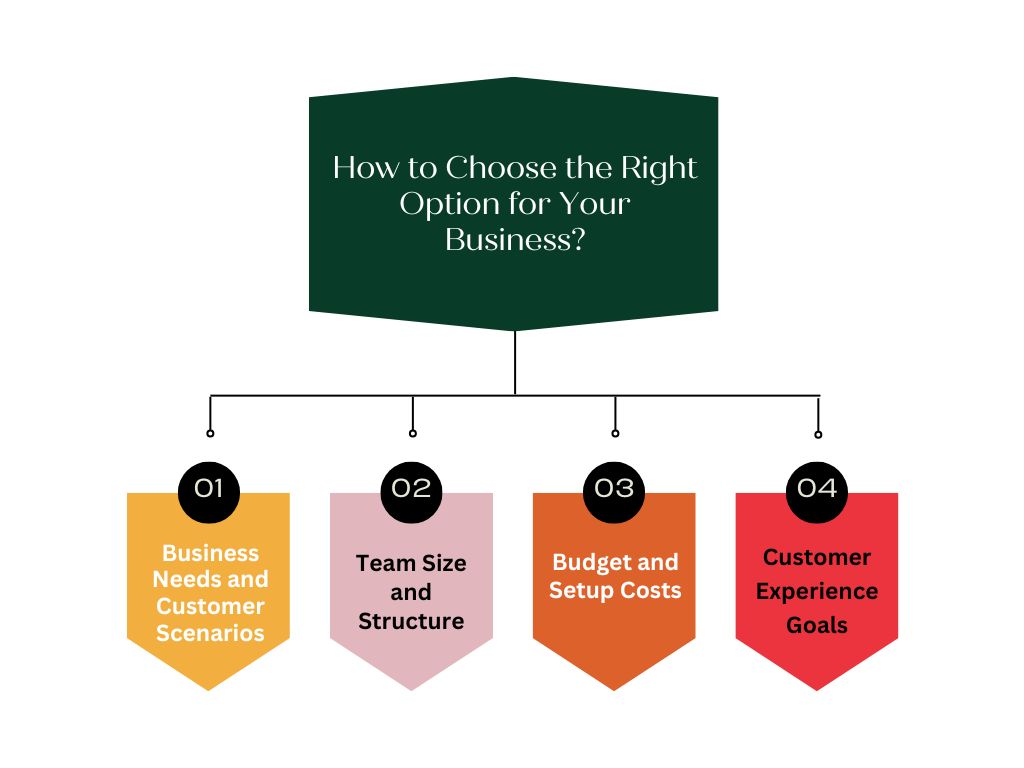
To figure out the best fit for your business, let’s look at four simple factors that shape how your calls should be managed.
Business Needs and Customer Scenarios
Start by thinking about when and why your customers call. Are they trying to reach one general line, or do they need specific people like sales or billing? If your business gets lots of specialized calls, call transfer is a must. It lets the first person who answers send the caller to the right expert quickly.
But if you’re a small team or a solo business owner, call forwarding or diverting works better, it keeps calls coming to you or your backup automatically. Also, think about what happens when you miss a call. If missed calls mean missed revenue, set up call diverting to route them to someone else or voicemail. And if you want to avoid unnecessary calls altogether, features like call barring can block unwanted numbers from interrupting your workflow.
Team Size and Structure
Your team size decides which call management feature makes the most sense. For small teams, call forwarding is a lifesaver. It helps your main number reach whoever is free. You probably won’t need formal transfers, just a quick pass or redirect. As your team grows, call transfer becomes essential for sending customers to the right department. Mid-sized teams often use a mix of transfers and forwarding to balance customer handling.
For large enterprises, all three come together – forwarding for mobility, transfers for department routing, and diverting for load balancing. Bigger setups may also use call barring to control which calls reach certain extensions or departments. The goal is simple: whoever can help should get the call first, without chaos or confusion.
Budget and Setup Costs
If you’re on a tight budget, start with the basics. Most carriers include call forwarding for free, though using it might cost extra per minute if the call is redirected to another line. Small businesses often use a simple call forwarding code or settings on their mobile phones to stay connected on the go. For mid-sized teams, VoIP systems give you more control with transfers, diverts, and even call barring, all in one subscription.
Larger companies can invest in full phone systems that manage complex routing rules and diverting options automatically. Whatever you pick, make sure it’s easy for your team to use. A cheaper system that’s too confusing can cost more in missed calls and mistakes than a slightly pricier one that just works.
Customer Experience Goals
Your call setup should match the experience you want to create for customers. If personal touch is your focus, use call forwarding and diverting so a real person always answers instead of voicemail. If speed is your top goal, rely on call transfer to get callers to the right department immediately. For 24/7 coverage, set up diverting after hours so customers can still reach on-call staff. Want fewer spam or irrelevant calls? That’s where call barring helps. It ends up blocking unwanted numbers, keeps lines open for real customers.
In the end, it’s all about balance: quick responses, minimal transfers, and ensuring every call reaches someone who can help.
Best Call Management Options for Every Business Type
Every business handles calls differently. What works for a five-person team might not suit a 500-person company. Here’s how to choose what suits best depending on your business type and setup.
Small Businesses and Startups
Smaller teams need simplicity and reachability above all. Usually, one main number handles everything. When a customer calls, someone must answer fast.
- Best setup: Use call forwarding to route calls from your business line to your mobile or another teammate’s phone. Add basic call diverting to send unanswered calls to voicemail or a backup number.
- When to transfer: If a colleague is better suited for the query, do a quick transfer or simply hand the phone over.
- Keep it easy: One number, one goal, make sure someone picks up.
- Extra tip: Use call barring to block spam or telemarketing calls that waste your time.
This setup keeps things personal and stress-free. Even if you’re out of the office, customers still reach a real person instead of a missed call tone.
Mid-Sized Businesses
Once your team grows, structure becomes essential. You may now have departments or a front desk handling multiple lines.
- Best setup: Combine call transfer with intelligent forwarding and diverting. Let receptionists or auto-attendants answer and transfer calls to the right department.
- Use call forwarding: For employees often on the move, forward desk phones to mobiles.
- Use call diverting: For overflow or missed calls, divert to backup teams or voicemail.
- Use call barring: Limit internal lines or block unwanted external calls to reduce distractions.
This mix balances efficiency with professionalism, callers feel cared for and never stuck waiting or redialing.
Large Enterprises
Big businesses juggle high call volumes and multiple locations, so automation is key.
- Best setup: Use advanced call diverting through automatic call distribution (ACD) and skill-based transfers.
- Add smart transfers: Route callers to the right agent or department instantly.
- Use forwarding for mobility: Executives can forward calls to assistants or mobiles.
- Add redundancy: If one center goes down, divert calls automatically to another.
- Call barring: Control who can make or receive certain calls, keeping systems secure.
This setup keeps large-scale operations running smoothly without letting customers feel lost in the system.
Remote and Hybrid Teams
When your team works from anywhere, your phone system must travel with them. Cloud systems make this easy.
- Best setup: Use cloud-based call forwarding so calls reach employees no matter where they’re logged in.
- Add diverting: If someone’s offline or unavailable, automatically send the call to another teammate.
- Use transfers: Pass calls between remote staff like they’re sitting in one office.
- Smart coverage: Divert calls across time zones for 24/7 service.
- Add call barring: Block unwanted numbers to keep remote workers focused.
Done right, customers won’t even notice your team is remote. The call just reaches the right person, every time.
Why Is Emitrr the Best Provider for Call Management Solutions?
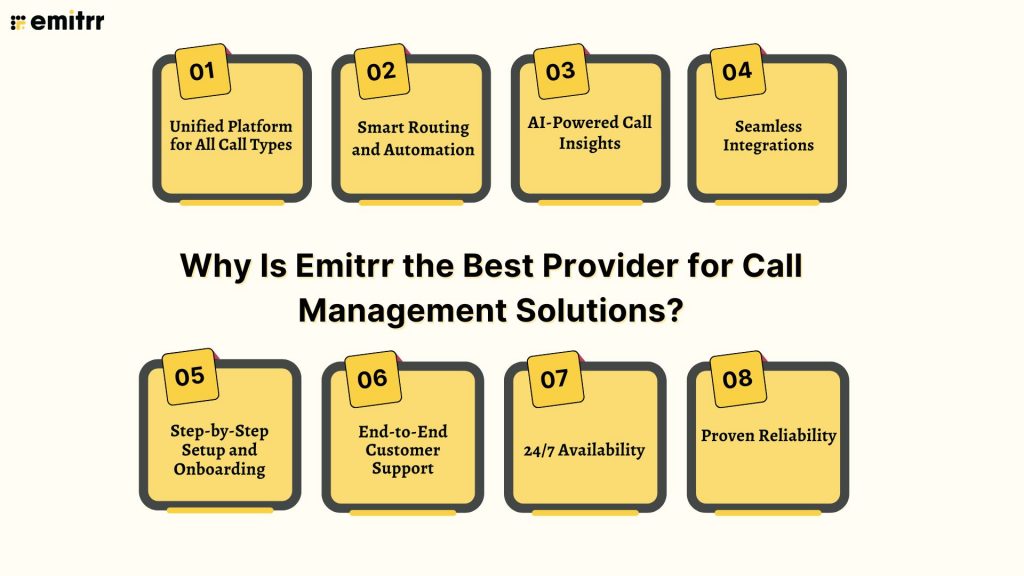
Emitrr is one call management system that can handle forwarding, transfers, and diverting without the complexity. It brings everything into one simple, intelligent platform that works smoothly across teams, devices, and customer scenarios. Here’s how it stands out.
Unified Platform for All Call Types
Emitrr gives you one simple place to manage every type of call. No need to jump between different apps or complicated tools. You can set call forwarding rules, transfer customers to the right department, or review missed calls right from one dashboard. The interface is simple enough that anyone on your team can use it without training. Even making tweaks and changes is easy. For example, it’s easy to figure out how to stop call forwarding or tweak your routing in just a few clicks. It’s an effortless, all-in-one setup that keeps your business running smoothly without any tech stress.
Smart Routing and Automation
Emitrr takes routing to the next level with smart automation. You can set rules so that calls go exactly where they should, to the right person, at the right time. For example, if one line is busy, the system can divert calls to another team member automatically. You can also set time-based or skill-based routing, meaning calls after hours can go to an on-call agent or to voicemail. This ensures your customers never hit a dead end. All of this is done with simple drag-and-drop controls, no IT support needed. It’s automation made easy for busy teams.
AI-Powered Call Insights
Emitrr doesn’t just handle calls. The best part is that it learns from them. It’s built-in AI phone system listens, analyses, and turns conversations into useful insights. You can see patterns like how often calls are transferred or when most missed calls happen. It can also detect tone and keywords to help improve your team’s responses. This makes every call a learning opportunity. Over time, these insights help you improve customer experience and reduce missed calls. It’s not just call management, it’s smarter decision-making powered by AI.
Seamless Integrations
Emitrr connects perfectly with your existing tools like CRMs, helpdesks, and messaging apps. When someone calls, their information pops up instantly if they’re already in your system. If you transfer the call, that context goes along too, no repeating details. After the call, logs and notes can sync automatically with your CRM or ticketing system. You can even get missed call notifications in Slack or Teams. It turns your phone system into a connected part of your workflow instead of a separate task.
Step-by-Step Setup and Onboarding
Setting up Emitrr is simple, even if you’re not tech-savvy. The platform guides you through every step, from adding numbers to setting up forwarding rules. The menus are clear, and most features just need a quick toggle. You can also record voicemail greetings, create routing paths, and port existing numbers easily. If you ever get stuck, the support team walks you through it. You’ll go from sign-up to active in no time, with everything working smoothly behind the scenes.
End-to-End Customer Support
Good support makes all the difference, and Emitrr delivers. Whether it’s a question about setting up a new number or changing your call rules, their team is always ready to help. You can reach them through chat, email, or phone. They don’t just fix problems. They also guide you with best practices and suggestions for better call handling. That means you always have expert help to keep your phone system running smoothly.
24/7 Availability
Emitrr’s cloud-based setup ensures your phones are always up. Even if you’re working late, your system won’t let you down. Calls can come in at any hour, and they’ll still get routed or diverted as planned. This is great for businesses that serve different time zones or have on-call support. And if you ever face an issue at odd hours, there’s likely someone available to help. With Emitrr, your communication never sleeps, and your business stays reachable 24/7.
Proven Reliability
Thousands of users trust Emitrr because it just works! Calls forward correctly, transfers are smooth, and voicemails arrive instantly. It’s tested and proven in real-world conditions, across industries. Businesses that switch to Emitrr often notice fewer missed calls, faster responses, and better team coordination. With Emitrr, you can focus on customers while it quietly handles everything behind the scenes.
How to Set Up Call Forwarding, Transfer, and Diverting with Emitrr
Setting up your call system in Emitrr takes just a few minutes. Here’s a simple step-by-step guide to get you started.
Step 1: Sign Up and Open Your Dashboard
Create your Emitrr account or log in if you already have one. Go to the Call Settings or Phone System tab in your dashboard. From here, select the business number you want to manage. This is where you’ll set up forwarding, diverting, and transfer rules.
Step 2: Set Up Call Forwarding
Find the Call Forwarding option in your settings. Enter the number where you want your calls to go, such as your mobile or a teammate’s phone. You can choose when calls should forward – immediately, after a few rings, or only after hours. Save your changes, and you’re done. You can always change or stop it later if needed by learning how to stop call forwarding in the same settings panel.
Step 3: Add Call Diverting Rules
Next, set what happens when you’re busy or can’t answer. In Emitrr, you can divert calls to voicemail, another number, or even a group line. You can also create time-based rules, like sending calls to an on-call person after business hours. This ensures every call gets answered somewhere, even when you’re away.
Step 4: Enable Call Transfers
Call transfers work right inside the app or dashboard. When you’re on a call, click the Transfer button and choose a teammate or number to send it to. For a smooth handoff, use the warm transfer option to talk to your colleague first before connecting the caller. For a quick pass, use a cold transfer instead.
Step 5: Record Voicemail and Greetings
Set up a friendly voicemail greeting so callers know they’ve reached the right place. You can upload or record a custom message. Emitrr also lets you receive voicemail alerts by email or text, so you can respond quickly even when you miss a call.
Step 6: Test Everything
Make a test call from your mobile to check your setup. Try letting it ring out, transfer it, or leave a voicemail. If anything doesn’t work as expected, adjust the settings in your dashboard, changes update instantly. You can also reach out to Emitrr support anytime for help.
That’s it! Your call management system is ready! With these simple steps, you can forward, divert, and transfer calls smoothly while keeping your customers connected.
Frequently Asked Questions
Call forwarding and diverting both send calls somewhere else before you answer. The difference is that diverting usually happens automatically if you’re busy or don’t pick up. Call transfer happens after you’ve answered, and you pass the caller to someone else.
Yes, easily. Most carriers let you use a call forwarding code like *72 to turn it on and *73 to stop it. With modern VoIP systems, just open the dashboard, add your mobile number, and you’re good to go.
Small businesses benefit most from call forwarding and diverting. These make sure no call goes unanswered. Call transfer helps if you have a few team members and need to pass calls around quickly.
Yes! Emitrr lets you forward, divert, and transfer calls in one place. You can set up rules for busy times, after hours, or no answer, and move live calls to teammates with one click.
Absolutely! Emitrr uses AI to route calls smartly. It can understand what a caller says and connect them to the right team automatically, making the process faster and smoother.
They make sure every call gets answered by the right person. Forwarding and diverting stop missed calls, while transfers get customers quick help. It’s faster, easier, and leaves a great impression.
Conclusion
Every call is a chance to impress your customers. Understanding how call forwarding, transferring, and diverting work helps you make sure those chances aren’t lost. These tools make your business sound more responsive and professional. Your customers get connected faster and never feel ignored.
And with Emitrr, managing calls couldn’t be easier. You can create smart call flows, pause or change forwarding anytime, and let AI handle routing smoothly. It’s like having a built-in assistant that connects every caller to the right person, every time. Ready to manage your business calls smartly? Book a free demo with Emitrr today!