
 4.9 (400+
reviews)
4.9 (400+
reviews)
Introduction
In today’s fast-paced world, clear and instant communication is essential for building stronger connections, whether in business, healthcare, or everyday interactions. Text messaging remains one of the most effective ways to reach people quickly and reliably, but not all group messages work the same way. That’s where understanding the difference between group SMS and group MMS becomes important.
While both let you send messages to multiple people at once, they create very different experiences. Group SMS focuses on simplicity and reach, ideal for quick updates, reminders, or alerts. Group MMS, on the other hand, makes conversations more interactive, allowing participants to reply in the same thread and share photos, videos, and other media.
In this blog, we’ll explore the key differences between group SMS and group MMS, when to use each, and how tools like Emitrr AI can take your group communication to the next level.
What is a Group SMS?
A group SMS is a simple way to send the same text message to several people at once using the standard SMS (Short Message Service) feature on your phone. Instead of messaging each person individually, you can create a group and send one message that goes out to everyone in that group.
However, unlike a group chat or group MMS, a group SMS doesn’t create a shared conversation where everyone can see each other’s replies. Each recipient receives your message separately, and when they reply, their response goes only to you, not to the rest of the group.
So, when comparing group chat vs mass text, a group SMS acts more like a mass text, where you’re broadcasting a message to many people at once, rather than having a shared discussion.
How does Group SMS work?
Here’s how it works in plain terms: you open your messaging app, type your message, choose multiple recipients, and send. Behind the scenes, your phone sends that same text to each person individually.
Everyone gets it just like a normal text message; they won’t know who else you sent it to, and their replies go only to you. That’s why a group SMS keeps conversations tidy and private.
One thing to keep in mind is that every phone and carrier has its own limit, so if you’ve ever wondered how many can be in a group text, it really depends on your device and service provider.
In short, a group SMS is the easiest way to stay connected with multiple people at once, especially when you want to keep the conversation simple and direct, no clutter, no chaos, just clear communication.
Pros of Group SMS
- Easy Way to Reach Everyone at Once: Sending one message to multiple people is simple and fast; no need to copy and paste or text each contact individually.
- Works on Every Type of Phone: A group SMS doesn’t depend on apps or internet connections. It works perfectly on any phone, smart or basic.
- No Internet? No Problem: Since group SMS uses your regular mobile network, your message gets delivered even when Wi-Fi or mobile data is unavailable.
- Keeps Conversations Private: Each person’s reply goes directly to you. This avoids the chaos of group chats where everyone sees everything.
- Great for Announcements and Updates: Ideal for sharing reminders, alerts, or quick updates, like team messages, event details, or appointment confirmations.
- Reliable and Consistent Delivery: SMS messages tend to deliver more reliably than internet-based apps, especially in areas with weak signal or slow data.
Cons of Group SMS
- No Shared Chat Experience: Unlike a group chat, recipients can’t see or reply to each other, they can only respond to you.
- Limited Message Length: Group SMS has a character limit (usually around 160), so longer texts might be split into separate messages.
- Restricted Number of Recipients: Ever wondered how many can be in a group text? It depends on your phone and carrier, which often limits to 10 or 20 people.
- Text Only, No Media Sharing: Group SMS supports plain text only. You can’t send photos, videos, or files through it.
- Possible Extra Charges: Depending on your carrier plan, sending multiple texts or reaching people on different networks might add to your bill.

What is Group MMS?
A group MMS (Multimedia Messaging Service) is a type of group message that allows you to share more than just text. It supports photos, videos, emojis, GIFs, and even audio clips, making communication richer and more engaging. Everyone included in the group can view all the messages and replies, creating a shared and interactive conversation, similar to a group chat.
Unlike a group SMS, where each recipient receives the message individually and replies go only to the sender, a group MMS keeps all participants in the same conversation thread. When someone responds, their reply is visible to the entire group, encouraging open and collaborative communication.
A group MMS is particularly useful for sharing visual content, coordinating plans, or keeping teams and social groups connected. It offers a balance between the simplicity of text messaging and the interactivity of modern group chat platforms.
When comparing group chat SMS vs MMS, a group MMS functions much more like a group chat, as it enables everyone to participate in a single, continuous discussion rather than receiving separate one-on-one messages.
How does Group MMS work?
Group MMS works by creating a single, shared conversation thread among multiple recipients. When you send a message to a group, everyone in that group receives it within the same chat window, and all replies are visible to every participant. This makes it more collaborative and interactive than a group SMS, where each reply goes only to the sender.
When you compose a group MMS, your phone automatically uses the Multimedia Messaging Service (MMS) protocol instead of the standard SMS protocol. This allows you to include rich media content, such as images, videos, GIFs, or emojis, along with longer text messages. Each participant’s device treats the conversation as one unified thread, making it easy to follow and engage in real time.
Group MMS messages typically use mobile data or a carrier’s MMS service, depending on your phone’s settings and plan. To make sure it works smoothly, the MMS option in your phone’s messaging settings must be enabled.
If you’re wondering how to switch from SMS to MMS, most devices do this automatically when you add multiple recipients or attach media to your message. Once converted to MMS, all participants can see each other’s replies, creating a true group chat experience.
In short, a group MMS transforms traditional texting into a more dynamic, shared communication space. It bridges the gap between mass text vs group chat, giving you the convenience of texting with the connected feel of a real-time group conversation.
Pros of Group MMS
- Shared Conversation Experience: A group MMS keeps everyone in the same thread, allowing all participants to see and respond to each other’s messages. It feels like a true group chat, making communication more interactive and connected.
- Supports Multimedia Content: You can send photos, videos, emojis, and GIFs, which makes your messages more engaging and expressive compared to plain text.
- Great for Collaboration: Since everyone can view each other’s replies, group MMS is perfect for team discussions, family updates, or event planning where group feedback is needed.
- Longer Messages Allowed: Unlike standard SMS, which limits messages to around 160 characters, MMS allows longer, more detailed texts to be sent as one complete message.
- More Personal and Engaging: Sharing visuals and keeping all replies in one thread gives conversations a warmer, more connected feel.
- Automatic Setup: Most modern phones automatically switch from SMS to MMS when you add multiple people or attach media, making the process seamless.
Cons of Group MMS
- Requires Mobile Data or MMS Plan: Sending and receiving group MMS messages requires mobile data or an active MMS plan. Without it, messages may fail to send or be delayed.
- Limited Compatibility: Some older phones or specific carriers don’t fully support MMS, which can result in messages being sent as individual texts instead of staying in one group thread.
- Uses More Data: Since MMS allows for images and videos, it consumes more data, which can be an issue if you’re on a limited data plan.
- Can Create Notification Overload: Every reply in a group MMS is sent to all participants, which can lead to constant notifications in busy group conversations.
- Privacy Concerns: Everyone in the group can see each other’s phone numbers, which may not be suitable for professional or large-scale messaging.
- Potential Delivery Delays: Large attachments or weak network connections can slow down message delivery compared to regular SMS.
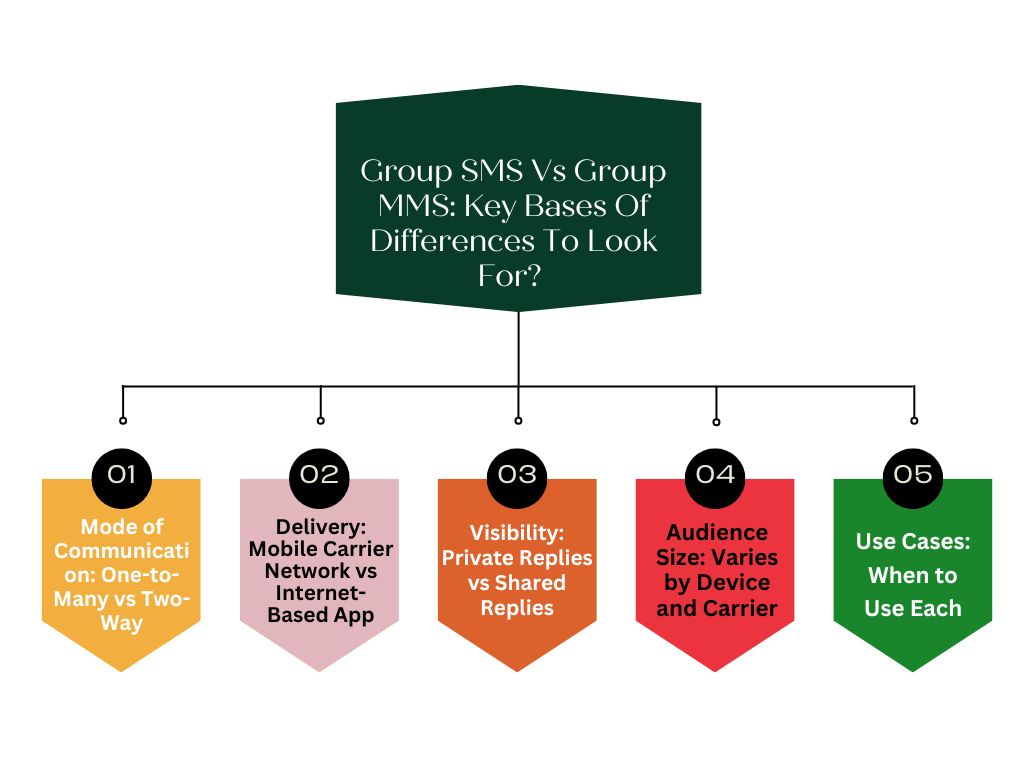
Group SMS Vs Group MMS: Key Bases Of Differences To Look For?
While group SMS and group MMS may sound similar, they differ in how messages are delivered, viewed, and shared. Knowing these differences helps you choose the right option depending on whether you need a quick update or a more interactive group discussion.
Mode of Communication: One-to-Many vs Two-Way
A group SMS is a one-to-many communication method. You send one message to several people at the same time, but each recipient receives it separately. Their replies come only to you and not to the entire group. On the other hand, a group MMS works as a two-way communication channel. All participants are included in a single shared conversation where everyone can see and reply to each other’s messages, creating a true group chat experience.
Delivery: Mobile Carrier Network vs Internet-Based App
Group SMS uses your mobile carrier’s text messaging network. It doesn’t rely on Wi-Fi or mobile data, which makes it reliable even when the internet connection is weak. Group MMS, however, uses your phone’s mobile data or MMS service to send and receive messages. While it’s not an internet-based app like WhatsApp or iMessage, it still needs data to handle images, videos, and group conversations.
Visibility: Private Replies vs Shared Replies
When you send a group SMS, each recipient’s reply comes directly to you. No one else in the group can see the responses, which keeps conversations private and organized. In contrast, a group MMS allows everyone to see and respond to all the messages within the same thread. This shared visibility creates a more open and interactive environment where all participants stay in the loop.
Audience Size: Varies by Device and Carrier
The number of people you can include in a group text depends on your device and carrier. With group SMS, the limit is usually smaller, often around 10 to 20 recipients. Group MMS, on the other hand, can typically handle a larger number of participants, although the exact limit still depends on your carrier and phone settings.
Use Cases: When to Use Each
Group SMS is best suited for one-way communication, such as sending updates, reminders, or alerts when you don’t need replies from everyone. It’s great for quick, straightforward messaging. Group MMS, however, is better for two-way discussions, team coordination, or planning events where group interaction matters. It makes communication more collaborative and engaging, especially when visuals or group input are needed.
Group SMS vs Group MMS- A comparison
To give you a clearer understanding of how group SMS and group MMS differ, here’s a simple comparison of their main features. This overview will help you decide which option works best for your needs, whether you want to send straightforward text updates, encourage group interaction, or make your messages more engaging with media.
| Key Basis | Group SMS | Group MMS |
| Mode of Communication | One message to many; replies go only to the sender. | Two-way; everyone sees all the messages and replies. |
| Delivery Method | Uses the mobile carriers’ SMS network. | Uses mobile data or MMS services. |
| Visibility of Replies | Replies are private. | Replies are visible to all participants. |
| Media Support | Texts only. | Supports photos, videos, and emojis |
| Message Length | Limited to 160 characters. | Allows longer messages. |
| Best Use Cases | Quick updates and announcements. | Group chats and team coordination. |
| Delivery Speed | Very fast | Takes longer to load |
| Cost | Costs less | Higher cost per message |
| Customer Engagement | Moderate response rates | Higher engagement through visuals |
Group SMS vs Group MMS – What Should you Choose?
Choosing between group SMS and group MMS depends on how you want to communicate and what kind of experience you want your audience to have. Both allow you to reach multiple people at once, but they work in different ways and serve different purposes. Group SMS focuses on simplicity and reliability, while group MMS brings interactivity and creativity into your conversations.
When to Choose Group SMS
Group SMS is best when your main goal is to share quick, clear information without needing group discussion or media attachments. It’s ideal for situations where you need to get a message out fast, like appointment reminders, schedule updates, alerts, confirmations, or short announcements. Because group SMS uses the standard text messaging network, it doesn’t rely on mobile data or internet connectivity. This makes it accessible to almost everyone, even those with basic phones or limited service.
It’s also a great option when privacy matters. Replies from recipients go only to you, not to everyone in the group. This prevents long group threads or unrelated side conversations, keeping communication clean and professional.
Businesses often use group SMS to send out notifications, service updates, or emergency alerts. Schools, healthcare providers, and community groups also rely on it to ensure their messages reach everyone instantly, regardless of the device they use.
In short, group SMS is the right choice when you want efficiency, privacy, and universal reach. It works best for one-way communication where the goal is to inform rather than engage in a conversation.
When to Choose Group MMS
Group MMS is ideal when you want richer, two-way communication that feels more like a real conversation. It’s designed for interaction, making it perfect for teams, families, friend groups, or organizations that need to collaborate or share feedback.
Unlike group SMS, group MMS allows you to send not only text but also photos, videos, audio clips, and emojis, adding color and emotion to your messages. Everyone in the group can see each other’s replies, making it a shared experience rather than a series of individual messages.
This makes group MMS particularly effective for event planning, team coordination, marketing campaigns, or any situation where visual content enhances understanding. For example, businesses might use group MMS to share promotional images, product photos, or special offers that grab attention and drive engagement.
It’s also more personal. Seeing everyone’s replies builds a sense of connection and collaboration that a simple group SMS can’t offer. The only requirement is that all participants have mobile data or an active MMS plan to ensure smooth message delivery.
Make The Most Of Group Texting With Emitrr AI
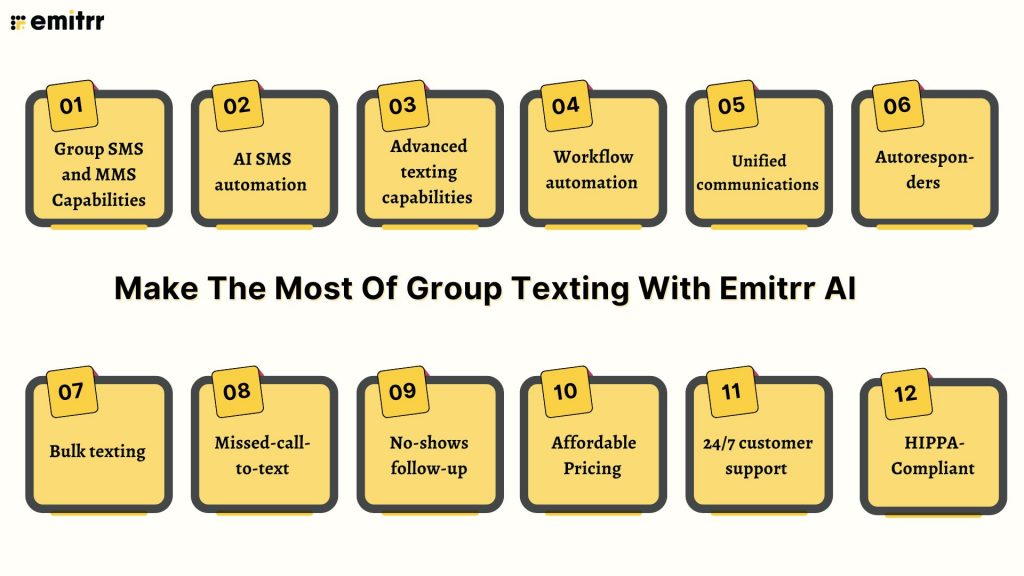
Let’s understand what Emitrr AI is, the best Group texting platform.
Group SMS and MMS Capabilities
Emitrr AI allows you to send both group SMS and group MMS messages with ease. Whether you’re sharing quick updates or running interactive conversations with media, you can reach multiple people at once while maintaining clarity and professionalism. Group SMS is ideal for instant alerts and reminders, while group MMS adds visuals like images and videos to make your messages more engaging and personalized.
AI SMS automation
Emitrr AI’s AI SMS automation and AI SMS generator work together to take communication to the next level. The AI SMS generator creates high-quality, context-aware text messages automatically, saving you time and effort while maintaining a personal tone. Whether you need appointment reminders, promotional texts, or follow-up messages, the system generates professional and natural messages in seconds.
Advanced texting capabilities
Emitrr AI goes beyond basic messaging. You can schedule texts, personalize them with custom tags, and manage two-way conversations, all from one easy-to-use dashboard. It’s built to support both one-on-one communication and large-scale outreach.
Workflow automation
With Emitrr AI, you don’t have to worry about keeping up with every text or reminder; it does the work for you. The platform automatically sends the right message at the right time, whether it’s confirming an appointment, following up on a missed call, or responding to a new customer inquiry. It connects smoothly with your existing systems, so everything runs in sync without you lifting a finger. Think of it as your smart texting assistant that never forgets a task or leaves a message unsent.
Unified communications
No more switching between platforms. Emitrr AI keeps all your communication channels, texts, calls, and chats in one unified interface, making it easier to manage and track every conversation with your contacts.
Autoresponders
Never miss a message again. Emitrr AI’s autoresponder feature ensures that every inquiry receives an instant reply, even outside business hours. It keeps customers informed while reducing response time and boosting satisfaction.
Bulk texting
Whether you’re reaching ten people or ten thousand, Emitrr AI’s bulk texting feature helps you broadcast messages quickly. It’s ideal for promotions, announcements, or urgent notifications, ensuring your message gets to everyone at once.
Missed-call-to-text
Turn missed calls into opportunities. With Emitrr AI, every missed call automatically triggers a personalized text message to the caller, helping you maintain engagement and never lose a lead.
No-shows follow-up
Reduce missed appointments and reconnect with customers through automated no-show follow-ups. Emitrr AI sends polite reminders or rebooking messages, helping you recover lost opportunities and maintain consistent communication.
Affordable Pricing
Emitrr AI offers flexible and affordable pricing plans designed for businesses of all sizes. You get access to enterprise-grade features without the high cost, making it easy to scale your communication as you grow.
24/7 customer support
Help is always available. Emitrr AI provides round-the-clock support to ensure your messaging system runs smoothly, so you can focus on what matters most, your customers.
HIPPA-Compliant
For healthcare providers and organizations that handle sensitive information, Emitrr AI offers fully secure messaging that keeps every conversation protected. Being HIPAA-compliant ensures that all messages, files, and data are encrypted and handled safely. You can communicate confidently with patients or clients, knowing your information is private, compliant, and completely secure at every step.
Frequently Asked Questions
The main difference lies in how messages are shared and viewed. A group SMS sends a single text to multiple people individually, and their replies come only to you. A group MMS, on the other hand, creates a shared conversation where everyone can see and reply to each other’s messages, similar to a group chat.
Group SMS works through your mobile carrier’s network and doesn’t require internet or data. Group MMS, however, needs mobile data or an MMS plan because it can include media files like photos, videos, and emojis.
No. Group SMS only supports plain text. If you want to share photos, videos, or other media, you’ll need to send a group MMS instead.
This depends on your phone and carrier. Most carriers allow between 10 and 20 recipients for group SMS. Group MMS may support larger groups, but limits can still vary depending on your service provider.
No. Replies in a group SMS go only to the sender. In a group MMS, all replies are visible to everyone in the conversation.
It depends on your goals. Group SMS is perfect for quick updates, reminders, and one-way alerts. Group MMS is better for engaging customers, sharing promotions with visuals, or having collaborative discussions.
Conclusion
Every message is a chance to connect, engage, and strengthen relationships with your audience. Whether you choose group SMS for quick, reliable updates or group MMS for interactive, media-rich conversations, the goal is the same: to communicate in ways that capture attention and drive real results.
With Emitrr AI, your messages don’t just reach people; they reach them at the right time, with the right impact. From AI-powered SMS automation to secure group messaging and workflow efficiency, Emitrr AI helps you turn every group message into a meaningful connection.
Ready to experience smarter communication? Schedule a free demo with Emitrr AI today and discover how effortless, intelligent messaging can transform the way you connect.