
 4.9 (400+
reviews)
4.9 (400+
reviews)
Introduction
In today’s digital-first world, healthcare providers are increasingly relying on online forms to streamline patient intake, appointment scheduling, and data collection. But with this convenience comes a critical responsibility: ensuring that all collected information is handled in strict accordance with the Health Insurance Portability and Accountability Act (HIPAA). Failing to do so can result in devastating fines, legal battles, and irreparable damage to your organization’s reputation. So, how can you be sure your forms are not only functional but also fully HIPAA compliant?
This comprehensive checklist will guide you through the essential elements of building HIPAA-compliant forms, safeguarding Protected Health Information (PHI) every step of the way.
Key Takeaways
- Platform Matters: Choose hosting and form-building tools that are explicitly HIPAA compliant and willing to sign a BAA.
- Minimum Necessary: Only collect the PHI absolutely essential for the form’s purpose.
- Encryption is Non-Negotiable: Both data in transit and at rest must be encrypted.
- Access Control & Audit Trails: Limit who can see data and track all access.
- Ongoing Vigilance: Compliance is a continuous process of review, training, and updates.

Understanding HIPAA and Its Relevance to Forms
Before diving into the checklist, let’s quickly recap what HIPAA is all about. At its core, HIPAA is a U.S. law enacted in 1996 to protect sensitive patient health information. It sets national standards for how Protected Health Information (PHI) should be handled, stored, and transmitted.
What is PHI? PHI is any information that can identify a patient and relates to their past, present, or future physical or mental health condition, the provision of healthcare to the individual, or the past, present, or future payment for the provision of healthcare. This includes names, addresses, dates of birth, phone numbers, email addresses, medical records, appointment details, insurance information, and billing data.
When you create an online form that collects any of this data, you are entering the realm of HIPAA compliance. This means every aspect of that form, from its design to the platform it resides on and how the data is stored, must meet HIPAA’s stringent requirements. The U.S. Department of Health and Human Services provides extensive guidance on these rules, emphasizing the need for robust privacy and security measures.
The HIPAA Compliant Form Building Checklist
Building HIPAA-compliant forms isn’t just about adding a disclaimer; it requires a thoughtful, multi-layered approach. Here’s a breakdown of what you need to consider:
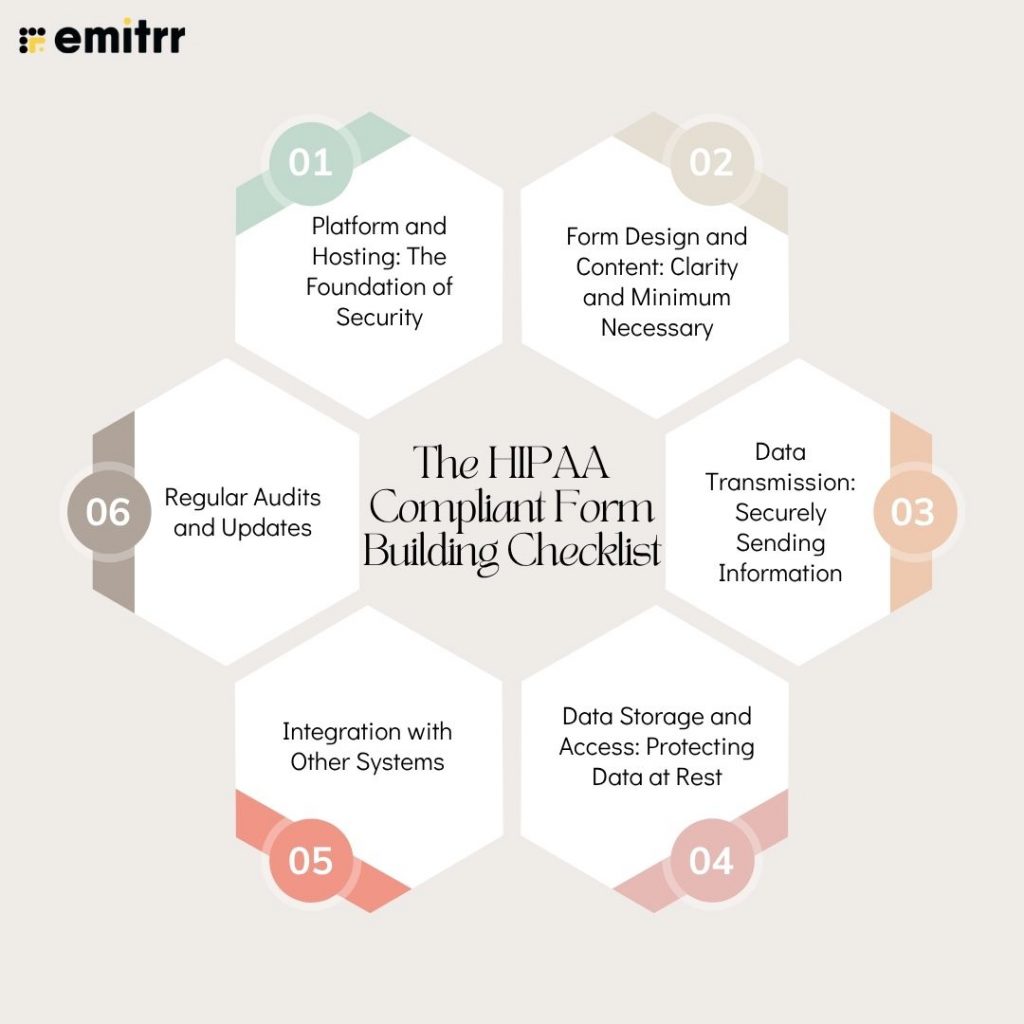
1. Platform and Hosting: The Foundation of Security
The platform you use to create and host your forms is paramount. A standard website builder or a general-purpose form tool might not offer the necessary security features.
- HIPAA-Compliant Hosting: Ensure your forms are hosted on servers that are HIPAA compliant. This means the hosting provider has implemented appropriate administrative, physical, and technical safeguards.
- Business Associate Agreement (BAA): If you are using a third-party form builder or hosting service, they must be willing to sign a Business Associate Agreement (BAA) with you. This legally binding document outlines the responsibilities of both parties in protecting PHI. Without a BAA, using a vendor to handle PHI is a direct violation of HIPAA. Understanding BAAs is crucial for healthcare vendors.
- Encryption: Data transmitted to and from your forms must be encrypted using strong protocols like TLS (Transport Layer Security). This prevents “man-in-the-middle” attacks where data could be intercepted.
2. Form Design and Content: Clarity and Minimum Necessary
The way your form is structured and the questions you ask are vital for compliance.
- Clear Purpose Statement: Clearly state the purpose of the form and what information you are collecting.
- Minimum Necessary Rule: This is a cornerstone of HIPAA. Only ask for the minimum necessary information required to fulfill the stated purpose of the form. Avoid collecting extraneous data that isn’t essential. For example, if a form is for appointment scheduling, you likely don’t need to ask about a patient’s entire medical history.
- Avoid Unnecessary Identifiers: Do not ask for sensitive identifiers like Social Security Numbers (SSNs) unless absolutely critical and legally required for the specific transaction.
- Plain Language: Use clear, easy-to-understand language. Avoid jargon that patients might not comprehend.
- Consent Language: Include clear language informing users that by submitting the form, they consent to the collection and use of their information as described, and that the transmission is happening over a secure system.
- Privacy Policy Link: Always link to your organization’s privacy policy, which should detail how patient data is handled.
3. Data Transmission: Securely Sending Information
How data travels from the user to your system is a critical security point.
- Encrypted Transmission (SSL/TLS): As mentioned, all data submitted through your forms must be encrypted in transit. Look for the padlock icon in the browser’s address bar, indicating a secure connection.
- Avoid Unsecured Channels: Never send PHI via standard email or unencrypted messaging services. If your forms integrate with other communication tools, ensure those integrations are also secure. For instance, if you’re using a system that sends confirmation messages, this should be handled by a HIPAA-compliant voicemail script or secure messaging.
4. Data Storage and Access: Protecting Data at Rest
Once the form is submitted, the data needs to be stored securely.
- Secure Storage: PHI collected via forms must be stored in a secure environment, whether on your own servers or within a HIPAA-compliant cloud service. This includes measures like encryption at rest.
- Access Controls: Implement strict access controls. Only authorized personnel should have access to the submitted data, and their access should be limited to what is necessary for their job function (again, the Minimum Necessary Rule). This often involves role-based access.
- Audit Trails: Maintain detailed audit logs that record who accessed the data, when they accessed it, and what actions they performed. This is crucial for accountability and for investigating any potential breaches. Many cloud communication platforms for businesses offer robust audit trail capabilities.
- Data Retention Policies: Establish clear policies for how long PHI is stored and ensure it is securely disposed of when no longer needed, in accordance with regulations.
5. Integration with Other Systems
If your forms integrate with other software (like Electronic Health Records – EHRs, Practice Management Systems – PMS, or CRM systems), these integrations must also be secure and HIPAA compliant.
- Secure APIs: Ensure any Application Programming Interfaces (APIs) used for integration are secured and transmit data in an encrypted format.
- Vendor Compliance: Verify that any integrated systems or third-party applications you connect to are also HIPAA compliant and have signed BAAs where necessary. This is particularly important when considering tools for call center speech analytics software that might process patient interactions.
6. Regular Audits and Updates
Compliance is not a one-time task. It requires ongoing vigilance.
- Periodic Reviews: Regularly review your forms and the associated data handling processes to ensure they remain compliant with current HIPAA regulations and best practices.
- Staff Training: Ensure all staff members who interact with patient data collected via forms are adequately trained on HIPAA policies and procedures.
- Stay Updated: HIPAA regulations can evolve. Stay informed about any changes or updates to the law that might affect your form building and data handling practices.
Real-World Examples and Common Pitfalls
Let’s look at some common scenarios where HIPAA compliance can be tricky:
- Appointment Request Forms: A seemingly simple form asking for a patient’s name, preferred time, and reason for visit is collecting PHI. The platform must be secure, and the data stored compliantly. Even a basic form for online scheduling software for pharmacy needs to adhere to these rules.
- Patient Feedback Forms: While intended for improvement, feedback forms that ask for patient names or other identifiers linked to their care are collecting PHI. De-identifying this data before analysis is key, or the form and storage must be fully compliant. Organizations focused on improving their online presence, like those in dentistry, need to be mindful of this. Implementing strategies to boost your dentistry practices business presence should always include a HIPAA-compliant approach.
- Contact Us Forms: If a “Contact Us” form on a healthcare provider’s website allows patients to describe symptoms or ask medical questions, it becomes a PHI collection point and must be treated as such.
- Using Generic Form Builders: Relying on free or consumer-grade form builders without a BAA is one of the most common and dangerous mistakes. These tools are not designed to meet healthcare data protection standards.
The Importance of Choosing the Right Tools
Selecting the right technology is crucial. Platforms that are built with healthcare compliance in mind, such as those offering features like secure messaging, encrypted communication, and robust access controls, can significantly simplify the process. For instance, an AI virtual receptionist can handle initial patient inquiries and data collection in a HIPAA-compliant manner, reducing the burden on staff and minimizing risk.
Frequently Asked Questions (FAQs)
Yes, if the form collects or transmits any Protected Health Information (PHI), it must be handled in a HIPAA-compliant manner. This includes information that can identify a patient and relates to their health, treatment, or payment for healthcare services.
A Business Associate Agreement (BAA) is a contract between a HIPAA-covered entity (like a healthcare provider) and a “business associate” (a vendor or service provider that handles PHI on their behalf). It legally obligates the business associate to protect PHI according to HIPAA standards. If a form builder or hosting service handles PHI for you, they must sign a BAA.
Generally, no. Standard consumer-grade tools like SurveyMonkey or Google Forms are typically not HIPAA compliant out-of-the-box and do not offer BAAs. Using them to collect PHI can lead to significant HIPAA violations. Always opt for platforms designed for healthcare data security.
Ensure your form is hosted on a secure server using HTTPS (SSL/TLS encryption). Most reputable form builders will clearly state their encryption protocols. For data stored after submission, ensure the platform or your storage solution offers encryption at rest.
This is a serious breach. You would be required to follow HIPAA’s Breach Notification Rule, which involves notifying affected individuals, the U.S. Department of Health and Human Services (HHS), and potentially the media. This can also lead to significant fines and legal action.
Yes, appointment reminders that contain PHI (like the patient’s name and appointment date/time) are considered electronic PHI (ePHI) and must be sent through a HIPAA-compliant communication channel. Standard SMS is not secure enough on its own. This is why solutions like VoIP software for nonprofits or dedicated secure messaging platforms are essential.
Conclusion
Building HIPAA-compliant forms is not merely a bureaucratic hurdle; it’s a fundamental aspect of ethical patient care and robust data security in the digital age. By meticulously following this checklist – focusing on platform security, data minimization, secure transmission and storage, and ongoing compliance efforts – you can confidently leverage the power of online forms while upholding the trust and privacy of your patients. Remember, in healthcare, protecting patient data isn’t just a good practice; it’s the law, and a critical component of maintaining a trusted healthcare practice.