
 4.9 (400+
reviews)
4.9 (400+
reviews)
Introduction
It may seem easy to leave a voicemail message, but in healthcare, even a few extra words or an insecure voicemail platform can lead to serious HIPAA voicemail violations and costly penalties.
Under HIPAA guidelines for voicemails, healthcare organizations must ensure that all messages—whether appointment confirmations or lab updates—are securely stored, encrypted, and only accessible to authorized individuals. A HIPAA-compliant voicemail greeting or HIPAA-compliant voicemail message should never reveal sensitive identifiers like full names, medical conditions, or test results. Understanding these HIPAA voicemail requirements is critical to maintaining compliance and protecting patient trust.
For example, a HIPAA-compliant voicemail example might sound like:
“Hello, this is Dr. Miller’s office calling for Jane. Please call us back at (555) 987-6543 regarding your recent visit. Thank you.”
This avoids disclosing PHI while still maintaining professionalism and clarity—exactly what leaving HIPAA-compliant voicemails should look like.
Balancing accessibility, automation, and privacy has always been a challenge in healthcare communication. A HIPAA-compliant voicemail service helps bridge that gap, enabling providers to securely connect with patients without risking compliance.
In this guide, we’ll explore everything you need to know about HIPAA and voicemail, from rules and setup requirements to examples and best practices, and how a platform like Emitrr can make your voicemail communication secure, compliant, and effortless.
What Is HIPAA-Compliant Voicemail?
A HIPAA-compliant voicemail is a message or voicemail service that saves, transmits, and accesses audio messages related to patients according to HIPAA privacy and security rules.
This means any voicemail with Protected Health Information (PHI), that is, information related to a patient’s name, diagnosis, what treatments they have received, the medications they are taking, or even info on times they have appointments, must be done in a secure voicemail for healthcare systems.
For a voicemail system to be considered HIPAA compliant, there are a few aspects to consider:
- It must encrypt messages both at rest and in transit (end-to-end).
- Access must be authenticated through some sort of password or multi-factor (MFA).
- An auditing method must be implemented.
- A third-party HIPAA-compliant voicemail provider must sign a Business Associate Agreement (BAA).
All in all, HIPAA-compliant voicemail solutions allow for convenience in communications without exposing PHI or your organization; it is that easy!
Key Elements of HIPAA Compliant Voicemail
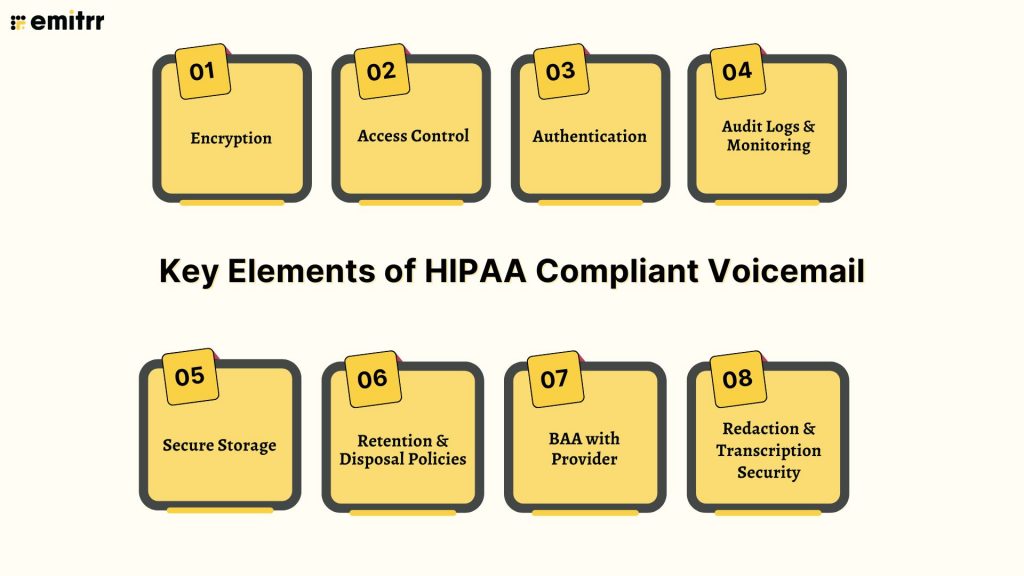
Creating a truly compliant voicemail requires looking at technical safeguards and even administrative safeguards. Here is what this means:
Encryption
Utilize a voicemail service with encryption that holds messages in transit and at rest. AES-256, or at least TLS 1.2+ encryption, ensures that the audio files cannot be intercepted.
Access Control
Access to voicemail should be limited to authorized personnel (e.g., medical staff) with permissions based on roles.
Authentication
Access to and playback of messages should require a password or Single Sign-On (SSO) for authentication.
Audit Logs & Monitoring
The system should record who has viewed which message, when they viewed it, and from which device.
Secure Storage
A HIPAA-compliant voicemail provider will ensure that voice messages are securely stored on servers with redundancy and limited access to staff.
Retention & Disposal Policies
Voicemails should be retained for only the amount of time needed for business or legal purposes and then securely deleted.
BAA with Provider
Before releasing any PHI, obtain a signed Business Associate Agreement from your HIPAA-compliant voicemail provider.
Redaction & Transcription Security
If you use voicemail transcription, ensure the text formats are stored on secure servers and are encrypted.
HIPAA Rules for Voicemail Storage, Retention, and Delivery
HIPAA includes several key requirements for health plans using a voicemail or call recording system.
Voicemail Storage
PHI voicemail messages must be stored in an encrypted environment.
Cloud servers must meet HIPAA storage standards for voicemails and have role-based access and monitoring.
Voicemail Retention
Voicemail messages must be retained for the least amount of time necessary, as prescribed by your organization’s data policy or stated law.
Voicemail messages should not be retained indefinitely, unless legally required.
Voicemail Messaging
When you send a message via phone or email, be sure it’s transferred in a secure voicemail message or encrypted voicemail service.
Do not provide detailed PHI in notifications in “You have a new message” emails or texts.
Voicemail Access Logs
Have auditable logs in place to track and log playback, downloads, and user activity.
Breach Notification
If unauthorized access happens, the provider must follow HIPAA breach notification communication criteria within the required timeframes.
Overall, HIPAA voicemail rules really come down to limiting exposure— the fewer people, systems, or devices that access PHI, the better.
Types of HIPAA Compliant Voicemail
There are a number of ways to achieve secure voicemail for healthcare, depending on your workflows.
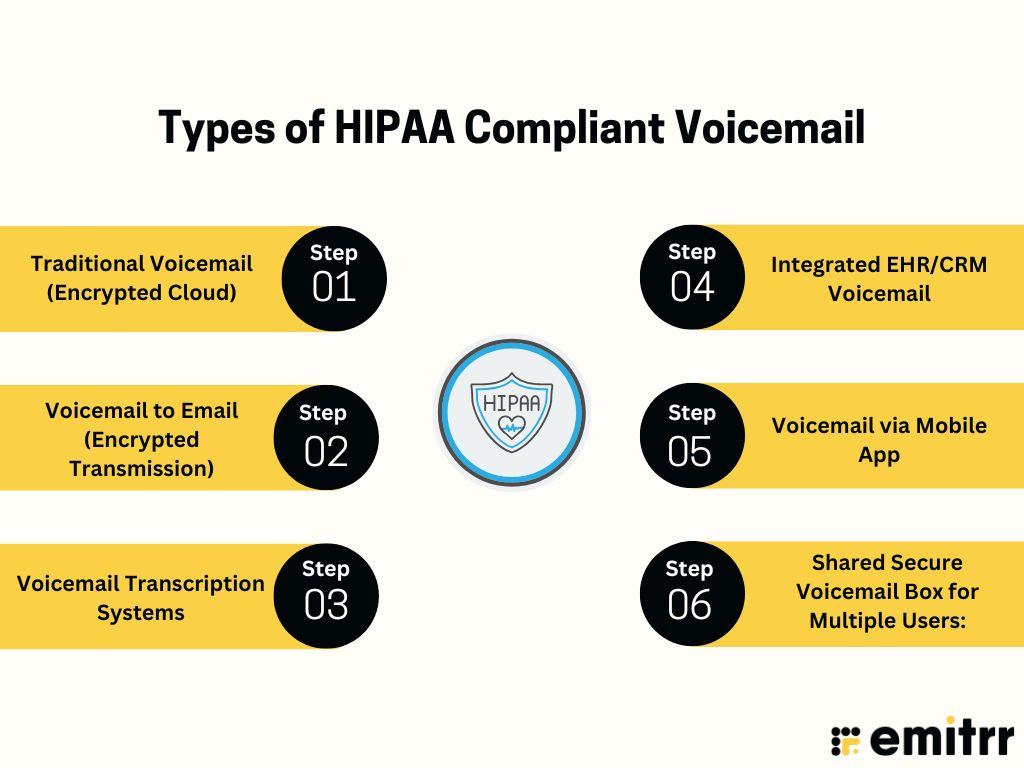
Traditional Voicemail (Encrypted Cloud)
Traditional voicemail via provider hosted on a secure cloud service, where encrypted voicemail messages are stored and accessed via a password-protected dashboard.
Voicemail to Email (Encrypted Transmission)
A HIPAA-compliant voicemail-to-email system can securely send the audio file or the transcription directly to a verified email account via encryption (TLS).
Voicemail Transcription Systems
Automatically convert voicemail messages to text (can be typed in a patient record for faster reading). You must use a HIPAA-compliant voicemail transcription system to keep PHI secure.
Integrated EHR/CRM Voicemail
Voicemails log automatically into EHR or CRM records, making a single source of patient communication data in a secure patient messaging system.
Voicemail via Mobile App
A secure voicemail application that complies with HIPAA allows the healthcare professional to send and read voicemail securely while on the go.
Shared Secure Voicemail Box for Multiple Users:
A shared inbox for departments (e.g., nursing or billing team) in a HIPAA-compliant voicemail system with granular user access rights.
How to Leave a HIPAA Compliant Voicemail
Leaving a voicemail in healthcare isn’t as straightforward as it might seem. Each message must adhere to HIPAA voicemail guidelines in order not to expose PHI. Here is a step by step on leaving a HIPAA compliant voicemail message safely and professionally.
Step 1: Verify Consent Beforehand
Ensure the patient has agreed to receive voicemail before leaving any messages and have selected the phone numbers they can take messages on. This is something that should be captured at patient intake, and then saved in your EHR proper.
Step 2: Limit Use to Secure Systems
Make certain that when you do have a digital patient message, it is within a HIPAA compliant voicemail or secure voicemail system. Do not use personal cell phones or unencrypted systems. It should allow encrypted voicemail and have audit trails for compliance monitoring.
Step 3: Avoid sharing PHI At All Costs
Never share what type of diagnosis or treatment someone had, whether they have insurance and anything about their lab results. Relatively simple—even one detail that identifies the patient is considered a privacy violation under HIPAA voicemail rules.
Step 4: Use Neutral Language
Keep your tone professional and indefinite. A HIPAA-compliant voicemail script, for example, could be:
“Good afternoon, I’m calling from Dr. Allen’s office to talk about your most recent appointment. Please contact us at (555) 123-4567.”
Don’t include mention of departments or medical conditions in your HIPAA-compliant voicemail greeting.
Step 5: Identify Yourself Properly
Tell them just your name and the office name. Stay away from titles such as “oncology,” “therapy,” or “psychiatry” that might indirectly expose PHI.
Example:
- “This is Jane from Dr. Allen’s office,” — ✅
- “This is Jane from the Oncology Department,” — ❌
Step 6: Just Keep It Short and Simple
Your voice message needs to be 15–30 seconds! Provide only the important details, such as a callback request or time of appointment. Remember, brevity reduces risk.
Step 7: Don’t Reveal All Details
Even oblique references — “your therapy session,” say, or “your medication review” can disclose PHI. Use more general terms like “your appointment” or “your upcoming visit,” instead.
Step 8: Verify Contact Information Clearly
Repeat your call-back number one more time so the patient doesn’t have to try too hard to call you back. Do not provide fax numbers or other contact information unless necessary.
Access ready-to-use HIPAA-compliant voicemail scripts for common healthcare scenarios.
Step 9: Store and Manage Voicemails Securely
Be sure that all voicemails sent are archived within HIPAA-compliant voicemail systems with encryption of messages at rest and in transit. Retention needs to be consistent with your organization’s policy and HIPAA retention requirements.
Step 10: Train Staff Regularly
All staff, even receptionists, assistants and clinicians, need ongoing training for leaving HIPAA compliant voicemails, adapting scripts when regulations change.

HIPAA Compliant Voicemail Transcription
Transcription is a convenience but presents risks if not done securely.
A HIPAA-compliant voicemail transcription service utilizes encryption, access controls, and audit logging functionality to ensure that protected health information is secured while your voicemail is being converted from audio to digital text.
How It Works:
- A voicemail is recorded through an encrypted voicemail service as an .mp4 or .m4a file.
- The file is sent to the transcription engine through a secure system.
- The transcribed text is stored or sent to staff through HIPAA-compliant voicemail-to-email transition methods.
What Does This Matter:
- Saves time for a busy clinic.
- Ability to easily refer to the note in your secure patient messaging system.
- Ability to have accessible documentation noted for the patient record.
- When choosing a HIPAA-compliant voicemail service, be sure to check that its transcription tools offer the same encryption and privacy as your audio storage system.
Best Practices for HIPAA Compliant Voicemail
Implement these best practices to ensure full compliance for your patients:
Develop a Written Policy
Prepare a written policy that specifies the use of voicemail, patient consent, and the record retention policy to ensure that communication is uniform and HIPAA compliant throughout your organization.
Train the Entire Staff
Ensure that all employees, from front-desk staff to physicians, are instructed on how to leave voicemail messages, monitor voicemail messages, and respond to voicemail messages securely and within HIPAA compliance. This type of regular education is designed to reduce human errors and maintain accountability.
Utilize Role-Based Access
Don’t automatically give all staff access to the voicemail. Use role-based access to limit who has access solely to the person who requires access to complete their work and manage messaging. This reduces the exposure of patient information unnecessarily.
Encrypt Everything
All voicemail audio files in the case are encrypted both in transit and at rest, so that if data is intercepted, it will appear as digital gibberish, and only those authorized to access the files are able to decrypt them and listen to the recordings.
Audit Systems Regularly
Go over the voicemail audit logs, storage system, and access permissions on a regular basis to determine the security of the voicemail messages. This makes it easier to identify any unauthorized access or violations of policy prior.
Obtain a BAA from Vendors
Make certain that the voicemail service provider signs a business associate agreement (BAA), so if any information related to a patient is legible in the voicemail transcript, they are legally liable to maintain HIPAA-level security when those messages are taken.
Update Voicemail Greetings and Voicemail Scripts
If you have a voicemail greeting, make certain that the greeting is written without providing any personal identifiers or health information to ensure you are not violating HIPAA. Once we have determined that the greeting is without revealing patient identifiers and health conditions, make all voicemail messages as neutral as possible and mindful of our obligation to avoid sharing patient identifiers indefinitely.
Enable Automatic Deletion
Configure the voicemail system to delete or archive every voicemail message beyond a predetermined timeframe.
Leverage Cloud Storage that has Redundancy
Choose a voicemail storage solution that is compliant with HIPAA, that uses location redundancy and storage redundancy, and also has adequate physical security.
Integration with Secure Communication Tools
Access voicemail from an encrypted voice messaging service, a patient downloads from the patient portal, or the EMR or CRM, such as Emitrr, you are using.
Examples of a HIPAA Compliant Voicemail Greeting
Here are some examples of voicemail greetings that are compliant with HIPAA for healthcare organizations:
Example 1: Medical Office
Here’s an example of a HIPAA-compliant voicemail greeting for medical offices –
“Hello, you have reached [Practice Name], and at this time, we cannot take your call. Please leave your name, your return phone number, and a brief message. To protect your privacy, please do not leave any details about your medical diagnosis. We will return your call as soon as possible.”
Example 2: Dental Clinic
Here’s an example of a HIPAA-compliant voicemail greeting for dental offices –
“Thank you for calling [Clinic Name]. Our office is currently closed. Please leave your name and phone number, and we will call you back when we open. Please do not leave any private health information.”
Example 3: Therapy Practice
Here’s an example of a HIPAA-compliant voicemail greeting for therapy practices –
“Hi, this is [Therapist Name]. I can’t take your call right now, but your privacy is important to me. Please leave a return number, and I will call you back soon. Please do not provide any information about your session.”
Example 4: Hospital Department
Here’s an example of a HIPAA-compliant voicemail greeting for hospitals –
“You have reached [Department Name] at [Hospital Name]. We cannot answer right now. Please leave your name, phone number, and appointment details if you have them. Please do not leave any personal health information in your message.”
Example 5: Pediatric Clinic
Here’s an example of a HIPAA-compliant voicemail greeting for pediatric clinics –
“You’ve called the office of [Pediatric Clinic Name]. We’re sorry, but we can’t answer the phone right now. Please leave your first and last name, your child’s first name, and a phone number we can use to return your call. To protect your family’s privacy, please do not discuss your child’s medical conditions or test results in your voicemail message.”
Example 6: Pharmacy
Here’s an example of a HIPAA-compliant voicemail greeting for pharmacies –
“Thanks for calling the pharmacy team at [Pharmacy Name]. We’re sorry to miss your call. Please take a moment to leave your name and preferred phone number, and one of the pharmacy team will call you back to talk about your prescription. For your protection, please do not leave the name of your medication or mention any health details.”
Example 7: Physical Therapy Center
Here’s an example of a HIPAA-compliant voicemail greeting for physical therapy centers –
“Hello, this is [Therapy Center Name]. We’re with patients, and we can’t take your call at the moment. However, please leave your name and a phone number where we can reach you, and we will return your call. For HIPAA compliance, please do not leave any health details about yourself or your therapy.”
Example 8: Optometry Office
Here’s an example of a HIPAA-compliant voicemail greeting for optometry clinics –
“Hi, you’ve reached [Optometry Practice Name]. Our office is currently closed. We would love to help you anyway! Please leave your first name, a phone number, and a brief message. Please do not leave your diagnosis or test results in the message to keep your information private.”
Example 9: Home Health Agency
Here’s an example of a HIPAA-compliant greeting for home health agencies –
“Hi, this is [Agency Name]. Our care team is with patients right now. Please leave your name, contact number, and ideal time for us to contact you. For your privacy, please do not leave personal medical or patient information.”
Example 10: Laboratory or Diagnostic Center
Here’s an example of a HIPAA-compliant voicemail greeting for radiologists and diagnostic centers –
“Thank you for calling [Lab Name]. Please leave your first and last name and the call-back number. Please do not leave any test results or medical information in this voicemail. We will be contacting you shortly during business hours.”
Ensuring HIPAA Compliance with Emitrr
When it comes to secure communication, Emitrr makes compliance easy.
An encrypted voicemail solution that is HIPAA compliant will help healthcare providers offer secure, efficient, and auditable communication with minimal disruption to their workflow.
What Emitrr provides:
End-to-End Encryption Voicemail / Voice
Emitrr provides encryption for voicemail, call recordings, and voice data while the data is in transit (e.g., whether TLS or SRTP) or stored/rest (e.g., AES-256). Therefore, PHI is protected from the patient leaving the message when a staff member accesses the message.
Secure Voicemail Storage with Full Audit Trails
Emitrr stores viewed messages and stored recordings in a secure, controlled environment. Emitrr keeps full audit logs (i.e., who viewed, when, what device, what action taken) of every message. This is vital for any HIPAA compliance audits or breach investigations.
Role-Based Access Controls & Multi-User Permissions
Emitrr allows users to define users (receptionists, clinicians, managers) and what actions (view, delete, forward, manage) the user can take with the voicemail messages. This “least privilege” principle limits PHI exposure.
Voicemail Transcription & Voicemail-to-Email
Emitrr can transcribe the voicemail as text and optionally send it to an authorized inbox, or not send it, all utilizing HIPAA-compliant voicemail transcription technology. This provides a way to quickly review voicemails without the need to listen to the full audio voicemail.
Voicemail-to-Text / Missed Call Follow-Ups
Once a call is missed, Emitrr’s voicemail to text feature can send an SMS or text notification encrypted, alerting the patient, or follow up when the call was missed.
Automated Voicemail Distribution & Alerts
Emitrr can distribute voicemails based on department, urgency, or staff schedules and can send notifications when a new voicemail is recorded for internal use to ensure timely response time.
To make this process effective and compliant, voicemail messages also need to be clear and carefully worded. Using standardized, HIPAA-compliant voicemail scripts helps teams handle routed voicemails consistently without risking the disclosure of sensitive information.
Grab ready-to-use HIPAA-compliant voicemail scripts for common healthcare scenarios.
Integrated Voice + Messaging + Communication Platform
Voicemails aren’t siloed; they are accessible with SMS/text, calls, and patient messaging in one platform. This transparent view enables staff to see a comprehensive communication history for a patient.
HIPAA-Compliant Call Recording
When turned on, Emitrr can record calls with consent and is treated similar to voicemail in the same encryption and logging process, allowing for quality assurance and audit prep.
Business Associate Agreement (BAA) & Compliance Controls
Emitrr offers clients a legal BAA establishing the scope of mutual responsibility for PHI. Emitrr also has additional compliance reporting, data subject access, and consumer data deletion features.
Single Tenant / Isolated Data Architecture
In maintaining data isolation, Emitrr offers architectures in which each client’s data is isolated either logically or physically (“the single tenant edges”) while adhering to our compliance protocols to reduce the risk of cross-account exposure.
Data Export / Consumer Rights Tools
Users can request a data export of their voicemail and messaging logs; Emitrr can provide a link that packages the messages and some messaging records into an encrypted file if that is more transparent for a client.
Deletion / Data Retention Controls
Clients can either request the deletion of voicemails or set retention policies that would automatically purge data over specified periods of time, as a means to lower legal risk.
AI-Assisted Voicemail Tools (Future / Advanced features)
Emitrr describes future or advanced features, such as AI voicemail that detects sensitive content, or that summarized voicemails, or offers compliant language, or that prioritises messages based on technologies related to urgency.
Frequently Asked Questions
Ans: Standard voicemail lacks encryption and access controls. HIPAA-compliant voicemail systems are specifically built to protect PHI through the use of encryption, audit trails, and controlled access.
Ans: Yes, if you set up a HIPAA-compliant voicemail-to-email service that encrypts the voicemail recording when transmitted, and use a verified email address for the recipient.
Ans: They should provide you with a Business Associate Agreement and tell you their protocols for encrypted voicemail services.
Ans: Yes, as long as you are using a HIPAA-compliant voicemail-to-transcription service for both audio and text formats.
Ans: This will depend on your internal retention policy, but voicemails should be deleted as early as operationally possible when HIPAA compliant.
Ans: Common voicemail HIPAA violations include leaving excessive PHI, using unsecure systems, or not obtaining patient consent to leave a voicemail.
Ans: Emitrr is the best HIPAA-compliant voicemail for healthcare because it incorporates automation, affordability, and true end-to-end encryption.
Conclusion
Voicemail remains one of the best ways to communicate effectively and personally in healthcare; however, it is also one of the riskiest without proper safeguards. Everything, from appointment reminders to clinical follow-ups of care, must comply with HIPAA’s strict standards of privacy.
By implementing a HIPAA-compliant Voicemail system, you are protecting your patients, your practice, staff, and reputation. This way, you can communicate through recorded messages, transcriptions, or delivery as HIPAA-compliant, secure, and traceable.
With Emitrr’s HIPAA Compliant voicemail, healthcare practices can communicate securely, improve workflows, and overall patient experience, all while keeping audit-ready and HIPAA compliant. Book a demo today.