
 4.9 (400+
reviews)
4.9 (400+
reviews)
Introduction
If you’re using Athenahealth, you already manage scheduling, documentation, and billing in one system. But many practices still rely on phone calls, manual reminders, and staff follow-ups for refills, payments, and pre-visit prep.
This guide explains how to automate prescription refills, pre-visit communication, and payment workflows in Athenahealth so that you can reduce phone volume, prevent no-shows, and save staff time.
AI Summary / TL;DR
You can automate refills, payments, and pre-visit workflows in Athenahealth by combining reminder rules, task routing, confirmation tracking, and digital communication.
At a minimum, practices should automate:
- Prescription refill intake and routing
- Appointment reminders and confirmations
- Pre-visit forms and instructions
- Pre- and post-visit payment reminders
- Schedule change notifications
For deeper automation, like two-way texting that updates appointment status automatically, missed-call recovery, AI refill intake, and schedule-based bulk messaging, you can use an integrated platform like Emitrr to extend Athenahealth’s capabilities.
This could result in fewer phone calls, fewer no-shows, faster collections, and significant staff time savings.

What You Can Automate in Athenahealth
Athenahealth supports core automation around scheduling and reminders. With the right setup, you can automate:
- Prescription refill intake
- Appointment reminders
- Confirmation tracking
- Pre-visit instructions
- Payment notifications
- Basic follow-ups
For more advanced workflows like two-way texting, missed-call recovery, language support, and AI-assisted refill handling, practices often extend Athenahealth using integrated communication tools.
Learn more about AI for Athenahealth Practices:
Automating Prescription Refills in Athenahealth
Refill calls account for 40% of total call volume for many healthcare practices. This is where automation is needed to reduce interruptions and allow nurses to focus on care.
Step 1: Enable Digital Refill Requests
Start by allowing patients to request refills digitally instead of calling.
This can be done through:
- Patient portal refill requests
- SMS-based refill intake (if using a messaging integration)
- Automated responses to missed calls
By using either of these or a combination, you can reduce refill phone calls and centralize requests in one system.
Step 2: Automatically Route Refill Requests to Staff
Once refill requests are submitted, set up routing rules so they go directly to the correct nurse, provider, or clinical pool.
Hence, instead of front desk staff relaying messages manually, refill requests should:
- Appear as tasks or cases
- Be assigned automatically
- Include patient context and medication details
This will help in preventing delays and in reducing back-and-forth communication.
Step 3: Create Refill Tasks Inside the Patient Record
Every refill interaction should live inside the patient chart. When automated properly:
- The refill request is logged
- The assigned nurse is notified
- Updates are written back into the patient record
There are certian tools that offer deep Athenahealth integration and create a case automatically when a refill-related SMS or call is received, eliminating manual data entry.
Optional: Automate Missed Call Follow-Ups for Refill Requests
Many refill requests still come through missed calls. By automating missed-call follow-ups here, you can:
- Instantly send a text after a missed call
- Ask the patient what they need
- Route refill requests directly into Athenahealth
Some AI-based systems can even handle refill intake through SMS and create cases automatically inside Athena.
Automating Pre-Visit Workflows in Athenahealth
Pre-visit automation helps in reducing no-shows and in keeping your schedule predictable, and here’s how you can automate this as well:
Step 4: Set Up Appointment Reminders
Set up automated reminders that are triggered by appointment booking. If you can setup reminders based on:
- Visit type
- New vs existing patient
- Insurance type
- Confirmed vs unconfirmed status
Or set a reminder cadence (for example: 3 days before, 1 day before, 2 hours before), then you will be able to esure consistency without staff manually checking schedules.
Learn more about scheduling appointments in Athenahealth.
Step 5: Allow Two-Way Confirmations and Reschedules
Patients should be able to confirm or reschedule directly via text.
If you set this up properly:
- Patients reply to confirm
- Status updates automatically write back into Athenahealth
- Staff can see confirmed vs unconfirmed appointments in real time
You just seriously think about implementing a two-way confirmation workflow, because it can significantly reduce no-shows, as patients can respond instantly instead of calling.
Learn more about Two-way texting inside Athenahealth:
Step 6: Send Pre-Visit Forms and Instructions Automatically
After an appointment is booked, you should automatically be able to send:
- Intake forms
- Pre-visit instructions
- Required documentation links
- Check-in reminders
If forms are completed before arrival and logged into the patient record, it can reduce front desk congestion.
Step 7: Use Schedule-Based Messaging for Provider Changes
Provider schedule changes are often handled manually with phone calls.
With schedule-based messaging, you can:
- View appointments by provider
- Select a specific date range
- Notify all affected patients with one message
For example, if a provider is unavailable between January 4-6, you can send one notification to all impacted patients instead of calling each individually. This saves hours and hours of staff time.
Automating Payments in Athenahealth
Payment automation improves collections and reduces billing follow-ups and here’s how you automate it insider Athenahealth:
Step 8: Send Pre-Visit Payment Links
Before the appointment, you can automatically send:
- Co-pay reminders
- Secure payment links
- Insurance-related payment notifications
This will prepare patients ahead of time and speed up check-in.
Step 9: Automate Post-Visit Balance Reminders
After the visit, automate balance reminders based on:
- Outstanding amount
- Time since visit
- Insurance processing status
By sending automated follow-ups, you can improve collection rates without increasing staff workload.
Learn more about setting up a reminder/recall workflow in Athena.
Step 10: Customize Payment Reminder Cadence
Instead of one generic reminder, set a sequence:
- Initial balance notification
- Follow-up reminder after X days
- Final reminder before escalation
By setting up an automated cadence, you can ensure consistent communication without the need to manually track everything.
Keeping Everything Synced Inside Athenahealth
Automation only works if data stays accurate. This is why your workflows should ensure:
- Conversations are logged into the patient profile
- Appointment status updates sync in real time
- Contact records stay consistent
- No manual copy-pasting between systems
Bi-directional sync can help in preventing errors and in maintaining consistent data across your EHR.
How Emitrr Extends Automation in Athenahealth
We have told you how you can improve your workflow and remove bottlenecks with Automation. Since Athena does not have these automation capabilities, you might be wondering how to make it happen. This is where a tool like Emitrr comes in.
Emitrr integrates directly with Athenahealth and helps extend automation across refills, payments, and pre-visit workflows.
Key capabilities include:
- Two-way SMS that writes confirmations and cancellations back into Athenahealth
- Automated reminders sent from your existing business number instead of a different system number
- Multi-language texting and calling to overcome language barriers
- Automated missed-call texting so no refill or appointment request is lost
- AI-powered appointment scheduling via SMS
- AI refill intake that can automatically create cases inside Athenahealth
- Schedule-based texting by provider, visit type, or date range
- Automatic patient reactivation for patients inactive for 3, 6, or 12+ months
- Real-time sync of conversations, appointments, and contact records
Practices using Emitrr commonly report:
- Up to 40% reduction in no-shows
- 3x improvement in patient response rates
- 15+ staff hours saved per week
Emitrr is best suited for high-volume, multi-provider, or multi-location practices that want to reduce manual communication and dependency on the phone. Book a free demo to see how it can benefit your practice.
Common Mistakes to Avoid When Automating Workflows in AthenaHealth
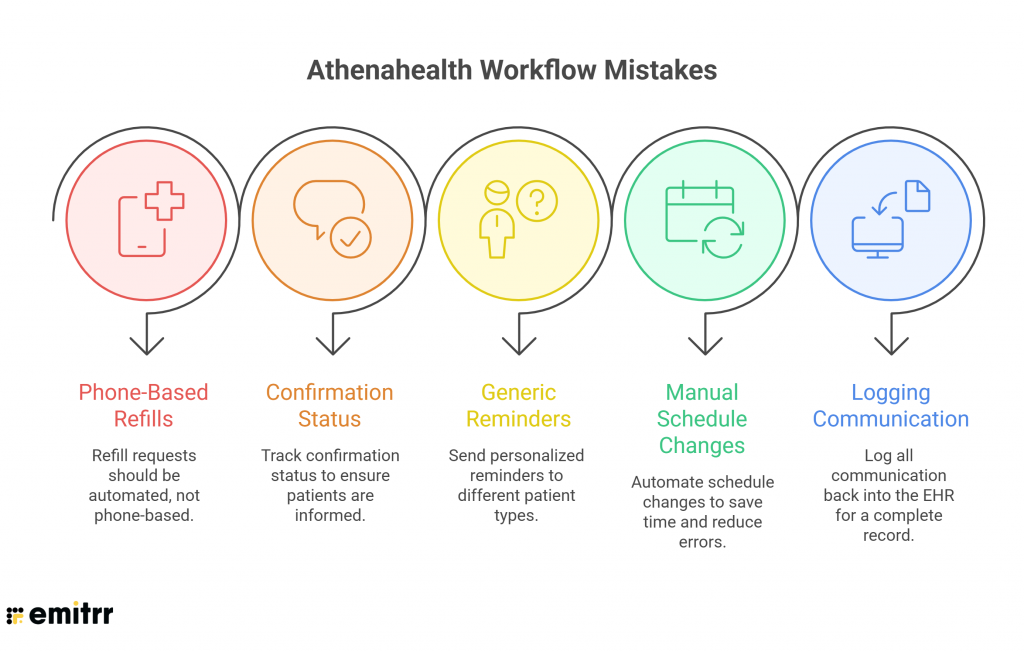
- Keeping refill requests phone-based
- Not tracking confirmation status
- Sending generic reminders to all patient types
- Manually calling patients for schedule changes
- Failing to log communication back into the EHR
Automation should reduce work — not create parallel systems.
Best Practices for Workflow Automation inside Athenahealth
Follow these best practices to automate refills, payments, and pre-visit workflows in Athenahealth:
- Use event-based triggers instead of manual sends
- Segment reminders by visit type and patient type
- Monitor no-show and response metrics monthly
- Standardize reminder cadence across providers
- Use message templates for clarity
Key Takeaways
Automating refills, payments, and pre-visit workflows in Athenahealth isn’t just about convenience — it directly impacts no-shows, staff workload, and revenue cycle performance.
When refill requests are routed automatically, confirmations sync back into the schedule, payments are prompted proactively, and schedule changes are handled in bulk, your front desk stops reacting and starts operating efficiently.
If you’re an Athena-heavy practice handling high appointment volume, multiple providers, or constant refill calls, extended automation makes a measurable difference.
Book a demo with Emitrr to see how two-way texting, AI refill intake, missed-call recovery, and schedule-based messaging can plug directly into Athenahealth — and turn manual workflows into automated systems.
FAQs
Athenahealth supports refill workflows through portal and internal task routing. For SMS-based intake and automated case creation, practices typically use an integrated communication platform.
Use automated reminders, two-way confirmations, and status tracking that writes back into the appointment record.
Yes, if two-way messaging is enabled through an integrated SMS platform that syncs confirmations back into Athenahealth.
Set up pre-visit and post-visit payment notifications with scheduled reminder cadence and secure payment links.
Use schedule-based messaging to select affected appointments by provider or date range and send bulk notifications instantly.