
 4.9 (400+
reviews)
4.9 (400+
reviews)

Introduction: The Importance of Online Scheduling in Primary Care Clinics
Online scheduling has moved beyond a mere convenience; it’s now a strategic lever for primary care clinics. With the ability to automate appointment scheduling, reminders, and follow-ups, clinics are realizing tangible improvements in patient engagement as well as operational efficiencies.
Retention & Revenue Gains: Clinics utilizing online scheduling have reported increased loyalty, faster rebooking speeds, and reduced overhead costs.
Market Aspect: Primary care providers who implemented two-way texting for appointment confirmations reported:
- 20% faster follow-up booking time
- 12% reduction in no-show rates
- 30% reduction in staff hours spent on phone calls
Behavioral Shift in 2025: With over 80% of patients booking appointments via mobile, the expectation is for self-service, 24/7 scheduling functions, particularly among Gen Z and Millennials.
Texting as Triage: Ongoing clinics that already utilize SMS as a triage tool to redirect patients to urgent care when necessary can be assured that appointment times are held for those who should be prioritized.
This blog provides a complete overview of the ten best online scheduling software for primary care clinics available in 2025, including features, pros, cons, pricing, reviews, and integrations, which should help you determine which online scheduling software is perfect for your practice.
An Overview of Online Scheduling Platforms for Primary Care Clinics
Online scheduling is now a foundational element of digital transformation in small to mid-sized practices. It is no longer just about scheduling appointments; it is about establishing trust with a patient, increasing operational efficiency, and connecting to the EHR.
- Central Role: Scheduling is fundamental to a Patient Experience strategy.
- EHR Integration: Newer solutions connect well with EHR systems, billing tools, and recall automation tools. This integration prevents double entry and errors.
- Specialty Product vs Generic Product: While there are generic scheduling apps available, primary care scheduling software is better suited, as it comes with the added benefits of being HIPAA compliant, role-based access, and healthcare integrations

Key Features and functionality to consider in Online Scheduling Platforms
When assessing the best online scheduling software platform, it is beneficial to have a checklist of key features. The success of the platform will always depend on the workflows you choose to employ; ultimately, results will depend upon the choice of key functionality. Choosing the best functionalities is the difference between minor operational efficiencies and full operational transformation.
- 24/7 Patient Self-Booking (Mobile/Desktop): This allows the patient the ability to book, reschedule, or cancel from anywhere, anytime, even after hours. This enhances convenience and retention.
- Two-Way SMS Confirmation + Reminders: Patients will confirm/cancel, or ask questions, limiting the amount of work your staff has to do, reducing no-shows.
- Waitlist + Cancellation Management: Identify your waitlisted patients when they are being contacted, identify slots opened, etc., and fill your schedule, even potentially with new patients, potentially saving revenue.
- Customizable Appointment Types: Offers uniquely tailored configurations for check-ups, follow-ups, or custom visits, plus retractable time slots to support required forms.
- Telehealth Integration: Patients can book appointments and participate in virtual visits through the platform.
- Front-Desk / Back-Office Dashboard: A standalone dashboard for staff to manage schedules, see patient data, and manage workflows under one interface.
- Instant Reschedule / Cancel: One-click reschedule or cancellation from texts or emails reduces the chance of no-shows, if patients control it themselves.
- Patient Forms / Insurance Upload: Accepts forms and uploads in a digital format, so patients can complete secure forms before their appointment.
- AI-Powered Smart Scheduling: Predicts no-shows, suggests the best appointment times, and automatically optimizes schedules to keep calendars full.
Security & Compliance Requirements
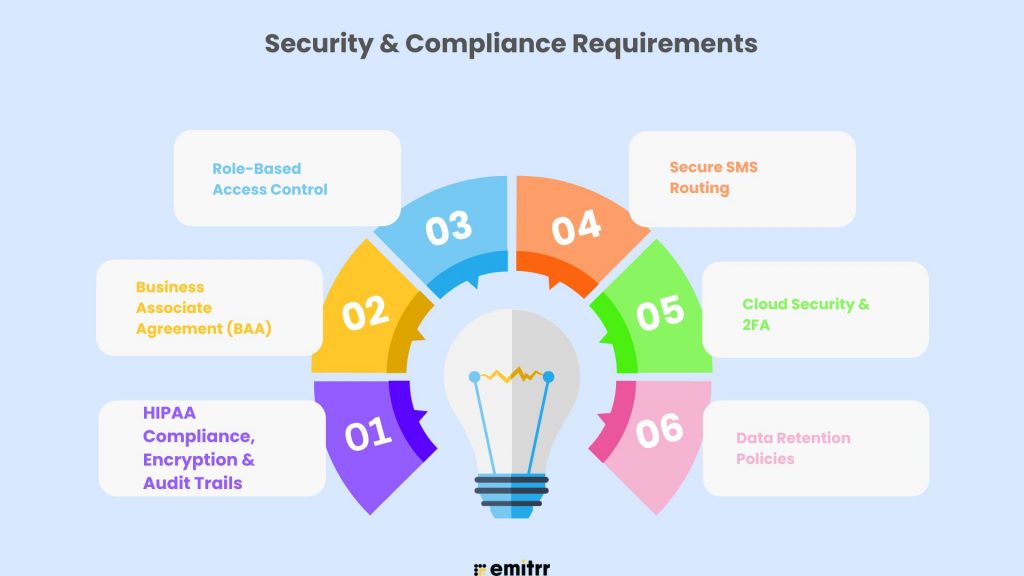
Security and compliance are critical in healthcare software. When comparing HIPAA-compliant scheduling software, you want to evaluate the core protections first rather than the flashy features.
- HIPAA Compliance, Encryption & Audit Trails: All communications must be encrypted, and logs need to capture access, as you are responsible for accountability.
- Business Associate Agreement (BAA): HIPAA mandate ensuring the provider handles PHI correctly. If there is no BAA, there is no compliance.
- Role-Based Access Control: Access is reduced by role to limit what staff can access. Staff will see only what they need to see when doing their work, while an admin can run reports or manage settings.
- Secure SMS Routing: Unlike standard texts, a secure route protects patient data so that it can’t be intercepted.
- Cloud Security & 2FA: Hosting on the cloud ensures security, as does two-factor authentication from unauthorized access to a patient’s account.
- Data Retention Policies: BAs must have articulated policies on retention of patient data and the secure deletion of data.
Important Integrations Required for Primary Care Clinics
A scheduling tool that is not using integrations turns into a data silo. The best tools will be a hub, connecting to systems you already have.
- EHR & PMS Systems: Sync up with Epic, Athenahealth, eClinicalWorks, and DrChrono to save errors and avoid duplication through manual data entry.
- Billing Tools: Platforms like Kareo, AdvancedMD, or QuickBooks allow links for co-pay reminders and payment.
- Marketing Platforms: Use Mailchimp or ActiveCampaign to send recalls, newsletters, and campaigns.
- VoIP & Phone Systems: VoIP tools like RingCentral or Aircall, which allow missed-call-to-text with a booking link, are perfect for caring and instant solutions enabled by urgent care scheduling software, such as CBV.
How Online Scheduling Software Helps Primary Care Clinics
Online scheduling changes more than scheduling logistics and provides real outcomes to patient care and clinic growth.
- Increase Patient Retention: Prompts and easy booking encourage loyalty and lifetime value.
- Decrease No-Shows: Push one/two-way SMS or have patients reschedule their appointments to decrease empty bookings on the calendar.
- Less Admin: Automation reduces repetitiveness to allow the advocacy of service to the patient.
- Increase Hours to Market: Allowing patients to book when they want requires no additional staff if you allow patients to book ideally after-hours.
- Increase Access: Online patient scheduling tools reduce barriers for elderly, chronic, or busy patients.
Selecting the Right Online Scheduling Software
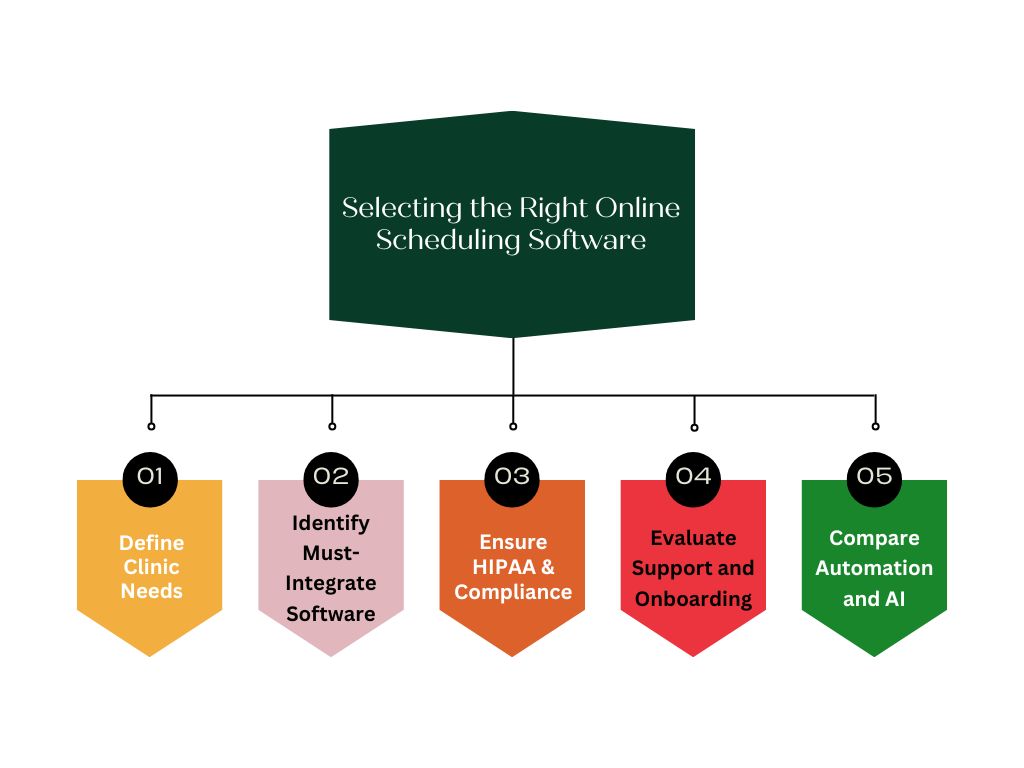
Choosing the right software is a long-term decision. Use this guideline to help you!
- Define Clinic Needs: Consider patient volume, specialties, locations, and staff roles.
- Identify Must-Integrate Software: Make sure you know what has to integrate with your scheduling software (EHR, billing, etc.) so you can work smoothly.
- Ensure HIPAA & Compliance: Anytime you are using any online scheduling software, always ask for a Business Associate Agreement (BAA) and check if it has encryption features and audit capabilities. It is non-negotiable to work with HIPAA-compliant scheduling apps.
- Evaluate Support and Onboarding: Ask how the onboarding process works after you purchase it, if training is also included, and if support is available, and if so, how (e.g., 24/7 or a dedicated account manager available business hours).
- Compare Automation and AI: Look at how the software can help beyond just scheduling; it should offer advanced reminders, analytics, and AI tools (e.g., note transcription, triage, etc.), which are available in some scheduling features.
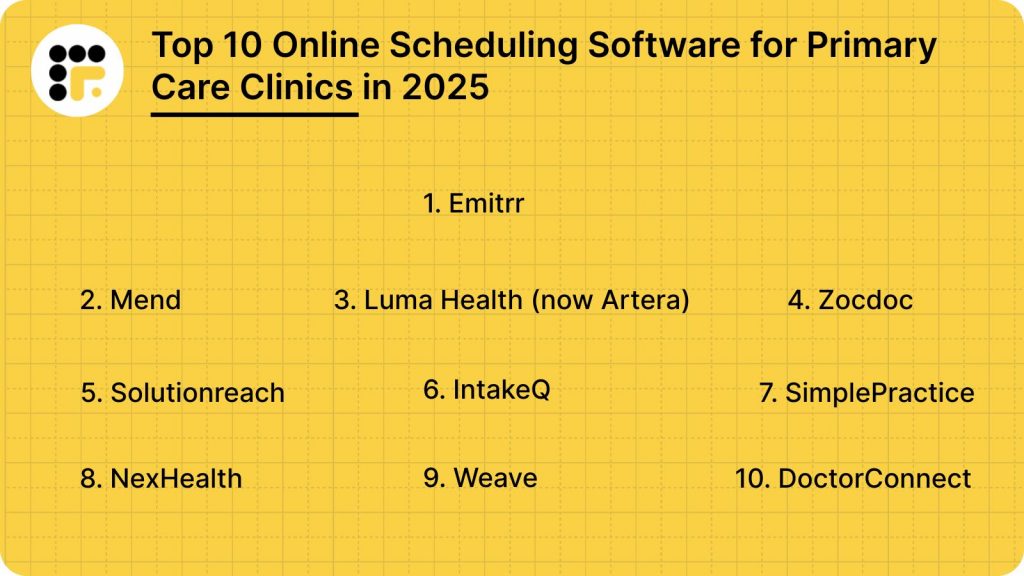
10 Best Online Scheduling Software for Primary Care Clinics
- Emitrr
- Mend
- Luma Health (now Artera)
- Zocdoc
- Solutionreach
- IntakeQ
- SimplePractice
- NexHealth
- Weave
- DoctorConnect
Below are the top 10 online scheduling providers for 2025. Each has its unique strengths. Let’s explore them:
1. Emitrr
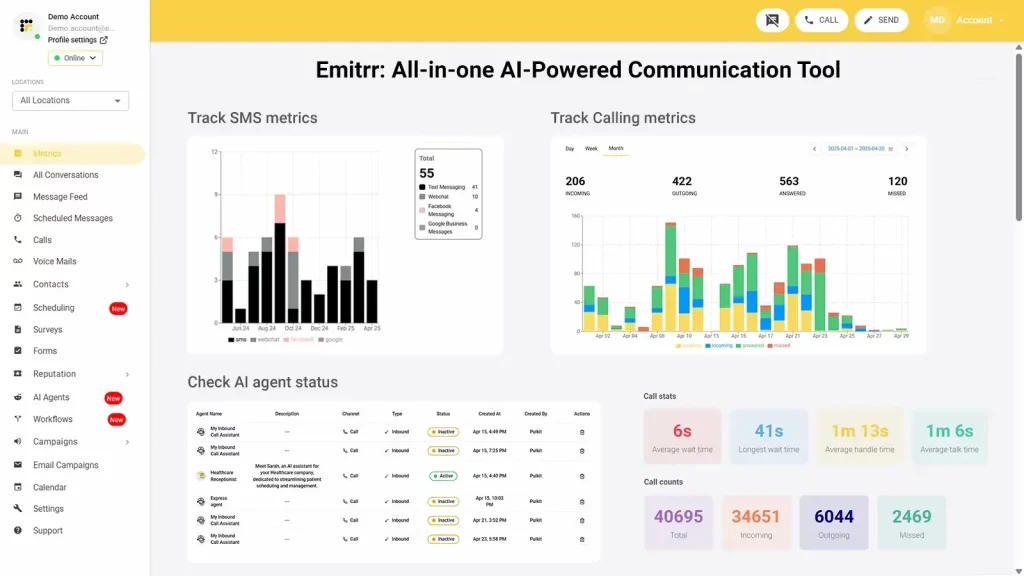
Overview: Emitrr is a premier communication solution without the need for a terminal, specifically for doctors and practices. With robust online scheduling and full patient engagement, Emitrr is a healthcare VoIP and communication platform focused on a unified patient communication journey from the moment of scheduling to a follow-up. This platform is 100% HIPAA-compliant and will enhance every step of the patient journey.
Features of Emitrr :
- Appointment reminders: Automatically remind patients via SMS, email, or voice notifications to eliminate no-shows.
- Patient Self-Scheduling: Patients can view open slots and schedule appointments online 24/7 from any device.
- Web chat to text: Transcribe your web chat conversations into your unified inbox.
- Digital Forms: Send patients secure SMS links to gather their secure intake information and paperwork before their visit.
- End-To-End Protection: It is crucial to verify that features comprising HIPAA encryptions, audit logs, and a Business Associate Agreement (BAA) enable full protection of patient data as it traverses every form of communication and storage. The protection of patient data builds customer (patient) trust.
- Advanced Primary Care Workflows: The platform is specifically designed for the workflows of a primary care clinic, allowing booking routine checkups, managing recalls, etc. This is not a “one size fits all” product; it is a solution built specifically for your workflows.
- Single Dashboard: A single HIPAA-compliant workspace with capabilities to manage calls, texts, and voicemails by your staff offers a value proposition from an efficiency perspective. The centralization eliminates miscommunications, removing the need to toggle between applications, and greatly increases front office efficiencies.
- Smart Automation: Automated reminders to patients and missed call-to-text are designed to keep your schedule full. You will never lose a patient lead; and it greatly reduces a huge chunk of admin time for human follow-ups.
- AI Agent: Emitrr’s AI agent works as if it were a new team member, you simply configure it, set prompts, and add knowledge sources. It handles scheduling, confirmations, rescheduling, and even staffing messages 24/7, all while improving over time
Pros of Emitrr:
- Excellent Customer Service: High ratings and 24/7 support lead to easy installation & troubleshooting (if necessary).
- Customization: Each practice will have a customized price and text package, so you pay only for what you need.
- 100% Transparency, No Hidden Fees: One press of a button to choose the right plan for your loving device, simple price, no additional charge, no extra cost.
- Safe Communication: 100% HIPAA and TCPA-compliant with a signed BAA so you can communicate with confidence.
- Patient Journey Features: From forms and scheduling to recalls and reviews, Emitrr has a feature to service every stage of the patient journey.
Cons of Emitrr:
- Some advanced AI capabilities are currently under development, but they contain strong capabilities.
Emitrr Pricing:
Begins at $99 per month, custom pricing available for larger practices.
Reviews of Emitrr:
4.8/5
Emitrr Support Channels:
24/7 chat, mail, telephone, and an exhaustive list of knowledge base.
2. Mend

Overview:
Mend is a digital health platform that supports in-person and virtual care. It is highly customizable with a focus on patient engagement and experience. In addition, it includes advanced predictive technology for forecasting no-shows, making it a great solution for a busy clinic.
Features of Mend:
- Telehealth capabilities with HD video conferencing to easily complete virtual appointments.
- Predictive IQ to forecast no-shows and proactively fill that appointment slot.
- Automated appointment reminders via text and/or email to reduce no-shows.
- Digital intake forms create a paperless patient experience.
- Secure chat and file sharing for HIPAA-compliant patient scheduling.
- Self-scheduling for patients.
Pros of Mend:
- Mend is a highly customizable and flexible platform.
- Mend provides predictive no-show technology to help clinics save revenue.
- Mend integrates with various medical practice management software.
- Mend is great, especially for virtual care and telehealth appointments.
Cons of Mend:
- The onboarding process can be complicated.
- Pricing is enterprise pricing, which can be very costly for small clinics.
Mend Pricing:
Starting at $0 per month for the free plan, enterprise pricing is customized.
Mend Reviews:
4.3/5
Mend Support Channels:
Phone, email, live support, tickets, training.
3. Luma Health (now Artera)
Overview:
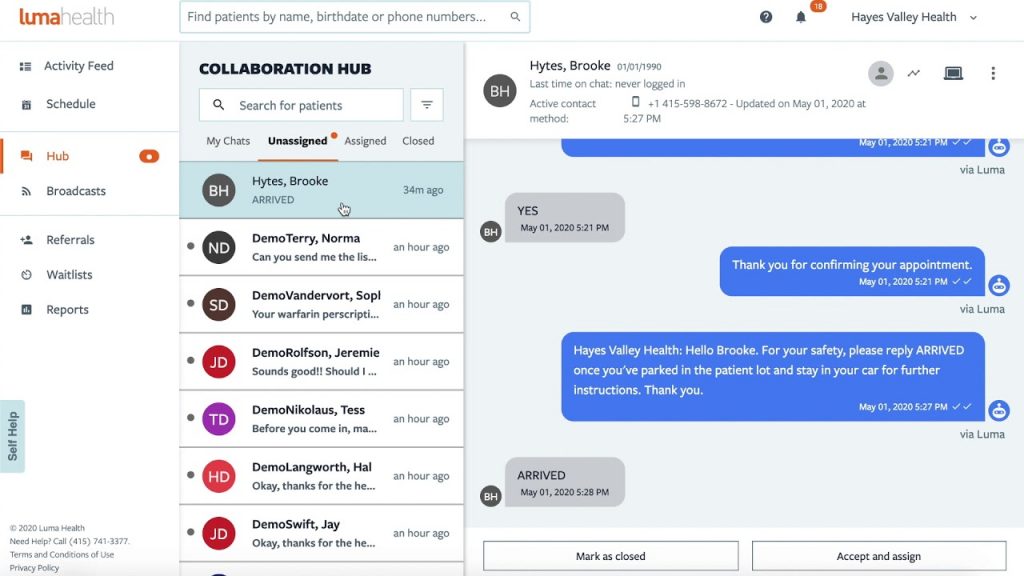
Luma Health, now part of Artera, is a patient engagement platform that automates workflows and enhances the patient experience throughout the care continuum. It works for a variety of healthcare organizations and is known for its extensive and easy-to-use features, as well as its HIPAA-compliant scheduling app that fosters a seamless experience.
Key Features of Luma Health:
- Smart appointment reminders and self-service patient scheduling.
- Secure two-way messaging and telehealth video visits.
- Automated intake forms and digital registration.
- Recall campaigns for patient outreach and improved follow-up care.
- Online review management for safeguarding the online reputation of your clinic.
- A dynamic waitlist feature to fill last-minute cancellations.
Pros of Luma Health:
- Extremely strong at automation and patient engagement.
- Solid integrations with major EHR systems.
- Intuitive interface for staff and patients.
- Comprehensive features that cover a very broad scope of communication needs.
Cons of Luma Health:
- It can be more expensive than simpler solutions for small practices in particular.
- Certain workflows come with customized options.
Pricing of Luma Health:
Starts at approximately $250 per month and is dependent on features, number of users, and integrations.
Reviews of Luma Health:
4.8/5
Luma Health Support Channels:
Ticket system and email
4. Zocdoc
Overview:
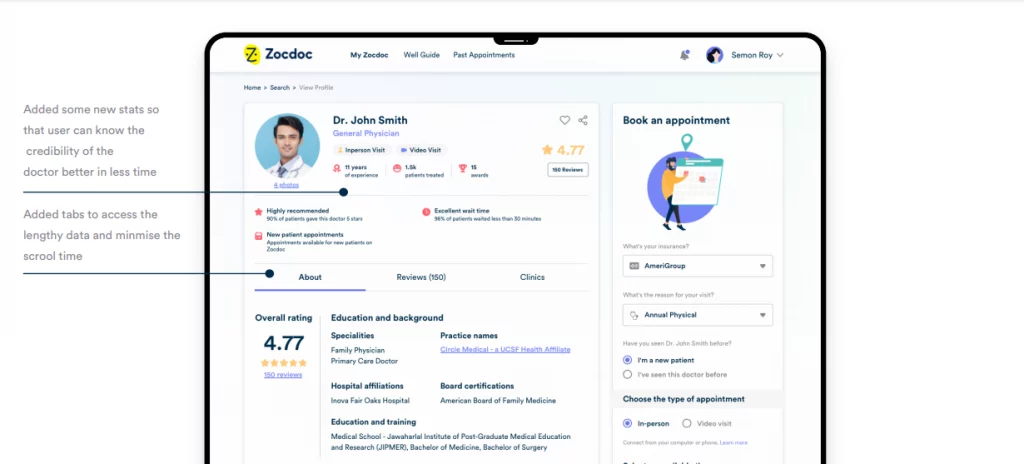
Zocdoc is an online marketplace that helps patients find a doctor in-network and allows patients to book appointments instantly online. For clinics, Zocdoc provides a great opportunity to acquire an infinite number of patients through its platform. This is a great option for a practice that is trying to build out.
Features of Zocdoc:
- Patient marketplace to gain visibility and book new patients.
- Online booking widget on the clinic’s website.
- HIPAA-compliant online appointment scheduling platform for patient bookings.
- Automated appointment reminders that will help reduce the number of no-shows.
- Patient review collection.
- Social proof building.
- Patients can filter providers by insurance plan.
Pros of Zocdoc:
- Great system for patient acquisition and marketing.
- “Pay per new patient booking” can be financially favorable for clinics trying to expand.
- It is easy to use for patients and providers.
- Provides clinics with free tools to engage existing patients.
Cons of Zocdoc:
- It can be expensive if a practice generates a significant volume of new patients through the marketplace.
- Less focused on practice management features.
Zocdoc Pricing
Marketplace charges a fee per new booked patient. Free tools are included for the clinic’s existing patients.
Zocdoc Reviews:
4.5/5
Zocdoc Support Channels:
Clinic support is available for providers in the signup process.
5. Solutionreach
Overview:
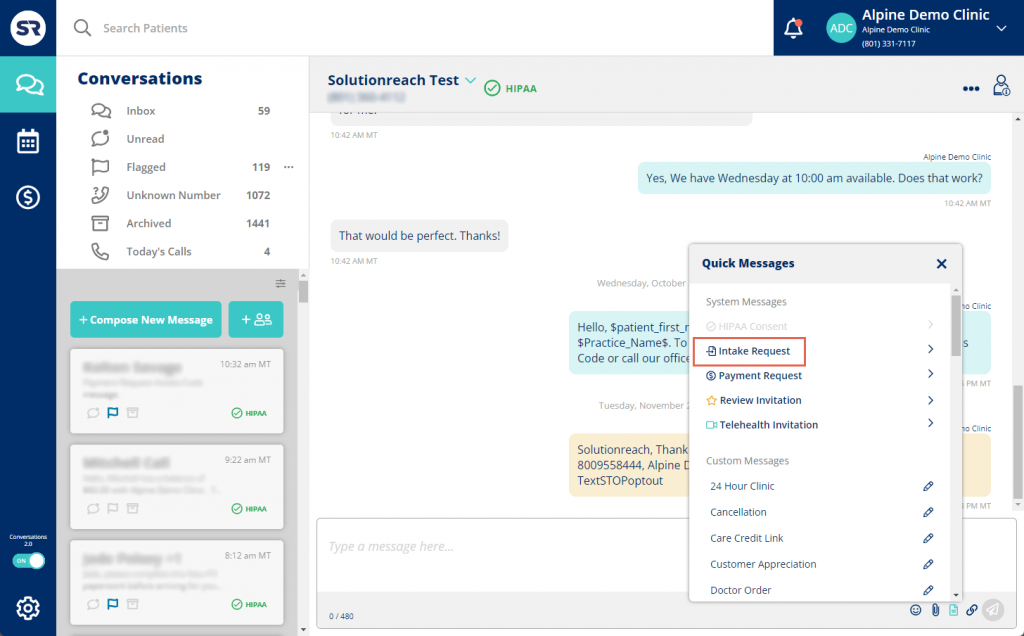
Solutionreach is a web-based patient engagement technology that helps enhance communication and optimize workflow. Solutionreach offers a flexible patient engagement solution, which is primarily focused on reducing no-shows and gathering patient feedback to improve the running of the practice.
Solutionreach Features:
- Automated appointment confirmations and reminders via text, email, and voice calls.
- Two-way text messaging for real-time, back-and-forth communication.
- ASAP waitlist to get patients in to fill open slots.
- Health information/Intake forms for paperless front office.
- Automated review requests and patient surveys.
- Secure communication capabilities for a HIPAA-compliant scheduling solution.
Pros of Solutionreach:
- Reduction in no-shows and cancellations, sometimes by significant amounts.
- Great all-in-one patient engagement technology that encompasses a wide variety of patient engagement needs.
- Provides growing practice with more reviews and builds patient engagement for the leading practices.
- Provides a lot of robust reports so practices can make data-driven decisions.
Cons of Solutionreach:
- Some users have complained of occasional hiccups with the technology.
Solutionreach Pricing:
No public pricing is listed; Solutionreach has quote-based pricing.
Solutionreach Reviews:
4.3/5
Solutionreach Support Channels:
No online support channels provided.
6. IntakeQ
Overview:
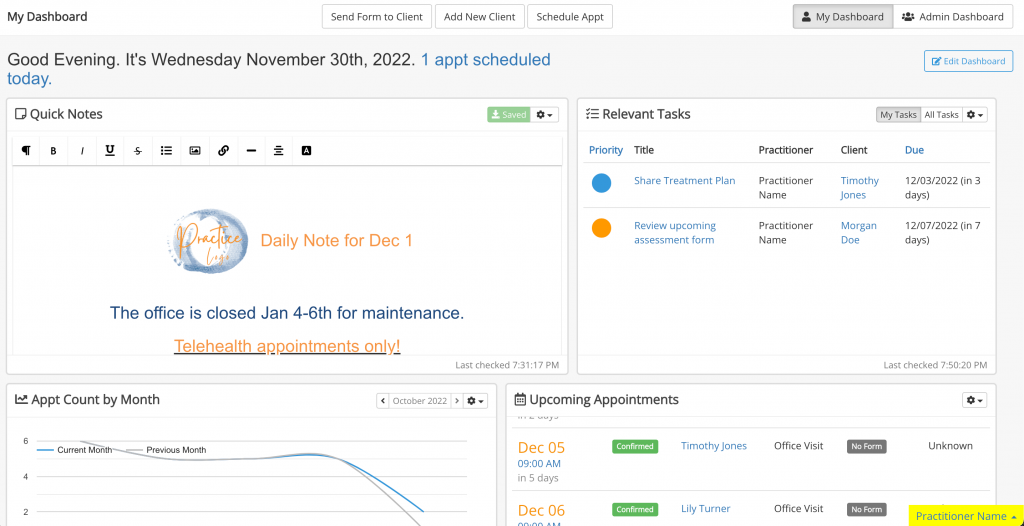
IntakeQ is a complete practice management system that started as a sophisticated online intake form builder. Today, IntakeQ also integrates great scheduling, billing, and telehealth functionality while placing a heavy emphasis on security and compliance.
Features of IntakeQ:
- Custom online intake forms where patients can e-sign, which is key in this HIPAA-compliant appointment scheduling system.
- Full appointment management scheduling (includes booking widget).
- Customized automated reminders and notices to prevent missed appointments.
- Secure client portal for patient communication and access to records.
- Telehealth functionality for virtual visits.
- Real-time calendar cross-sync to prevent double-booking.
Pros of IntakeQ:
- Incredible forms and intake process. Absolute time saver!
- Super customizable for specialized practices.
- Transparent pricing with no contracts.
- Includes a signed HIPAA with signed BAA.
Cons of IntakeQ:
- Sometimes seems more form-centric than scheduling-centric.
- No patient mobile app.
IntakeQ Pricing:
Plans start at $29.90 per month for forms only; plans for practice management start with pricing from $79.90 per month.
IntakeQ Rating:
4.5/5.
IntakeQ Support Channels:
Phone support available for higher-level tier plans.
7. SimplePractice

Overview:
SimplePractice is an all-in-one practice management software for health and wellness professionals, especially for those in mental health and private practice. It is an easy way to schedule, bill, and keep clinical documentation.
Features of SimplePractice:
- Clients can self-schedule appointments, including a public booking page
- Automated appointment reminders
- Telehealth platform for video sessions
- Full billing and secure payment processing
- Onboard messaging and client portal
- Full suite of charting and clinical documentation features
Pros of Simple Practice:
- Intuitive and easy to use
- Fully includes important features for running a solo or small practice
- Good length of a free trial for clients to try out the software
- Strong compliance focus and security as a HIPAA-compliant scheduling software
Cons of SimplePractice:
- There may be some disadvantages to multi-location, large primary care clinics.
- Customization options for intake forms are limited.
SimplePractice Pricing:
The starter plan starts at $49/month, Essential is $79/month, and Plus is $99/month.
SimplePractice Reviews:
4.6/5
SimplePractice Support Channels:
Provides a premium phone support line for Plus plan users.
8. NexHealth
Overview:
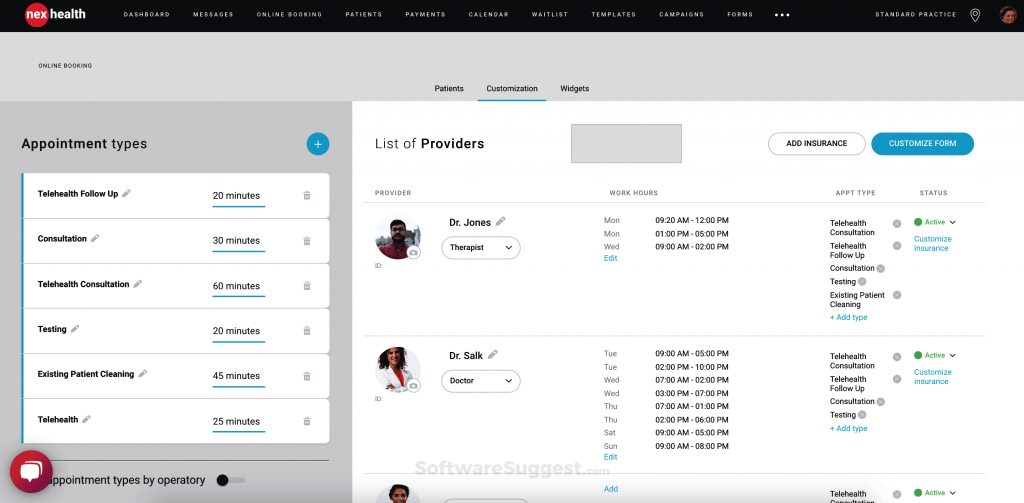
NexHealth is a patient experience platform that focuses on real-time integration with a clinic’s existing EHR. The idea is to automate the entire patient journey, including online booking, digital forms, payments, and recalls.
Features of NexHealth:
- Real-time online booking with EHR sync for appointment scheduling software, HIPAA-compliant use.
- Automated digital intake forms.
- Two-way messaging and automated recalls.
- Integrated payments.
- “Waitlist” feature for filling last-minute openings.
- Secure communication features for a HIPAA-compliant scheduling tool.
Pros of NexHealth:
- Real-time, two-way sync with 100+ EHR systems.
- Strong Patient engagement and automation capabilities.
- Helps practices grow, focusing on new patient acquisition.
- Will buy out your contract with a previous vendor.
Cons of NexHealth:
- Pricing is not publicly available- quote-based pricing.
- The setup can be a little complex.
NexHealth Pricing:
Not publicly available; quote-based pricing.
NexHealth Reviews:
4.8/5
NexHealth Support Channels:
NexHealth supports by phone and email.
9. Weave
Overview:
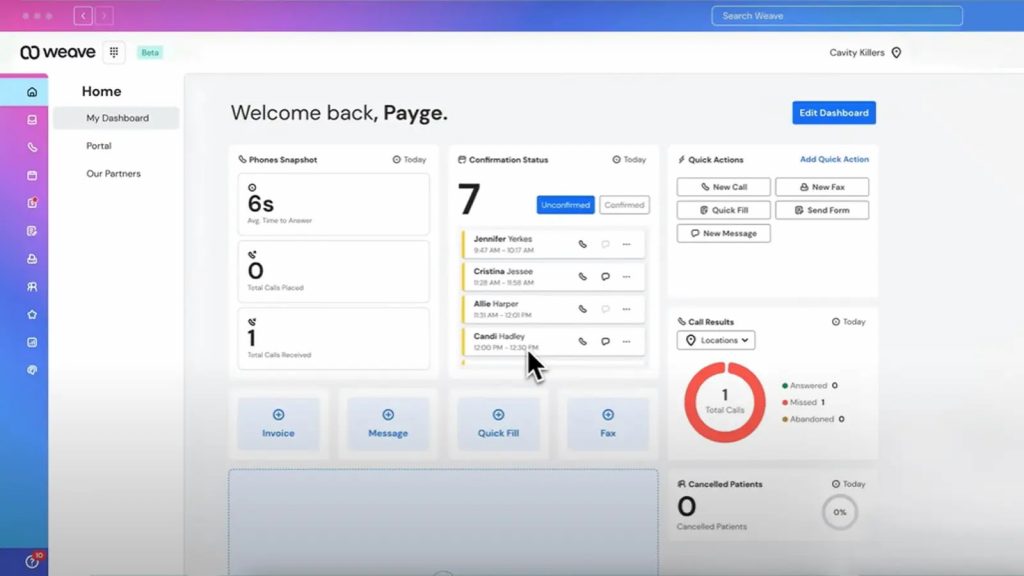
Weave is a complete communication and patient engagement platform that combines a business phone service with text messaging, scheduling, and payment features. Practices appreciate Weave’s all-in-one tool approach, especially if they are looking to eliminate multiple vendors.
Features of Weave:
- Two-way texting and automated reminders.
- VoIP phone service with call analytics.
- Digital forms and web assistants.
- Automated review request.
- Online scheduling and payment.
- Secure communications for HIPAA-compliant scheduling.
Pros of Weave:
- Consolidates multiple tools into one platform.
- Excellent for appointment management and scheduling.
- Good usability and functionality.
- Good analytics for understanding business performance.
Cons of Weave:
- Difficult onboarding.
- Not a pricing structure, with service levels billed on a quote basis.
Weave Pricing:
Quote-based pricing with service levels (Pro, Elite, Ultimate).
Weave Reviews:
4.8/5
Weave Support Channels:
Phone support and one-on-one training are offered for higher-tiered plans.
10. DoctorConnect
Overview:
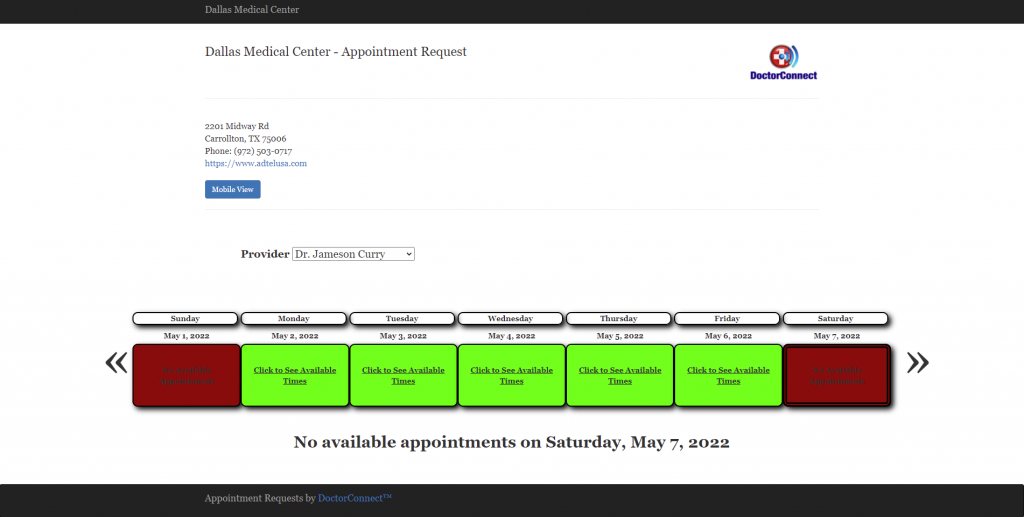
DoctorConnect is a patient communication platform that is focused on appointment reminders and automated communication. It aims to reduce no-shows and increase patient engagement by providing strong messaging and recall options.
Features of DoctorConnect:
- Automated reminders with text, email, and voice.
- Real-time messaging, which allows for two-way communication.
- Customizable appointment reminders that integrate patient-specific information.
- Automated requests for reviews.
- EHR Integration, which syncs patient and appointment data.
- Patient recall messaging to proactively follow up.
Pros of DoctorConnect:
- Automated appointment reminders and communication system via text, email, and voice
- It has very high ratings for customer service and ease of use.
- It is a proven method of decreasing no-shows and increasing patient satisfaction.
- For practices that want to focus on communication, it can be a cost-effective solution.
Cons of DoctorConnect:
- It is more of a communication platform than a scheduling tool.
- Does not have the comprehensive features of all-in-one solutions.
DoctorConnect Pricing:
Pricing is not listed publicly; it is quote-based.
DoctorConnect Reviews:
4.5/5
DoctorConnect Support Channels:
Phone and email.
Why Emitrr Is the Best Online Scheduling Software For Primary Care Clinics
- 1,000+ Integrations: A product like Emitrr has the power of direct connection with over 1,000 EHR/PMS, including industry-leading platforms like Epic and Athena. Real-time syncing prevents data silos, overbooking, and does not hold you hostage to vendors and their systems or processes.
- Remote Access & Telehealth- Ready: The app is perfect for telehealth consultations, on-call situations, or remote work. With the clinic’s number easily accessible from any device, it is great to know your clinic can always be reached without losing privacy.
- Fast Onboarding & Transparent Pricing: Don’t worry about a long onboarding process: it’s fast, simple, and takes a day with little effort from your IT department. The pricing is upfront, simple, and clear right down to the cent per ‘user” and there are no hidden fees.
- AI-Driven Tools: Emitrr includes intelligent features like instant voicemail transcription, which assist the clinic in becoming smarter and more efficient, ultimately with improved outcomes for the patient experience. Emitrr’s AI agent works as if it were a new team member, you simply configure it, set prompts, and add knowledge sources. It handles scheduling, confirmations, rescheduling, and even staffing messages 24/7, all while improving over time.
- Enterprise-Grade Uptime (99.99 %) & Scalability: Clinic owners can be reassured with the reliability of the platform – it can scale with the business, whether you are a single clinic or a multi-site enterprise.
Frequently Asked Questions
Ans: Yes, as long as you select a HIPAA-compliant scheduling software that includes a signed BAA, along with appropriate encryption to secure the patient data.
Ans: This depends on which software application you choose. Some have a family account function; others require separate profiles for each family member.
Ans: Emitrr and Mend are excellent tools primarily because they have integrated support for multiple providers, several locations, and centralized reporting.
Ans: Select scheduling software that has a real-time EHR sync and a centralized dashboard to prevent double booking and keep everyone’s appointment schedules updated.
Ans: Most modern software platforms offer custom API build options, and you may contact the software provider to create an API for your own EHR.
Conclusion
Digital scheduling is no longer a “nice to have” in primary care. Rather, it is required for efficiency, patient experience, and growth. Digital scheduling technology has become an essential element of every modern urgent care appointment scheduling software strategy.
Each clinic has individual needs, but HIPAA compliance, robust integrations, and automation are non-negotiable. Emitrr is one of the most trusted providers of end-to-end automation with a compliance-first approach and a universal dashboard for ease of use. Clinics that modernize their scheduling this year will experience the greatest leverage in patient satisfaction and operational excellence for many years to come.