
 4.9 (400+
reviews)
4.9 (400+
reviews)
Introduction
You know those days when your schedule just goes completely off track? One client cancels, another grabs the wrong slot, and suddenly your whole day’s upside down. That’s when a tool like SimplyBook.me can really save you. It takes the chaos off your hands and helps you breathe again.
These tools help you manage appointments, send reminders, and even handle payments. The best part? You can do all of this without making endless calls or confusing spreadsheets. And many people swear by it, right from salon owners to fitness coaches and doctors.
But let’s be real – no tool fits everyone perfectly. Maybe you want something easier to set up, or you just need quicker support when things go wrong. That’s when it makes sense to explore a few SimplyBook.me alternatives and see what else is out there. But first, let’s see what SimplyBook.me does and why so many people use it!
What is SimplyBook.me?
You can think of SimplyBook.me as that super-organised assistant who always keeps things in order. It can let your clients book appointments anytime, even when you’re fast asleep! Everything shows up right on your dashboard with automatic confirmations and reminders, so you’re never guessing who’s next. No more back-and-forth messages or digging through your notebook to stay on track.
It’s basically made for anyone and everyone who deals with a steady flow of bookings. Whether you run a spa, clinic, or small tutoring business. The idea’s simple: you handle the work you love, and SimplyBook.me takes care of the scheduling behind the scenes!
SimplyBook.me Features
- Online Booking Page: Your clients can book a slot at any time. They just need to visit your website or social pages. No calls, no back-and-forth.
- Automated Reminders: The system will send out text or email reminders automatically. So you don’t have to get into the grunt work.
- Online Payments: You can accept payments right when clients book, using PayPal, Stripe, or Square.
- Memberships and Packages: If you offer recurring sessions or bundles, you can easily set those up too.
- Custom Branding: You don’t have to lose your brand identity. Just customise the booking page to look exactly like your business.
- Reports and Analytics: Track how many bookings you’re getting and where you’re making the most money.
- Calendar Sync: Connect it with your Google or Outlook calendar so everything stays updated.
- Mobile App: You won’t be tied down to a clunky system. You can handle tasks right from your phone.
SimplyBook.me Pros
- Really easy to use: You really don’t need to be tech-savvy to figure it all out. Everything’s pretty simple and clean.
- Handles the repetitive stuff: Reminders, confirmations, and follow-ups are all taken care of on auto mode.
- Works for any kind of business: Whether you’re a hairstylist, a doctor, or a trainer, it will fit right in.
- Friendly pricing: The free plan’s good to start if you’re a small business owner. And the paid ones are pretty reasonable for mid-sized businesses.
- Looks professional: Your booking page feels organised and on-brand, which leaves a good first impression.
SimplyBook.me Cons
- Not many connections: It doesn’t plug into every app or CRM you might use.
- Support can be slow: If you need help fast, you might have to wait a bit.
- Takes time to learn: Some of the fancy settings need a little practice.
- Add-ons cost extra: Features like loyalty programs or coupons aren’t always free.
- Minor bugs here and there: A few users say calendar sync sometimes lags.
SimplyBook.me Integrations
- Calendar tools: Google, Outlook, and iCal all connect easily.
- Video platforms: Zoom, Teams, and Google Meet for online sessions.
- Payment systems: Stripe, PayPal, and Square for smooth payments.
- Social booking: Add booking links right on Facebook, Instagram, or Google Business.
SimplyBook.me Pricing
- Free Plan: Great if you’re just starting out. It generally covers up to 50 bookings a month.
- Basic Plan: $9.90 per month with more control over features.
- Standard Plan: $29.90 per month for automation and analytics.
- Premium Plan: $59.90 per month for full customisation and advanced tools.
SimplyBook.me Customer Support Channels
- Email: Drop them a message if you need help with setup or billing.
- Live Chat: Handy if you prefer quick answers while working.
- Help Centre: Packed with FAQs and how-to guides for self-help.
- Community Forum: Other users often share tips and solutions there too.
SimplyBook.me Ratings
- Capterra: 4.6/5
- G2: 4.4/5
SimplyBook.me Reviews
“Sometimes I find it hard to navigate on the mobile app. Secondly, If I book a client for them on my booking page, not the admin side, if I go to book someone else the last person info is still there and I cant seem to get rid of it without shutting the app or desktop off and then rebooting..”
“It is not easy to update times across all classes. There are too many areas that also have to be updated and it becomes frustrating to use and takes time to figure it out.”
Source: Capterra
Why Do Businesses Seek a SimplyBook.me Alternative?
SimplyBook.me is a pretty solid tool. It scores around 4.4 stars on G2 and 4.6 stars on Capterra based on over a thousand reviews. That means many people genuinely like it. But if you dig into those reviews, you’ll notice a pattern. Many users say, “It’s great, but…” and that “but” is exactly why businesses start exploring other options.
- It doesn’t always play well with other tools: You’d think a platform this polished would connect with everything, right? But some users say integrations are hit or miss. If your business uses specific CRMs for billing systems or communication tools, you might find yourself doing extra manual work just to keep things in sync. It’s not a dealbreaker, but it can get tiring when you’re managing clients every day.
- The add-ons sneak up on you: Many users love the starting price. It’s budget-friendly and gets you going fast. But once you start adding the good stuff like memberships, coupons, or SMS reminders, the monthly bill grows. It’s kind of like those streaming subscriptions, it looks cheap until you realise you’ve added five extras you didn’t plan for. That’s when people start looking for something more straightforward.
- Support could use some pep: The platform works well most of the time, but when something breaks, the help can take a while. Several users mention waiting longer than expected for replies or fixes. And in a business where bookings mean revenue, delays can be stressful. People want support that’s quick, human, and easy to reach, not something that leaves them hanging.
- The setup isn’t as simple as it looks: Once you get going, SimplyBook.me feels smooth. But getting there? Some users say it takes a bit of trial and error. The menus, templates, and automations can be confusing if you’re new to scheduling software. It’s great once it’s running, just not everyone has the patience (or tech confidence) to get through the learning curve.
- Mobile could be smoother: A lot of users appreciate having the app, but some mention it’s not as fast or intuitive as they’d like. When you’re running around, maybe checking bookings between clients or updating a slot from your phone, every tap matters. Businesses want something that just works wherever they are, without glitches or syncing delays.
And that’s what sends businesses looking for simpler, smoother, and better-connected scheduling tools.
What to Look For in a SimplyBook.me Alternative
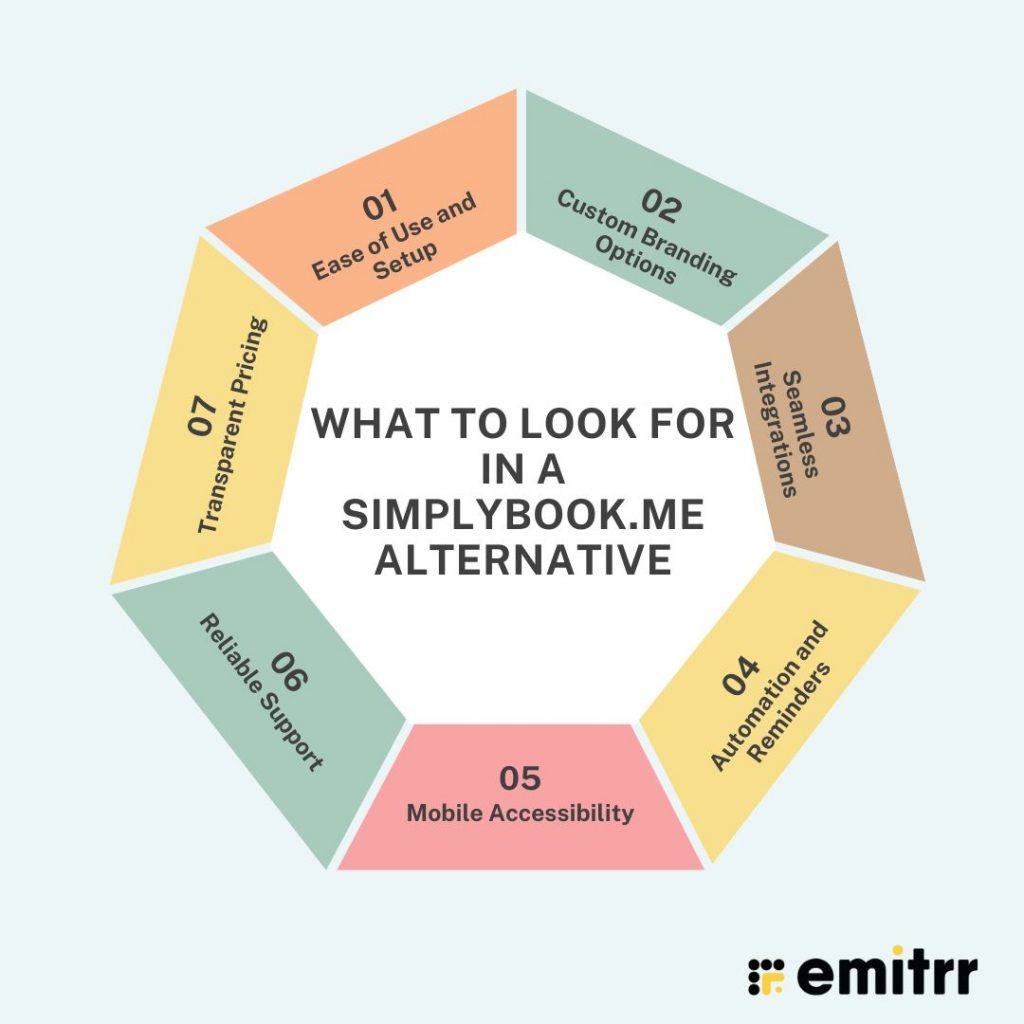
So when you start exploring new online scheduling tools, it’s not just about finding something cheaper. You should ideally look for a tool that fits your work style. Here’s what you need to keep in mind while comparing options.
Ease of Use and Setup
This one’s so important. No one has time to spend days learning new software. A good alternative should be something you can set up quickly. You should be able to import your client list, add your services, and start taking bookings without needing too much hand-holding. It should also feel intuitive, like something you’ve been using for years. If your staff or clients can’t figure it out easily, it won’t help.
Custom Branding Options
In this digital-first world, your booking page is often the first impression people get of your business. So, it should look like you, not the software provider! A good alternative should let you add your logo, brand colors, and even a personalised message or image. It’s not just about looks. It’s about trust. When clients see your brand instead of a generic booking form, it feels more professional and reassuring.
Seamless Integrations
Your scheduling tool shouldn’t be an island. Look for a platform that connects well with your CRM, payment system, email tools, and calendar apps. That way, everything updates automatically, and you don’t have to jump between tabs or copy-paste information. Integrations save time, reduce errors, and keep your workflow smooth, something every business owner appreciates.
Automation and Reminders
Missed appointments and no-shows can end up costing you a lot over time. The right tool should be able to handle reminders automatically, so you don’t have to. It should also send confirmations, thank-you notes, or follow-ups with no extra effort from your side. Smart scheduling and automation mean you’re always a step ahead. And your clients will notice!
Mobile Accessibility
Now, you can’t always be glued to your desk. And your scheduling tool shouldn’t expect you to be. Whether you’re managing a salon, clinic, or coaching business, you should be able to check your schedule, make edits, or contact clients right from your phone. A good mobile app lets you stay in control anywhere — even between meetings or while grabbing coffee.
Reliable Support
When things go wrong, fast help can make all the difference. Look for a company that offers quick and friendly support. Ideally through chat or phone, not just email. The right provider won’t leave you waiting when something breaks. Instead, they’ll guide you through the fix or offer simple step-by-step help so you can get back to work without stress.
Transparent Pricing
No one likes surprises — especially when it comes to billing. The right platform should be upfront about costs, showing exactly what’s included in each plan. You shouldn’t have to pay extra just to unlock basic tools or get support. Transparency builds trust, and that’s something every business owner values in the long run.
10 Best SimplyBook.me Alternatives
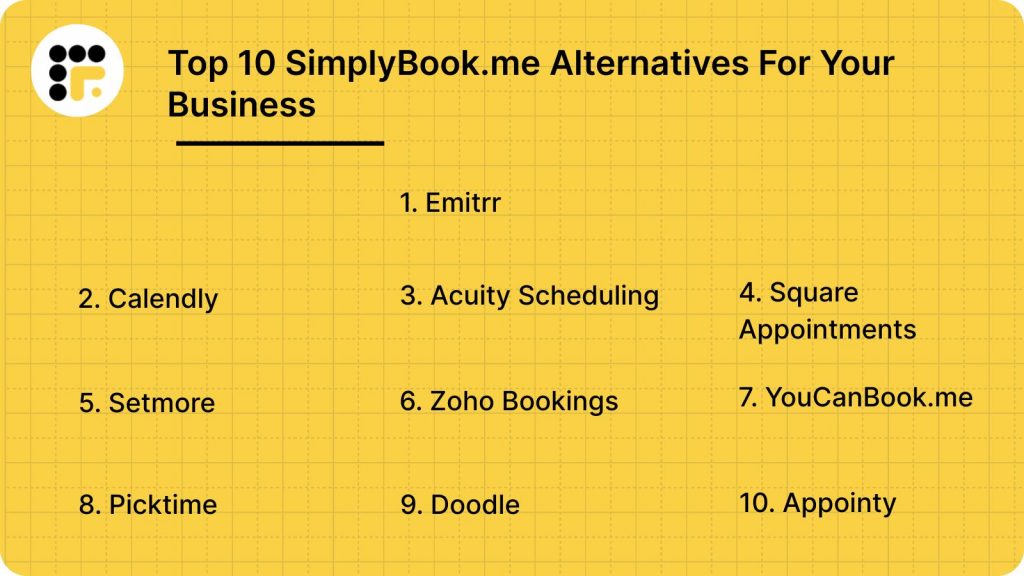
Here are 10 great alternatives that make scheduling simpler, faster, and a lot less stressful, whether you’re managing clients, patients, or team meetings.
- Emitrr
- Calendly
- Acuity Scheduling
- Square Appointments
- Setmore
- Zoho Bookings
- YouCanBook.me
- Picktime
- Doodle
- Appointy
1. Emitrr | Best SimplyBook.me Alternative
If you’re looking for a smarter, more hands-off way to manage scheduling and communication, Emitrr is the tool you need to check out. It can be used for healthcare, finance, retail, service-based businesses, you name it. Basically, any business that handles lots of calls, texts, and appointments every day. It’s a true all-in-one scheduling and AI-powered communication platform that helps your team save time, reduce no-shows, and improve patient or client satisfaction.
Emitrr Overview
Emitrr is designed to make appointment management and communication effortless. It’s more like your digital front desk. It can answer calls, book appointments, send reminders, and even follow up automatically. Whether you’re running a clinic, spa, or salon, Emitrr helps you manage bookings and client conversations from one simple, user-friendly place. Plus, it’s fully HIPAA-compliant, which means client data stays safe.
Emitrr Key Features
- AI-Powered Appointment Scheduling: Automatically books appointments, fills empty slots, and handles reschedules without manual effort.
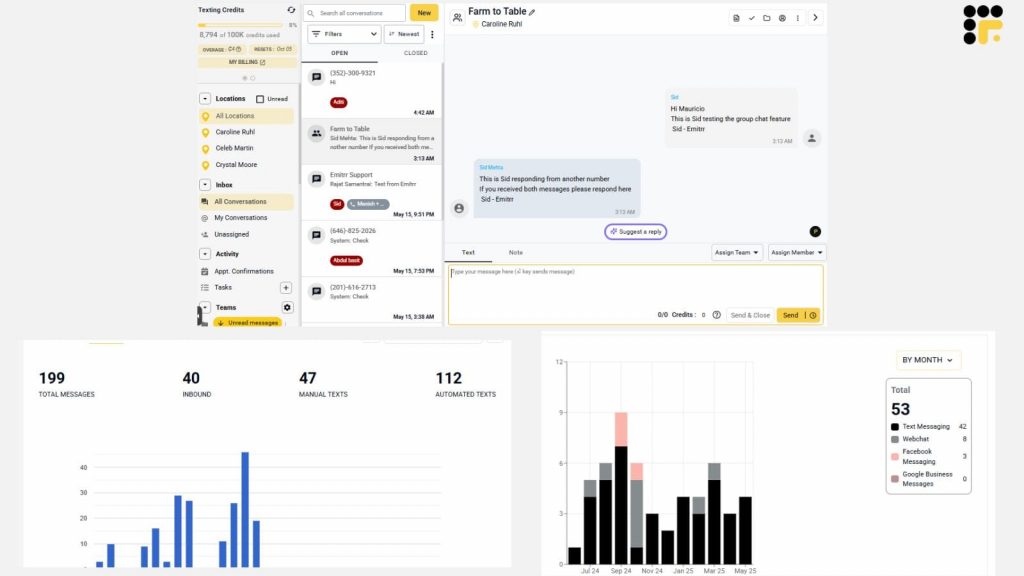
- Two-Way Texting: Lets you text with clients directly from your business number, perfect for confirmations or quick questions.
- Automated Reminders: Sends SMS, email, or voice reminders to reduce missed appointments.
- Smart Waitlist Management: Automatically fills cancelled slots with clients waiting for earlier appointments.
- Call and Voicemail Management: Routes calls to the right person, transcribes voicemails, and even texts clients back if you miss a call.
- Online Booking Page: Creates a branded booking page that clients can use anytime to schedule appointments.
- Calendar Sync: Syncs with Google Calendar, Outlook, and Apple Calendar to avoid double-booking.
- AI Voicemail Assistant: Answers calls after hours, triages urgent cases, and books appointments while you’re away.
- Bulk Messaging: Send updates, promotions, or reminders to multiple clients at once.
- Review Generation: Sends automatic review requests after appointments to boost your online reputation.
- Internal Team Chat: Keeps your staff connected for coordination on daily schedules and client updates.
- Detailed Analytics: Tracks appointments, cancellations, and response rates so you know what’s working best.
Pros of Emitrr
- Truly all-in-one: Combines scheduling, texting, calling, and reminders in one place, no need for extra tools.
- Perfect for healthcare: Built to handle the privacy and workflow needs of medical and dental practices.
- Super easy setup: Most users get up and running in a few minutes without tech help.
- Fewer no-shows: Automated reminders and confirmations keep your schedule full and on time.
- Smart communication: Two-way texting and AI voicemail mean you never lose a lead or miss a message.
- Time-saving automation: Frees up staff from repetitive scheduling tasks so they can focus on clients.
Cons of Emitrr
Emitrr keeps getting smarter with every update, adding new AI-powered tools and features all the time!
Emitrr Integrations
Emitrr offers 500+ integrations across:
- EHR/EMR Systems: Integrates with popular systems like Dentrix, Eaglesoft, DrChrono, and AdvancedMD.
- Calendar Tools: Works with Google, Outlook, and iCal for seamless sync.
- CRM Platforms: Connects with HubSpot, Salesforce, and other customer management tools.
- Payment Gateways: Supports Stripe and Square for easy invoice links.
- Review Sites: Connects with Google Reviews, Facebook, and Healthgrades for automated review requests.
Emitrr Pricing
Plans start at around $30/month.
Emitrr Ratings
- Capterra: 4.9/5
- G2: 4.7/5
Emitrr Customer Reviews
“very convenient, easy to navigate the platform, connected to my phone app and email for notifications.”
“We’ve been using Emitrr for both businesses for over a year now – it’s AMAZING!! Was super easy to set-up, the few times we’ve needed customer support was quickly addressed!!”
Source: Capterra
Emitrr Support Channels
- Email: support@emitrr.com
- Phone: +1 (210) 941-4696
- Live chat: Available on the Emitrr website
- Knowledge base: Includes guides, FAQs, and walkthroughs
- SMS support: Text the support number for help anytime
Curious how AI stacks up against humans when it comes to scheduling? Let’s find out.
Is AI Really Better Than Human Scheduling for Appointment Booking?

2. Calendly
Calendly Overview
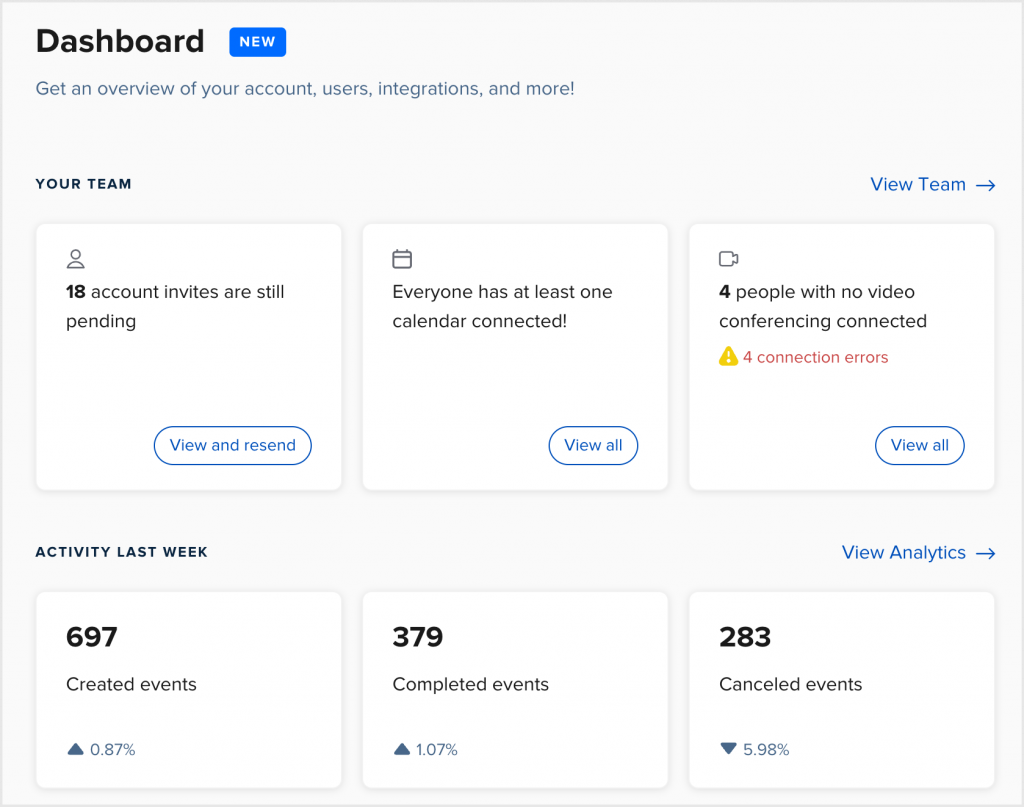
Calendly is one of the most widely used scheduling tools, and for good reason. It’s simple, clean, and takes the stress out of booking meetings. Instead of endless “What time works for you?” emails, you just share your Calendly link and let people pick a slot that fits your calendar.
Calendly Features
- One-Click Scheduling: Share a single link to let clients or colleagues book instantly.
- Calendar Sync: Integrates with Google, Outlook, and Apple calendars to prevent overlap.
- SMS Notification Service: Sends confirmations, reminders, and follow-ups automatically.
- Group Scheduling: Lets multiple participants book the same slot for team sessions.
- Timezone Intelligence: Detects client locations and adjusts meeting times automatically.
Pros of Calendly
- Quick and intuitive setup: You can start scheduling within minutes. No manual needed.
- Polished and modern interface: Looks clean and professional for clients.
- Powerful integrations: Works seamlessly with hundreds of apps and tools.
- Ideal for teams: Great for coordinating meetings across departments or time zones.
Cons of Calendly
- Free plan is limited: You’ll need to upgrade for features like reminders or group meetings.
- Not industry-specific: Lacks healthcare or legal compliance tools.
- Basic branding: Customisation is minimal compared to SimplyBook.me.
Calendly Integrations
Calendly offers over 100 integrations across productivity, communication, and CRM tools, including:
- Calendar apps: Google Calendar, Outlook, iCal, and Office 365 for instant sync.
- Video tools: Zoom, Microsoft Teams, Google Meet, and Webex for virtual meetings.
- CRM systems: Salesforce, HubSpot, Pipedrive, and Close CRM.
- Productivity apps: Slack, Notion, Zapier, and Trello.
- Payment gateways: PayPal and Stripe for paid consultations or sessions.
Calendly Pricing
- Free Plan: 1 user with basic features.
- Essentials Plan: $10/month with reminders and integrations.
- Professional Plan: $15/month with branding and automation.
- Teams Plan: $20/month with team routing and advanced workflows.
Calendly Ratings
- Capterra: 4.7/5
- G2: 4.6/5
Calendly Reviews
“The automation part is completely based on subscription and we cannot test that before buying and buying is little expensive here for small companies or for individual use.”
“1. Costly with respect to other available products in the market. 2. Premium subscription is need to test the workflow and automations module.”
Source: Capterra
Calendly Customer Support Channels
- Email Support
- Live Chat
- Help Centre
- Community Forum
3. Acuity Scheduling
Acuity Scheduling Overview
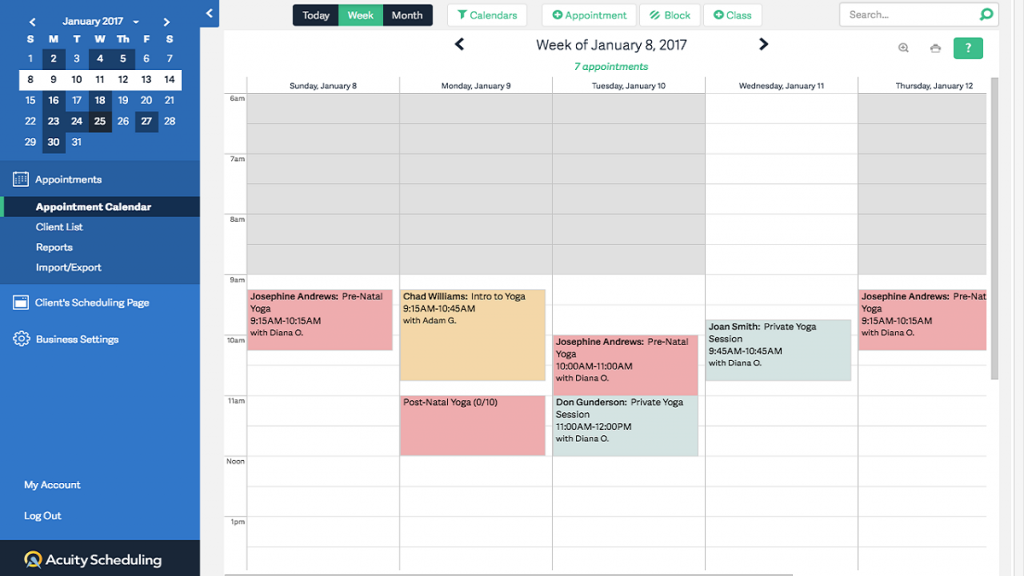
Acuity Scheduling is famous among small businesses and service providers who want more control. Acuity lets clients book, pay, and complete forms all in one place. It’s a bit more customisable than SimplyBook.me, especially if you want to collect client info before an appointment.
Acuity Scheduling Features
- Self-Scheduling: Clients can book, cancel, or reschedule appointments anytime.
- Custom Intake Forms: Collect client info or preferences before appointments.
- Online Payments: Accept deposits or full payments using PayPal, Stripe, or Square.
- Automated Email and SMS Reminders: Keep clients on track and reduce no-shows.
- Time Zone Detection: Automatically adjusts appointments for clients across regions.
Pros of Acuity Scheduling
- Highly customisable: You can tweak forms, emails, and payment settings to your liking.
- Perfect for solopreneurs: Especially great for coaches, trainers, and wellness providers.
- Integrated payment system: You can collect payments upfront for better cash flow.
- Flexible and reliable: Works smoothly across devices and time zones.
Cons of Acuity Scheduling
- Takes time to set up: With so many options, initial setup can feel a bit overwhelming.
- Basic design options: The booking pages look clean but lack deeper custom branding.
- Limited team scheduling: More suited for individuals or small teams than large enterprises.
Acuity Scheduling Integrations
Acuity connects with tools through direct integrations:
- Payment gateways: Stripe, Square, and PayPal for secure online transactions.
- Video conferencing: Zoom, Google Meet, and GoToMeeting for virtual sessions.
- CRMs and marketing tools: HubSpot, Mailchimp, and ActiveCampaign for client nurturing.
- Accounting and admin: QuickBooks, FreshBooks, and Xero for invoice tracking.
- Calendar apps: Google Calendar, Outlook, Office 365, and iCal for automatic sync.
Acuity Scheduling Pricing
Plans start at $20 per month.
Acuity Scheduling Ratings
- Capterra: 4.8/5
- G2: 4.7/5
Acuity Scheduling Customer Reviews
“The same applies to setting availability. It can be a bit confusing when blocking off times by day.”
“YOU ARE ON YOUR OWN. NO PHONE SUPPORT. Not ideal for larger companies who want to do subscription memberships, it’s very limiting and messy. They only do POS with Square or Stripe which have super high CC processing fees.”
Source: Capterra
Acuity Scheduling support channels
- Email support via help desk
- Help Center with guides and video tutorials
- Community forum for user questions
4. Square Appointments
Square Appointments Overview
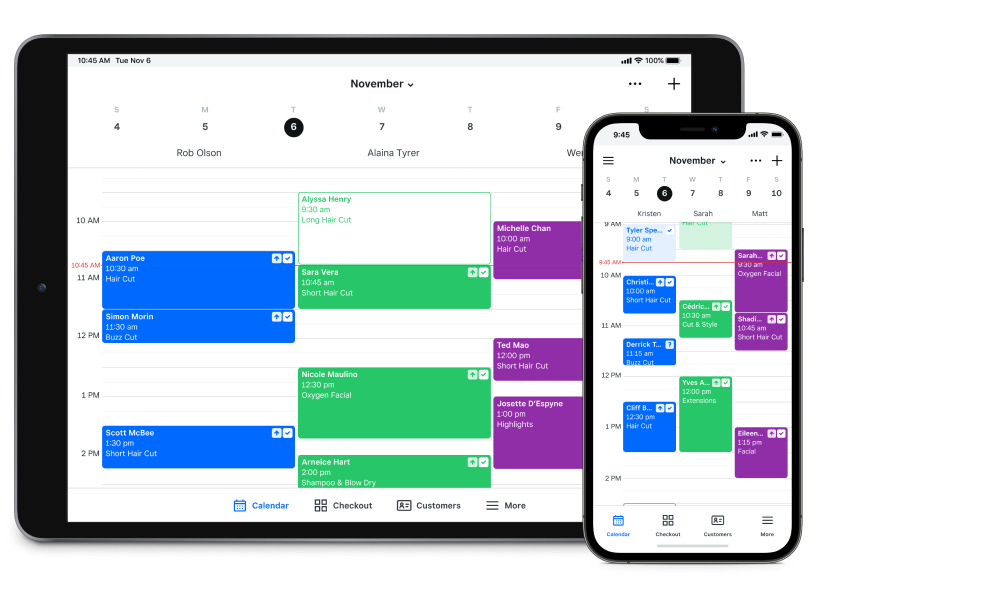
Built by Square, it’s perfect for salons, spas, barbers, and wellness professionals who already use Square for transactions. Square Appointments is more payment-focused. Everything from booking to checkout happens within the same ecosystem, making it a great fit for service businesses that want to simplify operations.
Square Appointments Features
- Online Booking Page: Clients can book services anytime via a custom booking site or directly from Google.
- Calendar Sync: Integrates with Google Calendar for real-time schedule updates.
- Automated Reminders: Sends automated SMS appointment reminders before each scheduled appointment.
- Integrated Payments: Collect deposits, charge no-show fees, and accept cards using Square POS.
- Staff Scheduling: Manage multiple team members’ calendars from one dashboard.
Pros of Square Appointments
- Seamless payment integration: Booking and billing happen together without switching apps.
- All-in-one system: Combines scheduling, point of sale, and inventory tracking.
- User-friendly mobile app: Works great for owners managing bookings on the move.
- Automatic reminders: Cuts down on no-shows and keeps clients informed.
Cons of Square Appointments
- Best suited for Square users: Works flawlessly if you already use Square POS but less so otherwise.
- Limited customisation: Branding options are more basic than SimplyBook.me.
- Transaction fees: Card processing fees may add up depending on volume.
Square Appointments Integrations
Square Appointments integrates natively within the Square ecosystem and also connects with:
- Payment and POS: Square Payments, Square Invoices, and Square POS.
- Calendar tools: Google Calendar and Outlook.
- CRM and communication: Mailchimp, HubSpot, and Twilio.
- Accounting software: QuickBooks and Xero for expense tracking.
- E-commerce platforms: WooCommerce, Wix, and BigCommerce.
Square Appointments Pricing
Square Appointments doesn’t list exact prices online. Costs can vary based on your team size and feature requirements.
Square Appointments Ratings
- Capterra: 4.5/5
- G2: 4.4/5
Square Appointments Reviews
“Square is not seriously updating square appointments. You cannot use gift cards, you can do discount codes, you can use apple pay or google pay online which is proven to increase website conversations ect. Square’s functionality does not extend to square appointments and I was also not informed of that before building out square appointments.”
Source: Capterra
Square Appointments Customer Support Channels
- Phone Support
- Email Support
- Live Chat
- Help Centre
5. Setmore
Setmore Overview
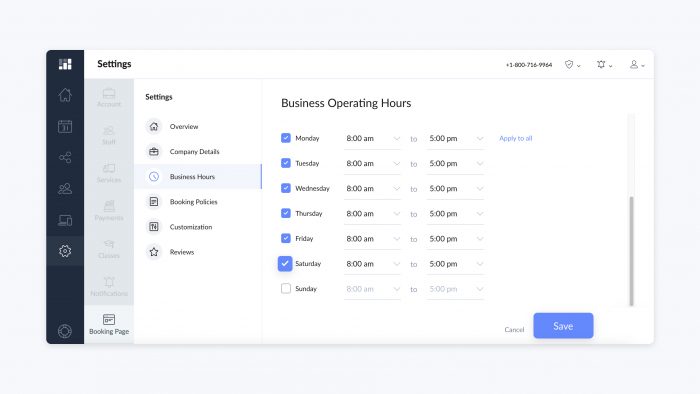
Setmore is a simple, no-fuss scheduling platform designed for small businesses and freelancers who just want booking to be quick and easy. It’s great for consultants, barbers, fitness coaches, and tutors.
Setmore Features
- Online Booking Page: Clients can self-book appointments 24/7 via your website or social media.
- Calendar View: See all appointments at a glance and manage multiple team calendars.
- Automated Reminders: Sends SMS or email reminders to reduce no-shows.
- Two-Way Sync: Integrates with Google and Outlook calendars for real-time updates.
- Payment Collection: Accepts payments online via Stripe or Square.
Pros of Setmore
- Easy to use: The setup is simple, and clients find it intuitive to book online.
- Strong integrations: Works well with popular tools like Zoom and Facebook.
- Mobile-friendly: You can manage your schedule easily from your phone.
- Ideal for individuals: Great fit for solopreneurs or small teams.
Cons of Setmore
- Limited advanced features: Doesn’t offer complex automation like SimplyBook.me.
- Basic branding options: The booking page design is simple and not deeply customisable.
- Occasional sync lags: Calendar updates sometimes take a few minutes to reflect.
Setmore Integrations
Setmore connects with a variety of tools for smoother scheduling and communication, including:
- Video tools: Zoom, Google Meet, and Teleport for virtual sessions.
- Payment gateways: Stripe and Square for online transactions.
- CRM and automation: HubSpot, Mailchimp, and Zapier.
- Calendar apps: Google Calendar, Outlook, and iCal for real-time sync.
- Social media platforms: Instagram, Facebook, and LinkedIn for direct booking links.
Setmore Pricing
- Free Plan: Includes core scheduling, reminders, and online booking.
- Premium Plan: $12/month with payments and recurring bookings.
- Pro Plan: $9/user/month with advanced automation and integrations.
Setmore Ratings
- Capterra: 4.6/5
- G2: 4.5/5
Setmore Reviews
“Integrations don’t work quite well. Google Calendar integration is a hit or miss.”
“Customer service is the worst I’ve ever experienced. “Live” chats left me hanging for hours, promised responses never arrived by email, phone calls were fobbed off with “send us an email.“
Source: Capterra
Setmore Customer Support Channels
- Live Chat
- Email Support
- Help Centre
- Community Forum
6. Zoho Bookings
Zoho Bookings Overview
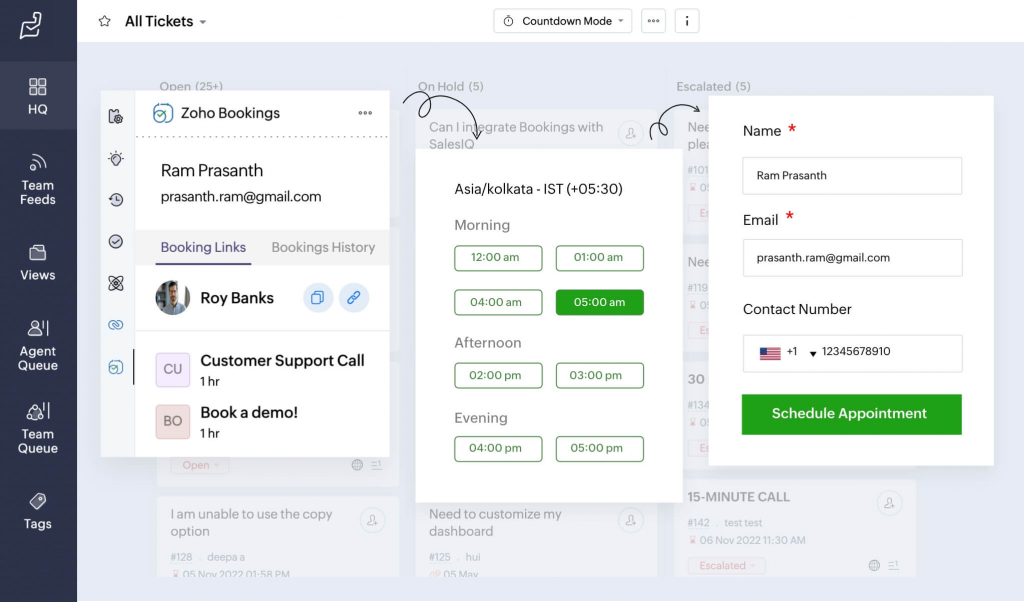
Zoho Bookings is part of the larger Zoho ecosystem, which makes it a great choice for businesses already using Zoho CRM, Mail, or Calendar. It’s designed for professionals and teams who want a simple, integrated way to manage their schedule without switching between multiple tools.
Zoho Bookings Features
- Online Appointment Scheduling: Clients can book appointments through your branded booking page anytime.
- Calendar Integration: Syncs with Zoho Calendar, Google, and Outlook to prevent double-booking.
- Team Chat: Manage multiple staff calendars and allocate meetings automatically.
- Automated Reminders: Sends SMS and email notifications before appointments.
- Custom Workflows: Create automation rules for approvals, follow-ups, or cancellations.
Pros of Zoho Bookings
- Great for teams: Handles multi-staff scheduling smoothly with automatic allocation.
- Fully integrated with Zoho apps: Syncs perfectly with Zoho CRM, Campaigns, and Invoice.
- Flexible setup: Lets you manage multiple services, durations, and locations easily.
- Affordable: Plans are priced lower than many competitors for what they offer.
Cons of Zoho Bookings
- Best for Zoho users: Works best if your business already runs on Zoho products.
- Learning curve: The dashboard feels a bit complex for first-time users.
- Limited third-party integrations: Focuses mostly on internal Zoho connections.
Zoho Bookings Integrations
Zoho Bookings connects natively with Zoho’s ecosystem and key third-party tools, including:
- Zoho Suite: Zoho CRM, Zoho Calendar, Zoho Mail, Zoho Invoice, and Zoho Campaigns.
- Calendar and communication: Google Calendar, Outlook, Microsoft Teams, and Slack.
- Payment gateways: Razorpay, Stripe, and PayPal for seamless checkout.
- Automation and APIs: Zapier, Zoho Flow, and custom API integrations.
Zoho Bookings Pricing
- Free Plan: For one staff member with basic scheduling features.
- Basic Plan: $6/month per user with reminders and payment support.
Zoho Bookings Ratings
- Capterra: 4.4/5
- G2: 4.3/5
Zoho Bookings Reviews
“Sometime when an event is created the calander of the person does not gets blocked sometimes it creates a bit of a problem.”
“The bookings don’t always automatically place the zoho meeting link in the meeting invite causing confusion and extra work to manually add it. It would also be great if I could accept or decline meetings booked by users before the meeting goes onto my calendar.”
Source: Capterra
Zoho Bookings Customer Support Channels
- Email Support
- Live Chat
- Help Centre
- Community Forum
7. YouCanBook.me
YouCanBook.me Overview
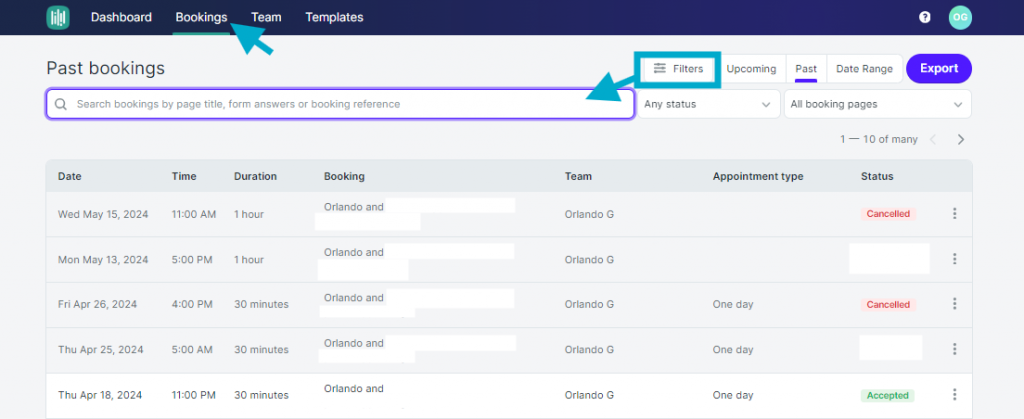
YouCanBook.me is a scheduling tool that’s loved by educators, consultants, and small businesses. It integrates directly with Google and Microsoft calendars, making it super convenient for anyone who already uses those platforms.
YouCanBook.me Features
- Calendar Integration: Syncs directly with Google and Outlook calendars for live availability.
- Custom Booking Pages: Personalise your page with your logo, colors, and welcome text.
- Automated Notifications: Sends confirmation, reminder, and follow-up emails automatically.
- Time Zone Detection: Adjusts appointment times automatically for remote bookings.
- Team Scheduling: Supports group bookings, round-robin scheduling, and shared calendars.
Pros of YouCanBook.me
- Clean and minimal: The interface is simple and doesn’t overwhelm you with features.
- Excellent for teams: Handles multiple calendars and group scheduling easily.
- Reliable automation: Reminders and notifications go out without fail.
- Budget-friendly: Offers strong functionality at an affordable monthly price.
Cons of YouCanBook.me
- Limited design options: The booking page could use more creative flexibility.
- Basic analytics: Doesn’t offer deep reporting or insights like other tools.
- No built-in CRM: You’ll need integrations to manage client data effectively.
YouCanBook.me Integrations
YouCanBook.me integrates well with major business and productivity apps, including:
- Calendars: Google Calendar, Outlook, Office 365.
- Payment systems: Stripe for secure online transactions.
- Video tools: Zoom, Microsoft Teams, and Google Meet.
- Automation tools: Zapier, Slack, and Mailchimp.
- Website embedding: Add booking widgets to Squarespace, Wix, or WordPress.
YouCanBook.me Pricing
- Free Trial: 14 days with full features.
- Paid Plan: $9/month per calendar with unlimited bookings and automations.
YouCanBook.me Ratings
- Capterra: 4.6/5
- G2: 4.5/5
YouCanBook.me Reviews
“Recently the support is always busy, and they always take days to WEEKS to reply our emails. Just today our integration broke, it’s a bug on their side due to a parameter they changed, and there is no urgent help line support, no way to get back to them and support via email is just too slow.”
Source: Capterra
YouCanBook.me Customer Support Channels
- Email Support
- Help Centre
- Community Forum
- Chat Support
8. Picktime
Picktime Overview
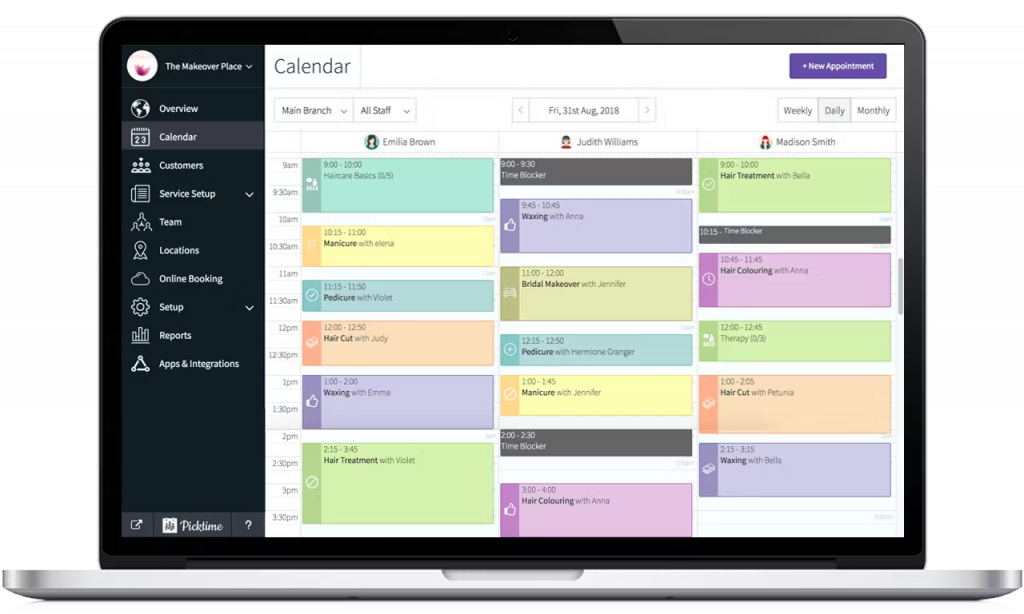
Picktime is a free, user-friendly scheduling platform built for businesses that want simplicity with a dash of automation. It’s especially popular with salons, gyms, tutors, and small service providers who want an easy way to manage bookings without spending a lot.
Picktime Features
- Online Booking Page: Lets clients book appointments through your website, social media, or a custom booking link.
- Calendar Management: Displays all staff and resource availability in one view.
- Recurring Bookings: Perfect for clients who book weekly or monthly sessions.
- Automated Reminders: Sends SMS or email alerts before appointments.
- Payments Integration: Accept payments via PayPal, Stripe, or Square.
Pros of Picktime
- Free and feature-packed: The free plan includes most features small businesses need.
- Simple setup: You can get started within minutes without tutorials.
- Ideal for beginners: Interface is clean, visual, and easy to understand.
- Great team management: Handles multiple employees and locations smoothly.
- Good automation: Reminders and scheduling happen quietly in the background.
Cons of Picktime
- Limited customisation: Booking pages could use more branding flexibility.
- Basic integrations: Fewer third-party apps compared to competitors.
- No dedicated mobile app: Runs well in browsers but lacks a native app experience.
Picktime Integrations
Picktime connects with several useful tools to streamline your operations, including:
- Calendars: Google Calendar, Outlook, and iCal for real-time availability sync.
- Payment systems: Stripe, PayPal, and Square for online payments.
- Video platforms: Zoom and Google Meet for virtual bookings.
- Marketing tools: Mailchimp and Constant Contact for client communication.
Picktime Pricing
Plans start at $9.99/month with advanced reporting and integrations.
Picktime Ratings
- Capterra: 4.8/5
- G2: 4.7/5
Picktime Reviews
“At the time, there were not enough features for me to integrate all client management through the platform: forms, notes, etc.”
“Would like different colors for employees for easier view.”
Source: Capterra
Picktime Customer Support Channels
- Email Support
- Live Chat
- Help Centre
- Community Forum
9. Doodle
Doodle Overview
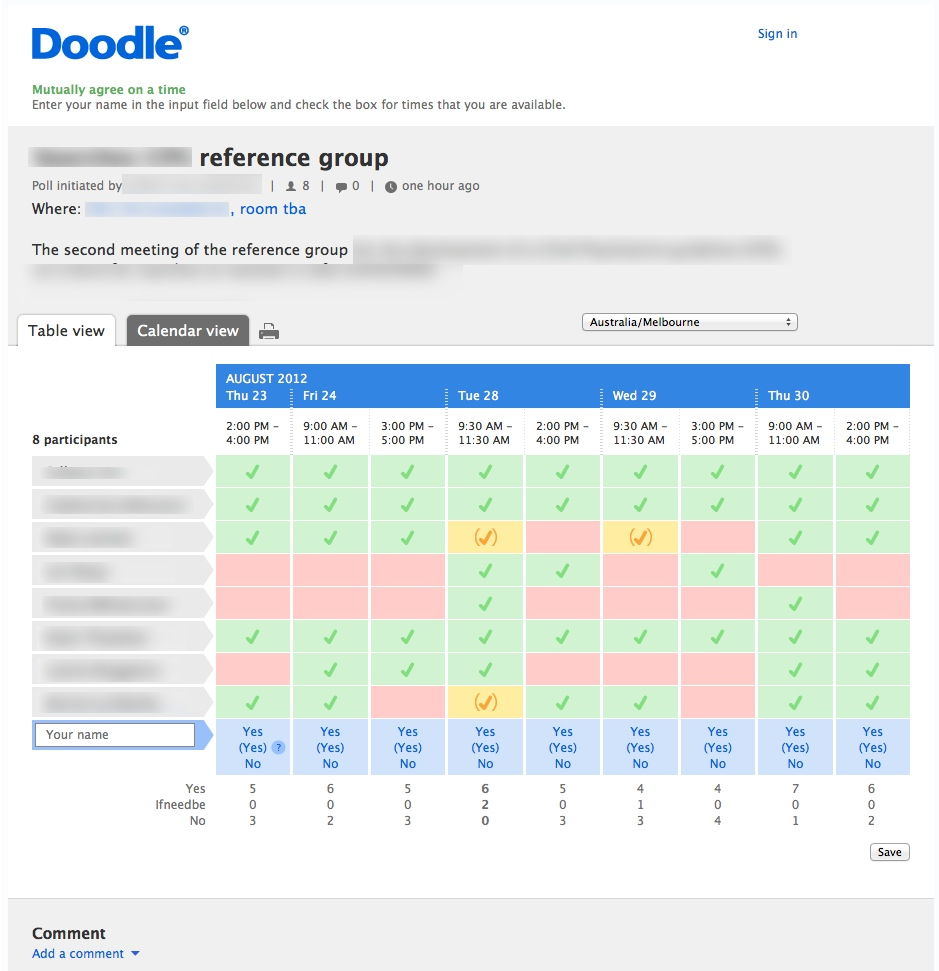
Doodle is widely used for meetings, interviews, and collaborative events where multiple people need to agree on one slot. Compared to SimplyBook.me, Doodle is less about managing clients and more about simplifying scheduling for teams and internal collaboration. It’s ideal for companies, educators, and HR departments.
Doodle Features
- Group Polls: Create polls so participants can vote on available time slots.
- Booking Page: Share your personal booking link for one-on-one scheduling.
- Calendar Integration: Syncs with Google, Outlook, and Apple calendars.
- Meeting Reminders: Sends notifications to all participants once a slot is chosen.
- Team Scheduling: Allows shared team pages for collaborative meeting management.
- Availability View: Shows who’s free and when, eliminating email chains.
Pros of Doodle
- Perfect for group scheduling: Makes team coordination painless.
- Strong integrations: Works with major calendar and meeting tools.
- Ideal for remote teams: Time zone adjustments happen automatically.
- Saves email hassle: Cuts out endless back-and-forth messages about availability.
Cons of Doodle
- Not designed for client bookings: Better suited for internal team use.
- Limited payment features: Doesn’t support deposits or billing.
- Branding options are basic: You can’t fully customise the booking experience.
Doodle Integrations
Doodle connects with many communication and productivity tools to make scheduling effortless:
- Calendars: Google Calendar, Outlook, Office 365, and iCal for sync.
- Video conferencing: Zoom, Microsoft Teams, Google Meet, and Webex for automatic links.
- CRM tools: Slack, Trello, and Asana for task coordination.
- Automation tools: Zapier and Microsoft Power Automate for workflow connections.
- Email clients: Gmail and Outlook for quick invites.
Doodle Pricing
- Free Plan: Basic polls and calendar integration.
- Pro Plan: $6.95/month with custom branding and booking pages.
- Team Plan: $8.95/month per user with shared team calendars and analytics.
- Enterprise Plan: Custom pricing for larger organisations.
Doodle Ratings
- Capterra: 4.6/5
- G2: 4.5/5
Doodle Reviews
“sometimes the application has a delays and theres a time that viewing results are very difficult.”
“sometimes it missed an event on my calendar.”
Source: Capterra
Doodle Customer Support Channels
- Email Support
- Help Centre
- Community Forum
- Chat Support
10. Appointy
Appointy Overview
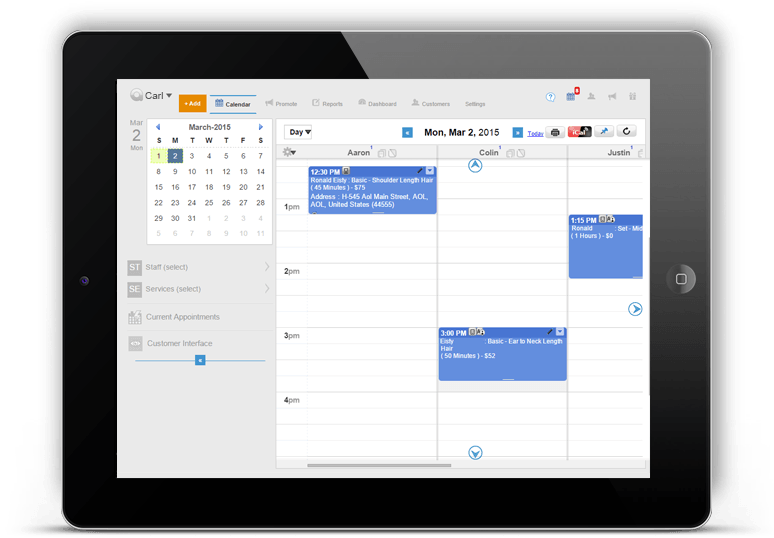
Appointy is used by schools, fitness studios, salons, and even government offices. It’s great for teams that want a reliable system that feels both professional and approachable.
Appointy Features
- Online Booking System: Lets clients book appointments through your website or social media.
- Automated Reminders: Sends texts and emails before appointments to reduce no-shows.
- Custom Booking Page: Create a branded booking site that matches your business.
- Calendar Management: Manage multiple staff calendars with drag-and-drop ease.
- Payment Integration: Accept payments through Stripe, Square, and PayPal.
Pros of Appointy
- User-friendly interface: Setup is fast, and navigation feels natural even for beginners.
- Versatile: Works across industries, from education to wellness.
- Great automation: Handles reminders, recurring bookings, and payments without effort.
- Affordable: Offers strong features even on lower-tier plans.
Cons of Appointy
- Mobile app can be better: Some users say it feels a bit basic compared to the web version.
- Limited third-party integrations: Doesn’t connect with as many tools as larger competitors.
- Advanced features locked in higher plans: You’ll need to upgrade for analytics or memberships.
Appointy Integrations
Appointy integrates with a mix of productivity, communication, and payment tools, including:
- Calendars: Google Calendar, Outlook, and iCal for live sync.
- Payments: Stripe, PayPal, Square, and Authorize.net.
- Video conferencing: Zoom, Google Meet, and Microsoft Teams.
- Marketing tools: Facebook, Instagram, and Mailchimp.
- Automation tools: Zapier and Google Apps for custom workflows.
Appointy Pricing
Plans start at $29.99/month. Custom pricing for large teams and franchises.
Appointy Ratings
- Capterra: 4.6/5
- G2: 4.6/5
Appointy Reviews
“It needs a payment app so i can take tap and pay payments.”
“If new booking user hasn’t confirmed his email address, Appointy still books this user into the schedule, and if that user misspelled his email address he doesn’t receive appointment reminder, hence you get a no-show, causing you to loose money and your staff getting angry for lost time slot.”
Source: Capterra
Appointy Customer Support Channels
- Email Support
- Live Chat
- Help Centre
- Phone Support
What Makes Emitrr the Best SimplyBook.me Alternative?
Emitrr stands out because it’s not just a booking tool, it’s your complete scheduling sidekick. Every feature is designed for people who want to save time, stay organised, and keep communication simple. Here’s what makes it shine:
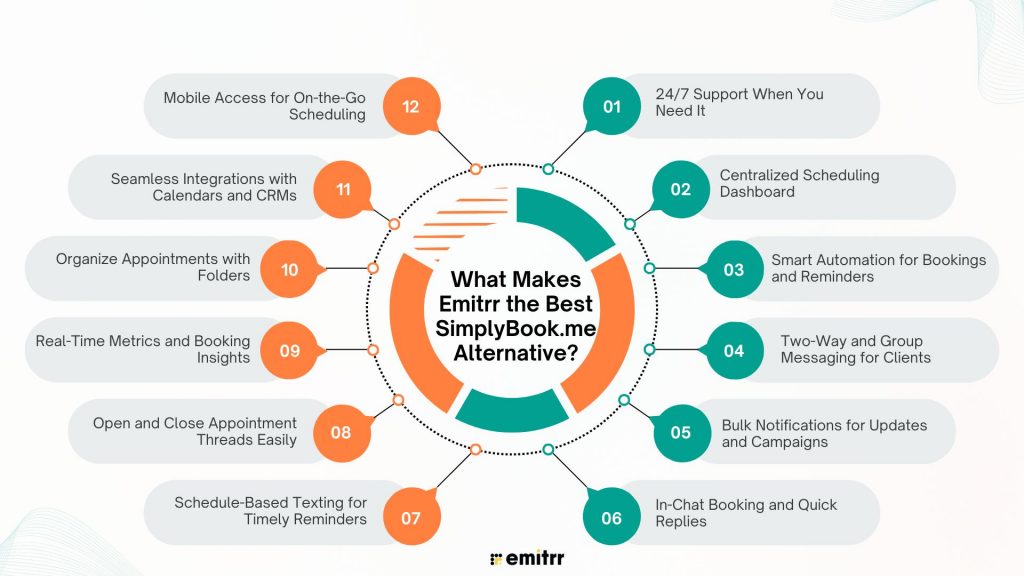
24/7 Support When You Need It
When something goes wrong, you shouldn’t have to wait until morning to fix it. Emitrr’s support team is always there, literally day or night. You can reach them through chat, email, or phone. That kind of support makes a huge difference when your business depends on staying connected. You feel like there’s always someone in your corner, ready to jump in when needed.
Centralized Scheduling Dashboard
Emitrr keeps everything in one place. No more flipping through tabs or searching emails just to confirm a slot. You can see every appointment, who it’s with, and what’s next at a glance. It’s like your daily schedule got an upgrade, clear and calm instead of messy and scattered. Once you get used to it, you’ll wonder how you ever managed without it!
Smart Automation for Bookings and Reminders
Emitrr’s automation is like having an extra team member who never forgets a thing. It sends confirmations, reminders, and even follow-ups without you lifting a finger. If someone cancels, it can automatically offer the slot to the next person on your waitlist. It’s the kind of “set it and forget it” feature that saves hours every week and keeps your schedule full. Clients appreciate the reminders, and you get fewer no-shows. Everyone wins.
Two-Way and Group Messaging for Clients
Ever wish your texts with clients didn’t feel so one-sided? Emitrr lets you have real conversations, not just notifications. You can text back and forth directly from your business number. Whether it’s a question about timing, parking, or rescheduling. You can also send group messages for updates or announcements. It feels personal, easy, and quick, just the way communication should be.
Bulk Notifications for Updates and Campaigns
Need to let everyone know about a schedule change, holiday closure, or new offer? Instead of sending dozens of texts manually, Emitrr lets you send one message to everyone at once. You can filter who receives it — say, clients with appointments this week or everyone in a certain category. It’s simple, efficient, and a total time-saver when you’ve got important news to share fast.
In-Chat Booking and Quick Replies
This one’s a game changer. Clients can book directly through chat without leaving the conversation. You can also respond instantly using quick reply SMS templates for common questions like “What’s your availability?” or “Can I reschedule?” It keeps things smooth and natural, like chatting with a friend, but still professional. The fewer clicks your clients need, the more likely they are to book.
Schedule-Based Texting for Timely Reminders
Emitrr lets you schedule texts to go out exactly when you want, not too early, not too late. Maybe you want to remind someone the day before their appointment or send a thank-you note right after. You can plan it all ahead so clients get the right message at the perfect time. It’s a small touch that makes your business look polished and dependable.
Open and Close Appointment Threads Easily
Every client interaction stays tidy and trackable. Once an appointment’s done, you can close that conversation thread so it doesn’t clutter your shared SMS inbox. If the client messages again later, their thread reopens with full history, super handy when you need context fast. It keeps everything organised while still feeling natural, like texting from your phone but smarter.
Real-Time Metrics and Booking Insights
Emitrr gives you clear, real-time data about how your scheduling is going. You can see how many appointments were booked, rescheduled, or missed, and even which reminders worked best. These insights help you spot patterns, like busy days or common cancellations. It’s simple but powerful, helping you make better decisions without spreadsheets or guesswork.
Organize Appointments with Folders
If you handle multiple services or team members, this feature is a lifesaver. You can create folders to separate different types of appointments, say, consultations, follow-ups, or group sessions. It keeps everything neat so you don’t mix up clients or time slots. Think of it like color-coding your calendar, but easier and cleaner.
Seamless Integrations with Calendars and CRMs
Emitrr connects smoothly with your Google Calendar, Outlook, or CRM tools like Salesforce or HubSpot. Once it’s linked, every update happens automatically, no double entries or missed syncs. It keeps your systems talking to each other so you can focus on actual work, not admin tasks. It’s one of those behind-the-scenes things you barely notice but can’t live without.
Mobile Access for On-the-Go Scheduling
You don’t need to be tied to your desk to stay on top of things. The Emitrr mobile app lets you manage bookings, reply to messages, and see your schedule from anywhere. Whether you’re between appointments or heading home, you can still stay connected and in control. It’s lightweight, easy to use, and built for how you actually work day-to-day.
Which Industries Are Catered by Emitrr?
Emitrr isn’t built for just one type of business. Whether you’re in finance, healthcare, or even home services, it adapts to how you work and helps you stay connected with your clients. Here’s how different industries can make their daily tasks a breeze with Emitrr:
Financial Services
If you’re in banking, lending, or financial consulting, you know how many calls and follow-ups it takes to manage clients. Emitrr makes that process smoother. It automates appointment scheduling, sends reminders for meetings, and even follows up after consultations. You can text clients securely about loan updates or upcoming renewals, and everything stays compliant. No more juggling between spreadsheets and email threads, it’s all in one clean dashboard.
Education
Schools, colleges, and training centers use Emitrr to simplify communication with students and parents. It’s perfect for scheduling counselling sessions, online classes, or parent-teacher meetings. Reminders go out automatically, attendance can be tracked, and last-minute updates, like class changes or holiday notices, reach everyone instantly. For educators, it’s one less thing to worry about in an already busy day.
Healthcare
Emitrr really shines in healthcare. Clinics, dental offices, and therapy centers use it to manage appointments, send reminders, and handle patient communication without constant phone calls. The AI voicemail feature can even book appointments after hours. Everything’s HIPAA-compliant, so privacy is never a concern. From automated recall messages to post-visit feedback texts, it helps providers stay efficient while keeping patients happy.
Legal Services
Law firms and solo attorneys use Emitrr to schedule client consultations, court appearances, and case updates without endless back-and-forth emails. You can confirm meetings, send reminders, and securely share links or documents through text. For busy legal teams, this means fewer missed appointments and a more organised calendar. Plus, clients love the convenience of quick, direct communication.
Wellness
From spas and yoga studios to personal trainers, the wellness industry runs on punctuality and consistency. Emitrr helps you manage bookings, fill cancelled slots, and send reminders automatically. You can even set up thank-you messages or promotional texts for regular clients. It keeps your schedule full, your clients informed, and your day running stress-free, which, let’s be honest, is what wellness is all about!
Retail
Retailers use Emitrr to engage customers beyond the store. Whether it’s appointment-based shopping, product demos, or service bookings, the platform keeps everything organised. You can send text campaigns, updates about orders, promotions, or new arrivals, all from one place. It’s an easy way to stay connected with customers and keep them coming back, no clunky email campaigns needed.
Real Estate
For realtors and property managers, communication is everything. Emitrr helps schedule property showings, follow-ups, and client meetings with ease. Automated reminders cut down on missed viewings, and you can text prospects directly about new listings or open houses. It keeps every conversation from initial contact to closing in one thread, so you always know where things stand.
Automotive
Car dealerships and auto service centers use Emitrr to manage test drives, service bookings, and maintenance reminders. If a customer’s car is ready for pickup or needs attention, you can text them right away. The scheduling system keeps bays full, technicians on track, and clients informed. It’s quick, simple, and way more personal than old-school phone calls.
Home Services
For electricians, plumbers, and cleaning companies, staying organised is half the battle. Emitrr helps book jobs, confirm visits, and send reminders automatically. You can even message clients with ETA updates or quick “we’re on our way” texts. It saves time, keeps customers in the loop, and helps you handle more jobs without extra admin work.
Insurance
Insurance agents use Emitrr to keep client communication effortless from policy renewals to claim updates. Automated reminders make sure clients never miss a renewal date, and two-way texting lets you answer questions fast. It’s also great for onboarding new clients and sending follow-ups after meetings. Everything stays documented, professional, and secure, without the email clutter.
Frequently Asked Questions
SimplyBook.me is used by all kinds of service-based businesses. Right from salons and spas to clinics, gyms, and consultants. Basically, anyone who makes appointments or manages bookings can use it to stay organised and save time.
People usually switch because they want something simpler to set up or faster support. Others just want more automation and features without paying extra for them.
Emitrr is a great fit for finance and consulting because it offers automated reminders, calendar syncing, and secure client communication. It keeps meetings organised, clients updated, and follow-ups, all from one place!
Much easier than you’d think! Most modern platforms let you import your existing data, connect your calendar, and start taking bookings within a few minutes. The best ones even offer onboarding help to make the switch smooth and stress-free.
Yes, plenty. Tools like Emitrr, Doodle, and Calendly offer affordable plans with strong automation and communication features that fit small business budgets perfectly.
Conclusion
The right scheduling tool not only books appointments but also gives you back time, cuts down no-shows, and keeps your clients happy. If SimplyBook.me feels like it’s missing a few things, there are plenty of great options that make scheduling smoother and smarter.
If you’re ready to see how easy scheduling can really be, book a free demo with Emitrr today and experience the difference for yourself!