
 4.9 (400+
reviews)
4.9 (400+
reviews)
Introduction
A medical office typically relies on a variety of communication methods—phone, voicemail, email, and SMS, among others. One method that excels in providing instant communication is secure, encrypted SMS. Utilizing SMS in medical settings can yield impressive results, enhancing inter-team communication and patient engagement alike. Let’s explore some effective SMS templates for medical offices and discuss how you can implement them in your practice.
Why SMS Matter in Medical Offices?
Even in today’s app-filled world, the simplest tools often work best. For medical offices, SMS is the most reliable way to stay connected with patients. When used right, they can reduce confusion, save time, and improve attendance.
Role of SMS in Patient Communication
Medical texting has become the preferred way to talk to patients. It’s fast, easy, and shows results. According to multiple studies, nearly 92% of people want the option to communicate with care teams by text. Why does it work so well? Because people actually read texts. SMS open rates hover around 98%, far above email’s 20%. That means your reminders are more likely to be seen and acted on.
It’s not just about reach, it’s about reducing no-shows too. Text medical reminders have been shown to lower missed appointments by up to 30%. Whether it’s an appointment update or a quick follow-up, SMS helps your team connect with patients where they already are, their phones.
SMS for Medical Offices
Texting is one of the easiest ways to stay in touch with patients. It’s fast, familiar, and usually gets read right away. But to make it truly work in a medical setting, a few basic rules can go a long way.
So, let’s walk through some best practices, the kinds of messages you can send, and ready-made templates you can start using today.
Best practices for sending SMS
Here are some simple rules you can follow to make your texts clear, helpful, and compliant:
- Get patient consent first: Make sure the patient has opted in before you text. This is required under HIPAA, TCPA, and CASL. Always include a way to opt out, like “Reply STOP to unsubscribe”.
- Avoid sensitive details: Don’t include personal health information in a regular message. Instead, say “Your results are ready”. Share details only through a secure or HIPAA-compliant link.
- Keep it short and simple: Short texts are easier to read on mobile screens. Stick to one message, use everyday language, and keep it under 160 characters when possible.
- Use a warm, human tone: Write like you’re talking to a real person. “Hi Sam, this is Dr. Lee’s clinic” feels friendlier than a robotic “Clinic: Appointment reminder”.
- Be clear about next steps: Tell the patient exactly what to do next. For example, “Reply YES to confirm” or “Call us at 555-1234 to reschedule”.
- Support two-way replies: If patients reply, someone should be available to respond. Use a two-way texting platform to avoid missing important replies. If replies aren’t supported, say so in your message.
- Send messages at the right time: Avoid texting too early or too late in the day. Mid-morning to early afternoon works best. Also, limit the number of messages, send only what’s useful.
Types of SMS you can send
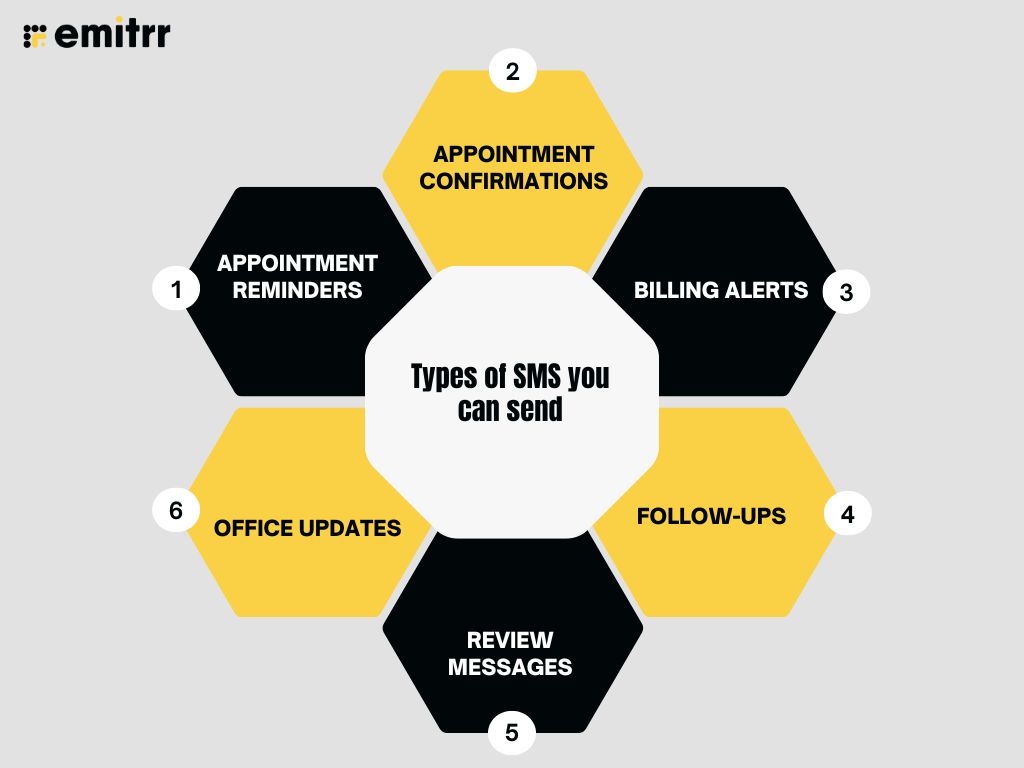
Here are a few message types your clinic can send to make communication smoother:
- Appointment reminders: A quick note a day or two before the visit
- Appointment confirmations: A message that confirms time and offers options
- Billing alerts: A reminder about a payment or outstanding balance
- Follow-ups: A message to check in after a visit
- Review messages: You can ask your patients to rate their checkup experience
- Office updates: Notices about closures, new hours, or events
Ready to use SMS Templates for Medical Offices
You can copy these messages into your system and just add the details like name, date, or time.
Appointment Reminder
Template 1:
“Hi [Patient Name], this is [Clinic Name] reminding you of your appointment on [Date] at [Time]. Reply “C” to confirm or call [Phone Number] if you need to reschedule. Thanks!”
Template 2 :
“Reminder: You have an appointment with [Practice Name] on [Date] at [Time]. Please reply YES to confirm or call [Phone Number] to reschedule.”
Template 3:
“Hi [Patient First Name], just a friendly reminder of your appointment with [Provider or Practice Name] on [Date] at [Time]. Questions? Call us at [Phone Number].”
Template 4:
“Don’t forget your visit at [Practice Name] on [Date] at [Time]. Arrive 10 mins early. Need to reschedule? Call [Phone Number].”
Appointment Confirmation
Template 5:
“Hello [Patient Name]! Your appointment with [Provider/Clinic Name] is confirmed for [Date] at [Time]. Reply “YES” to confirm or call us if you need to change the time. See you soon!“
Template 6:
“Thank you, [Patient First Name]! Your appointment at [Practice Name] is confirmed for [Date] at [Time]. We look forward to seeing you!”
Template 7:
“Your appointment on [Date] at [Time] with [Practice Name] is confirmed. Questions? Reply to this message or call [Phone Number].”
Template 8:
“[Practice Name]: Your appointment is confirmed. [Date] at [Time]. Please bring your ID and insurance card.”
Billing Notification
Template 9:
“Hi [Patient Name], this is the billing team at [Clinic Name]. You have a balance of [Amount]. Please call [Phone Number] or stop by to make a payment. Let us know if you have any questions.“
Template 10:
“[Practice Name]: A new statement is available. To view or pay your bill, visit [Secure Link] or call [Phone Number].”
Template 11:
“Hi [First Name], your balance of $[Amount] is now due at [Practice Name]. Pay online here: [Link] or call [Phone Number] with questions.”
Template 12:
“[Practice Name] billing notice: A payment of $[Amount] is due. Please make a payment online at [Link] or contact us at [Phone Number].”
Follow-Up After Visit
Template 13:
“Hi [Patient Name], we hope you’re feeling better after your recent visit. If you have questions or need help, reply to this message or give us a call. We’re here for you.“
Template 14:
“Hi [First Name], we hope you’re feeling better! If you have any questions about your recent visit to [Practice Name], give us a call at [Phone Number].”
Template 15:
“Thank you for visiting [Practice Name], [First Name]. If symptoms persist or you need assistance, we’re here to help—call [Phone Number].”
Template 16:
“[Practice Name]: It was a pleasure seeing you today. Let us know how you’re doing or if you need anything. Reach us at [Phone Number].”
Review Request SMS Template
Template 17:
“Hi [Patient Name], thanks for visiting [Clinic Name] today! We’d love to hear how your experience was. It only takes a minute, just tap the link to leave a quick review: [Review Link]. Thanks for your time!“
Template 18:
“Hi [First Name], thanks for choosing [Practice Name]! We’d love your feedback. Please leave a quick review here: [Review Link]”
Template 19:
“Your opinion matters to us! Tell us how we did by leaving a review: [Link] – Thank you for visiting [Practice Name].”
Template 20:
“Help others find quality care. Share your experience with [Practice Name] by leaving a review here: [Review Link]. We appreciate you!”
Office Closure Notice
Template 21:
“[Clinic Name] update: We’ll be closed on [Date] for [Holiday or Reason]. We’ll reopen on [Date] at [Time]. For urgent needs, call our on-call line or 911. Thanks for your understanding!“
Template 22:
“[Practice Name] will be closed on [Holiday/Date]. We will reopen on [Date]. For urgent issues, call [Alternative Number or On-Call Service].”
Template 23:
“Notice: [Practice Name] is closed from [Start Date] to [End Date]. We apologize for any inconvenience. Please call [Phone Number] for questions.”
Template 24:
“Hi [First Name], due to [Reason, e.g., weather/holiday], our office will be closed on [Date]. Reschedule at [Phone Number] if needed.”

Late Arrival or Wait Time Notification
Template 25:
“Hi [First Name], we’re running about [X] minutes behind today. Your appointment at [Practice Name] may start a bit later. We appreciate your patience!”
Template 26:
“[Practice Name]: If you’re running late for your [Time] appointment, please call us at [Phone Number] to confirm arrival. Thank you!”
Template 27:
“Hello [First Name], your provider is currently delayed. Your appointment may begin at [New Time]. We apologize and thank you for your understanding.”
Vaccination or Screening Reminder
Template 28:
“[Practice Name]: You may be due for a [Flu Shot / COVID Booster / Mammogram / Colonoscopy]. Call [Phone Number] to schedule or learn more.”
Template 29:
“Hi [First Name], protect yourself this season—schedule your [Flu/COVID/Other] vaccine at [Practice Name]. Book at [Link] or call [Phone Number].”
Template 30:
“Friendly reminder from [Practice Name]: Your [test/vaccine] is due. Preventive care saves lives! Call [Phone Number] to schedule.”
Reactivation / Inactive Patient Outreach
Template 31:
“Hi [First Name], we miss you at [Practice Name]! If it’s been a while since your last visit, we’d love to see you again. Call [Phone Number] to schedule.”
Template 32:
“It’s time to check back in with your health! [Practice Name] is accepting appointments—call [Phone Number] today.”
Template 33:
“[Practice Name]: Life gets busy! Let’s reconnect—schedule your follow-up or wellness visit today at [Phone Number] or [Link].”
Insurance Update Request
Template 34:
“Hi [First Name], please verify or update your insurance info before your next visit to [Practice Name]. Call [Phone Number] or update online: [Link]”
Template 35:
“[Practice Name]: To ensure smooth billing, please bring your most recent insurance card to your upcoming appointment.”
Template 36:
“Your insurance on file may need updating. Call [Phone Number] or log in to your patient portal to verify before your appointment.”
When to Use SMS vs. Voicemail
Both SMS and voicemail have their place in a medical office. But they work best in different situations. Let’s break it down so it’s easy to decide what to use and when.
SMS Usage: When it’s quick and simple
If the message is short, routine, or doesn’t need a long explanation just go with text. Patients like it because it’s quick. They can read it in seconds and reply just as fast.
Some great examples:
- Appointment reminders
- “Your lab results are ready”
- “Dr. Humphrey is running 10 minutes late”
Texts are great for updates that don’t need a personal touch. They’re easy to send, easy to read, and don’t interrupt the patient’s day.
Voicemail Usage: When it’s personal or detailed
Sometimes, texting just isn’t enough. If you need to explain something important or if tone matters using voicemail is better.
Some examples:
- Pre-surgery instructions
- Follow-up after a concerning test
- A personal check-in or reassurance
Voicemail lets patients hear your voice. That can be comforting. It also helps when you need to explain something with a bit more care or detail. This can especially be helpful for older patients.
Often, the best approach is to use both. One can support the other. Here’s a simple comparison to help you decide:
| Situation | Best Channel | Why it works |
| Appointment reminder | SMS | Quick, easy to confirm |
| Lab results ready | SMS | Just a heads-up (details can shared over phone) |
| Doctor running late | SMS | Real-time, instant delivery |
| Post-surgery instructions | Voicemail | Needs care and clarity |
| Follow-up after test or concern | Voicemail | Tone and empathy matter |
| No response to text | Voicemail + SMS | Leave a voicemail, then send a quick follow-up text |
| Office closure or emergency update | Both | Text sends it fast, voicemail backs it up |
Don’t think of SMS and voicemail as either-or. Use them together. That way, your message gets through, in the right tone, at the right time, however the patient prefers to hear it.
Everyday Use Cases for SMS in Medical Offices
There’s no single way to reach every patient. Some situations are better for texting. Others need a call. And sometimes, using both works best. Here’s a real-life example that shows how SMS and can work on their own or together.
A snowstorm hits early in the morning. Roads are unsafe, and your clinic needs to close for the day. You send a group SMS to all patients with appointments.
The message is quick and direct: “Due to heavy snow, our clinic is closed today. We’ll contact you to reschedule. Stay safe!” The text reaches everyone instantly. It saves your front desk from making dozens of phone calls. Most patients read it within minutes.
How Medical Offices Can Use SMS Templates for Sending SMS?
Here’s a step-by-step guide on how medical offices can send messages using SMS templates on Emitrr:
1. Login into Emitrr’s dashboard and go to “campaigns> text campaigns.”

2. Now click on the “create campaign” option.

3. A new page will open. Here type in the campaign name and select the template option at the bottom of the box.

4. Now you will see the option to either choose a template or create a new one. Select “create template” option

5. Give a name to your template and paste the message in the box.

6. You can also select the “use a property” option appearing at the bottom, if you want to send customized messages to your patients. Once done, click on create & your template will be saved.

7. Next, you will get the option to send or schedule your message. Select “Immediately” if you want to send the SMS instantly, or choose “Later” if you want to schedule the message campaign for later

8. Now scroll down and click on Next. You will see a new page where you can upload the list of contacts to whom you wish to send the appointment reminder messages.

9. Lastly, click on “Next” and then “Confirm and send” to send appointment reminder messages to multiple patients scheduled for the day.
You can also check out this video instead:
Frequently Asked Questions
Yes, absolutely! It’s one of the easiest ways to cut down on no-shows. Patients can confirm or reschedule right from their phone, which keeps your schedule on track and reduces last-minute gaps.
If someone calls your clinic and no one answers, Emitrr automatically sends them a follow-up text. You don’t need to lift a finger, and the patient still gets a response, which helps you stay on top of every lead or patient concern.
Yes, it is. Emitrr is fully HIPAA-compliant and safe to use in medical offices. All messages are encrypted, and there’s a secure texting mode for sensitive info. They’ll also sign a BAA with your practice, so you’re covered on the compliance front.
Conclusion
Texts may feel simple, but they do big things. They help your patients feel seen, reduce no-shows, and keep your front desk from being overwhelmed.
Emitrr brings both together in one easy-to-use platform. From automated texts to voicemail drops and reminders, it helps you stay connected without extra work. So, want to see it in action?
Book a free demo with Emitrr today and explore ready-to-use SMS templates tailored for your medical office!