
 4.9 (400+
reviews)
4.9 (400+
reviews)
Introduction to VoIP for Pediatricians
Let’s say it’s a Monday morning. Your clinic opens at 9. But by 9:15, the phone is ringing nonstop. Parents calling to reschedule, ask about fevers, or book school physicals. The front desk is juggling paperwork, voicemail, and a blinking line three calls deep. Sounds familiar?
This is exactly where a VoIP system steps in.
VoIP for healthcare is way more than just making or receiving calls. Think of it like this, someone calls your clinic, but instead of the old landline system, VoIP lets you route that call to the right person instantly. Missed the call? No problem. You get the voicemail in your inbox as a transcript. You can even shoot back a quick text to follow up.
It’s simple, smart, and everything stays in one place. No sticky notes, no chasing callbacks. Just cleaner, faster communication that makes your day a little easier. It keeps your clinic connected, responsive, and calm, even when things get busy. That’s what makes VoIP more than just a phone system. It’s your behind-the-scenes helper that keeps communication flowing and patients happy.
In this guide, we’ll walk you through why VoIP matters for pediatricians, how it helps parents, what features to look for, and why a HIPAA compliant VoIP like Emitrr might just be your clinic’s best upgrade yet.
Importance of VoIP for Pediatricians
VoIP isn’t just fancy tech, it actually makes day-to-day life smoother for your whole clinic. Let’s break down how it helps everyone, from doctors to parents to the front desk.
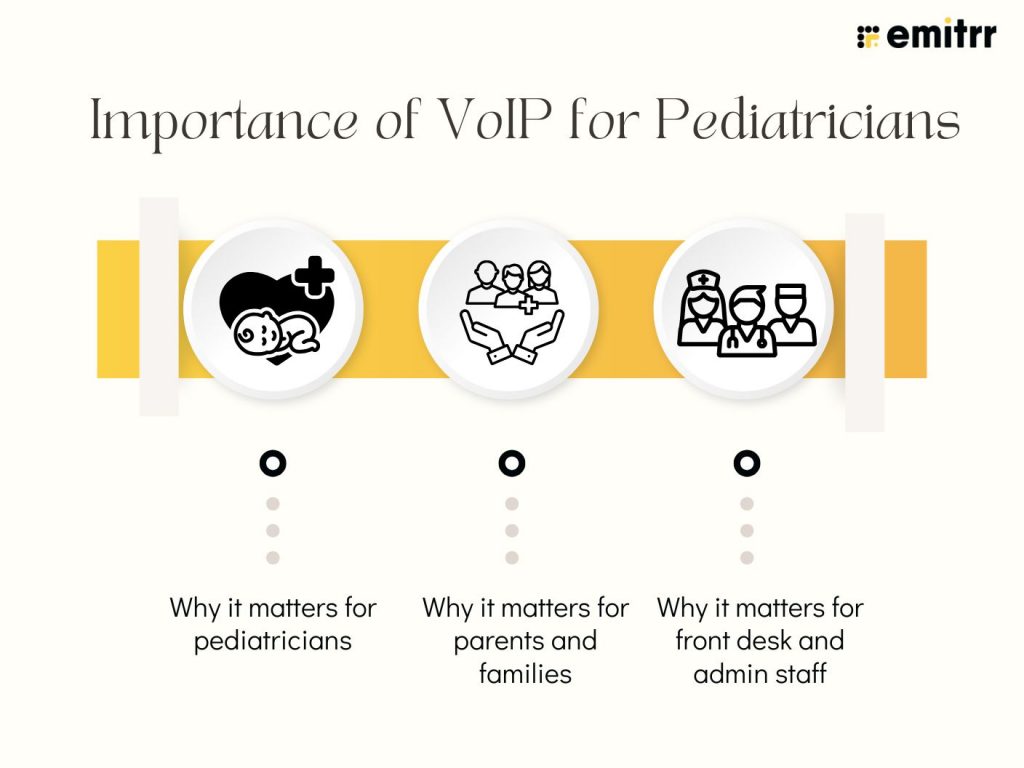
Why it matters for pediatricians
Pediatricians don’t just see patients, they manage packed schedules, high call volumes, and panicked parents asking for urgent slots. A regular phone line just can’t keep up.
Picture this: Five parents are trying to book the same flu shot slot. With VoIP phone systems for healthcare, calls are automatically routed based on urgency or type. Voicemails land as text, so you don’t miss a thing. Instead of scrambling, you’re calmly working through your list, fully in control.
And the best part? You don’t need a huge budget. The VoIP for pediatricians cost is often lower than what you’d spend maintaining old-school phone lines, especially with all the extra features baked in.
Why it matters for parents and families
Parents are busy. They’re in meetings, at school pick-ups, or managing multiple kids. When they call your clinic, they just want clear answers, fast.
Say a parent misses a reminder call. With a HIPAA compliant phone system, they’ll still get a text right after: “Your child’s vaccine appointment is tomorrow at 11 AM.” No need to call back, no voicemail lost. Everything is secure, simple, and on their time.
Families feel supported, and they stay in the loop, even if they can’t answer right away!
Why it matters for front desk and admin staff
Your front desk team is really the heartbeat of your clinic. But when the phone keeps ringing, voicemails pile up, and they’re constantly calling parents back, it gets exhausting. Without the right support, even the most organised staff can feel stretched thin.
Now imagine this: A parent calls to ask about rescheduling. A VoIP phone system for healthcare sends the call to the front desk queue, but when it’s missed, a text goes out automatically “Would you like to reschedule?” The parent replies, the slot updates, and your front desk never even had to dial.
It’s all tracked in one place. Fewer headaches. Happier staff. And with a HIPAA compliant phone system, nothing slips through the cracks.

Benefits of VoIP for Pediatricians
Let’s be real, managing calls in a busy pediatric clinic isn’t easy. There are check-ups, vaccine reminders, urgent calls from worried parents, and a front desk team trying to keep up with it all. That’s where VoIP really shines. It doesn’t just help you make calls, it helps your clinic breathe easier, work faster, and stay more connected without extra effort.
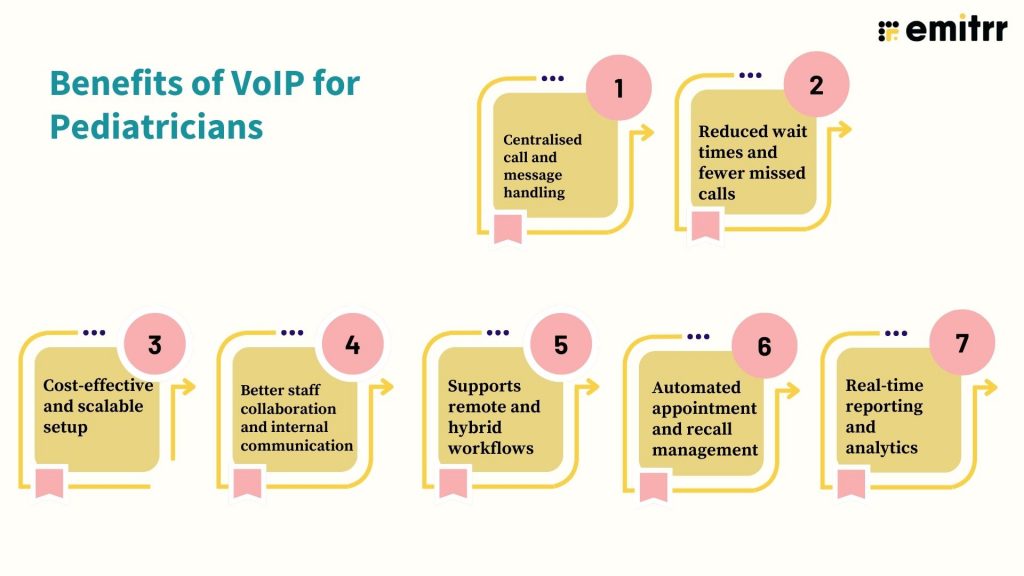
Centralised call and message handling
No more flipping between your clinic phone, mobile, or scribbled notes. VoIP brings everything, calls, voicemails, and texts, into one simple dashboard. Your staff can see who called, reply right away, or shoot a quick text without hopping between apps. It keeps everyone in sync and makes sure nothing gets missed.
Reduced wait times and fewer missed calls
We’ve all been there, parents call, it rings forever, and they hang up frustrated. With VoIP, calls get routed to whoever’s free next. If no one can answer, it lets the parent leave a voicemail that’s instantly turned into text for your team to read. Even better, it can send a text back automatically so they know you’re on it.
Cost-effective and scalable setup
Setting up traditional phone systems can get expensive fast, especially across multiple locations. VoIP is lighter on the wallet and much easier to manage. All you really need is good internet. Need to add a new staff member or open another clinic? Just click a few buttons, no rewiring, no fuss.
Better staff collaboration and internal communication
Need to quickly loop in a nurse or check something with another doc? VoIP makes that easy. You can transfer calls, send quick messages, or just use internal extensions. It saves a ton of time and avoids all the back-and-forth. Everyone stays on the same page, even on busy days.
Supports remote and hybrid workflows
Some doctors work from home. Others move between branches. And someone’s always checking messages after hours. With VoIP, none of that’s a problem. You can take calls on your laptop, phone, or tablet, wherever you are. It’s perfect for telehealth, hybrid setups, or just staying flexible.
Automated appointment and recall management
Reminding parents about check-ups and vaccines takes time. But with VoIP, you can automate that. It sends out texts or calls based on your schedule, so families stay on track and your front desk doesn’t have to call everyone manually. It’s one less thing for them to worry about.
Real-time reporting and analytics
Want to know how many calls your clinic missed last week? Or how long people are stuck on hold? VoIP shows you all that in real time. You get insights into call flow, staff response times, and even parent engagement. It helps you spot problems early and make better decisions without guessing.
Use Cases of VoIP in Pediatric Clinics
Here are some everyday situations where a HIPAA-compliant voip service really shines.
Handling school, sports, and camp physicals
Every year, there’s that mad rush when schools ask for physical forms, sports teams need clearance, and summer camps send checklists. Instead of drowning in calls, your VoIP system can handle it all. Set up a special call queue just for physical appointments. Add a voicemail option for form requests. You can even send out automated reminders by age group. Makes that season way less chaotic.
Managing high call volumes during sick season
You know how it gets during flu season, calls flood in, phones ring nonstop, and parents are anxious. With VoIP, you can create smart call flows. For example, parents calling about flu symptoms get routed to a special nurse line or voicemail with callback options. That way, you’re not putting everyone on hold, and your front desk isn’t overwhelmed.
Helping after-hours communication stay smooth
What happens when a parent calls at 8 PM about a rash or a missed dose? With VoIP, they can leave a voicemail that gets transcribed and sent to the right inbox. Or, you can route those calls to an on-call number without giving out anyone’s personal phone. No scrambling, no missed concerns, just clean handoffs.
Using missed-call textbacks to re-engage
Let’s say a parent calls during lunch hour and no one picks up. Normally, they’d wait or forget to call back. But with VoIP, the system instantly texts them “Sorry we missed your call. Want to reschedule or leave a message?” It’s a small thing, but it helps you catch calls you’d otherwise lose.
Offering multilingual call support for diverse families
If your practice serves families who speak different languages, you can set up language-based call routing. For example, “Press 2 for Spanish” or “Press 3 for Hindi.” It shows families you’re thoughtful, and it makes communication easier on everyone.
Sending automated immunisation alerts
Some VoIP systems let you automate call reminders for things like MMR, flu shots, or COVID boosters. You can schedule these by age or last visit date, and parents get a friendly nudge without your staff having to manually follow up. It keeps your vaccine compliance high without the admin headache.
Handling medication or follow-up questions securely
Instead of trying to catch someone live on the phone, parents can leave a message or question, and your team gets it with context and time to respond properly. And because it’s all HIPAA-compliant, there’s no worry about discussing protected health info.
Helping with billing and insurance follow-ups
Sometimes, it’s not the nurse who needs to talk to a parent, it’s the billing team. VoIP lets you route those calls separately or even trigger auto-reminders about balances or insurance updates. One less thing your front desk needs to juggle.
Best Practices for VoIP in Pediatric Clinics
Getting a VoIP phone system is a big step forward. But to really get the benefits of using a VoIP system, you’ll want to set it up right from the start. These best practices will help you make sure your system actually makes life easier, for your staff, your patients, and your front desk.
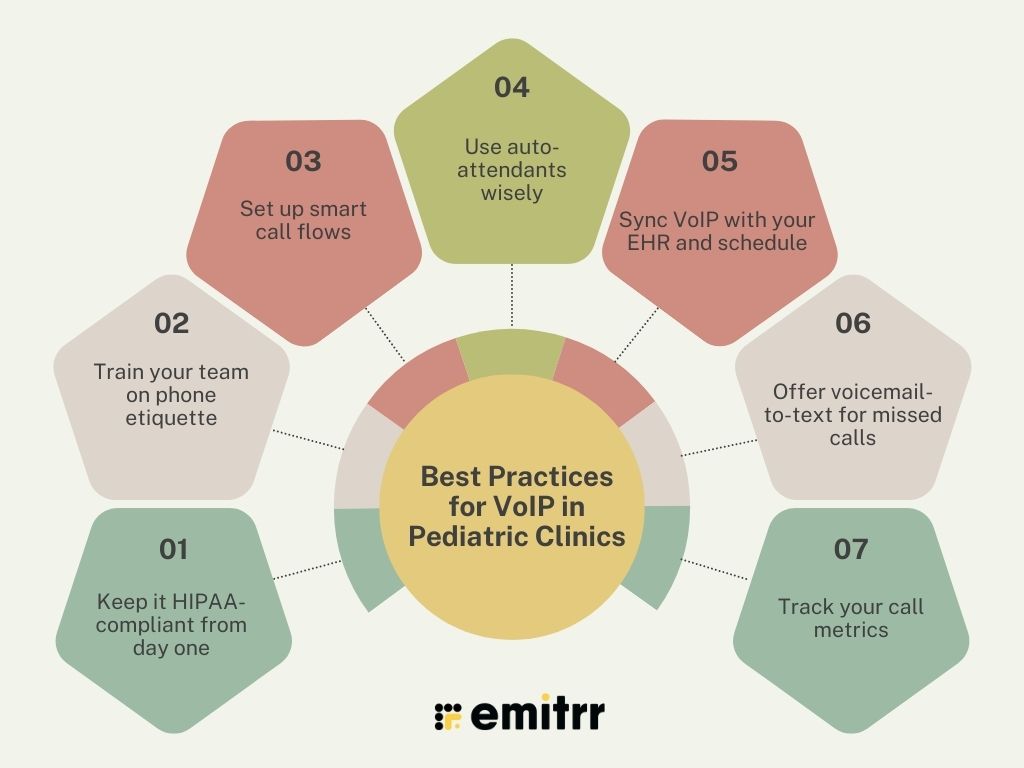
Keep it HIPAA-compliant from day one
This one’s non-negotiable. You’re dealing with protected health information, which means your phone system has to follow HIPAA rules. That includes encrypted calls, access controls, secure storage, and proper user permissions. Don’t assume it’s covered, ask your provider directly. Do they offer a HIPAA-compliant VoIP service? Do they understand the needs of healthcare clinics like yours? Getting this sorted early on saves you a lot of trouble later.
Train your team on phone etiquette
A new phone system won’t magically fix communication if the people using it are unsure or overwhelmed. Make sure your team knows how to answer with confidence, transfer calls smoothly, and leave clear, helpful voicemails. Even small things like smiling while talking or using a parent’s name can make a big difference. It’s not just about using the system right. It’s about making every parent feel like they’re in good hands.
Set up smart call flows
Think of your VoIP system like a traffic cop, it directs calls exactly where they need to go. Instead of everything landing at your front desk, you can route calls to the right team members based on the need. New patient? Send them to scheduling. Billing question? Straight to your finance team. Sick child? Route to the nurse line. It cuts down on back-and-forths and helps callers feel taken care of from the very first ring.
Use auto-attendants wisely
We’ve all been frustrated by endless phone menus. So don’t do that to your patients. Auto-attendants are super helpful—just keep them short and clear. Think: “Press 1 to schedule, 2 for billing, 3 to speak with a nurse.” That’s it. Also, always offer an option to speak to a real person. And if you can, record your own greetings in a warm, friendly tone. It’s a small touch that makes your practice feel more approachable.
Sync VoIP with your EHR and schedule
If your VoIP system can talk to your EHR or scheduling software, you’re golden. That means staff can see who’s calling, check appointment history, or even pull up the patient record, right during the call. Some systems also auto-log the call or add notes straight into your system. It saves time, reduces manual work, and helps your team sound more informed when speaking to parents.
Offer voicemail-to-text for missed calls
Missed calls happen, especially during lunch breaks or busy seasons. With voicemail-to-text, you don’t have to keep checking your voicemail inbox. Instead, the system transcribes the message and sends it straight to your email or dashboard. It’s quick, easy to scan, and keeps things moving without delay. Plus, your staff can follow up faster, which parents will definitely notice.
Track your call metrics
Want to really know how things are running? Look at your call reports. VoIP systems let you track things like average wait time, number of missed calls, how long each call lasts, and how quickly someone picks up. This data helps you spot problems early, maybe mornings are too overloaded, or some calls are being dropped. It also helps you see what’s working, so you can double down on it.
Challenges to Watch Out For Pediatricians
VoIP is a game-changer, no doubt. But like with any new tool, there are a few bumps to watch out for. Knowing these ahead of time can help you plan better and avoid headaches down the line.
Setting it up can feel overwhelming
Let’s be honest, changing your phone system can feel like a big deal. If you’ve been using a landline forever, moving to a cloud-based setup might sound technical or time-consuming. You might wonder, “Will we lose calls during the switch?” or “What if something breaks?” That’s totally normal. The good news? With a provider like Emitrr, the setup is guided. You’ll get help every step of the way. You may need a test run or two, but once it’s live, things tend to click into place.
You need a stable internet connection
This one’s important: VoIP calls run on your internet, not phone wires. So if your Wi-Fi is spotty, calls might drop or sound choppy. Nobody wants that, especially not a worried parent trying to get through. Most HIPAA compliant phone systems include backup tools or quality checks to smooth things out, but it’s still a good idea to check your internet speed before making the switch.
Your staff might resist at first
Change isn’t everyone’s favourite thing, especially when your team is already busy. The front desk might be nervous about learning new buttons or features. That’s totally fair. But once they see how easy it is to pull up voicemails, transfer calls, or even text a quick reminder, they usually come around fast. Sometimes it just takes one good day with the new system to win them over.
Pricing and contracts can be confusing
Not all VoIP plans are created equal. Some providers make their pricing sound simple, but then tack on charges for support, texts, or integrations. Others want you to commit to a full year upfront. That’s a lot to ask, especially if you’re just testing the waters. Before signing anything, ask for clear monthly pricing. Make sure you know exactly what’s included, and whether you’re stuck in a contract if it doesn’t work out.
You might not use every feature
Some platforms come with a mountain of features, analytics, AI suggestions, fancy dashboards, and more. But let’s be real: most pediatric clinics just want to handle calls, send reminders, and maybe log a few notes. Too many extras can feel overwhelming, especially during busy seasons. Look for a platform that keeps it simple but lets you grow into the advanced stuff when you’re ready.
Integration hiccups with your EHR
VoIP works best when it connects smoothly with your EHR, scheduling tool, or patient database. But not every VoIP phone system for healthcare will sync perfectly with your existing tools. Sometimes you’ll need help from tech support to get everything running together. So before you go all in, check what’s compatible and whether support is included to help with setup.
How to Set Up VoIP for Your Pediatric Clinic Using Emitrr
Setting up VoIP might sound techy, but with Emitrr, it’s surprisingly smooth. You don’t need an IT degree, just a few smart steps and some initial setup time. Here’s how to get started:
Step 1: Schedule a free demo with Emitrr
Start by booking a free demo. This gives you a chance to walk through the dashboard, see how the calling and texting tools work, and ask any questions. You’ll also learn how it fits into your clinic’s daily workflow, no commitment needed.
Step 2: Share your current setup
Your onboarding team will ask what phone system you’re using now, how many locations you have, and what your main communication pain points are. This helps them tailor the setup to your exact needs, whether it’s handling call volume, setting up after-hours voicemail, or reducing no-shows.
Step 3: Port your existing phone number
Don’t worry, you can keep your clinic’s number. Emitrr helps you port it over securely so your patients never have to learn a new one. There’s usually zero downtime, calls keep coming in during the switch.
Step 4: Set up smart call flows
This is where the magic begins. Create rules like “Press 1 for appointments” or “Route missed calls to voicemail with a text follow-up.” You can even set custom greetings for weekdays, holidays, or after-hours. It takes just a few clicks, and you’re in control the whole time.
Step 5: Train your team (it’s easy!)
The dashboard is super intuitive. Most front desk staff are up and running in under an hour. Emitrr also offers live onboarding and training sessions, so your team can learn how to check voicemails, transfer calls, and reply to texts, all from one screen.
Step 6: Go live and track results
Once everything’s set, flip the switch and go live. You’ll start seeing fewer missed calls, faster callbacks, and happier parents. Emitrr’s built-in call analytics help you track what’s working, which messages get responses, and where improvements can be made.
Recommended for watching:
Case Study: VoIP in Action at a Pediatric Clinic
Let’s take a look at how VoIP made a real difference for a mid-sized pediatric clinic. Like many practices, they were juggling a lot: non-stop calls, a tired front desk, and too many voicemails that nobody had time to listen to.
They decided to switch to Emitrr, a VoIP HIPAA compliant system built specifically for healthcare teams. What happened next was a total game-changer.
Fewer missed calls during peak seasons
Flu season used to be chaos. The phone wouldn’t stop ringing, and the staff couldn’t keep up. With Emitrr, they set up smart call flows that routed overflow calls straight to voicemail, with transcripts automatically sent to staff inboxes. That meant no more digging through long voice messages. They could see what was urgent and follow up instantly.
Smoother call flow and less front desk confusion
Before Emitrr, every call landed on the same line, creating confusion and constant call transfers. Now, calls are routed right where they need to go. Parents wanting to book check-ups go to scheduling, billing queries go to admin, and medical concerns reach the nurse line directly. It saved the front desk a ton of time and kept things running smoothly.
Happier parents with instant text follow-ups
One of the most appreciated features? Emitrr’s missed-call textbacks. If a parent called during a busy hour and didn’t get through, they’d instantly get a text saying, “Sorry we missed your call, how can we help?” Most parents replied directly, and the team followed up from there. Parents loved the quick response and felt like they were being heard, even if they never spoke to someone live right away.
Better control over after-hours messages
After-hours voicemails used to pile up and go unchecked till morning. Now, those voicemails get transcribed, flagged by urgency, and neatly displayed for staff to act on as soon as the clinic opens. No more missed concerns or messy mornings, just a clear plan and peace of mind.
More 5-star reviews without asking twice
Emitrr automatically sends follow-up texts after calls, politely asking parents to leave a review if they were happy with the service. Turns out, they were. Within three months, the clinic’s Google rating jumped by a full star. No extra work, just consistent nudges at the right moment.
More informed care through EHR syncing
All calls and texts are logged and synced with patient records. When a parent called on Monday and came in on Wednesday, the doctor already knew what was discussed. That made visits more efficient and personalised.
FAQs
VoIP systems let you do more than just take calls. You can route them smartly, respond faster, send texts, and even review call transcripts, all from one dashboard. It’s like upgrading from a landline to a smart assistant for your clinic.
Yes, as long as you choose a provider like Emitrr that’s designed for healthcare and built with HIPAA compliance in mind. It ensures patient info stays safe and private during every interaction.
Features like call routing, voicemail-to-text, and auto-replies help reduce bottlenecks. Your team can focus on care instead of playing phone tag, and no call gets missed—even during the busiest hours.
Absolutely. VoIP platforms like Emitrr are cloud-based, so whether you’ve got two locations or ten, everything stays connected. One dashboard, multiple clinics, easy.
Yes! Emitrr combines calling, texting, smart automation, and review collection, all in one platform. That’s what makes it such a great fit for busy pediatric practices.
Yes. Emitrr’s team offers onboarding, which means you can switch over without interrupting your clinic’s day-to-day. It’s a smooth transition, and you’ll get support every step of the way.
Conclusion
If you’re still juggling voicemails, missed calls, and a front desk that’s always playing catch-up, it might be time for a change. A smart VoIP system built for pediatric clinics doesn’t just improve call quality, it changes how your entire clinic communicates.
With Emitrr, you’re not just getting any phone system. You’re getting one of the best VoIP for pediatricians. Which is HIPAA compliant, easy to use, and built to handle everything from check-ups and sick visits to after-hours questions and appointment reminders.
It keeps your team on the same page, helps parents feel heard, and gives you peace of mind knowing nothing’s falling through the cracks.
Ready to simplify your clinic’s communication? Book a free demo with Emitrr today. You’ll wonder how you ever managed without it!