
Introduction
In a world where convenience and speed are non-negotiable, online appointment scheduling has emerged as a game-changer. From booking a haircut to scheduling a doctor’s visit or consultation, digital scheduling tools have revolutionized how businesses and customers connect.
Gone are the days when clients had to call during business hours or wait in line just to fix an appointment. Today’s digital-first consumers expect instant solutions, and that’s where online appointment scheduling shines. With just a few clicks or taps, clients can book appointments anytime, anywhere, freeing up valuable time and reducing friction.
This guide explores the transformative impact of online scheduling, helping businesses understand its potential, overcome common challenges, and choose the right tool for their needs.
Common Challenges Faced with Online Appointment Scheduling
While digital appointment scheduling tools have revolutionized the way businesses manage bookings, they are not a one-size-fits-all solution. Many organizations encounter a range of practical challenges when adopting and using these systems. Here are some of the most common issues:
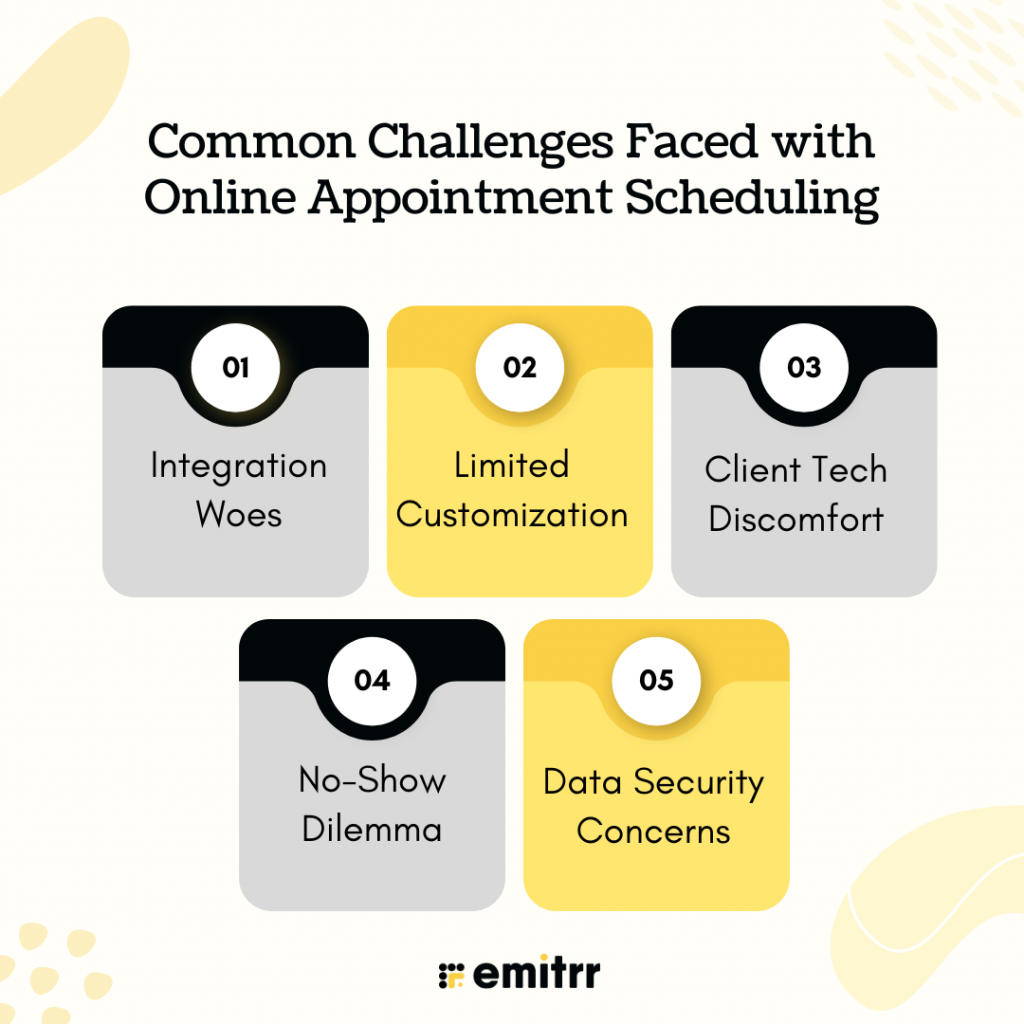
Integration Woes
One of the most significant hurdles businesses face is integrating online scheduling tools with their existing systems, especially Customer Relationship Management (CRM) software, Electronic Health Record (EHR) systems, and internal communication platforms. A scheduling tool that doesn’t sync seamlessly with these databases can lead to fragmented workflows, double bookings, or data silos. For instance, in healthcare, a missed integration with EHR may result in scheduling errors or incomplete patient histories, affecting service quality.
Limited Customization
Not all scheduling platforms offer the depth of customization that niche businesses require. Many tools come with rigid templates or standard booking flows that lack flexibility in terms of service length, provider preferences, or tiered pricing. For example, a consultant who offers variable session lengths or a beauty salon that rotates stylists based on service types may find standard options inadequate. This lack of personalization can lead to inefficient use of time slots and a less-than-optimal user experience.
Client Tech Discomfort
Although younger, tech-savvy customers may readily embrace online scheduling, older demographics or less tech-savvy users can find these systems confusing or intimidating. Navigating a digital interface, verifying appointments via email, or inputting personal details might be daunting to them. This discomfort can lead to friction during the booking process or even deter some clients from making appointments altogether.
No-Show Dilemma
Even with automated reminders and confirmations, appointment no-shows continue to be a persistent issue. Life is unpredictable—clients may forget, have last-minute emergencies, or simply neglect to cancel in time. While reminders reduce the frequency of missed appointments, they don’t eliminate them. Some businesses respond with cancellation fees or require upfront payments, but these can deter bookings if not handled tactfully.
Data Security Concerns
Online scheduling involves exchanging sensitive client information, including names, contact details, medical records, and payment details, depending on the industry. Without proper encryption, secure authentication protocols, and compliance with data protection regulations (such as HIPAA or GDPR), these systems become vulnerable to cyberattacks and data breaches. Ensuring a secure booking experience is not just a best practice—it’s a legal and ethical necessity.
Who Uses Online Appointment Scheduling?
Online appointment scheduling is no longer a luxury; it’s a necessity across many industries. Whether you’re running a busy clinic or freelancing from a home office, digital booking tools help manage time, reduce no-shows, and improve the overall client experience. Here’s how different professionals and businesses are leveraging it, with examples of the tools they trust:
Healthcare Providers
From multi-specialty hospitals to local dental clinics, healthcare professionals have adopted online scheduling to reduce front desk overload and give patients control over their appointments. Tools like Emitrr enable clinics and healthcare practitioners to automate appointment confirmations, follow-ups, and reminders via SMS and voice, which reduces no-shows and enhances patient engagement.
- Use Case: A patient visits the clinic’s website, selects the department, chooses a time slot, and books instantly—no phone calls or hold music.
- Popular Tools:
- Zocdoc – Widely used in the U.S. to connect patients with doctors and dentists.
- SimplePractice – Designed for therapists, counselors, and mental health professionals.
- MediBuddy (India) – Used by hospitals and diagnostic centers to manage appointment flow.
Salons & Spas
Beauty businesses often operate on tight schedules, where even a single missed appointment can affect the entire day. Scheduling tools help these businesses display available services, allocate staff, and ensure smooth transitions between clients.
- Use Case: A customer wants a haircut and facial next weekend. They open the salon’s booking page, see who is available, select a stylist, and pay in advance.
- Popular Tools:
- Fresha – Free to use and ideal for salons and wellness centers.
- Vagaro – Offers built-in POS and marketing tools for beauty businesses.
- Booksy – Great for barbers, spas, and independent stylists with mobile setups.
Freelancers & Coaches
Whether it’s a design consultation, a virtual fitness session, or career coaching, freelancers benefit from tools that automate scheduling and integrate with payment gateways.
For coaches looking beyond scheduling, AI for life coaches can also support client communication, follow-ups, and personalized engagement.
- Use Case: A life coach shares a link on LinkedIn. A prospective client clicks, picks a time, and pays for a 60-minute Zoom session—all in one go.
- Popular Tools:
- Calendly – A favorite for coaches, consultants, and creatives thanks to its simple interface and integration with Zoom and Google Meet.
- Acuity Scheduling – Offers client intake forms and packages, perfect for multi-session plans.
- TidyCal – Affordable and simple, ideal for solopreneurs managing a lean operation.
Consultants & Legal Professionals
For professionals who bill by the hour, such as lawyers, accountants, and business consultants, online scheduling makes managing meetings and billing clients much more efficient.
- Use Case: A law firm allows clients to schedule free 15-minute consultations, which helps it screen incoming inquiries and streamline the client onboarding process.
- Popular Tools:
- Clio Scheduler – Tailored for law firms, integrated with case management software.
- Setmore – Good for independent consultants, offering free plans and integration with Stripe.
- TimeTap – Useful for those who need advanced features, such as client waitlists and secure data handling.
Educational Institutions
From universities to private tutors, educators are using online booking tools to streamline office hours, classes, one-on-one sessions, and even entrance interviews.
- Use Case: A tutor running a small online academy sets up a booking page where students can book their preferred slot for Math or Science lessons.
- Popular Tools:
- YouCanBook.me – Syncs perfectly with Google Calendar and is ideal for academic settings.
- Koalendar – Simple for teachers and tutors to use, even if they’re not tech-savvy.
- Picktime – Allows class scheduling and staff management for institutes with multiple teachers.
Features to Look for in an Appointment Scheduling Tool
Choosing the right appointment scheduling tool isn’t just about booking time slots—it’s about making life easier for both your team and your clients. The right features can turn a good system into a game-changer for your business. Here are the essentials you should look for:
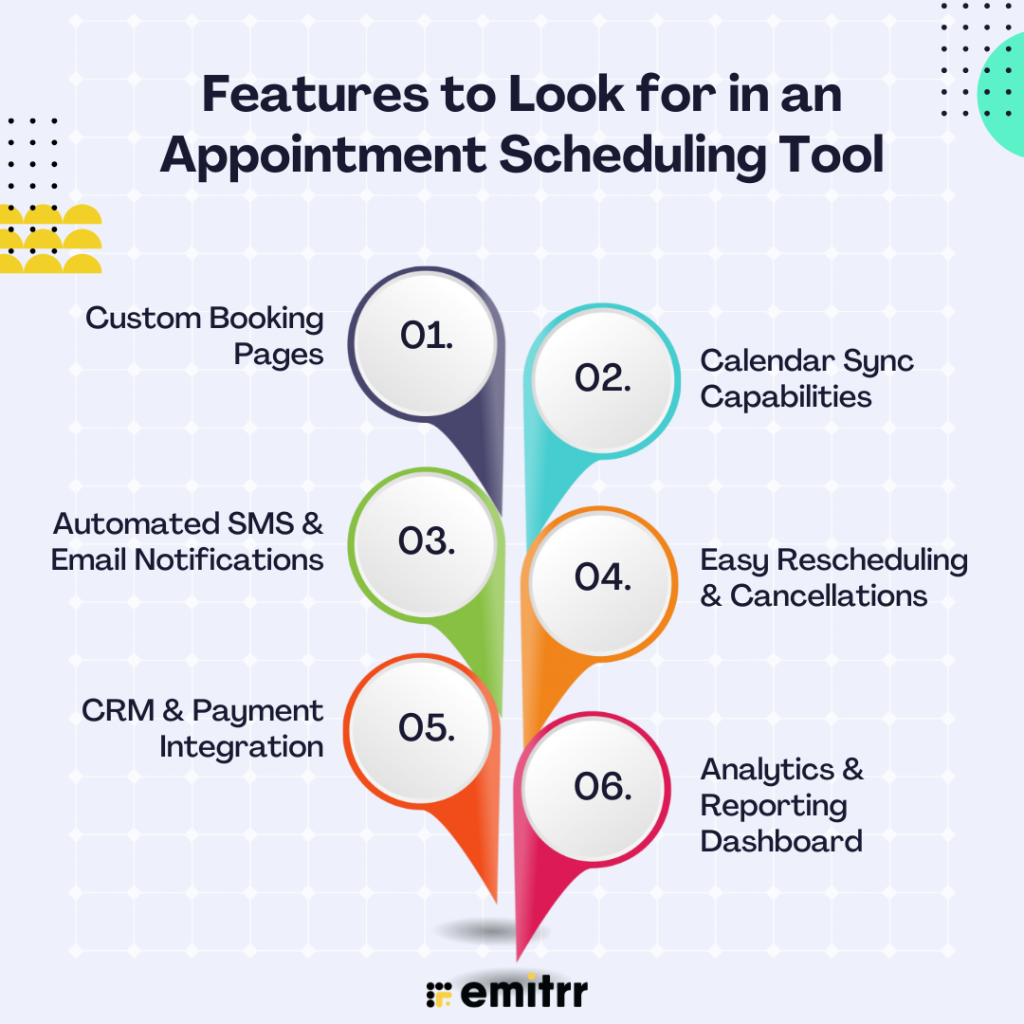
Custom Booking Pages
Your booking page should reflect your brand, not feel like a generic calendar. A good tool allows you to customize your landing page with your logo, color scheme, service descriptions, and even customer reviews. This builds trust and creates a professional first impression for anyone booking with you.
Calendar Sync Capabilities
A great scheduling tool should integrate seamlessly with your existing calendars, such as Google Calendar, Outlook, or Apple Calendar, so you don’t double-book yourself. Real-time sync ensures your availability is always up to date, whether you add meetings from your phone or computer.
Automated SMS & Email Notifications
Let your tool do the follow-up work. Automated confirmations and reminders, sent via text or email, help reduce no-shows and keep clients informed about their upcoming appointments. It’s a small touch that goes a long way in building professionalism.
Easy Rescheduling & Cancellations
Plans change—your system should handle it smoothly. Give your clients the freedom to reschedule or cancel their appointments with minimal friction. The less back-and-forth you need, the more time you’ll save.
CRM & Payment Integration
Look for tools that connect with your existing CRM or sales platform so customer information flows seamlessly across systems. If your business requires upfront payments or deposits, built-in payment gateway integration (such as Stripe or PayPal) is a must.
Analytics & Reporting Dashboard
Data is your friend. A solid scheduling platform offers built-in analytics that show trends in bookings, popular time slots, cancellation rates, and client behavior. These insights help you make smarter decisions, like adjusting your availability or optimizing staff shifts.
Steps to Implement Online Scheduling in Your Workflow
Switching to online scheduling can feel like a big shift, but it doesn’t have to be overwhelming. A well-planned approach can make the transition smooth and highly rewarding. Here’s how to implement it effectively:
Step 1: Assess Your Pain Points
Before you dive into software trials, take a close look at your current scheduling process. Are appointments falling through the cracks? Is double-booking an issue? Are clients complaining about long wait times or confusing booking methods? Understanding where things are going wrong is the first step toward fixing them.
Step 2: Choose the Right Tool for Your Business
Not every tool fits every business. Start by outlining your core needs, such as integrations, team size, types of services, and budget. Read user reviews, request demos, and test a few options. Whether you need something simple or a full-featured platform like Emitrr, the key is finding the one that fits your workflow best.
Step 3: Customize Your Booking Setup
Once you’ve selected your tool, tailor it to your operations. Set service durations, define availability hours, assign staff, add buffer times between appointments, and specify rules for cancellations or rescheduling. A well-configured setup prevents chaos and keeps things running smoothly.
Step 4: Train Your Staff
Your scheduling tool is only as effective as the people using it. Walk your team through the platform, showing them how to manage appointments, communicate with clients, and troubleshoot common issues. The goal is to make them confident enough to handle both the tech and any customer queries.
Step 5: Educate Your Clients
Even the best tool won’t help if your clients don’t know how to use it. To promote the new system, use email campaigns, social media posts, website banners, and even physical signage at your office. If possible, provide a quick how-to or video walkthrough—it shows that you value their experience.
Step 6: Monitor, Adjust, and Optimize
Once your system is live, keep a close eye on how it’s working. Are clients adapting easily? Is your team comfortable? Are no-shows decreasing? Use feedback, usage reports, and analytics to make adjustments. Maybe you need to tweak reminder timings or expand your availability based on demand—stay flexible and open to improvement.
Benefits of Using Online Scheduling Systems
Adopting an online scheduling system doesn’t just simplify appointment booking—it transforms how your business operates, communicates, and grows. Here’s how:

Improved Client Satisfaction
Clients notice when booking is quick and hassle-free. With 24/7 access to book appointments, they’re no longer limited to business hours or stuck on hold. This ease of use builds trust and keeps clients coming back because convenience is key in today’s fast-paced world.
Operational Efficiency
Manual scheduling takes up valuable time—juggling calendars, confirming slots, and handling reschedules. Online systems automate these processes, reducing your team’s workload and minimizing errors like double bookings. Less paperwork and fewer phone calls mean more time spent on what really matters: delivering excellent service.
Scalable Solution
Whether you’re a solo freelancer or managing a multi-location enterprise, online scheduling tools can scale with you. Add new team members, offer additional services, or handle higher appointment volumes—all without changing your core system. It grows with your business, not against it.
Data Insights & Analytics
Online scheduling tools often come with built-in reporting dashboards. You can track which services are most popular, identify your busiest time slots, and even monitor cancellation rates. These insights help you optimize staffing, adjust hours, and improve your overall strategy.
Reduced No-Shows with Automated Reminders
Missed appointments cost money and disrupt your schedule. Online platforms help reduce no-shows by automatically sending email or SMS reminders before an appointment. Some tools even allow clients to confirm or cancel through the reminder, keeping your calendar up to date and accurate.
Enhanced Professional Image
A sleek, modern booking interface shows your clients you’re serious about running a professional business. It instills confidence and positions your brand as organized, efficient, and easy to work with. First impressions count—especially online.
Upgrade to Emitrr for Smart Appointment Management
In the fast-paced world of customer service, Emitrr emerges as more than just an appointment booking tool—it’s your all-in-one client communication and scheduling assistant. It doesn’t just schedule meetings; it strengthens customer relationships, boosts operational efficiency, and keeps your business ahead of the curve.
Let’s break down all the ways Emitrr transforms how businesses manage appointments:
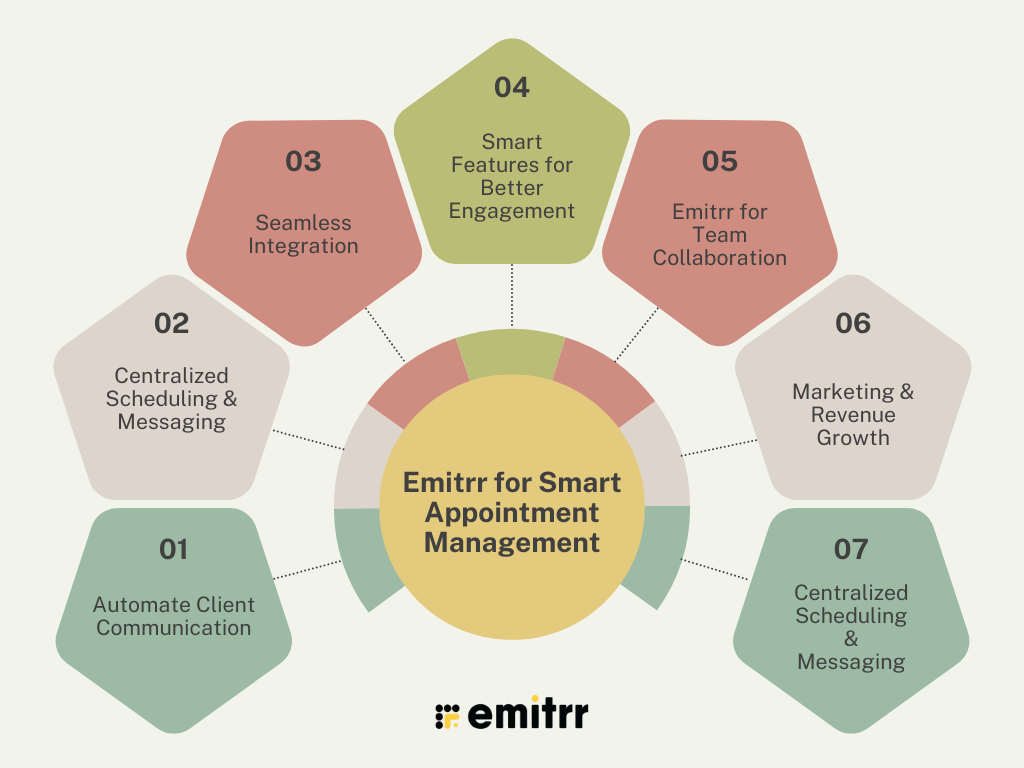
Automate Client Communication
Client communication is the heartbeat of any service-based business. Emitrr takes this off your plate while making it more effective.
- Real-Time SMS & Email Notifications: We instantly notify clients about bookings, rescheduling, and cancellations, ensuring clarity and reducing back-and-forth communication.
- Scheduled Reminders: This feature automatically sends personalized reminders (via SMS, voice, or email) based on your preferred timeline—days, hours, or even minutes before the appointment.
- Follow-up Messaging: Post-appointment follow-ups automatically collect feedback, offer rebooking options, or request reviews.
- Mass Texting Made Easy: Want to update your entire client base about a new offer or time slot? Emitrr’s mass messaging allows you to do so within minutes and offers full personalization options.
Centralized Scheduling & Messaging
No more toggling between apps, emails, and calendars. Emitrr puts everything under one roof.
- Unified Communication Hub: This tool combines appointment details and client messages in one place, allowing you to view full conversation histories with context.
- 2-Way Messaging Interface: Unlike most schedulers, Emitrr allows real-time client communication, so clients can ask questions and receive responses instantly.
- Auto-Fill Rebookings: Based on past client behavior, Emitrr recommends the best time slots for repeat appointments and even books them automatically when approved.
- Multi-Location Management: If you run multiple branches or service locations, Emitrr helps manage each one from a single dashboard, reducing confusion and saving time.
Watch the video below to see the Emitrr AI Scheduling Assistant in action:
Seamless Integration
Emitrr works where you already work, making adoption smooth and intuitive.
- Plug-and-Play with CRMs & Calendars: Easily integrates with platforms like Google Calendar, Microsoft Outlook, Salesforce, HubSpot, and over 1000 other tools.
- Billing & Payment Integration: Link with payment gateways like Stripe or Square to accept payments at the time of booking, minimizing late cancellations or no-shows.
- Text-enable existing phone numbers: Keep your business line while enjoying the convenience of SMS-based interactions. Clients don’t have to call—they can just text you.
- EHR & Practice Management Tools: Emitrr integrates with electronic health records to sync appointments and reduce clerical errors, making it especially useful for healthcare providers.
Smart Features for Better Engagement
Emitrr is loaded with smart capabilities designed to enhance both user and client experiences.
- Custom Booking Pages with Branding: Create a personalized booking experience using your logo, colors, and service categories, making it feel like an extension of your brand.
- Intelligent Routing: Automatically route bookings to the right team member based on service type, client history, or staff availability.
- Shortcodes & Booking Links: Share smart booking links via text, social media, or QR codes for instant appointment access—perfect for marketing campaigns and walk-ins.
- Advanced Analytics Dashboard: Track appointment volume, no-show rates, campaign performance, and even client response times—all from a user-friendly visual dashboard.
- Voice Call Reminders: For clients who prefer phone updates, Emitrr can send automated voice calls to remind them of their appointment details.
Emitrr for Team Collaboration
Whether you’re a solo entrepreneur or managing a team, Emitrr adapts to your structure.
- Staff Shift Management: Organize availability, assign staff to services, and allow clients to pick a preferred professional—all inside the platform.
- Internal Notifications: Team members get real-time updates when a new appointment is made, rescheduled, or canceled.
- Role-Based Access: Ensure data privacy and clarity with custom permission levels for administrators, team leads, and front desk staff.
Marketing & Revenue Growth
Emitrr isn’t just about bookings—it’s about business growth.
- Lead Nurturing via SMS: Follow up with interested leads who didn’t convert right away. Set automated text sequences to re-engage and convert them over time.
- Review & Referral Automation: Prompt happy clients to leave reviews on Google or refer a friend after a successful appointment, without lifting a finger.
- Abandoned Booking Recovery: If a client starts to book but doesn’t complete, Emitrr can follow up with a reminder or special offer to nudge them back.
Centralized Scheduling & Messaging
No more toggling between apps, emails, and calendars. Emitrr puts everything under one roof.
- Unified Communication Hub: This tool combines appointment details and client messages in one place, allowing you to view full conversation histories with context.
- 2-Way Messaging Interface: Unlike most schedulers, Emitrr allows real-time client communication, so clients can ask questions and receive responses instantly.
- Auto-Fill Rebookings: Based on past client behavior, Emitrr recommends the best time slots for repeat appointments and even books them automatically when approved.
- Multi-Location Management: If you run multiple branches or service locations, Emitrr helps manage each one from a single dashboard, reducing confusion and saving time.
FAQs
Online scheduling is incredibly versatile. Healthcare providers (like doctors and therapists), salons and spas, consultants, freelancers, and educational institutions are among the top users. However, the truth is that any business that relies on setting appointments can benefit, from auto repair shops to personal trainers. If you’re booking time with clients, you’ll gain efficiency with a scheduling tool.
Automated SMS or email reminders gently nudge clients about their upcoming booking, giving them enough time to prepare, reschedule, or cancel if necessary. This proactive communication dramatically reduces forgotten appointments and keeps your schedule running smoothly.
Yes, most reputable scheduling platforms take data security very seriously. They use strong measures like end-to-end encryption to protect your and your clients’ information. Many solutions also adhere to regulatory standards like HIPAA (for healthcare) or GDPR (for global data protection), adding an extra layer of trust and compliance.
Absolutely! Today’s top scheduling tools integrate seamlessly with platforms like Facebook, Instagram, and Google Business. This means your clients can book an appointment directly from your social media profiles, without needing to visit your website, making the booking process faster and more convenient.
Online scheduling tools work quietly but powerfully behind the scenes. They help you capture more bookings by being available 24/7, reduce no-shows with reminders, and enhance client satisfaction with a smooth experience—all of which translate into higher revenue. Plus, features like upselling, package deals, and dynamic pricing during peak hours can directly boost your bottom line.
Definitely. Many platforms, including advanced ones like Emitrr, allow you to create tailored booking pages. You can set up different services, assign specific staff members, define custom time slots, and even add intake forms, making the experience highly personalized for both you and your clients.
A: Most modern scheduling systems make it incredibly easy for clients to modify or cancel their appointments online. This flexibility reduces the number of no-shows, improves client goodwill, and gives your team time to adjust schedules without chaos.
Conclusion
Online appointment scheduling has transformed from a nice-to-have feature into a critical part of running a customer-centric business. It’s more than just setting appointments—it’s about creating a smoother, smarter, and more satisfying journey for both your team and your clients.
By automating reminders, offering 24/7 accessibility, integrating with other business tools, and providing valuable data insights, online scheduling systems save time, cut costs, and unlock new growth opportunities.
Among the many options available, Emitrr stands out as a powerful, next-gen solution. It goes beyond basic booking by offering robust automation, seamless CRM and payment integrations, two-way communication, and HIPAA-compliant security, making it ideal for businesses that want to elevate their customer service without adding extra workload. If you’re looking to streamline your operations and deliver an exceptional client experience, investing in a platform like Emitrr is one of the smartest moves you can make for your business’s future. Book a demo to learn more!!


 4.9 (400+
reviews)
4.9 (400+
reviews)