
Introduction to Call Transfers in VoIP
Call transfer is a must for any business relying on calls in this day and age. Be it managing a high volume of incoming calls or connecting a customer with the right person who can best address their needs, a VoIP call transfer makes this possible and keeps conversations going without unnecessary disruptions.
With Voice over Internet Protocol, otherwise known as VoIP, Call Transfers are a whole new dimension. They easily allow active calls to be transferred from one user to another without the connection ever getting dropped. That means less time spent waiting and more time getting the help that customers need.
Let’s delve into the inner details of how VoIP call transfers work, what their benefits are, how to transfer a call to another extension, and how they can be optimized for the best results that your team and customers require.
What is a Call Transfer?
Call transfer is the process of moving an active phone call from one user to another. This fundamental feature of telecommunications lets customers reach the right person or department with minimal effort.
In case a caller reaches the wrong team or person, the call transfer will ensure that the person is routed promptly, without the customer having to hang up and re-dial another number. This way, communication becomes seamless and efficient.
Call transfers are very valuable in customer service and play a very important role in maximizing agent productivity. Businesses can enhance customer experiences by promptly connecting customers with the right team while allowing agents to focus on their core tasks. This is why such capabilities are widely used across industries.
This feature further saves misdirected calls that are transferred to the appropriate individual or department. Further, once an agent cannot assist the customer, the call may be transferred to a different individual who can assist in improving the service delivery. As a whole, call transfers are a game-changer: helping to smooth out communications, boost collaboration, and ultimately deliver better service.
How Call Transfers Work?
It is imperative that business establishments effectively manage calls to ensure that there is smooth communication with exceptional customer service. Knowing how to transfer calls across various devices and applications is a must. Here is a guide on how to transfer calls on office phones, cell phones, and VoIP applications, with a summary of related call management features.
How to Transfer a Call on an Office Phone?
Here are the steps on how to transfer calls on the office phone:
- Initiate the Transfer: During an active call, press the ‘Transfer’ or ‘Trans’ button on your desk phone**.
- Dial the Recipient’s Number: Enter the extension or phone number of the person or department to whom you wish to transfer the call.
- Choose Transfer Type:
- Blind (Cold) Transfer: Immediately press the ‘Transfer’ button again to connect the caller directly without prior consultation.
- Warm (Attended) Transfer: Wait for the recipient to answer, discuss the caller’s needs, then press ‘Transfer’ to complete.
- Complete the Transfer: Once the transfer is confirmed, hang up to finalize the process.
- Blind (Cold) Transfer: Immediately press the ‘Transfer’ button again to connect the caller directly without prior consultation.
**Note: Procedures may vary depending on your phone system; consult your device’s manual for specific instructions.
How to Transfer a Call from a Cell Phone?
Transferring calls from a mobile device can be done through built-in features or third-party
applications:
Using Built-in Features:
How to transfer phone calls on iOS?
- Tap “Add Call” (may appear as a plus sign or a phone icon with a plus sign) while on a call.
- Dial the recipient’s number.
- Tap “Merge Calls” once the second call connects.
- Briefly explain to the recipient that you are transferring the call.
- Disconnect with the original caller.
How to transfer phone calls on Android?
- While on a call, tap “Add Call” (may look like a plus sign or a phone icon with a plus sign).
- Enter the number of the person you wish to add to the call.
- When the second call connects, tap “Merge” or “Transfer” (the wording may vary).
- Briefly let the recipient know that you are transferring the call.
- Disconnect with the original caller.
Note: Availability of these features may depend on your mobile carrier and device model.
Types Of Call Transfers
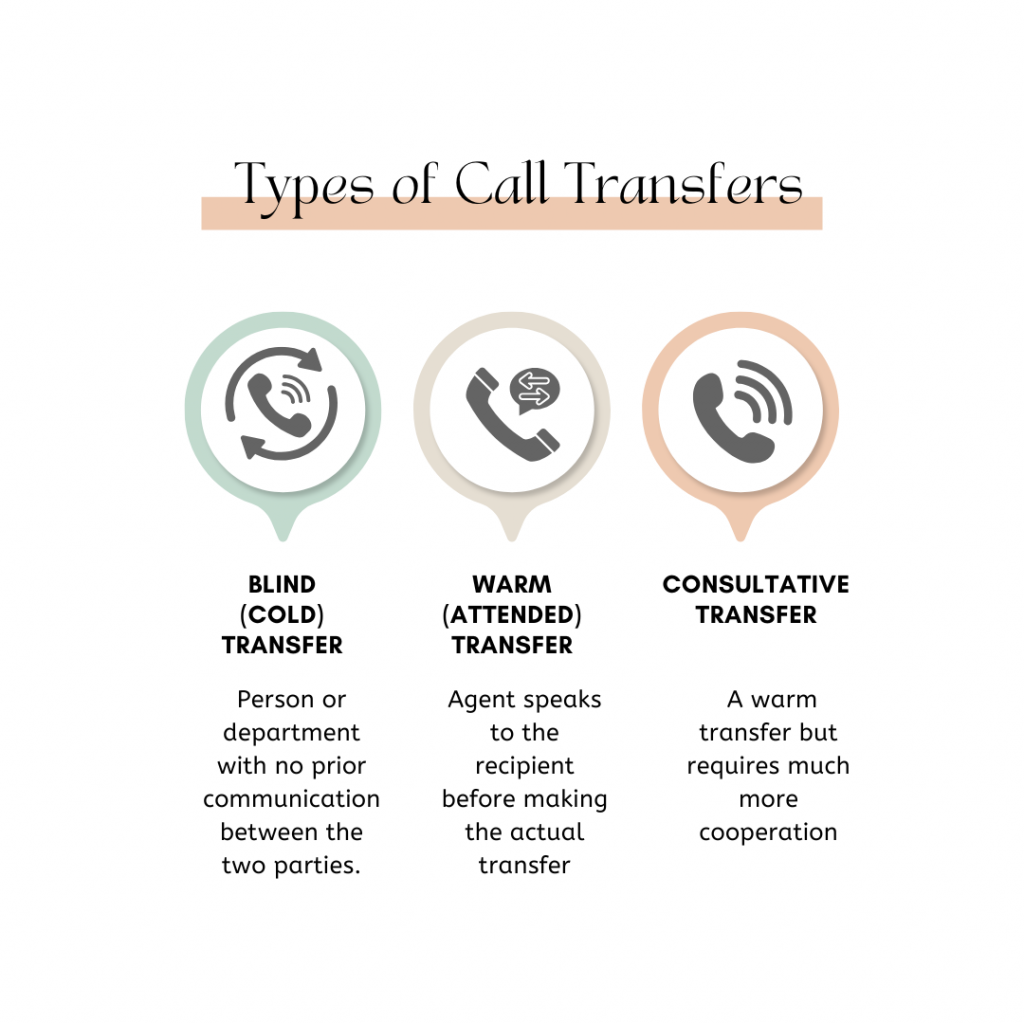
VoIP Call transfers form an important part of business communication. They ensure the calls are directed to the right person or department in a business, creating a smooth and satisfying customer experience. There are three main kinds of phone call transfers: blind (cold) transfer, warm (attended) transfer, and consultative transfer. Each serves a specific purpose, depending on the situation and the amount of interaction required. Understand the difference between cold transfer vs warm transfer in detail below:
Blind (Cold) Transfer
– What is a cold transfer: A blind or cold transfer transfers a call directly to another person or department with no prior communication between the two parties. The original agent simply redirects the call without speaking to the recipient or providing context.
– When to use: In cases where time is of the essence, blind transfers can be useful. This can be, for instance, transferring a caller to a general department or an extension where he can be further assisted.
– Example: A receptionist transfers a call directly to the sales department after establishing that the caller wants to speak to a salesperson, without introducing the caller to the sales team.
Warm (Attended) Transfer
– What is a warm transfer: A warm or attended transfer is when the original agent speaks to the recipient before making the actual transfer. In this case, the agent can provide information about the caller’s need or concern to the person receiving the call so the latter is adequately prepared in assisting the caller.
– When to use: Warm transfers are applied when the topic is complex or sensitive and requires a smooth handover with adequate context.
– Example: A customer care representative discusses the issue with a technical support expert so that the latter is better prepared to handle the situation without having to ask the customer to repeat it all over again.
Consultative Transfer
– What is a Consultative transfer: A consultative transfer is a warm transfer but requires much more cooperation. The original agent stays on the call for a while introducing the caller and the recipient ensuring that everything flows smoothly. This is usually after both have connected, and the handoff has been made by the original agent.
– When to use: Transfer consultative calls are mostly best suited for high-touch situations, like sales calls or escalations where one or more agents should be added to a call for a while.
– Example: A financial advisor connects a client to a mortgage specialist and stays on the line to make introductions and provide initial details before they leave the conversation.
Each type of phone call transfer plays a very important role in the provision of efficient and professional customer service. The choice of method depends on the urgency of the call, the complexity of the issue, and the need for context or collaboration.
Benefits of VoIP Call Transfers
Business phone system call transfers are the backbone of effective communication and customer satisfaction in contemporary businesses. Here are some of the most important benefits of implementing this feature in your operations:
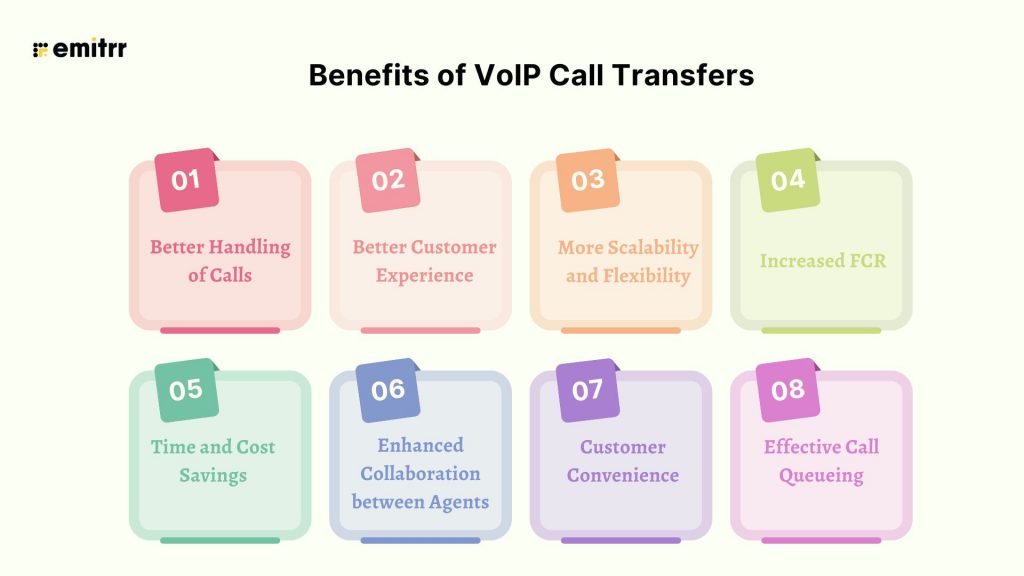
Better Handling of Calls
VoIP call transfers streamline the management of calls by allowing agents to connect customers quickly to the right person or department. This minimizes waiting time and reduces the frustration of being redirected multiple times, thus improving overall customer service.
Better Customer Experience
VoIP transfers the call to the most appropriate team member or subject matter expert, ensuring customers get correct information and answers right away. It provides callers with a smoother and more fulfilling experience.
More Scalability and Flexibility
VoIP facilitates the transfer of calls between various devices-whether desk phones, mobile phones, or computers-with its ability to easily move around and connect in any form of remote or hybrid working arrangement. This will ensure there are no lapses in communication anywhere.
Increased FCR
VoIP call transfers greatly enhance FCR by routing calls to the most available agent. First call resolution decreases repeat calls and increases customer satisfaction while saving operational costs.
Time and Cost Savings
VoIP call transfers minimize the need for callbacks, thus saving time and resources. First call resolution of customer concerns saves operational overheads while optimizing the workforce.
Enhanced Collaboration between Agents
Warm transfers allow the agents to speak with one another before the call is passed. It ensures that they can share the customer’s history, CRM data, and all other related information, making interactions smoother and facilitating better interdepartmental collaboration.
Customer Convenience
VoIP call transfers mean there is no re-dialing by the customers because they have contacted the wrong department. The ability to transfer calls to a proper destination ensures an effortless completion of the process.
Effective Call Queueing
VoIP with transferring capabilities ensures efficient management of call queues to avoid queuing for an unnecessarily long time. The customer has to repeat his or her issues least with warm transfer, therefore enhancing the quality of services.
VoIP call transferring is not a mere function; it’s a clever tool to enhance communication as a whole, thereby upgrading services and the way work is conducted and operated.
Common Challenges With VoIP Call Transfer
Customer Irritation Due to Repeated Transfers
Transferring the call to multiple agents or departments frustrates a caller, especially if the customer has to narrate their problem every time. This impacts the satisfaction score of the customer and increases customer churn. Furthermore, it impacts brand reputation.
Transfer Times Too Long
The long transfer times become irritating for customers, which will lead to dissatisfaction and eventual loss of customers.
Technical Issues
Dropped calls or delays in transfer will break the communication line as well as damage the associated trust with your business’ phone system.
Data Security Threats
In transfers, confidential customer information may leak out. There is an associated risk that vulnerable data will be exposed by such inadequate security measures.
Ineffective Proper Training
Agents who are not trained on transfer protocols or VoIP phone systems call transfer may end up not effectively managing calls, resulting in delays and errors and a frustrating experience for agents and customers alike.
Use Cases Of Call Transfer
Departmental Transfers
When a customer calls a general number, it is not necessary that they know which department to connect to to get the resolution of their problem. With business call transfers, it gets easy for the front desk or IVR system to route the call to respective departments such as sales, support, or billing.
Skill-Based Transfers
Some customer issues need special attention and knowledge; business call transfer can then route the customer call to the employee who has expertise on it. This not only minimizes back and forth but also avoids any kind of miscommunication.
Escalation Transfers
Multi-location businesses and businesses with multiple branches can transfer calls to the office nearest to the customer. This ensure localized support, faster response times, and sometimes even language-specific assistance.
Escalation Transfers
A lot of times it is not necessary that the customer’s issue gets resolved at the very first level; there are chances when the call needs to be handled by a supervisor or manager for escalation and faster resolution, and these kinds of situations call transfers become crucial.
VIP or Priority Customer Transfers
Many businesses also have tiers of customers, such as VIP or high-value clients and for whom they offer exclusive services, and business call transfer ensures that calls of these customers can be transferred to dedicated support teams for personalized service..
After-Hours or Overflow Transfers
Handling calls during peak hours or after hours is one of the biggest problems businesses face. Business call transfers help here by redirecting calls to an on-call executive, staff, or remote agents to avoid any type of missed opportunities.
Conference Transfers
There are calls that have special requirements and involve multiple team members call transfer here can help by offering the capability where more than one person can join the conversation seamlessly.
Security and Compliance Requirements
Call transfers in a business phone system are more than just redirecting calls; they also involve sensitive customer and business information that must be protected. Ensuring security and compliance during call transfers is critical, especially for industries handling personal, financial, or health-related data. Here are a few security and compliance requirements businesses need to take care of while transferring a call:
Regulatory Compliance: VoIP call transfers should comply with major data protection laws such as GDPR, CCPA, HIPAA, and more!! This makes sure that the cloud-based call transfer that contains sensitive data adheres to regulatory requirements, which not only protects businesses but also customers.
Business phone systems should comply with major data privacy and security regulations such as GDPR, CCPA, HIPAA, and PCI-DSS. This ensures that call transfers involving sensitive data adhere to legal standards and protect both your business and customers.
Secure Access with Strong Authentication: Use strong authentication methods, like two-factor authentication, to safeguard access to call forwarding settings and prevent unauthorized modifications.
Obtain Customer Consent: Always obtain explicit consent from customers before forwarding or recording calls, and clearly communicate how their information will be used and stored.
Implement Role-Based Access Controls: Establishing role-based access control is critical so that only authorized personnel can have access to the information relevant to their role.
Monitor and Audit Activities: Regularly monitor and audit the activities to ensure adherence to the standard regulatory requirements, and also flag any suspicious activity.
Maintain Comprehensive Documentation: Keeping a clear record of customer communication, call logs, and compliance procedures helps you stay prepared for audits and protect your organization legally.
Best Practices For Call Transfer
Below, we share best practices to ensure smooth and efficient business call transfers:
Implement Transfer Procedures
Establish clear guidelines on when and how to make a cloud-based call transfer. This results in consistency in the way in which all agents receive calls, thus reducing any confusion or errors.
Use Warm Transfers When Necessary
Warm (attended) transfers allow the agent to add context, and even prep the receiving agent before passing the call. This avoids having a customer repeat themselves and is very helpful to the customer in general.
Invest in Agent Training
Equip your team with the skills and knowledge to use the business phone system effectively. Technical know-how, customer service etiquette, troubleshooting for common issues, and data security best practices should be included in training.
Implement Advanced Call Routing
Leverage smart call routing features such as IVR (Interactive Voice Response) systems, skills-based routing, and call queues to avoid the use of manual transfers and to ensure calls are routed to the best-suited agent or department.
Monitor and Optimize Transfer Performance
Analyze cloud-based call transfer metrics on a regular basis- average hold time, transfer rates, customer feedback, and abandonment rates. Improve areas where necessary.
Ensure Strong Inter-Agent Communication
Encourage agents to share notes, CRM updates, and relevant information during transfers. This facilitates seamless handovers and ensures customers don’t need to repeat their concerns.
Offer Self-Service Solutions
The unwanted transfer volume could be reduced through offering self-service options such as IVR systems, FAQs, or even chatbots for daily queries.
Provide adequate technological infrastructure
Ensure there is internet, good VoIP equipment, and scheduled maintenance in order to limit the technological problems and seamless transfers during the calls.
Have Secure Solutions
Protect the customer information in the course of transfer with secure solutions through encryption, access control among others.
Leverage Call Parking
Use call parking features to hold calls temporarily while finding the right recipient, reduce hold times and enhance customer satisfaction.
By implementing these best practices, businesses can make the process of cloud-based call transfers an efficient and smooth part of their communication strategy, thereby ensuring customer satisfaction and operational efficiency.
Future Trends For Call Transfer
Here are some future trends for business call transfer:
AI Predictive Auto Dialing: One of the significant trend for cloud-based call transfer is AI-driven auto dialers which will predict the best times to contact leads and optimize agent productivity by reducing idle time and missed connections.
Growing Demand for Self-Service: Customers that mostly prefer solving issues on their own through AI chatbots, IVRs, and knowledge bases that will drive faster resolutions and higher satisfaction.
Powerful Generative AI: Generative AI will enhance customer engagement by producing context-aware responses, automating workflows, and improving overall communication quality.
Advanced Conversational AI: AI-powered virtual agents are evolving to understand intent, context, and emotions, delivering more natural and human-like customer interactions.
Omnichannel Support: Businesses are already integrating voice, chat, email, social and other platforms to provide consisten support to customers across all the channels.
Adoption of Omnichannel Communication Platforms: Companies are rapidly adopting to unified platforms that offers centralized customer interactions as it enables smooth transitions and better context across every touchpoint.
Analytics Provide Important Insights: Advanced analytics now help identify trends, agent performance, and customer behavior, empowering data-driven decisions to improve service efficiency.
Ensuring Safety in Security Policies: Modern call systems emphasize encryption, access control, and compliance to safeguard sensitive customer data and maintain trust.
Streamline Call Transfers With Emitrr
Leave behind the old landline and upgrade your communication level with Emitrr’s VoIP phone system. As designed for modern businesses, Emitrr offers unmatched quality in calls, advanced features, and a seamless experience-all at an affordable cost. Here’s why switching over to Emitrr is a game-changer for your business:
99.99% Uptime for Uninterrupted Connectivity
Say goodbye to call drops and service interruptions. Emitrr ensures near-perfect uptime, keeping your business connected with customers at all times.
Excellent Call Quality
Enjoy crystal-clear HD voice quality, making every conversation feel like it’s happening in person. To know more about VoIP, check out this YouTube video:
Advanced Call Management Features
Emitrr offers a comprehensive suite of tools to streamline your communication, including:
- IVR with Call Tree: Effortlessly route calls based on their inputs to the right team or department.
- Call Routing and Queue Groups: Automatically route calls to the best-suited agent to save precious time.
- Ring Everyone Feature: No calls go unanswered because all the available team members are ringing at the same time.
Multi-Device and Multi-Location Support
Emitrr allows users to answer calls on desk phones, mobile devices, and even across multiple locations if the team is hybrid or remote.
Seamless Integrations
Emittr’s let you connect easily to more than 1,000 apps, including Salesforce, HubSpot, and MailChimp, helping to automate workflows in various business fields, such as health, real estate, or home services.
Features for Maximum Efficiency
- Call Recording: Record calls to use for training, for regulatory compliance, or for ensuring quality.
- AI Enhancements: Features that are about to be released and promise to enhance customer experiences
- Missed Call to Text: Sends automatic SMS messages that alert when no opportunity is lost
Affordable Pricing and Fantastic Support
Emitrr starts at just $30 per user/month (billed annually), making it an incredible value for businesses of all sizes. Plus, its exceptional customer service, rated 5/5 on Capterra, means help is always a call or click away.
Easy Onboarding and Intuitive Interface
The user-friendly dashboard and minimal training requirements make it easy to transition your team to Emitrr, reducing downtime and boosting productivity from day one.
Switch to Emitrr’s VoIP call transfer system today and transform the way your business communicates. Embrace flexibility, scalability, and efficiency with a platform built for the future of work.
Frequently Asked Questions
A blind transfer, also known as a cold transfer, directly connects the caller to another extension or phone number without any interaction between the transferring agent and the recipient of the call.
Cold Transfer (Blind Transfer): The caller is directly transferred to the recipient without any prior notification or interaction.
Warm Transfer (Attended Transfer): The transferring agent first connects with the recipient and briefly explains the reason for the transfer and provides any necessary context before connecting the caller.Yes, you can typically transfer calls from a cell phone.
Methods:-
Most modern smartphones (iOS and Android) have built-in features for call merging or transferring.
Many VoIP apps also offer call transfer functionality.
The method for transferring calls to another phone depends on the device and system you are using:
-Landline Phones: The process usually involves specific button combinations or features within the phone system.
-VoIP Phones: Transferring calls typically involves using buttons on the phone or features within the VoIP software.
-Cell Phones: The process varies depending on the operating system (iOS or Android) and the specific phone model.
The “best” call transfer app for businesses depends on various factors, including budget, specific needs, and existing technology. Popular Options: Some popular VoIP platforms with strong call transfer features include Emitrr, RingCentral, 8×8 etc.
Many businesses and people are switching to a VoIP phone because of the many benefits it offers including reduction in calling cost, access to advanced calling features, ability to scale or downscale, among others.
Yes, you can easily forward VoIP calls to your cell phone using a VoIP call forwarding service provider. This feature could be very useful for business owners or individuals who have a team of people and are looking for the ability to communicate from anywhere, anytime without incurring too much calling expense.
Conclusion
Call transfer is essential for effective communication, allowing businesses to connect the caller with the right team in an efficient manner. It increases customer satisfaction, improves first-call resolution rates, and enhances team collaboration. Modern VoIP solutions have made call transfers more flexible and accessible, ensuring top-notch service delivery.
It is among the best solutions when it comes to streamlining call management processes. Its features are robust, such as call routing, IVR, and even seamless integrations, together with excellent reliability and support for customers. Emitrr allows you to upgrade your communication game.
Book a quick demo here to see how Emitrr can help you achieve scalability with its VoIP call transfer solution. Switch to Emitrr’s VoIP phone system today and experience the future of call management!


 4.9 (400+
reviews)
4.9 (400+
reviews)