
Introduction
You can really think of faxing like a two-way street. One side brings information in (inbound), the other sends it out (outbound). And while it might sound like ancient tech, faxing is still a daily reality for businesses in healthcare, law, government, and more. And these days, faxing’s had a serious glow-up – it’s all digital, smart, and no loud machines in sight!
So what’s the real difference between inbound and outbound faxing? Whether you’re swamped with incoming forms or constantly sending out paperwork, knowing how each type works and when to use which can seriously improve how your team communicates. In this guide, we’ll break it all down and show how Emitrr makes handling both sides smooth, secure, and surprisingly simple.
Faxing in the Modern Business Landscape
Faxing might seem like a thing of the past, but it’s still very much part of the present. Just in a much smarter form. At the end of the day, businesses still need to send important stuff fast, keep it safe, and follow the rules. Faxing just happens to still tick all those boxes.
What has changed is how it’s done. Today, everyone uses internet faxing. No more bulky machines or waiting by the printer. You don’t need a noisy old fax machine anymore. Just your laptop or phone will do the trick. It’s fast, dependable, and honestly, way easier to handle. No paper jams, no weird error beeps, just send or receive and get on with your day!
And yes, faxing is still a big deal in industries like healthcare, law, finance, and government. Why? Because when it comes to sharing sensitive info, privacy rules are strict, and faxing still ticks all the right boxes for security and compliance. But instead of old-school hardware, they’re now adopting digital fax solutions that blend into their daily tools and systems.
So, while the method has evolved, the mission is the same: move important documents safely and efficiently. And digital faxing is making that easier than ever.
Inbound Faxing Explained
Inbound Faxing Overview
Inbound faxing simply means receiving faxes. It’s like a digital mailroom for your business. Customers, clients, or partners send documents to your fax number, and those documents arrive in your system. Instead of printing on paper like in the old days, most inbound faxes now show up as digital files in your email or dashboard. It’s all about securely collecting incoming documents like forms, contracts, or records – quickly, clearly, and without any manual hassle.
How Inbound Faxing Works
When someone faxes your number, the system does the rest. No beeping machines or waiting around. It turns the fax into a PDF and sends it straight to your email or inbox. You don’t need to be nearby. It runs 24/7 in the background, so your docs just show up, complete with the time and sender info.
Key Features of Inbound Faxing
- Dedicated Fax Number: You get a specific fax number for receiving documents, which others can send faxes to at any time.
- Digital Delivery: Incoming faxes are converted to electronic files (e.g. PDFs) and delivered to your email or online dashboard instead of paper printouts.
- Auto-Routing: The system can automatically send incoming faxes to the right person or department (for example, based on the number dialled or cover page info).
- Notifications: You receive alerts (via email or SMS) when a new fax comes in, so nothing slips through unnoticed.
- Archiving: All inbound faxes are stored securely in a central location, letting you search and access past received documents easily.
Common Inbound Use Cases
- Healthcare Clinics: Used to receive healthcare referrals, prescriptions, or lab results from other providers.
- Legal & Real Estate: Common for receiving signed contracts, agreements, and other official documents securely.
- Finance Institutions: Clients send loan applications, authorization forms, or identity documents via fax.
- Government Offices: Accept forms, ID submissions, and signed applications that often require a physical signature.
- Retail & Supply Chains: Used for receiving purchase orders, restocking requests, or distributor paperwork.
Outbound Faxing Explained
Outbound Faxing Overview
Outbound faxing is all about sending documents out from your business. You’re the one initiating the message. Instead of printing papers and standing by a machine, you now just upload a file, enter the fax number, and hit send. Most outbound faxes today are sent digitally from your computer or phone. It’s fast, reliable, and still legally accepted. Whether it’s a medical summary, contract, or client form, outbound faxing helps you get important documents to the right person super quickly and securely.
How Outbound Faxing Works
You choose a file (like a PDF or scanned form), type in the recipient’s fax number, and press send through your online fax app or dashboard. That’s it. The system turns your file into a fax and delivers it to the other side, whether that’s another digital service or an old-school fax machine. Once it goes through, you get a confirmation that it was delivered.
Key Features of Outbound Faxing
- Easy File Upload: Attach PDFs, scans, or other documents directly from your device.
- Cover Pages: Add a fax cover sheet – a quick message or sender info to keep things clear and professional.
- Send to Many at Once: Fax the same doc to multiple contacts in one go, great for announcements or updates.
- Schedule + Auto-Retry: Set your fax to send later or let the system try again if it doesn’t go through on the first try.
- Delivery Reports: You’ll know if your fax landed or not. No guessing, just clear status updates.
Common Outbound Use Cases
- Healthcare: Need to send a prescription or patient file? Just fax it straight to the clinic or pharmacy, quick and secure.
- Legal & Real Estate: Contracts, agreements, court forms, you can send them off with a timestamp, no delivery doubts.
- Finance & Banking: Whether it’s a loan form or ID document, faxing makes sure it gets there with proof it was delivered.
- Insurance: Claims and policy docs go out fast, so your clients and partners aren’t left waiting.
- Operations & Admin: Share updates, purchase orders, or memos with teams and vendors, no matter where they are.

Key Differences Between Inbound and Outbound Faxing
Inbound and outbound faxing are like two halves of a conversation, one’s for receiving, the other’s for sending. Here’s a quick side-by-side to make it easy to understand:
| Aspect | Inbound Faxing (Receiving) | Outbound Faxing (Sending) |
| Direction | Faxes come into your business from outside. | Faxes go out from your business to others. |
| Who Starts It | Someone else sends a fax to you. | You send a fax to someone else. |
| Main Goal | To receive and organise important documents. | To send documents quickly and securely. |
| Top Priorities | Don’t miss anything, route it to the right person, and keep it tidy. | Make sure it goes through to the right place, with proof it was sent. |
| Features You’ll See | Unique fax number, email delivery, alerts for new faxes, secure storage. | Cover sheets, send scheduling, retry if failed, and delivery updates. |
| Everyday Use Cases | Getting patient records, client forms, and signed papers. | Sending invoices, contracts, or referrals to partners. |
| What If It Fails? | If the line’s busy, the system usually queues it and tries again. | If it doesn’t go through, your system retries and lets you know. |
Pros and Cons of Inbound Faxing and Outbound Faxing
Every technology has its advantages and drawbacks, and faxing is no different. Inbound and outbound faxing each come with its own set of pros and cons. Let’s break them down:
Inbound Faxing
Here’s what’s great and not so great about inbound faxing:
Inbound Faxing Pros
- Hands-Off Reception: Faxes arrive automatically. You don’t need to actively fetch documents. Just let them come in.
- Instant Documentation: Incoming faxes often serve as legal proof or official records (e.g. a signed contract received via fax is time-stamped and saved).
- Secure and Direct: Sensitive documents sent by fax come straight to your system, reducing the risk of interception compared to email in some cases.
- No Missed Deliveries: Unlike postal mail, faxed documents don’t get “lost in transit”. If the fax was confirmed, you have the document, often immediately.
- Digital Organisation: With inbound fax via a digital service, all received files can be automatically saved and organised for easy reference (no piles of paper to sort through).
Inbound Faxing Cons
- Unwanted Faxes: Just like junk mail, you might receive spam or irrelevant faxes, which waste time and resources (though many services let you block numbers).
- Need for Monitoring: Someone still has to check the inbox – if a fax comes in at 3 AM, you might not see it until later, unless alerts are in place.
- Reliance on Sender’s Timing: You can only receive when someone decides to send. Urgent incoming info is at the mercy of when the sender hits “send fax”.
- Potential Downtime: If your fax line or service goes down temporarily, senders might get a busy signal or error. This means you could miss an inbound fax, but modern cloud services have overcome this thanks to high uptime.
- Conversion Glitches: In digital systems, very occasional issues might occur (like a page not rendering clearly) if the sender’s machine had problems. But this is not very common.
Outbound Faxing
Here are the upsides and downsides when you’re the one faxing documents to others:
Outbound Faxing Pros
- Fast Delivery: Faxing can send documents almost instantly to the recipient’s fax, much quicker than postal mail for delivering signed papers.
- Delivery Confirmations: Wondering if your fax made it? You’ll get a clear “yes, it’s delivered” notice. Perfect for peace of mind, especially with legal or sensitive docs.
- Still the Norm: Believe it or not, plenty of places like hospitals, law offices, and government agencies still prefer fax. Using it means you’re speaking their language.
- Send to Everyone at Once: Got an update or form to share with a bunch of people? Just hit send once – broadcast faxing handles the rest.
- Secure by Design: Thanks to encryption software in digital fax, your documents are locked down tight. Great for keeping private info private and staying compliant with rules like HIPAA.
Outbound Faxing Cons
- Requires Accuracy: If you dial the wrong fax number or have outdated recipient info, your fax won’t reach the right person, and you’ll need to track down the correct number.
- Line Busy or Failures: Sometimes the recipient’s fax line is busy, or their machine is out of paper, causing delays. Even though your system will retry, it can slow down urgent sends.
- Volume Costs: Sending a lot of faxes can incur costs like phone line charges or per-page fees on some services, which add up if you’re faxing hundreds of pages regularly.
- Learning Curve: Switching to an online fax system means staff have to learn a new app or interface for sending faxes. It’s usually pretty simple, but it’s an extra step compared to simply emailing documents.
- Formatting Issues: Occasionally, a complex document with unusual fonts or graphics might not fax clearly, requiring you to double-check the output or adjust the file format.
Choosing the Right Fax Setup for Your Business
So, should your business focus on inbound faxing, outbound faxing, or a mix of both? The answer really depends on your operations. So let’s consider a few scenarios to figure out the best setup:
When Inbound Faxing Takes Centre Stage
If your business mostly receives documents, then inbound faxing is your main need. Think of clinics getting lab reports, or service providers receiving forms and approvals daily. You’ll want features like instant alerts and auto-routing so nothing important gets missed. A strong inbound setup keeps everything flowing smoothly without needing manual checks. It’s perfect for teams that depend on receiving documents to keep moving.
When Outbound Faxing Is the Priority
Outbound faxing becomes your focus when you’re regularly sending documents out. For example, pharmacies faxing prescriptions or firms sending agreements to clients. You need tools that make sending fast, reliable, and easy to track. Features like bulk send, retries, and delivery confirmations help a lot. If your team sends faxes often, a reliable outbound setup saves you time and stress.
Where a Hybrid Approach Works Best
Many businesses don’t just send or receive – they do both. Legal teams, hospitals, and even small offices deal with faxes coming in and going out all day. A hybrid system lets you manage everything in one place, from a single inbox or dashboard. It makes switching between receiving and sending seamless and keeps everything well organised. If you use fax in both directions, a combined setup keeps things efficient and simple.
What to Look for in a Modern Fax Solution
Picking a fax system isn’t just about sending papers anymore. It’s about saving time, keeping things secure, and making work easier for your whole team. Here’s what really matters, and how it helps in real life:
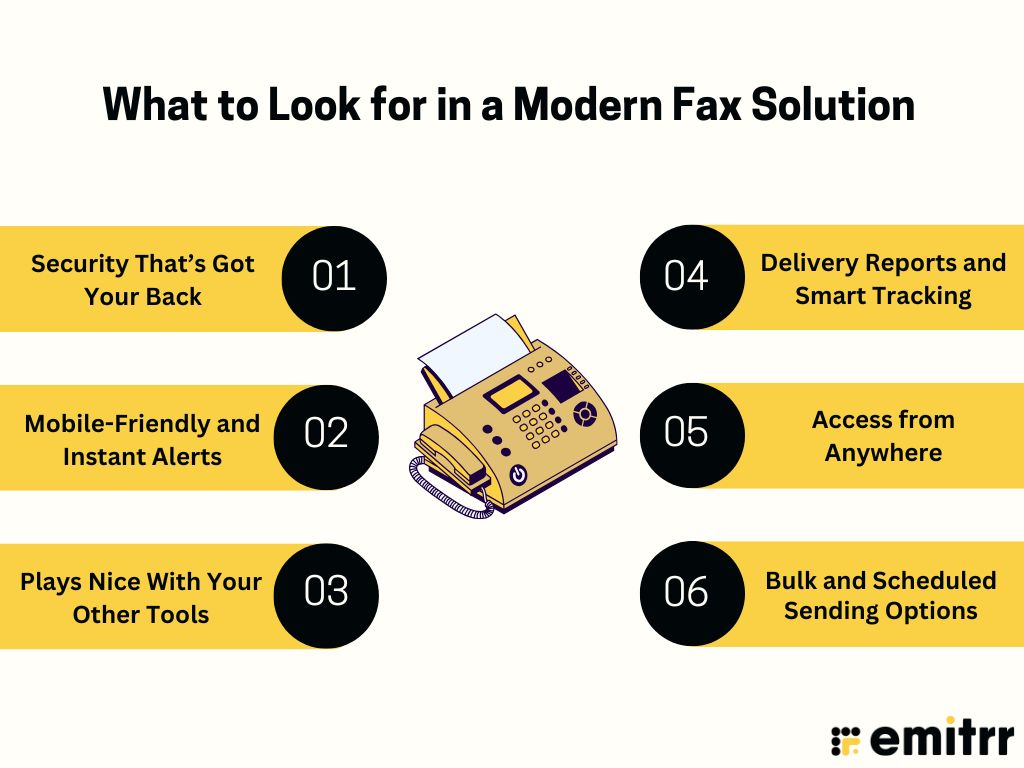
Security That’s Got Your Back
If you’re dealing with patient records or legal contracts, you can’t mess around with privacy policies. A good digital fax tool should lock down your documents with strong encryption. Think of it like a secure envelope that only the right person can open. It should also track who accessed what, which is super helpful if you ever need to check who viewed a sensitive file.
Mobile-Friendly and Instant Alerts
Out grabbing coffee? No problem. A smart fax tool pings your phone the moment a new fax arrives. You can even open it, forward it, or reply on the spot. No waiting, no fuss. Perfect for busy teams that are always on the move.
Plays Nice With Your Other Tools
The best fax systems don’t work alone. They sync with the stuff you already use, like your CRM, email, or medical records software. So a fax from a client can slide straight into their file, or a referral can be logged automatically in a patient profile. Less dragging, less clicking, more doing.
Delivery Reports and Smart Tracking
Ever sent a fax and wondered if it actually made it? With modern tools, you don’t have to guess. You get real-time updates like sent, failed, delivered, and even why it failed. It’s like a read receipt for your documents! Super handy when you need proof for legal stuff or just peace of mind.
Access from Anywhere
Work doesn’t just happen at your desk anymore. With cloud communication and storage, your faxes follow you on your laptop, phone, wherever you are. So whether you’re at home, visiting a client, or catching a flight, you can open that contract or form in seconds without missing a beat.
Bulk and Scheduled Sending Options
Need to send updates or forms to dozens or hundreds of contacts? A modern system lets you send to multiple recipients at once and schedule faxes to go out later. Great for off-hours communication or big campaigns. No need to manually hit send every time, just set it and go.
How Emitrr Supports Both Inbound and Outbound Faxing
Emitrr isn’t just a fax service. It’s like having a smart, AI-powered receptionist or assistant for your document flow. Whether you’re sending or receiving faxes, it takes care of the process so you can focus on work that actually matters.
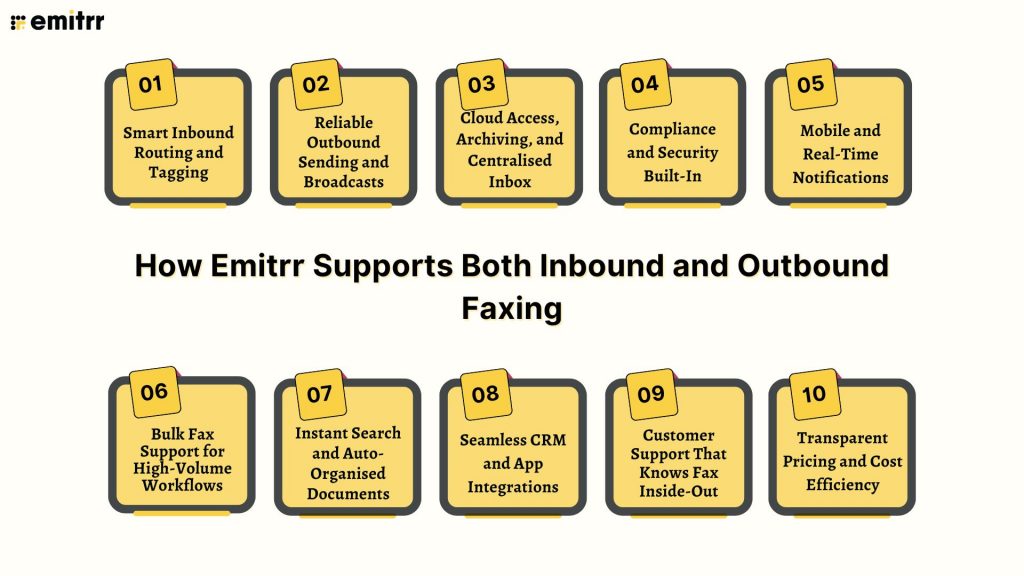
Smart Inbound Routing and Tagging
With Emitrr, incoming faxes don’t just pile into a generic inbox. The system automatically routes each fax to the right person or team, based on your rules. You can even tag them – like “Billing” or “HR”, so they’re instantly sorted and easy to find later.
Reliable Outbound Sending and Broadcasts
Sending faxes is a breeze. Upload your document, enter the number, and click send. It’s really that simple. Plus, you can send one fax to many people at once and get confirmation reports, so you always know what went through.
Cloud Access, Archiving, and Centralised Inbox
You can view and manage faxes from anywhere. All you need is internet access. Everything lives in one shared inbox, making collaboration easy. Plus, all documents are auto-archived, searchable, and neatly organised in folders or threads.
Compliance and Security Built-In
Emitrr is designed to handle sensitive info, which is why it’s fully HIPAA and GDPR compliant. Every fax is encrypted during transfer and storage. You even get access logs, so you know who viewed what and when.
Mobile and Real-Time Notifications
You’re not tied to a desk anymore. Emitrr lets you send and receive faxes from your phone or tablet. And with real-time alerts, you’ll never miss a document, even if you’re out grabbing coffee. It keeps you connected wherever you are, so faxing doesn’t interrupt your day.
Bulk Fax Support for High-Volume Workflows
Need to fax a document to hundreds of people? No problem. Emitrr handles large batches without slowing down or crashing, making it perfect for busy departments. It’s built to scale, so whether you’re sending ten faxes or ten thousand, the system keeps up with ease.
Instant Search and Auto-Organised Documents
No more hunting through folders or paper piles. Emitrr makes everything searchable, just type in a keyword or number. It also auto-organises your faxes into threads or categories, so your inbox stays clean.
Seamless CRM and App Integrations
Emitrr connects with the apps your business already uses, like CRMs or cloud storage. That means you don’t have to copy-paste or upload things twice. You can even automate where faxes go or pull data from them directly into other tools. Everything works together smoothly, cutting down on manual work.
Customer Support That Knows Fax Inside-Out
If you ever get stuck, Emitrr’s support team is there with real answers, not copy-pasted scripts. They understand faxing inside and out, and they’re great at helping with setup, porting numbers, or solving issues fast. You’re never left on your own.
Transparent Pricing and Cost Efficiency
Emitrr’s pricing is clear and flat, no surprise fees or per-page extras. You’ll also save on paper, toner, and machines. And since it combines faxing with texting and calling, it’s one platform for all your communication needs.
Frequently Asked Questions
Yes! You can send and receive faxes right from your phone or tablet. Whether you’re on the go or at your desk, faxing with Emitrr fits right into your pocket.
Inbound is when faxes come to you. Outbound is when you send them out. It’s exactly like how you’d receive or send texts/emails – simple as that!
Healthcare, insurance, and government use inbound faxing a lot. They’re always getting forms, referrals, and signed documents from outside parties.
Pharmacies, legal teams, and financial services are big outbound users. They’re often the ones sending out prescriptions, contracts, or statements.
Totally! Emitrr handles both like a pro – you can send, receive, and track everything in one place without juggling tools.
Yes! It’s HIPAA and GDPR compliant, with secure encryption and audit logs. Perfect for industries that deal with sensitive info.
Conclusion
Business communication is evolving fast, and smart document handling is a big part of that. Understanding how inbound and outbound faxing works can help you build a more organised, responsive, and secure workflow. Inbound faxing keeps your incoming paperwork sorted and instantly accessible, while outbound faxing ensures you send important files with confidence and tracking.Emitrr brings it all together in one smooth platform. From cloud access and mobile alerts to bulk sending and smart integrations, it’s faxing built for today’s pace. So, are you ready to make document handling faster and easier? See how Emitrr can streamline your faxing in just a few clicks. Book your demo with Emitrr today!


 4.9 (400+
reviews)
4.9 (400+
reviews)