
Introduction
Manual data entry in Athenahealth exists because most patient information, forms, insurance cards, and documents comes in as unstructured data.
OCR (Optical Character Recognition) helps convert these inputs into structured data, reducing the need for manual typing. But to actually eliminate repetitive work, OCR needs to be combined with proper data mapping and system sync.
In this guide, you’ll learn exactly how to use OCR to reduce manual data entry in Athenahealth, step by step.
AI Summary
- Manual data entry in Athenahealth happens because data enters as unstructured inputs
- OCR converts images and documents into structured, usable data
- OCR alone doesn’t eliminate manual work, data mapping and validation are required
- High-impact areas include intake forms, insurance cards, and prescriptions
- Integrating OCR with Athenahealth reduces typing, errors, and processing time
- Two-way sync helps eliminate duplicate data entry across systems
- The right setup can significantly improve staff efficiency and patient experience
What is OCR (And How It Helps in Athenahealth)
OCR (Optical Character Recognition) is a technology that reads text from images, PDFs, or scanned documents and converts it into editable, structured data.
In Athenahealth workflows, this means:
- A photo of an insurance card → becomes usable patient and policy data
- A scanned intake form → becomes structured patient information
- Uploaded documents → become searchable, editable records
Instead of staff manually typing this information into Athena, OCR extracts the text automatically. However, OCR only handles data extraction. To fully reduce manual work, that data still needs to be:
- Mapped to the correct fields in Athena
- Validated for accuracy
- Synced across systems to avoid duplicate entry

How to Reduce Manual Data Entry Using OCR in Athenahealth (Step-by-Step)
Reducing manual data entry in Athenahealth isn’t just about adding OCR, it’s about setting up the right flow from data capture to final entry inside the system. Here’s how to do it effectively:
Step 1: Identify High Manual-Entry Points in Athena
Start by pinpointing where your team spends the most time entering data into Athenahealth. This typically includes patient registration, insurance verification, and document uploads. Focus on workflows where staff repeatedly type the same information into Athena’s patient records or billing modules. These are the best candidates for OCR for healthcare data entry.
Step 2: Standardize How Data Enters Your System
Before using OCR, clean up how you collect data. In Athena workflows, inputs often come from multiple sources, paper forms, emails, uploads, or even patient messages. Where possible, shift to more consistent input methods like digital forms or document uploads. This makes it easier for OCR tools to process data accurately and reduces dependency on manual handling of unstructured data in healthcare.
Step 3: Use OCR to Extract Key Patient and Insurance Data
Introduce an OCR tool to scan documents such as intake forms, insurance cards, and medical records. The goal here is to automatically extract:
- Patient demographics
- Insurance details
- Relevant medical information
Instead of manually typing this into Athenahealth, OCR converts it into structured data, helping automate patient data entry in Athenahealth.
Step 4: Map Extracted Data to Athenahealth Fields
This is the most critical step. OCR only extracts data, you need to ensure it flows into the correct fields inside Athena. For example:
- Patient name → Patient profile
- Insurance ID → Billing section
Using integration tools or middleware, you can connect OCR outputs to Athena’s system and enable EMR data automation. Without this step, staff will still end up copying data manually.
Step 5: Add Validation to Prevent Errors
Even the best OCR tools can make mistakes. To avoid errors in medical data entry, set up validation rules before data is finalized in Athena. Flag missing or incorrect fields so staff only review exceptions instead of manually entering everything. This significantly reduces rework and improves data accuracy.
Step 6: Reduce Duplicate Work with Two-Way Sync
After data is entered into Athena, the next challenge is avoiding duplicate entry across tools. Using solutions with two-way sync with Athenahealth, you can ensure:
- Patient data stays consistent across systems
- Updates don’t require re-entry in multiple tools
This is a key part of healthcare workflow automation, as it removes repetitive work beyond just initial data entry.
Step 7: Continuously Optimize Workflows
Once OCR and integrations are in place, monitor where manual work still exists in your Athena workflows. Look for:
- Remaining data entry steps
- Bottlenecks in intake or billing
- Repeated corrections or errors
Refining these areas helps you further reduce manual data entry in Athenahealth over time.
Where Athenahealth Falls Short for OCR-Based Automation
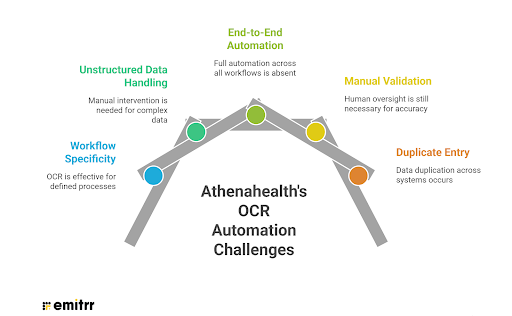
While Athenahealth is strong at managing and storing patient data, it has limitations when it comes to reducing manual data entry using OCR and automation.
OCR is Limited to Specific Workflows
Athenahealth offers AI-powered OCR in Athenahealth, mainly for insurance verification. While this reduces manual entry in that area, it doesn’t extend across all workflows like intake forms or general document processing.
Unstructured Data Still Needs Manual Handling
Most unstructured data in healthcare, such as PDFs, scanned forms, and uploads, is not fully converted into structured fields. Staff often still review and enter this data manually into Athena.
No End-to-End Automation
Athena’s OCR focuses on extraction and suggestions, not full automation. Data often requires confirmation and isn’t always auto-mapped across all fields, limiting true EMR data automation.
Manual Validation is Still Required
Even with OCR, staff must verify accuracy, fix errors, and handle exceptions, so manual effort is reduced, not eliminated.
Duplicate Entry Across Systems
OCR doesn’t solve duplicate data entry. Without two-way sync with Athenahealth, teams may still re-enter the same data across tools.
How Emitrr Helps Reduce Manual Work in Athenahealth (Without OCR)
Emitrr is a HIPAA-compliant AI-driven communication tool that offers native integration with Athenahealth and help Athenhealth users to simplify their workflows where athena falls short. Here’s how Emitrr helps in reducing manual tasks:
AI Agent That Captures Structured Data
A large portion of manual data entry in Athenahealth comes from unstructured inputs like calls, voicemails, and patient messages. Emitrr’s AI agent addresses this by capturing structured data during real interactions. For example, when a patient requests a prescription refill or shares details via SMS, the AI collects key information, such as medication name, pharmacy, and patient identifiers, in a structured format. This removes the need for staff to listen to voicemails or manually type notes into Athena.
Automated Prescription Refill Intake
Prescription refill requests are typically messy, patients call, leave voicemails, or provide incomplete details. In Athena alone, this creates back-and-forth and manual data entry.
With Emitrr, refill requests can be:
- Captured via AI voice or SMS
- Structured automatically
- Routed as cases inside Athena for staff review
See how AI agents can reduce prescription refill calls by 40%
Two-Way Sync with Athenahealth
One of the biggest contributors to manual work is duplicate data entry across systems. Emitrr’s two-way sync with Athenahealth ensures that all patient interactions, whether it’s appointment confirmations, refill requests, or SMS conversations, are automatically updated in Athena. This eliminates the need for staff to re-enter the same data, enabling better EMR data automation and ensuring records stay consistent.
AI-Powered Automation for Intake and Scheduling
Beyond data capture, Emitrr reduces manual effort in day-to-day workflows like appointment scheduling inside athena, confirmations, and follow-ups. Patients can book, reschedule, or respond via SMS, and these updates are automatically reflected in Athena. This reduces the reliance on front-desk staff and helps optimize overall administrative workload in healthcare.
Automatic Logging of Patient Interactions
In many Athena workflows, documenting patient communication is still manual. Emitrr automatically logs calls, SMS conversations, and outcomes directly into patient records. This ensures that all interactions are recorded without additional effort, reducing missed information and improving data accuracy.
Centralized Communication Reduces Data Entry
By bringing all patient communication, calls, texts, and follow-ups into one system integrated with Athena, Emitrr reduces scattered inputs. This minimizes the need to switch between tools and re-enter data, helping teams better manage unstructured data in healthcare while reducing overall manual workload.
Best Practices to Maximize OCR + Automation in Athenahealth
Here are some best practices that you can follow to maximize OCR and automation in athenhealth.
Start with High-Impact Workflows
To effectively reduce manual data entry in Athenahealth, focus first on areas with the highest volume of repetitive work, like patient intake, insurance verification, and prescription requests. Applying OCR for healthcare data entry in these workflows delivers the fastest ROI and reduces immediate administrative burden.
Standardize Data Input Formats in Athena
OCR works best when inputs are clean and consistent. Encourage structured data collection through digital forms, clear document uploads, and guided patient inputs. This minimizes variability in unstructured data in healthcare and improves OCR accuracy.
Combine OCR with Proper Data Mapping
OCR alone only extracts data, it doesn’t ensure it lands in the right place. To achieve real EMR data automation, make sure extracted data is mapped correctly to Athenahealth fields (patient info, insurance details, etc.). This prevents manual copy-paste and reduces errors.
Always Include a Validation Layer
Even with advanced OCR, errors can happen. Add validation checks to flag missing or incorrect data before it enters Athena. This helps reduce errors in medical data entry while ensuring data quality without full manual review.
Use Automation to Handle What OCR Can’t
OCR handles document-based inputs, but a lot of manual work comes from calls, voicemails, and patient communication. Use automation tools (like AI agents, SMS workflows, and scheduling automation) to capture structured data from these channels and reduce overall administrative workload in healthcare.
Eliminate Duplicate Entry with Two-Way Sync
One of the most overlooked issues is duplicate work across systems. Using tools with two-way sync with Athenahealth ensures that once data is captured, via OCR or patient interaction, it doesn’t need to be entered again elsewhere. This is key to scaling healthcare workflow automation.
Continuously Monitor and Optimize
After implementation, regularly review where manual work still exists in Athena workflows. Identify bottlenecks, repeated corrections, or areas where OCR accuracy drops, and refine processes accordingly.
Frequently Asked Questions
Yes, Athenahealth offers AI-powered OCR in Athenahealth for specific workflows like insurance verification. However, it does not fully automate data extraction across all intake and document processes.
No. OCR helps reduce manual typing by extracting data, but you still need data mapping, validation, and EMR data automation to minimize manual work completely.
The most effective use cases include patient intake forms, insurance card scanning, and document processing, areas with high unstructured data in healthcare.
Using tools with two-way sync with Athenahealth ensures that data captured from patient interactions or workflows is automatically updated across systems, eliminating duplicate entry.
Automation tools like AI agents, SMS workflows, and scheduling automation help capture structured data from calls and messages, reducing the overall administrative workload in healthcare.
Conclusion
OCR in Athenahealth helps reduce manual data entry, but it doesn’t solve everything. Manual work still exists across calls, messages, and disconnected workflows. To truly reduce effort, clinics need a combination of OCR, automation, and two-way sync with Athenahealth.
Emitrr helps eliminate duplicate entry, capture structured data from patient interactions, and automate everyday workflows, reducing overall administrative workload in healthcare and improving efficiency. Book a demo to learn more.


 4.9 (400+
reviews)
4.9 (400+
reviews)