

Introduction
Patient intake is the process of collecting, verifying, and reviewing the information a healthcare organization needs to prepare a patient for care. It covers more than completing patient intake forms. The process may include patient registration, medical history, insurance documentation, consent forms, appointment-specific questions, document collection, record updates, and final check-in requirements.
When intake begins only after the patient arrives, staff have little time to correct missing information, confirm insurance details, obtain signatures, or request records. Patients may spend longer in the waiting room, while providers may begin the visit without the information they expected. A clear pre-visit intake process gives patients time to complete requirements from home and allows staff to address problems before the appointment.
This guide explains what patient intake means, what information it includes, and how it differs from registration and check-in. It also covers the main patient intake steps, traditional and digital intake methods, common challenges, and the role technology plays in improving the workflow. Finally, it explains how Emitrr can serve as the communication and workflow layer that helps practices send intake requirements, answer patient questions, monitor completion, and move patients from scheduled to intake-ready. It is written for healthcare leaders improving intake operations.
AI Summary
- Patient intake is the process of collecting and reviewing the information needed to register, prepare, and treat a patient.
- It includes demographic, medical, insurance, consent, financial, and appointment-specific information.
- Registration and check-in are individual parts of the broader patient intake workflow.
- Pre-visit intake helps practices resolve incomplete forms and missing documents before arrival.
- Digital patient intake reduces paper handling, repeated data entry, and waiting-room delays.
- An effective intake process must be secure, accessible, easy to complete, and connected to existing practice workflows.
What is Patient Intake
Patient intake is the process healthcare organizations use to collect, verify, and review the administrative, medical, insurance, financial, and consent information required to prepare a patient for care. It begins when information is first requested or received for a visit and ends when the required information has been reviewed and the patient is ready for care.
In simple terms: Patient intake gets the patient, their information, and the practice ready for the appointment. A patient intake form collects information, but the complete process also includes assigning requirements, reviewing submissions, resolving missing items, and updating the patient record.
The healthcare intake process may begin when a patient calls, submits an appointment request, schedules online, or is referred by another provider. It can continue through patient pre-registration, form completion, document submission, staff review, record updates, and check-in.

New Patient Intake vs. Returning Patient Intake
The amount and type of information collected depend partly on whether the patient is new or returning.
New patient intake: It usually requires comprehensive data collection. The patient may need to provide demographic and contact details, patient insurance information, medical and medication history, allergy information, consent forms, identification, and appointment-specific documents. These details help the practice create the patient record and prepare for the first encounter.
Returning patient intake: It generally focuses on verifying and selectively updating information already in the record. Patients may confirm their address, phone number, insurance coverage, medications, allergies, and recent medical changes without completing an entire new patient questionnaire again.
A returning patient may need a fuller intake after a long gap in care, when visiting a new specialty, undergoing a new procedure, changing insurance, or reporting a major medical update. Both patient types may also need visit-specific questionnaires or updated consent forms.
Good intake does not start from zero at every visit. It asks returning patients to confirm what is still accurate and update what has changed.
Patient Intake vs. Patient Registration vs. Patient Check-In
Patient intake, patient registration, and patient check-in are related, but they are not interchangeable. Confusing them can result in unclear ownership, duplicate patient data collection, or overlooked requirements. Patient intake software helps practices organize the broader intake process by collecting and managing patient information before and during the visit, while registration and check-in address more specific stages of that workflow.
| Process | Primary purpose | When it occurs | Typical information or tasks | Completion point |
| Patient intake | Prepare the patient and practice for care | Before and during the visit | Medical, administrative, insurance, and consent information | Patient is intake-ready |
| Patient registration | Create or update the patient record | Usually before the visit | Demographics, insurance, and contact information | Record is created or verified |
| Patient check-in | Confirm arrival and resolve final requirements | On the appointment day | Arrival, copay, signatures, and remaining documents | Patient is ready to be seen |
Patient registration is an administrative component of intake. It establishes or verifies the patient’s identity, contact details, insurance information, and administrative record. Patient check-in is the final day-of-visit stage. It confirms arrival and gives staff an opportunity to collect outstanding updates, signatures, documents, or payments.
Information collected earlier supports both stages. Demographic and insurance details help staff complete registration, while consent forms and pre-visit questionnaires reduce the work remaining at check-in.
Pre-registration is not always complete intake. A patient record may exist even though the practice is still waiting for a health history form, insurance card, referral, consent, or procedure-specific questionnaire.
Each practice should define who owns registration, intake review, missing-item follow-up, and final check-in. Clear ownership keeps tasks from falling between teams.
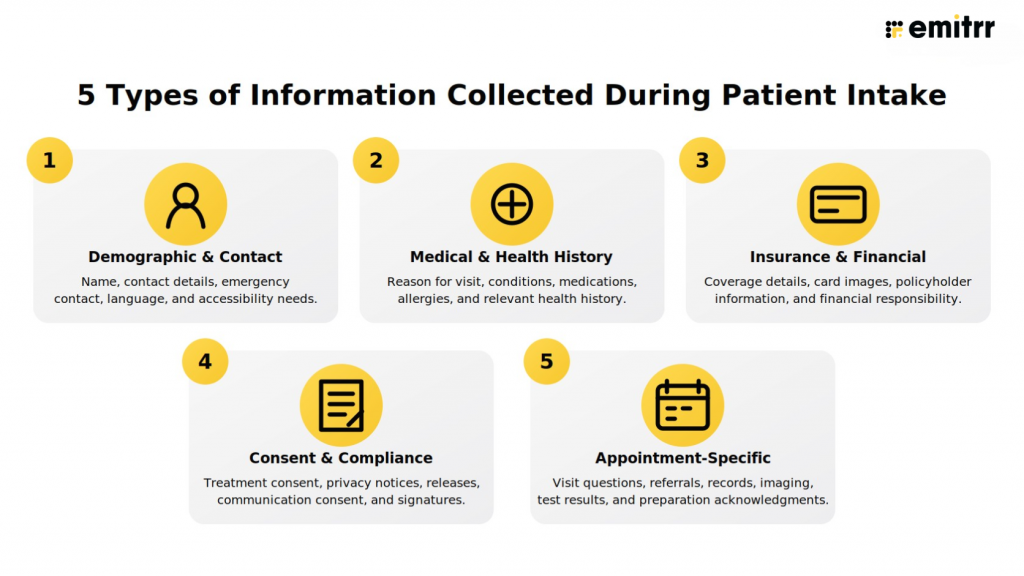
What Information is Collected During Patient Intake
Patient intake requirements vary by specialty, appointment type, patient status, service, procedure, provider, and location. Practices should collect only the information required to support care, administration, payment, and compliance.
Patient Demographic and Contact Information
Demographic information helps the practice identify the correct patient, create or update the record, and maintain reliable communication. This may include the patient’s legal and preferred name, date of birth, address, phone number, email address, preferred communication method, and emergency contact information.
Parent, guardian, or responsible-party details may be required where applicable. Preferred language and accessibility or accommodation needs also help the practice communicate appropriately and plan support before the visit.
Patient Medical and Health History
The medical portion of intake gives the clinical team relevant background before the encounter. Depending on the visit, a health history form or medical history questionnaire may request:
- The reason for the visit and presenting concerns
- Past medical history and current conditions
- Medication history and current medications
- Allergy information
- Surgical history
- Family medical history
- Social history where clinically relevant
- Previous treatment, test results, or medical records
The information requested should reflect the care being provided. Orthopedic intake forms may ask about pain, mobility, previous treatment, and imaging. Therapy intake forms may focus on symptoms, treatment history, daily functioning, and patient goals.
Insurance and Financial Information
Insurance and financial information helps the practice prepare for eligibility review, billing, and financial discussions. It may include primary and secondary insurance details, the carrier, member ID, group number, policyholder information, insurance card images, other insurance documentation, responsible-party details, and payment information where appropriate.
Insurance eligibility verification confirms whether coverage is active. Patient benefits verification may provide more detail about benefits, deductibles, copays, or authorization requirements. These are related administrative processes, but neither represents the complete patient intake process.
Consent and Compliance Information
Practices may need acknowledgments, authorizations, and signatures before providing or documenting certain services. Common examples include consent to treatment, acknowledgment of the Notice of Privacy Practices, release-of-information authorization, financial policy acknowledgment, communication consent, and procedure-specific consent.
Electronic patient intake forms may allow patients to review and sign these documents electronically. Because the forms may contain protected health information (PHI), practices need appropriate safeguards for collection, transmission, access, retention, and storage.
HIPAA note: A digital form or software product does not make a healthcare organization HIPAA compliant by itself. Compliance depends on the technology, configuration, safeguards, policies, vendor relationships, and how the organization uses the system.
Appointment-Specific Information
Appointment-specific intake ensures that the information requested matches the scheduled service. It may include a pre-visit questionnaire, condition-specific questions, referral documents, previous imaging, test results, medical records, or procedure preparation acknowledgments.
Every patient should not automatically receive the same packet. Dental intake forms, therapy intake forms, urgent care registration, and orthopedic intake forms serve different purposes. Forms may also vary by provider, department, location, or scheduled procedure.
Looking for ready-to-use patient texting SMS templates? Then here are the best ones, Download the templates now!
What are the Steps in the Patient Intake Process?
The exact patient intake workflow varies by organization, but most healthcare practices follow the same basic progression. Some patient intake steps may overlap or happen simultaneously when scheduling, communication, forms, and patient records are connected.
Patient intake process at a glance:
- Receive patient or referral information.
- Identify the patient and visit requirements.
- Schedule the appropriate appointment.
- Assign the required forms and documents.
- Collect the patient’s information.
- Review the submission.
- Create or update the patient record.
- Complete final check-in requirements.
1. Receive the Initial Patient or Referral Information
The process begins when the patient contacts the practice through phone, text, a website, online scheduling, or another approved channel. Information may also arrive from a referring provider through fax, a portal, an electronic health record (EHR), or another authorized method.
At this stage, the practice captures enough information to identify the patient and determine the next step. This commonly includes the patient’s name, contact details, reason for seeking care, and referral source.
2. Identify the Patient and Visit Requirements
Staff determine whether the individual is a new or returning patient and clarify the reason for the visit. They identify the correct specialty, service, provider, department, and location.
The practice should also establish whether the visit requires a referral, previous records, special preparation, insurance documentation, or a visit-specific questionnaire. Identifying these requirements early prevents overreliance on a generic intake packet.
3. Schedule the Appropriate Appointment
The patient’s needs are matched with the correct appointment type and availability. The practice confirms the provider, location, date, time, and visit format and communicates initial instructions.
The selected appointment type should determine which intake requirements the patient receives. A consultation, annual examination, procedure, and follow-up visit may require different forms within the same specialty.
4. Assign the Required Forms and Documents
The practice assigns the forms that apply to the visit. These may include new patient registration forms, a health history form, insurance documentation, consent forms, financial policies, and specialty- or procedure-specific questions.
Forms should be relevant to the scheduled service. Long packets containing unnecessary questions add friction and make it harder for patients and staff to recognize the most important requirements.
5. Collect the Patient’s Information
Patients complete the required forms on paper, online, or through an electronic patient intake system. They may also submit insurance cards, identification, referral documents, test results, or previous medical records.
Electronic forms may support digital uploads and electronic signatures. Practices should also provide appropriate help for patients facing language, accessibility, device, or technology-literacy barriers. PHI and other sensitive information must be handled through suitable channels.
6. Review the Submission
Staff check required fields, missing signatures, outstanding documents, and conflicting information. Clinical, administrative, or insurance questions may require follow-up or escalation to the appropriate team.
Submitted does not always mean complete. A form can be returned while still missing a signature, card image, required answer, referral, or clarification. Intake is complete only after the practice reviews the applicable requirements.
7. Create or Update the Patient Record
Staff create a record for a new patient or verify and update the existing record for a returning patient. Reviewed information is entered, transferred, or attached to the appropriate system.
Where integrations support it, structured information and completed documents may be added electronically. Where they do not, staff may still need to review and transfer information manually. The goal is to make accurate information available to the teams that need it without unnecessary duplicate data entry.
8. Complete Final Check-In Requirements
On the appointment day, staff confirm the patient’s arrival and ask whether relevant information has changed since the intake was submitted. They resolve remaining forms, signatures, documents, or payments and verify that applicable requirements are complete.
Once those final items are addressed, the patient can be marked ready for the clinical encounter.
Watch this video to see how HIPAA-compliant digital intake forms streamline workflows, save staff time, and keep patient data secure.
What is Pre-Visit Intake
Pre-visit intake is the completion and review of required patient information before the appointment date. It commonly begins after scheduling and may include registration forms, medical history, insurance documentation, consent forms, and appointment-specific questionnaires.
With online or digital patient intake, patients can complete these requirements on a phone, tablet, or computer. Staff can review submissions while there is still time to request missing information, clarify conflicting answers, or help patients who cannot complete the process independently.
Pre-visit intake vs. patient pre-registration
- Patient pre-registration primarily creates or verifies the administrative patient record.
- Pre-visit intake may also include medical history, consent, insurance documents, referrals, and visit-specific information.
Earlier completion can mean less waiting-room paperwork, earlier identification of missing documents, more time to address insurance or registration problems, better preparation for the provider, and a shorter check-in process. It also gives staff more time to support patients who need assistance.
Pre-visit intake does not eliminate final verification. Staff may still need to confirm changes and complete outstanding requirements when the patient arrives.
Types of Patient Intake: Paper, Online, Digital, Electronic, and Paperless
Healthcare organizations use several intake methods, ranging from printed packets to connected electronic workflows. These terms describe different ways of collecting and managing patient information, but they do not mean the same thing.
Important distinction: A form can be online without being mobile-friendly, digital without being integrated, and electronic without automatically updating the patient record.
Paper Patient Intake
Paper intake uses printed forms completed at home or in the waiting room. Staff review handwritten information and may manually enter it into an EHR, practice management system (PMS), or registration platform. Forms may then be stored physically or scanned into the patient record.
Paper can remain necessary for patients who need an alternative or staff-assisted option. However, handwritten responses can be difficult to read, required fields may be missed, and staff may spend additional time distributing, collecting, scanning, and transcribing forms. Thus, it is clear that manual patient intake creates a lot of problems.
Online Patient Intake
Online patient intake makes forms available through a website, portal, or shared link. These may be fillable PDFs or browser-based forms that patients complete before arriving.
Placing a printable form online does not automatically create an effective online intake experience. A form designed for paper may be difficult to read on a phone, lack clear navigation, or still require staff to transfer every answer manually.
Digital Patient Intake
Digital patient intake uses mobile-friendly forms that patients can complete on a phone, tablet, or computer. Depending on the system, digital patient intake forms may include electronic signatures, document uploads, required-field validation, submission tracking, and visibility into incomplete forms.
A well-designed digital experience makes it easier for patients to submit information and for staff to see whether the requirements have been completed. With patient intake automation, practices can take this further by automatically collecting forms, tracking completion status, and flagging missing information for follow-up.
Electronic Patient Intake
Electronic patient intake collects information in a structured electronic format. The workflow may connect with scheduling, patient registration, an EHR, or a PMS.
Where supported, submitted information can be transferred to or attached to the patient record. Integration depth differs among vendors and healthcare systems. Practices should verify which fields, documents, statuses, and updates can move between systems instead of assuming all electronic forms provide automatic write-back.
Paperless Patient Intake
Paperless patient intake is a practice-wide effort to reduce paper collection, handling, scanning, and physical storage. It commonly uses digital forms, electronic signatures, document uploads, and mobile patient registration.
Why Patient Intake Matters in Healthcare
Patient intake affects more than front-desk efficiency. The completeness and accuracy of intake information influence clinical preparation, administrative accuracy, financial readiness, patient experience, and operational consistency.
Clinical Readiness and Patient Safety
Medical history, medications, allergies, previous procedures, and the presenting concern provide important context for the clinical team. Collecting relevant information before the visit gives the provider an opportunity to review what is available and identify whether additional records or clarification may be needed.
Intake does not replace clinical assessment or verification. It supports preparation by making relevant patient-reported information available before the encounter.
Administrative Accuracy
Correct demographic and contact information helps practices maintain accurate patient records and communicate reliably after scheduling. A structured process can also help staff identify potential duplicate records or outdated information before the visit.
Without accurate contact details, patients may not receive forms, instructions, appointment updates, or follow-up communication.
Insurance and Financial Readiness
Collecting insurance documentation earlier gives staff more time to identify missing card images, inactive coverage, incorrect subscriber information, or other documentation problems.
Early collection does not guarantee coverage or payment. It gives the practice more time to complete applicable insurance eligibility or patient benefits verification processes and discuss unresolved requirements before the appointment.
Patient and Staff Experience
Patients may become frustrated when they provide the same information repeatedly or spend the beginning of an appointment completing paperwork. Staff face similar frustration when they must call several times for a missing signature, insurance card, or health history form. A well-organized intake workflow reduces unnecessary repetition, supports a shorter check-in process, and creates a more orderly new patient experience.
Watch this video to see how disconnected calls, voicemails, faxes, appointment requests, and other patient tasks create communication gridlocks for front-desk teams.
Operational Consistency
Standard requirements help practices create a more consistent process across providers, departments, and locations. Staff know what must be collected, who reviews it, and what happens when information remains incomplete.
Consistency is especially important for multi-location organizations, where separate teams may otherwise develop different methods for assigning forms and following up with patients.
Traditional vs. Digital Patient Intake
Here is the difference between traditional intake compared to digital patient intake:
| Area | Traditional patient intake | Digital patient intake |
| Form access | Paper packet, commonly provided at the practice | Mobile or web access before arrival |
| Completion timing | Often completed in the waiting room | Can be completed before the appointment |
| Data entry | Staff may re-enter handwritten information | Information is collected digitally |
| Legibility | Handwriting may be difficult to read | Typed and standardized responses |
| Missing fields | Commonly found during manual review | Required fields can reduce omissions |
| Document collection | Physical submission, copying, or scanning | Digital upload where supported |
| Signatures | Handwritten signatures | Electronic signatures |
| Status visibility | Staff manually check whether forms were returned | Pending and completed forms may be visible |
| Storage | Physical storage or scanned documents | Secure electronic storage |
| Patient effort | More work during check-in | Can be completed from the patient’s own device |
| Staff effort | Manual distribution, collection, review, and entry | Less handling when the workflow is connected |
| System connectivity | Typically manual | Varies by platform and integration |
Digital intake does not automatically correct confusing instructions, duplicate questions, poor form design, or undefined staff ownership. A long electronic form can be as difficult to complete as a paper packet.
Practices also need an accessible alternative for patients who require help. A hybrid model may combine digital pre-visit intake with phone support, staff-assisted completion, tablets, or paper forms when appropriate.
Common Patient Intake Challenges
Intake problems usually result from unclear requirements, poor timing, disconnected systems, difficult forms, or undefined responsibility. Each problem can affect the patient, staff workload, or appointment readiness.
Incomplete or Inaccurate Information
Patients may skip required fields, omit part of their medical history, forget signatures, or submit incomplete insurance documentation. Returning patients may leave outdated demographic or coverage information unchanged. If staff discover these issues during check-in, they have less time to resolve them without delaying the visit.
Long and Repetitive Forms
Patients are more likely to rush, abandon, or provide incomplete responses when forms request the same information repeatedly. Generic packets may also include questions that do not apply to the scheduled appointment.
Forms Reaching Patients Too Late
When intake begins in the waiting room, staff have little time to request a referral, locate a missing insurance card, or clarify a response. The appointment may start late even if the patient arrived on time.
Disconnected Intake and Patient Records
Forms may be collected through one system while the patient record remains in another. Staff may need to copy answers manually, download and upload documents, or notify another team that information has arrived. These extra steps increase administrative work and can leave submitted information outside the workflow where it is needed.
Limited Workflow Visibility
Staff may not be able to see which patients have completed intake, which forms remain outstanding, or who owns the next follow-up. Some teams compensate with spreadsheets, paper lists, or repeated chart checks.
Accessibility and Communication Barriers
Poor mobile design, language limitations, limited internet access, disabilities, and low technology confidence can prevent patients from completing intake. An effective process offers accessible forms, clear instructions, appropriate language support, and assisted or alternative methods where needed.
Patient Data Security Concerns
Intake may involve PHI, identification, insurance cards, medical history, and signed authorizations. Sending or storing this information through inappropriate channels can create privacy and security risks. Practices need suitable access controls, transmission and storage safeguards, staff procedures, and retention practices.
Learn where intake workflows commonly break down and what practices can change to prevent avoidable delays, billing issues, and extra administrative work.
What Makes a Patient Intake Process Effective
An effective patient intake process collects the right information with minimal patient effort while giving staff enough time, context, and visibility to prepare for the appointment.
Requirements Matched to the Visit
Requirements should reflect the specialty, service, procedure, provider, location, and patient status. A new surgical patient may need different records and consent forms from a returning primary care patient. Matching forms to the visit keeps the process relevant and makes important requirements easier to identify.
A Patient-Friendly Form Experience
Effective forms use clear language, logical sequencing, and minimal repetition. They should work well on mobile devices and explain why information or documents are required. Accessible and multilingual options may be necessary for the population being served.
Secure Information Collection
Sensitive information should be collected, transmitted, stored, and accessed through appropriate channels. Access controls, privacy notices, consent procedures, vendor agreements, security safeguards, and staff practices may all contribute to HIPAA-appropriate handling of PHI.
Defined Review and Follow-Up Ownership
A completed submission needs an owner. Practices should define who reviews demographic details, medical questions, insurance information, signatures, and supporting documents. The workflow should also identify who contacts the patient and where clinical or insurance questions are escalated.
Connection to Existing Patient Records
Information should be accessible to the appropriate team without unnecessary re-entry. Depending on the integration, forms may be stored as documents, mapped to record fields, or made available through a connected workflow. Practices should verify these capabilities rather than assuming every intake system provides the same connectivity.
Quick effectiveness check:
- Does each patient receive only the forms relevant to the visit?
- Can patients complete the forms easily from a mobile device?
- Can staff see what is complete, missing, or awaiting review?
- Is there a clear owner for unresolved requirements?
- Does information reach the appropriate patient record or team?
- Are assisted and alternative completion options available?
The Role of Technology in Patient Intake
Technology should support a clearly designed intake process. Its role is to make information easier to collect, review, protect, and connect with existing workflows without creating another disconnected system. With AI voice and SMS, you can automate the intake process.
Digital Forms and Document Collection
Technology can give patients mobile access to forms before the appointment. Depending on the platform, patients may be able to complete forms, add electronic signatures, upload insurance cards or identification, and submit referral documents or medical records through a secure workflow.
Intake Status and Staff Visibility
A shared view of intake status can show which patients have completed their requirements and which submissions are pending or incomplete. Staff can focus on patients who need follow-up instead of checking every record manually.
Status visibility can also support consistent intake management across departments and locations, particularly when teams share responsibility for registration, review, and check-in.
Patient Communication
Technology can deliver forms and instructions through channels patients already use. Each message should identify the practice, explain why the information is needed, and tell the patient how to get help.
Two-way communication matters because incomplete intake is not always caused by forgetfulness. A patient may not understand a question, know which document to upload, or be able to access the form. Giving patients a way to ask questions helps staff identify and resolve these barriers.
Practice-System Connectivity
Patient intake technology may connect with scheduling, registration, EHR, or PMS workflows. Connectivity can reduce disconnected records, minimize duplicate data entry, and make submitted documents available to the correct team.
How Emitrr Helps Patients Complete Intake Before Their Visit
Sending a form does not make a patient intake-ready. Patients may overlook the request, misunderstand what they need to provide, or submit a form without the required signature or document. Staff then have to call, resend links, check multiple systems, and resolve missing information during check-in.
Emitrr works as the communication and workflow layer between the scheduled appointment and the completed intake. It helps practices deliver the right requirements, answer patient questions, track completion, and move information into existing workflows where integrations support it.
Send the Right Intake Requirements Before the Visit
Once an appointment is scheduled, practices can send digital patient intake forms through text or email. Patients can complete forms, add electronic signatures, and submit insurance cards, identification, referrals, or other supporting documents from their own devices.
The intake request can be matched to the patient and appointment instead of sending the same packet to everyone. A new orthopedic patient, for example, may receive a health history form, insurance request, and imaging instructions, while a returning patient may only need to verify existing information and complete a visit-specific questionnaire.
Emitrr can also connect intake with online appointment scheduling, helping practices begin the appropriate pre-visit workflow after an appointment is booked.
Help Patients Resolve Questions That Prevent Completion
Intake often remains incomplete because a patient does not understand a question, cannot locate a requested document, or is unsure which form applies. With two-way texting, patients can ask the practice for help without starting another phone call or leaving a voicemail.
This communication gives staff an opportunity to resolve barriers before the patient arrives. It can also reduce repeated calls about form links, insurance cards, signatures, referrals, or appointment instructions.
When communication involves sensitive information, practices can use Emitrr’s HIPAA-compliant texting capabilities and secure workflows based on the type of information being exchanged.
Give Staff Visibility Into What Still Needs Attention
Emitrr helps teams distinguish between completed, pending, and incomplete intake requirements. Instead of manually checking every patient record, staff can focus their attention on the patients who still need help.
This visibility can support more consistent intake management across providers, departments, and locations. Practices can also use workflow automation to reduce repetitive delivery and follow-up tasks while keeping staff responsible for reviewing submissions and resolving exceptions.
Connect Intake With Existing Practice Systems
Emitrr can connect intake with scheduling, EHR, and practice management workflows through its healthcare integrations. Depending on the connected system, completed forms or collected information may be transferred, attached, or written back to the patient record.
Integration depth varies by EHR and PMS. Practices should confirm which fields, documents, statuses, and write-back actions are supported for their system. Emitrr does not replace the patient record or staff review. It helps practices coordinate the communication, collection, tracking, and follow-up required to get patients intake-ready before their visit.
Key Takeaways
- Patient intake is the complete process of collecting, reviewing, and preparing patient information for care.
- A patient intake form is one component of the broader intake workflow.
- Patient registration creates or verifies the administrative record, while check-in completes remaining day-of-visit requirements.
- Intake commonly includes demographic, medical, insurance, financial, consent, and appointment-specific information.
- New patients generally complete comprehensive intake, while returning patients verify and update existing information.
- Pre-visit intake helps practices resolve missing information before the patient arrives.
- Digital intake can reduce paper handling, duplicate entry, incomplete forms, and waiting-room delays.
- Effective intake requires relevant requirements, accessible forms, secure collection, and defined staff ownership.
- Technology can support collection, patient communication, status visibility, and practice-system connectivity.
- Emitrr helps practices communicate with patients and move required intake tasks toward completion before the visit.
FAQs
Patient intake is the process of collecting, reviewing, and preparing the administrative, medical, insurance, consent, and visit-specific information required for care.
It may include demographics, contact details, medical history, medications, allergies, insurance documents, consent forms, financial information, and appointment-specific questions.
The main steps are receiving patient information, identifying requirements, scheduling, assigning forms, collecting information, reviewing submissions, updating the record, and completing check-in.
Patient intake is the complete preparation workflow. Patient registration creates or verifies the patient’s administrative record.
Digital patient intake is the electronic collection of patient information through mobile or online forms, document uploads, and electronic signatures.
Pre-visit intake is the collection and review of required patient information before the patient arrives for the appointment.
Conclusion
Patient intake is the foundation for clinical, administrative, and financial readiness. When the process begins early and requirements are clear, practices have more time to resolve missing information, prepare patient records, and help patients arrive ready for care.
A strong patient intake workflow combines relevant forms, secure information collection, accessible completion options, staff review, and clear ownership. Technology works best when it connects patients, staff, scheduling, and patient records instead of creating another isolated task.
Emitrr helps practices deliver digital intake requirements, communicate with patients, track completion, and connect intake with existing workflows where supported. Book a demo with Emitrr to see how your practice can move more patients from scheduled to intake-ready before their visit.

 4.9 (400+
reviews)
4.9 (400+
reviews)