
 4.9 (400+
reviews)
4.9 (400+
reviews)
Introduction
You know that feeling when you send an important package and wait anxiously for the “Delivered” notification? Until that confirmation pops up, there’s a tiny voice in your head wondering: Did it get there? Did someone sign for it? Now imagine that, but instead of a package, it’s a patient file, a time-sensitive form, or a signed contract that never made it to the other side. Not great, right?
That’s exactly where fax confirmation pages step in. Think of them as the FedEx tracking number of the fax world, quietly doing their job behind the scenes, but absolutely essential when things get real. They don’t make a big fuss, but they do something super important: they tell you the fax didn’t just leave your outbox, it landed safely on the other side. In industries like healthcare, legal, insurance, and finance, fax confirmation pages are still trusted proof of delivery. No “Oops, it went to spam” or “Sorry, the attachment didn’t open.” Just clear, timestamped proof that you did your part.
What Is a Fax Confirmation Page?
A fax confirmation page is basically your fax’s way of saying, “Hey, your document made it!” It’s a quick report that shows up right after you send a fax, letting you know if it actually went through. Think of it like a delivery receipt, but for documents.
It tells you the important stuff:
- When the fax was sent
- Who it was sent to
- How many pages were included
- And whether it was delivered successfully (or if it failed, why)
If you’re using a traditional fax machine, it usually prints out a page. If you’re using a virtual fax service, you’ll probably get a digital confirmation, maybe a PDF or an email.
Now, why does this even matter? Because in the business world, that little confirmation can save you from a lot of stress. Let’s say you fax over a signed contract, a patient file, or some legal docs. If someone later says, “We didn’t get it,” you’ve got proof in your hands (or inbox) showing you did your part on time, to the right number, and with the right number of pages. It’s how businesses stay accountable, protected, and headache-free.
What Actually Shows Up on a Fax Confirmation Page
So what exactly do fax confirmation pages show? Every fax machine or service might format things a bit differently, but the core details are usually the same. Let’s find out.
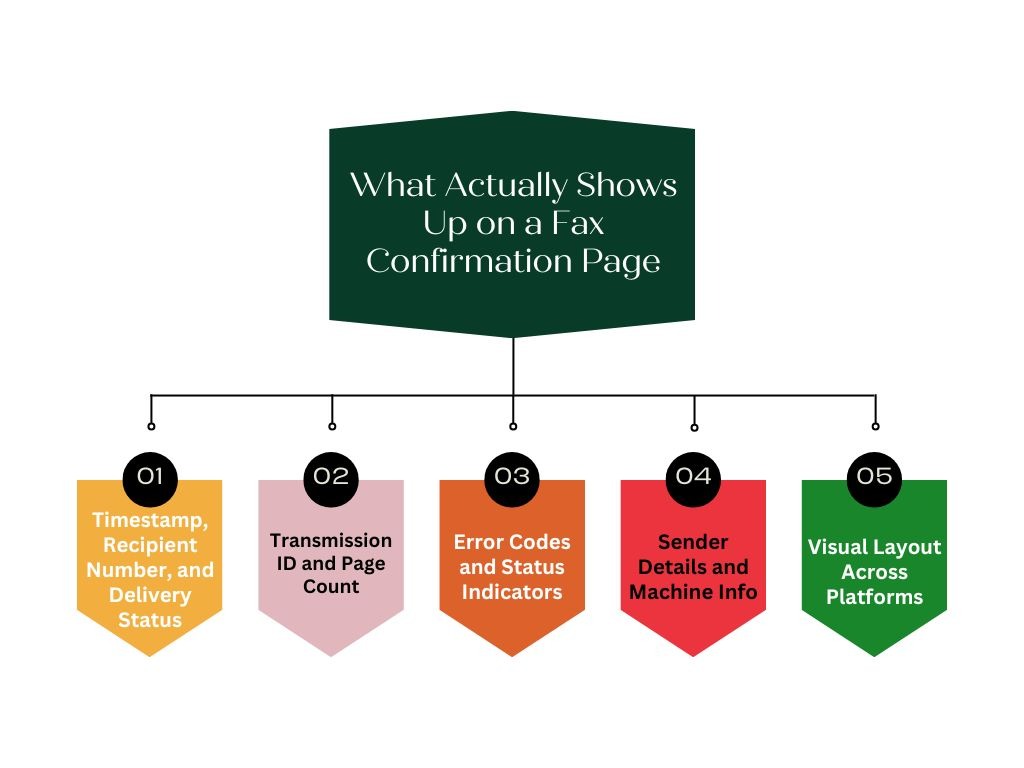
Timestamp, Recipient Number, and Delivery Status
First up, you’ll see when the fax was sent. This timestamp is usually front and center, showing the exact date and time the fax started. Right next to it, you’ll find the number it was sent to, so you can double-check it went to the right place. Then there’s the delivery status: the make-or-break detail that tells you if it was “Success,” “Failed,” or something in between. This is the part most people scan for first, because it gives you the all-clear or a heads-up to try again. It’s the quickest way to know whether your fax got through or hit a roadblock.
Transmission ID and Page Count
Every fax confirmation page usually lists how many pages were sent, so if you meant to send 6 but it says 5, you’ll know something went wrong. It’s an easy way to catch a missed page, a jam, or a glitch before it causes problems. You might also see something called a transmission ID or job number. This is just a unique code that identifies your specific fax, kind of like a tracking number. You probably won’t use it every day, but it’s super handy for support or audit if you need to look up that exact fax later. Especially in busy offices, this ID helps you pinpoint faxes quickly in a sea of activity.
Error Codes and Status Indicators
Error messages on a fax confirmation page are like little clues from your fax system, letting you know what went wrong. You might see something clear like “Line Busy” or “No Answer,” or a mysterious code like “Error 003.” Modern platforms usually explain it in plain language, but older ones? Not so much. Still, don’t brush these off. They’re your heads-up that something needs fixing, whether it’s a wrong number, a busy line, or a connection glitch.
Sender Details and Machine Info
Confirmation pages don’t just show where your fax went. They also show where it came from. That could be your company name, your fax number, or even your department, depending on how your system is set up. If you’re using an internet faxing service, you might also see the user who sent it or the email account linked to the transmission. This is super helpful in big teams, so you know who sent what. Some setups even label the device or location (like “Front Desk Printer”) so you know which machine handled it. It’s all about creating a clear trail of who did what and when, especially important in regulated industries or big workflows.
Visual Layout Across Platforms
Now here’s the fun part: confirmation pages don’t all look the same. Old-school fax machines usually print a simple black-and-white slip with just the basics, maybe even on that curly thermal paper. Newer devices might add branding or a little more style. Digital fax platforms like Emitrr or eFax often send a clean PDF or email report with all the info neatly organized. You might even see company logos or a mini preview of the first fax page, which helps make sure the right document got sent. Some services even include QR codes now, so you can scan and instantly check or verify fax details online.
Common Misconceptions About Fax Receipts
Fax confirmation pages seem really simple, but they can be misunderstood. A lot of people skip the fine print or assume “confirmation” always means “mission accomplished.” That’s how things fall through the cracks. Let’s clear up the common fax myths.
“Sent” Doesn’t Always Mean “Delivered”
This one gets people all the time. Just because you hit “Send” doesn’t mean your fax made it to the other side. The machine might’ve dialed out, but maybe the recipient’s line was busy, maybe the number was wrong, or maybe their fax machine ran out of paper. If any of that happens, the fax won’t get delivered, even if yours says “Sent.” That’s why the confirmation page is so important, it tells you if it actually went through. Bottom line: “sent” is just the start “delivered” is what counts.
Confirmation Page Doesn’t Guarantee Complete Transmission
The confirmation page says the fax went through, but that doesn’t always mean everything made it. You still need to check the page count to make sure all your pages were actually sent. If you sent 5 but the confirmation says 4, one probably got skipped. Also, a “successful” fax doesn’t mean the content was legible. If your scan was crooked or too light, the other side might have trouble reading it. So always double-check that what got sent is what you meant to send.
Confusing Email Alerts with Confirmations
In the digital fax world, notifications come in fast, but not all of them mean your job’s done. The first email you get usually just says, “We got your fax request.” That’s not the delivery confirmation! The real one comes after it’s delivered (or failed). People often stop at the first alert and assume everything’s fine, but that’s how missed faxes happen. Always wait for the second message, the one that actually tells you if the fax landed or not.
Skipping Error Code Review
Now, confirmation pages can look boring, and those little codes might seem like technical fluff. But ignore them, and you might miss that the fax failed. A line that says “NG #403” or “Error: Busy” means your fax didn’t go through, even if a confirmation page printed out. Always scan the status line and look for anything other than “Success” or “OK.” Those codes are the machine’s way of saying, “Hey, something went wrong, try again.” It only takes a few seconds, and it could save you hours later.
Overlooking Failed Faxes in Reports
In a busy office, it’s easy to send a bunch of faxes and assume they all worked, especially if you don’t stop to check. But if even one or two fail and no one notices, it could mess up a deal, delay a claim, or cause serious confusion. Some systems generate summary reports or logs, don’t just file those away without reading the status lines. Digital platforms usually show failures in red or flag them clearly. A quick look can catch failures before they turn into full-blown problems.

Who Uses Confirmation Pages and What They Track
Fax confirmation pages aren’t just for the sender – they’re a shared safety net. Different teams rely on them for timing, proof, and peace of mind. Whether it’s legal, healthcare, or admin, everyone’s looking for that final “yes, it went through.”
Office admins keeping tasks on track
Admins are often the fax MVPs in any office. They’re the ones sending out forms, tracking tasks, and using confirmation pages to check things off their to-do lists. If they’re asked to send a document, they’ll want that confirmation in hand before saying, “Done.” It’s also part of their filing system, especially in places like clinics or legal offices, where the confirmation gets attached to the original document for record-keeping. It’s not just about peace of mind, it’s about showing anyone who asks, “Yes, that fax went out, here’s the proof.” For admins, confirmation pages are part receipt, part checklist, and part insurance policy.
Legal and compliance teams watching the clock
For legal and compliance folks, timing is everything, and a fax confirmation page is their timestamped proof that something was sent when it was supposed to be. If a document needs to be delivered by a certain deadline, this page shows whether it happened (or didn’t). Lawyers often attach confirmation pages to client files, and in many cases, they’re considered acceptable legal proof in disputes. Compliance officers also lean on these to track if communication timelines were followed, especially in sectors like finance and healthcare. It’s not just about “did we send it?” but “did we send it in time?” These pages help avoid costly mistakes or penalties down the road.
IT teams monitoring system health
You might not think your IT team cares about fax, but they absolutely do, especially when things go wrong. If error messages start piling up or faxes take longer than usual to send, confirmation pages help them spot the problem early. They’ll use the data to check for network issues, misconfigured settings, or even clock sync problems that mess up timestamps. In digital fax systems, IT also tracks whether confirmations are reaching users correctly – via email, dashboards, or APIs. And when your company is scaling, IT might use confirmation volume to decide if more lines or upgraded plans are needed. Basically, these pages help IT keep the wheels turning smoothly.
Healthcare staff building paper trails
In healthcare, fax still plays a central role, and confirmation pages are a key part of the process. When a clinic sends a referral, test result, or prescription by fax, the confirmation page serves as proof that the document was sent on time and to the correct destination. If a specialist later says the referral never arrived, staff can easily pull the confirmation from the patient’s file to clarify. It’s also essential for compliance: hospitals and clinics must demonstrate they followed privacy regulations and met response timelines. Some electronic health record systems even allow teams to attach fax confirmations directly to the patient’s digital case file.
Customer service making sure delivery happens
Whether it’s insurance, banking, or utilities, customer service teams often fax documents on behalf of clients, and they need to know it actually got there. Confirmation pages are their go-to for tracking delivery and following up fast if something goes wrong. If a customer calls back saying, “I didn’t get the form,” reps can pull up the confirmation to see if it went through, when, and to what number. It’s also how they stay in line with internal deadlines or service-level agreements. In some teams, logging or attaching the confirmation is required before closing a case. It’s all about follow-through and making sure nothing slips through the cracks.
For educational institutions, students, and volunteer organizations, here are templates for academic and application purposes:
How Traditional and Digital Confirmations Differ
Used a fax machine and a digital fax service? You’ll know that confirmations look and work pretty differently. Here’s how they compare.
| Aspect | Traditional Fax Confirmations | Digital Fax Confirmations |
| Format | Printed on paper, often auto-generated by the machine | Sent via email or shown in app/dashboard, usually as a PDF |
| Access | Only available at the fax machine | Accessible from anywhere, instantly on any device |
| Storage | Filed physically in folders or binders | Automatically saved, searchable, and backed up in the cloud |
| Security | Depends on physical access and paper handling | Protected by digital encryption and user-level access |
| Audit-Readiness | Manual filing and retrieval, prone to loss or damage | Easy exports, searchable logs, and built-in retention settings |
| Sharing | Requires scanning or copying | Share instantly via email or integrated apps |
| Reliability | Can suffer from poor print quality or toner issues | Clear, consistent, and professionally formatted |
Real Impact of Confirmation Pages on Business Operations
From keeping business operations smooth, accountable, and efficient to proving compliance in legal settings, these little pages pack a surprising punch. Let’s look at the real ways they drive value across an organisation.
Improved Workflows and Efficiency
Fax confirmation pages eliminate the guesswork. The moment you see “Fax Sent Successfully,” you can confidently move to the next task without chasing anyone for updates. It streamlines workflows by removing delays, especially for time-sensitive documents. If the fax failed, you know right away and can resend or troubleshoot, keeping things moving. That instant feedback helps businesses act faster and plan follow-ups the same day. It’s a small step that saves a lot of time.
Error Reduction
Mistakes happen – wrong numbers, jammed machines, poor connections. But confirmation pages are like built-in checkpoints that catch errors early. Seeing an error message like “Busy Line” or “Number Not Recognised” lets you fix the issue before it spirals. Without it, you might assume the fax went through and only realise days later. That small window to catch and correct problems helps maintain accuracy and trust in your processes. It’s proactive problem-solving baked right in.
Accountability and Audit Trail
Confirmation pages provide a clear record of what was sent, when, and by whom. This is crucial in organisations where tasks are delegated, and timelines matter. Instead of relying on memory or verbal updates, there’s a paper or digital audit trail to show who took action. If someone questions whether a document was sent, you can point to the timestamp and delivery result. It shifts the conversation from blame to clarity, keeping teams accountable and on track.
Building Trust with Clients and Partners
Having a confirmation page to back up your communication shows professionalism and care. Clients and partners feel reassured knowing you can prove that something was sent and delivered. For example, being able to say “We sent it yesterday at 3:12 PM and here’s the confirmation” builds confidence in your reliability. It also helps your team follow up with certainty, instead of saying “We think we faxed it.” That transparency strengthens relationships and avoids awkward miscommunications.
Speeding Up Decision-Making and Follow-Ups
In many workflows, the confirmation acts as the green light for the next step. Whether it’s placing an order, following up with a supplier, or booking an appointment, it all starts once the fax is confirmed. This cuts down on lag time between actions and keeps the business rhythm steady. Instead of waiting days or second-guessing, teams can act with certainty. It brings a rhythm and flow to operations that keep everything on schedule.
Risk Mitigation
When it comes to legal, compliance, or financial issues, having proof of delivery is non-negotiable. Fax confirmations provide that proof, they’re like receipts for information. If there’s ever a dispute or a compliance audit, the confirmation can be used to show you met deadlines or made the right attempts. It helps protect businesses from penalties, misunderstandings, or liability claims. In many industries, that little page could be the difference between safety and risk.
Peace of Mind (Which Leads to Focus)
There’s a psychological benefit too. Confirmation pages give closure. When you see that “Success” message, it clears mental space so you can move on. Without that confirmation, you’re left wondering if you need to check, follow up, or resend. That mental load adds up and can distract from other tasks. By eliminating that doubt, confirmation pages help people stay focused, calm, and productive. And across a whole team, that peace of mind can translate to better overall performance.
How Confirmation Page Formats Have Evolved
Fax confirmation pages have come a long way since the days of curly thermal rolls. As faxing moved from clunky machines to sleek digital platforms, confirmation formats followed suit — becoming clearer, smarter, and more integrated into modern business tools. Here’s how they’ve transformed over the years.
Thermal Paper Rolls (The Early Days)
In the early fax era, confirmation pages were printed on heat-sensitive thermal rolls – thin, shiny paper that faded over time. These pages were a simple printout with date, time, number of pages, and result. You couldn’t store them long-term without photocopying, and they were easily damaged. Still, they got the job done.
Plain Paper and Better Printouts
With the arrival of laser printing and more advanced fax machines in the ‘90s and 2000s, confirmation pages began appearing on plain paper. They were easier to read and file, and manufacturers started adding structured formats, reference numbers, or branded headers. The experience was still mostly black-and-white, but much more professional-looking.
Inclusion of Faxed Content Preview
Some business-grade fax machines introduced the option to print a tiny preview of the first page of the fax on the confirmation. This helped match confirmations to specific documents, especially in offices where multiple faxes were flying around. It added visual context to the usual delivery data and became a useful feature for high-volume environments.
Branded Headers and Custom Info
Companies began customising their fax headers, and those details made their way into confirmation pages too. It became common to see company names, department labels, or even contact info at the top. Higher-end systems even allowed logos or digital letterhead, giving fax coversheets and confirmation pages a more official, branded look.
Email/PDF Confirmations
As online faxing took off, confirmation pages went digital. Email confirmations (often with PDF attachments) became the norm, especially with cloud fax providers. These versions looked cleaner, sometimes featured colour or logos, and included more metadata, down to seconds, time zones, or transmission IDs. Some even added QR codes or barcodes to verify authenticity or allow quick access in online portals.
Real-Time Dashboards
Confirmation “pages” became optional in modern fax apps. Instead of waiting for a page to print, users now see status updates like “Sending” or “Delivered” right in their fax dashboard. You can still generate a confirmation report if needed, but many users rely on real-time updates on-screen. Confirmation is now an experience, not just a printout.
Enhanced Information
Today’s confirmations can include much more than just status. Some show duration, speed (baud rate), fax mode (e.g. fine or standard), and recipient status in broadcast scenarios. These extras help with diagnostics and give teams more insight into what happened during the transmission.
Multi-language and Localisation
Global adoption meant localisation became important. Fax confirmations can now appear in your preferred language, from French to Japanese, with region-appropriate formatting. It’s a small but helpful shift for international teams and compliance purposes.
Security Features
Security-conscious businesses pushed for new confirmation elements: digital signatures, tamper-proof QR codes, and unique IDs that prove a fax came from a verified source. These measures add authenticity and help prevent forgery, especially in legal, medical, or financial contexts.
Evolution to Notifications
In many cases, the confirmation page is now just a notification, a push alert on your phone or a line in a mobile app. If you’re faxing something casual, that’s enough. You might never open the PDF unless you need formal proof. The concept has evolved from document to dynamic message.
Integration with Other Tools
Modern fax platforms often push confirmation data directly into CRMs, project trackers, or document management systems. You might see “Fax sent to Client X” logged automatically, with status and timestamp included. It eliminates the need to handle a separate document, confirmations are just part of the workflow now.
Why Some Industries Still Rely on Physical Confirmations
Even with all the progress in digital faxing, some industries just can’t let go of that printed confirmation slip. Here’s why paper still rules in certain corners of the business world.
Legal Industry
Lawyers live and breathe paper trails. In many legal processes, a printed fax confirmation holds the same weight as a certified mail receipt. Firms often file these confirmations right behind the sent document in a physical case folder. It’s a habit, but also a safety net. Courts or regulators may expect hard copy proof, and a stamped confirmation page just feels more official in a courtroom than a digital screenshot. Plus, legal professionals still rely on physical annotations like “RECEIVED” stamps, it’s baked into how they operate.
Healthcare and Insurance
Fax is still king in healthcare. While records are digital internally, when information is exchanged with outside parties, it’s often faxed. The printed confirmation then gets stapled into the patient’s file or scanned into their chart. Why? Because it’s simple, secure, and meets HIPAA compliance needs. Many smaller clinics don’t have high-tech integrations, so the routine remains: fax, wait, print confirmation, file. It’s trusted, tangible, and easy to show auditors during compliance checks.
Government and Public Sector
Government offices often run on legacy systems and layers of policy. Many still require fax communications backed by printed confirmation pages, sometimes by law. Paper offers them a tamper-evident trail, and for departments that handle sensitive data, there’s comfort in knowing the proof is physically stored. Also, bureaucratic timelines can delay tech upgrades, so they stick with what’s familiar. A city office faxing vendor notices, for instance, will file each printed confirmation as part of their official purchasing records.
Finance and Banking
Financial services operate under heavy compliance. Faxed confirmations can be a vital part of that paper audit trail. For example, a broker might fax a trade confirmation and file the printed report as legal proof that it was sent. Regulators often expect paper documentation, and for high-stakes deals, a physical confirmation page offers a sense of finality and credibility that digital still struggles to replace in more conservative institutions.
International and Cross-Border Deals
When working with a global partner, especially in regions where fax is still the norm, businesses often keep physical confirmations for alignment. If your international counterpart expects a fax with a printed receipt, that’s what you send. It’s about shared expectations and maintaining smooth, mutually acceptable workflows.
Cultural and Legal Trust in Paper
Some industries simply view paper as more “real.” Email? Easy to ignore. A printed confirmation? That’s proof. In some legal contexts, fax confirmations are still explicitly recognised in contracts and regulations. So if the law says “fax with confirmation,” companies aren’t taking chances with anything else, even if digital is arguably more secure. The comfort of holding that piece of paper still carries weight in boardrooms, courtrooms, and client offices alike.
What to Expect from a Modern Fax Confirmation System
Switching from an old-school fax setup to a digital one? Or just looking to upgrade? Here’s what a modern fax confirmation system typically brings to the table, all designed to make life easier, faster, and more reliable when it comes to tracking faxes.
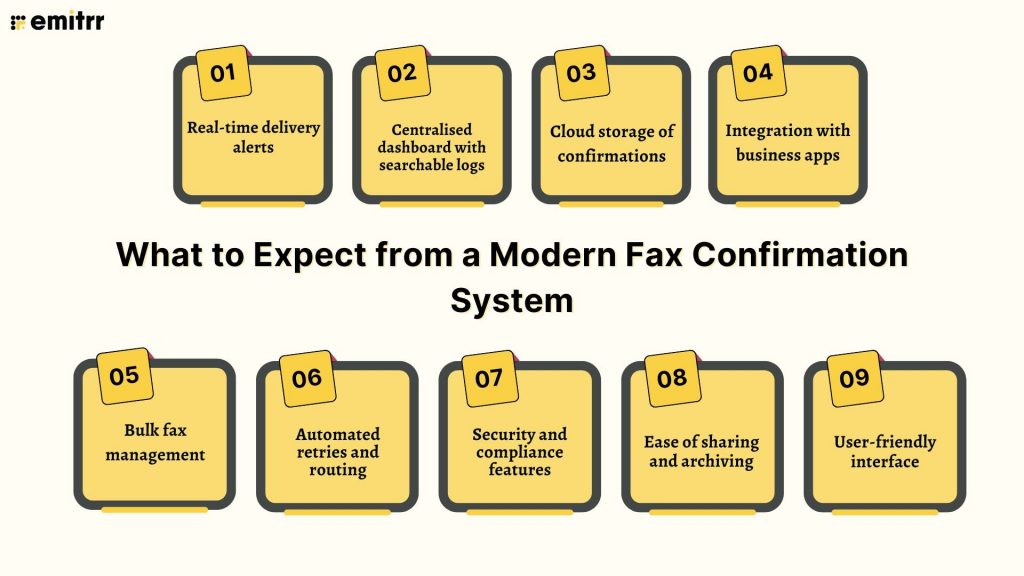
Real-time delivery alerts
No more hovering near a machine or refreshing a screen. With modern faxing, you get instant updates. As soon as your fax is sent (or if it fails), you’ll receive an alert – via email, app notification, or even in your CRM. It’s instant clarity. You’ll know the moment something succeeds or needs your attention, so you can act fast instead of guessing.
Centralised dashboard with searchable logs
Everything in one place. A modern dashboard gives you a full overview of all your fax activity, incoming and outgoing, with filters, search, timestamps, status updates, and more. Need to find a fax from last Tuesday to a specific client? Just search their name. No paper piles, no guesswork. Some systems even allow exportable logs or downloadable reports.
Cloud storage of confirmations
Forget filing cabinets. Every confirmation is stored securely in the cloud communication system. Whether it’s a line in your fax history or a downloadable PDF, it’s there when you need it, even years later. You can access it from anywhere, whether you’re at your desk, on a different device, or halfway across the world.
Integration with business apps
Modern fax doesn’t live in a silo. Many systems plug right into your email, CRM, or helpdesk, so confirmations show up where you already work. That might mean a fax confirmation auto-logging to a client record in Salesforce, or a notification dropping into a Slack channel. It’s seamless, and it saves time by skipping the copy-paste routine.
Bulk fax management
Sending to 5 or 500 recipients? A modern system can handle it. You can track success/failure rates in batches, schedule large sends after hours, and receive a grouped status report. One dashboard, one job ID, one summary, it’s all optimised for scale without the chaos of manual faxing.
Automated retries and routing
If a line’s busy or a number doesn’t connect, modern systems will retry automatically. You’ll be alerted if it ultimately fails, but you don’t need to babysit the process. Outgoing faxes can also be rerouted through backup lines if needed, and incoming faxes can be auto-forwarded to the right department or person based on number or rules.
Security and compliance features
Today’s fax systems are built with security in mind. Think encryption, audit logs, access controls, and compliance tools for things like HIPAA or GDPR. Confirmations may include digital signatures or detailed timestamps for audit-readiness. For sensitive industries, this means peace of mind and legal protection.
Ease of sharing and archiving
Need to forward a confirmation to a client or colleague? Just click. Everything is digital and easily shareable. Many platforms also integrate with services like Google Drive or Dropbox, so confirmations can auto-archive in your preferred cloud storage. It’s all automatic and easy to back up.
User-friendly interface
Modern interfaces are built for humans, not IT specialists. No cryptic error codes, just clear language (“Success” or “Failed due to busy line”). Some systems let you customise how much detail shows in notifications or logs, and most are accessible from a browser or mobile apps. You can manage faxes and confirmations without needing a user manual.
How Emitrr Enhances Fax Confirmation Reliability
Emitrr takes everything fax confirmations are meant to do and makes it faster, smarter, and easier to manage. Here’s how it delivers next-level reliability without the old-school fuss:
Instant Delivery Tracking and Real-Time Alerts
As soon as you send a fax through Emitrr, the system starts tracking and keeps you in the loop every step of the way. You’ll get real-time alerts the moment it’s delivered (or if something goes wrong), so there’s no second-guessing or waiting around. And if it hits a busy line? Emitrr automatically retries, so you don’t have to lift a finger.
Centralised, Searchable Fax Logs
Every fax you send or receive is logged in a central dashboard that’s easy to search and filter. Whether you’re looking for a fax by client name, number, or date, it’s all there in just a few clicks – no lost printouts, no time wasted.
Seamless Integration with Business Tools
Emitrr works hand-in-hand with your existing tools like CRMs, EHRs, and project management platforms. So when a fax is sent or received, the confirmation details can flow straight into your daily workflow, automatically logged, tracked, and available where your team already works.
Smart Routing of Confirmations
Whether you want different teams handling specific fax numbers or need confirmations to go to certain people only, Emitrr’s routing rules make it easy. You can direct faxes and their confirmation updates based on sender, recipient, or type, ensuring the right people see the right info at the right time.
No Hardware or Third-Party Services Required
You don’t need to install, plug in, or maintain anything. Emitrr runs entirely in the cloud, so you can ditch the bulky machines and outdated service providers. Just assign a fax number (new or ported), and you’re good to go, from any device, anywhere.
All-in-One Communications View
Calls, texts, and faxes all live in one shared inbox on Emitrr, which means fax confirmations aren’t floating in a silo. You can track the full conversation with a client, including messages and fax history, all in one place for total clarity.
Easy Setup and Instant Use
Setting up faxing in Emitrr is as simple as clicking a few buttons. From the dashboard, you can assign a number, add contacts, upload documents, and send – no training, no tech hurdles, no waiting for IT.
High-Volume Faxing Made Simple
If you regularly send bulk faxes, Emitrr has your back. You can send to multiple recipients in a single go, track delivery success across the batch, and even schedule jobs to go out during off-hours, all with built-in reporting to keep things clear.
Cloud Storage for Confirmations
Confirmation records are securely stored in the cloud, so you can view, download, or share them whenever you need, whether it’s tomorrow or a year from now. Everything is backed up, searchable, and accessible from wherever you work.
Designed for Regulated Industries
Emitrr is HIPAA-compliant and built with the strictest security standards in mind. From encrypted transmissions to detailed access logs, the platform ensures fax confirmations are secure, traceable, and audit-ready, ideal for healthcare, legal, and finance teams.
User-Friendly Interface
Forget confusing error codes and clunky menus. Emitrr’s interface is clean, readable, and easy to navigate, whether you’re viewing a confirmation on your desktop or checking fax history from your phone. It just makes sense.
Smart Sharing and Archiving
Need to pass a confirmation along to a colleague or client? Emitrr makes it easy. Download and forward in seconds, archive to your connected cloud storage, or tag and assign faxes internally so nothing slips through the cracks.
Frequently Asked Questions
It usually shows the date, time, recipient number, number of pages, and whether the fax was delivered or failed. Think of it as your digital receipt – simple, but essential. Some systems even add a thumbnail or ID for extra clarity.
Emitrr won’t leave you guessing, it alerts you right away if a fax fails and tells you why. Better yet, it retries automatically, logging every attempt so you’re never out of the loop.
Absolutely. A successful fax confirmation often holds up in court or audits as proof of delivery. It shows you did your part, what happens next is on the recipient.
No confirmation usually means no delivery. Check your dashboard or machine settings, and don’t assume it went through. When in doubt, resend or follow up to be safe.
Yes! Emitrr lets you add your business name, sender ID, and branding where it counts. Confirmation PDFs can reflect your identity, keeping everything polished and professional.
Conclusion
Fax confirmation pages are still a powerhouse in modern workflows. These little slips of assurance do more than confirm delivery. They prevent errors, reduce back-and-forth, and give teams that “we’re good to go” moment. Whether it’s legal, healthcare, or day-to-day admin, a reliable confirmation can save the day.
The confirmation page isn’t just a formality. It’s your first line of defence against lost documents and miscommunication. Use it well, and you’ll stay ahead of the chaos! Ready to bring that reliability into your workflow? Book a demo with Emitrr and see how smart, seamless faxing can work for you!