
 4.9 (400+
reviews)
4.9 (400+
reviews)
Introduction
Digital transformation has reshaped the way modern businesses communicate — and faxing is no exception. Today, organisations are shifting away from physical fax machines and relying on digital faxing platforms for security, compliance, convenience, and speed. Among the most searched cloud fax solutions, FaxBB and iFax stand out as popular choices.
Both platforms allow users to send and receive digital faxes, but they differ significantly in capability, compliance levels, scalability, pricing, integrations, and intended user base.
This guide provides a complete comparison of FaxBB vs iFax — covering features, pricing, pros, cons, support, reviews, and ideal use cases. Toward the end, you’ll also learn why Emitrr is increasingly becoming the preferred alternative for businesses seeking automation, HIPAA compliance, and unified communication capabilities.
What is EtherFax?
EtherFax is a secure cloud-based faxing platform designed for organisations that require advanced document exchange and compliance. It operates using Fax-over-IP (FoIP) technology, enabling high-volume faxing without traditional phone lines or hardware. EtherFax also integrates with existing fax servers, multifunction devices, and enterprise communication systems, offering a seamless transition from legacy faxing infrastructure.
Its architecture ensures encrypted, reliable, and scalable fax transmission with minimal technical maintenance. Due to its robust compliance capabilities, EtherFax is widely utilised in the healthcare, legal, government, and financial sectors, where HIPAA compliance, audit tracking, and secure file delivery are crucial.
What is iFax?
iFax is a user-friendly online fax service built for individuals, small businesses, and distributed teams that need flexible and fast digital faxing. Designed with a mobile-first approach, iFax enables users to send, receive, sign, and manage faxes through the web, Android, and iOS applications without the need for fax machines or phone lines. Its intuitive interface supports custom cover pages, e-signatures, templates, and cloud integrations, making it accessible for both personal and professional workflows.
iFax is especially suited for small to medium businesses, freelancers, and remote teams seeking an affordable, modern faxing solution with convenient setup and accessibility.
Key Differences Between FaxBB and iFax
While both FaxBB and iFax offer online faxing, their capabilities differ significantly. FaxBB focuses on simplicity and affordability, while iFax delivers compliance, integrations, automation, and enterprise-grade features for regulated and high-volume faxing needs.
| Comparison Criteria | FaxBB | iFax |
| Deployment | Web-based only | Web, iOS, Android, Desktop |
| Compliance | Basic encryption | HIPAA, GDPR, SOC2, PHI-ready |
| Integrations | Limited | Google Drive, Dropbox, Slack, Salesforce & more |
| Support | Email-based | 24/7 live support |
| Pricing | Lower cost | Scalable tiered pricing |
| Feature Set | Basic | Advanced automation and enterprise tools |
Key Similarities Between FaxBB and iFax
FaxBB and iFax share several essential features that make online faxing convenient and efficient, offering secure, paperless communication with flexible device access and support for modern business workflows.
Paperless Faxing From Any Device
Both FaxBB and iFax eliminate the need for traditional fax machines and physical documents. Users can send and receive faxes digitally from desktops, laptops, tablets, or smartphones, making the workflow faster, accessible, and environmentally friendly.
Email-To-Fax and Fax-To-Email Support
Both platforms allow users to send faxes directly through email and receive them as digital attachments. This simplifies communication, reduces manual steps, and ensures faxing fits seamlessly into existing business email workflows.
Secure Encrypted Transmission
FaxBB and iFax both offer secure document transfer with encryption to protect sensitive data. While security levels differ, both solutions prioritise privacy and safeguard information during fax transmission and storage.
Multi-User Access Options
Both services support multiple users under one account, depending on the chosen plan. This makes collaboration easier for teams, especially in environments where several staff members need access to shared fax communication channels.
FaxBB vs iFax: Compared
Choosing between FaxBB and iFax depends on usability, compliance, features, and scalability. While both offer online faxing, iFax is geared toward regulated industries and enterprise workflows, whereas FaxBB suits smaller teams looking for a basic, budget-friendly digital faxing solution.
FaxBB Features
- Web-Based Fax Sending and Receiving: FaxBB works completely through a browser, making it simple for users who don’t want extra software. It’s ideal for basic fax needs but lacks advanced automation or device-specific apps, unlike iFax, which offers full mobile and desktop compatibility.
- Email-To-Fax Integration: FaxBB enables faxing directly from email, reducing manual steps. While convenient, its workflow flexibility is limited compared to iFax, which offers smarter routing, tracking, and automated workflows across multiple email clients and business software tools.
- Document Storage and Tracking: FaxBB includes simple document storage and basic tracking for sent faxes. It serves small teams well but doesn’t include advanced audit logs or compliance-level recordkeeping like iFax, which offers secure, encrypted storage and detailed delivery tracking.
- Multi-User Account Support: FaxBB allows multiple accounts within a plan, but team management features are minimal. In contrast, iFax provides role-based access, user permissions, and branding options, making it more suitable for teams requiring oversight and structured collaboration.
iFax Features
- Mobile and Desktop Apps for All Platforms: iFax offers apps for iOS, Android, Mac, and Windows, ensuring flexibility and on-the-go access. Unlike FaxBB’s web-only access, iFax supports businesses needing mobile faxing and seamless workflow continuity across devices.
- Encrypted, HIPAA-Compliant Faxing: iFax is built for regulated industries with encrypted transmission and full compliance support. This makes it ideal for healthcare, legal, and enterprise use — a significant advantage over FaxBB, which lacks HIPAA and advanced security certifications.
- Cloud Storage Integrations (Google Drive, Dropbox): iFax integrates with major cloud platforms, enabling automated syncing, secure backups, and seamless file transfers. FaxBB’s integration options are much more limited, making iFax better suited for teams using cloud-based document management tools.
- Custom Cover Pages and E-Signature Support: iFax allows branding customisation and built-in e-signatures, improving professional HIPAA-compliant communication and speeding approval workflows. FaxBB does not support advanced customisation or e-signing, making iFax a more complete solution for digitally processed documents.
Plans & Pricing
Pay-per-page and volume-based pricing options:
- Standard Rate: Starts at $0.01 per page for individual faxing.
- Bulk Fax Broadcast Pricing: Costs decrease with higher volumes — for example:
- 1,000 pages at 2.5¢ each ($25 USD)
- 5,000 pages at 2.0¢ each ($100 USD)
- 50,000 pages at 1.3¢ each ($650 USD)
- 100,000 pages at 1.0¢ each ($1,000 USD)
- 300,000+ pages at 0.8¢ each (pricing varies by country and volume)
iFax Pricing
- Basic Plan: ~$12.49/month when billed annually; includes ~200 pages per month.
- Plus Plan: ~$24.99/month when billed annually; includes ~500 pages and both incoming + outgoing faxing.
- Pro / Enterprise Plans: Start around ~$33/month (or custom quote) for ~1000+ pages/month, including advanced features such as API access, HIPAA compliance audits, brand customisation, and live customer support.
Integrations
FaxBB Integrations: FaxBB offers basic integrations with email platforms like Gmail and Outlook. Its cloud backup support is limited, making it suitable for simple workflows rather than automated or advanced business systems.
iFax Integrations: iFax integrates with major platforms, including Google Workspace, Microsoft 365, Salesforce, Dropbox, Box, and Slack, enabling advanced automation, seamless workflows, and compatibility with enterprise-level document and communication systems.
FaxBB Pros
- Affordable: FaxBB offers budget-friendly pricing, especially for low-volume users, making it suitable for individuals, small businesses, or anyone needing occasional faxing without committing to expensive subscriptions.
- Simple setup: FaxBB is easy to onboard with no software installation required. Users can start faxing quickly through a web browser, making it accessible for non-technical users and facilitating fast adoption.
- Lightweight for low-volume faxing: Designed for basic sending and receiving, FaxBB works best for occasional or small-scale fax needs without complex workflows, compliance requirements, or heavy document automation.
FaxBB Cons
- No HIPAA-like compliance: FaxBB lacks advanced security certifications such as HIPAA, making it unsuitable for healthcare, legal, financial, or enterprise environments handling sensitive or regulated data.
- No automation: FaxBB does not offer workflow automation, e-signing, routing rules, or advanced processing, limiting scalability for growing teams or businesses requiring modern fax efficiency.
- Limited integrations: FaxBB works with email platforms but lacks deep integrations with productivity suites, CRMs, or cloud storage tools, reducing compatibility with modern business systems.
- Minimal enterprise support: FaxBB doesn’t provide dedicated support, onboarding, or enterprise-grade features, making it less suitable for organisations needing advanced reliability, service agreements, or technical assistance.
iFax Pros
- HIPAA & GDPR compliant: iFax meets major compliance requirements, including HIPAA and GDPR, making it secure for industries handling sensitive documents such as healthcare, law, insurance, and finance.
- Ideal for regulated industries: With encryption, audit trails, access controls, and data protection, iFax supports strict workflows required by hospitals, law firms, and enterprises needing compliance-ready faxing.
- Advanced automation & collaboration: iFax includes automation tools, e-signatures, cover page branding, routing, and multi-user access, helping teams streamline communication and work collaboratively with minimal manual effort.
- Broad device support: iFax works seamlessly across web, desktop, Android, and iOS apps, ensuring users can send, receive, and manage faxes from any device or environment.
iFax Cons
- Higher pricing: Compared to simpler fax tools, iFax is costlier due to enterprise-grade security, features, and compliance—making it less attractive for low-volume or occasional users.
- Some advanced features behind premium plans: Automation, API access, branding, and compliance features require higher-tier plans, meaning smaller users may need to upgrade to unlock full platform capability.
Reviews & Ratings
FaxBB Ratings: FaxBB currently has no verified reviews available on platforms like G2, making it difficult to assess real user experience, reliability, support quality, and overall satisfaction compared to more established solutions.
iFax Ratings: iFax maintains an impressive 4.7/5 rating on G2, reflecting strong user satisfaction, reliable performance, helpful support, and enterprise-grade features that appeal to regulated industries and high-volume business users.
When to Use FaxBB
FaxBB works best for users or small teams who need a simple, low-cost faxing tool without advanced compliance or automation requirements. It’s suitable for basic workflows where affordability and ease of use matter most.
Minimal Faxing Needs
If your fax volume is low and usage is occasional rather than daily, FaxBB provides a lightweight patient experience without unnecessary features or complexity, making it ideal for basic, infrequent communication needs.
Budget Is the Priority
FaxBB is a cost-effective option for small teams, freelancers, or startups looking to save money. Its lower pricing structure ensures you only pay for essential faxing features without premium overhead.
No Need for Compliance or Automation
If your workflow doesn’t require HIPAA, automation, or regulated data handling, FaxBB offers enough functionality for everyday communication without compliance overhead or advanced technical integrations.
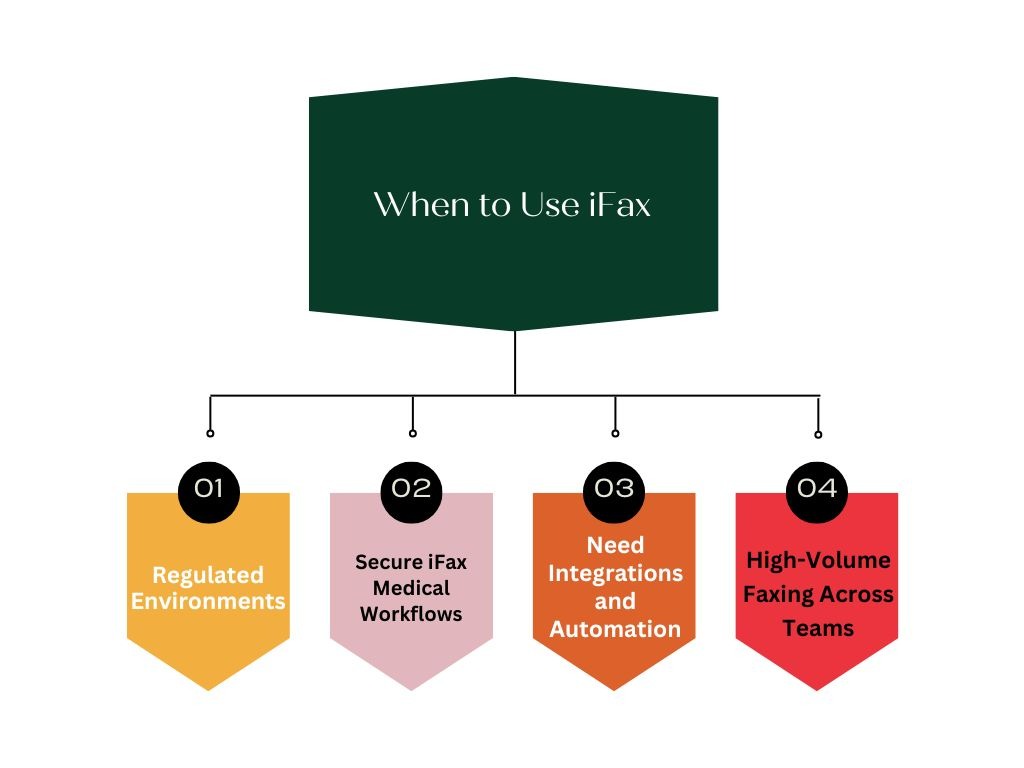
When to Use iFax
iFax is a strong fit for businesses requiring secure, scalable, and compliant faxing workflows. It supports automation, HIPAA compliance, and enterprise-grade features, making it ideal for regulated industries and high-volume usage.
Regulated Environments
iFax is suitable for healthcare, financial, and legal sectors where compliance matters. Its HIPAA, GDPR, and SOC2 features protect sensitive data and ensure lawful handling of medical, legal, or financial records.
Secure iFax Medical Workflows
Healthcare providers benefit from encrypted communication, e-signatures, audit trails, and PHI-ready technology. iFax simplifies digital patient communication while maintaining compliance and operational efficiency across clinical and administrative workflows.
Need Integrations and Automation
Organisations using cloud services, CRMs, or workflow automation tools gain value from iFax’s deep integrations. This supports scalable, automated faxing processes across departments and reduces manual handling.
High-Volume Faxing Across Teams
iFax supports multiple users, shared dashboards, and enterprise tools. It’s built for teams faxing daily and managing large document flows efficiently with tracking, reporting, and centralised control.
Want to learn all the essentials of HIPAA and why it matters? This insightful video explains everything you need to know. Watch now:
Emitrr: A Better Alternative to FaxBB & iFax
Emitrr Overview
Emitrr is an all-in-one communication and fax automation platform built for modern businesses that need secure, scalable faxing. With HIPAA compliance, cloud-based access, and multi-channel communication capabilities, Emitrr enables organisations to manage faxing, SMS, reminders, and automation workflows seamlessly—making communication faster, secure, and more efficient.
Emitrr Features
- Cloud Faxing, SMS & Automation: Emitrr brings faxing, texting, reminders, and automation into one unified dashboard, reducing manual work and improving workflow efficiency across teams without switching between multiple tools or systems.
- HIPAA/GDPR Compliance: Emitrr ensures secure handling of sensitive data with encryption, access controls, audit logs, and compliance safeguards, making it suitable for healthcare practices, legal teams, finance, and regulated industries.
- Real-Time Tracking & Delivery Notifications: Users get immediate visibility into fax delivery status, failures, and confirmations. This minimises delays, reduces uncertainty, and helps teams respond faster with accurate record-keeping.
- Customizable Workflows & Templates: Emitrr allows businesses to build automated communication journeys and reusable templates, reducing repetitive tasks and improving consistency across customer communication and operational processes.
Emitrr Pricing
- Standard Plan — Starting at ~$20/user/month: Best for small to mid-sized businesses needing secure faxing and communication. Includes HIPAA-compliant faxing, SMS, call automation, basic integrations, real-time tracking, and core workflow features designed to replace manual fax processes.
- Professional Plan — Starting at ~$35/user/month: Ideal for enterprises or multi-location teams with high fax volume. Offers advanced automation, customizable workflows, deep CRM/EHR integrations, priority support, enhanced reporting, and scalable compliance controls suitable for regulated industries like healthcare, finance, and legal.
Emitrr Pros
- Unified Communication Platform: Emitrr consolidates faxing, texting, calling, and automation into a single interface, eliminating fragmented tools and helping teams manage communication faster, more efficiently, and with fewer errors.
- HIPAA Compliance: Emitrr ensures secure data handling through encryption, access controls, and audit trails, making it a reliable choice for healthcare, legal, and finance organisations that require strict compliance and data protection.
- Strong Automation Capabilities: With automated reminders, follow-ups, workflows, and routing, Emitrr reduces manual effort, boosts efficiency, and ensures documents and communication reach the right place at the right time.
- 24/7 Live Support: Emitrr provides responsive, real-time assistance with onboarding, troubleshooting, and optimisation—ensuring users never experience workflow interruptions or technical bottlenecks when dealing with critical communication tasks.
- Built for Scalability Across Industries: Whether managing a single location or multiple offices, Emitrr scales effortlessly. Its features support high-volume faxing, team collaboration, and expansion across different industries without system limitations.
Emitrr Cons
- Some advanced automation features require initial onboarding
Emitrr Integrations
Emitrr integrates seamlessly with Salesforce, Google Workspace, HIPAA-Compliant VoIP systems, EHR platforms, and CRMs, creating a unified hub for fax automation, patient communications, and customer engagement across all business channels.
Emitrr Ratings
Take a look at what more you can do with Emitrr AI:
Frequently Asked Questions
Yes—FaxBB works well for small businesses, prioritising affordability and simplicity. However, if security, HIPAA compliance, or integrations matter, iFax becomes the stronger option for long-term scalability and regulated workflows.
Yes—iFax is HIPAA-compliant and supports secure transmission of protected health information (PHI), making it suitable for healthcare organisations, medical billing teams, clinics, and any provider handling sensitive patient data.
Yes—Emitrr goes beyond digital faxing by offering automation, SMS, calling, reminders, and workflow orchestration, making it a more advanced, unified communication platform for modern and fast-growing businesses.
Absolutely—Emitrr is built as a multi-channel platform, allowing businesses to manage fax, text messaging, reminders, and communication workflows in one place for increased efficiency and customer engagement.
Emitrr provides enterprise-grade security with end-to-end encryption, HIPAA/GDPR adherence, audit trails, and role-based access controls—ensuring complete protection of sensitive business and patient information.
Conclusion
FaxBB and iFax are strong online faxing solutions, but they serve different needs. FaxBB works well for small teams that want simple, affordable faxing without extra complexity. iFax is better suited for regulated industries such as healthcare, legal, and insurance, where compliance, security, integrations, and workflow automation matter.
But if you need something beyond faxing—like SMS, calling, automation, reminders, and multi-channel patient or customer engagement—Emitrr offers a more scalable and future-ready approach. It helps teams save time, reduce manual work, and improve communication efficiency across platforms.Ready to see it in action? Schedule a free demo call.