
 4.9 (400+
reviews)
4.9 (400+
reviews)
Introduction
Texting software for healthcare helps providers send secure SMS messages for appointment reminders, follow-ups, billing alerts, and patient communication. Because these messages often involve protected health information (PHI), practices must use HIPAA-compliant texting software with encryption and a signed BAA.
In this guide, we compare the best healthcare texting software in 2026 based on security, automation, integrations, pricing, and overall value, so you can choose the right solution for your practice.
AI Summary
- Texting software for healthcare enables providers to communicate with patients via SMS for reminders, follow-ups, billing, and operational updates.
- Healthcare texting software must protect patient data and comply with HIPAA when PHI is involved.
- HIPAA-compliant texting software includes end-to-end encryption, access controls, audit logs, auto log-off, and a signed BAA.
- Secure text messaging for healthcare is required when sharing lab results, clinical updates, prescriptions, or medical images.
- The best healthcare SMS software integrates with EHR, PMS, and scheduling systems to reduce manual work.
- In this guide, we compare the top healthcare texting platforms based on security, automation, integrations, pricing, and overall value.
If you want a quick side-by-side look at how these tools compare on AI features, updates, and best use cases, start here.
| Software | Texting Features | AI Features | Integrations | Best For |
|---|---|---|---|---|
| Emitrr ⭐ Best texting software for healthcare | Two-way SMS, appointment reminders, missed-call text back, mass texting | AI auto-replies, AI call answering, smart routing | EHR/EMR, PMS, VoIP, CRM | Clinics wanting AI-powered patient communication |
| Falkon SMS | Two-way texting, bulk SMS, reminders | Basic automation | Practice management systems | Small–mid medical offices |
| Avochato | Two-way SMS, broadcast messaging, call + text | AI chatbots, workflow automation | HubSpot, Salesforce, Zapier | Multi-location healthcare teams |
| Textline | Business texting, team inbox, MMS | Automation rules, AI tagging | CRM, Slack, Zapier | Support-focused teams |
| MessageDesk | Landline texting, two-way SMS | Limited AI | CRM, Zapier | Clinics wanting to text-enable existing landline |
| SimpleTexting | Mass texting, campaigns, MMS | Drip campaigns, automation | Zapier, Mailchimp, HubSpot | Marketing-heavy practices |
| Artera | Patient messaging, reminders, intake forms | AI-powered patient engagement workflows | Major EHRs | Enterprise health systems |
| Spok | Secure clinical messaging, alerts | Workflow automation | Hospital systems, nurse call systems | Hospitals & clinical communication |
| Dialogue Health | Patient texting, engagement campaigns | Automation workflows | Healthcare systems | Patient engagement programs |
| Klara | Two-way patient messaging, forms, scheduling | AI automation, smart routing | EHR integrations | Specialty clinics |
| OhMD | Secure texting, broadcast messaging | Automation tools | EHR integrations | HIPAA-compliant small practices |
What is Texting Software for Healthcare
Texting in healthcare can be used to communicate with staff members, patients, doctors, etc. This could include sharing updates and information about schedules, appointment reminders, patient outreach, marketing campaigns, etc. However, note that a healthcare communication app should be used only to exchange operational information and not clinical information that might put sensitive patient information (PHI) at risk, as per HIPAA guidelines. HIPAA rules clearly state that no confidential patient details should be put at risk, and violation of the same could result in hefty legal penalties.
Why You Need a HIPAA-Compliant Texting Software
If you also want to do not just operational but also clinical communication via SMS and exchange information like lab results, blood test results, share images and files containing X-rays and other scans, prescription details, etc., then you should look for HIPAA-compliant texting software instead.
Take a look at this interesting video to learn more about why you NEED a HIPAA-compliant texting software:
To make patient communication even easier, get healthcare SMS templates that are ready to use, consistent, and designed specifically for healthcare messaging needs:
Healthcare Texting App vs HIPAA-Compliant Texting App: Communication Use Cases
Take a look at how standard healthcare texting software compares to HIPAA-compliant texting software in terms of use cases.
| Feature | General Healthcare Texting | HIPAA-Compliant Texting |
| Appointment Reminders | ✅ Yes | ✅ Yes |
| Broadcast Messages (e.g., closures) | ✅ Yes | ✅ Yes |
| Two-Way Clinical Messaging (PHI) | ❌ Not Safe | ✅ Fully Supported |
| Care Team Collaboration | ❌ Basic | ✅ Secure & Structured |
| Lab Results / Treatment Updates via Text | ❌ Risky | ✅ Encrypted & Legal |
| Internal Messaging (Staff & Admins) | ✅ Yes | ✅ Yes (with protections) |
| Voice & SMS Sync to EHR | ❌ Rare | ✅ Often Integrated |
Features To Look For In Healthcare Communications Platform
- Two-way texting: An important feature in healthcare texting software is the ability for two-way messaging. This allows your customers to respond, facilitating seamless conversations.
- Group texting: Send an SMS to a patient and their family in a group via the group texting feature.
- Scheduling: Consider healthcare communication platforms that offers scheduling for sending SMS at a later time, which can be a useful feature for planning communications.
- Templates: Look for this feature to design new templates or modify existing ones for sending SMS to patients.
- Website chatbot: This feature helps engage your website visitors and collect their information, which can be used to send SMS to them or to help them make appointments with your doctors directly.
- Integrations: Look for healthcare sms software that can seamlessly connect with your existing EHR or PMS systems to maintain a smooth operational workflow.
- Auto responses: Auto-responders automatically send health care text messages to patients, making them ideal for addressing frequently asked questions.
- Missed-call-to-text: Missed-call-to-text feature ensures automated SMS is sent to any calls that go missed.
- Unified inbox: Opt for a solution that offers a unified inbox, enabling you to access and respond to discussions across various platforms such as Social media, Google Business profile, Facebook page, or web chat from a single interface.
- MMS messaging: Look for this MMS messaging in the healthcare communication platforms to be able to send images, documents, and other files to your patients.
- Analytics dashboard: This feature allows you to monitor the effectiveness of your campaigns through various performance metrics, such as the total number of SMS sent, opened, replied to, and converted, enabling you to optimize your campaigns as needed.
- Multi-location management: This feature allows you to manage the conversations across different locations right from a single dashboard.
- Digital intake forms: Using this feature, you can send patient intake form link to the patients scheduled for the day and get important information beforehand.
- Broadcast messages: Allows you to broadcast healthcare text messages to multiple people at once and helps in announcing any changes in appointment schedule, availability, etc.
- AI text enhancement: Enhance and improve your SMS to make it more empathetic and polished with AI text enhancement features.
- Webchat: This feature allows you to engage with visitors on your website and collect their information, increasing the chances of converting them into patients.
Must-have security features when looking for communication tools in healthcare:
- End-to-end encryption: This feature ensures that your conversations are end-to-end encrypted which makes it safe from external threats.
- User control access: Healthcare text messaging should offer you user access control so that you can manage who can access and view conversations at all levels.
- HIPAA compliance: Make sure your healthcare texting software complies with HIPAA regulations and offer all security features that can help you protect sensitive patient information.
- Secure texting: Secure text messaging when turned on enables private conversation with your patients, ensuring their PHI remains safe.
- Audit Control: This is another key feature to look for when selecting the right messaging software for your practice. Having audit controls can help you keep track of how patient information is sent and stored, and it can alert you if any unauthorized access is caught. Regular texting is not secure on its own, so having these controls is necessary when communicating with patients.
- Access Management: Your healthcare communications software should let you assign roles to different users and should give you control over how much information they can access. The system should also keep track of user activity so you can review it if there are any data leaks.
- Auto log off: The feature automatically logs you off if there’s no activity detected after a certain amount of time. This feature helps in preventing data theft if the app is left idle. For this, the app checks for activity like typing, mouse movements, or clicks. If it doesn’t detect any activity for a while, it will log off automatically.
- No open source: By nature, open-source apps can’t meet HIPAA standards, but if you still want to use an open-source platform, then make sure it follows all the necessary protocols to be HIPAA compliant. If it doesn’t meet the compliance you need, then you must look for a non-open-source patient messaging service.
- TCPA compliance: Along with following HIPAA guidelines, the SMS service you choose should also help with TCPA SMS compliance. This means the app should allow you to get clear written permission from your patients before you start sending them marketing messages and give them the choice to opt out of texts.
- Message lifespan: Look for a healthcare communications software that enables you to send messages which automatically delete from both your device and the recipient’s device after a specified time. Because the messages are removed after a certain period, you can have peace of mind regarding unauthorized access, even if a device is lost or stolen..
- Interoperability: Interoperability is a crucial feature for facilitating easier data sharing. It enables different systems to communicate and exchange information, leading to improved data quality, less manual effort, enhanced productivity, cost savings, and real-time access to medical records.
Integrations to Look for in a Healthcare Communication App
Depending on your use case, you may want to look for different kinds of EHR, PMS, CRM, calendar integrations:
- Epic
- Athenahealth
- DrChrono
- eClinicalWorks
- Cerner
- NextGen
- Practice Fusion
- Kareo
- TheraNest
- AdvancedMD
- ChiroTouch
- Salesforce
- Klaviyo
- HubSpot
- PatientPop
- Solutionreach
- 123FormBuilder
- Typeform (with HIPAA plan)
- Formstack
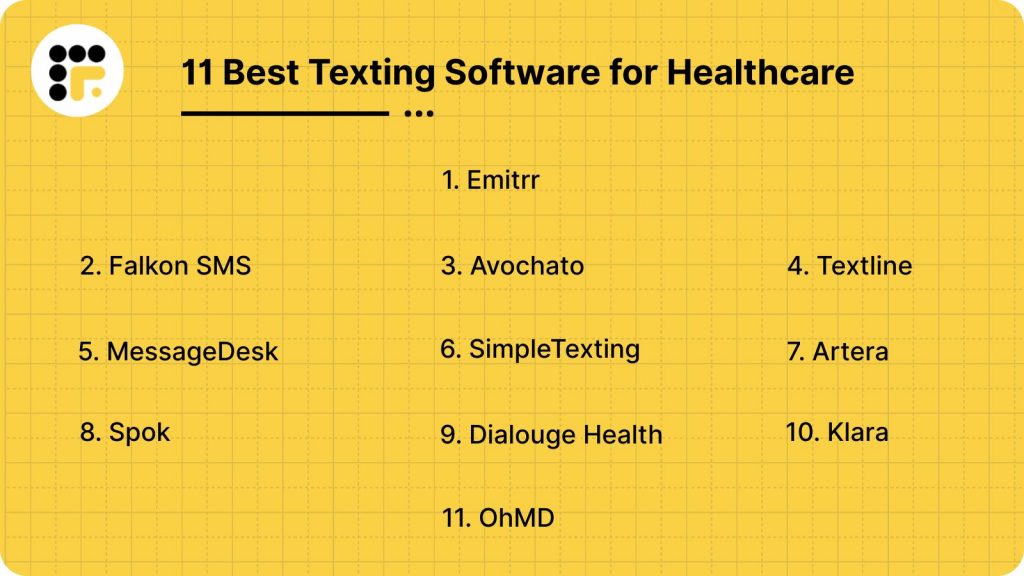
11 Best Healthcare Communication Solutions
Here’s a list of 11 best Healthcare Communication Solutions:
- Emitrr
- Falkon SMS
- Avochato
- Textline
- MessageDesk
- SimpleTexting
- Artera
- Spok
- Dialogue Health
- Klara
- OhMD
1. Emitrr: Best healthcare communication platform

Emitrr Overview
Emitrr is a HIPAA-compliant messaging software and can be used to exchange both clinical and operational information. A few security features offered by Emitrr include end-to-end encryption, user control access, remote wiping, and more. We highly recommend choosing this software as it not only complies with HIPAA but is one of the most robust and affordable software solutions for secure patient texting.
Here are more details on Emitrr:
Emitrr Features
- 2-way texting: Enable your customers to respond via text, enhancing their engagement with your business with two-way texting option.
- Group texting: Dispatch SMS messages to groups and receive replies within the same text thread with group texting.
- MMS texting: Attach multimedia files, such as videos and images, to your SMS messages.
- Recurring texts: Plan and schedule automatic SMS for various campaigns like promotions and reminders.
- Contact management: Organize, tag, and oversee all your contacts and interactions.
- Mass/bulk texting: Send health care text messages to a large number of recipients and receive individual replies in your inbox with mass texting.
- Drip campaigns: Deliver a sequence of personalized messages to your contact list.
- Integrations: Connect with third-party applications and streamline your workflow through automation.
- Web chat to text: Convert web-based conversations into your inbox with web-chat to text feature.
- Unified inbox: Handle and respond to all conversations across different platforms, including the web, Facebook, and phone, in one centralized location.
- Personalization: Tailor your SMS by including details such as the recipient’s first and last name for a personal touch.
- Automation: Create automated responses for your customers or schedule health care text messages for future delivery.
- Chat-based SMS survey: Distribute review links and survey links to collect customer feedback.
- Reports: Monitor metrics such as customer service volume, resolution times, message delivery rates, and receive detailed reports on these aspects.
- Segmented list: Organize your customers into classifications to keep conversations distinct.
- Export chats: Safely transfer conversation data between different platforms.
- Landline texting: Enable SMS functionality on your existing landline number to send texts with landline texting.
- Auto-replies: Automate responses for frequently asked questions.
- Opt-outs: Ensure TCPA compliance by allowing customers to opt out of your messages.
- Custom fields & templates: Design new templates or modify existing ones for sending SMS to customers.
- Link shorteners: Share tracking or review links in a more presentable format.
- Bilingual messaging: Communicate with customers in multiple languages.
- Conversation tagging & folders: Tag conversations by category, response, or nature for easier identification.
- Reputation management: Enhance your online reputation across review platforms like Google, Yelp, and Facebook with tools for feedback tracking, survey automation, link sharing, and more.
- VoIP: Access calling features such as call recordings, IVR, extension editing, calling analytics, call disposition, call transfer, voicemail transcription, and more.
- Emitrr AI: Use Emitrr AI to generate text, enhance your messages and to automate conversations with your patients. Here’s a quick video showing what Emitrr AI can do:
Pros of Emitrr
- High rated customer support: Emitrr provides outstanding customer service and boasts an impressive 5/5 star rating on Capterra for this reason.
- Affordable cost: Emitrr gives you a personalized price quote based on your texting volume, ensuring you pay only for what you need and receive the best value for your investment.
- Comprehensive features: Emitrr is more than just SMS software; it includes texting features, VoIP capabilities, reputation management, and scheduling, effectively addressing various aspects of your business.
- Complete pricing transparency, no hidden fees: Emitrr ensures full transparency regarding pricing when you schedule a call with them, avoiding any unexpected charges later on.
Cons of Emitrr
More AI integration features are being built currently.
Emitrr Pricing
Emitrr offers a very affordable and flexible text-based pricing model starting at just $45 a month for 500 SMS credits. To get a custom pricing quote, you can book a free demo call with Emitrr.
Emitrr Integrations
Emitrr seamlessly integrates with more than 1000+ apps and third-party tools across different industries such as healthcare, dental, real estate, recruiting, etc. with tools like:
- MailChimp
- AthenaHealth
- eClinicalWorks
- Zapier
- HubSpot
- Denticon
- HouseCall Pro
- And more!
Emitrr Reviews & Ratings
Emitrr has a solid 5/5 customer service rating on Capterra and here’s what customers are saying about it:
“They have built a powerful, easy to use web interface. The onboarding of our staff and contacts was excellent 3 Any issues we have had were addressed immediately and professionally by Emitrr staff.”
“I LOVE Emitrr. The support you get is wonderful, the app is easy to use and they have been incredibly responsive. As a small business, we needed a messaging platform that wouldn’t break the bank and this meets all our needs (and then some) without making us feel overwhelmed.”
Source: Capterra
Emitrr Support Channels
- Live chat: Chat with Emitrr’s live representatives
- Phone: Call Emitrr at +1 (210) 941-4696
- Email: Send email to Emitrr’s support team at support@emitrr.com
- Knowledge base
- FAQs/forum
- SMS

2. Falkon SMS: Best for user-friendly interface

Falkon SMS Overview
Falkon SMS is a cloud-based texting platform designed to enhance communication through secure text messaging for healthcare. The software caters to all kinds of industries, including the healthcare industry. The platform offers features like automated replies, message scheduling, group texting, and MMS support, aiming to streamline patient interactions. However, when it comes to ensuring HIPAA compliance, it does not offer a lot of security features except two-factor authentication.
Falkon SMS Features
- Two-way texting: Allows you to engage in real-time conversations with customers.
- Automated replies: Set up auto-responses for common inquiries.
- Group broadcasts: Send healthcare text messages to multiple recipients simultaneously.
- Message scheduling: Plan and schedule messages for optimal delivery times.
- MMS & emoji support: Enhance messages with multimedia content.
- MS teams extension: Integrate with Microsoft Teams for seamless communication.
- Shared inbox: Collaborate with team members on customer interactions.
- Advanced reporting: Analyze message delivery and engagement metrics.
- 2-factor authentication: Enhance account security.
Pros of Falkon SMS
- User-friendly interface: This software has intuitive design which makes it suitable for users of all technical levels.
- Competitive pricing: Comes with transparent pricing with no hidden fees.
- Reliable delivery: Ensures timely and consistent message delivery to patients.
- Responsive support: Prompt and helpful customer service.
- Secure communication: Offers encryption and compliance with industry standards.
Cons of Falkon SMS
- Limited integrations: Lacks native integrations with some CRM and EHR and PMS tools.
- Lack of advanced features: This software does not offer A/B testing and other advanced personalization options.
- International coverage: Falkon serves the U.S. market, which may not be ideal if you have locations globally.
Falkon SMS Pricing
Falkon SMS offers four pricing plans:
- Lite: $14.99/month per number
- Basic: $39.99/month per number
- Premium: $99.99/month per number
- Enterprise: Custom pricing
Falkon SMS Integrations
Falkon SMS offers limited integration with:
- Microsoft Teams
- Zapier
- And other CRM platforms
Falkon SMS Reviews & Ratings
Falkon SMS has a rating of 5/5 stars out of six reviews on G2, and here’s what users are saying about it:
“One aspect that could be improved in Falkon SMS is its lack of advanced customization options. While it offers a decent range of themes to choose from, some users might find themselves craving more control over the visual elements of the interface.”
“It is a very useful platform but where it lacks a bit is that its analytics report. Sometime I feel that the report should be a bit more exhaustive and give out more details.”
Source: G2
Falkon SMS Support Channels
- Live support
- Help center
3. Avochato: Best for multi-channel messaging

Avochato Overview
Avochato is essentially a business texting platform; however, it also caters to the healthcare industry. The software advertises HIPAA compliance on its website but does not offer many secure texting features and thus should only be used for operational communication. The software comes with live chat and many SMS features that help in improving internal and external communication. Avochato is also known for offering regular updates on features along with great customer service. However, the high price tag and slowness of the app are Avochato’s biggest pain points.
Avochato Features
- Keywords: Send automatic replies to frequently asked patient queries based on different keyword triggers and save precious business time.
- Templates: Use templates to draft messages for questions that are asked frequently and save a lot of time.
- Broadcasts: Send patient messages to multiple subscribers at once and allow them to respond to you privately.
- Mobile app: Use the Avochato mobile app for Android and iOS users to access and reply to messages from anywhere.
- Auto assignment: Assign conversations to your team based on pre-defined rules.
- Shared inboxes: Use shared inboxes to manage messages coming in from different platforms, such as websites, WhatsApp, live chat, right from a single shared inbox.
Pros of Avochato
- Great customer support: Avochato’s support team is very efficient and professional. And users appreciate the quick responses they get from their support team.
- Updates regularly: Avochato keeps upgrading and bringing in new features, and users love that.
- Smooth-functioning app: The Avochato app is quite intuitive and functions very smoothly.
Cons of Avochato
- Laggy software: Avochato users complain about frequent software crashes and lags, hampering productivity.
- High pricing: Avochato’s standard plan costs $250 per user per month, making it an expensive healthcare messaging app.
- Lacks the option to attach files: This software does not support many basic features like attaching images, files, etc., in messages. This may be a big issue with professionals that require sending reports, images to patients.
- Offers limited integration: Avochato facilitates most of its integrations through Zapier, so it’s a bit of a question mark whether this software will integrate with your existing EHR/PMS system or not.
Avochato Pricing
Avochato offers a 14-day free trial and three pricing plans:
- Lite: $23 per month/per user
- Standard: $42 per month/per user + $210/month platform fee
- Premium: Custom
Avochato Integrations
Avochato facilitates most of its integrations through Zapier; so here are a few integrations options that you can find with Avochato:
- Slack
- Salesforce
- Microsoft Teams
- Zapier
Avochato Reviews & Ratings
Avochato has been rated 4.4/5 on g2 and 4.7/5 on Capterra. See what Avochato customers are saying:
“Software is a bit laggy and glitchy, requiring multiple refreshes. Also iPhone app lacks a lot of essential features.
“When using a smartphone app it doesn’t let you see your contact’s tags and it can be annoying. It doesn’t integrate with CRMs.”
Source: Capterra
Avochato Support Channels
- Chat
- 24/7 Live Support
- Phone
4. Textline: Best for team collaboration

Textline Overview
Textline is a popular messaging tool that caters to all kinds of industries, including the healthcare industry. This software comes with many texting features, such as SMS templates, two-way texting, group texting, etc., that may help in operational communication. However, the biggest drawback of this texting platform is that it has high pricing, lacks automation, and lacks advanced security features.
Textline Features
- Group texting: Create groups and send SMS to multiple people at once.
- Text surveys: Create surveys from scratch or use pre-built patient satisfaction surveys to get actionable improvement insights from your customers.
- Two-way SMS and MMS: Use this feature to do one-on-one conversations with your patients.
- SMS templates: Use pre-built templates or create new ones when drafting SMS and save time that may go to waste in manually typing messages.
- Landline texting: Text-enable your existing healthcare landline number and use it to send SMS.
- Scheduled messages: Schedule mass texts or single SMS to go out at a future time and date.
Pros of Textline
- Ease of use: Textline’s interface has a simplistic and modern design and requires no technical expertise.
- Reliable customer service: Textline has a 5-star customer service rating on Capterra, and many reviews suggest how reliable Textline’s support is.
- Great workflow: Textline allows users to assign/claim text chains to team members, collaborate together, utilize address books, resolve text chains, and so on for a smooth workflow.
Cons of Textline
- High pricing: Textline’s pricing starts at $20 per user for basic features, and the price can quickly add up if you have many users working for you.
- Hidden charges: Textline also has hidden charges like industry fees, extra messaging costs, etc., increasing the overall price and making it an expensive option.
- Delays in sending SMS: Users face frequent errors and delays in sending SMS when using the Textline software.
Textline Pricing
There are 4 Textline pricing options available:
- Limited: $20 per month / per agent
- Standard: $30 per month / per agent
- Pro: $50 per month / per agent
- Enterprise: Custom pricing
Textline Integrations
Popular Textline integrations that you can find are:
- Salesforce
- Zapier
- Aircall
- HubSpot
- Slack
- And more.
Textline Reviews & Ratings
Textline has an overall customer rating of 5/5 on Capterra is 5/5 and 4.5/5 on g2. Here’s what Textline customers are saying:
“The thing that I would say that I dislike the most is when I go to type in a customer’s name, if you type in too many characters or not enough, the name/number may not pop up at all.”
“The updates made are not always user-friendly especially on mobile versions. Limits on what you can input in messages and setting up contact lists for announcements requires some work arounds. The biggest con is the price you pay for users and then text charges above and beyond the basics.”
Source: Capterra
Textline Support Channels
- Email/Help Desk
- Knowledge Base
- Chat
5. MessageDesk: Best for shared inbox texting

MessageDesk Overview
MessageDesk is a robust messaging and communication platform. The software caters to businesses across different industries, including healthcare. MessageDesk’s best highlight is its webchat features, using which your website visitors can start a conversation with you right from the web. However, there are some issues with this software; have a detailed look below to find out.
MessageDesk Features
- Text enable existing number: Get your existing business number text enabled to enjoy both calling and texting.
- Templates, Tags, Media & Links: Create templates for repetitive SMS, add tags to conversations, and attach media and links in the SMS.
- Shared SMS inbox: Bring your team’s communications in a single inbox for easier collaboration.
- EHR integration: Integrate MessageDesk with your existing EHR/EMR for easy access to patient data.
- Broadcast texting: Send broadcast messages to your patients about changes in schedule, season’s greetings, discounts and offers, and more.
- Chatbot: Use an embeddable website chatbot and start conversations that lead to sales.
- Automated healthcare text messaging: Automate patient outreach and send customized SMS reminders and confirmations for effective communication.
Pros of MessageDesk
- Intuitive software: MessageDesk has a modern and easy-to-use interface that can be used by people at all levels easily.
- Shared SMS inbox is great: This add-on feature is great to bring together your team and to keep everyone involved on the same page.
- Easy to import contact lists: Adding and importing contact list on MessageDesk in a breeze.
Cons of MessageDesk
- Very limited features: MessageDesk is in a growing stage right now and thus offers very limited SMS and other communication features compared to other software listed.
- Not the best value for money: For the pricing, MessageDesk does not offer that many features, and thus is not the best value for money option.
- Limited customization options: There is very limited customization that you can achieve with MessageDesk, be it for communication or for the plan you may need.
MessageDesk Pricing
There are three MessageDesk pricing options available:
- Operator: $29 per month for one user
- Team: $79 per month for 5 users
- Custom: Need to contact support
MessageDesk Integrations
MessageDesk may not integrate with a lot of EHR/PMS software. However, it does integrate with:
- Zapier
- Ooma
- QuickBooks
- Shopify
- And more!
MessageDesk Reviews & Ratings
MessageDesk has an overall rating of 4.8/5 on Capterra. Here’s what MessageDesk customers are saying:
“So so user friendly and seamless, it really does most of the work for you.”
“The only thing I would like to see is the ability to keep a conversation open even if I have responded. Often, in order to close a conversation, I need to wait for the customer’s response, not the other way around.
Source: Capterra
MessageDesk Support Channels
- FAQs
- Phone
- Help desk
- Chat
6. SimpleTexting: Best for healthcare SMS marketing

SimpleTexting Overview
SimpleTexting is essentially a cloud-based business messaging platform, but it also caters to the healthcare industry. Using this software, you can do two-way conversations, schedule messages, send out bulk SMS, and much more! This texting software also allows users to send and receive messages using a toll-free number, a local number, their 10-digit phone number, or even a 6-digit shortcode. However, it is expensive and cannot be used to share any kind of sensitive information about patients.
SimpleTexting Features
- Two-way SMS for healthcare: Use this feature to do one-on-one conversations with your staff members and patients.
- Subscriber list segmentation: Organize and segment your contact list on the basis of age, demographics, behavior, etc.
- Autoresponders: Send automatic replies to frequently asked customer queries and save precious business time.
- Analytics and reporting: Get a detailed analysis and report on how your SMS campaigns are performing.
- Text-to-vote campaigns: Engage patient engagement with your practice with an interactive text-to-vote campaign.
- Link shortening and tracking: Shorten links and send them to patients via SMS and track how they are performing.
- SMS Polls and Surveys: Gather surveys or conduct polls and gather valuable customer feedback for improvement.
Pros of SimpleTexting
- Comprehensive features: SimpleTexting offers a comprehensive suite of features for texting, and users love that.
- Easy to use: SimpleTexting’s interface has a simplistic and modern design, and users love how easy it is to use this platform.
- Customer service: SimpleTexting’s customer service is rated 4.8 on Capterra, and users highly appreciate the platform for offering effective resolutions.
Cons of SimpleTexting
- SimpleTexting pricing is high: SimpleTexting’s pricing ranges between $39/month to $899/month, and the platform also charges an additional fee for every extra user, making it an expensive option.
- Limited international messaging: SimpleTexting supports texting in the US and Canada only, making it a poor fit for global businesses.
- Non-HIPAA compliant: SimpleTexting does not comply with HIPAA and cannot be used by healthcare professionals to exchange sensitive patient information.
- Complex billing & renewal process: SimpleTexting’s auto-renewal option for billing is complex, and users do not like it.
SimpleTexting Pricing
SimpleTexting’s pricing options range between $39/month to $899/month. The platform also charges $20/per user/per month for every extra user, an expensive texting software.
SimpleTexting Integrations
SimpleTexting integrates with 1000+ CRM/EHR tools including:
- Salesforce
- MailChimp
- Amplifier
- Slack
- Hubspot
- Integrately
- Zapier
- And much more!
SimpleTexting Reviews & Ratings
SimpleTexting has an overall rating of 4.7/5 on both Capterra, and here’s what users are saying:
“The app is a bit glitchy, and it does get pretty expensive when you have a decent amount of people on your list since you are charged based on sent messages. Eventually I may be priced out if I keep building.”
“Seems like a bait and switch. I signed up with a certain number of credits and was never warned about extra charges that will be applied. This was only brought to my attention at the time of the renewal with a large bill.”
Source: Capterra
SimpleTexting Support Channels
- Phone
- Chat
- Knowledge base
- FAQs
7. Artera: Best for enterprise healthcare

Artera Overview
Artera, previously known as Well, is a digital health and HIPAA-compliant healthcare messaging app designed for enterprise-level healthcare systems. The software comes with many AI and automation features that help simplify conversations with patients. It also offers self-scheduling, intake, forms, billing, and other related features that help the front desk save time and minimize repetitive tasks. However, this SMS software is quite expensive and not suitable for small or mid-sized practitioners.
Artera Features
- Broadcast messaging: Artera allows users to set up broadcast messages, which help the staff members reach out to multiple patients at once, helping them save time and improve efficiency.
- End-to-end encryption: This texting software offers end-to-end encryption, ensuring the conversations you have with your patients remain confidential and safe from the attacks of any external hackers.
- Online self-scheduling: This texting software offers a self-scheduling feature using which patients can see the available time slots of their preferred provider and book the appointment themselves.
- Conversational messaging: This feature allows the patient and staff members to have a two-way conversation.
- AI agent: Artera also offers an AI agent that interacts with patients in multiple languages; and helps them in rescheduling their appointments and other similar tasks.
- Integrations: Artera seamlessly integrates with many EHR/PMS tools.
- HIPAA compliance: Artera is a HIPAA-compliant messaging software that ensures the patient’s PHI is always protected.
Pros of Artera
- Easy to use: Users love how easy it is to use Artera; the intuitive interface of this platform makes it easy for the staff to get a hang of this tool.
- Customization: Users love how they can customize when, what, and where they want to send their messages. The automation and broadcast features also help save a lot of time that may be wasted in manually sending SMS to each patient.
- Advanced analytics: Artera offers an advanced analytics reporting feature that allows you to create and share custom reports, create filters, modify reports, and save edits in them. This advanced feature helps in coming up with actionable insights for different healthcare campaigns.
- Supports multi-communication channels: Artera allows you to interact and communicate with your patients via different channels such as SMS, web, voice, and email.
Cons of Artera
- High price: Artera is one of the most expensive texting software that we have come across with pricing plans starting at $15,000 per year. There are way better texting software available with better features at a much lower price.
- Advanced automation features require training: Artera comes with some advanced automation and AI features for which training is required, in a healthcare setting, when staff already don’t get enough time, spending time on learning a software becomes inconvenient.
- Glitchy software: Many users have highlighted facing frequent glitches with the automation feature of this software creating a lot of confusion.
Artera Pricing
Artera offers an annual subscription model starting at a hefty price tag of $15,000 a year with no free trial. The pricing increases as you choose more features.
Artera Integrations
Artera integrates with a number of EHR/PMS tools, including:
- Epic
- Clarity Wave
- Fountain
- MEDITECH Expanse
- Oracle
- NextGen Office
- Oracle Ambulatory EHR
- And more!
Artera Reviews & Ratings
Artera has a rating of 4.9/5 on Capterra and here’s what customers are saying about it:
“I wish it had more feature to make the process a lot easier. Simple clicks of the mouse allow for you to have a preset reminder for the patients. I wished it would sent automatic in the language the patient selected.”
“Ease of use. Patient and Staff friendly. Patients appreciate the text contact. Interactive and east to train staff was a big pro for our office.”
Source: Capterra
Artera Support Channels
- Email support
- Live chat support
- Phone support
- Knowledge base and help guides
8. Spok: Best for clinical communication
Spok Overview
Spok is a secure communication platform meant for healthcare organizations. The platform offers many verticals for different areas of communication, including Spok Care Connect, Spok Messenger, Spok Voice Connect, and more. Spok is HIPAA compliant; however, it does not offer that many texting features and is more suitable for paging needs. Here’s more detail on this software:
Spok Features
- Secure texting for health care: Spok is HIPAA and HITECH-compliant. It also offers a secure messaging feature to ensure patient-doctor communication is not jeopardized.
- On-call scheduling: Spok’s on-call scheduling feature offers accurate and up-to-date information at your fingertips.
- Contact center: Comes with features like IVR and interactive speech feature to help improve contact center communication.
- Paging: Offers one of the largest paging systems to help you send critical alerts.
Pros of Spok
- HIPAA and HITECH compliance: Spok offers reliable security with HIPAA and HITECH compliance, ensuring safe patient-doctor communication.
- Reliable for sending alerts and paging: The best feature of Spok is probably that it can be integrated with your paging system and is good for paging staff members or sending alerts during emergencies.
Cons of Spok
- Limited texting features: Spok offers very limited texting features, and is not a good software to consider if you rely heavily on texting, it is more suitable for paging and other alerts.
- Glitchy system: Many users have highlighted how this software shuts down randomly; it lags and slows you down, which can be frustrating.
- Limited compatibility with EHR systems: Spok does not integrate with all EHR/PMS and requires you to check compatibility with your existing EHR system.
- Expensive pricing structure: Although Spok has not revealed its pricing plans, many users have highlighted that Spok is quite expensive.
- Poor value for money: Given the high price, Spok does not offer the best value for money. There are way better healthcare messaging apps available for a better price and features.
Spok Pricing
There is not much Spok pricing details available. The platform ideally offers custom pricing plans depending on the size and needs of your healthcare practice.
Spok Integrations
Spok integrates with HR, ADT, and other non-clinical tools. It also integrates with a few EHR systems, but you need to cross-check its compatibility first.
Spok Reviews & Ratings
Spok has a rating of 3.8/5 on G2, and here’ what users are saying about it:
“Technical difficulties within the software, issues with other integration systems, and expensive pricing structure.”
“The software is slow and sometimes shuts down. It is annoying that I can’t take a new pager via the app, I need to call the Hospital Operator to transfer a pager. I would appreciate it if I could text more easily via Spok, but you can’t text someone with a ghost pager. I also dislike that every number is de-identified, and I can’t automatically see who is paging me (and that person doesn’t necessarily see who I am when I page them.”
Source: G2
Spok Support Channels
- 24/7 live representative support
- Phone support
- Email/help desk
- Live chat
- FAQs and knowledge base
9. Dialogue Health: Best for patient engagement

Dialogue Health Overview
Dialogue Health is a popular HIPAA-compliant texting platform that is meant for enterprise-level healthcare solutions. With its wide range of features, the software helps reduce staff burnout, reduce repetitive tasks, and improve secure patient communication. However, this software may be expensive for small or mid-sized healthcare providers, and even enterprise-level users may face integration issues with this healthcare texting platform.
Dialogue Health Features
- Two-way sms for healthcare: Allow your patients to text you back with a two-way texting feature.
- Mass texting: Send emergency notifications and other text alerts to multiple patients at once.
- Drip campaign: Set up drip campaigns and schedule multiple follow-up messages using this hospital communication system.
- Personalized triggers: Set up personalized triggers to generate automated text message replies.
- Templates: Use templates to save time in drafting the same message again and again.
- Multi-language communication: Allow your customers to interact with you in the language they are most comfortable in with multi-language features.
- HIPAA compliance: Ensure secure texting with patients with HIPAA compliance.
- Reports & analytics: Get access to detailed reports and texting usage with analytics feature.
Pros of Dialogue Health
- Reduces staff burnout: By offering features like automated scheduling, automated follow-up, and reminder messages, Dialogue Health helps reduce staff burnout.
- Ensures safe communication: Dialogue Health adheres to HIPAA, TCPA, and CTIA standards and ensures secure communication with your patients.
- Easy to use: Users love the intuitive interface of Dialogue Health and how easy it is to use this software.
- Reduces no-show rates: With features like automated follow-ups, personalized triggers, etc. this patient texting software helps in reducing no-show rates.
Cons of Dialogue Health
- Some integrations require additional setup: The biggest disadvantage of Dialogue Health is that it integrates with limited EHR systems, and you may be required to spend on additional setup or customization for integration with some tools.
- Some texting features come with expensive plans: Some much-needed patient texting features, such as Drip campaigns, trigger calendars, etc., come with advanced plans, which may be expensive.
Dialogue Health Pricing
Dialogue Health’s pricing information is not publicly available, you need to get in touch with their support team to find out more information on this.
Dialogue Health Integrations
Dialogue Health integrates with major EHR/PMS software, including:
- Epic
- NextGen
- gMed
- gGastro
- AdvantX
Dialogue Health Reviews & Ratings
Dialogue Health has a rating of 5/5 on Capterra and here’s what users are saying about it:
“Due to system limitations, appointment updates need to be updated manually which causes additional work for the scheduling department.”
“The platform is very user friendly and provides the ability to personalize messages to an individual or send out campaign messages to a group. This feature has been very helpful in our collections department.”
Source: Capterra
Dialogue Health Support Channels
- Email and phone support
- Onboarding and training resources
- Knowledge base
10. Klara: Best for intake workflows

Klara Overview
Klara is a comprehensive patient texting platform that offers SMS messaging for healthcare professionals and telemedicine options. The platform’s best thing is that it is very easy to use, and it comes with many automation capabilities. However, poor integration and limited functionality are the two biggest pain points of this patient communication software. Here’s a detailed overview of what Klara has to offer:
Klara Features
- Appointment reminders: Send appointment reminders to patients via SMS with options to confirm, cancel, or reschedule appointments.
- Webchat: Enable the web chat feature and interact with potential patients right on the website.
- Broadcast messaging: Update changes in the schedule of healthcare providers and share important information with all your patients scheduled for the day at once with broadcast messaging.
- Two-way sms: Allow your patients to text you back with a two-way texting feature.
- EHR integration: Simplify your workflow and keep your records updated by integrating your current EHR system with Klara.
- Healthcare automation: Automate routine tasks like appointment reminders, patient messaging, etc., to reduce administrative workload and improve patient interaction.
- Textable numbers: Make your medical phone number textable without changing numbers and start receiving patient SMS.
Pros of Klara
- Telemedicine support: Klara offers a telemedicine facility with features like a virtual waiting room and video streaming, allowing your patients to connect with you remotely.
- Useful automation capabilities: Klara automates many routine tasks such as answering calls, sending appointment reminders, sending patient forms, etc., and reduces administrative workload.
- Intuitive dashboard: This clinical communication software has a very intuitive interface and is super easy to use. Klara’s desktop version is also well-designed and can easily be used by all.
- Engagement optimization: With features like two-way texting, secure texting, file sharing, etc., Klara helps healthcare professionals simplify patient communication for better patient engagement.
Cons of Klara
- Poor integration with PMS/EMR/EHR/ systems: Klara does not integrate with PMS/EMR/EHR/ systems seamlessly, affecting the way healthcare professionals communicate with their patients.
- Many functional issues: Users find many functional issues with the Klara app, such as issues with internal message assignment, issues with labeling conversations, etc, which affect the day-to-day healthcare tasks.
- Unreliable customer support: Klara users often complain about delayed responses from Klara’s customer support team, even for urgent issues. They have also pointed out how the limited support options pose a lot of problems for users.
- Limited team collaboration features: Klara lacks many team communication features such as conversation tags, conversation assignments, sharing reference notes, tags, etc.
Klara Pricing
Klara has not revealed any information related to its pricing.
Klara Integrations
Klara integrates with EHR & PMS software, including:
- Practice Fusion
- NexHealth
- ModMed
- EpicCare EMR
- Athenahealth
- DrChrono
- Oracle Health
- Nextech
Klara Reviews & Ratings
Klara has a customer ratings of 4.5/5 on G2 and 4.3/5 on Capterra, and here’s what users are saying about it:
“The way the messages are labeled or assigned needs to improve. My suggestion is to bump up the screening of the type of msgs. Improvement is needed in picking up certain filtered words to help categorize the msgs.”
“What I like most about the Klara app is the simplicity of getting around the app. It’s very easy to use and you can speak with your provider with ease, as well as send and receive documents/forms.”
Source: Capterra
Klara Support Channels
- Phone
- Chat
11. OhMD: Best for secure patient texting

OhMD Overview
OhMD is a modern HIPAA-compliant patient texting solution. Whether you want to leverage multiple communication channels or execute a robust patient communication strategy, OhMD can be customized to your needs. The platform comes with many useful features; however, the expensive pricing, technical glitches and failure in sending SMS are some of the biggest issues with OhMD. Here’s a detailed look at OhMD:
OhMD Features
- Two-way texting: Allow your patients to text you back with a two-way texting feature.
- Forms and patient surveys: Send patient insurance cards, educational information, pictures, or links in seconds.
- Automated texting: Automate patient outreach by sending customized reminders for recall texts for your medical practice using this clinical communication software.
- Patient calling: Place voice calls to patients about clinical questions, billing, and scheduling, without leaving OhMD.
- Broadcast texting: Send emergency notifications and other text alerts to multiple patients at once.
- Referral management: Get a dedicated patient referral phone number that referrers can call or to with automatic transcription.
- Team collaboration: Track user activity, audit conversations, assign roles, and more with team collaboration features.
Pros of OhMd
- Live website chat: OhMD offers a live website feature that helps in converting visitors into potential patients.
- Plenty of features: This software comes with plenty of features, be it for texting, reputation management, or automation.
- Video visit: Using OhMD’s video visit feature, you can cater to your patients from anywhere and offer them more flexibility.
Cons of OhMd
- Limited messaging templates: OhMD offers a very limited number of templates, and this can burden your operations team with time-consuming manual responses, hindering staff productivity.
- Lacks app: OhMD does not offer app even with the paid plan.
- Expensive: OhMD’s paid plan starts at $250 a month, which is quite expensive.
OhMD Pricing
OhMD offers basic SMS features for free, but its more comprehensive plans start at $250 a month.
OhMD Integrations
OhMD integrates with PMS and EHR software seamlessly, including:
- Athenahealth
- DrChrono
- Allscripts
- Cerner
- eClinicalWorks
- Veradigm
- AdvancedMD
- Epic
OhMD Reviews & Ratings
OhMD has a rating of 4.8/5 on g2 and here’s what OhMD users are saying:
“I’ve only been using OhMD for about 2 months so I’m not sure what all I can do with it. What I use it for is to communicate with patients about scheduling appointments. I don’t like that I can’t message patients directly, and when they message me back, my entire office can see the conversation. I wish it were more private.”
“I like using OhMD because most patients have their phones set up to block unknown callers, and many don’t even check their voicemail.”
Source: g2
OhMD Support Channels
- Phone
How To Choose Right Texting Software For Healthcare?
Not sure how you should go about choosing the right communication systems in healthcare? Here’s how to choose the right one:
Determine your use case
Start by identifying your use case. Why do you want to purchase texting software? Is it just to send notifications or promotional messages? Or do you want to be able to communicate within the premises with your staff, other departments, as well as patients? If the former is the reason, then look for a healthcare texting app, and if the latter is the reason, then look for a HIPAA-compliant medical messaging app.
Look for HIPAA compliance
This may sound counterintuitive because of the above point. But we have said it before, and we will say it again. You do not want to risk violating HIPAA regulations when communicating patient information via SMS. To be on the safer side, choose a HIPAA-compliant texting platform strictly irrespective of your use case.
Evaluate the texting features
Now, think of all the necessary texting features you may need. Do you want to be able to send files and images? Do you want to be able to send reviews or form links? Do you want to have access to features like secure chatting, group and broadcast messaging, templates, AI, etc? Make a list of all the features that may be required.
Look for integrations
Not all SMS software integrates with all PMS/EHR tools, make sure to ask and check if the SMS platform of your choice offers smooth integration with your existing tools.
Consider pricing & scalability
Go for healthcare messaging options that offer the best value for money, and that can be scaled or descaled depending on your texting needs, volume, and growth. You do not want to change your texting software again and again, as it could lead to a loss of precious time in training. Determine scalability and commit for the long term.
Consider ease-of-use, training availability, etc.
Any clinical communication software you implement would require you to train your staff members. Make sure the platform you choose is easy to use, the provider offers free training as well. So that all this can happen smoothly without putting too much burden on your staff members.
Why Emitrr Is The Best Healthcare Texting Software?
Here are top reasons why we think Emitrr is the best texting software for healthcare:
Offers capabilities beyond just texting
Emitrr not only offers texting services but also HIPAA-compliant VoIP services, reviews and reputation management services, and scheduling services. You can either choose to stick with just SMS or add on these features as well to manage end-to-end communication in a seamless way.
AI integration
Emitrr now also offers AI features like AI text generator, AI text enhancement, AI automation, etc., which can be a game changer in reducing repetitive tasks and making use of time in the best possible way.
1000+ Integrations
Emitrr effortlessly syncs with your current CRM/EMR/EHR/PMS systems in the healthcare field, turning repetitive tasks into automated campaigns and significantly enhancing your operational efficiency. When it comes to seamlessly integrating with your existing healthcare infrastructure, Emitrr is your go-to choice.
Comes with high security features
Emitrr offers high security features such as end-to-end encryption, user control access, remote wiping, auto log-off, secure texting, interoperability, message life span, and more. This ensures all communication between you and your patients and staff adheres to HIPAA compliance.
Secure texting
Emitrr offers a unique secure texting feature that when enabled, takes you to a secure cloud that lets you have confidential doctor-patient conversations.
Here’s a quick video showing how secure texting feature works:
5/5 rated customers support
Emitrr, takes great pride in offering top-tier customer support. Their support team is renowned for delivering tailor-made solutions that fit your unique needs. It’s no wonder that the majority of healthcare users rate Emitrr a solid 5 out of 5 on review platforms like Capterra, showering praise on our exceptional service that not only solves problems but also wins hearts and referrals.
Affordable
Emitrr’s pricing structure is very transparent and flexible. The platform offers affordable customized services depending on the client’s business needs, and you pay only for what you use. Additionally, there are no hidden charges or setup fees involved.
FAQs
Text messaging in healthcare is used for sending appointment reminders, appointment scheduling, prescription refill reminders, answering patient queries, etc. It is also used within the healthcare department for staff communication and for communication across departments.
Emitrr is the best software for healthcare professionals, especially when it comes to patient, doctor, and staff communication. This robust software offers SMS and VoIP services to help you simplify communication. It also offers AI, scheduling review, and reputation management services, which you can opt for to take your medical practice to the next level.
Emitrr is the best HIPAA-compliant texting app boasting security features like user access control, end-to-end encryption, secure chat, remote wiping, auto-log off, etc., so that your sensitive patient information always remains safe and in compliance with the HIPAA rules and regulations.
In order to use texting in healthcare, you must choose a HIPAA-compliant texting platform to ensure the safe transmission of patient PHI. You must also ensure that the platform is TCPA-compliant and is signed with BAA.
Texting services for healthcare providers cost anywhere between $25 a month to $299 a month, depending on the platform, features, and plan you choose.
Key Takeaways
- Not all texting software is safe for healthcare, only HIPAA-compliant texting software can securely handle PHI.
- Healthcare texting software improves appointment attendance, reduces call volume, and enhances patient experience.
- Secure text messaging platforms should include encryption, user role controls, audit trails, and EHR integration.
- Integration with systems like Epic, Athenahealth, NextGen, and DrChrono prevents manual data entry and documentation gaps.
- Pricing models vary, some platforms charge per user, others per message, location, or annual contracts.
- The right patient texting software should balance compliance, automation, usability, and affordability for your practice size.
To know more about the various features and pricing of Emitrr, book a free demo call now.