
 4.9 (400+
reviews)
4.9 (400+
reviews)
Introduction
HIPAA compliance for medical offices is no longer just a regulatory requirement; it’s a critical part of running a trusted, modern healthcare practice. With rising data breaches and stricter enforcement, even small clinics must follow HIPAA requirements for healthcare providers to protect patient information and avoid costly penalties. From secure messaging to access controls, ensuring HIPAA-compliant patient communication is often the biggest challenge for clinics today.
In this guide, we’ll break down everything you need to know, from HIPAA rules for medical practices and a practical checklist to the tools and workflows that help you stay compliant without slowing down operations.
AI Summary
- HIPAA compliance for medical offices ensures patient data (PHI) is protected across all systems and communication channels
- Following HIPAA requirements for healthcare providers helps avoid penalties, legal risks, and reputational damage
- The biggest compliance gap lies in patient communication, calls, texts, and emails are often not secure
- Using HIPAA-compliant communication tools for healthcare is essential for modern clinics
- Solutions like HIPAA-compliant texting for medical offices and automated reminders reduce risk and improve efficiency
- A proper HIPAA compliance checklist for healthcare includes administrative, technical, and physical safeguards
- Investing in HIPAA-compliant patient communication software is one of the fastest ways to achieve compliance
- Clinics that adopt secure patient communication platforms see fewer errors, better patient experience, and lower no-show rates
What is HIPAA Compliance in Medical Offices?
HIPAA compliance for medical offices means ensuring that every part of your clinic, front desk, providers, billing team, and even communication workflows, follows strict rules to protect patient data (PHI).
In a typical medical office, patient information flows through multiple touchpoints: appointment scheduling, intake forms, prescription refill requests, follow-ups, and billing. Each of these must follow HIPAA requirements for healthcare providers to prevent unauthorized access or data leaks.
Unlike hospitals with dedicated compliance teams, small and mid-sized practices often rely on front-desk staff and manual workflows, making HIPAA compliance for small medical practices more challenging and prone to errors.
Where HIPAA Applies in a Medical Office (Real Workflows)
HIPAA isn’t just about storing records securely, it directly impacts everyday clinic operations:
- Appointment scheduling & reminders: Sending reminders via personal phones or non-secure tools can violate HIPAA-compliant appointment reminders standards
- Prescription refill requests: Voicemails and manual callbacks often expose PHI, making HIPAA-compliant refill request workflows critical
- Patient intake & forms: Collecting sensitive data requires encrypted and access-controlled systems
- Patient communication (calls, SMS, email): Clinics must use HIPAA-compliant patient communication software or secure patient communication platforms
- Billing & insurance communication: Financial and medical data must follow strict patient data protection laws in healthcare
What is Protected Health Information (PHI)?
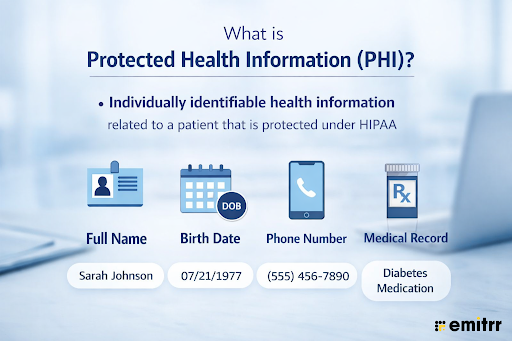
In a medical office setting, PHI includes more than just medical records. Common examples include:
- Patient name + appointment details
- Phone numbers used for reminders or follow-ups
- Prescription and refill information
- Treatment history shared over calls or texts
- Insurance and billing details
Even something as simple as a missed call text-back can become a violation if not sent via HIPAA-compliant texting for medical offices.

Key HIPAA Rules Medical Offices Must Follow
To maintain HIPAA compliance in clinics, medical offices must follow three core rules, but the real challenge is applying them to daily workflows.
HIPAA Privacy Rule (Front Desk + Staff Level)
This rule controls how patient data is accessed and shared within the practice. In a medical office, this means:
- Front desk staff should not share patient details over unsecured calls or messages
- Patient information should not be discussed in open areas
- Only authorized staff can access specific records
Violations often happen during routine tasks, making this one of the top causes of common HIPAA violations in medical offices.
HIPAA Security Rule (Systems + Tools You Use)
This rule focuses on securing electronic patient data (ePHI), which is where most clinics struggle.
For medical offices, this includes:
- Using HIPAA-compliant communication tools for healthcare instead of personal devices
- Implementing secure patient messaging solutions for doctors
- Ensuring encrypted systems for appointment reminders, follow-ups, and intake
For example, switching to HIPAA-compliant texting for medical offices instead of regular SMS is a key step toward compliance.
HIPAA Breach Notification Rule (When Things Go Wrong)
Even well-run clinics can face data breaches. HIPAA requires medical offices to:
- Identify and assess the breach quickly
- Notify affected patients
- Report incidents within the required timeframe
Delays often happen in clinics relying on manual processes, increasing the risk of non-compliance with HIPAA and penalties.
If your practice also uses a phone, then we recommend that you learn more about HIPAA compliance in VoIP. Watch this video to learn more:
HIPAA Compliance Checklist for Medical Offices
If you’re wondering how to ensure HIPAA compliance in clinics, this practical checklist breaks it down by real medical office workflows.
A strong HIPAA compliance checklist for healthcare should cover how your front desk communicates, how providers access data, and how patient information flows across systems.
Administrative Safeguards (People + Processes)
These focus on how your staff handles patient data daily. For medical offices, this includes:
- Regular HIPAA training for front desk and staff (especially for patient communication)
- Role-based access (e.g., front desk vs provider vs billing team)
- Defined protocols for appointment scheduling, cancellations, and follow-ups
- Secure handling of prescription refill requests (no unmanaged voicemails)
- Vendor agreements with any HIPAA compliant software for healthcare providers
Clinics that skip training often face the most HIPAA compliance mistakes healthcare providers make.
Technical Safeguards (Systems + Communication Tools)
This is where most compliance gaps exist, especially in communication. Your medical office should have:
- HIPAA compliant patient communication software for SMS, calls, and email
- Encrypted systems for patient intake forms and records
- Access controls (logins, permissions, session timeouts)
- Audit logs to track who accessed patient data and when
- Secure backups of patient records
Using personal phones or regular texting instead of HIPAA compliant texting for medical offices is one of the biggest risks here.
Physical Safeguards (Clinic Environment)
Even small clinics must secure physical access to patient data. Checklist for medical offices:
- Restricted access to computers and EHR systems
- Locked cabinets for physical records
- Screen visibility controls at the front desk
- Secure disposal of printed patient information
Learn more about the rules of HIPAA-compliant texting
Common HIPAA Violations in Medical Offices
Most HIPAA violations in medical offices happen due to everyday workflow gaps, especially in communication and manual processes.
Using Personal Devices for Patient Communication
Staff often use personal phones for quick texts or calls, but this is not HIPAA compliant patient communication due to lack of encryption and audit trails. Over time, this creates untracked conversations that are difficult to secure or monitor.
Voicemail-Based Workflows (Especially Refills)
Voicemails for appointments or prescription refills often contain sensitive information, increasing the risk of PHI exposure. Delayed callbacks also make these workflows inefficient and harder to manage securely.
Non-Compliant SMS & Email Tools
Regular SMS and email tools are not built for healthcare and lack required safeguards. Without HIPAA compliant communication tools for healthcare, patient data remains vulnerable across daily interactions.
Learn more about whether your SMSs are HIPAA compliant or not:
Lack of Staff Training
Untrained staff may unknowingly mishandle patient information during routine tasks like confirmations or follow-ups. This is one of the most common causes of HIPAA violations in medical offices. See what else can lead to employee HIPAA violations.
No Monitoring or Audit Trails
Without tracking systems, clinics have no visibility into who accessed patient data. This makes compliance difficult to prove and increases the risk of non-compliance with HIPAA.
Manual & Fragmented Workflows
Reliance on calls, paper notes, and disconnected tools increases errors and data exposure. These inefficiencies make HIPAA compliance for small medical practices harder to maintain.
Hidden Costs of HIPAA Non-Compliance for Medical Offices
Failing to maintain HIPAA compliance for medical offices doesn’t just lead to fines; it creates long-term financial and operational damage that many clinics underestimate.
- Financial penalties: HIPAA violations in healthcare can range from hundreds to millions of dollars, depending on severity and negligence, making even small errors costly for clinics.
- Legal and compliance costs: Investigations, legal fees, and corrective actions add up quickly, especially when clinics fail to meet HIPAA requirements for healthcare providers.
- Loss of patient trust: Data breaches or poor communication practices can damage your reputation, leading to patient churn and fewer referrals.
- Operational disruption: Fixing compliance issues often requires workflow changes, retraining staff, and system upgrades, slowing down daily operations.
- Revenue leakage from inefficiencies: Manual, non-compliant processes (like calls and voicemails) lead to missed appointments, delays, and poor patient experience.
In most cases, the cost of fixing non-compliance is far higher than investing in HIPAA compliant patient communication software upfront.
Why Medical Offices Struggle with HIPAA Compliance
Even with clear regulations, many clinics find it difficult to maintain HIPAA compliance in clinics due to how their workflows are structured.
- Over-reliance on manual workflows: Calls, voicemails, and paper-based processes increase human error and make compliance harder to control.
- Communication gaps: Patient interactions often happen outside secure systems, highlighting the need for HIPAA compliant communication tools for healthcare.
- Limited staff training and bandwidth: Small teams juggle multiple responsibilities, leaving little time to focus on compliance best practices.
- Fragmented systems: EHRs alone are not enough, clinics still need secure patient communication platforms to handle messaging, reminders, and follow-ups.
- Lack of visibility and tracking: Without audit trails or centralized systems, clinics cannot monitor or prove compliance effectively.
How to Ensure HIPAA Compliance in Your Medical Office
Achieving HIPAA compliance for medical offices doesn’t require complex systems, it requires fixing the right workflows, especially around communication and data access.
Here’s a practical approach clinics can follow to choose the right HIPAA-compliant app:
- Start with a risk assessment: Identify where patient data is being exposed, calls, texts, voicemails, or manual processes. This is the first step in meeting HIPAA requirements for healthcare providers.
- Standardize patient communication: Move away from personal devices and fragmented tools. Use HIPAA compliant patient communication software like Emitrr to centralize all interactions.
- Train staff regularly: Ensure front desk and care teams understand what qualifies as PHI and how to handle it securely.
- Implement access controls: Limit who can view or edit patient data based on roles to reduce unnecessary exposure.
- Enable audit trails and monitoring: Track all communication and data access to ensure accountability and simplify compliance reporting.
Most clinics see the fastest improvement by fixing communication workflows first using HIPAA-compliant texting for medical offices and secure messaging tools.
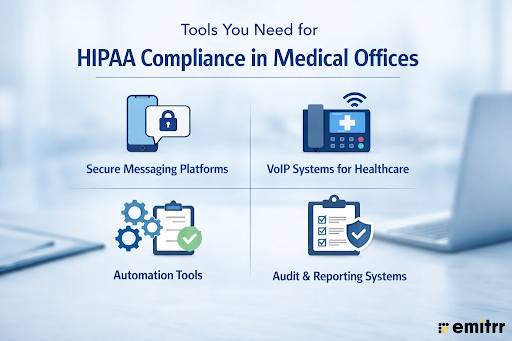
Tools You Need for HIPAA Compliance in Medical Offices
How Emitrr Helps Medical Offices Stay HIPAA Compliant
Emitrr is a patient communication and engagement platform built for healthcare practices. It helps medical offices streamline everyday workflows, like texting, calling, reminders, and follow-ups, while maintaining HIPAA compliant patient communication.
Instead of relying on disconnected tools or manual processes, clinics can manage all patient interactions in one secure, compliant system.
See how secure texting inside Emitrr works:
Key HIPAA-Compliant Capabilities
- Secure 2-way messaging & calling: Enables HIPAA-compliant texting for medical offices and HIPAA VoIP with encryption and controlled access
- End-to-end encryption: Protects patient data across messages, calls, and stored communication
- Audit trails & access controls: Tracks all activity and ensures only authorized staff can access PHI
- Automation for compliant workflows: Sends HIPAA-compliant appointment reminders, follow-ups, and recalls
- Replaces high-risk workflows: Reduces reliance on voicemails, manual callbacks, and personal devices
- EHR/EMR integration: Syncs patient data and communication to support consistent HIPAA compliance in clinics
Frequently Asked Questions
HIPAA compliance requires medical offices to protect patient data (PHI) through administrative, technical, and physical safeguards. This includes secure systems, controlled access, staff training, and using HIPAA compliant patient communication software for all interactions.
Standard SMS and email are not inherently secure and do not meet HIPAA requirements. Medical offices must use HIPAA compliant communication tools for healthcare that offer encryption, access control, and audit trails to safely communicate with patients.
Yes, doctors can text patients, but only through HIPAA compliant texting for medical offices. This ensures messages are encrypted, securely stored, and accessible only to authorized users.
HIPAA violations can result in fines ranging from hundreds to millions of dollars, depending on severity and negligence. In addition to financial penalties, clinics may face legal action, audits, and reputational damage.
Small clinics can achieve HIPAA compliance for medical offices by training staff, reducing manual workflows, and adopting HIPAA compliant patient communication software. Focusing on secure communication is often the fastest and most impactful step.
Yes, especially for handling patient communication and data storage. Using HIPAA compliant communication tools like Emitrr helps reduce risk, improve efficiency, and ensure your clinic meets regulatory requirements.
Coclusion
Maintaining HIPAA compliance for medical offices is no longer just about avoiding penalties, it’s about building trust, improving workflows, and protecting patient relationships.
For most clinics, the biggest gap isn’t awareness; it’s execution, especially in patient communication. Fixing this with the right tools can dramatically reduce risk while improving efficiency.
Book a demo with Emitrr to see how you can avoid HIPAA violations and communicate with patients confidently.