
 4.9 (400+
reviews)
4.9 (400+
reviews)
Introduction
Once a patient’s chart is created, the next step is scheduling the appointment. This stage is critical, but in many practices, it still depends on manual effort. Staff need to review charts, contact patients, check availability, and confirm appointments.
As referral volume grows, this process becomes harder to manage. Delays in outreach can slow down scheduling, and patients may not respond in time. This can lead to missed opportunities and longer wait times.
AI changes this by taking over scheduling right after chart creation. It can reach out to patients, offer available slots, and confirm appointments without manual involvement.
In this guide, you will learn how AI-driven scheduling works, the challenges it solves, and how it helps practices move patients from referral to appointment faster.
How Does AI Scheduling Work Step by Step?
- Detects Ready-To-Schedule Patient Charts
- Initiates Patient Communication
- Collects Patient Preferences
- Matches Availability With Provider Schedules
- Offers Available Time Slots
- Confirms The Appointment
- Sends Reminders And Follow-Ups
What Happens After Patient Chart Creation in Referral Intake?
Once a patient’s chart is created, the referral moves into the scheduling stage. This is where the practice prepares the patient for an appointment by verifying details and initiating outreach. In many cases, this process still depends on manual coordination between staff and patients.
Below are the typical steps that follow chart creation:
- Review of patient details: Staff checks if the chart includes required information such as contact details, address, and insurance. If anything is missing, they follow up before moving forward.
- Insurance verification and validation: The patient’s insurance is reviewed to confirm eligibility. If the insurance is inactive or incorrect, it must be resolved before scheduling.
- Referral readiness check: Only charts with complete and valid information are marked ready for scheduling. Incomplete referrals may stay pending.
- Patient outreach for scheduling: Staff contacts the patient by phone or message to offer appointment slots and explain next steps.
- Appointment coordination: Available time slots are checked, and the patient’s preferred date, time, and location are matched with provider availability.
- Appointment confirmation: Once a slot is selected, the appointment is confirmed and recorded in the system.
- Pre-visit communication: Patients may receive instructions, forms, or reminders before their visit.
For example, after a referral is received and a chart is created in the EHR, a referral coordinator reviews the patient’s details and insurance. Once everything is complete, they call the patient to schedule an appointment based on available slots. If the patient does not answer, follow-ups are required, which can delay the process.
This stage is critical because any delay here directly impacts how quickly a patient gets care.

Why Is Referral Scheduling Still Manual After Chart Creation?
Even after patient charts are created, many practices continue to rely on manual scheduling processes. This is because key steps still depend on human coordination, disconnected systems, and incomplete data.
The table below highlights why scheduling often remains manual:
| Reason | What Happens | Impact |
| Incomplete patient information | Charts may miss phone numbers, addresses, or insurance details | Scheduling gets delayed until details are verified |
| Insurance validation required | Staff need to confirm eligibility before booking | Adds extra steps before scheduling can begin |
| Dependence on phone calls | Staff must call patients to coordinate availability | Slows down response and requires multiple follow-ups |
| No real-time scheduling system | Availability is checked manually across providers | Increases time to find suitable slots |
| Lack of automation tools | No system to trigger outreach after chart creation | Staff must remember and initiate each step |
| Patient unavailability | Patients may not answer calls or respond quickly | Leads to repeated outreach and delays |
| Multi-location coordination | Scheduling across locations requires manual effort | Adds complexity and slows down booking |
| No prioritization logic | Urgent and routine referrals are handled the same way | Critical cases may not be scheduled faster |
What Challenges Do Practices Face in Referral Scheduling?
Referral scheduling is a critical step, but it often becomes a bottleneck as volume increases. Many practices struggle to move patients from chart creation to confirmed appointments quickly. These challenges slow down operations and affect patient access to care. Check the key challenges below:
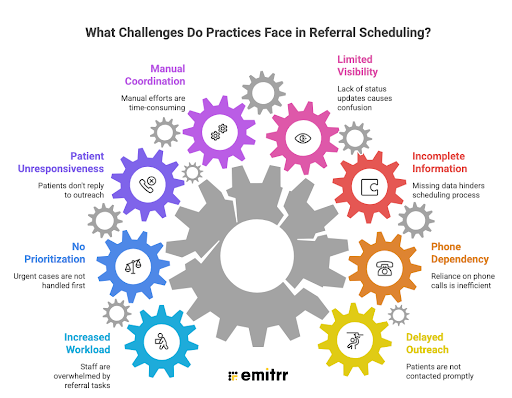
Delays In Patient Outreach
Staff may not contact patients immediately after chart creation, which slows down scheduling and increases wait times.
High Dependency On Phone Calls
Scheduling often relies on calling patients, which leads to missed calls, voicemails, and repeated follow-ups, especially during periods of high call volume.
Incomplete Patient Or Insurance Information
Missing or incorrect details can delay scheduling until the information is verified and updated.
Limited Visibility Into Scheduling Status
Teams may not know which patients have been contacted or scheduled, making it harder to track progress.
Manual Coordination Across Providers And Locations
Matching patient preferences with provider availability takes time and increases complexity, particularly in referral intake in multi-location healthcare practices.
Patient Unresponsiveness
Patients may not answer calls or respond quickly, which delays appointment booking and requires multiple attempts.
No Prioritization Of Urgent Cases
Without clear triage, urgent referrals may not be scheduled faster than routine cases.
Increased Workload For Staff
As referral volume grows, staff struggle to manage outreach, scheduling, and follow-ups efficiently.
These challenges make referral scheduling slow, inconsistent, and difficult to scale without automation.
How Can AI Take Over Referral Scheduling After Chart Creation?
AI can take over referral scheduling by stepping in as soon as a patient’s chart is marked ready. Instead of relying on staff to initiate outreach, the system automatically begins the scheduling process using the information already available in the chart.
Once the chart has complete details such as contact information and insurance, an AI SMS chatbot reaches out to the patient through messaging. It asks for preferred location and availability, then offers suitable time slots based on real-time provider schedules. The patient can respond directly, select a slot, and confirm the appointment without needing a phone call. If the patient is not available, alternative options are shared instantly within the same conversation.
For instance, after a referral coordinator creates a patient chart in the EHR, the AI for texting system can automatically send a secure message to the patient within minutes. The patient receives available appointment options, chooses a convenient time, and confirms the booking through SMS. The appointment is then scheduled without any manual follow-up, reducing delays and workload for staff.
This approach ensures faster scheduling, reduces dependency on manual outreach, and helps move patients from referral to appointment more efficiently.
How Does AI Scheduling Work Step by Step?
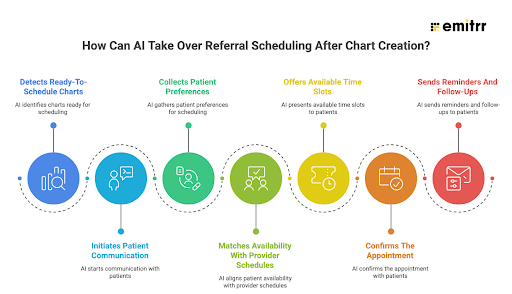
AI scheduling follows a structured flow that begins right after a patient’s chart is ready. It removes manual steps and ensures patients are contacted and scheduled quickly.
Step 1. Detects Ready-To-Schedule Patient Charts
The system identifies when a patient chart has complete information, such as contact details and insurance. Only these cases move forward for scheduling.
Step 2. Initiates Patient Communication
AI reaches out to the patient through SMS or messaging. This happens automatically without staff needing to trigger the process.
Step 3. Collects Patient Preferences
The system asks the patient for preferred location, date, or time. Responses are captured in real time.
Step 4. Matches Availability With Provider Schedules
Based on patient preferences, AI checks available slots across providers and locations. It selects the most suitable options.
Step 5. Offers Available Time Slots
Patients are presented with available appointment options. If the first option does not work, alternative slots are suggested instantly.
Step 6. Confirms The Appointment
Once the patient selects a slot, the appointment is confirmed and recorded in the system.
Step 7. Sends Reminders And Follow-Ups
Automated reminders are sent before the appointment. Follow-ups can also be triggered if the patient does not respond initially.
What Are the Benefits of AI-Driven Referral Scheduling?
AI-driven referral scheduling helps practices move patients from chart creation to confirmed appointments faster and with less effort. It reduces manual work and ensures a more consistent and efficient process. Check the key benefits below:
- Faster patient outreach: AI contacts patients immediately after chart creation, reducing delays in scheduling. This helps patients get quicker access to care and improves overall response time.
- Reduced dependency on staff: Scheduling no longer relies on staff making calls or managing follow-ups. This frees up time for teams to focus on more important tasks and complex cases.
- Higher appointment conversion rates: Patients can respond and book appointments easily through messaging. This reduces drop-offs and increases the number of referrals that convert into visits.
- Improved patient experience: Patients can choose convenient time slots and respond at their own pace. This makes the scheduling process simple and more accessible.
- Lower no-show rates: Automated reminders keep patients informed about their appointments. This helps ensure they show up prepared and on time.
- Better use of provider availability: AI matches patient preferences with real-time availability. This helps fill open slots efficiently and reduces scheduling gaps.
- Consistent and standardized process: Every patient goes through the same scheduling workflow. This reduces variability and improves coordination across teams.
- Scalability without added workload: Practices can handle higher referral volumes without increasing staff. AI manages outreach and scheduling efficiently as demand grows.
- Real-time tracking and visibility: Teams can monitor scheduling status at every stage. This helps identify delays and maintain control over the process.
How Does Emitrr Automate Referral Scheduling After Chart Creation?
Once a patient’s chart is created, the next step is to move the patient to a confirmed appointment without delays. Emitrr helps automate this entire process by handling patient outreach, scheduling, and follow-ups in a structured way.
Instead of relying on staff to initiate each step, Emitrr ensures that every ready-to-schedule patient is contacted and guided through booking automatically. This improves speed, reduces manual work, and keeps the workflow consistent.
Below is how Emitrr automates referral scheduling after chart creation:
- Centralized Referral Coordination: Clinics can manage incoming referrals in one organized system. Referral information, scheduling status, and patient communication can all be tracked in the same workflow.
- HIPAA-Compliant AI Communication: All patient conversations are handled through a HIPAA-compliant AI agent. This ensures patient communication and intake data remain secure and compliant with healthcare privacy requirements.
- Automated Referral Status Updates: Referring providers receive automatic updates when referrals are received or scheduled. This keeps provider communication organized and reduces manual follow-ups.
- Automated Patient Chart Creation Readiness: Emitrr AI integrates with your EHR workflow to ensure only complete referrals move forward. Once referral coordinators create a patient chart with basic details such as name and date of birth, Emitrr AI checks whether required fields, such as phone number, address, and insurance, are available. Only fully ready cases are picked up for the next step, which improves data accuracy and reduces back-and-forth.
- Intelligent Referral Filtering: Emitrr AI automatically filters out incomplete or invalid referrals. Cases with missing insurance or contact details are not pushed into scheduling. This ensures staff and systems focus only on referrals that are ready to convert into appointments.
- AI-Led Patient Scheduling from Chart Creation: The moment a patient chart is created with complete information, Emitrr initiates patient outreach. It contacts the patient through SMS, asks for the preferred location, and enables patient self-scheduling by offering the earliest available slots. If the patient is not available, alternate options are shared in the same conversation.
Watch a quick video of Emitrr’s AI scheduling assistant in action:
- Automated Provider Assignment: Based on the patient’s selected location and time slot, Emitrr AI automatically assigns the right provider. This removes manual coordination and ensures efficient use of provider schedules.
- Faster Referral-to-Appointment Conversion: By removing manual steps and delays, Emitrr AI helps move patients from referral to scheduled appointment much faster. This improves overall efficiency and increases completed visits.
- Automated Referral Lifecycle Closure: After scheduling is completed, referral status updates are handled automatically. Referring providers receive updates, and the referral is moved out of the active queue into the patient record.
Frequently Asked Questions
AI-driven referral scheduling uses automation to contact patients, offer appointment slots, and confirm bookings after chart creation.
AI starts scheduling as soon as the patient chart is complete and ready, with all required details available.
AI can handle most scheduling tasks, but staff may still step in for complex or special cases when needed.
AI contacts patients instantly and offers available slots in real time, reducing delays caused by manual outreach.
Yes, AI can match patients with the right location and provider based on availability, making it ideal for multi-location setups.
Conclusion
Referral scheduling after chart creation is often where delays happen. Manual outreach, follow-ups, and coordination can slow down the process and increase workload for staff.
AI helps remove these delays by automating scheduling from the moment a patient’s chart is ready. It ensures patients are contacted quickly, appointments are booked faster, and workflows stay consistent.
By adopting AI-driven scheduling, practices can improve efficiency, reduce manual effort, and move patients from referral to appointment without friction.
To see how this works in real time, book a free demo with Emitrr AI and automate your referral scheduling process.