
 4.9 (400+
reviews)
4.9 (400+
reviews)
Introduction
Wondering how Internet faxing works? We got you!
If you are still using the same old, inefficient traditional fax machine, then it’s time to switch to a cost-effective, scalable, and super convenient online fax service provider like Emitrr that’s ideal for all kinds of business industries.
So keep reading as we share step-by-step guides on how internet faxing works, how to send fax online and share a few benefits and use cases of using online faxing.
How Does Internet Faxing Work?
Internet faxing or online faxing works by sending and receiving faxes over the internet with the help of an online fax service provider. As opposed to traditional faxing, there is no paper or a physical machine involved when faxing over the internet. Instead, attaching files, sending PDFs, or emails is entirely done over the internet via a third-party online fax service provider.
So what happens is that online fax service providers and traditional fax machines use similar technologies for transmitting fax data, only the way you receive or send the fax is different. Online faxing turns your documents into a format that a fax machine can read and vice versa. This means even if the person you are sending the fax to is still using a standard fax machine, you don’t need one. All you need is an internet connection and an online fax setup.
To ensure smooth transitions in patient care and secure record sharing, use these templates for admissions, discharges, and lab results:
Hospital Admissions Fax Cover Sheet
Discharge Summary Fax Cover Sheet
How to Send Fax over the Internet?
Sending faxes over the internet is super easy and convenient. Here’s a step-by-step guide on how to send fax over the internet:
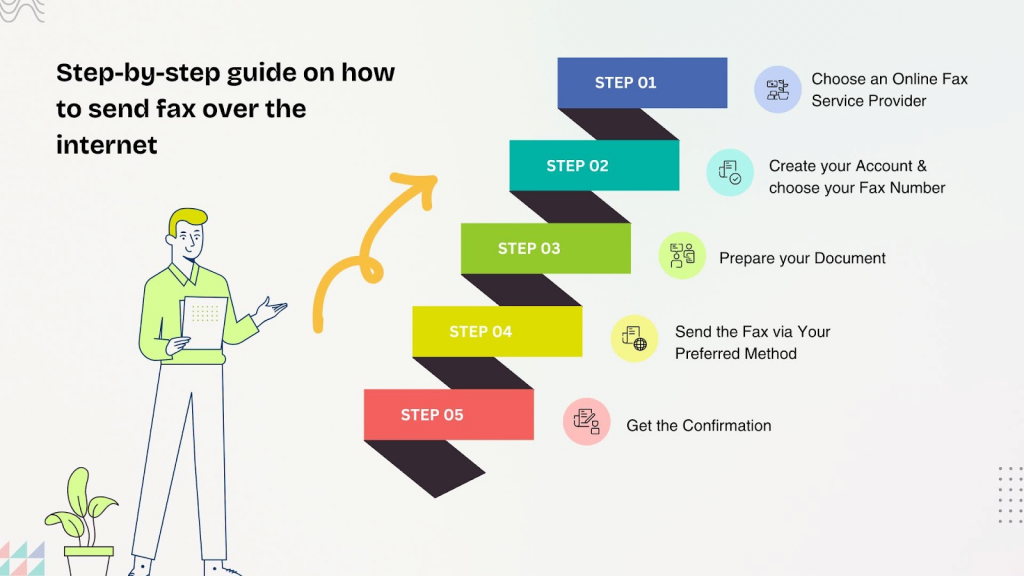
Step 1: Choose an Online Fax Service Provider
Begin by choosing an online fax service provider like Emitrr. If you are a healthcare or legal business owner, ensure that the online fax service you choose offers compliance with HIPAA, GDPR, and more.
Step 2: Create your Account & choose your Fax Number
Once you have chosen an online fax service, the next step is to create an account by entering details like name, email, phone number, your address and payment details. Upon signing up, you will get a dedicated online fax number (toll-free or local number). And if you already have a fax number, then your chosen online fax platform should give you the option to retain it.
Step 3: Prepare your Document
The next step is to prepare the document you would like to send. So create or scan the file you want to fax (PDF, Word, image, etc.) and make sure it’s clear and ready to send.
Looking for a fax cover sheet?
Step 4: Send the Fax via Your Preferred Method
To finally send the fax, you can choose your digital fax service in two ways:
- Web portal
- Mobile app
Option 1: Web Portal:
To send the fax via the web portal:
- Log into your fax service’s dashboard
- Click on Send Fax”
- Enter the recipient’s fax number
- Upload your file
- And click send
Option 2: Mobile App:
To send the fax via the mobile app:
- Open the fax provider’s app on your smartphone/tablet
- Tap on “Send Fax”
- Enter the fax number
- Upload a file or take a photo of the document
- Click on send to send it instantly
Step 5: Get the Confirmation
Upon sending the fax, you will get a confirmation by email or app notification showing whether your fax was successful. And if the recipient is also using an online faxing service, then they will also get a notification or an email notifying them that a new fax is waiting for them.

How to Receive Fax over the Internet?
Here’s a step-by-step guide showing how to receive fax over the internet irrespective of whether the sender is using a traditional or online fax service themselves.
Step 1: Choose an Online Fax Service Provider
To receive a fax online, again, you need to sign up with an online fax service provider like Emitrr. Upon signing up, you will be given a dedicated fax number (local, toll-free, or international fax number). If you already have a fax number that you want to retain, you can do that as well.
Step 2: Sender Sends a Fax
The sender dials your virtual fax number from their traditional fax machine or online fax service. If they are using a traditional fax machine, then to them, it will look like they are sending a traditional fax.
Step 3: Fax Server Receives the Transmission
Once the sender has sent the fax, the fax will go to the fax service provider and their system will intercept the incoming fax through secure servers. The fax will then be converted into a digital file format (usually PDF or TIFF).
Step 4: You Receive the Online Fax
Finally, you will receive the converted fax into your system, be it mobile app, web portal or email. You can save, read, print or forward this fax instantly via the internet.
How Email to Fax Works?
Here’s a step-by-step guide showing how email to fax works:
- Step 1: Open your email and create a new email message.
- Step 2: In the “To” section, enter the recipient’s fax number followed by your fax service’s domain. For example, 1234567890@emitrr.com
- Step 3: Now add the file you want to send as an attachment. You can also add a subject line, body text or cover letter, if needed, and click on send.
- Step 4: Next, your fax service provider will receive the email, it will convert the attachment into a fax-compatible format (TIFF or PDF). Then the system will dial out to the recipient’s fax number through secure servers to send it across the receiver.
- Step 5: The recipient’s online fax account or traditional fax machine will receive the document as a fax. And to them, it will look like any regular fax transmission.
- Step 6: Finally, you will get the fax delivery confirmation via email.
Benefits of Sending Fax Online
Businesses are increasingly implementing digital faxing because of a number of benefits. Let us take a look at them:
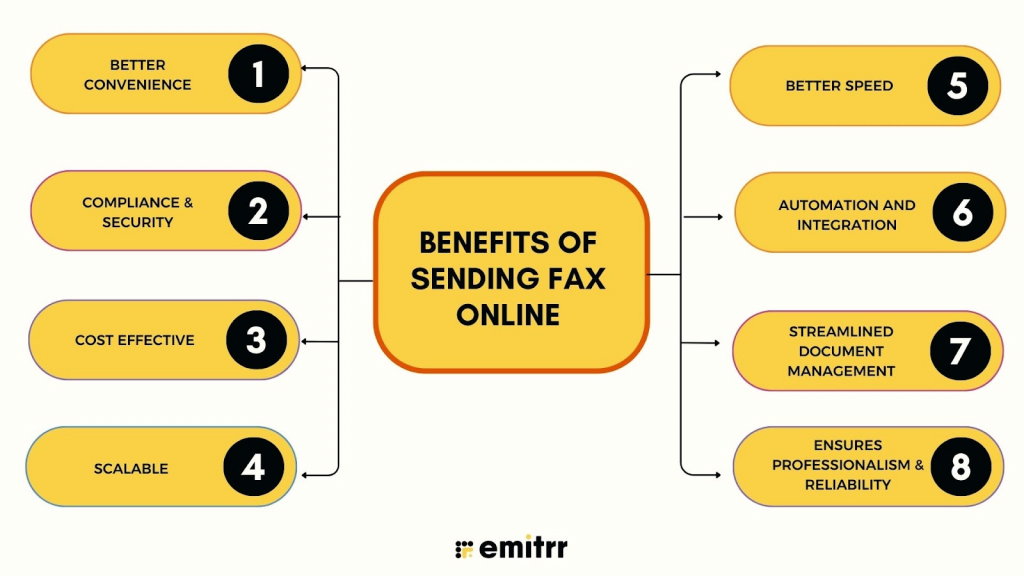
Better Convenience
Sending faxes online is super convenient as you don’t need a physical fax machine that requires both space and maintenance to send and receive faxes. Instead, all you need is an internet connection and your phone, laptop or computer to send and receive faxes from anywhere in the world. Plus online fax machines are a great addition to your remote team or office with multiple locations.
Compliance & Security
Many businesses, especially in healthcare, government or law, are required to comp[y with HIPAA, GDPR and other compliance protocols to keep data safe. And most digital fax services support these, offer encryption and other security measures to keep your data safe, which is way safer compared to sending a fax via email or traditional mail.
Cost Effective
Online faxing is way cheaper compared to traditional faxing. With online faxing all you need is an internet connection and pay a subscription for an online fax service provider of your choice. No need to spend on a fax machine, its maintenance cost, ink, paper or phone lines.
Scalable
Scaling with traditional faxing systems is very difficult, adding more fax machines and fax lines involve capital and time. And so, cloud-based fax services make scaling effortless. Want to add more lines? Want to expand to different locations? All this can be done instantly with a few clicks using an online fax service provider.
Better Speed
Online faxing is super efficient when it comes to speed. With it, you don’t need to deal with paper jams or busy fax lines. Sending fax online is lightning fast, all you need to do is upload your digital documents and click on send, and that’s it, it’s that fast.
Automation and Integration
Unlike traditional fax machines, you can integrate your cloud-fax service with your email, cloud storage, any third-party business apps you use or even add automation for smarter workflows. With it, you can schedule your faxes, set up automatic receipt confirmation, and more.
Streamlined Document Management
Digital faxing is great to streamline and manage your documents. Every time you send or receive a fax, the system automatically stores it in the cloud, it can even categorize the fax based on custom parameters such as date, sender, or subject matter that you set. This reduces the likelihood of human error, misplacement and keeps your documents organized.
Ensures Professionalism & Reliability
Online fax platforms offer dedicated business online fax numbers, be it local or toll-free numbers so that you can maintain professionalism and seem reliable while enjoying other aforementioned benefits.
In short, online faxing is faster, more secure, cheaper, and more convenient than traditional faxing, making it a smart choice for modern businesses that still need fax capabilities.
Business Use-Cases of Online Faxing
Different businesses may require an digital fax service for different purposes. Let us take a look at a few industries and use cases of online faxing for each of them.
Healthcare
Healthcare providers constantly exchange information related to lab results, patient records, prescriptions, medical history, and more with other healthcare professionals or pharmacies. However, complying to HIPAA regulations in healthcare is crucial when exchanging such critical patient information. HIPAA compliant faxing is essential to meet these requirements so that you can safely exchange data.
Legal & Law firms
Legal professionals need to send and receive signed contracts securely, some use it to submit filings to courts that still require fax. Instead of relying on physical fax machines, legal professionals can send these documents directly from email or cloud storage, reducing delays and ensuring faster turnaround.
Financial Services & Banking
Banks or financial institutions may require online faxing to receive signed documents from clients, to send audit trails and financial disclosures securely or to verify documents while client onboarding. Industry-specific online faxing services use encryption such as TLS 1.2 or higher for data in transit and AES-256 for data at rest to protect your client’s sensitive data.
Education
Schools or educational institutions can use online faxing services to share official documents between departments or with government agencies. They can use it to send transcripts, enrollment forms or test papers without spending much time or cost on paper, ink, etc.
Real Estate
Real Estate professionals can use online faxing services to exchange signed agreements with clients, to transfer deeds and legal paperwork quickly or to send applications for mortgage & loan processing, ensuring fast delivery and security both.
Government
Online faxing for Government officials can be used to send sensitive documents that may need to be exchanged with businesses and citizens, or may be used to send critical updates when phone systems fail. Digital fax comes in very handy to ensure faster delivery and security when exchanging such sensitive documents.
Frequently Asked Questions
To fax over the internet for free, you need to create an account with a free online fax service like, Cocofax, FaxZero, FaxPlus, or FreeFax, then go to the “Send Fax” section. Next, attach your documents, enter the recipient’s virtual fax number (with area code, country code,and fax number), and click “Send”.
Yes, you can send faxes online through email via online fax services like Emitrr, eFax, iFax, and more. To do this, you need to compose a new email, enter the recipient’s fax number followed by a special domain like @emitrr.com in the “To” field, followed by attaching your document, and then click send. The online fax service will then convert your email and attachment into a fax and send it to the recipient’s fax machine.
Yes, online faxing can be highly secure, especially with reputable providers that use strong encryption like TLS/SSL for data in transit and at rest. It’s often safer than traditional fax or unsecured email for sensitive documents. However, security also relies on the provider’s safeguards and your own habits, such as using strong passwords and staying alert to phishing scams.
People still use fax over email for greater security, reliable delivery, legal validity, and regulatory compliance, especially in fields like healthcare and finance. Faxing via phone lines is harder to intercept for a cybercriminal than email, and the physical receipt of a fax offers added control and reassurance for sensitive documents.
Conclusion
Sending faxes doesn’t need to be time-consuming, archaic, or boring. With online fax services like Emitrr, you can send faxes online securely and quickly. Emitrr is packed with features, is HIPAA compliant, highly secure, and super affordable. So book a demo with Emitrr today and find out more on how we can help you improve and automate your business communications.