
 4.9 (400+
reviews)
4.9 (400+
reviews)
Introduction
Wondering how to set up automated reminder and recall workflows in Athenahealth? We got you.
Recalls and reminders are time-consuming but extremely important tasks to perform when running a healthcare practice. But what if there was a way to improve these two workflows while reducing front-desk workload inside Athena? Sounds too good to be true, right?
This guide shows how to set up reminder and recall workflows in Athenahealth, where native automation stops, and how practices use Emitrr along with it to fully automate patient outreach.
How to Set Up Automated Reminder & Recall Workflows in Athenahealth?
- Open the Patient Outreach Messaging Section in Athenahealth
- Select the Option for Automated Reminder Messages
- Choose the Communication Channels (Phone, Text, or Email)
- Configure the Type of Reminder or Recall Workflow You Need
- Apply Patient Communication Preferences
- Enable Language Options if Needed
- Activate the Automated Reminder Workflow
What Are Reminder & Recall Workflows in Athenahealth?
Before jumping into setup, it’s important to separate two concepts that are often lumped together:
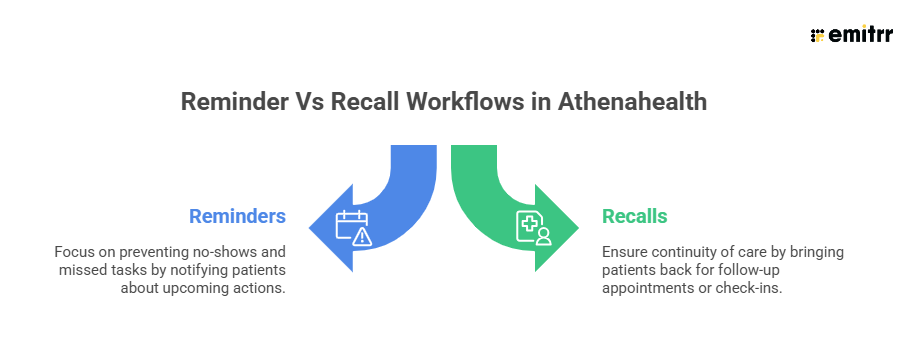
Athenahealth supports both through its Patient Outreach Messaging system, AthenaOne, with:
- Automated Reminder Messages: Pre‑built outbound messages (phone, text, email) for appointments, bills, and lab notifications.
- Tailored Messaging Campaigns: A campaign builder that allows practices to send targeted messages to specific patient groups for follow‑ups, health information, or office notifications.
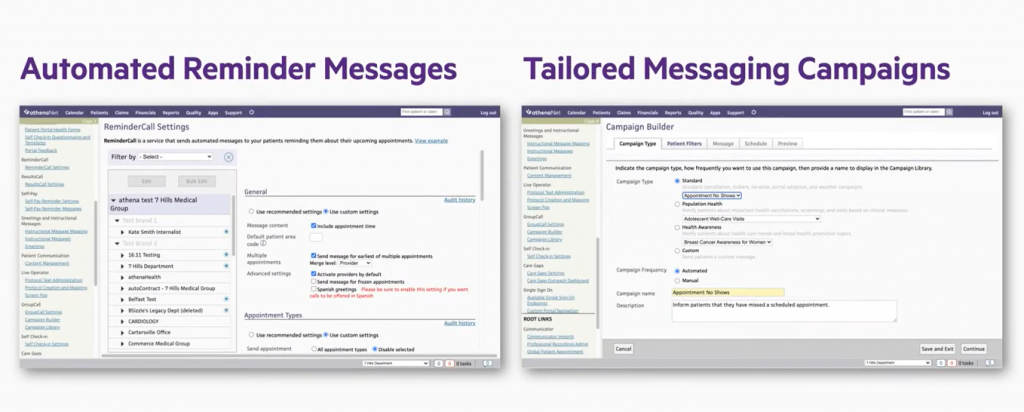
Understanding this distinction matters because most clinics get reminders right but struggle with recalls. Recalls require timing logic, segmentation, and follow‑through, things Athena only partially automates out of the box.

Setting Up Automated Appointment Reminders in Athenahealth: Step-by-Step Guide
Here’s how to set up automated appointment reminders in Athenahealth:
Step 1: Access athenaOne Patient Outreach Messaging
Log into Athena and navigate to the Patient Outreach Messaging area within your athenaOne system. This is where all reminder and campaign tools are managed.
Step 2: Select “Automated Reminder Messages”
Choose the option for Automated Reminder Messages, which are pre-built workflows designed for operational notifications such as: Appointment reminders, Bill payment alerts, Lab result notifications, etc.
Step 3: Choose Message Channels (Phone, Text, or Email)
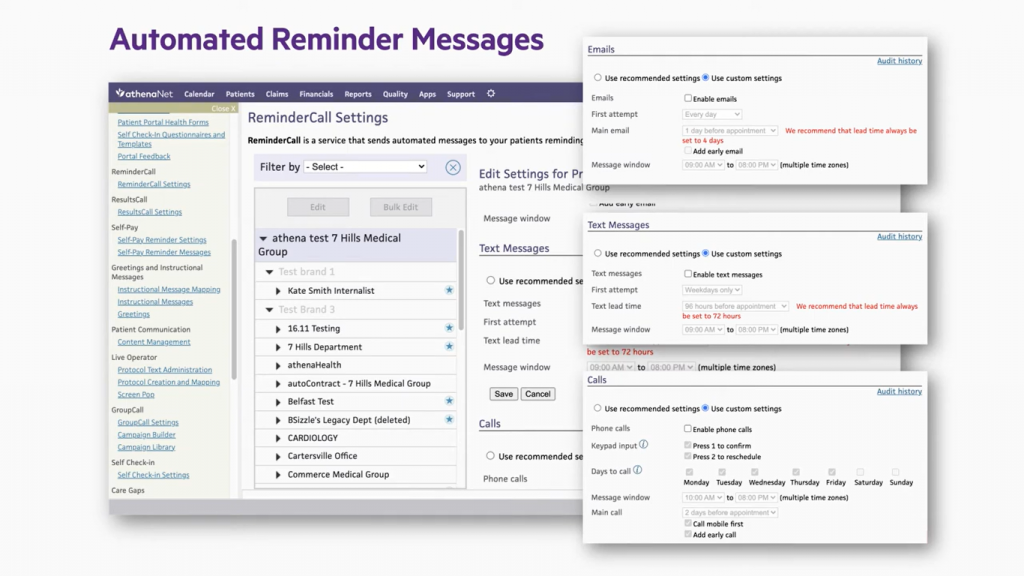
Select how reminders will be delivered: Phone calls, SMS, or Email. You can enable one or multiple channels depending on your practice’s outreach strategy.
Step 4: Configure the Reminder Use Case
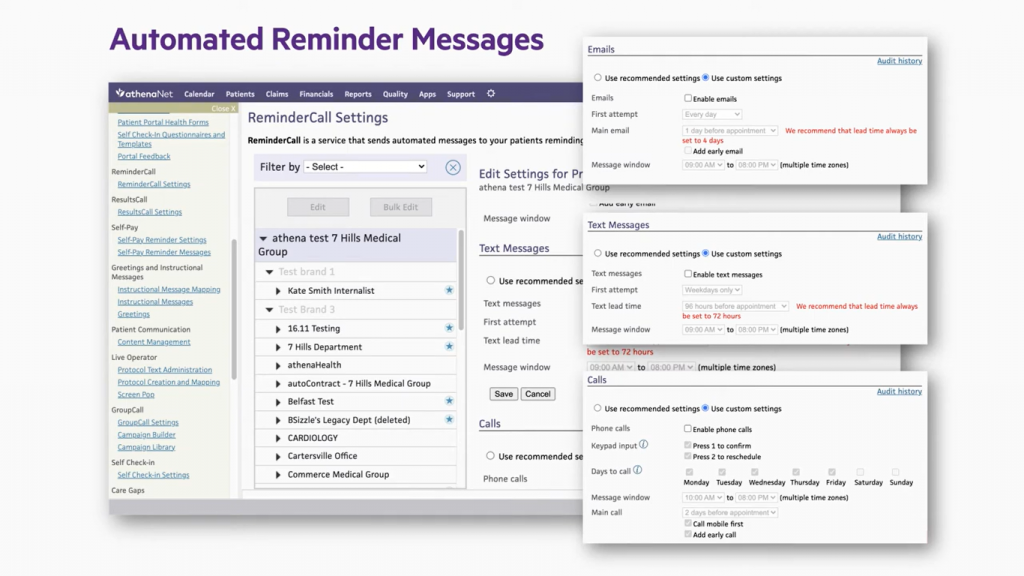
Choose what the reminder is for. Is it for appointments, billing notifications, lab result availability, or something else. This defines the type of event that will trigger the automated message.
Step 5: Apply Patient Communication Preferences
Athena allows patients to choose how they prefer to be contacted (phone, text, or email) through the patient portal or directly with the practice.
Step 6: Enable Language Options (If Needed)
If your patient population includes Spanish-speaking patients, enable Spanish-language messaging for text and phone reminders.
Step 7: Activate the Workflow
Once configured, activate the automated reminder. Athena will now send reminders automatically based on your settings, without staff needing to manually contact patients.
Setting Up Recall Workflows in Athenahealth: Step-by-Step Guide
Athena does not label recalls as a separate module. Instead, you can build recall workflows using its Tailored Messaging Campaigns options.
Step 1: Open the Campaign Builder
Within Patient Outreach Messaging, select the option for Tailored Messaging Campaigns.
This tool allows you to create outreach campaigns using built-in templates.
Step 2: Choose a Message Template
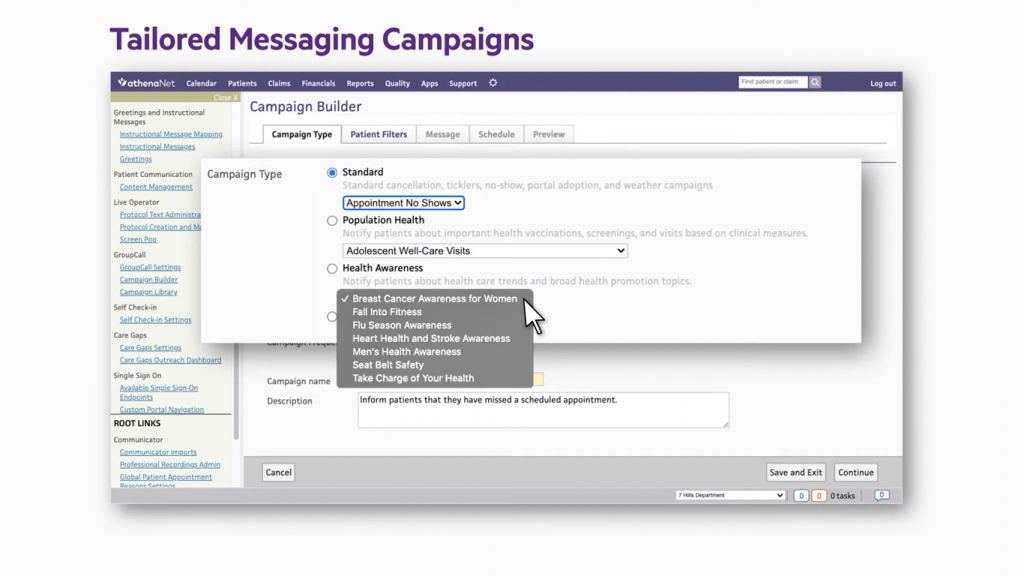
Select a template based on the type of recall or follow-up you want to run, such as:
- Appointment follow-ups
- Health-related information
- Office notifications
- Preventive care reminders
Step 3: Define the Patient Audience
Choose who should receive the campaign:
- A small, targeted group (e.g., patients needing a follow-up)
- A large patient population (e.g., all patients due for annual visits)
This is how Athena enables care-gap outreach at scale.
Step 4: Select Delivery Method (Phone, Text, or Email)
Next, decide whether you want to send the recall message via phone calls, text messages, or Emails. You can match the channel to patient communication preferences stored in the system.
Step 5: Customize the Message for the Use Case
Customize the message to the recall purpose, such as:
- Bringing patients back for overdue visits
- Encouraging real-time scheduling for preventive care
- Sharing health-related reminders
- Notifying patients about office updates that require action
Step 6: Apply Language and Preference Settings
As with reminders, you can set language preferences to recalls as well, but the language options are limited to English and Spanish only.
Step 7: Launch the Campaign
Once the audience, message, and channels are set, launch the campaign. Athena will distribute the recall messages to the selected patient group.
What Athenahealth Can Do Natively (and Where It’s Limited)
As you can see from the above steps, the recalls and reminders capability is very limited in Athenahealth. Here’s what Athena does well:
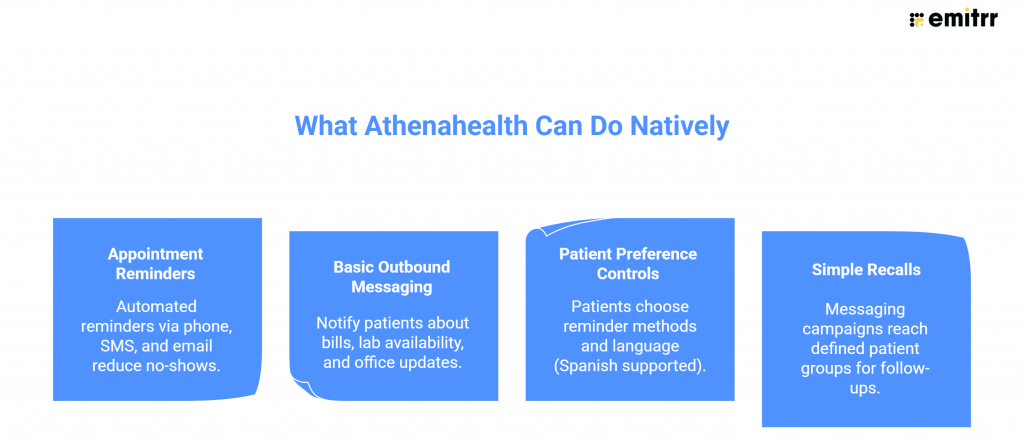
Where Clinics Hit Real‑World Limits
Insights from real operational conversations reveal the gaps clearly:
1. Manual follow‑ups still dominate
Even with reminders, staff still field endless calls: “When is my appointment?” “Was my prescription sent?” “Do I need to be seen again?” Athena sends messages, but it doesn’t handle conversations.
2. One‑way communication in practice
Reminders go out, but replies often don’t loop cleanly back into actionable workflows. Patients respond, but staff still have to interpret and act manually.
3. Complex rules aren’t automated
A clinic explained their real workflows that were complex and time-consuming to deal with:
- Some providers don’t see children under five.
- New patients can’t self‑schedule online.
- Controlled medications always require a visit.
- Refills depend on when the patient was last seen (three‑month rule).
Athena stores the data, but it doesn’t natively orchestrate these decisions.
4. Language and personalization constraints
Spanish is available, but multi‑language, two‑way, rule‑based conversations aren’t.
5. No AI handling of edge cases
Patients don’t just cancel, they reschedule, ask about refills, switch pharmacies, and want immediate answers. Athena reminders notify, but they don’t resolve.
This is why many clinics still feel “busy” even after enabling automated messaging inside their Athena EHR.
Common Problems Clinics Face with Athena Reminders
Here are some pain points clinics actually voice when relying on Athenahealth only for reminders and recalls:
“We still spend all day on scheduling.”
Even with reminders, front desks answer repetitive calls: who to see, where to go, which provider handles what age, and which locations are available.
“Refill calls are a mess.”
Patients run out of meds, haven’t been seen in months, or changed pharmacies without telling anyone. Staff must check visit history, determine whether a medication is controlled, and decide whether to create a case or require an appointment.
“Patients reply, but nothing is automated.”
Messages go out, but reschedules, cancellations, and questions still land on staff.
“Everything still comes from different numbers.”
Patients don’t recognize reminder numbers, reducing response rates.
“We can’t segment by real‑world rules.”
Age limits, provider restrictions, visit‑type logic, refill policies, these live in people’s heads, not in Athena workflows.
“No AI to handle edge cases.”
From “Where’s my Adderall?” to “Did you send my prescription to the right pharmacy?”, staff still handles it manually.
How to Fully Automate Reminders & Recalls with Emitrr + Athenahealth
Athenahealth gives clinics a starting point for patient communication, but as most front-desk teams quickly realize, “basic reminders” don’t solve operational challenges.
This is where Emitrr + Athenahealth turns reminders and recalls from a simple notification tool into a fully automated patient engagement workflow, one that actually reduces no-shows, cuts staff workload, and keeps Athena updated automatically. Here’s how it works in practice.
Cadence-Based Reminders: Automate When and How Often You Follow Up
With Athena alone, setting up reminders is typically fixed and rigid, or requires you to set up campaigns that are again limited.
But by adding Emitrr to it, instead of a single ping, you can configure workflows like:
- Appointment reminders that go out in 72 hours, 24 hours, or same day
- High-risk visits that go out in: 5 days, 2 days, morning of
- Recalls (annual physicals, chronic care, medication reviews)that goes out in: 30 days, 60 days, 90 days
Within this, you can tailor these reminders by:
- Visit type
- Provider
- Department or location
- Patient category (routine vs high-value appointments)
This matters because clinics operate on rules and not on templates. Whether it’s “don’t schedule new patients late in the day,” or “certain providers don’t see under five,” you can set Emitrr AI workflows to reflect real clinical logic instead of forcing staff into one-size-fits-all automation.
Message One Patient, or Hundreds, By Provider, Date, or Schedule
One of the biggest operational gaps in Athena is the inability to act quickly when schedules change. With Emitrr’s schedule-based texting, your team can:
- Pull the full appointment schedule of all your providers directly from Athena
- Filter by:
- Provider
- Location
- Date range
- Appointment type
- Send messages to:
- One patient (individual follow-up)
- All affected patients (bulk updates)
- Multiple practitioners’ schedules at once
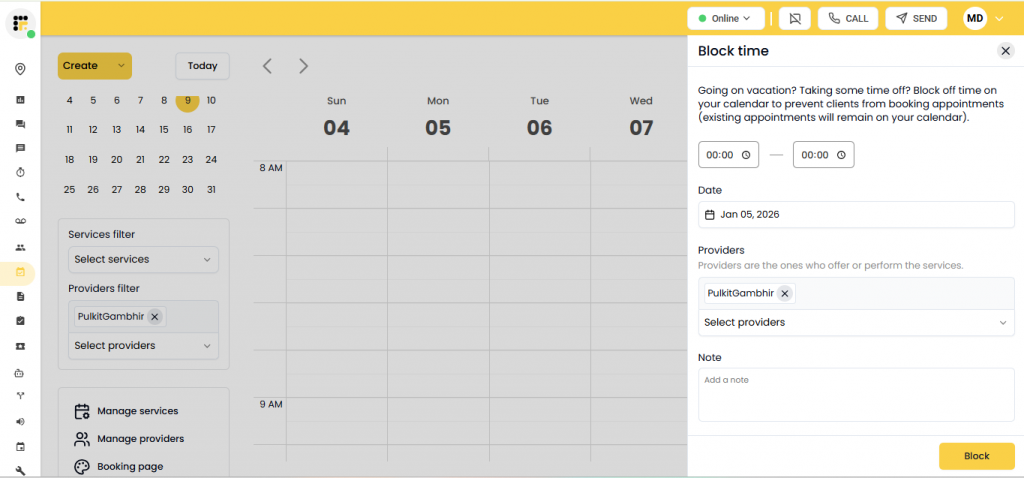
This is critical when a provider is unavailable, clinic hours change, or weather, emergencies, or staffing issues disrupt the day. So instead of calling patients one by one, you can instantly notify everyone who needs to reschedule, without leaving Athena.
Learn more about texting inside Athenahealth in this short video:
Two-Way Reminders That Write Back into Athena Automatically
Athena’s reminders are often one-way. Patients can’t easily confirm, cancel, or reschedule, and when they do, staff still have to manually update the EHR.
Emitrr fixes that. When a patient replies to a reminder or recall message:
- “Confirm”: Appointment status is updated in Athena
- “Cancel”: Appointment is canceled and logged
- “Reschedule”: AI handles next steps or routes appropriately
- No response / missed call: Automated follow-up kicks in
Every interaction, be it on SMS, call, or email for confirmation or cancellation, is synced back into the Athena patient profile. There is no need to copy-paste or guess what happened after the message went out.
Reminders Sent From Your Clinic’s Existing Number (Not a Random Short Code)
Patients trust familiar numbers. Athena reminders often go out from a different system-generated number, which patients ignore or mistake for spam. Emitrr sends SMS and voice messages from your clinic’s actual phone number, and replies go back into the same thread your staff already uses. This increases response rates and eliminates the confusion of “Who is this texting me?”
AI Handles Missed Calls, Booking, and Recalls Automatically
If your front desk is flooded with calls, most of them are probably calls related to:
- Scheduling
- Prescription refills
- “Level-1” questions (appointments, referrals, medication status)
Emitrr’s AI agent automates these workflows:
For Appointments:
- Missed call: instant auto-SMS
- Patient replies: AI books or reschedules
- If patient doesn’t know the provider: AI sends the correct location or provider-specific booking link
- If patient is new: routed to staff automatically
For Recalls:
- Patients overdue for visits (annuals, chronic care, labs)
- Automated recall campaigns go out based on your cadence
- AI handles booking and updates Athena EHR when scheduled
For Refills:
- AI collects key details: patient name, DOB, medication, pharmacy
- If refill is allowed, it creates a nurse case / encounter in Athena
- If visit is required, it sends the scheduling link automatically
The best part is Emitrr AI is smart enough to handle prescription refills related to controlled vs non-controlled medications and can understand the need for asking the patient to reschedule an appointment if they are reaching out post 3 months for refills.
Multi-Language Messaging Without Extra Staff Work
Athena doesn’t solve language barriers, but Emitrr does. With it, you can send SMS and voice reminders in multiple languages and allow patients to reply in their preferred language. For clinics serving diverse populations, this alone removes a massive friction point in recalls and confirmations.
Custom Recall Campaigns That Actually Bring Patients Back
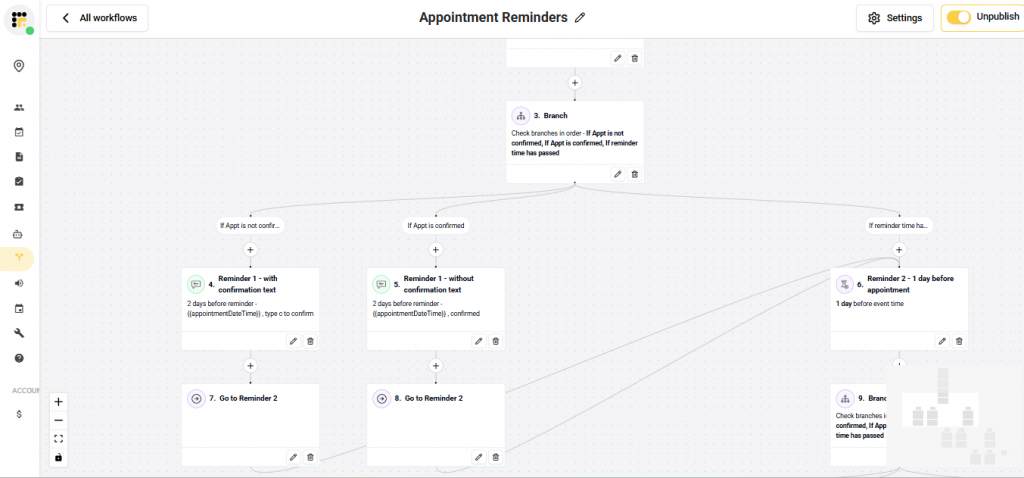
AthenaOne’s limited reminder system drops at “send a reminder,” but Emitrr lets you create true recall workflows:
- Identify patients overdue for care in Athena
- Apply cadence-based follow-ups
- Let AI handle booking or route to staff when needed
- Write every outcome back into the patient record
Instead of “We sent a message,” your team sees:
- Who responded
- Who booked
- Who canceled
- Who needs follow-up
Clinics using this approach routinely see up to 90% reduction in no-shows because recalls are no longer passive and are being actively managed.
All Communication Synced into Athena Patient Profiles
Every text, call, confirmation, cancellation, or AI interaction you do using Emitrr is logged directly into the Athena patient record and appears alongside clinical and administrative data. There is no need to switch screens or manage spreadsheets and manual notes. This gives staff full context before they ever pick up the phone.
FAQs
Yes. Athenahealth can send basic automated reminders via email, voice, and limited SMS. However, workflows are often rule-based and one-way, which means patient replies, reschedules, and confirmations usually require staff follow-up.
Recall workflows in Athenahealth flag patients who are due or overdue for visits (annual exams, chronic care follow-ups, vaccinations, etc.). Staff can generate recall lists and send outreach, but most recall communication and follow-up still involves manual effort.
To fully automate reminders and recalls, practices often integrate Athenahealth with patient communication platforms like Emitrr that support two-way texting, AI scheduling, and schedule-based messaging. This allows patients to confirm, cancel, or reschedule automatically, reducing no-shows and eliminating manual calls.
Athenahealth is a cloud-based EMR/EHR platform used by medical practices for clinical documentation, scheduling, billing, and patient engagement. It’s known for real-time payer rules, integrated revenue cycle management, and strong interoperability.
No. Athenahealth and Epic are both leading EHR systems, but they’re different platforms. Epic is typically used by large hospitals and health systems with on-premise or private cloud deployments, while athenahealth is cloud-native and popular with outpatient practices, specialty clinics, and mid-sized organizations.
A “Tickler” in athenahealth is a reminder or follow-up task tied to a patient or appointment. It alerts staff to take action later, such as confirming visits, completing referrals, or following up on labs, so nothing falls through the cracks.
To set up the Athena Patient Portal, log into athenaOne, go to Settings > Patient Engagement > Patient Portal, and enable portal access. Then configure features like appointment requests, messaging, forms, and bill pay. Staff can invite patients via email or at check-in, and patients activate their account using the link provided.
Conclusion
Because of the limited recall and reminder features offered by Athenahealth, it is best to pair it up with a strong, AI-driven recall and reminder system like Emitrr. Thousands of healthcare practitioners are using it alongside Athena to bridge the gap that Athena EHR comes with, and that too by reducing the number of hours that front-desk staff usually spend on such repetitive tasks. Book a free demo with Emitrr today, and see how amazingly its native integration with Athenahealth can save you 30-40 hours a week.