
 4.9 (400+
reviews)
4.9 (400+
reviews)
Introduction to iFax Pricing
iFax has built a strong reputation as a convenient online fax solution for users who want to move away from traditional fax machines. The platform works across email, web, and mobile apps, making it easy to send and receive documents from virtually anywhere.
When people search for iFax pricing, they’re usually trying to answer a few practical questions:
How much will it cost per month?
Are there page limits?
Will it scale as usage grows?
Because iFax uses a tiered subscription model, understanding how those plans work can help you avoid choosing a package that’s either too restrictive or unnecessarily expensive. Let’s take a closer look.
AI Summary
- iFax uses a tiered subscription model based on monthly fax pages
- Plans include secure online faxing and HIPAA compliance
- Lower tiers suit light or occasional faxing
- Page limits can impact high-volume users
- Extra pages may increase monthly costs
- Emitrr offers faxing plus VoIP, automation, and AI tools
iFax Pricing
iFax pricing is structured around monthly page allowances, with higher tiers unlocking larger limits and additional features. Each plan includes secure online faxing, HD fax quality, and cross-platform access. Exact pricing may vary based on billing cycle (monthly or annual) and region, and some larger plans require contacting sales. Most iFax plans include a 7-day free trial so you can test the service before subscribing.
Basic Plan — $8.33 per month
- Includes 200 fax pages
- Superior HD fax quality
- Cross-platform faxing (web, email, mobile)
- OCR functionality to convert faxes into searchable and editable text
Best for: Individuals, freelancers, and users with light or occasional faxing needs.
Plus Plan — $16.67 per month
- Includes 500 fax pages
- 1 free fax number
- All features are included in the Basic Plan
Best for: Small businesses and professionals with steady inbound and outbound fax usage.
Pro Plan — $25.00 per month
- Starts at 1,000 fax pages
- Built for higher-volume faxing
- Plan customization available based on business needs
Best for: Growing businesses, teams, and organizations managing frequent fax communication.
What to keep in mind: iFax plans are page-based, so monthly costs can rise if your fax volume exceeds the included limit.

iFax Pricing vs. Emitrr Pricing: A Comparison
iFax is a solid choice if your primary requirement is secure online faxing with predictable monthly page usage. The tiered structure works well for users who can estimate their fax volume accurately.
However, businesses often realize that faxing rarely operates in isolation. It connects with:
- Phone calls
- Appointment confirmations
- Follow-ups
- Customer or patient communication
- Workflow automation
This is where many teams begin evaluating an iFax alternative. Emitrr positions faxing as part of a larger communication ecosystem rather than a standalone utility. Instead of managing separate tools for VoIP, SMS, automation, and faxing, Emitrr combines them into one platform.
For growing businesses, this often translates into fewer tools, fewer manual tasks, and better operational efficiency. Emitrr’s pricing removes the need for managing separate fax page allowances and expands value beyond standalone faxing to support unified team communication.
Pros and Cons of iFax Pricing
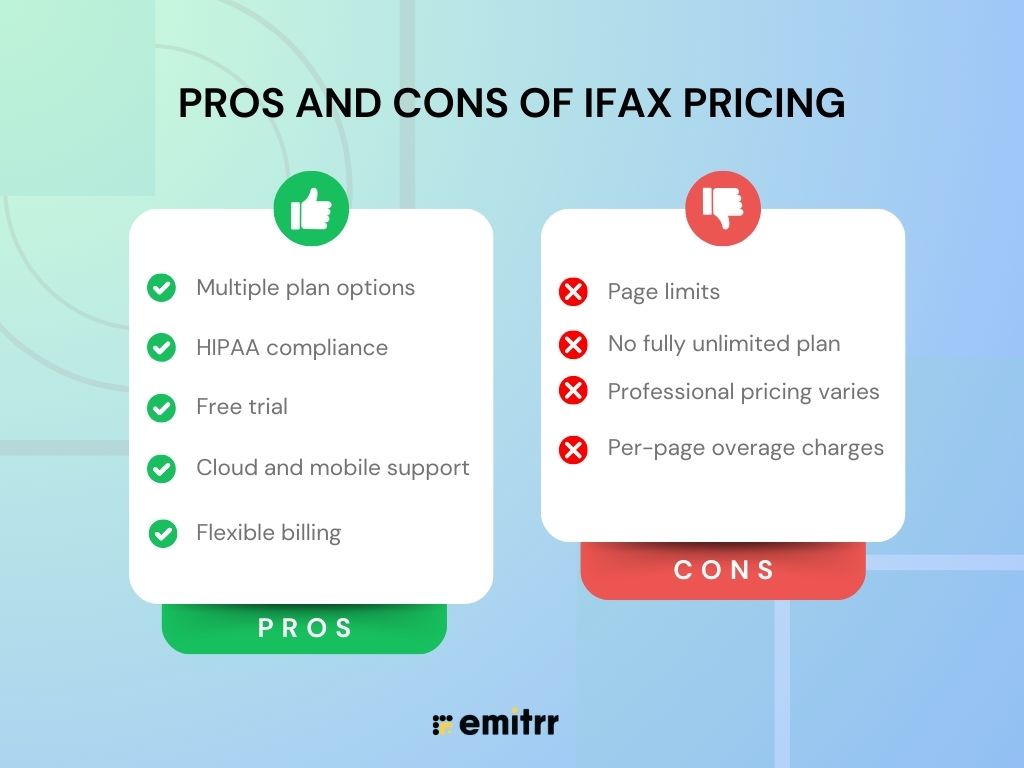
Take a quick look at the pros and cons below:
Pros of iFax Pricing
- Multiple plan options: You can choose from basic to professional tiers based on fax volume and needs.
- HIPAA compliance: All paid plans include secure, compliant faxing suitable for regulated industries.
- Free trial: A 7-day trial lets you test before committing.
- Cloud and mobile support: Fax from email, web apps, and mobile devices.
- Flexible billing: Options to choose monthly or annual payments.
Cons of iFax Pricing
- Page limits: Each plan has a monthly page cap; exceeding it may lead to extra fees.
- No fully unlimited plan: No plan includes unlimited pages without additional cost.
- Professional pricing varies: Some higher tiers require contacting sales, which may delay clarity on exact costs.
- Per-page overage charges: Exceeding the monthly allowance can increase the cost.
Emitrr Pricing
Emitrr’s virtual faxing is simple and intuitive. Teams can upload documents, fax directly from the dashboard, and keep everything securely stored in one place. This is a major advantage for healthcare practices that manage referrals, prescriptions, insurance documents, and patient records daily. Emitrr does not treat faxing as a standalone utility. It becomes part of a broader communication ecosystem that improves team efficiency and workflow automation.
Emitrr offers two VoIP plans, Standard and Professional, to match different levels of business needs. Pricing starts at $20 per user per month when billed annually. Both plans come packed with a myriad of features that help businesses handle calls, automate follow-ups, and streamline customer communication seamlessly.
Take a quick look at Emitrr’s VoIP pricing for each plan:
| Name of the plan | Pricing if paid annually | Pricing if paid monthly |
| Standard | $20 per user per month | $25 per user per month |
| Professional | $30 per user per month | $35 per user per month |
Get a clear breakdown of the pros and cons of VoIP in this video:
Standard Plan
The Standard Plan includes unlimited calling per user and a collection of essential tools to manage day-to-day communication for small teams. While the features are limited, they cover exactly what most businesses need to stay connected and organized. No clutter, no confusion.
With this plan, you get access to:
- HIPAA-Compliant Virtual Faxing: Send and receive HIPAA-compliant virtual faxing securely within the same platform. No need for a separate fax provider.
- Unlimited Calling (outbound and inbound): Each user can make and receive as many calls as needed every month to keep daily communication flowing smoothly.
- HD Voice: HD Voice improves call clarity so conversations sound crisp and professional.
- Call Hold Music: With call hold music, callers hear music while they wait, helping create a smoother on-hold experience.
- Call Recording (manual): Manual call recording allows users to record calls on demand for training or documentation.
- Call Queue Groups: Call queues organize incoming calls and hold them in line when all users are busy.
- Call Extensions: Call extensions assign direct lines or codes to individual team members or departments for easier internal routing.
- Call Routing (During and After Hours): Call routing during and after hours sends callers to different destinations depending on your set schedule.
- Call Transfer: With call transfer, live calls can be sent to another user or department without disruption.
- Call Forwarding: Call forwarding redirects incoming calls to alternate numbers or devices when you are away or unavailable.
- Number Porting: VoIP call porting enables you to keep your existing business phone number when moving to Emitrr. You can easily transfer your current VoIP number without changing what your customers already know.
- Contact Sync: Contact sync keeps your customer lists up-to-date and easily accessible during calls.
- Set Personal Working Hours: With Personal Working Hours, each user can define their call availability.
- Mobile App: Emitrr’s mobile business communication app allows users to handle calls and messages directly from their smartphone, wherever they are.
- AI Agent Customization: This is the most powerful way to simplify your workflows into a single dashboard. You can create your own AI agent to handle routine queries, assist with call routing, and support your team by managing basic interactions.
Watch Emitrr’s all-in-one AI voice agent transform your communication experience:
Professional Plan
The professional plan builds on everything included in the standard plan and a set of advanced tools to give your team more control, more automation, and a smarter way to handle calls. It is a solid choice for businesses that are growing, juggling high call volumes, or are set to take their communication system to the next level.
With the Professional Plan, you unlock the following features:
- Call Transcription: Call transcription automatically converts voice into text, making it easier to review and keep track of important details.
- IVR (Interactive Voice Response): IVR, also known as a call tree, helps guide callers to the right department or team member through a simple, automated menu.
- Call Recording (automated): Automated AI call recording captures every conversation without needing to press a button, so nothing gets missed.
- Missed Call Auto Text: Missed call auto text sends a quick, automated message to customers when you are unable to pick up, helping you stay responsive.
- Call Conference: Call conference allows multiple people to join the same VoIP call, making it easy to run meetings or group discussions directly through the platform.
- Voicemail Transcription: This voicemail transcription software turns recorded messages into readable text, saving you time when checking voicemails. If your calls are slipping through, this feature helps you catch up without missing context.
- HIPAA Compliance: Healthcare and other regulated industries need extra protection when it comes to customer data. A HIPAA-compliant communication helps you stay within the rules, keep sensitive information secure, and stay away from any legal trouble.
- Access Management: Access management gives you control over who can view or change settings, helping you manage permissions across your team.
How Emitrr Offers Better Value for Money As Compared to iFax?
Emitrr stands out with its capability to deliver far more than basic faxing. Customers consistently rate the platform highly, with an average rating of 4.8, reflecting satisfaction with usability, reliability, and support. This goes beyond features on paper. It reflects how smoothly the system fits into everyday operations.
Let’s take a closer look at the areas where Emitrr delivers stronger value.
Predictable Pricing
Many fax solutions rely on usage-based pricing tied to page limits. As document volume increases, businesses often need to upgrade plans or pay additional charges. This can make monthly costs difficult to anticipate. Emitrr follows a more predictable pricing model. Costs are communicated clearly upfront, so that businesses can plan budgets confidently. There is no pressure to constantly track usage or worry about unexpected fees.
More Than Just Faxing
Traditional internet faxing tools focus primarily on sending and receiving documents. That works for basic needs, but businesses typically require more comprehensive communication capabilities. Emitrr’s VoIP faxing opens up new possibilities by combining faxing, SMS, and AI-powered features. With capabilities like broadcast faxing, teams can manage communication more efficiently instead of relying on multiple disconnected tools.
Improved Workflow Efficiency
Faxing often connects to other tasks such as confirmations, follow-ups, SMS appointment reminders, and internal coordination. Most digital fax services offer limited support for these extended workflows. Emitrr improves efficiency through rich features like an AI voice chatbot. This helps teams reduce manual work and respond faster.
Get access to 100+ ready-to-use fax cover sheet templates, available free in PDF format. Perfect for those moments when you just need a clean, professional cover page instantly.
AI-Powered Communication
Most fax providers function as document fax transmission services. They do not actively enhance how businesses manage calls or conversations. Emitrr integrates AI into daily communication processes. Calls can be transcribed, routed intelligently, and supported by automation rules, so teams stay organized and productive.
Seamless Integrations
Emitrr integrates effortlessly with 500+ tools, including platforms like Athenahealth, Dentrix, and HubSpot. This ensures data flows smoothly across systems, reduces manual updates, and allows teams to manage everything from Emitrr with far less friction.
Reliable Customer Support
Support quality becomes critical when communication tools directly impact daily operations. Delayed responses or unresolved issues can disrupt workflows and create frustration. Emitrr is recognized for responsive onboarding and customer assistance. Businesses receive timely guidance during setup and faster resolution when issues arise, which contributes to a smoother overall experience.
Reduced Reliance on Multiple Tools
Using different platforms for faxing, texting, and calling often results in fragmented workflows and inefficiencies. Emitrr centralizes communication channels into a unified dashboard. Teams can gain better visibility, improved coordination, and a more streamlined workflow.
Key Takeaways
- iFax pricing is built around page-based monthly plans
- Suitable for individuals and businesses with a stable fax volume
- HIPAA compliance included
- Page caps can impact heavy users
- Growing teams often look for an iFax alternative
- Emitrr combines faxing, VoIP, AI, and automation in one system
- Higher upfront cost but broader long-term value
Frequently Asked Questions
iFax offers a 7-day free trial, but ongoing use requires a paid subscription after the trial ends.
Yes, iFax is widely used and reviewed as reliable, secure, and easy to use for sending and receiving faxes across devices, including mobile and web.
Plans have monthly page limits that can lead to extra charges if exceeded, and there’s no unlimited page plan in standard tiers.
Yes, you can cancel your iFax subscription through your account settings; just ensure cancellation before the next billing cycle to avoid charges.