
 4.9 (400+
reviews)
4.9 (400+
reviews)
Introduction
Picture this. It’s a busy Tuesday morning at your clinic. You’ve just finished a well-baby check-up, there’s a line of parents waiting, and your phone keeps buzzing – “When’s my child’s appointment?” “Can I get my bill?” “Do we still have vaccines tomorrow?”
Now imagine you don’t have to type the same replies again and again. Instead, you’ve got SMS template for pediatricians ready for every situation! One tap, message sent, parents informed. That’s what this guide is here for. We’ve rounded up over 40 best sms template for pediatricians you can put to work right away!
Along the way, we’ll talk about why texting has become such a big deal in pediatric care, how to keep messages short and HIPAA-friendly, and simple ways to send them without it eating into your day. By the end, you’ll have a set of messages ready to go, making it easier to keep parents informed while you focus on the kids.
Why SMS Matters in Pediatric Clinics
Text messages are hard to ignore, and that’s great news if you’re trying to reach parents. Texts have a near-perfect open rate of 98%, while emails often hover around just 20-25%. Plus, most texts get read within minutes, not hours.
Role of SMS in Parent Communication
- Fast, reliable updates: Texts reach parents instantly, even when they’re busy or on the go
- Preferred by parents: 89% of people say they’d rather get a text than a call from their healthcare provider
- Instant reassurance: A quick “Yes, you can give Tylenol” beats waiting for a callback
- Friendly and discreet: Parents can get updates without interrupting their day
- Trust-building channel: Meeting parents where they are helps build lasting trust
Role of SMS in Clinic Operations
- Lower no-show rates: Text reminders can reduce no-shows by up to 26%
- Saves staff time: No more endless calls or voicemail tag, one text gets the job done
- Quick routine tasks: Send billing alerts, insurance updates, or follow-up messages in seconds
- Easy reference: Parents can check back on texts for appointment dates or instructions
- Smoother scheduling: Keeps the day organised and focused on the kids in the clinic
Best Practices for Sending SMS
Having templates is great, but how you send texts matters too. Here are some best practices for effective and professional messaging. Each of these tips will help ensure your patient message template hits the mark.
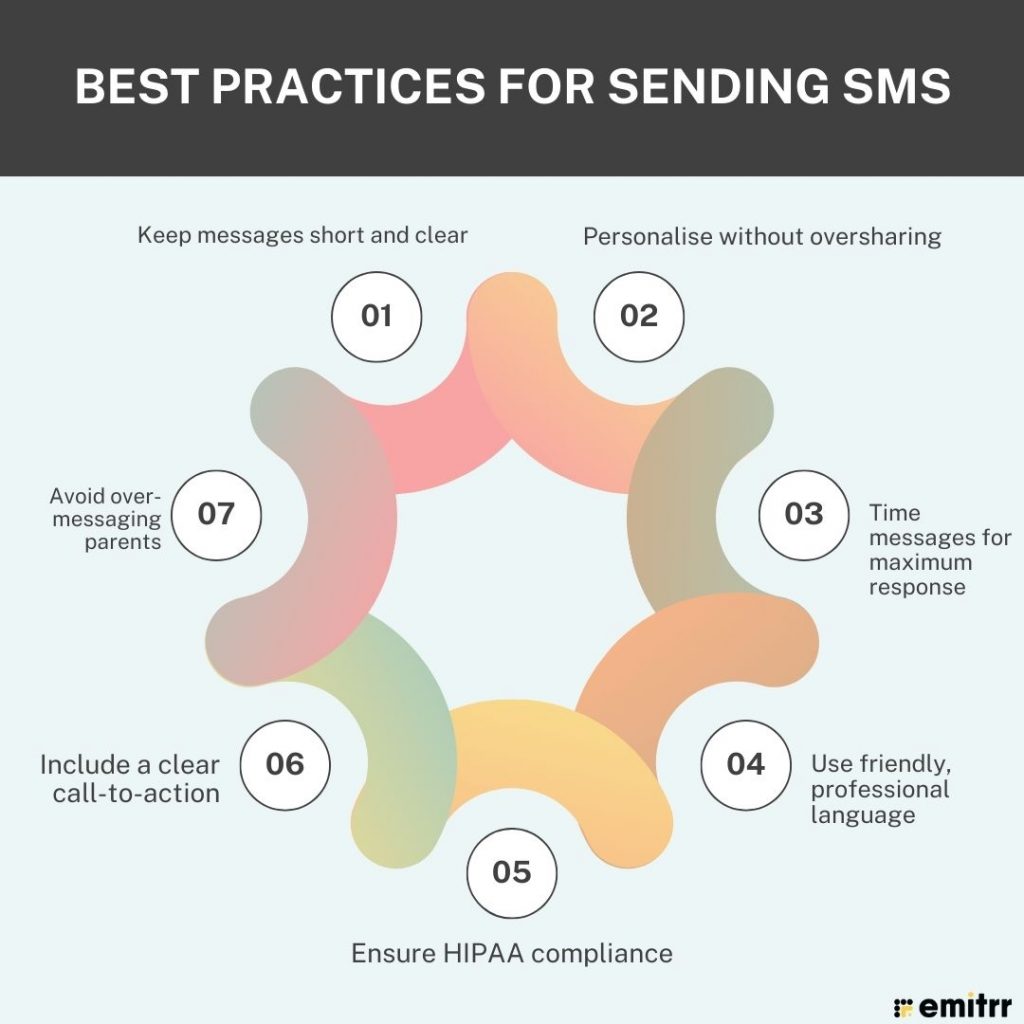
Keep messages short and clear
Short and simple always wins. Parents are busy, and most will read your text on a lock screen or smartwatch. If it’s too long, the key info might get cut off or skipped. Aim for 160 characters if possible, something they can read and understand in a few seconds. Avoid cramming in long explanations or multiple questions. One clear point per text works best.
Personalise without oversharing
A personalized text message goes a long way. Using the parent’s name and the child’s name when it makes sense feels warmer than “Dear patient.” But keep privacy in mind. Avoid including sensitive medical details in a regular text. You can mention the reason for contact in general terms, but skip specifics like diagnoses or lab results.
Time messages for maximum response
When you send a text matters just as much as what you say. Appointment reminders work best one or two days ahead, usually late morning or early evening. Avoid early-morning pings or late-night buzzes for non-urgent updates. Be mindful of school runs, dinner times, or other busy moments. Well-timed texts show you respect parents’ schedules.
Use friendly, professional language
Think of your text like a quick, in-person chat. Start with a warm greeting and keep the tone polite. Skip the slang, but also avoid stiff medical terms that feel distant. Say “check-up” instead of “pediatric wellness examination.” Clear, friendly language makes your clinic approachable and helps parents feel comfortable replying.
Ensure HIPAA compliance
Privacy always comes first. Don’t send test results or detailed health info in a standard text. Use a HIPAA-compliant platform for anything sensitive, and make sure parents have agreed to receive texts. Keep it general when needed and move private details to secure channels. That way, you can text freely without risking privacy issues.
Include a clear call-to-action
If you need the parent to do something, your message should clearly state that. Whether it’s “Reply Y to confirm,” “Click here to pay,” or “Call us to schedule,” make the next step crystal clear. If it’s just an update, invite them to reach out with questions. Clarity saves time and avoids back-and-forth confusion.
Avoid over-messaging parents
More texts don’t mean better communication. Stick to messages that are useful or time-sensitive. A reminder the day before and maybe a quick same-day update works well. Combine non-urgent updates or space them out. And if a parent opts out, stop immediately. This keeps your texts welcome, not annoying.
Types of SMS You Can Send in a Pediatric Setting
There are many situations where quick sms templates for healthcare can be helpful. Here are some common types of SMS messages pediatric clinics send, each serving a different purpose.
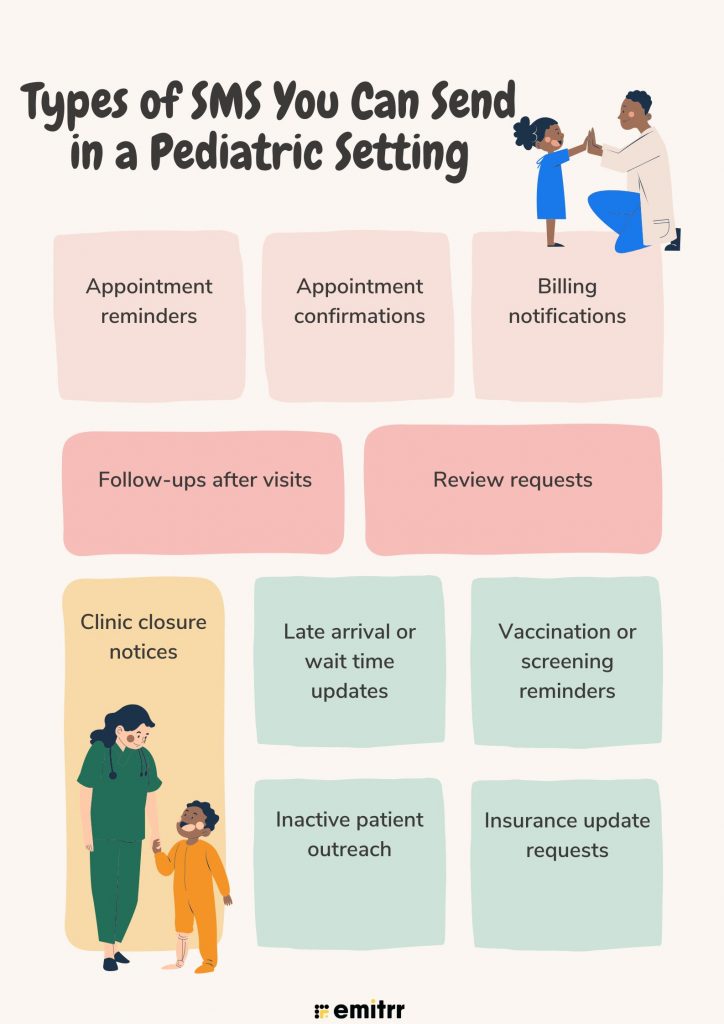
Appointment reminders
A quick appointment reminder text can save everyone a lot of hassle. Send it a day or two before the visit, or even a few hours ahead on the same day. Always mention the date, time, child’s name, and your clinic name so there’s no confusion. Parents have a lot on their plates, so it’s easy for an appointment to slip their minds. A friendly nudge helps them show up on time or reschedule if needed.
Appointment confirmations
This is your way of saying, “We’ve got you booked.” Send it right after the appointment is made so parents can save it on their phone. Something simple like “Your appointment is confirmed for [Date] at [Time]” works well. If there’s anything they should bring or do, add that too. It stops mix-ups before they happen and gives parents peace of mind. Plus, it’s a nice touch that makes your clinic feel welcoming.
Billing notifications
No one really loves talking about bills, but keeping it clear and polite makes it easier. A short text can let parents know a bill is ready, remind them about a balance, or confirm a payment. SMS is quicker than mail and harder to miss than email. Add a payment processing link or simple instructions if you can. This way, bills get sorted faster, and you don’t have to chase multiple calls.
Follow-ups after visits
Once the family walks out, your care doesn’t stop. A quick check-in like “How’s Mia doing today?” shows you genuinely care. You can also remind them about any instructions. Parents love knowing you’re still looking out for their child. It’s a great way to catch any problems early and keep them from turning into bigger issues.
Review requests
Happy families can be your best advocates. After a visit, send a short thank-you and a gentle ask for feedback. Something like “We’d love to hear your thoughts if you have a minute” feels friendly and low-pressure. Add a direct link so it’s easy to leave a review. This not only boosts your pediatric clinic’s reputation but also gives parents a chance to share any concerns privately.
Clinic closure notices
If you’re closing for a holiday, bad weather, or any reason, a quick SMS keeps everyone in the loop. Let them know the date, reason, and what happens next, like how you’ll reschedule. A warm, reassuring tone helps soften the inconvenience. It also shows you value their time and don’t want them turning up to a locked door.
Late arrival or wait time updates
Delays happen! Whether it’s them or you. If a parent is late, a quick “Are you on your way?” works wonders. If you’re running behind, a short “We’re about 15 minutes late” helps them plan. Parents appreciate knowing what’s going on rather than sitting and wondering. It’s a small effort that makes a big difference in keeping things friendly and stress-free.
Vaccination or screening reminders
It’s easy for parents to lose track of routine care. A friendly “It’s time for Jake’s check-up” or “Mia’s flu shot is due” is a helpful nudge. Keep it upbeat and highlight the benefit of staying on top of health checks. It keeps kids healthy and helps you fill your calendar, everyone wins!
Inactive patient outreach
Life gets busy, and sometimes families just stop coming in. A warm message can be all it takes to bring them back. No pressure, just a reminder that check-ups matter and you’d love to see them again. Make it easy for them to book with a simple reply or link.
Insurance update requests
Insurance changes happen, and missing details can cause headaches. A quick “Please update your insurance info with us” saves everyone trouble later. Offer an easy way to send it – a secure link, a photo, or just bringing the card in next time. Parents will be glad you reminded them before it became a problem.
Ready-to-Use SMS Templates for Pediatricians
Here are 40 SMS templates made just for pediatric clinics. We’ve sorted them into categories so you can quickly find what you need. Just tweak the wording to match your clinic’s style and add in the details like names, dates, or times!
Appointment Reminder
Use these templates to remind parents of an upcoming appointment for their child. (Be sure to insert the correct name, date, and time.)
“Hello [Parent Name], this is [Clinic Name]. Just a friendly reminder of [Child Name]’s appointment on [Date] at [Time]. Please reply ‘Y’ to confirm or call us if you need to reschedule. See you soon!”
“Hi [Parent Name]! [Child Name] has a check-up scheduled for [Date] at [Time]. We look forward to seeing you at [Clinic Name]. Reply to confirm or let us know if you need to make any changes. Thanks!”
“Reminder: [Child Name] has an appointment at [Clinic Name] on [Date] at [Time]. Please arrive a few minutes early. Reply YES to confirm or call [Clinic Phone] to reschedule if needed.”
“Just a quick reminder from [Clinic Name]. [Child Name]’s appointment is on [Date] at [Time]. We’re excited to see you! If you can’t make it, kindly call us in advance to reschedule. Thank you!”
Appointment Confirmation
These templates confirm an appointment has been set and provide key details. Send them right after scheduling an appointment for clarity.
“Hi [Parent Name], [Child Name]’s appointment at [Clinic Name] is confirmed for [Date] at [Time]. We’ve got you on our calendar! Reply to this message if you have any questions. See you then!”
“Your appointment for [Child Name] on [Date] at [Time] is confirmed. Thank you for scheduling with [Clinic Name]! If anything changes or you need to cancel, please call us at [Phone Number].”
“Appointment confirmed: [Child Name] will see Dr. [Doctor Last Name] on [Date] at [Time] at [Clinic Name]. Please arrive 10 minutes early to fill out any needed forms. We’ll send a reminder as the date approaches.”
“Thank you for booking with [Clinic Name]! [Child Name] is all set for [Appointment Type] on [Date] at [Time]. If you need to update insurance or have questions before then, just let us know. We look forward to seeing you!”
Billing Notification
Use these to gently remind about bills or inform parents of invoices. Keep the tone polite and provide a clear action (like a link or phone number to pay).
“Hello [Parent Name], this is a billing reminder from [Clinic Name]. The invoice for [Child Name]’s visit on [Visit Date] (Amount: $$$) is now available. Please visit [Payment Link] to view and pay at your convenience. Thank you!”
“Hi [Parent Name], just a heads-up from [Clinic Name]: there’s an outstanding balance of $$$ for [Child Name]’s last visit. Please give us a call at [Phone] or pay online at [Link] when you get a moment. We appreciate your prompt attention!”
“Good news, your payment for [Child Name]’s [Visit Date] visit was received! Thank you for taking care of that. If you need a detailed receipt or have any questions about the bill, reply here or contact our office.”
“Dear [Parent Name], we’ve processed the insurance for [Child Name]’s recent visit. Your copay amount is $$$. You can settle this via our patient portal [Portal Link] or in person at your next visit. Thanks for being on top of this!”
Follow-Up After Visit
These templates help you check in on the child after an appointment or remind parents of the required care instructions. They show you care and open a door for any questions.
“Hi [Parent Name], this is [Clinic Name] checking in. We hope [Child Name] is feeling better after the visit. If you have any questions about the care plan or new symptoms, just reply to this text or call us. We’re here to help!”
“It’s been a couple of days since [Child Name]’s appointment. How are things going? If [Child Name] isn’t improving or you’re concerned about anything, please let us know. Get well soon!”
“Thank you for visiting [Clinic Name] yesterday. We wanted to check if everything is okay with [Child Name] post-visit. If you think of any questions or if something isn’t going as expected, we’re just a text or call away. Take care!”
“Hello [Parent Name], after [Child Name]’s shots today, we expect them to be a little fussy or maybe have a mild fever. That’s completely normal. If you’re worried or need advice, reply here and we’ll gladly assist!”
Review Request SMS Template
After a successful visit, use these to encourage parents to give feedback or an online review. Keep it casual and appreciative.
“Hi [Parent Name], thank you for visiting [Clinic Name] with [Child Name] today! We hope you had a great experience. If you have 30 seconds, could you share your feedback in a quick review? Here’s a link: [Review Link]. We really appreciate it!”
“Hello from [Clinic Name]! We’re so glad we could care for [Child Name]. If we made your day a little easier, would you mind leaving us a short review online? Thank you for being part of our clinic family!”
“Your opinion matters to us. If you have any feedback about [Child Name]’s recent visit, please reply and let us know. And if you’re happy with our care, a brief review on our page would mean a lot. Thanks for helping us improve!”
“Hi [Parent Name]! Just wanted to say we appreciate you choosing [Clinic Name]. If you’ve been pleased with our care for [Child Name], could you do us a small favor? Leave a star rating or review at [Link] so other families can find us. Thank you so much!”
Clinic Closure Notice
Use these to inform patients about unexpected closures or changes in hours. Be clear about dates and any next steps.
“NOTICE: [Clinic Name] will be closed on [Date] due to [Reason, e.g. Memorial Day Holiday]. If you had an appointment that day, we’ll be reaching out to reschedule it. We apologize for any inconvenience. Have a safe holiday!”
“Update from [Clinic Name]: Due to the severe weather, our office is closing early today at [Time]. All afternoon appointments will be contacted to reschedule. Please stay safe, and we’ll be back to serve you during normal hours tomorrow.”
“Heads up: Our clinic will be closed tomorrow (Wednesday) for a staff training day. We’ll reopen on Thursday at 8 am. If you need to reach us urgently, call our after-hours line at [Phone]. Thank you for understanding!”
“Unexpected closure: [Clinic Name] is currently without power, so we have to close for the rest of today. If you had an appointment, we will call/text you to re-book once we’re up and running. We’re sorry for the inconvenience, and thank you for your patience.”
Late Arrival or Wait Time Notification
These templates help communicate about delays, whether the patient is late or the clinic is behind schedule. Always remain courteous and understanding.
“Hi [Parent Name], we have [Child Name]’s appointment scheduled at 10:00 AM today. It’s 10:15 now and we haven’t seen you yet. Is everything okay? If you’re running late or need to reschedule, just let us know.”
“Hello [Parent Name], just a quick update from [Clinic Name]: Dr. [Last Name] is running about 15 minutes behind schedule. We apologize for the wait. If you prefer to reschedule [Child Name]’s appointment instead of waiting, please reply or call us. Thank you for your patience!”
“We’re sorry for the delay, things are a bit busier than expected today. [Child Name]’s appointment might start roughly 10-15 minutes later than planned. We appreciate your understanding and promise to be with you as soon as possible!”
“Hi [Parent Name], if you’re on the way but running late to [Child Name]’s appointment, no worries. Just shoot us a text with your ETA. If we need to adjust the schedule or rebook, we’ll do our best to accommodate.”
Vaccination or Screening Reminder
Use these to remind parents about important preventive care (vaccines, annual check-ups, screenings). Emphasize keeping the child healthy.
“Hello [Parent Name], [Clinic Name] here. Our records show [Child Name] is due for their next vaccination. Please call us at [Phone] or reply to this text to schedule an appointment at your convenience. Let’s keep [Child Name] up-to-date and healthy!”
“Hi [Parent Name]! It’s time for [Child Name]’s yearly wellness exam. Regular check-ups are key to staying healthy. When you’re ready, give us a call or text back to book a visit. We can’t wait to see you both!”
“Friendly reminder: [Child Name] is due for a routine screening as they just turned [Age]. Let’s make sure everything is on track. Reply or call [Clinic Name] to set up a quick screening appointment.”
“Flu season is coming up, and we want to keep [Child Name] safe! The flu vaccine clinic at [Clinic Name] starts next week. Reply if you’d like to reserve a slot for [Child Name], or call us to learn more. Stay healthy and warm this season!”
Inactive Patient Outreach
Re-engage families who haven’t been in for a while with a warm invite to schedule a check-up.
“Hi [Parent Name], it’s been a while since we’ve seen you and [Child Name] at [Clinic Name]! We hope you’re doing well. If it’s time for a check-up or if you have any concerns, we’d love to see you. Reply or call us to set up an appointment at your convenience.”
“[Child Name] is due for a visit, and we’ve missed you! Life gets busy, we understand. Whenever you’re ready, we’re here to provide a wellness check or any care needed. Just give us a call or text back to book a date that works for you.”
“Hello [Parent Name], just a friendly note from [Clinic Name]. We noticed [Child Name] hasn’t had a yearly exam in over a year. If you’d like to come in, we have openings. You can text or call. Take care!”
“Long time no see! We hope [Child Name] is doing great. If you’ve been holding off on that next appointment, now’s a good time to get back on track. Reply to schedule a visit, and we’ll find a time that works for you. We’re here whenever you need us.”
Insurance Update Request
Prompt parents to update or confirm their insurance details to avoid any billing hiccups. Keep it straightforward.
“Hi [Parent Name], this is a quick request from [Clinic Name]. We’re updating our records and need to confirm [Child Name]’s insurance info. When you have a moment, please reply with any new insurance details or give us a call. Thanks for helping us keep things running smoothly!”
“Insurance check: Our files show that [Child Name]’s insurance might have changed or expired. To ensure your visits are covered, please update your insurance information with us. You can text back a photo of the new card or call our office for assistance.”
“Dear [Parent Name], as of [Date], [Child Name]’s insurance on file is due for renewal. Please let us know if there have been any changes to your insurance plan. Keeping your info up-to-date helps us serve you better. Thank you!”
“Hello! [Clinic Name] here with an administrative reminder. If you’ve switched jobs or insurance providers recently, could you verify [Child Name]’s current insurance details with us? It will only take a minute via text or phone. Thanks in advance for your help!”
When to Use SMS vs. Voicemail in Pediatric Clinics
Texting is fantastic for many situations, but sometimes a good old phone call or HIPAA-compliant voicemail is more appropriate. How do you decide the best way to reach out? As a rule of thumb, use SMS for quick, routine updates and use a voicemail for more urgent or sensitive communication. Here’s a quick comparison of when to use each:
| Scenario | Best Method | Reason |
| Routine reminder or confirmation | SMS | Quick and non-intrusive. Parents can check and reply without stopping what they’re doing |
| Detailed or sensitive information | Voicemail | Better for explaining clearly and showing empathy |
| Urgent matter/ no response to text | Voicemail | Gets attention faster and lets you leave a message if needed |
| Clinic-wide announcement (non-urgent) | SMS | Reaches everyone at once and is more likely to be read |
| After-hours or emergency instructions | Voicemail | Ensures urgent info is heard and understood right away |
Most things are easy to handle with a quick text. But if it’s personal or urgent, a call is better. Many clinics do both. They start with a friendly text, and if there’s no reply, follow up with a call to make sure parents get the help they need.
How Pediatric Clinics Can Use Emitrr’s SMS Templates for Sending Messages
Sending texts to parents with Emitrr is super simple, and once you set it up, it can run in the background while you focus on your little patients. Here’s exactly how to do it:
- Log in and find the campaign tab: Open your Emitrr dashboard, then head over to “Campaigns > Text Campaigns”.
- Start a new campaign: Click on “Create Campaign”. A new page will pop up, give your campaign a clear name so you know what it’s for later.
- Pick your template: Scroll down to the Template option. Here, you can grab one of Emitrr’s ready-to-use pediatric templates or click “Create Template” to make your own from scratch.
- Write your message: If you’re making a new one, give it a name and type your text in the box. Want it to feel personal? Click “Use a Property” to drop in details like [Parent Name], [Child Name], [Appointment Date], or [Time]. That way, each message feels like it was written just for them.
- Decide when it goes out: Choose “Immediately” if you want it sent right away, or “Later” if you’d rather schedule it. You can even set up triggers, like having appointment reminders go out 2 days before every visit without you lifting a finger.
- Add your contacts: Hit “Next” and upload the list of parents you want to reach.
- Double-check privacy: Make sure you have permission to text each parent and avoid putting sensitive health details in the SMS. Emitrr is HIPAA-compliant, but it’s still best to keep texts general.
- Send and keep track: Click “Next”, then “Confirm and Send”. From there, you can see who got your message, who replied, and respond right inside Emitrr. So all your conversations stay in one place.
With this setup, you can send appointment reminders, vaccine day alerts, or quick follow-ups in just a few clicks. Once it’s rolling, Emitrr does the heavy lifting so you and your team can spend more time caring for kids and less time chasing phone calls!
Frequently Asked Questions
Just keep it simple by using a HIPAA-compliant texting platform like Emitrr that offers encrypted text messaging and a BAA. Don’t include private health details in texts. Stick to things like appointment reminders or general updates, and always get parent or guardian consent first.
Yes, totally! Emitrr lets you add placeholders like [Parent Name] or [Child Name] so each text feels personal. For example, “Hi Sarah, this is Sunshine Pediatrics reminding you about Emma’s visit on Monday.” It’s still automated but feels one-to-one.
Usually, 24-48 hours before the appointment works best. That’s enough time for parents to plan, but not forget. Try late morning or early evening, times when parents are more likely to check their phones.
Emitrr can send messages on its own once you set it up. You choose the template, timing, or trigger (like an appointment date), and it does the rest. It can handle reminders, follow-ups, even vaccine due alerts, all without your staff having to remember!
Absolutely! Emitrr shows you if texts were delivered and who replied. You can see confirmations, follow up on no-responses, and even set auto-replies. It turns texting into a two-way chat so you can keep the conversation going with parents.
Conclusion
Texting is such an easy win for pediatric clinics. Parents read them, they’re quick to send, and they save you from endless phone calls. With the templates and tips we’ve shared, you can keep families in the loop without adding extra work to your day. Just keep your texts short, warm, and privacy-safe, and you’re good to go!
The best part? With Emitrr, you set things up once and the messages send themselves, personalised so every parent feels it’s just for them. You can even start with our free templates and watch how much smoother your days get. And if you’re ready to really level up your parent communication, book a free demo with Emitrr. It’s the simplest way to make scheduling stress-free and keep families happy!