
 4.9 (400+
reviews)
4.9 (400+
reviews)
Introduction:
“You might only have 160 characters to gain a patient’s trust.”
Texts can be more than administrative instruments; they can be the first contact some patients have with your practice. A missed call or short message can both make a difference in communicating with patients and affect their loyalty. In today’s increasingly fast-paced healthcare environment, patients are looking for rapid, clear, and personalized messaging—if they’re not receiving it, they’re likely to look for it elsewhere.
For doctors, communication barriers, such as missed appointments, ignored follow-ups, and impersonalized messages may cause friction in the patient experience. This is where strategic use of SMS can help. This guide includes practical case studies, 35+ SMS templates you can customize, and resources to help you eliminate no-shows, boost patient interaction, and seamlessly manage your schedule.
SMS Templates for Physicians
Why SMS works: SMS has a 98% open rate! SMS is immediate, non-invasive, mobile, and the tool most patients prefer.
1. Appointment Reminders
Use case example: Reducing no-shows and schedule consistency; maximizing providers’ capacity.
“Hello [Patient Name], this is [Clinic Name]. You have an appointment with Dr. [Physician Name] on [Date] at [Time]. To confirm, reply YES or to reschedule, call [Phone Number].
“Hi, just a gentle reminder your session with [Provider Name] is in 2 hrs at [Clinic Name]. Please arrive ten minutes early.”
“Hi [Patient Name], your appointment with Dr [Dr. Name] is on [Date] at [Time]. Need to reschedule? Click: [Reschedule Link]”
“You have an appointment with Dr. [Physician Name] at [Clinic Name] on [Date] at [Time]. Respond CONFIRM or call at [phone number] for modifications.”
“Hi [Patient Name], your appointment with Dr. [Physician Name] is on [Date] at [Time]. Complete forms: [Forms Link]. Questions? Call [Phone Number].”
2. Follow-Up Instructions / Post-visit Care
Use case example: To provide adherence to care, guide next steps, and improve the experience of post-visit care and follow-up instructions. (This could also account for follow-up with lab tests as needed by efficient medical scheduling systems.)
“Hi [Patient First Name], and hope you are doing better! Follow up and do not forget your bloodwork by Friday. Call [phone number] for support.”
“Thank you for your visit with us! Here is your medication information: [Short Link]. Please make sure to follow closely.”
“Hello [Patient First Name], don’t forget to book your follow-up with Dr. [Physician First Name] in 2 weeks. To book your appointment: [Booking Link] or call.”
“Your lab results are now available in the patient portal: [Portal Link]. If anything comes up, we will be in contact.”
“Get plenty of rest and keep the area clean. For care tips, see: [Care Tips Link]. Call us if you have more serious symptoms.”
“URGENT: [Patient Name], please call [Clinic Name] at [Phone Number] as it relates to your visit.”
3. Reminders on Payment & Insurance
Use case example: Making payments fast, clarifying amount dues, and decreasing the load of the billing process with the help of medical practice scheduling software.
“Your invoice from [Clinic Name] dated [Date] is ready. You can make your payment online at: [Payment link].”
“Reminder that your co-pay of $[Amount] dated [Date] is due. You can pay online: [Payment link] or in person.”
“Dear [Patient Name], your payment of $[Amount] dated [Date] is past due. You can pay at [Payment link] or give us a call at [Telephone Number].”
Template 4 (Insurance Update Request): “Hi [Patient Name], let us know if we can get a copy of your updated insurance info for your appointment. Update your Insurance: [link] or call us at [Telephone Number].”
“Need a hand? [Clinic Name] can help with payment plans. Find out more at: [Payment Plan Link]. Or give us a call.”
“Hi [Patient Name], your remaining balance of $[Amount] is due now, if you want to pay online, here: [Payment link]. Thank you for coming to [Clinic Name].”
4. Patient Feedback & Reviews
Use case example: Get feedback, increase ratings , and build trust by integrating scheduling management software.
“Would you mind leaving us a review? Here’s where you get to write your review: [Review Link]
“[[Patient’s Name]!] The team at [Clinic Name] is happy to have you. Got 30 seconds? Rate here: [Feedback Link]”
“We value your feedback. Tell us about your experience with Doctor [Doctor’s Name]: [Survey URL]”
“I hope you are well [Patient Name]. Loved your visit? “Leave Your Rating and Review (just click on the stars) Rate and Review/Subscribe in iTunes: [Rate and Review Link]
“We can do better! Send any feedback on your visit here: [Feedback Link]”
“Dear Your First Name, if you enjoyed your visit to [Clinic Name], write a review of us here: [Review Link]”
5. Emergency Closing/Notifications
Use case example: Notify patients regarding unexpected changes or clinic emergencies which is an essential part of reliable healthcare scheduling systems.
“[Clinic Name] is closed today because of the weather. We will be in touch to reschedule.”
“URGENT: Dr. [Doctor’s name] not available today, [date]. If an emergency, please call [Urgent Care Number] or go to ER.”
“Just a heads up, [CLINIC NAME] currently is without power. “I don’t see why you have to visit, it’s a waste of time, Call this number before your visit [Phone Number]”
“Your appointment with Dr.[Doctor’s Name] is scheduled for [date] at [time] and needs to be rescheduled urgently. We will be in touch shortly.”
“Important: [Clinic Name] has moved to a new location to [new address] effective [date]. Here are directions: [map link]”
“NOTICE: Online Scheduling is currently under maintenance and unavailable. If it’s an emergency, call [phone number].”
6. Health Campaigns and Check-up Reminders
Use case: Encourage preventive care and empower patients.
“It’s time for your annual physical, [Patient Name]. Book now: [Booking Link]”
“Flu shots are available at [Clinic Name]. Walk in or reserve: [Booking Link]”
“Don’t postpone your [Screening]. Riddle me that. Book your appointment today [Booking Link]”
“[Clinic Name] is holding a [Vaccine Type] drive on [Date]. Book: [Booking Link] or Call.
“Introducing! [New Service] is now available at [Clinic Name]. Book now: [Service Link]”
“Make sure you’re drinking enough, [Patient Name]! For additional tips, go to: [Blog Link]”
Things to Avoid in SMS for Physicians
Even with the best intentions, a few missteps in SMS can harm communication and patient trust. Knowing how to avoid them is essential for any physician scheduler seeking successful outreach.
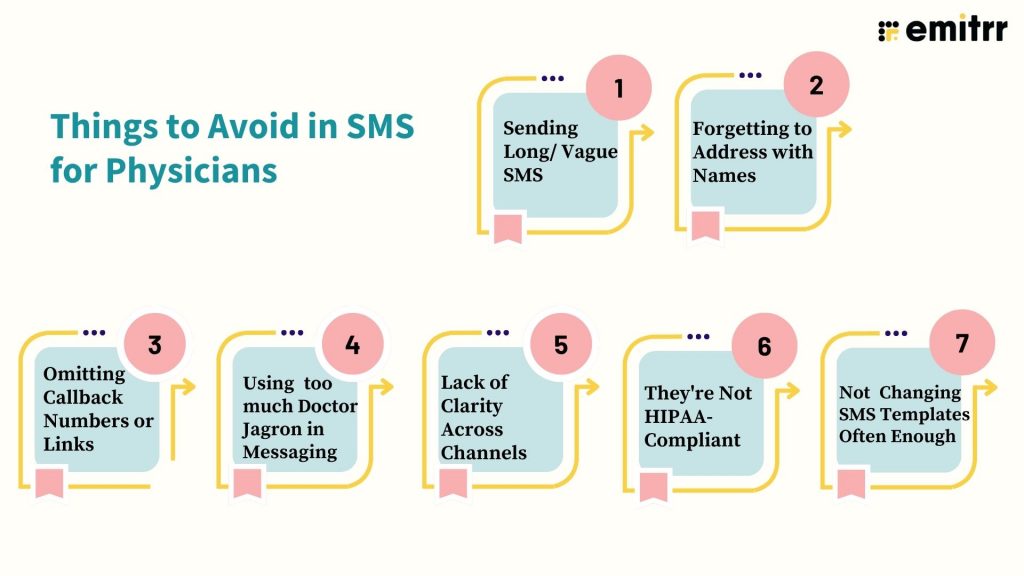
- Sending Long/ Vague SMS: Long garbled text can get confusing for a patient to decipher. Be brief, to the point, and action-oriented.
- Forgetting to Address with Names: Anything that begins with “Dear Patient” is a little bit impersonal. Leverage the patient’s name for instant rapport.
- Omitting Callback Numbers or Links: Messages should include a clear CTA—insert a phone number or a link for follow-ups or bookings.
- Using too much Doctor Jagron in Messaging: Avoid jargon. Use plain language that patients can comprehend.
- Lack of Clarity Across Channels: Incohesive messages lead to confused customers. Maintain a consistent tone and information between SMS, voicemail, and others.
- They’re Not HIPAA-Compliant: Sharing sensitive info over unsecured mediums is a HIPAA breach. Leverage HIPAA-compliant software and steer clear of insecure PHI sharing.
- Not Changing SMS Templates Often Enough: Patients are confused by old announcements. Keep them up to date for accuracy and ease of reference.
How Emitrr Improves Your Your Patient Engagement
Today’s physicians utilize multiple communication methods—calls, texts, portals—that cause inefficiencies and a fragmented patient experience, which impinges on physician scheduling and the overall ability to run a smooth practice.
Emitrr has developed an all-in-one VoIP, SMS, and voicemail platform designed for healthcare, providing a single solution to bundle patient communication. This is more than a scheduling solution, Emitrr is a complete engagement tool that provides seamless connectivity, enables the scheduling of provider availability, and enhances patient retention.
Emitrr’s essential features include:
- Customized greetings based on departments/hours so patients always hear relevant and timely messages.
- Voicemail-to-email/text so your team can listen to messages faster and without having to play back the message over again; great for automated scheduling workflows.
- Clear phone calls for better connection with patients and no dropped calls.
- An easy-to-use dashboard to view all communications: calls, texts, and voicemails in one place for easier management of medical scheduling services.
- Automated SMS for missed calls, reminders, and reviews keep engagement consistent, which improves medical scheduling systems.
Frequently Asked Questions about Physician Online Scheduling
Ans: Yes, if you have the patient’s consent via opt-in and work within the limits of other regulations such as the TCPA. Most of the medical scheduling systems will also provide consent tracking and message compliance accordingly.
Ans: Only if they are sent via the encrypted, HIPAA-compliant platform Emitrr, as an example. SMS sent via standard communication channels are not secure and all vendors were required to have a Business Associate Agreement submitted to the Office of Civil Rights.
Ans: Use an integrated system like Emitrr which combines VoIP, SMS text, voicemail-to-text/voicemail-to-email features, and scheduling functionalities, all from the same dashboard, which you can then apply workflows to within your practice.
Ans: Yes, they were designed to work with tools like Emitrr. Just load, customize, automate, and manage, and you will take your starting level of communication to a seamless management level… and close to no resistance for the entire process.

Conclusion
Communicating begins with the fundamentals! Whether it’s a friendly SMS or an appropriately timed text, the communications we send affect how patients feel about a practice. Using the appropriate tone of voice along with timing and of course, with tools like Emitrr, can help to make every appear as a platform for a true system of engagement.
If such streamlining sounds interesting, with communication automation features out of the box, and smart automtion, Emitrr is built for physicians just like you.