
 4.9 (400+
reviews)
4.9 (400+
reviews)
Introduction
Believe it or not, faxing is still alive and kicking in many businesses today. In fact, about 17% of companies worldwide still rely on faxing for critical operations. With even higher usage in healthcare, legal, and government sectors.
At the same time, we’re seeing a big shift toward cloud-based fax solutions. Analysts are now saying that fax reached a tipping point where most faxes are now sent digitally via online services rather than old fax machines. So yes! The fax market isn’t dying! It’s actually growing, thanks to the rise of digital faxing. So, traditional fax vs digital fax: which one makes sense for your business in this day and age? Let’s break down both to help you decide.
What Is Traditional Faxing?
Traditional faxing is the good ol’ classic way of sending documents. Yes, we’re talking about those chunky machines with a phone line plugged in, beeping away as they do their thing. You’ve probably seen one in a corner office, collecting dust but still somehow part of the daily routine. This method has been around for decades and still pops up in a lot of industries. Let’s break down how it actually works.
How Traditional Faxing Works
Here’s the gist: you load a paper document into the fax machine, it scans it, and turns the content into a series of funky sounds. Basically, it “talks” in code through the phone line. The machine then dials the other person’s fax number and sends those sounds across the line. On the other end, their machine “listens,” decodes the message, and prints out a paper copy of your original doc.
It’s like a quick phone call between two machines. One talks, the other listens and prints. If the line’s not busy, the whole thing usually takes a minute or so per page. Once it’s done, your machine prints a little confirmation page saying, “Yes, it went through.” At the end of the day, traditional faxing is really just scanning paper, sending it through a phone line, and printing it out on the other end. Old-school, but it gets the job done.
Key Features of Traditional Faxing
Let’s look at what defines the traditional fax setup:
- You Need the Gear: This means a real fax machine or a multi-function printer that supports fax, plus a working landline. No Wi-Fi, no cloud, just cables and dial tones.
- It Sends Sound, Not Files: Everything’s transmitted as audio tones. Think of it like your document being turned into sound waves, zipping through the phone line.
- Always a Paper Trail: Every fax comes out as a hard copy on the other side. That means more paper, more toner, and more stuff to file or shred later.
- Confirmation Pages: Once your fax goes through, you get a printed receipt with all the details – time, date, and recipient’s number. It’s old-school proof your fax landed.
- All Machines Speak the Same Language: A big plus? Even the oldest fax machine can still send and receive faxes with a brand-new one. They all speak the same “fax language,” so it just works.
- No Internet Needed: Faxing uses phone lines, not the internet. Great if you’re somewhere with no Wi-Fi, but it also means you’ve got to be near the machine to send or get a fax.
What Is Digital Faxing?
Digital faxing is the newer, cloud-based way of sending documents. Instead of using a machine and a phone line, you send files through the internet. You might’ve already “faxed” without knowing it, like emailing a PDF or uploading a document online.
That’s digital faxing in action. No paper, no beeps, no clunky machine. Just your laptop or phone doing the job from anywhere. Quick, clean, and super easy. Let’s peek under the hood to see how it really works.
How Digital Faxing Works
Here’s the flow: you upload a document (could be a PDF or image) using your email, app, or web portal. Then you hit send. The digital fax service takes it from there. If the recipient has a traditional fax machine, the system converts your file and sends it over the phone network. If they’re using digital fax, too, the whole exchange stays online.
When someone sends you a fax, it shows up in your email or app as a file. You can read it, save it, forward it, or print it if you really want to. No phone lines, no printing, and no need to stand near a machine. As long as you’ve got internet, you’re good to go.
Key Features of Digital Faxing
Let’s look at what defines the digital fax setup:
- No Machines Required: You don’t need a fax machine or a landline. Just a device with internet access.
- It Sends Files, Not Sounds: Instead of those old fax tones, it just sends files like PDFs or images through the cloud. Quick and quiet.
- All-Digital Delivery: Everything happens online. You send and receive docs without printing a thing, unless you want a paper copy.
- Real-Time Updates: You’ll know the moment your fax is sent or received. No more guessing or waiting around.
- Secure and Compliant: Your documents are encrypted and safely stored. Most services meet HIPAA, GDPR, and other data rules.
- Works With Other Apps: You can link it to tools you already use – email, CRMs, cloud drives- to keep your workflow smooth.
- Stored in the Cloud: Every fax is saved on the cloud system, so you can find, search, and share them whenever you need, no filing cabinets required.
- Send from Anywhere: Whether you’re at your desk or on the go, you can fax from your laptop or phone with Wi-Fi or mobile data.
Key Differences Between Traditional Fax and Digital Fax
Now that you know how each method works, let’s put them side by side:
| Aspect | Traditional Fax (Analog) | Digital Fax (Online) |
| Transmission Method | Over telephone lines (PSTN) as analog signals | Over the internet/cloud as digital data |
| Hardware Needed | Requires a fax machine and a dedicated phone line | No physical fax machine. Just an online service (computer or phone) |
| Document Format | Paper scanned and printed (physical documents) | Electronic files (PDFs, images) – paperless |
| Cost Factors | Ongoing costs for paper, ink/toner, maintenance, and phone line fees (can be quite high) | Typically lower costs. No consumables or phone lines. Usually, a flat monthly fee or per-page fee |
| Security | Unencrypted. Faxed papers could be seen by anyone at the machine (always check the privacy policy) | Encrypted transmission and secure cloud storage (data protected in transit and at rest) |
| Delivery Confirmation | Prints a confirmation page for each fax sent | Sends digital confirmations (email or app notification) for sent/received faxes |
| Accessibility | Only from the fax machine’s location (you must be on-site) | Accessible anywhere with internet (office, home, mobile device) |
| Scalability | Limited – one line per machine. Adding capacity means more hardware/lines | Easily scalable – add virtual fax numbers or users instantly, no extra hardware needed |
| Integrations | None. It’s a stand-alone device | Integrates with email, cloud apps, and other software (e.g., fax via email or auto-save to cloud storage) |
| Quality and Clarity | Often lower quality. Prints can lose clarity, and fax resolution is limited | High-quality documents. Digital files maintain clarity. Plus high-resolution scanning |
| Reliability | Relies on phone line quality. Busy signals, line noise can interrupt faxes | Relies on an internet connection. No busy signals. Faxes queue if needed, and auto-retry on failures |
As you can see, digital faxing gives you clear advantages in flexibility, cost, and integration. And of course, traditional faxing is beneficial when you have no internet or need a simple, standalone solution.
Pros and Cons of Traditional Fax and Digital Fax
Let’s be real, both traditional and digital faxing come with their own set of perks and headaches. It really depends on what works best for your team, setup, and day-to-day needs.
Traditional Fax
Traditional Fax Pros
- Simple and Familiar: This one’s been around forever. You feed the paper in, dial a number, press send, and boom, it’s gone! No learning curve here.
- No Internet Required: Even if your Wi-Fi crashes or there’s zero signal, you can still fax as long as the phone line is alive.
- Uses What You’ve Got: If your office already has a fax machine sitting in the corner, it’s easy to just keep using it.
- Instant Paper Copy: As soon as something comes through, it prints. You’ve got a physical copy right there, handy if you love that paper trail.
Traditional Fax Cons
- Can Get Pricey: Between phone bills, paper, ink, and fixing the machine when it jams, it all adds up over time.
- Hard to Grow With: Need to scale up? That means more machines, more phone lines, and a lot more hassle.
- Not the Most Secure: Faxes land on paper trays where anyone can grab them. Plus, no encryption means your data’s pretty exposed.
- Old-School Problems: Think smudgy prints, paper jams, and busy signals. Not exactly ideal when you’re in a rush.
Digital Fax
Digital Fax Pros
- Budget-Friendly: You cut out paper, ink, maintenance, and extra phone lines. Most online fax plans are way cheaper in the long run.
- Fax from Anywhere: At your desk, on the road, or in your PJs – you can send or read a fax from any device, anytime.
- Seriously Secure: With encryption software, your documents are stored safely. Perfect for industries like healthcare or finance that need top-notch privacy.
- Plays Nice with Your Tools: Whether it’s your email, CRM, or Google Drive, Emitrr works right alongside the tools you already use.
- Scales Without Effort: Need to add a new user or number? It just takes a click. No extra machines, no IT headaches.
Digital Fax Cons
- Needs Internet Access: If your connection drops, so does your ability to fax, unless you’ve got mobile data to back you up.
- Might Need a Quick Tutorial: If your team’s used to pressing buttons on a machine, learning a new platform could take a hot minute.
- Some Folks Still Use Old Fax: You can still send to those machines, but if theirs is out of paper or busy, you’ll hit the same old snags.
- You’re Using a Service: Your faxes go through a provider, so you’re putting trust in a third party.
Which One Is Better for Your Business Use?
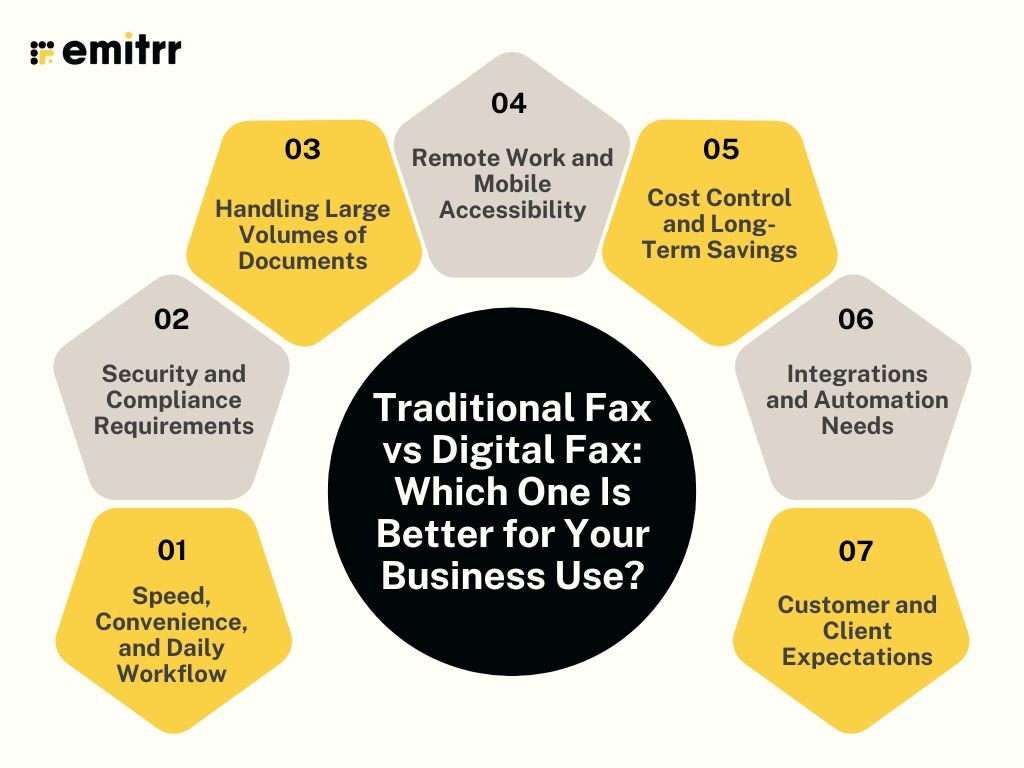
Choosing between traditional and digital faxing? There’s no one-size-fits-all answer. It really depends on how your business works day to day. Let’s talk through some key areas that can help you decide what fits best.
Speed, Convenience, and Daily Workflow
How often are you faxing stuff during the day? If it’s a regular thing, digital faxing will save you a ton of time. No walking to a machine, no waiting for dial tones, no paper jams. Just upload and hit send. You can even fax while you’re doing other things. On the flip side, traditional fax might be okay if you only send one or two documents a month. But when it comes to daily convenience? Digital wins hands down.
Security and Compliance Requirements
Got sensitive data? Think healthcare, finance, or legal. You’ll need to meet strict HIPAA compliance rules. That’s where digital fax shines. It offers encryption, secure logins, and a full audit trail. Traditional fax doesn’t do encryption, and anyone near the machine could see confidential papers. If compliance is a dealbreaker, digital fax is definitely the safer bet.
Handling Large Volumes of Documents
Do you send a lot of faxes or long ones with tons of pages? Traditional fax will slow you down. It sends one at a time and can’t multitask. Digital fax can handle bulk sending, send to many people at once, and even queue up jobs without crashing. You won’t deal with busy signals or paper running out. If your fax volume is high, go digital and don’t look back.
Remote Work and Mobile Accessibility
Not always in the office? Digital fax lets you send and receive from anywhere—your laptop, tablet, or phone. Traditional fax keeps you tied to the machine. That doesn’t work if your team is hybrid or fully remote. With digital fax, a salesperson on the road or a team member working from home can stay productive without skipping a beat.
Cost Control and Long-Term Savings
Here’s where it gets real. Traditional fax means paying for landlines, paper, ink, and machine maintenance. That stuff adds up fast. Digital fax usually has one flat monthly fee and no surprise expenses. Plus, you save time, which saves money. If your team faxes more than once in a blue moon, digital is almost always the more budget-friendly choice in the long run.
Integrations and Automation Needs
Want to make life easier for your team? Digital fax can connect with your email, CRM, cloud drive, and other tools. It can also trigger alerts, auto-save docs to folders, and even pull out info using AI. Traditional fax doesn’t do any of that. You’ve got to handle paper manually, scan it, and then deal with it. If automation and streamlined workflows matter, digital’s your answer.
Customer and Client Expectations
Think about who you’re faxing. Some clients still use traditional fax machines and expect you to fax them. Digital fax can still talk to those machines, so you’re covered. But more and more, people expect faster, smoother communication. A digital setup shows your clients that you’re modern and efficient. You’ll process things faster, respond quicker, and never have to say, “Our fax machine is down.” It’s a win all around.
How Emitrr Makes Digital Faxing Faster and Easier for Business
Emitrr isn’t just another online fax tool. It’s like giving your old fax machine a smart, modern upgrade. It simplifies everything from sending faxes on your phone to sorting them with AI. Whether you’re in healthcare, real estate, or just sick of paper jams, Emitrr helps you fax smarter, not harder.
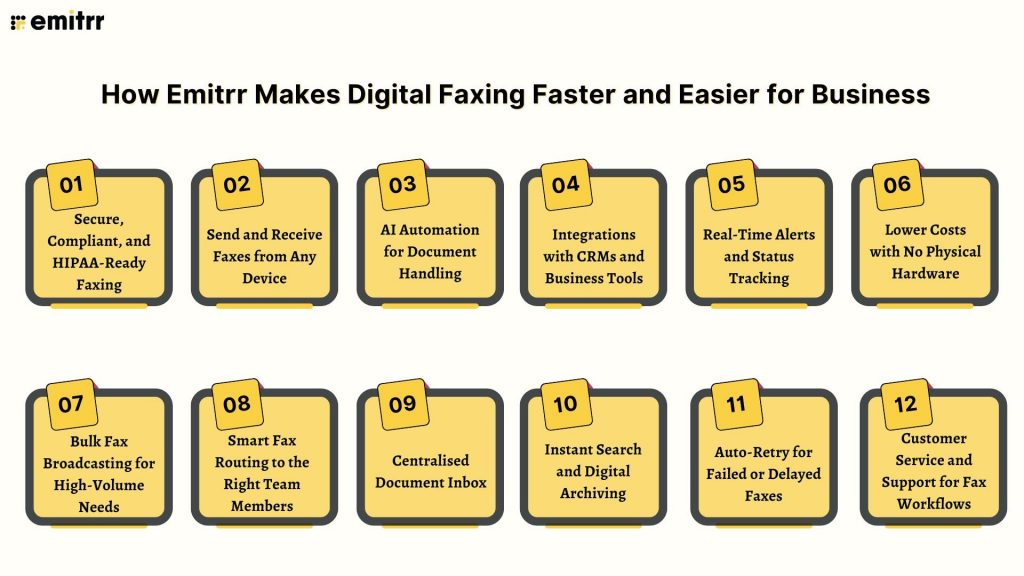
Secure, Compliant, and HIPAA-Ready Faxing
Your sensitive docs are in safe hands. Emitrr encrypts everything, stores it securely in the cloud, and limits access to your team only. It’s HIPAA-ready and GDPR-compliant, with audit trails and permissions baked in. So you can send medical records, financial data, or legal files without stressing about compliance.
Send and Receive Faxes from Any Device
Laptop at the office? Phone in the car? Emitrr works everywhere. Upload your doc, hit send, and that’s it. No machines, no wires. It’s faxing that follows you wherever work happens. You’ll even get live updates so you know exactly when your fax goes through.
AI Automation for Document Handling
Emitrr doesn’t just receive faxes, it actually reads them. Using smart OCR tech, it can pull out names, numbers, and sort documents based on content. You can create rules so that faxes auto-tag, route, or notify the right person. Less manual sorting, fewer errors, way more time saved.
Integrations with CRMs and Business Tools
Emitrr plays well with the tools you already use. Whether it’s Salesforce, HubSpot, Google Drive, or your EHR, faxes can flow in and out without extra steps. You can even automate tasks using Zapier or APIs. It’s faxing that fits into your existing workflow.
Real-Time Alerts and Status Tracking
You’ll always know what’s going on. Emitrr sends alerts the second a fax comes in or finishes sending. You’ll never wonder, “Did it go through?” again. Think of it like tracking a package, but for important documents.
Lower Costs with No Physical Hardware
No machines. No paper. No maintenance bills. Emitrr cuts out all the expensive stuff and replaces it with one predictable monthly fee. You’ll save on supplies, repairs, and staff time, and finally ditch that dusty old fax line.
Bulk Fax Broadcasting for High-Volume Needs
Got a message for hundreds of clients? Emitrr can send one fax to a whole list in a single click. It’s perfect for updates, notices, or campaigns. And yes, you get delivery reports for each one. Fast, simple, and way more efficient than feeding paper one by one.
Smart Fax Routing to the Right Team Members
Set it and forget it. With Emitrr, faxes automatically land in the right inbox, billing, HR, sales, wherever. No more forwarding emails or misplacing docs. It’s like having a traffic cop for your fax line who never takes a break.
Centralised Document Inbox
No more faxes sitting on a tray or buried in someone’s inbox. Emitrr gives your whole team access to one shared inbox for all texting, fax activity. You can tag, assign, or archive faxes with just a click. It keeps everyone in sync, and nothing gets missed.
Instant Search and Digital Archiving
Need to find a fax from last month? Just type a name or keyword and boom, it’s there. Emitrr stores your faxes in the cloud and makes them searchable, sortable, and organized. Say goodbye to file cabinets and digging through piles of paper.
Auto-Retry for Failed or Delayed Faxes
If a fax fails, Emitrr doesn’t just give up. It automatically retries in the background. No need to rescan or resend. You’ll be notified if there’s a real issue, but otherwise, it handles delivery quietly and reliably behind the scenes.
Customer Service and Support for Fax Workflows
Got questions? Hit a snag? Emitrr’s support team is ready to help with setup, training, or troubleshooting. They know faxing inside and out, and they’re just a message away. It’s like having a fax expert in your back pocket whenever you need one.
Frequently Asked Questions
It’s faxing that does more than just send and receive. Intelligent faxing uses AI to read, sort, and route documents automatically, saving you from manual busywork.
Emitrr keeps your team on the same page with shared access, real-time updates, and automated filing. It turns faxing from a clunky task into a smooth part of your day.
Yes! Emitrr encrypts your faxes and stores them safely in the cloud. Unlike traditional fax, there’s no risk of sensitive papers sitting on a public tray.
Absolutely! You can keep your existing number, and setup is quick. Emitrr ensures a seamless switch without missing a single fax.
Healthcare, finance, legal, insurance – you name it. Any industry dealing with forms, signatures, or sensitive info gains speed, security, and peace of mind.
Absolutely! Emitrr connects with CRMs, EHRs, cloud drives, and even your current fax number. It fits right into your existing workflow without disruption.
Conclusion
Faxing doesn’t have to be stuck in the past. With a digital solution like Emitrr, it’s faster, smarter, and way less frustrating. Whether you’re tired of paper jams, tied to an office machine, or navigating strict compliance needs, digital faxing lets you send and receive documents securely, from anywhere.
Switching to digital just makes sense. You save time, reduce costs, and simplify your workflow, all through one easy-to-use platform. Emitrr goes beyond just fax, with calling, texting, and smart automation built in. Think of it as retiring your old fax machine and upgrading your entire communication setup. Ready to move forward? Book a demo with Emitrr and see how simple modern faxing can be.