
 4.9 (400+
reviews)
4.9 (400+
reviews)
Introduction: Overview of VoIP Software for Physicians
In the high-stakes world of healthcare, time is critical and every call counts, but if your practice’s telephone system is outdated, can you be confident you’re delivering patient care worthy of the 21st century?”
Today’s doctors have more on their minds than just the patients they are treating. Between appointment booking, staff coordination, and compliance with privacy regulations, communication has legitimately become a central part of modern-day medical practice. Here’s where Doctor VoIP software comes into play.
VoIP (voice over internet protocol) makes telephone calls through the internet, which makes it secure, mobile-first, and ready to scale for clinics, hospitals, private practices, etc.
This blog is your comprehensive reference for understanding what makes a VoIP solution ready for healthcare. Whether there are HIPAA-compliant security layers, EHR integrations, or facilitated after-hours calls, we’ll discuss the best VoIP for physician offices and help you choose the best VoIP for your practice.

Important Things to Consider When Choosing Physician VoIP Services
Physicians should consider the attributes they believe will align best with their clinical practice when selecting a VoIP system. Here are some key attributes:
- HIPAA compliance and encryption: Your data is encrypted and conforms to U.S. health law.
- Voicemail transcription: Get your voice messages as text on your cell phone so that you can easily read them on the go.
- Auto attendant and call routing: Routes calls to the appropriate department without needing front-desk interaction.
- Missed call follow-ups through SMS: SMS is generated when a call is missed by the patient.
- Integrated appointment reminders: Voice or text message reminders help reduce no-shows.
- Customizable dashboards: Allow physicians and staff to see call logs, messages, and follow-ups in one location.
- Support for remote and hybrid teams: A must for telehealth and multi-location practices.
- Works across platforms: This guarantees communications whether from a mobile device, desktop, or tablet.

Security & Compliance Considerations for Physicians’ VoIP Provider

Engaging a VoIP software for a physician’s practice entails extensive responsibility surrounding security and compliance, most importantly HIPAA compliance for any issues relating to patient data. Any healthcare VoIP system that uses PHI must meet these regulatory requirements.
Things to Know About HIPAA and VoIP
All VoIP systems that transmit and store PHI- (symptoms, diagnoses, or call metadata) are HIPAA compliant. VoIP systems are classified as electronic protected health information (ePHI).
- Security Rule: Requires the establishment of safeguards to protect ePHI: – Network Security; – Access Control; Encryption (data in transit).
- Privacy Rule: Requires compliance with uses and disclosures of PHI by covered entities and their business associates.
Business Associate Agreement (BAA)
- Mandatory Requirement: A VoIP provider that manages or uses PHI must have a signed Business Associate Agreement (BAA).
- Why It’s a Must: If there is no BAA in place, your practice is liable for breaches if they occur, while the VoIP provider would share that liability if a signed BAA was in place.
Encryption of Data
- End-to-End Encryption for Calls: Use SIP TLS and SRTP to protect data in flight (data being transmitted).
- Encryption at Rest: All data must be encrypted while at rest (typically voicemail and call logs) to secure data being stored from unauthorized access.
Access Control & Authentication
- Role-Based Access: Users view only what is essential for their job (e.g. receptionists should not hear a physician’s call recording).
- Complex Passwords/MFA: Multi-factor authentication must be used along with strict password complexity requirements.
- Automatic Log Off: Sessions must automatically expire when idle.
Audit Trails & Activity Logs
- User Activity Logging: Logs track who accessed, the date and time of access, and what was accessed.
- Accountability: Logs are essential for audits, investigations, and breach detection.
Secure Data Centers
- Physical Security: Requires biometric access, surveillance, and access restrictions.
- Failover/Disaster Recovery: Continuous operations for data retrieval must be in place.
Network Security
- Firewalls/IDS/IPS: Systems must protect and detect malfeasance.
- Security Audits: Scheduled external audits, vulnerability scans, and testing must be routine.
TCPA Compliance
- Consent for Patients: Automated calls or text messages, including appointment reminders, require written consent from the patient before any such contacts are made per the TCPA to avoid penalties.
Important Integrations for Physicians VoIP Service

EHR / PMS Integration
This is the most crucial integration for any medical office telephone system.
- Direct Dialing from EHR: Click-to-call from patient records saves time and dialing errors
- Patient Identification (Screen Pop): Incoming calls can show patient information using caller ID for better ‘context’ and a more efficient use of time
- Call Logging: Automatically records call details in the EHR for documentation and continuity of care.
- Appointment Sync: Sends automated reminders according to the EHR schedules to reduce no-shows
- Common EHRs Supported: Athenahealth, Epic, eClinicalWorks, NextGen, Practice Fusion, Kareo, Dentrix (in the case of dental).
CRM Integration
Although it is less common, CRM integration supports non-clinical workflows such as marketing and patient retention efforts.
- Unified View: You can see all patient touchpoints (calls, texts, emails) all in ‘one place’.
- Retention & Marketing: Helps outreach efforts, trends you see, and campaigns you manage for engagement.
Calendar Integrations (Google/Outlook)
- Sync Staff Availability: Important for smart routing where staff may have meetings, vacations, and so on.
- Scheduling Appointments: This makes it much easier to book appointments for smaller practices.
Messaging Platforms (if not built-in)
In instances where practices have separate secure chat applications, can check integrations or APIs available to connect.
Payment Processors
Can provide secure, compliant payment collection using calls or via a post-call payment link.
Other Niche Healthcare Software
For practices using something like imaging or lab systems, be sure to check the availability of an API for potential custom integrations. So, you can check the continuity of the workflow.
Selecting a VoIP Provider for Physicians
Selecting a reputable VoIP for medical offices is essential to maintain efficiency, maximize patient satisfaction, and be compliant. To help you navigate the decision, here is a short checklist:
- Consider HIPAA Compliance, Call Quality & Uptime: Select providers offering HIPAA-compliant VoIP, with BAA, HD voice calling, and guarantee an uptime of 99.99%.
- Focus on EHR/PMS Integrations: Integrate with your EHR and PMS to facilitate functionality such as click-to-call, patient look-up and call logging.
- Easy Onboarding & Training: Look for intuitive interfaces, robust training capabilities, and dedicated support to get staff comfortable.
- Review Pricing: Look for any hidden fees, flexible pricing per user, and the ease that comes with scaling as your clinic expands.
- Check Reviews & Case Studies: Don’t just listen to sales claims—use G2, Capterra, and healthcare case studies to evaluate real-world fit.
- Expert Support Team: Select a provider with demonstrated health industry experience and skilled support staff who are responsive.
Watch this video to learn the Pros and Cons of VoIP –
Best VoIP Services for Healthcare in 2025
Determining the best VoIP for physicians requires an understanding of the offerings of high-level VoIP providers. Below is a complete analysis of the top 10 software for 2025, each with advantages and disadvantages for healthcare practices
1. Emitrr
2. Nuacom
3. Nextiva
4. JustCall
5. OhMD
6. Dialpad
7. RingRx
8. RingCentral
9. 8×8
10. Zoom Phone
1. Emitrr : Best VoIP Competitor
Overview:
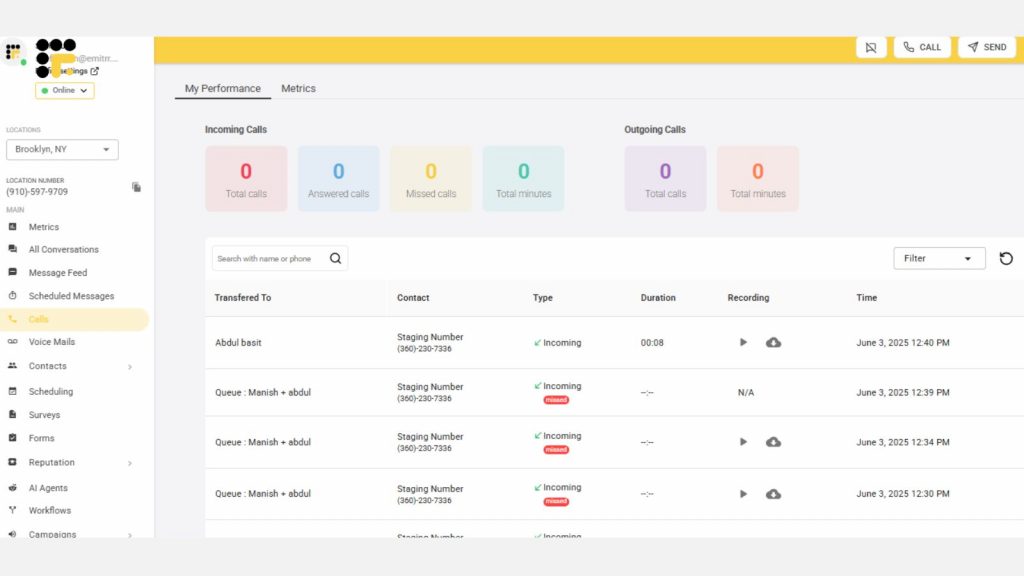
Designed specifically for healthcare, Emitrr is a VoIP and messaging platform that is HIPAA compliant. Emitrr is focused on unified communications with patients for modern clinics, practices designed for Profitable Growth (patient-centricity), and Super-Responsiveness to modern patients’ needs.
Features:
- Single, easy-to-use dashboard to manage calls, text and voicemails
- Configurable auto-attendants (IVR) and smart call routing
- Voice-to-text transcriptions for voicemail trail.
- Unique missed call, text reply automation.
- Automatic appointment reminders (text/voice).
- Seamless EHR/PMS integration (1000+ integrations with: Athena Health, Epic, eClinicalWorks, NextGen)
- Intelligent AI features to enhance productivity, like predictive call handling
- 29 Scalable multi-site support
- Cross-platform access on (mobile, desktop, web) for use remote and in-clinic
- Quick onboarding and easy-to-use interface.
- Recording of calls (with permission control)
- Advanced call analytics and reporting
Pros:
- Created exclusively for healthcare and physicians to guarantee relevance.
- HIPAA-compliant VoIP that’s backed by a signed Business Associate Agreement (BAA).
- Quick setup and easy-to-train staff for fast adoption.
- High uptime (99.99%) with super clear calls.
- Transparent pricing that is predictable and without hidden charges.
- A focus on unified communications and improving proactive patient communications.
- Great customer support and a team that understands clinic interests and operations.
Cons:
- Some advanced features are coming under the way
Pricing:
From $30/month per user.
Rating:
4.8/5
Integrations:
Athenahealth, eClinicalWorks, Epic, NextGen, Practice Fusion, Kareo, Dentrix, +1,000 more.
Support Channels:
Email, Chat, Phone, onboarding specialist dedicated.
2. NUACOM
Overview:
NUACOM offers an all-in-one business VoIP service that emphasizes call routing, together with adaptability for industries including some healthcare clients.
Features:
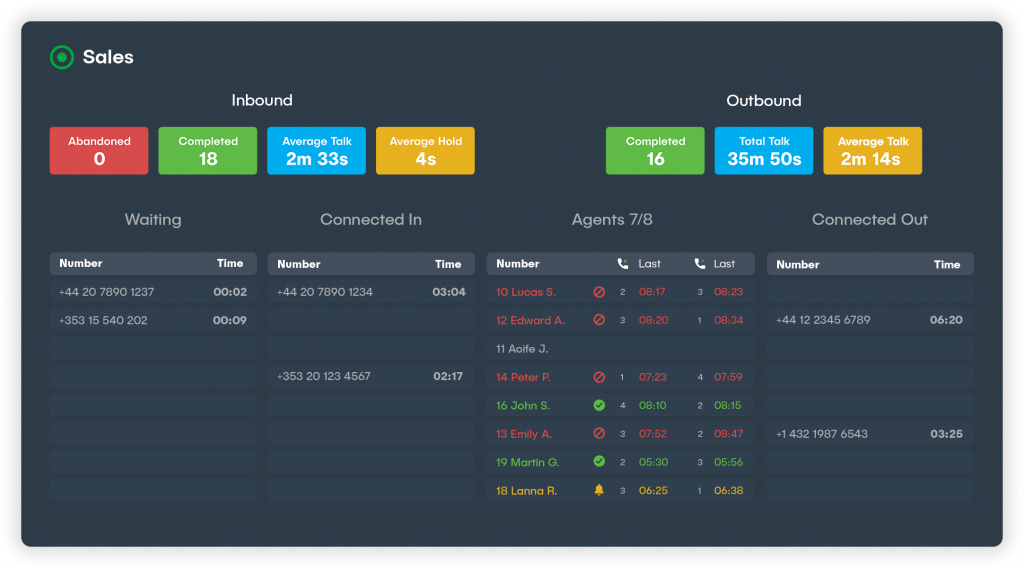
- Complete call management (routing, hold, transfer, call queues)
- Voicemail and voicemail-to-email
- Conference calling
- CRM integrations (e.g. Salesforce, HubSpot), adding unified and connected patient data
- Real-time reporting and analytics on call activity and efficiency
- Mobile and desktop apps
- Variability from Interactive Voice Response (IVR) automated greetings and routing
Pros:
- Good for practices that need strong multi-channel communication management
- Comprehensive call management allows for efficient routing of calls
- Great integration capability with common business tools and solutions for data flow
- Scalable to support growing practices and changing needs
Cons:
- Not based in healthcare, which means you will need to explicitly discuss with them HIPAA-compliant VoIP and business associate agreements for possible healthcare use cases.
- May not have some niche healthcare-specific automation features associated with a healthcare-specific VoIP solution for communication and agency management
Pricing:
You’ll need to contact your vendor for a quote; expect tiered pricing of $25/user/month starting as a minimum
Rating:
4.3/5
Integrations:
HubSpot, Salesforce, Zendesk, Microsoft Teams, Zapier.
Support Channels:
Phone, email, online help center.
3. Nextiva
Overview:
A prominent and reliable VoIP system recognized for its solid functionalities, unified communications solutions, and substantial validity for small to medium businesses and enterprise organizations. Nextiva has options if you seek healthcare compliance.
Features:
- Unlimited calling (domestic) & unlimited faxing
- Voicemail to email functionality with voicemail transcriptions
- Call forwarding (advanced) options with a custom auto-attendant and call queues
- Team collaboration features (chat and video conferencing)
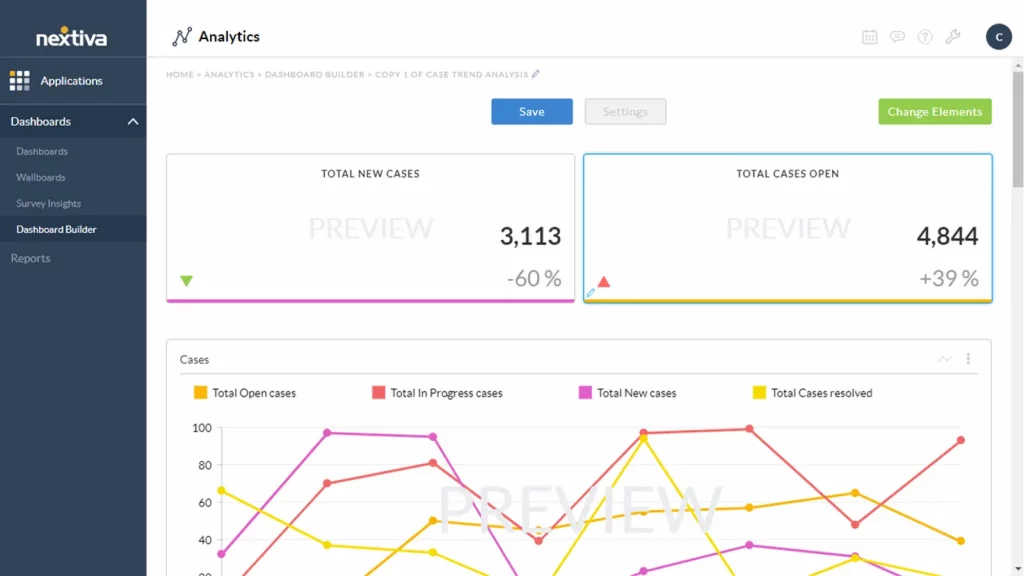
- Analytics and reporting (comprehensive) with call performance
- Call recordings and eFax capabilities
- Integrations with popular CRMs (Salesforce and Zendesk) and general business applications (Outlook, Microsoft Teams, G Suite)
Pros:
- Highly reliable with a guaranteed uptime of 99.999%.
- All-inclusive and extensive feature set for a general business communication need.
- Better integrations with popular software.
- Can grow with the practice regardless of what the practice size is (a small clinic to a large hospital phone system).
- 24/7 customer support, proactively working with consumer satisfaction.
Cons:
- New users will have a learning curve to overcome due to many features to explore.
- It also isn’t created solely for healthcare, which means HIPAA compliance is reliant on a specific setup and a signed BAA.
- Pricing can swing up significantly at other tiers and with add-ons.
Pricing:
Tiered plans (Essential, Professional, Enterprise) typically start around $20-30/user/month.
Rating:
4.5/5
Integrations:
Salesforce, Outlook, Zendesk, HubSpot, Microsoft Teams, G Suite, and many others via APIs.
Support Channels:
24/7 Phone, Chat, Email
4. JustCall
Overview:
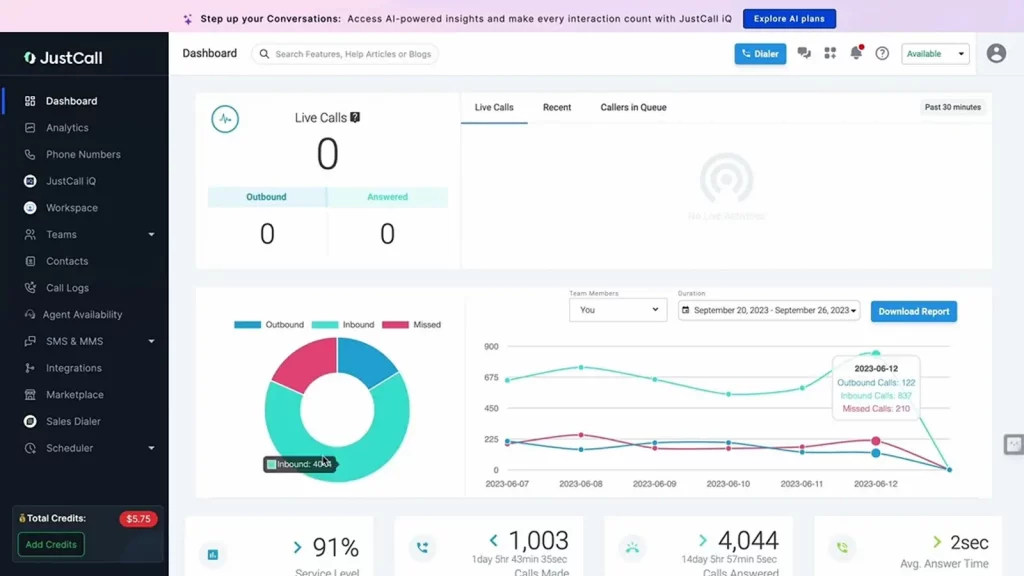
JustCall is a VoIP and SMS solution designed for sales and support teams, but its extensive features and ability to integrate with call center software make it applicable to some medical office phone system requirements.
Features:
- Local and toll-free number footprint
- Bi-directional SMS (communication with patients and appointment reminders.)
- It has record and IVR (Interactive Voice Response) functionality
- Question & Answer intelligent call routing and queuing
- CRM integrations (Salesforce, HubSpot, Zendesk) for 1:1 alignment across teams
- Sales and support automation facilities
- Sync across multiple devices to access your files wherever you are
- Call analytics and reporting
Pros:
- It is a powerful text messaging tool that helps to better communicate and follow up with patients.
- Provides great resources for outbound patient engagement campaign management (e.g. reminders).
- Strong CRM integration to get complete patient information and interactions.
- Versatile and able to accommodate other communication applications not limited to voice.
Cons:
- Not optimized for healthcare, so might need to do more manual configuration for HIPAA and BAA.
- Could be missing certain healthcare-specific automation tools or workflows built-in.
- Additional features and more users can also increase the price.
Pricing:
Tiered plans, usually begin at $25-35/user/month.
Rating:
4.4/5
Integrations:
Salesforce, HubSpot, Zendesk, Pipedrive, Intercom, Freshdesk, among others.
Support Channels:
Chat, email, phone (at higher levels), extensive knowledge base.
5. OhMD

Overview:
OhMD is a communications platform heavily focused on healthcare texting and patient engagement with integrated VoIP for secure patient conversations.
Features:
- Secure patient texting and messaging (HIPAA compliant)
- Virtual waiting rooms to reduce check-in patterns for telehealth
- Customizable patient forms for things like surveys
- Patient engagement features as well as broadcast messaging
- VoIP for secure phone calls with patients
- EHR/PMS software integrations (Epic, Cerner, Athenahealth, eClinicalWorks) for patient context
- Automated appointment reminders
- Internal messaging for teams
Pros:
- Purposefully built for healthcare and healthcare communications needs from the ground up.
- Strong emphasis on HIPAA-compliant secure patient messaging and data privacy.
- Simple and intuitive for patients to use, enhancing patient satisfaction
- Improves and optimizes patient engagement workflows to limit manual work.
Cons:
- Offers VoIP, but messaging is its core strength, so it may not have as extensive of calling features as a full-fledged VoIP vendor.
- Will not fully replace a robust multi-line phone system for healthcare with extremely high, complex, call volume if advanced routing is a primary focus.
- Pricing is often custom, so it needs a direct quote.
Pricing:
Contact the vendor for a quote. They’re often quoted with custom options based on your practice size/features.
Rating:
4.6/5
Integrations:
Major EHRs (Epic, Cerner, Athenahealth, eClinicalWorks), and other Practice Management software
Support Channels:
Phone, email, and online support.
6. Dialpad

Overview:
AI-powered business VoIP solution that supports voice, video, and messaging. It has a good reputation for impressive transcription and analytics tools and is highly scalable for doctors.
Features:
- Enterprise-grade voice calling on Cloud PBX
- AI call transcription, summaries, and guidance in real-time
- Live conversation sentiment analysis during calls
- Custom call routing, queues, and auto-attendant
- Video conferencing and team messaging under one roof
- Global numbers and international calling options
- Call Performance with strong analytics and reporting for calls
Pros:
- Powerful AI features to boost productivity and provide actionable call insights.
- Easy-to-use and user-friendly with an intuitive interface.
- Highly scalable for expanding practices with zero sensitivity
- Combine video and messaging for an all-in-one communication solution.
Cons:
- Not inherently HIPAA compliant VoIP out-of-the-box; a proper manual set-up and a signed BAA are needed to use it for healthcare purposes.
- Very possible you may not need all the AI features and the additional cost for very small practices with minimal needs.
- The reliance on AI for transcription sometimes results in minor inaccuracies.
Pricing:
Tiered plans (Standard; Pro; Enterprise), usually begin from $15-25/user/mo.
Rating:
4.3/5
Integrations:
Salesforce, HubSpot, Google Workspace, Microsoft 365, Zendesk and many more.
Channel Support:
Web, phone, email, knowledge base.
7. RingRx
Overview:
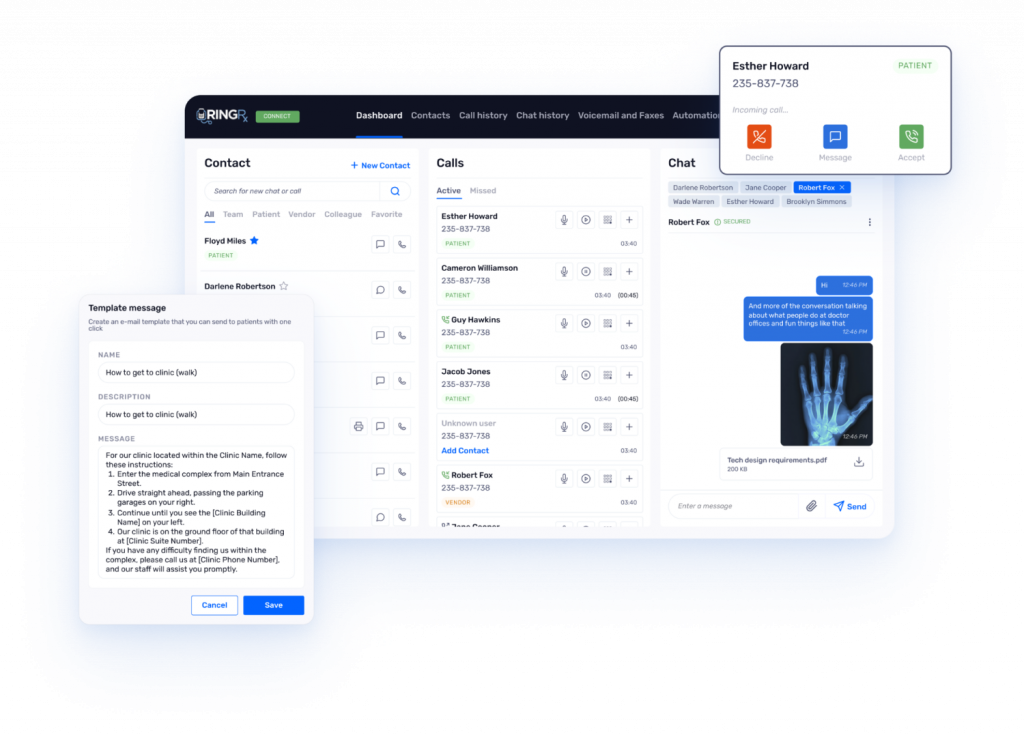
RingRx is a VoIP solution for healthcare practices. They provide communication tools created specifically with HIPAA compliance in mind.
Features:
- HIPAA-compliant phone service with a signed BAA
- Secure patient messaging and secure internal messaging
- Call routing, call queues, and auto-attendant that you can customize
- Voicemail and voicemail-to-email/text
- On-call scheduling and routing for after-hours patient care
- Ability to integrate patient forms and secure eFax
- Mobile applications for physicians and staff to access while being on the work
- Ability to record calls (with the ability to manage consent)
Pros:
- Designed for healthcare, making compliance easier when using relevant features
- Strong HIPAA compliance features are built-in to the system
- Has a mobile-friendly design that supports flexibility for physicians
- Recognizes specific healthcare workflows and integrates well into those processes
Cons:
- May have limited general business integrations compared to larger, broad-use VoIP providers
- Pricing may be higher given the system’s specialized healthcare focus and extensive compliance features.
- The user interface, while fine and functional, may be limited in a more modern UX compared to general business VoIP.
Pricing:
Tiered plans. Generally, starts around $30 to $50/user/month
Rating:
4.2/5
Integrations:
Has dedicated integrations with some of the more popular healthcare EHRs/PMS. Please check their website for the specific list of providers.
Support Channels:
Phone, email, and online support.
8. RingCentral

Overview:
An industry leader in cloud-based communication and collaboration solutions, RingCentral has an excellent VoIP service for providers that comes with a generous set of features for businesses of any size, including in healthcare where functionality is of utmost importance.
Features:
- Enterprise-grade Cloud PBX, with advanced call management (routing, queueing, recording, IVR)
- Integrated video conferencing and team messaging
- Optional contact center services for bigger practices
- Unlimited domestic calling, SMS/MMS business texting
- Fax-to-email and voicemail-to-email applications
- Analytics and reporting dashboards
- Deep CRM and business application integrations (Salesforce, Zendesk, Microsoft 365, Google Workspace, and some EHRs through connectors)
- Dedicated apps for mobile and desktop, with access from anywhere
Pros:
- Very full-featured unified communications portfolio that allows us to meet a wide range of needs.
- Extraordinarily reliable, with an industry-leading SLA of 99.999%.
- Strong security, with HIPAA-ready options and a signed BAA.
- Highly scalable, from a single cream clinic to huge hospital phone systems.
Cons:
- Can be more expensive than most basic VoIP for physician users, especially higher tiers.
- The large number of features may be overwhelming for very small practices at first, leading to more upfront, customized onboarding and training design.
- Some advanced features may end up being add-ons increasing total cost.
Pricing:
Tiered, starting at approximately $20-30/user/month.
Rating:
4.5/5 (based on general practices)
Integrations:
Strong integrations with Salesforce Zendesk, Microsoft 365 and Google Workspace, as well as different healthcare EHRs via third-party connectors or custom APIs.
Channel Support:
24/7 Phone, chat, Email, Large resource library.
9. 8×8

Overview:
8×8 is a unified cloud communications platform providing a range of video, voice, chat, and contact center services including healthcare VoIP with advanced security and compliance requirements such as HITRUST and HIPAA.
Key Features:
- Enterprise-level business VoIP (Cloud PBX) with advanced call handling features including personal attendant
- Robust, high-quality video conferencing and built-in team chat
- Optional integrated contact center features
- Powerful calling and IVR features such as custom call routing, call queues, advanced, flexible auto-attendant, etc.
- Real-time analytics and historical reports
- eFax capability as well as voicemail-to-email and email-to-fax capabilities
- Desktop and mobile applications that allow team members to work from anywhere on either device
- Global capability with the ability to get local numbers in many countries
Pros:
- It has a very strong focus on security and compliance (HIPAA and HITRUST certified).
- Global, reliable, and safe infrastructure, which is very nice for multiple locations or multi-lingual use cases with worldwide coverage.
- A unified communication ecosystem for practices that require contact center capabilities for larger organizations.
- Highly scalable for practice growth, as well as the ability to replace a hospital phone system.
Cons:
- The interface can be overwhelming for new users because there are so many features at the enterprise level.
- Pricing could be higher than some competitors due to advanced features and larger deployments.
- Setup and configurations may be more technical to manage initially.
Pricing:
Tiered pricing starts around $15-25/user/month.
Rating:
4.4/5
Integrations:
Salesforce, Zendesk, G Suite, Microsoft Teams, Hubspot, and integrations specific to various industries.
Support Channels:
Phone, Chat, Email, 24/7 online portal, Knowledge base.
10. Zoom Phone

Overview:
Zoom Phone is an add-on service to Zoom’s popular video conferencing platform which offers a robust, enterprise-grade cloud phone service. It is user-friendly and integrates well with video, both of which allow physicians to use the platform for communication in a telehealth space.
Features:
- Cloud PBX capability with secure voice calling
- Call queueing, call auto attendant, and intelligent call routing
- Call recording and voicemail transcription
- SMS messaging capabilities (domestic only)
- Seamless link into Zoom Meetings and Zoom Chat
- Allows softphones (desktop/mobile app) and physical desk phones
- Some basic call analytics and reporting
- Call parking, hold, transfer
Pros:
- Very user-friendly interface, existing Zoom users are already familiar with.
- High call quality and a reliable service for consistent communication.
- Great integration with video for telehealth and internal collaboration to simplify workflows.
- Flexible licensing model; often cost-effective for existing Zoom users.
Cons:
- Zoom is primarily viewed as a video conferencing platform, so phone-specific advanced PBX capabilities may be bare compared to dedicated VoIP providers.
- HIPAA compliance requires specific configuration, as well as being signed on a BAA before Zoom Phone is HIPAA compliant; it is not inherently designed for healthcare use.
- Some advanced phone capabilities may require add-ons or higher-tier plans.
Pricing:
Add-on service to Zoom Meeting plans, typically beginning around $10-15/user.
Rating:
4.6/5
Integrations:
Google Workspace, Microsoft 365, Salesforce, and many more via Zoom’s strong ecosystem and marketplace.
Channel Support:
24/7 live Support, Chat, Email, Knowledge base.
Why Emitrr Is the Premier VoIP Provider for Physicians
With so many VoIP providers, Emitrr stands out as the best provider for physicians and healthcare practices, for several reasons:
- HIPAA-compliance & Secure: Built from the ground up with end-to-end encryption, audit logs, and a BAA available, patient data protection is at our core.
- Healthcare-Focused Design: Each feature is designed with clinical workflows in mind – whether it’s managing appointments, pre-appointments, or patient follow-ups – so that it works instinctively with a medical office phone system.
- Unified Dashboard: The number one feature – manage calls, texts, and voicemails in one place! Takes away fragmented communication and allows more time for treating and caring for patients.
- Smart Automation: Automatically ensure appointment reminders, and missed call follow-ups through SMS and auto-replies, so staff are open to focus on important patient care.
- Integrations: Attaches seamlessly to your 1000+ existing EHR/PMS systems so data flows easily, offering a single patient record.
- Remote Access: Gives the freedom for doctors and staff to use the clinic’s number, anywhere even outside of the clinic, important for Telehealth and working from home or outside of the clinic.
- Quick Onboarding: You will be up and running in a day; Emitrr is built for quick deployment with negligible IT overhead, ensuring a smooth transition.
- Transparent Pricing: Upfront, transparent pricing with no hidden fees, so practices can budget with confidence.
- AI-Powered Features: AI-enabled features for predictable call management and smart transcriptions give you additional processes to enhance clinic productivity and flow, as well as provide an excellent patient experience.
- Scalable: Grows with your clinic effortlessly – Simply add new users, or add new branches as necessary, with no complex infrastructure changes required.
- Dependable: Has 99.99% uptime, and reliability, with great call clarity means you and your clinic will always be accessible and clear in communication.
Frequently Asked Questions
Ans: Landlines utilize physical copper wires for connectivity. VoIP utilizes your internet (broadband) connection to transmit voice – this means more features, better flexibility, and often lower costs. Overall VoIP is the smart choice for a healthcare phone system.
Ans: Yes. If you choose a HIPAA-compliant VoIP provider that provides a BAA, offers end-to-end encryption, has access controls in place, and undertakes regular audits – security is guaranteed for healthcare VoIP.
Ans: Definitely. VoIP phone systems for healthcare integrate all locations, have interoffice dialing, and have centralized controls; plus, calls can be quickly routed throughout your various locations.
Ans: Most VoIP providers, Emitrr included, offer number porting – this means moving your existing phone number to the VoIP provider, keeping continuity, and allowing patients to continue to access you.
Ans: Not really. Although you may use desk phones, most VoIP software, for physicians, uses softphones (apps on a computer or smartphone) – therefore, essentially lowering the cost of hardware.
Conclusion
In 2025, communication will be smart, secure, and scalable – and not as an option, but as a necessity for healthcare. VoIP software for healthcare replaces your outdated systems with mobile, affordable, feature-rich solutions.
The VoIP phone system created for healthcare delivers an exceptional patient experience while maintaining HIPAA compliance and streamlining workflow so that your teams can focus on patient care.
So, if you are looking for a HIPAA-compliant VoIP designed specifically for your medical practice, then consider Emitrr – designed for physicians, trusted by clinics, and created to integrate all communication aims into one unified source.