
 4.9 (400+
reviews)
4.9 (400+
reviews)
Introduction
Faxing isn’t gone; it has supremely evolved. Today, online faxing has become faster, smarter, and completely digital. Instead of bulky machines and paper jams, modern tools like Emitrr, WiseFax, iFax, and Emitrr Faxing let you send and receive documents securely from any device.
Each platform serves a different need. WiseFax is simple and pay-as-you-go, perfect for occasional users. iFax offers advanced business features like eSignatures, team access, and HIPAA compliance. Emitrr Faxing takes it a step further, combining calls, texts, and faxes into one unified communication platform.
This blog compares WiseFax vs iFax and Emitrr Faxing, breaking down their pricing, features, pros, and best use cases to help you find the right fit for your business.
What is WiseFax?
WiseFax is an online fax service that lets you send and receive faxes digitally, no fax machine, phone line, or special software required. You can upload a document from your computer, phone, or cloud storage, enter a fax number, and send it instantly from your browser.
It works on a pay-as-you-go model, meaning you only pay when you send a fax, making it an affordable choice for individuals or small businesses that fax occasionally. WiseFax also offers optional fax number subscriptions for those who need to receive faxes regularly.
With support for multiple file types, secure transmission, and integrations with cloud platforms like Google Drive and Dropbox, WiseFax provides a simple, fast, and flexible way to handle faxing online.
What is iFax?
iFax is a modern online fax service that lets you send and receive faxes digitally from any device, whether it’s a computer, smartphone, or tablet, with no fax machine or phone line required. It’s designed for convenience, offering an intuitive app and seamless support across iOS, Android, Windows, and Mac.
What makes iFax stand out is its built-in tools like eSignatures, document editing, and cloud storage integration, giving users everything they need in one platform. It’s also a HIPAA-compliant faxing platform, ensuring your data stays private and secure, perfect for professionals in healthcare, law, and business.
With flexible iFax pricing plans and secure, paperless faxing, iFax is a trusted solution for anyone looking for a reliable and feature-rich online fax service.
Key Differences Between WiseFax and iFax
Trying to decide between WiseFax and iFax? Both are great online fax services, but they’re designed for different kinds of users. The table below gives a quick look at their main features, pricing, and who each one is best suited for, so you can pick the one that fits your needs best.
| Features | WiseFax | iFax |
| Starting Price | $8/month | $8–$9.99/month |
| Page Limit | 300 pages (with plan) | Varies by plan |
| Overage fees | Token per page | Often lower per-page rates |
| Integrations | Cloud-based | Advanced API + cloud |
| User Rating | 4.1/5 | 4.5/5 |
| Best for | Occasional users | Businesses/professionals |
Key Similarities Between WiseFax and iFax
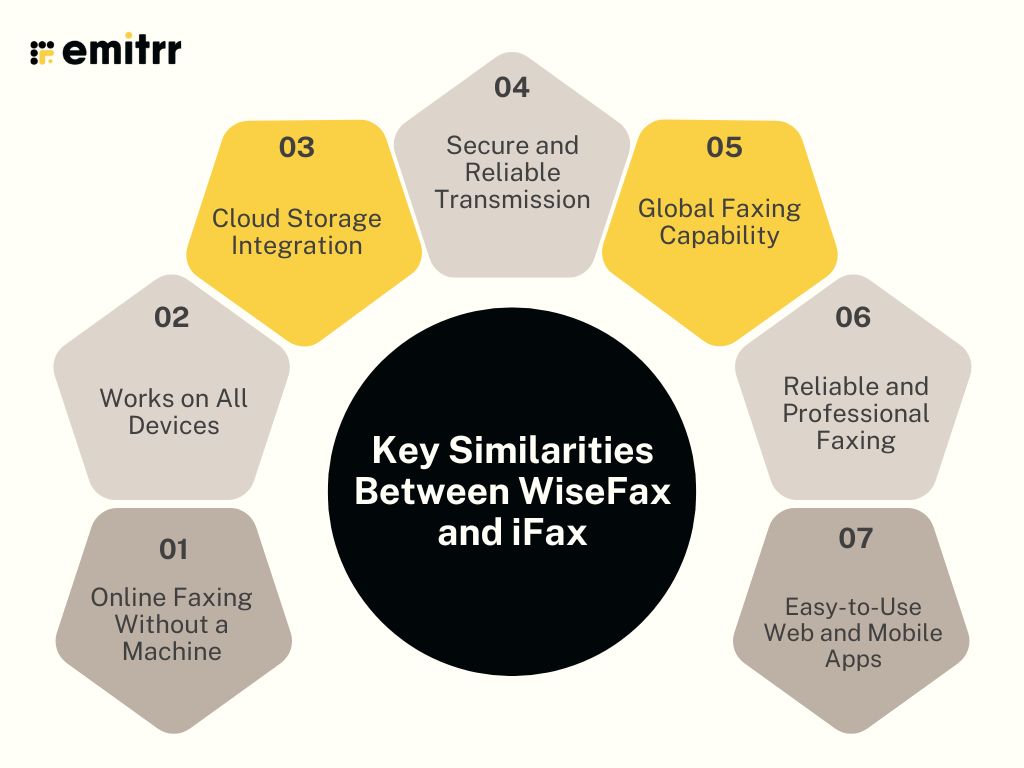
When comparing WiseFax vs iFax, it’s easy to see that both share several useful features that make online faxing simple, secure, and convenient. Before diving into their differences, here’s a quick look at what WiseFax and iFax have in common and why both are popular choices for anyone looking for an affordable online fax service.
Online Faxing Without a Machine
Both WiseFax and iFax make faxing completely digital. You can send and receive faxes without a bulky fax machine, paper, or even a phone line. Everything is handled through the web or mobile app, so you can upload your document, enter the number, and send it within seconds. Whether you’re a business owner or an individual, this is one of the main reasons people switch to a more affordable online fax service like these two.
Works on All Devices
Both iFax and WiseFax work across multiple devices, including desktop, laptop, smartphone, and tablet. You can send a fax from your phone while traveling or manage incoming faxes from your computer at work. This flexibility is what makes the WiseFax vs iFax comparison so interesting; both are built for modern users who need to stay connected wherever they are.
Supports Multiple File Formats
WiseFax and iFax both accept a wide range of file formats, including PDFs, Word documents, Excel sheets, and even image files like JPG and PNG. You can upload a scanned paper, edit it if needed, and fax it instantly. For users who work with different document types daily, this feature saves time and keeps things simple.
Cloud Storage Integration
Both platforms integrate seamlessly with popular cloud storage apps like Google Drive, Dropbox, and OneDrive. That means you can easily pull documents from your cloud account, fax them instantly, and even store received faxes back to the cloud for safekeeping. When comparing iFax vs WiseFax features, this one stands out for professionals who rely on digital document sharing and want everything in one place.
Secure and Reliable Transmission
Security is something both WiseFax and iFax take seriously. Your documents are encrypted from start to finish, ensuring safe and private transmission every time. Whether you’re sending contracts, invoices, or personal forms, you can trust that they’ll arrive securely. In terms of WiseFax vs iFax differences, both perform strongly here; reliability and data protection are top priorities for each.
Global Faxing Capability
One of the best parts about both WiseFax and iFax is their worldwide faxing coverage. You can send faxes locally or internationally with just a few clicks. This makes them ideal for freelancers, global teams, and businesses that work with international clients. When it comes to WiseFax vs iFax, both services shine in offering reliable global communication at an affordable rate.
Easy-to-Use Web and Mobile Apps
Both platforms are built to be simple, even for beginners. You don’t need any tech skills, just upload your file, type the fax number, and press send. The interfaces are clean, intuitive, and designed for speed. Whether you pick WiseFax or iFax, both make faxing straightforward and stress-free, which is exactly what most users want from an affordable online fax service today.
WiseFax Vs iFax: Compared
Now let’s have a WiseFax vs iFax full comparison test:
Features
WiseFax Features
- Pay-as-You-Go Sending: Send faxes instantly without a monthly commitment or subscription.
- Dedicated Fax Number Subscription: Get your own fax number with weekly or monthly plans to receive faxes easily.
- Global Faxing: Send and receive faxes across multiple countries using the same account.
- Advanced Document Optimization: Automatically enhance contrast, detect edges, rotate, or clean up scanned documents before sending.
- Wide File Format Support: Fax PDFs, Word documents, images, and other file types with built-in editing tools.
- Platform Flexibility: Access WiseFax from your web browser, desktop, or mobile, and integrate with Google Drive, Dropbox, and Office 365.
- Secure Storage & Tracking: Keep all sent and received faxes safely stored with detailed delivery confirmations.
- Team and Organization Support: Invite teammates, share fax access, and manage multiple fax numbers within one account.
iFax Features
- Cloud Integration: Connect iFax with Google Drive, Dropbox, and OneDrive to send and receive faxes directly from your cloud storage.
- Multi-Platform Access: Use iFax on web, desktop, iOS, and Android, so you can fax from anywhere, anytime.
- Document Scanner & Editor: Scan documents with your device’s camera, add notes, highlight text, and even sign before sending.
- Electronic Signatures: Add legally binding digital signatures to your documents for faster approvals and paper-free workflows.
- Secure & HIPAA-Compliant Faxing: All faxes are encrypted and comply with HIPAA and GLBA standards, ideal for healthcare, finance, and legal use.
- Dedicated Fax Numbers: Get your own local or toll-free fax number, or port your existing one easily into iFax.
- Global Faxing Capability: Send and receive faxes anywhere in the world without worrying about compatibility or time zones.
- Broadcast Faxing: Send one fax to multiple recipients at once, great for announcements or business updates.
Plans & Pricing
WiseFax Pricing
- Monthly Subscription (Fax Number): $8.00 per month
- Weekly Subscription (Fax Number): $4.25 per week
- Pay-as-You-Go Sending: $1.00 per fax token (usually one token per page)
iFax Pricing
- Plus Plan: $8.33/month (annual billing, with 200 faxes sent and no receiving).
- Pro Plan: $16.66/month (billed annually, with 500 total pages plus receiving).
Integrations
WiseFax Integrations
- Google Drive, Box, Google Docs, Microsoft Office 365, Microsoft Word, Dropbox, Gmail (Email-to-Fax)
iFax Integrations
- Google Drive, Dropbox, Box, and API for your own solution.
Pros & Cons
WiseFax Pros
- Easy to use with a clean, web-based interface
- No subscription required for sending faxes (pay-as-you-go model)
- Affordable pricing for occasional users
- Supports multiple file formats (PDF, Word, images, etc.)
- Works across devices like desktop, tablet, and mobile
- Integrates with Google Drive, Dropbox, and other cloud services
- Secure transmission with encryption
WiseFax Cons
- No free plan available
- Receiving faxes requires a separate paid subscription
- Limited advanced business features compared to competitors
- Costs can add up for high-volume users
- No dedicated mobile app with full functionality (browser-dependent)
iFax Pros
- Easy-to-use interface with web, mobile, and desktop access
- Includes a dedicated fax number in most plans
- Offers a free plan with limited pages
- Fully HIPAA-compliant, ideal for healthcare and legal industries
- Supports integrations with Google Drive, Dropbox, and OneDrive
- Advanced features like digital signatures and team collaboration
- Secure, encrypted fax transmission for data protection
- Reliable customer support and scalable plans for businesses
iFax Cons
- Higher monthly pricing compared to pay-as-you-go services
- It may be expensive for light or occasional users
- The free plan has limited pages and fewer features
- Some advanced tools are only available in higher-tier plans
- Occasional delays when sending large files or international faxes
Reviews & Ratings
WiseFax Reviews & Ratings
WiseFax has an overall rating of 4.1/5 on Capterra.
Here are some of the reviews of WiseFax:
“Their invoicing dept is efficient. Their faxing or service department is non-existent”
“Easy to use, very transparent and user friendly”
Source: Capterra
iFax Reviews & Ratings
iFax has an overall rating of 4.6/5 on G2.
Here are some of the reviews of iFax:
“Secure, reliable, and incredibly easy to use.”
“Simple to use and the product actually works.”
Source: G2
When to Use WiseFax?
WiseFax is best suited for individuals and small businesses that need a simple, flexible, and affordable online fax service without long-term commitments. It’s ideal when you only send faxes occasionally and don’t want to pay a monthly fee.
You should use WiseFax when:
- You need to send a one-time or occasional fax without subscribing to a plan.
- You prefer a pay-as-you-go model instead of monthly billing.
- You want to send faxes internationally without setup hassles.
- You need to fax directly from your computer or phone using a web browser.
- You’re looking for an easy and secure way to upload, edit, and send documents online.
When to Use iFax?
Choose iFax if you need a powerful, feature-rich, and professional-grade faxing solution. It’s designed for businesses, enterprises, and professionals who want advanced tools, strong security, and seamless team collaboration.
iFax is the right choice when:
- You need multi-platform access; it works perfectly on iOS, Android, Windows, and macOS.
- You want built-in tools like eSignatures, document annotation, and workflow automation.
- You handle large volumes of faxes or manage multiple numbers and team members.
- You require enterprise-level security and compliance, including HIPAA and GDPR standards for handling sensitive information.
Emitrr: The Better Alternative to WiseFax & iFax
Emitrr Overview
Emitrr Faxing is a modern, VoIP-powered solution that redefines how businesses send and receive documents. Unlike traditional tools or older online fax platforms like WiseFax and iFax, Emitrr brings everything together in one place: calls, texts, and faxes, so you never have to switch between multiple apps.
You can easily create or port your fax number right from the Emitrr dashboard and manage all your communications, faxes, messages, and voicemails from a single, simple interface. Every interaction is automatically stored, organized, and encrypted, helping your business stay compliant and transparent.
What sets Emitrr apart from WiseFax vs iFax is its all-in-one design, fast setup, and seamless integration. It’s built for modern teams that want speed, security, and simplicity without the hassle of extra software or outdated fax machines. In short, Emitrr isn’t just another online fax service; it’s the smarter, more connected way to manage your business communication.
Emitrr Features
- Multi-Recipient Faxing: Send one fax to several people at once, perfect for saving time and staying efficient.
- Broadcast Faxing: Instantly deliver a single fax to your entire contact list, great for updates, announcements, or newsletters.
- Large File Support: Easily fax high-resolution images and large documents up to 30 MB without losing quality.
- Custom Fax Covers: Create personalized cover pages with recipient details, notes, or your company logo for a professional touch.
- Inbound & Outbound Faxing: Send and receive faxes directly through Emitrr, with no fax machine or extra hardware required.
- Fax-to-Email & SMS Alerts: Automatically route incoming faxes to your email for easy viewing and get instant SMS notifications when new faxes arrive.
- Scheduled Faxing: Set faxes to send at a specific date and time, ideal for reminders, time-sensitive updates, or bulk messaging.
Emitrr Pros
- Unified Communication Platform: Combines fax, texting, calling, and review management in one powerful solution.
- Built for Regulated Industries: Features AI automation and robust HIPAA compliance, making it perfect for healthcare, legal, and financial sectors.
- Intuitive Mobile Dashboard: A user-friendly, mobile-first interface accessible to your entire team.
- Transparent and Scalable Pricing: Designed to fit both SMB and enterprise budgets with clear, usage-based plans.
- Round-the-Clock Support: Offers 24/7 proactive customer assistance and personalized onboarding for a smooth setup experience.
Emitrr Cons
- Some advanced features are under process and will be live shortly.
Emitrr Pricing
- Standard: $25/month
- Professional: $35/month
- Pricing is typically bundle-based, and often doesn’t include per-page overages.
Emitrr Integrations
- Salesforce, HubSpot, AthenaHealth, Denticon, Mailchimp, Zapier, QuickBooks, and many EMR/EHR systems.
Emitrr Customer Support Channels
- Live chat, email, phone, and choices in the knowledge base with a focus on getting in touch.
Emitrr Ratings
4.8/5
Emitrr Reviews
“You have it all integrated into one platform, the signatures, the amount of characters, you can attach files, send photos. You are able to create and send forms. Unlimited amount of things we can use and take advantage of.”
“I LOVE Emitrr. The support you get is wonderful, the app is easy to use and they have been incredibly responsive. As a small business, we needed a messaging platform that wouldn’t break the bank and this meets all our needs (and then some) without making us feel overwhelmed.”
Source: Capterra
Key Benefits of Emitrr Online Faxing
All-in-One Platform
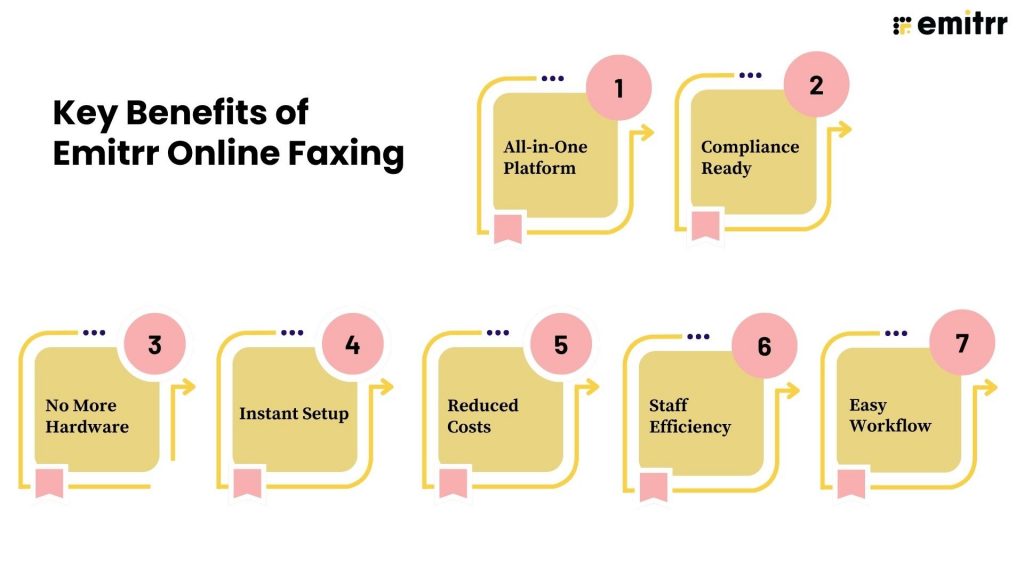
Emitrr brings calls, texts, and faxes together in one simple place, so your team doesn’t have to jump between different tools or apps. Everything you need to communicate with clients is right there, organized, consistent, and easy to manage.
Compliance Ready
Security comes built-in with Emitrr Faxing. It’s HIPAA-compliant, which means it’s perfect for healthcare, legal, and financial teams that deal with sensitive information. Every fax, text, and call is encrypted and stored safely, giving you peace of mind that your data stays protected.
No More Hardware
Forget about bulky fax machines, paper jams, and maintenance. Emitrr lets you send and receive faxes completely online, from your computer or phone. It’s faster, cleaner, and saves both money and space in the office.
Instant Setup
Getting started takes just a few minutes. You can add a new fax number or transfer your current one directly from the Emitrr dashboard, no complex setup, no waiting. You’ll be ready to start faxing right away.
Reduced Costs
With Emitrr, there’s no need for separate fax subscriptions, phone lines, or piles of paper. Everything happens digitally, which saves money and helps your business go greener by cutting down on waste.
Staff Efficiency
When calls, texts, and faxes all live in one dashboard, your team can work faster and more efficiently. No more switching between tabs or logging into multiple systems, just one clean workspace to send, receive, and track everything.
Easy Workflow
Emitrr Faxing feels as easy as texting. You can assign faxes to team members, leave internal notes, and track every message in one thread. It keeps things organized, collaborative, and simple for everyone.
Frequently Asked Questions
The main difference is their focus. WiseFax is simple and pay-as-you-go, great for occasional users. iFax is more advanced, offering business tools like eSignatures, team access, and HIPAA compliance. Emitrr Faxing goes beyond faxing, it combines calls, texts, and faxes in one secure platform, making it ideal for businesses that want all communication in one place.
No, WiseFax doesn’t offer a free plan. You pay per fax using tokens. iFax, however, provides a free plan with limited pages, making it a good way to test the platform before subscribing.
If you need a quick, affordable online fax service for occasional use, go with Emitrr or WiseFax.
If you fax occasionally, WiseFax is usually more affordable because you only pay per fax. But if you fax often or need extra tools like eSignatures and team management, iFax offers better value through its monthly or yearly plans.
Conclusion
Each platform has its strengths. WiseFax is simple and flexible for occasional faxing, while iFax offers advanced tools for business users. But Emitrr Faxing rises above them both. It’s more than just a fax service; it’s a complete communication hub that combines calls, texts, and faxes in one place.
With instant setup, strong security, and seamless integration, Emitrr delivers the fastest, most efficient, and truly modern faxing experience for businesses.