
Introduction
Patient intake software helps healthcare practices collect demographic details, medical history, insurance information, consent forms, signatures, and supporting documents before an appointment. The best systems replace paper forms and disconnected administrative tasks with a secure, trackable digital intake process. Patients can complete electronic patient intake forms from their phones, while staff can see what has been submitted and what still requires attention.
However, patient intake platforms perform different jobs. Some focus primarily on digital patient forms. Others combine intake with patient communication, scheduling, payments, insurance verification, telehealth, customer relationship management, or full practice management. A small dental practice may need a very different solution from a multi-location medical group or health system.
This patient intake software comparison blog reviews 10 platforms with distinct strengths. It examines their core intake capabilities, EHR or practice management system compatibility, implementation considerations, pricing transparency, and overall fit. The goal is to help healthcare organizations identify the best patient intake software for their existing technology, specialty, workflow requirements, staffing capacity, and patient experience goals.
AI Summary
- Patient intake software helps healthcare practices collect, review, and manage patient information before the appointment.
- Not every patient intake platform performs the same role.
- Emitrr is best for connected patient intake and patient communication.
- Curve Dental is best for dental intake within a cloud-based practice management system.
- LeadSquared is best for CRM-led patient acquisition and onboarding.
- Solutionreach is best for patient engagement with intake support.
- Mend is best for telehealth and hybrid-care intake.
- Luma Health is best for enterprise patient journey orchestration.
- Klara is best for messaging-led patient intake.
- Weave is best for small practices wanting digital forms with phone and texting.
- NexHealth is best for forms, scheduling, and patient experience workflows.
- Phreesia is best for comprehensive patient registration, eligibility, payments, and check-in.
- Choose according to EHR/PMS compatibility, form requirements, patient communication needs, specialty, implementation capacity, and budget.
How We Evaluated Patient Intake Software
We evaluated each platform according to how well it supports patient information collection, registration, pre-visit completion, staff visibility, system connectivity, security, and the needs of different healthcare organizations. The comparison considers:
- EHR/PMS integration: We examined whether each platform connects with electronic health record and practice management systems, what information can move between systems, and whether integration capabilities vary by vendor or workflow.
- Implementation requirements: We considered the work required to configure forms, migrate existing documents, establish integrations, train staff, assign permissions, and deploy the platform across one or more locations.
- Pricing transparency: We reviewed whether the company publishes pricing and whether practices may need to account for implementation, integrations, communication usage, transactions, add-ons, or location-based charges.
- Customer support, ratings, and verified reviews: We considered available support options and the importance of reviewing current customer feedback about usability, implementation, reliability, and service quality.
Patient Intake Software at a Glance (TL;DR)
| Platform | Best For | Core Intake Focus | EHR/PMS Integration |
| Emitrr | Connected patient intake and communication | Digital forms, documents, e-signatures, patient communication, and completion follow-up | 500+ integrations; data exchange and write-back vary by system |
| Curve Dental | Dental intake within a cloud-based PMS | Dental registration, forms, records, scheduling, and practice management | Native Curve Dental workflow with selected third-party integrations |
| LeadSquared | CRM-led patient acquisition and onboarding | Inquiry capture, onboarding workflows, communication, and task management | Healthcare integrations and APIs; supported systems vary |
| Solutionreach | Patient engagement with intake support | Patient forms, communication, reminders, and engagement | EHR/PMS integrations; availability and sync depth vary |
| Mend | Telehealth and hybrid-care intake | Digital forms, online check-in, scheduling, payments, and virtual care | Integrations with selected healthcare systems |
| Luma Health | Enterprise patient journey orchestration | Intake, scheduling, navigation, outreach, and pre-visit workflows | Enterprise EHR integrations; supported workflows vary |
| Klara | Messaging-led patient intake | Form collection, two-way messaging, appointment preparation, and team collaboration | Integrations with selected EHR/PMS platforms |
| Weave | Small practices wanting forms with phone and texting | Digital forms, patient communication, scheduling support, and practice engagement | Integrations with selected dental and medical systems |
| NexHealth | Forms, scheduling, and patient experience | Digital forms, online booking, patient communication, and system synchronization | Integrates with supported dental and medical systems |
| Phreesia | Comprehensive enterprise patient registration | Registration, intake, eligibility, consent, payments, and digital check-in | Enterprise EHR and healthcare-system integrations |
Top 10 Patient Intake Software for Healthcare Practices
1. Emitrr: Best for Connected Patient Intake and Communication
Overview
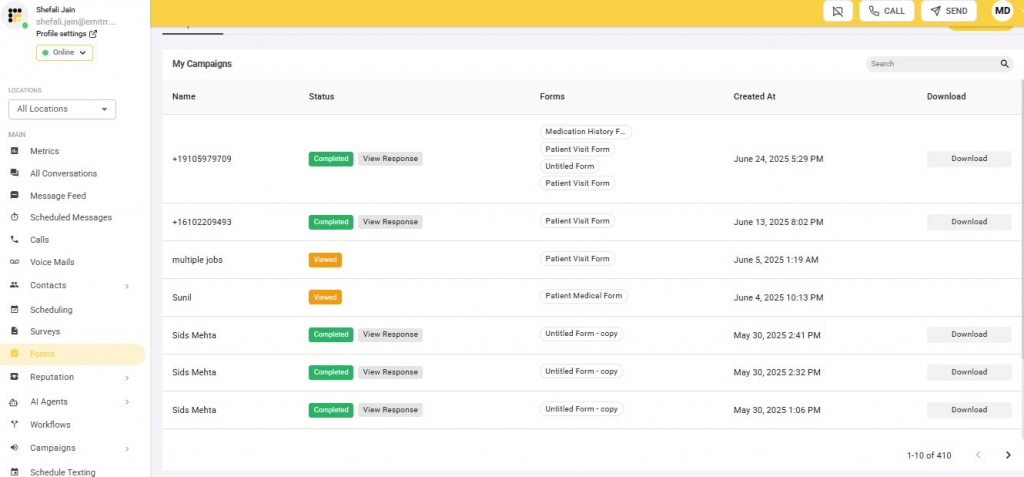
Emitrr is a healthcare communication and workflow platform that helps practices collect patient information, forms, electronic signatures, insurance documents, and other intake requirements before a visit. Its main advantage is connecting digital patient intake with the communication needed to move patients through the process.
Practices can send secure form links through text or email, answer patient questions through two-way messaging, request missing documents, and follow up when intake remains incomplete. Teams can also connect intake with appointment confirmations, reminders, scheduling, and supported electronic health record or practice management workflows.
Emitrr is a strong option for practices that do not want patient forms to operate as an isolated tool. It can complement a dedicated intake, registration, or EHR system by handling communication and follow-up around the intake process. The exact data exchange and write-back available depend on the connected system.
Emitrr Key Features
- Customizable digital intake forms: Create digital intake forms for demographics, medical history, consent, insurance, and appointment-specific information.
- Mobile-friendly completion: Allow patients to complete forms from a phone, tablet, or computer before arriving.
- Forms through text and email: Deliver secure form links through convenient patient communication channels.
- Electronic signatures: Collect signatures for treatment consent, privacy policies, financial agreements, and other documents.
- Document collection: Collect insurance cards, identification, referral documents, images, and supporting files using an AI SMS agent and AI voice agent.
- Two-way patient texting: Let patients ask questions when intake requirements are unclear using two-way texting.
- Incomplete-intake follow-up: Contact patients who have not completed required forms or submitted documents.
- Shared team inbox: Give staff visibility with shared inbox into patient conversations and outstanding intake requirements.
- Appointment communication: Connect intake with confirmations, appointment reminders, rescheduling, and other appointment workflows.
- EHR/PMS workflows: Transfer forms, documents, or patient information into supported systems where integrations permit.
- Secure communication: Support the secure handling of protected health information within HIPAA-aligned workflows.
- Multilingual communication: Help practices communicate with patients across supported languages.
- Reporting: Track form delivery, responses, communication activity, and team performance.
Pros of Emitrr
- Combines digital intake forms with patient communication.
- Helps staff address the reasons patients do not complete intake.
- Supports forms, electronic signatures, documents, texting, scheduling, and reminders.
- Reduces dependence on separate form and communication tools.
- Supports independent and multi-location healthcare practices.
- Connects with more than 500 EHR, PMS, and CRM systems.
- Supports write-back and connected workflows where the integration permits.
- Gives teams shared visibility into patient communication.
Cons of Emitrr
- Integration depth varies by EHR/PMS.
- Some write-back or advanced workflow capabilities depend on the connected healthcare system.
- Advanced AI or usage-based capabilities may require additional pricing.
Emitrr Pricing
Emitrr offers two VoIP pricing plans: Standard and Professional. Messaging, integrations, workflow automation, and AI usage may be priced separately.
| Name of the plan | Pricing if paid annually | Pricing if paid monthly |
| Standard | $20 per user per month | $25 per user per month |
| Professional | $25 per user per month | $30 per user per month |
Emitrr Integrations
Emitrr integrations connect the platform with more than 500 healthcare and business systems. Healthcare integrations include:
- athenahealth
- eClinicalWorks
- DrChrono
- Spry PT
- Dentrix
- Denticon
- Eaglesoft
- Dentrix Ascend
- Dentrix Enterprise
- Curve Hero
- Zapier
- Salesforce
- HubSpot
- Mailchimp
Emitrr Customer Support Channels
- Live chat: Chat with Emitrr’s support representatives.
- Phone: Call Emitrr at +1 (210) 941-4696.
- Email: Contact support@emitrr.com.
- Knowledge base: Access product guidance and troubleshooting resources.
- FAQs and forum: Review answers to common product questions.
- SMS: Contact the team through text messaging.
Emitrr Ratings
Emitrr maintains strong ratings across trusted review platforms, with a 4.8 on Capterra and a 4.8 rating on G2.
Emitrr Reviews
“You have it all integrated into one platform, the signatures, the amount of characters, you can attached files, send photos. You are able to create and send forms. Unlimited amount of things we can use and take advantage of.”

2. Curve Dental: Best for Dental Intake Within a Cloud-Based PMS
Overview
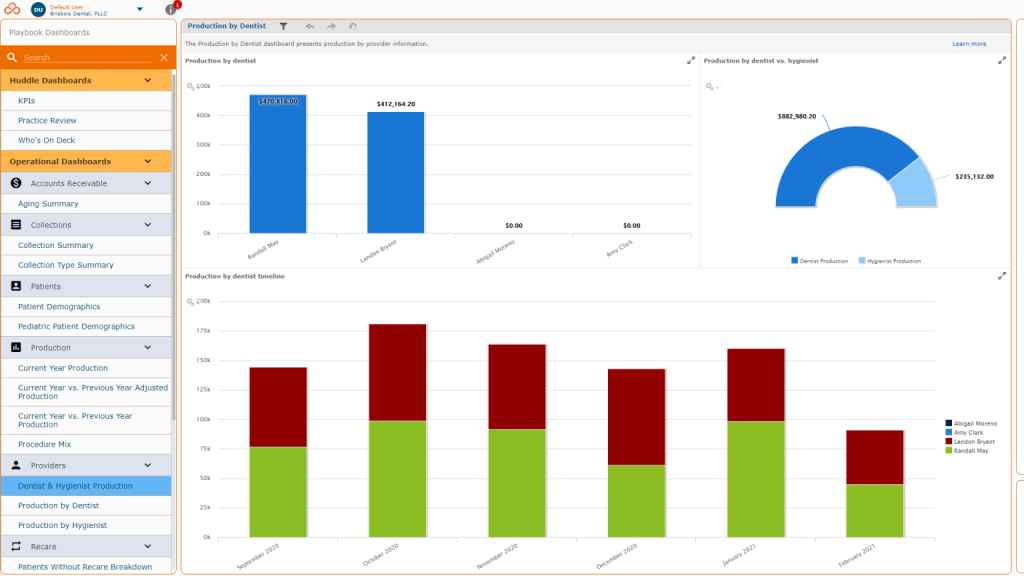
Curve Dental is a cloud-based dental practice management system that combines patient records, scheduling, billing, insurance management, and patient-facing workflows. Unlike a standalone patient forms software product, Curve Dental keeps registration and intake information within the broader dental practice environment.
This makes it most relevant to dental practices that want intake to work inside the same system used for daily operations. Patient demographics, health history, insurance details, appointments, and clinical records can remain connected instead of being managed across unrelated tools.
Curve Dental is not designed as general medical intake software. Practices outside dentistry, or dental organizations committed to another PMS, should consider whether adopting an entirely new practice management system is justified by their intake requirements.
Curve Dental Key Features
- Dental new patient forms: Collect patient demographic, contact, insurance, and health-history information.
- Medical history collection: Capture medications, allergies, conditions, and relevant dental history.
- Patient registration: Create and manage patient information within the dental PMS.
- Cloud-based patient records: Give authorized team members access to patient information from supported devices.
- Online scheduling: Support appointment requests or booking within the patient workflow.
- Insurance management: Collect and manage insurance information within the broader dental workflow.
- Patient communication: Support appointment-related patient communication where available.
- Practice management: Connect intake with clinical records, scheduling, billing, and daily dental operations.
Pros of Curve Dental
- Keeps intake information inside the dental practice management system.
- Is designed specifically for dental workflows.
- Combines scheduling, records, billing, insurance, and patient management.
- Suits practices wanting a cloud-based dental platform.
- Reduces the need to transfer information into a separate dental PMS.
Cons of Curve Dental
- Is primarily suitable for dental practices.
- May be excessive for practices seeking only digital patient forms.
- Intake flexibility depends on the platform’s current form capabilities.
- Practices using another dental PMS may face migration requirements.
- Specialty dental workflows should be confirmed before purchase.
Curve Dental Pricing
To know Curve Dental’s pricing, you would have to get in touch with their support team.
Curve Dental Integrations
- GoTo Connect
- Bola AI
- Birdeye
- Other Integrations
Curve Dental Customer Support Channels
- Email/Help Desk
- FAQs/Forum
- Knowledge Base
- Phone Support
- 24/7 (Live rep)
- Chat
Curve Dental Ratings
Curve Dental has a rating of 4.4 on Capterra.
Curve Dental Reviews
“Easy to learn, fast customer service, online videos help also. Love the features and the display windows”
3. LeadSquared: Best for CRM-Led Patient Acquisition and Onboarding
Overview
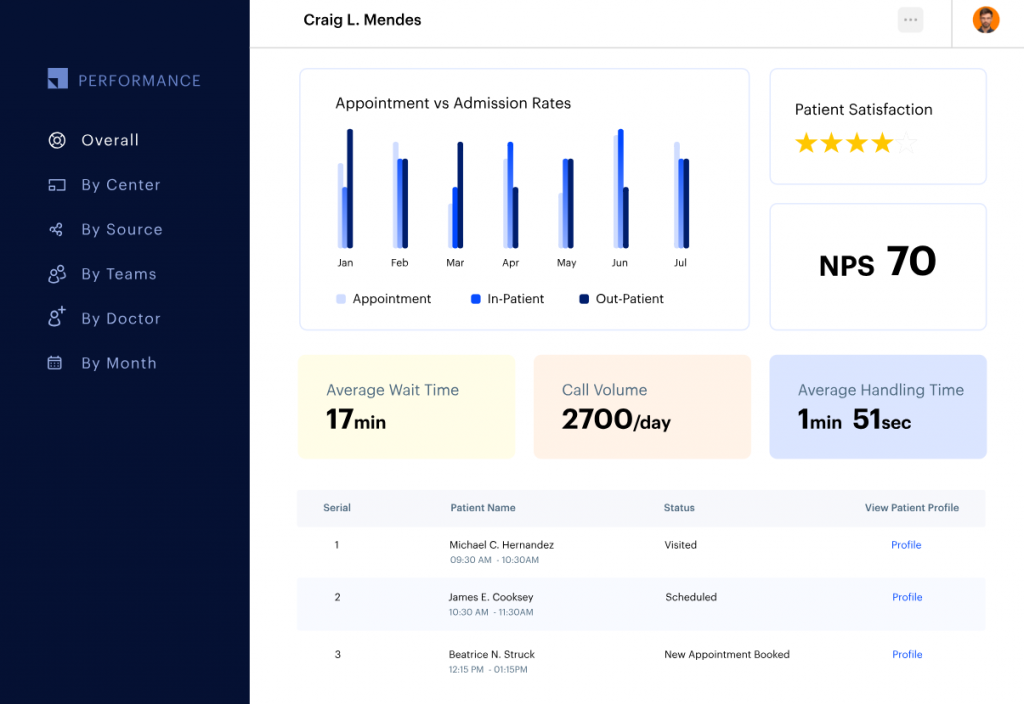
LeadSquared is a customer relationship management and workflow platform that helps healthcare organizations manage inquiries, prospective-patient follow-up, appointment conversion, and onboarding. Its intake role begins earlier than traditional clinical registration, often when a patient first contacts an organization or submits an inquiry.
The platform can capture information from websites, calls, campaigns, and other channels. It can then assign inquiries, create follow-up tasks, track conversion stages, and coordinate communication. This makes it relevant to hospitals, specialty groups, elective-care providers, and centralized access teams managing a high volume of potential patients.
LeadSquared should be evaluated as CRM-led patient onboarding software rather than a complete clinical registration system. Healthcare organizations still need to verify how information reaches the clinical record and whether their required consent, insurance, medical history, and document workflows are supported.
LeadSquared Key Features
- Inquiry capture: Collect patient or prospective-patient information from calls, websites, campaigns, and other sources.
- Patient onboarding workflows: Move patients from initial interest to appointment and onboarding.
- Custom forms: Collect information required during lead intake and onboarding.
- Workflow automation: Assign inquiries, create tasks, and trigger follow-up based on patient activity.
- Appointment management: Support scheduling and appointment-related workflows.
- Communication tools: Contact patients through supported communication channels.
- Lead prioritization: Help teams identify which inquiries require immediate action.
- Analytics: Track inquiry sources, conversion, follow-up, and onboarding performance.
- APIs and integrations: Connect CRM information with supported healthcare and business systems.
Pros of LeadSquared
- Is a strong fit for organizations managing large patient inquiry volumes.
- Supports the workflow before formal clinical intake begins.
- Provides assignment, follow-up, and pipeline visibility.
- Is useful for centralized patient acquisition teams.
- Offers workflow customization and reporting.
Cons of LeadSquared
- Is not a dedicated clinical patient intake platform.
- May require substantial configuration and implementation support.
- Clinical forms, insurance workflows, and EHR write-back must be verified.
- May be more complex than a small practice requires.
- CRM data does not automatically become part of the clinical record.
LeadSquared Pricing
To know LeadSquared’s pricing, you would have to get in touch with their support team.
LeadSquared Integrations
- 100 Coins
- AdvancedMD
- Ameyo
- Acuity Scheduling
LeadSquared Customer Support Channels
- Email/Help Desk
- FAQs/Forum
- Knowledge Base
- Phone Support
- 24/7 (Live rep)
- Chat
LeadSquared Ratings
Leadsquared has a rating of 4.3/5 on Capterra
LeadSquared Reviews
“My overall experience with LeadSquared has been positive—it’s easy to use, helps streamline lead management, and improves sales efficiency, though there’s some room for improvement in customization and performance.”
4. Solutionreach: Best for Patient Engagement With Intake Support
Overview
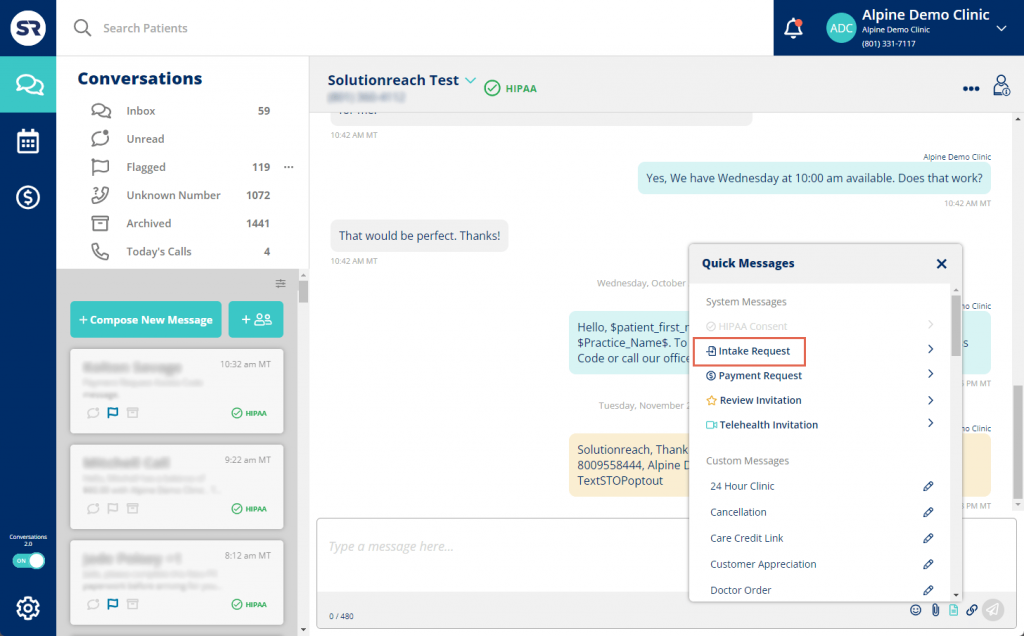
Solutionreach is a patient engagement platform that combines communication, appointment reminders, patient outreach, recall, surveys, and digital forms. It is most useful for practices that want intake support within a broader patient communication system.
Practices can use electronic patient forms to collect information before an appointment and use messaging or reminders to keep patients informed. The same platform can continue supporting patient engagement after intake through recall messages, surveys, and ongoing outreach.
Solutionreach is better evaluated as a patient engagement platform with intake features than as a comprehensive patient registration system. Organizations with advanced insurance, financial clearance, conditional-form, or enterprise registration requirements should verify whether its intake capabilities are sufficiently deep.
Solutionreach Key Features
- Digital patient forms: Send and collect patient information electronically.
- Patient communication: Support individual patient conversations.
- Mass messaging: Send practice updates or instructions to groups of patients.
- Appointment reminders: Contact patients before scheduled visits.
- Patient surveys: Collect feedback through digital surveys.
- Patient recall: Contact patients who are due for another visit.
- EHR/PMS connectivity: Connect communication and form workflows with supported systems.
- Team collaboration: Give staff access to patient communication from a shared environment.
Pros of Solutionreach
- Combines patient communication and engagement features.
- Supports forms alongside reminders and messaging.
- May suit practices already using Solutionreach.
- Offers tools for patient recall and ongoing engagement.
- Provides a broader patient communication environment.
Cons of Solutionreach
- Intake is one component of a broader engagement platform.
- Form customization and integration depth should be confirmed.
- Complex registration and insurance workflows may require another platform.
- Pricing is not publicly transparent.
- Practices should evaluate recent feedback about support and technical reliability.
Solutionreach Pricing
There are three SolutionReach pricing plans available:
- Pro: Need to contact support
- Enterprise: Need to contact support
- Premium add-ons: Need to contact support
Solutionreach Integrations
SolutionReach offers integration with third-party tools; however, not much information is available on the same.
Solutionreach Customer Support Channels
- Phone
- Chat
- Knowledge base
- FAQs
Solutionreach Ratings
SolutionReach has a rating of 3.8 on Capterra
Solutionreach Reviews
“Overall, I love it, it is super easy to navigate and we have very minimal problems with it. I can say that it is one of the best systems to use for an eye doctor’s office!”
5. Mend: Best for Telehealth and Hybrid-Care Intake
Overview
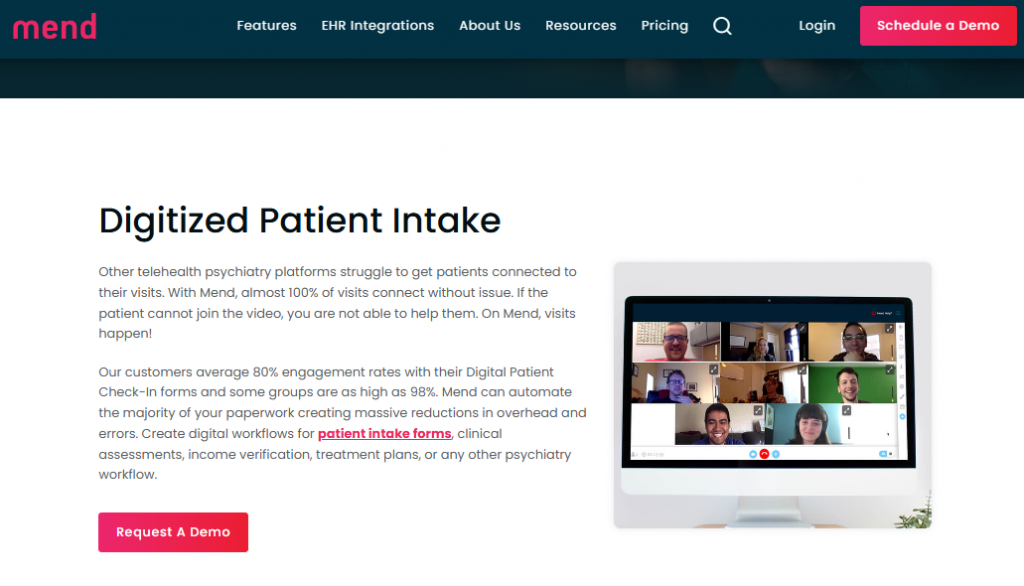
Mend combines digital patient intake, online check-in, scheduling, patient payments, and virtual-care capabilities. It is most relevant to organizations that need patients to complete required steps before entering a telehealth appointment or receiving care through a mix of virtual and in-person visits.
The platform can help connect online patient intake forms with appointment preparation. Instead of treating registration, check-in, payment, and video access as separate patient tasks, organizations can place them within a more connected pre-visit experience.
Mend may provide more functionality than a practice needs if most care is delivered in person and the primary requirement is basic patient form automation. Buyers should confirm EHR compatibility, supported intake workflows, and whether required capabilities are included in the proposed package.
Mend Key Features
- Digital intake forms: Collect required patient information before a visit.
- Online patient check-in: Allow patients to complete arrival requirements remotely.
- Appointment scheduling: Support booking and appointment management.
- Patient payments: Collect payments within the pre-visit or check-in workflow where supported.
- Telehealth preparation: Connect intake and check-in with virtual appointments.
- Patient communication: Send appointment and visit-preparation messages.
- Group video: Support virtual individual or group-care workflows.
- EHR integration: Connect with supported healthcare systems.
Pros of Mend
- Is a strong fit for telehealth and hybrid-care workflows.
- Combines intake, check-in, scheduling, payments, and virtual care.
- Helps patients prepare before joining virtual appointments.
- Can reduce dependence on separate telehealth and intake tools.
- Is relevant to behavioral health and other virtual-care specialties.
Cons of Mend
- May include more virtual-care functionality than an in-person practice needs.
- Intake value may depend on adopting the broader Mend platform.
- EHR compatibility must be confirmed.
- Pricing is not publicly available.
- Practices should review recent feedback about performance and connectivity.
Mend Pricing
To know Mend’s pricing, you would have to get in touch with their support team.
Mend Integrations
- athenaHealth
- Exam
- Kipu
- eClinicalWorks
- Acumen
Mend Customer Support Channels
- Email/Help Desk
- Knowledge Base
Mend Ratings
Mend has a rating of 4.6 on Capterra
Mend Reviews
“Mend tech team wonderful at making changes as we request them and finding solutions for alternate workflows. Great implementation process.”
6. Luma Health: Best for Enterprise Patient Journey Orchestration
Overview
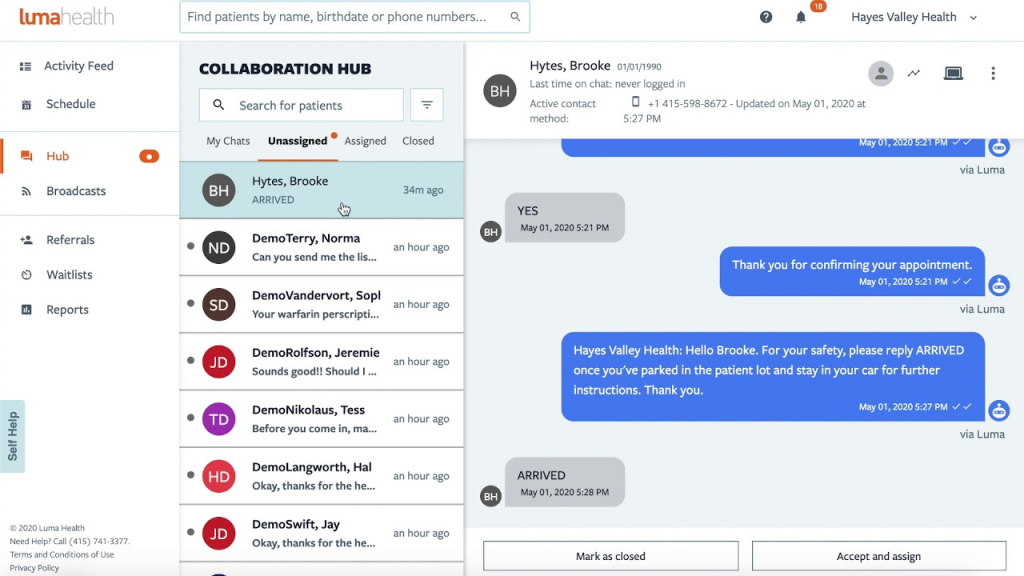
Luma Health is a patient success and workflow orchestration platform that helps healthcare organizations coordinate access, scheduling, intake, communication, and navigation across the patient journey. Its purpose extends beyond replacing paper forms.
Enterprise groups can use Luma Health to organize patient-facing tasks across departments, locations, and stages of care. Intake can form part of a larger workflow involving appointment access, pre-visit instructions, outreach, navigation, and follow-up.
This breadth makes Luma Health more suitable for health systems, hospitals, and larger medical groups than for small practices seeking a straightforward patient intake form software product. Prospective buyers should evaluate the modules required, implementation demands, and the exact EHR workflows included in the proposed deployment.
Luma Health Key Features
- Digital patient intake: Collect information and forms before appointments.
- Patient scheduling: Support appointment booking and scheduling workflows.
- Patient outreach: Send targeted messages and instructions.
- Workflow orchestration: Coordinate patient tasks across different stages of care.
- Patient navigation: Guide patients through appointment and preparation requirements.
- Conversational communication: Support two-way communication and patient responses.
- Enterprise administration: Coordinate workflows across teams and locations.
- EHR connectivity: Use information from supported healthcare systems to power patient workflows.
- Reporting: Track patient engagement and workflow performance.
Pros of Luma Health
- Supports intake as part of a broader patient journey.
- Is designed for larger healthcare organizations.
- Combines access, scheduling, communication, and navigation.
- Supports multi-location and enterprise workflows.
- Connects patient outreach with healthcare-system information.
Cons of Luma Health
- May be too complex for small independent practices.
- Pricing is not publicly available.
- Enterprise implementation may require significant resources.
- Intake is one part of a broader platform rather than the sole focus.
- Exact functionality depends on purchased modules and integrations.
Luma Health Pricing
To know Luma Health’s pricing, you would have to get in touch with their support team.
Luma Health Integrations
- Epic
- Veradigm
- OracleHealth
- eClinicalWorks
- Greenway
- Meditech
Luma Health Customer Support Channels
- Email/Help Desk
- FAQs/Forum
- Knowledge Base
- Phone Support
- Chat
Luma Health Ratings
Luma Health has a rating of 4.6 on Capterra
Luma Health Reviews
“I love that Luma gives us the opportunity to customize the messages that go out to our patients. We have used other software that didn’t and this capability is huge for us.”
7. Klara: Best for Messaging-Led Patient Intake
Overview
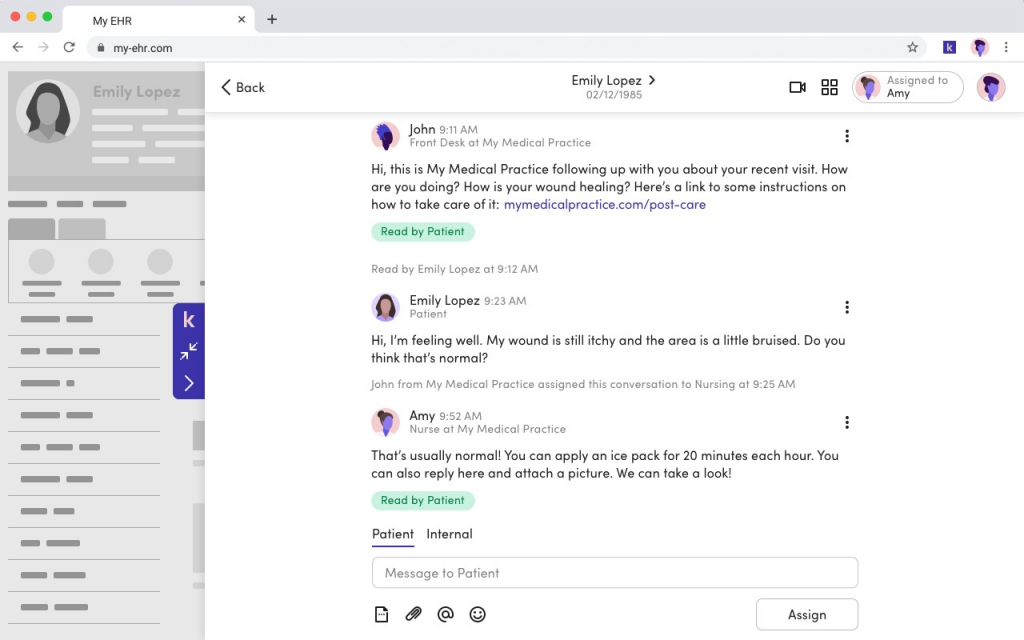
Klara or ModMed is a patient communication platform that helps healthcare practices exchange messages, send forms, collect information, and coordinate appointment preparation through a shared communication environment. Its intake value centers on the conversation surrounding a patient’s forms and pre-visit requirements.
Patients may need help understanding a question, identifying the correct document, or confirming what must be completed before an appointment. Klara allows teams to manage those conversations while maintaining shared visibility into patient messages.
Klara is best suited to practices that view two-way communication as a central part of intake. Organizations needing comprehensive electronic patient registration software, real-time eligibility verification, detailed payment workflows, or enterprise financial clearance should verify whether another system is required.
Klara Key Features
- Patient messaging: Communicate with patients through supported digital channels.
- Digital forms: Send forms and collect patient information.
- Document exchange: Collect or share files through supported workflows.
- Appointment preparation: Send pre-visit instructions and requests.
- Team collaboration: Give staff shared visibility into patient conversations.
- Conversation routing: Direct patient messages to the appropriate team member.
- Appointment reminders: Support pre-visit communication.
- EHR integration: Connect patient communication with selected healthcare systems.
Pros of Klara
- Maintains a strong focus on patient communication.
- Helps practices manage intake questions and form follow-up.
- Gives staff shared access to patient conversations.
- Supports pre-visit preparation.
- Suits practices that rely heavily on patient messaging.
Cons of Klara
- Messaging capabilities extend beyond patient intake.
- Comprehensive registration, insurance verification, and payment capabilities should be confirmed.
- EHR integration depth varies.
- Pricing is not publicly transparent.
- Practices may require another system for advanced intake or financial clearance.
Klara Pricing
To know Klara’s pricing, you would have to get in touch with ModMed support team.
Klara Integrations
- Practice Fusion
- NexHealth
- EpicCare EMR
- ModMed
- Nextech
- Athenahealth
- DrChrono
- Oracle Health
Klara Customer Support Channels
- Phone
- Chat
Klara Ratings
Klara has a rating of 4.3 on Capterra.
Klara Reviews
“What I like most about the Klara app is the simplicity of getting around the app. It’s very easy to use and you can speak with your provider with ease, as well as send and receive documents/forms.”
8. Weave: Best for Small Practices Wanting Forms With Phone and Texting
Overview
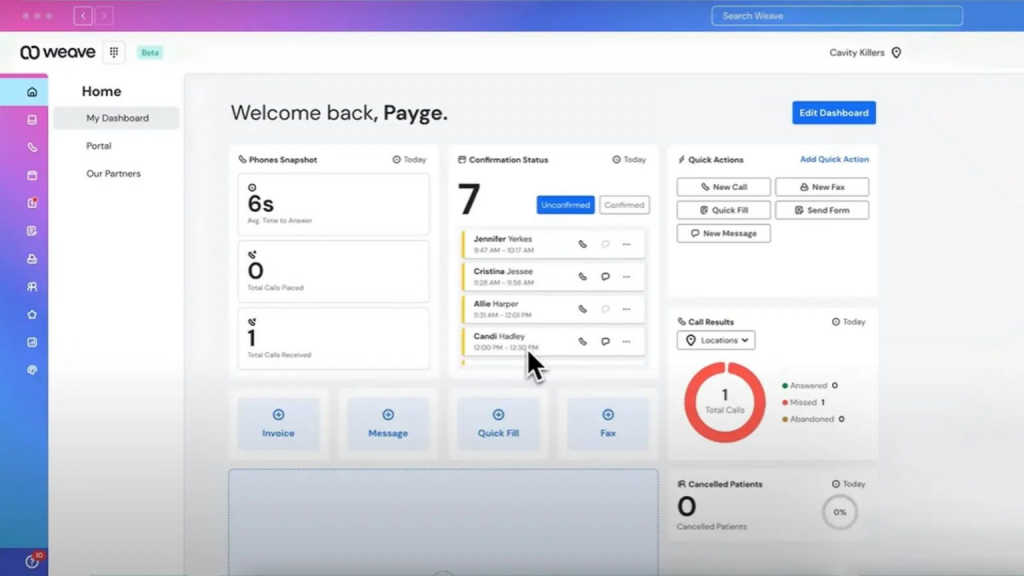
Weave is a communication platform for dental and healthcare practices that combines phone, texting, appointment communication, payments, and digital forms. Its appeal lies in bringing several front-desk communication functions into one system.
A practice can use digital forms to gather information and then contact patients through phone or text about missing paperwork, appointment details, or payment requirements. This can make Weave useful for smaller organizations seeking paperless patient intake alongside everyday patient communication.
However, intake is part of a broader communication package. Practices should determine whether the forms meet their exact requirements and confirm how information moves into their existing EHR or PMS. Multi-location organizations should also calculate costs across all required locations, users, and add-ons.
Weave Key Features
- Digital forms: Send patient forms before the appointment.
- Form customization: Create or modify forms for practice requirements.
- Patient texting: Communicate with patients about outstanding information.
- Phone system: Manage patient calls within the broader communication platform.
- Appointment reminders: Send visit reminders and instructions.
- Payments: Collect patient payments through supported workflows.
- Practice-management integration: Connect with supported dental and healthcare systems.
- Team communication: Give staff access to patient conversations and activity.
Pros of Weave
- Combines phone, texting, forms, and payments.
- Is a familiar fit for smaller dental and healthcare practices.
- Provides intake alongside broader front-desk communication.
- Supports patient follow-up through texting.
- Connects with selected practice management systems.
Cons of Weave
- Starts at a relatively high per-location price.
- Intake is part of a broader communication package.
- Integration depth varies between systems.
- Multi-location costs can increase as locations are added.
- Practices should evaluate recent customer support feedback.
Weave Pricing
There are four Weave pricing options available:
- Base Plan: Starts at $199/month
- Coordinate Bundle: $149/month
- Attract Bundle: $149/month
- AI and other products: Additional pricing
Weave Integrations
- Softdent
- PracticeWorks
- Sensei
- OrthoTrac
- drChrono
- Win OMS
- Eaglesoft
- Dolphin
- And more!
Weave Customer Support Channels
- Chat
- FAQs/Forum
- Phone
- Email/Help Desk
- Knowledge Base
Weave Ratings
Weave has a rating of 4.8 on Capterra.
Weave Reviews
“I have overall had an amazing experience with Weave, from the ease of installation, to the ease of use and the ever helpful updates.”
9. NexHealth: Best for Forms, Scheduling, and Patient Experience
Overview
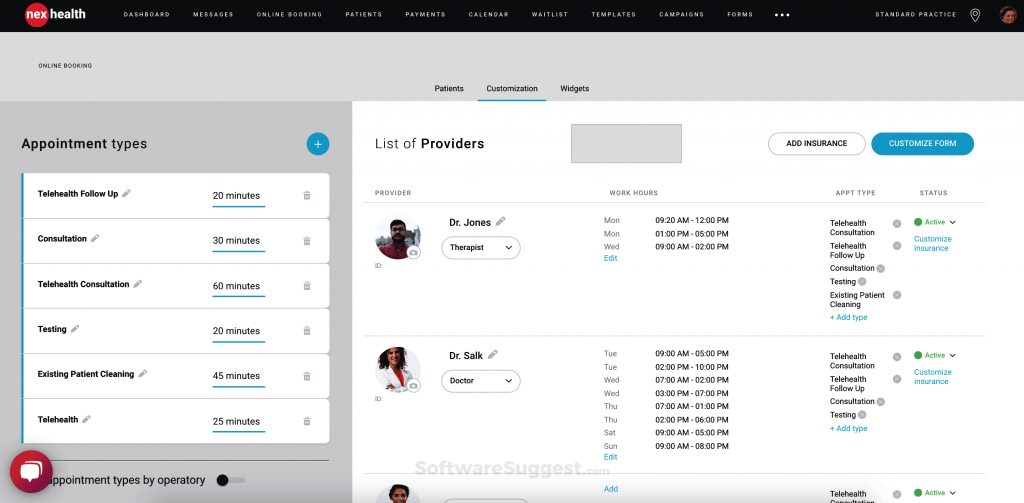
NexHealth is a patient experience platform that connects online scheduling, digital forms, patient communication, insurance verification, and payment workflows with supported dental and medical systems. It is designed to automate patient-facing tasks while synchronizing relevant information with an existing health record system.
Its form capabilities include mobile completion, customizable questions, conditional logic, rules based on appointment or patient type, and follow-up for incomplete paperwork. Where supported, patient details and submitted forms can sync into the connected system.
NexHealth is particularly relevant to dental practices and medical organizations using a compatible EHR or PMS. Because its value depends heavily on system connectivity, buyers should confirm the exact fields, documents, alerts, and workflow actions supported by their specific integration.
NexHealth Key Features
- Digital forms: Send and collect patient forms electronically.
- Conditional logic: Show or hide questions according to previous responses.
- Automated form delivery: Send forms according to appointment type, procedure, or patient status.
- Incomplete-form follow-up: Remind patients when required paperwork remains unfinished.
- Online scheduling: Allow patients to view availability and book appointments.
- Patient record synchronization: Transfer supported information between NexHealth and connected practice systems.
- Patient messaging: Send appointment and intake communication.
- Insurance verification: Confirm eligibility through supported workflows.
- Payments: Support digital payment collection where available.
- Patient experience tools: Connect forms, scheduling, communication, and other patient-facing workflows.
Pros of NexHealth
- Combines scheduling, forms, communication, insurance verification, and payments.
- Is a strong fit for dental practices using supported systems.
- Provides a modern patient-facing experience.
- Can reduce duplicate entry where supported integrations allow.
- Supports form rules, conditional questions, and pre-visit completion.
- Can follow up on incomplete forms.
Cons of NexHealth
- Fit depends heavily on EHR/PMS compatibility.
- Integration capabilities vary by system.
- Pricing may depend on the selected products and practice configuration.
- Complex enterprise registration workflows may require another product.
- Medical specialty requirements should be confirmed before purchase.
NexHealth Pricing
To know NexHealth’s pricing, you would have to get in touch with their support team.
NexHealth Integrations
- Curve Dental
- Denticon
- Dentrix
- Dentrix Ascend
- Dentrix Enterprise
- Eaglesoft
- eClinicalWorks
- Open Dental
NexHealth Customer Support Channels
- Email/Help Desk
- Phone Support
- Chat
NexHealth Ratings
NexHealth has a rating of 4.6 on Capterra.
NexHealth Reviews
“Robust functionality that automates patient engagement workflow and integrates seamlessly with our Patient Management System.”
10. Phreesia: Best for Comprehensive Enterprise Patient Registration
Overview
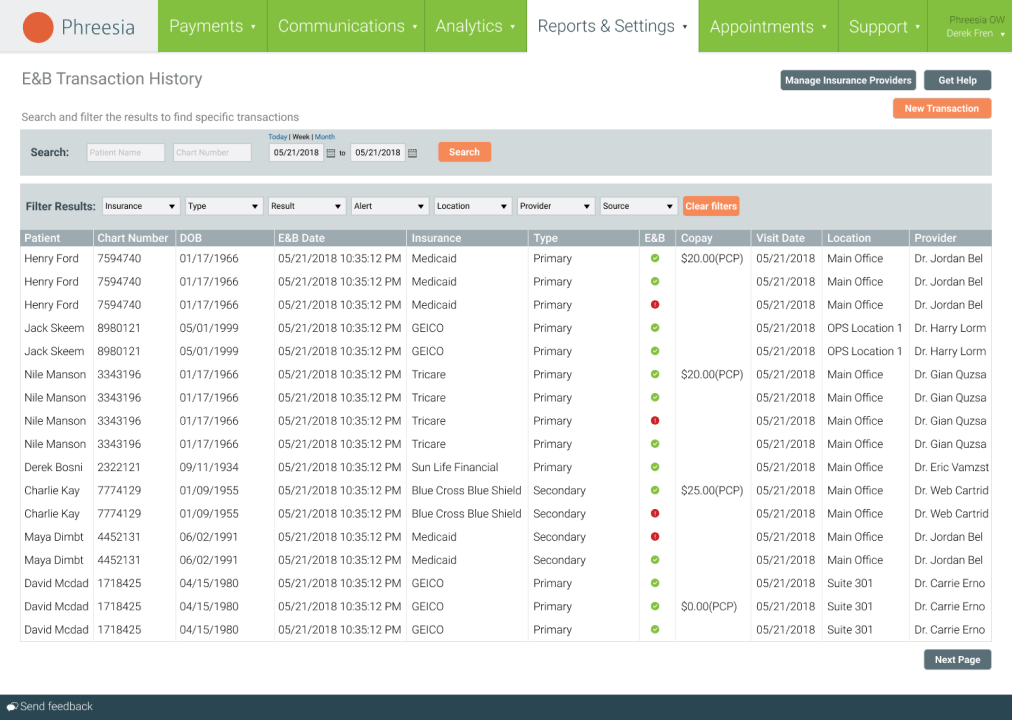
Phreesia is a patient intake, registration, activation, eligibility, payment, and digital check-in platform designed for healthcare organizations with comprehensive administrative and financial intake requirements.
The platform extends beyond patient forms. It can support demographic collection, clinical intake questions, consent, insurance eligibility, payments, and check-in across remote and in-office workflows. This makes Phreesia relevant to larger medical groups, hospitals, and health systems looking for structured registration processes at scale.
That breadth can also increase implementation complexity. Small practices or organizations that need only online patient intake forms may find the platform more extensive than necessary. Buyers should examine the complete contract, implementation plan, integration scope, transaction requirements, and modules included.
Phreesia Key Features
- Digital patient registration: Collect and verify patient demographic information.
- Patient intake forms: Collect medical history, consent, and appointment-specific information.
- Insurance verification: Support insurance information collection and eligibility workflows.
- Patient payments: Collect copays, balances, and other payments.
- Digital check-in: Allow patients to complete registration and check-in remotely or in the office.
- Consent management: Collect and manage electronic signatures and consent documents.
- Patient communication: Send instructions and registration requests.
- EHR integration: Connect registration and intake with supported healthcare systems.
- Patient activation: Support outreach and patient participation.
- Analytics: Track registration, payment, intake, and patient activity.
Pros of Phreesia
- Offers comprehensive intake and registration capabilities.
- Supports insurance, consent, payments, and check-in.
- Is designed for larger healthcare organizations.
- Connects administrative and financial intake.
- Supports both remote and in-office workflows.
- Provides enterprise reporting and workflow management.
Cons of Phreesia
- May be too complex for small practices.
- Pricing is not publicly available.
- Implementation may require substantial time and resources.
- Practices needing only digital forms may purchase more functionality than necessary.
- Contract, payment, and implementation requirements should be reviewed closely.
Phreesia Pricing
To know Phreesia’s pricing, you would have to get in touch with their support team.
Phreesia Integrations
- eClinicalWorks
- athenaHealth
- AdvancedMD
- Meditech
- Epic
- Oracle
- Nextgen
- And more!
Phreesia Customer Support Channels
- Call
Phreesia Ratings
Phreesia has a rating of 4.3 on Capterra.
Phreesia Reviews
“Overall, I think I like using Phressia, I feel there are a few things that could be better, but my honest opinion is, it’s a good application.”
Key Features to Look for in Patient Intake Software
The right patient intake management software should make information easier for patients to submit and easier for staff to review, transfer, and act on. Features should be evaluated as part of the complete intake workflow rather than as isolated capabilities.
- Customizable digital forms: Create forms for patient demographics, medical history, medications, allergies, insurance, consent, and specialty-specific requirements.
- Conditional form logic: Show questions according to previous answers, appointment type, specialty, provider, or location.
- Mobile-friendly completion: Allow patients to complete forms easily from a phone without downloading an application.
- Electronic signatures: Collect treatment consent, privacy acknowledgments, financial agreements, and other authorizations.
- Document uploads: Collect insurance cards, identification, referrals, images, and medical records.
- Patient pre-registration: Capture and verify required information before the appointment.
- Digital check-in: Complete remaining arrival requirements without waiting-room paperwork.
- Intake completion tracking: Show which forms are complete, incomplete, pending, or missing.
- Patient communication: Allow staff to send forms and answer patient questions through text or another supported channel.
- Incomplete-form follow-up: Contact patients who have not completed intake requirements.
- Insurance verification: Distinguish basic insurance information collection from actual eligibility and benefits verification.
- EHR/PMS integration: Connect patient forms, appointments, demographics, and documents with existing healthcare systems.
- Secure patient data collection: Evaluate encryption, access controls, audit trails, authentication, data storage, vendor security practices, and business associate agreement availability.
- Multi-location management: Control templates, permissions, workflows, and reporting across multiple locations.
- Reporting: Track completion rates, missing information, form abandonment, staff follow-up, and intake performance.
- Implementation and support: Evaluate form migration, integration setup, staff training, launch support, and ongoing assistance.
Practices should also test how the system behaves when a patient does not follow the expected path. For example, staff need to know what happens when a form is partially completed, an insurance card is unreadable, a consent signature is missing, or a patient responds with a question instead of completing the request.
Which Patient Intake Software Is Right for You?
The right solution depends on the job the healthcare organization needs the software to perform. A practice seeking digital patient forms may not need an enterprise registration platform, while a hospital managing financial clearance and eligibility will likely require more than a simple form builder.
| If You Need… | Best Platform |
| Digital intake forms connected with two-way patient communication, document collection, reminders, and follow-up | Emitrr |
| Dental intake, patient records, scheduling, insurance, and billing within a cloud-based dental PMS | Curve Dental |
| CRM-led patient acquisition, inquiry management, appointment conversion, and onboarding workflows | LeadSquared |
| Digital forms combined with patient reminders, recall, surveys, and engagement | Solutionreach |
| Digital intake, online check-in, payments, and appointment preparation for telehealth or hybrid care | Mend |
| Enterprise intake, scheduling, outreach, and patient navigation across a broader patient journey | Luma Health |
| Messaging-led form collection, pre-visit communication, and shared team conversations | Klara |
| Digital forms combined with phone, texting, payments, and front-desk communication for small practices | Weave |
| Online scheduling, digital forms, insurance verification, payments, and patient-experience workflows connected to supported practice systems | NexHealth |
| Comprehensive patient registration, insurance eligibility, consent, payments, and digital check-in | Phreesia |
Key Takeaways
- Start with the intake problem the practice needs to solve, not the vendor’s total number of features.
- Determine whether the practice needs a standalone intake tool, patient engagement platform, practice management system, CRM, or enterprise registration platform.
- Test the patient experience on a mobile device before selecting a platform.
- Confirm that forms can change by patient type, appointment, specialty, provider, and location.
- Verify how the platform handles incomplete forms, missing documents, and patient questions.
- Do not treat “EHR integration” as a complete answer. Confirm exactly what data syncs and whether information writes back.
- Distinguish insurance information collection from real-time eligibility and benefits verification.
- Review safeguards for protected health information, BAA availability, access controls, audit logs, and data-storage practices.
- Calculate the complete cost, including implementation, integrations, messaging, transactions, add-ons, and multi-location fees.
- Match implementation complexity to the practice’s available staff and technical resources.
- Use demonstrations to test real intake workflows rather than reviewing isolated features.
- Choose the platform that fits the existing healthcare technology stack and removes the most manual work for patients and staff.
FAQs
Patient intake software helps healthcare practices collect and manage patient information, forms, signatures, insurance details, and documents digitally.
The best software depends on the practice’s size, specialty, intake requirements, EHR or PMS, and budget. Emitrr is well suited to practices needing digital intake connected with patient communication and follow-up.
Key features include customizable forms, mobile completion, electronic signatures, document uploads, completion tracking, secure data collection, and EHR/PMS integration.
Pricing varies by vendor, practice size, locations, integrations, usage, and add-ons. Ask for a complete quote that includes implementation and ongoing fees.
Many platforms do, but integration depth varies. Confirm which information syncs, whether write-back is supported, and what staff must still enter manually.
Patient intake software can support HIPAA-compliant workflows. Practices should verify security safeguards, access controls, audit logs, encryption, and Business Associate Agreement availability.
Patient intake software collects forms, information, signatures, and documents. Patient registration software may also handle identity verification, eligibility, check-in, record creation, and payments.
Some platforms provide real-time eligibility checks, while others only collect insurance information. Verify the supported payers, returned data, and whether benefits verification costs extra.
Conclusion
The best patient intake software depends on the organization’s practice type, intake complexity, EHR or PMS, patient experience requirements, and implementation capacity. A small practice may need simple mobile forms and dependable support, while a multi-location group or health system may require conditional workflows, centralized controls, eligibility verification, payments, and enterprise reporting.
Compare platforms based on mobile usability, completion visibility, integration depth, security controls, support, and complete pricing. Test how each system handles incomplete forms, missing documents, patient questions, and record updates before making a decision.
For practices that want digital intake connected with patient texting, document collection, appointment reminders, and completion follow-up, Emitrr can bring those workflows together while complementing the existing intake and healthcare systems. Book an Emitrr demo to see how the platform can support your patient intake process.


 4.9 (400+
reviews)
4.9 (400+
reviews)