
Introduction
Patients don’t want phone calls. They want quick updates on their phones. That’s why medical offices are switching to texting. Messages get opened, replies come faster, and nothing gets missed.
For staff, texting means fewer voicemails and fewer no-shows. Reminders, follow-ups, and reschedules happen in seconds. With AI-powered, HIPAA-compliant texting, practices can automate routine conversations, personalize messages, and save hours every day, without losing the human touch.
That’s why the right texting software matters. Here are the 10 best texting software for medical offices.

AI Summary: Best Texting Software for Medical Offices
- Texting software for medical offices is a HIPAA-compliant platform that enables clinics to send and receive secure patient SMS messages.
- Medical texting software is commonly used for appointment reminders, confirmations, follow-ups, billing alerts, and two-way patient communication.
- The best patient texting software includes EHR integration, automation workflows, missed-call text back, and secure messaging with a signed BAA.
- Clinics use medical texting services to reduce no-shows, lower call volume, and improve response times.
- Pricing varies by vendor, with models based on users, locations, or message volume.
- In this 2026 comparison guide, we evaluate the top texting software for medical offices based on features, compliance, integrations, and overall value.
If you want a quick side-by-side look at how these tools compare on AI features, updates, and best use cases, start here.
| Software | Texting features | AI features | Integrations | Best for |
|---|---|---|---|---|
| Emitrr ⭐ Best medical texting service | 2-way SMS, reminders for medical appointments, broadcasts | Intent detection, auto actions | Athena, Dentrix, HubSpot | High-volume medical offices |
| Spruce Health | Secure messaging, team inbox | Smart routing | EHR systems | Care teams & telehealth |
| OhMD | Patient texting, forms, reminders | Message automation | EHR / PMS | Patient communication |
| Solutionreach | Reminders, recalls, reviews | Basic automation | Practice management | Patient retention |
| NexHealth | SMS, scheduling, intake | Workflow automation | EHR-native | Digital patient experience |
| Klara | Secure 2-way texting | Message triage | EHRs | Front-desk efficiency |
| Podium | SMS, reviews, payments | AI review responses | CRM systems | Reviews + texting |
| Weave | SMS + calling | Limited automation | PMS | Small practices |
| Luma Health | Reminders, intake, follow-ups | AI workflows | EHR-native | Enterprise clinics |
| Updox | Secure texting, fax | Rule-based automation | EHR systems | HIPAA communications |
Key Features to Look for in a Medical Texting Service
Not all tools are made for healthcare. You need features that fit your daily work and also keep patient data safe. Here’s what you need to look for when choosing a platform for your medical office:
Two-way texting and real-time replies
The platform should allow two-way texting with patients in a single inbox. AI can help here by sorting urgent messages, flagging important replies, or even suggesting quick responses based on past interactions. This makes it easier to confirm appointments, answer questions, and resolve issues faster.
✉️ Check your text before you send it.
Use free SMS Length Calculator to avoid patient message splitting, character-limit surprises, and unexpected costs.
Smart automation with AI for reminders and recalls
Look for a healthcare texting software that uses smart automation with AI to send timely reminders. It should:
- Notify patients about upcoming appointments
- Send follow-up messages after visits
- Trigger annual checkup or vaccine recalls
AI can time these messages better and adjust based on patient habits. This can help reduce no-shows and keep your schedule full.
Learn more about how AI is changing healthcare:
Group texting for announcements
You should be able to send one message to many patients at once. This is useful for clinic updates like holiday hours, bad weather closures, or flu shot drives. AI tools can help you segment patient groups and send messages that are more relevant.
Secure messaging and PHI protection
Patient information must stay safe at all times. So, choose a software that follows HIPAA texting rules with features like encryption, password-protected messages, and secure links. Some AI tools can even scan for sensitive information before a message goes out, adding an extra layer of security.
Missed call follow-ups
If a patient calls and no one picks up, the system should send a text right away. AI can detect these missed calls and instantly follow up with a helpful message. This will save your office time and prevent lost connections. It’s a great way to handle after-hours or peak-time calls.
Team messaging and coordination tools
Your whole team may be handling texts at once. Look for software that lets you:
- Assign messages to specific staff
- Add internal notes
- Track conversations across users
Smarter healthcare AI-powered tools can route messages based on type or urgency. This will enable the right team member to jump in where required, without any confusion.
Templates and quick replies
Pick a healthcare text messaging tool that saves you time with pre-set message templates. Whether it’s directions, prep instructions, or reminders, AI tools go a step further and even recommend the right template based on patient intent. This keeps communication fast but still personal.
Patient-friendly tools and file sharing
Look for platforms that offer extras to make things easier for patients. This might include:
- Chat from your website that connects to your text inbox
- Secure links to intake forms or test results
- Image sharing (like insurance cards or prescriptions)
AI tools for medical offices can guide patients through these steps without needing your staff’s input.
EHR and EMR integration
Your texting software should work smoothly with your existing health record or scheduling system. AI can help by auto-updating records with new numbers, syncing appointment changes, and logging patient conversations, all without manual entry.
Reports and insights
Some platforms offer dashboards that show how many messages were delivered, how fast patients replied, and how your no-show rates changed. AI can turn this data into simple insights, like best times to send reminders or which patients often need follow-ups.

HIPAA Compliant SMS Messaging: Security & Compliance Requirements
Texting is quick and easy, but in healthcare, it also needs to be safe. You’re dealing with private medical information, so the software you use must protect that data and meet HIPAA rules. Here’s what to check for when choosing a secure, HIPAA-compliant texting tool for medical professionals:
- Messages should be encrypted: The platform should lock your messages so that only your staff and the patient can read them. Even if the message goes over Wi-Fi or a mobile network, it stays private.
- Patients should log in safely: If your patients use a portal or app to view messages, it should ask for a password or even a code sent to their phone. That way, no one else can see their health information, even if their phone ends up in the wrong hands.
- Set permissions and track activity: Not every team member needs access to everything. The software should let you control who can view or send certain messages. It should also keep a history of who sent what and when. So you can always trace back what happened.
- Store messages securely: All messages should sit on a secure, HIPAA-compliant server. Some systems let you auto-delete old messages or allow patients to clear their history. If you need to save chats for medical records, there should be a safe way to download them.
- Get a signed BAA: Your vendor must sign a Business Associate Agreement. This is a basic HIPAA rule. It just means they promise to handle patient information safely. If they won’t sign one, don’t use them.
- Ask for patient consent: It’s absolutely non-negotiable to let patients know you’ll be texting them. You can include this in your intake forms. Some platforms make it easier by offering opt-in and opt-out settings, so you know who’s okay with receiving texts.
Most people get HIPAA compliant texting wrong, learn more about how your messages should look like when communicating with patients:
Choosing the right medical text messaging service means keeping your patients’ info safe while staying compliant. When these basics are covered, you can text with confidence and focus on what matters most, caring for your patients.
How Patient Texting Systems Integrates with EHR & Practice Systems

Texting works best when it connects with the tools you already use. If it runs separately, your team ends up doing the same work twice. They might even miss some key updates. A good medical office texting platform should fit right into your systems and make daily tasks smoother.
EHR and practice management system integration
Your medical office texting software should sync directly with your EHR or practice system. This helps with:
- Auto-triggered appointment reminders
- Contact info updates syncing back to patient records
- Fewer manual entries across systems
Look for platforms that support real-time two-way sync. Many tools work with leading EHRs, including:
- Athenahealth (athenaOne)
- Epic Systems
- eClinicalWorks
- NextGen Healthcare
- Practice Fusion (cloud-based)
- AdvancedMD
Phone system integration
Patients often call and text the same number. A connected phone and texting system helps avoid confusion. Some tools let you send and receive texts using your main office number, so patients always recognize who’s reaching out.
Calendar and scheduling tool integration
If your team uses Google Calendar or Outlook, linking these with your texting app can be useful. You can:
- Set staff alerts
- Manage internal schedules
- Send reminders without switching platforms
Website and patient portal connection
Some platforms allow website chat to flow into your texting inbox. Others let you send messages through your patient portal. Both options help patients reach out easily, and get replies where they’re already active.
CRM and marketing tool connection
For clinics that run email campaigns or collect feedback, integration with tools like Mailchimp or Salesforce can help:
- Keep patient contact lists updated
- Track outreach efforts
- Collect Google or Facebook reviews through text
Payment system integration
A few medical text messaging services let you send payment links or billing reminders over text. Some even sync with tools like QuickBooks, making it easy to manage balances and send secure payment requests.
Custom integrations and open APIs
If your clinic uses custom systems, look for platforms that offer an open API or Zapier support. You can:
- Connect the texting app to hospital systems
- Log messages in spreadsheets
- Trigger alerts in tools like Slack
When your texting software works well with your other tools, it saves time, reduces errors, and helps your team stay on top of every message. Taking this extra step is completely worth it for long-term efficiency.
Why Medical Offices Use Patient Text Messaging Service
Texting has become a must-have for modern medical offices. It’s simple, fast, and fits naturally into your workflow. But with the right tools, especially AI-powered texting, it goes beyond just sending reminders. It becomes a smarter, more helpful way to connect with patients and manage your day.
Helps reduce no-shows
Medical texting helps patients remember their appointments. A quick reminder makes it easier for them to show up or even reschedule if needed. Surveys also find that 78–95% of patients have daily access to text messaging and prefer it for appointment reminders over phone, email, or letters.
Saves time for staff
Texting takes routine tasks off your team’s plate. Instead of calling every patient, staff can send short messages in seconds. An urgent care clinic started texting prep instructions instead of explaining them over the phone. This saved time and kept the phone lines open for more urgent calls.
Improves patient satisfaction
Patients like texting because it feels simple and familiar. They can ask questions, get updates, or reschedule without having to call or log into a portal. A pediatric clinic found that patients were more likely to reply to a text than to an email. They felt more connected to the care team and less frustrated by delays.
Keeps follow-ups on track
Checking in after a visit shows patients that you care. A short text asking how they’re doing can catch problems early. For example, one dental office sends follow-up texts a few days after cleanings. When patients mention discomfort, staff can respond quickly and offer help.
Speeds up responses
Text messages are usually seen within minutes, making them ideal for quick updates. This comes in handy when you need to notify patients about sudden changes, like a doctor running behind or a clinic closing early due to weather. One dermatology clinic used texting to send out these real-time alerts and respond to common questions such as “Are you open today?” or “Can I reschedule?” They ended up noticing that patients appreciated the instant replies, and staff had more time to focus on in-person care.
Improves internal coordination
Texting tools often let your staff leave notes or tag each other in message threads. This helps everyone stay on the same page. At an OB-GYN clinic, if a patient texts about medication, the receptionist can easily bring in a nurse to reply. It keeps the whole conversation in one place.
Makes group messages easy
Some situations call for sending one message to many patients. Texting works well for that too.
A rural health center used group texting during a vaccine drive to notify patients. Those who were interested could reply and schedule right away, saving the team hours of follow-up calls.
Supports after-hours care
Patients may reach out in the evening or overnight. Some systems send a friendly auto-reply, letting them know when someone will get back to them. A pain clinic can use this feature to give patients peace of mind without waking up the staff. Messages are still seen and followed up on the next day.
Makes documentation easier
Texting platforms usually keep a full record of each conversation. This helps your team remember what was said and when. For example, one speciality clinic even adds these messages to patient records, making it easier to track care and follow-up actions.
Access compliant, easy-to-use SMS templates for medical office workflows. Help your staff spend less time typing and more time caring for patients. Download your free pdf now!!
How To Choose the Right Texting Software for a Medical Office
Choosing the right texting software for your medical office doesn’t have to feel overwhelming. By breaking it down step by step, you can focus on what really matters for your clinic.

Step 1: List what your office really needs
Start by identifying how you want to use the software. Do you only need it for appointment reminders and simple two-way texting? Or are you looking for additional features like digital forms, video calls, or team chat? A small clinic may only need the basics, while a growing multi-site practice might require more tools.
Step 2: Make sure it’s HIPAA-compliant
Only consider platforms that offer a signed BAA and follow healthcare privacy standards. Ask about message encryption, how patient identity is verified, and where data is stored. Choosing a medical text messaging platform that’s built for healthcare ensures you stay compliant and protects patient information.
Step 3: Keep it simple for staff and patients
The software should be easy to use for everyone. A clean, intuitive design helps staff manage messages without extra steps or confusion. Patients should also be able to respond without needing to download an app or log into a portal. During demos, pay attention to how the interface looks and feels. A tool that’s simple and clear from day one will be used more effectively by your entire team.
Step 4: Check if it connects with your current systems
Make sure the medical office texting tool can integrate with your EHR or scheduling software. If you use Epic, Dentrix, or Athenahealth, check whether the texting provider supports direct integration. If it doesn’t, look for tools that offer open APIs or data import/export options. A system that syncs with your current workflow will save time and reduce errors.
Step 5: Look at support and reliability
Reliable customer support is essential. If a message fails to send or the system goes down, you need quick answers. Look for platforms that offer live chat, phone support, or email assistance. Read real user reviews to see how responsive the support team is and whether the platform has a history of technical issues.
Step 6: Think about future growth
If you plan to expand your clinic or add new locations, choose software that can scale with you. Look for features like multi-location management, user permissions, and bulk messaging. Also, check how the pricing changes as your team or message volume grows.
Step 7: Understand the pricing
Medical text messaging services vary widely in how they charge. Some use a flat monthly rate, while others bill per user or per message. Make sure you’re not paying for features you won’t use, and ask about any extra costs for training or setup. Think about the return on investment. If it helps fill a few empty appointment slots each month, it may pay for itself.
Step 8: Read reviews and ask your network
Read verified reviews to see what other clinics are saying about the platform. Look for feedback from offices like yours, whether that’s a dental practice, urgent care, or specialty clinic. You can also ask colleagues or professional groups for honest input. Real-world experience often reveals more than a sales demo.
Taking the time to follow these steps will help you find texting software that truly fits your medical office.
Best Patient Texting Software & Medical Texting Services Compared
Choosing the right texting platform will truly transform how your medical office communicates with your patients on a daily basis. Here are the top 10 HIPAA-compliant texting platforms for healthcare practices in 2026:
Let’s take a closer look at each platform:
1. Emitrr: Best for High-volume medical offices
What is Emitrr?
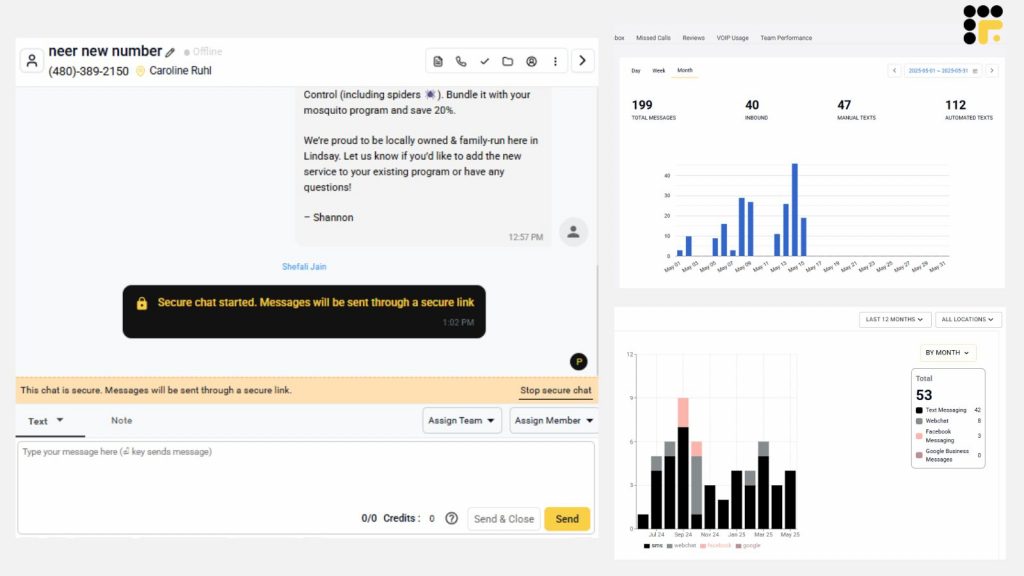
Emitrr is a healthcare-first texting platform designed to reduce missed calls, no-shows, and front-desk overload. It enables HIPAA-compliant, two-way texting from your clinic’s existing phone number, so patients can confirm appointments, reschedule, ask questions, or request refills without calling.
What sets Emitrr apart is its AI-driven automation. The platform detects patient intent from text replies and can take action inside your EHR, such as confirming appointments, creating nurse cases for refills, or routing messages to the right staff automatically.
Emitrr supports multilingual texting, custom reminder cadences, and schedule-based messaging pulled directly from EHRs like Athenahealth. All conversations sync back to the patient record, keeping staff out of manual follow-ups and system switching.
Best for: Medical offices that want AI-powered, EHR-integrated texting to cut no-shows and reduce front-desk workload, without losing the human touch.
Key features of Emitrr
- Shared team inbox: Manage all patient conversations from one place and assign messages to staff.
- Automated reminders: Send appointment reminders, no-show follow-ups, and check-in messages automatically.
- Missed-call texting: If a patient calls and no one answers, Emitrr can auto-text them a response.
- Review requests: Prompt happy patients to leave feedback on Google or Facebook right after their visit.
- Smart auto-replies: Answer common patient questions like “Are you open today?” or “What’s the address?” instantly.
- Two-way texting: Let patients reply to your texts and continue the conversation like a real-time chat. with two-way texting.
- Web chat to SMS: Turn website visitors into text conversations to reduce drop-offs.
- Templates and bulk texts: Use ready-made or custom templates to send reminders, alerts, or announcements to many patients at once.
- Call and voicemail features: Use the same system to make voice calls and receive voicemail transcripts.
- Integration support: Connects with over 1,000 EHRs and CRMs including Dentrix, DrChrono, Kareo, Epic, and more.
- Emitrr AI: Generate or edit messages within clicks.
Watch this video to learn more about what you can do with Emitrr AI:
Emitrr pros
- Built for healthcare: Designed specifically for medical, dental, and veterinary practices.
- Very easy to use: Clean dashboard and fast onboarding make it simple for staff.
- Saves staff time: Smart automation handles repetitive messages and common patient queries without manual input.
- Responsive support team: Known for fast issue resolution and onboarding help.
- Affordable plans: Offers well-prices plans. These are suitable for small to medium size medical offices as well.
Emitrr cons
There are a few additional features which are still in development.
Emitrr pricing
Starts at $42/month for 500 credits.
Emitrr ratings
- Capterra: 4.8/5
- G2: 4.7/5
Emitrr customer reviews
“AWESOME. I would recommend to anyone looking for a messaging platform. Especially love having a text friendly retail number that is the SAME as the number we’ve always had.“
“Exceptional! Friendly! The team at Emitrr handles your need promptly.”
Source: Capterra
Emitrr support channels
- Email: support@emitrr.com
- Phone: +1 (210) 941-4696
- Live chat: Available directly on the Emitrr website
- Knowledge base: Includes extensive documentation, FAQs, and troubleshooting guides
- SMS support: Text for help
2. Spruce Health: Best for care teams & telehealth
What is Spruce Health?
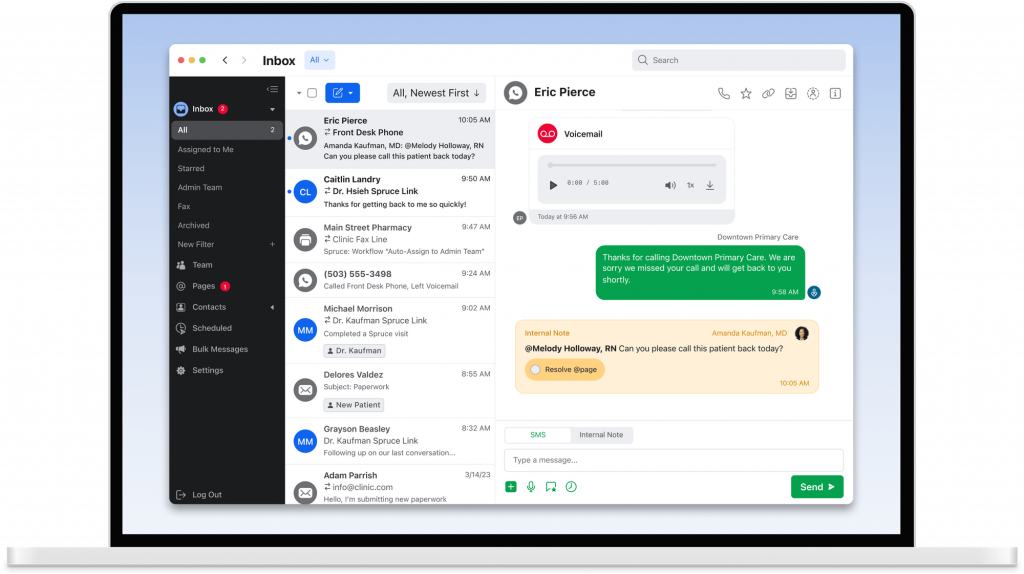
Spruce is a secure texting and calling platform made for healthcare clinics. It combines phone, text, voicemail, and video visits into one app. Your team can handle all patient messages from a single dashboard.
Key features of Spruce Health
- Text and call in one app: Use the same number for texting and phone calls.
- Shared inbox for teams: Everyone sees the same messages and can reply or assign them.
- Secure messaging: Send HIPAA-safe messages using Spruce or through their app.
- Auto-replies and scheduling: Set after-hours messages and scheduled responses.
Spruce Health pros
- All-in-one platform: Text, call, fax, and video chat from one place.
- Team-friendly: Easy to tag and assign tasks to team members.
- No contracts: Month-to-month pricing gives flexibility.
Spruce Health cons
- Limited EHR integrations: Works with only a few systems like Athena.
- Phone issues on desktop: Earlier versions had trouble with computer-based calls.
- Advanced tools cost more: Bulk texting and analytics need the higher plan.
Spruce Health pricing
The basic plans start at $24 per user/month
Spruce Health ratings
- Capterra: 4.5/5
- G2: 4.5/5
Spruce Health customer reviews
“Some functions are not easily implementable such as blocking unwanted phone numbers or rerecording personal messages, though they do explain it quite clearly on their APP customer guide.”
“Sometimes, the notifications do not come through as a push notification on my device. I have had a couple instances where I had new messages and I had to open the app to find out. I wish there was an easy way to search the messages and files received.”
Source: Capterra
Spruce Health support channels
- Email support
- In-app live chat
- Setup help for new users
- Online help center
3. OhMD: Best for Patient communication

What is OhMD?
OhMD is a simple, HIPAA-compliant texting platform made for healthcare providers who want to cut down on phone calls and make communication easy. Patients don’t need an app or login. They can just text your practice like they would text a friend. It’s a good fit for clinics that want quick setup, high response rates, and a friendly patient experience.
Key features of OhMD
- Two-way texting: Patients can text your practice directly and get replies in real time.
- Automated workflows: Set up auto-replies, reminders, and follow-up messages without manual effort.
- Web chat to text: Website messages turn into text threads in your dashboard.
- Video visits: Send one-click video links through text for easy telehealth access.
- AI voice + text agents answer routine calls and texts automatically.
OhMD pros
- Easy for patients: No need to download anything or log in—just regular texting.
- Strong EHR integrations: Works with over 85 EHRs, including Athenahealth, DrChrono, and eClinicalWorks.
- Responsive support: Known for great onboarding help and customer service.
OhMD cons
- Limited to texting: Doesn’t offer voice calls like some all-in-one platforms.
- Some message glitches: A few users have reported message delays or occasional bugs.
- Full features on higher plans: Some tools like advanced automation may only come with premium packages.
OhMD pricing
OhMD pricing plans starts at $200–$250/month for medical use . But, pricing may vary based on features and staff size.
OhMD ratings
- Capterra: 4.7/5
- G2: 4.7/5
OhMD customer reviews
“Some users do not like it because it is a separate app. I can’t figure out a way to delete old clients from my records. At times it seems to freeze. I then just sign out and sign back in which fixes it. I was told that I need to upgrade to a newer version, so that may be my problem.”
Source: Capterra
OhMD support channels
- Email support
- Live chat
- Knowledge base with guides
- Onboarding and training help
4. Solutionreach: Best for Patient retention

What is Solutionreach?
Solutionreach is a well-known patient communication tool trusted by many medical, dental, and vision practices. It focuses on reminders, recalls, surveys, and texting to help fill your schedule and keep patients engaged. The platform is HIPAA-compliant and helps automate many front desk tasks.
Key features of Solutionreach
- Appointment reminders: Sends automatic texts and emails with confirm/cancel options.
- Two-way texting: Lets you chat with patients directly from your dashboard.
- Patient surveys and reviews: Sends post-visit feedback requests and links to leave online reviews.
- Recall messaging: Reminds patients when it’s time to come back for follow-up visits.
Solutionreach pros
- Strong reminder system: Helps reduce no-shows by sending smart, timed reminders.
- All-in-one communication: Includes texting, email, scheduling, and reputation tools.
- Wide EHR compatibility: Integrates with many popular practice management systems like Dentrix, NextGen, and Allscripts.
Solutionreach cons
- Outdated interface: Some users find the dashboard clunky and slow.
- Customer service issues: Support response time and billing practices have been a common complaint.
- Contract lock-ins: Often requires annual contracts that auto-renew if not cancelled early.
Solutionreach pricing
Solutionreach pricing starts around $329/month. Costs increase as more features or locations are added.
Solutionreach ratings
- Capterra: 3.8/5
- G2: 3.7/5
Solutionreach customer reviews
“Can be difficult to maneuver from time to time due to updates/ modifications made to the programing.”
“NOT fully compatible with Dentrix,( even though they said they were). Can not use all the features I would like.”
Source: Capterra
Solutionreach support channels
- Email support
- Phone support
- Knowledge base
- Live chat for limited hours
5. NexHealth: Best for Digital patient experience

What is NexHealth?
NexHealth is a modern all-in-one patient experience platform. It combines real-time online scheduling, texting, digital forms, and payments in one tool. It’s popular among growing medical and dental practices and is known for its clean design and smart EHR syncing.
Key features of NexHealth
- Real-time EHR sync: Updates your schedule and patient info instantly with supported systems.
- Automated reminders: Sends appointment confirmations and follow-ups without manual work.
- Online booking and waitlists: Patients can book or claim openings via text.
- Unified messaging: Combines text and email threads in one inbox.
NexHealth pros
- Clean and easy interface: Staff and patients find it simple to use.
- Reduces no-shows: Smart reminders and waitlist fill-ins help keep the schedule full.
- Full patient journey: Handles booking, intake, and follow-up in one place.
NexHealth cons
- Higher price point: More expensive than basic texting platforms.
- Learning curve: Some features need setup and training.
- Best for EHR users: Works best if you use one of their integrated systems.
NexHealth pricing
NexHealth pricing starts at around $350/month. Custom quotes vary by size and features. There’s no free version available.
NexHealth ratings
- Capterra: 4.7/5
- G2: 4.6/5
NexHealth customer reviews
“That it didn’t integrate as nicely with Curve Dental Software. I wanted two custom booking links – one for the general public to schedule specific appointments online, and another for recare patients to schedule recares when prompted by a reminder/notification link. It took a long time to find a way to make this possible, but the end result was not great. Also, it seemed as though staff had a hard time ensuring forms sent to patients were completed prior to the appointment, because there was no obvious indication of form status visible on Curve.”
“They make changes without adequate/any notification. They change workflow and functionality on the fly and expect the office to adapt. They placate, but do not listen to customers. LIMITED support hours. WEST coast centric mentality – east coast starts at 8am, but west coast support starts at 5am so they can fix issues before they impact the day.”
Source: Capterra
NexHealth support channels
- Email support
- Phone support
- Knowledge base
- Dedicated customer success team
6. Klara: Best for Front-desk efficiency

What is Klara?
Klara is a HIPAA-compliant texting and messaging tool built for medical practices. It lets you chat with patients through regular SMS or secure links and helps your team work together using shared conversation threads. It’s designed to cut down on phone tag and speed up patient responses.
Key features of Klara
- Two-way texting: Patients can text your office directly, no app needed.
- Team messaging: Staff can chat internally within the same patient thread.
- Secure attachments: Share photos, forms, and instructions through text.
- Telehealth video visits: Send one-click links to host virtual appointments.
Klara pros
- Simple and clean interface: Easy for staff and patients to use.
- Good team collaboration: Assign chats, tag staff, and add notes internally.
- No app required for patients: Patients can text back using regular SMS.
Klara cons
- Fewer automations: Doesn’t offer as many reminders or workflows as others.
- Limited reporting tools: Not ideal if you want detailed analytics.
- No built-in payment feature: You’ll need a separate system for billing.
Klara pricing
The plans start around $300/month.
Klara ratings
- Capterra: 4.6/5
- G2: 4.4/5
Klara customer reviews
“The video conferencing doesn’t support multiple service recipients (clients) at the same, such as for group sessions.”
“Frequently receive error messages that a response cannot be sent to a number. Not sure if it is specific to a carrier. Also, despite the message, sometimes the families receive the response. Also a little pricey.”
Source: Capterra
Klara support channels
- Email and phone support
- Help center
- Chat support
- Customer success managers for onboarding
7. Podium: Best for Reviews + texting

What is Podium?
Podium is a texting and communication platform that helps medical offices manage patient conversations, reviews, and feedback from one dashboard. It lets you text patients from your existing office number and automates reminders, follow-ups, and review requests.
Key features of Podium
- Text-enabled landline: Patients can text your main number, no new line needed.
- Automated review invites: Automatically request Google or Healthgrades reviews post-visit.
- Bulk messaging: Send one message to many patients at once.
- Inbox for all messages: View texts, web chat, and reviews in one place.
Podium pros
- Boosts online reviews: Great for improving your Google ratings.
- Easy to use: The interface is clean and simple for teams.
- Web chat integration: Website messages come in as texts for easy response.
Podium cons
- Can be pricey: Monthly plans are higher than some competitors.
- Limited healthcare focus: Not built specifically for medical practices.
- Fewer EHR integrations: Doesn’t sync deeply with many medical systems.
Podium pricing
Podium pricing starts at around $399/month. No per-text charges. Flat monthly rates.
Podium ratings
- Capterra: 4.3/5
- G2: 4.2/5
Podium customer reviews
“Inability to interface with Facebook for payments.”
“It feels really expensive to me. At this point I might be able to get similar functionality for significantly less money, but nonetheless, because we’ve made the investment in it and trained our team on it, I selfishly don’t want to have to deplore another program and do another batch of training.”
Source: Capterra
Podium support channels
- Email support
- Live chat
- Help center with guides
- Dedicated success reps for premium users
8. Weave: Best for Small practices

What is Weave?
Weave is an all-in-one phone and texting platform made for healthcare practices. It combines VoIP phone service with two-way texting, appointment reminders, digital forms, payments, and more, all using your existing office number.
Key features of Weave
- Two-way texting: Text patients easily from your office number.
- Missed call text-back: Automatically follow up when no one answers the phone.
- Digital forms: Send intake or consent forms via text.
- Text-to-pay: Collect payments securely through a text message.
Weave pros
- Great for front desk teams: Combines calls and texts in one system.
- Strong PMS integrations: Syncs with many dental and medical platforms.
- Auto-reminders: Helps reduce no-shows with scheduled texts.
Weave cons
- Requires phone system switch: You’ll need to use Weave’s VoIP phones.
- Setup takes time: Onboarding can take longer due to phone changes.
- Contract required: Often sold on annual agreements, not month-to-month.
Weave pricing
There’s not much details regarding Weave’s pricing plans on review websites.
Weave ratings
- Capterra: 4.3/5
- G2: 4.3/5
Weave customer reviews
“The customer support is lacking and the fact when you have a problem and there is no manager to talk to is not helpful.”
“I don’t love that it does not directly attach to the medical record.”
Source: Capterra
Weave support channels
- Email and phone support
- Help center
- Onboarding team for training
9. Luma Health: Best for enterprise clinics

What is Luma Health?
Luma Health is a patient communication and engagement platform built for clinics and hospitals. It helps automate appointment reminders, recalls, feedback surveys, and waitlist fills using smart two-way texting.
Key features of Luma Health
- Automated reminders: Sends texts to confirm, reschedule, or cancel appointments.
- Smart waitlist: Fills cancelled slots by texting the next patient in line.
- Feedback surveys: Automatically texts patients after visits to collect reviews.
- Secure messaging: HIPAA-compliant two-way conversations with patients.
- AI chatbot: Offers AI chatbot for patient inquiries and engagement workflows
Luma Health pros
- Helps reduce no-shows: Timely reminders and easy rescheduling via text.
- Great EHR integrations: Works with Epic, Athenahealth, and more.
- Patient-friendly texting: No need to download an app.
Luma Health cons
- Best for large practices: Might be too much for very small offices.
- Takes time to set up: Full integration needs IT help at first.
- Pricing not transparent: Requires custom quote.
Luma Health pricing
Luma Health has a custom pricing model. It’s basically based on provider count and feature set.
Luma Health ratings
- Capterra: 4.6/5
- G2: 4.5/5
Luma Health customer reviews
“Not having access to patient account numbers and not being able to exclude patients by insurance companies are our major hurdles. It is also a bit pricy and the contract terms are long and inflexible.”
“The constant changes of my account representatives really made it difficult to build relationships. Overtime Luma’s account representatives stopped contacting the practice and as result we had to figure out solutions on our own. Additionally, they changed their payment terms to where if we didn’t pay them upfront then they would drop us as a customer.”
Source: Capterra
Luma Health support channels
- Phone
- Onboarding specialists
- Help center
- Dedicated account manager for larger clinics
10. Updox: Best for HIPAA communications
What is Updox?
Updox is a secure communication platform built for healthcare practices. It combines HIPAA-compliant texting, electronic faxing, and telehealth in one tool. Many clinics use it to replace paper faxes, reduce phone calls, and stay in touch with patients through simple SMS updates.
Key features of Updox
- Secure patient texting: Two-way texting with encryption and privacy controls.
- E-fax built-in: Send and receive faxes digitally from any device.
- Appointment reminders: Send automated messages for upcoming visits.
- Telehealth video links: Text patients a secure link for virtual visits.
Updox pros
- All-in-one system: Combines text, fax, and video in one place.
- Easy for staff: One inbox to manage all communication types.
- Good for compliance: Meets HIPAA and audit trail standards.
Updox cons
- Outdated design: Interface could be more modern.
- Can be glitchy: Occasional lags or fax delays reported.
- Per-user pricing: Can get costly for larger teams.
Updox pricing
Updox pricing starts at around $50/user/month.
Updox ratings
- Capterra: 4.1/5
- G2: 4.2/5
Updox customer reviews
“The inability to fax blast to a contact list. The complexity of adding/importing contact lists.”
“Sometimes it takes a little while for something I’ve “printed” to show up in the inbox, but that would be the case for a normal printer anyway. A quick “refresh” of the page gets it sorted, but speeding this process would be my only request!”
Source: Capterra
Updox support channels
- Email and phone support
- Training sessions during setup
- Help library and FAQs
- Support portal for account issues
Save time with pre-written SMS templates for appointments, reminders, and follow-ups. Designed to help medical teams communicate faster and more efficiently.
Why Emitrr Is The Best Medical Office Texting Software
If your medical office wants to cut down on phone calls, respond faster to patients, and simplify front desk workflows, Emitrr is a top choice. It’s built keeping the needs of healthcare communication in mind. Emitrr’s platform is secure, smart, and designed for busy teams. Here’s why so many clinics trust Emitrr:
- All-in-one communication dashboard: Manage texts, voicemails, calls, and chat from a shared inbox. No juggling multiple tools.
- Instant response to missed calls: When a patient calls and no one answers, Emitrr sends a text automatically so you don’t lose the conversation.
- Easy appointment reminders: Set up automated reminders and confirmations to reduce no-shows without manual follow-ups.
- Two-way texting with patients: Have natural text conversations with patients. Answer questions, share forms, or send updates in real time.
- Smart review requests: Ask for patient reviews post-visit via text to grow your online reputation.
- Syncs with your EHR: Emitrr connects with 1000+ systems, including Athenahealth, Dentrix, DrChrono, and Kareo, so it pulls appointments automatically.
- HIPAA-compliant and secure: Built with healthcare privacy in mind, including BAA support and encryption.
- Easy to learn and use: Staff can get started quickly. There’s no steep learning curve.
- Great for solo or multi-site practices: Whether you’re a one-provider office or a growing group, Emitrr scales with your needs.
- Reliable customer support: Known for quick responses and a team that listens to feedback.
Emitrr can greatly simplify your daily patient communication while saving staff time. These features make it one of the most practical investments a medical office can make in 2025!
Frequently Asked Questions
Yes. Emitrr is fully HIPAA-compliant. It supports encryption, access controls, and will sign a BAA to help you protect patient information.
Absolutely. Emitrr handles appointment reminders, missed call texts, two-way patient messaging, and even voicemail follow-ups. The best part is that you can access off of this from one dashboard.
Focus on HIPAA compliance, easy two-way texting, automation (like reminders or follow-ups), and integration with your EHR. Support and ease of use matter too.
No. Most top platforms (like Emitrr, OhMD, Spruce) use standard SMS, so patients can reply just like a regular text. No downloads needed.
Yes, absolutely! Automated texts cut down phone calls, handle reminders, and let staff reply quickly to questions. All of which save time and improve patient satisfaction.
Medical texting software reduces no-shows by sending automated appointment reminders, confirmations, and rescheduling options via SMS. Since text messages have extremely high open rates, patients are more likely to see and act on reminders, keeping schedules full and reducing last-minute gaps.
Yes, leading medical texting platforms integrate with EHRs and practice management systems to sync appointments, patient data, and message history, allowing staff to text patients directly from the patient record.
Key Takeaways
- Medical texting software reduces no-shows and improves response times.
- HIPAA-compliant SMS messaging is essential for protecting patient data.
- Two-way patient texting and EHR integration save significant staff time.
- Automation handles reminders, follow-ups, and routine patient inquiries.
- Pricing models vary, compare based on volume, integrations, and workflow needs.
- The right patient texting software should simplify operations, not add manual work.


 4.9 (400+
reviews)
4.9 (400+
reviews)