

Overview of Online Scheduling for Podiatry Clinics
Almost 80 percent of people say they’d book care online through a health plan website if given the option. That tells you everything about what patients expect today — quick, easy, self-service access to their doctors.
Now picture a busy podiatry clinic. The phone keeps buzzing, appointments keep moving around, follow-ups never end, and your staff is running on fumes. Then a couple of no-shows pop up, and suddenly your whole day and your revenue take a hit!
This is exactly why many podiatrists are turning to online podiatrist appointment scheduling tools. It’s more than just filling a slot on the calendar. It’s all about keeping things simple. Patients book in a few clicks, those last-minute cancellations drop, and your front desk finally gets a break from the phone. These days, 24/7 online booking isn’t a nice extra… It’s just expected. It’s what patients expect! They want convenience. You want a smoother schedule. The right scheduling software connects both.
So, in this guide, we’ll cover what to look for, why it matters, and the 10 best tools podiatrists can rely on this year.
Must-Have Features in Podiatry Scheduling Software
Picking the right tool can feel like a lot. But if you’re a podiatrist setting up online appointment scheduling, these are the features that really make your day-to-day easier.
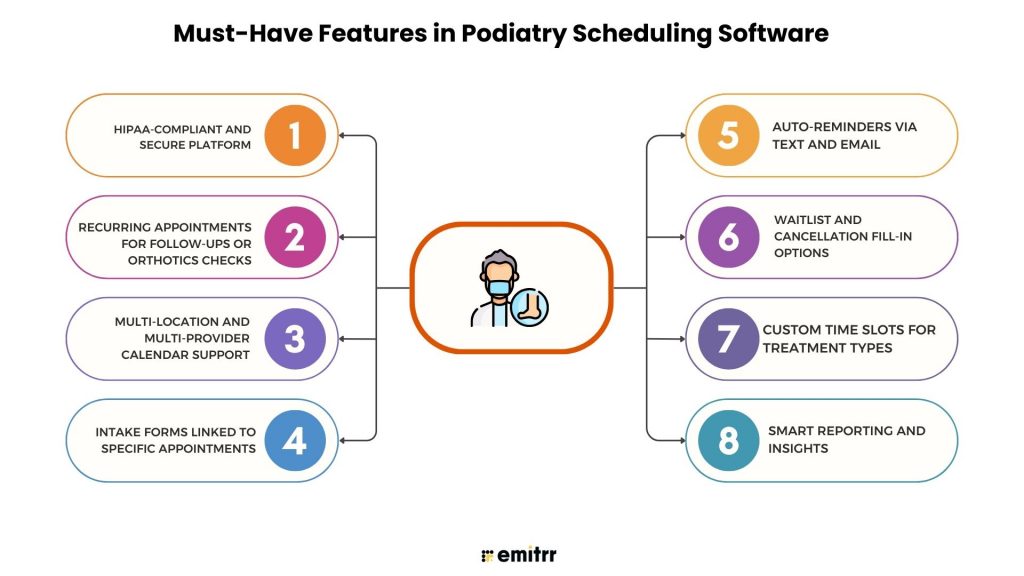
HIPAA-compliant and secure platform
Patient trust is everything. When someone books a podiatrist online appointment, they need to know their details are safe. A HIPAA-compliant system keeps all communication encrypted, so no one’s personal health data leaks out. It’s not just about ticking a legal box, it’s about showing patients you take their privacy seriously. It’s like adding a solid lock to your clinic’s digital front door.
Recurring appointments for follow-ups or orthotics checks
One-and-done visits are rare in podiatry. Patients often need multiple check-ins, whether it’s post-surgery or orthotics fittings. Instead of booking one by one, recurring appointment features let you lock in a whole series at once. Patients leave knowing exactly when to come back. Your calendar stays on track, and your staff doesn’t have to keep juggling rescheduling and calls. It keeps things simple and stress-free!
Multi-location and multi-provider calendar support
Got more than one doctor? More than one clinic? Without the right tool, it’s chaos. Having a multi-location provider gives you one master view of everything. Patients can pick their preferred podiatrist or location with zero hassle. Your staff sees all availability in one place, so there are no mix-ups. Whether you’re running one office or five, everyone stays on the same page.
Intake forms linked to specific appointments
Not every patient visit looks the same. Someone booking a virtual podiatrist appointment might just need a quick symptom checklist, while a bunion consult requires detailed history. When forms match the appointment type, patients can fill them out online before they even show up (or log in). That means less front-desk paperwork and more time actually spent with the podiatrist.
Auto-reminders via text and email
No-shows are the fastest way to throw your day off track. Automated reminders fix that. A quick text or email saying, “See you tomorrow at 3 PM” can cut missed visits by half. You can even customize messages, “Don’t forget your orthotics” or “Bring your insurance card.” Patients stay prepared, and your schedule stays tight.
Waitlist and cancellation fill-in options
Cancellations don’t have to be wasted time. With a waitlist, your system automatically offers the open spot to another patient. It’s a win-win: the patient gets an earlier appointment, and you don’t lose revenue. Instead of stressing when someone cancels, your calendar fills itself back up. It’s like turning cancellations into opportunities.
Custom time slots for treatment types
Not all appointments take the same time. A nail trim? Quick. A surgical consult? Longer. Custom time slots keep your calendar realistic. They keep your day on track, shorten wait times, and make patients feel cared for instead of hurried. It’s a small change that can completely improve the flow of your clinic.
Smart reporting and insights
Want to know which days are busiest or how many patients actually cancel? Smart reporting gives you the answers. You can track no-shows, spot appointment trends, and even see which services bring in the most patients. Instead of guessing, you plan with confidence. It’s like getting a clear snapshot of how your clinic’s really running, all from one dashboard.
Download our ready-to-use SMS templates for online scheduling to simplify appointment booking and reduce no-shows.
Security & Privacy Compliance for Podiatry Scheduling
Booking a podiatrist appointment online means sharing personal info, not just time. Patients care about privacy as much as they care about how much is a podiatrist appointment. That’s why security has to come built-in.
HIPAA compliance and encrypted communication
HIPAA compliance is the baseline. Without it, you risk fines and patient trust. A secure system encrypts every reminder, intake form, or virtual podiatrist appointment link, keeping it locked away from prying eyes. Patients can book confidently knowing their private health data won’t leak out. One less thing for them and you to worry about.
Safe intake and consent forms
Clipboards and paper forms? Too easy to lose. Digital intake and consent forms stay safe inside the system. Patients can fill out forms online before their visit, and everything gets stored safely in the system. No paper piles at the desk, no lost signatures, just a smoother digital patient check-in that feels stress-free for everyone.
Audit logs and secure backups
An audit log is like a detailed history book. It shows exactly who accessed patient data and when. And with secure backups, nothing disappears even if systems crash. That means records, billing details, and appointment histories are always recoverable. Think of it as insurance for your clinic’s data.
Staff access controls
Not everyone in your clinic needs full access. With smart permissions, reception staff can view scheduling, while doctors see medical histories. This limits who can handle sensitive info and keeps data exposure to a minimum. It’s a simple but powerful layer of protection. Everyone sees what they need, nothing more.
Patient privacy settings
Every patient has their own comfort zone when it comes to privacy. Some prefer texts, others stick to email. Good scheduling software lets patients choose how they’re contacted and what’s shared. That flexibility shows patients their preferences matter, which makes them more likely to return. A small touch that builds big trust.

Key Integrations for Scheduling Software in Podiatry Clinics
The best scheduling tools don’t work in isolation. They connect with the systems you already use every day. Here’s how the right integrations make life easier for podiatrists and patients.
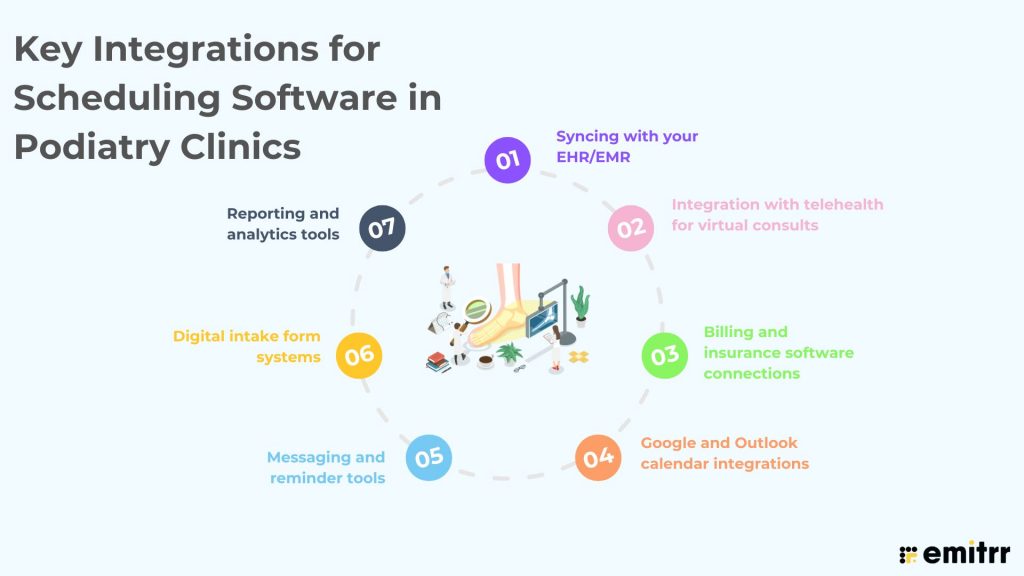
Syncing with your EHR/EMR
No one wants to enter the same patient details twice. With EHR/EMR syncing, appointment info flows straight into the patient record. It keeps everything updated without extra typing. Less manual work for staff, fewer mistakes for patients. That’s a win on both sides. It also makes charting faster because everything’s right there in one place.
Integration with telehealth for virtual consults
Sometimes patients don’t need to come in for every visit. With telehealth integration, you can easily set up a virtual podiatrist appointment right from your scheduling system. The link is sent automatically, so patients just click and join. It’s a smooth way to extend care beyond the clinic walls. And it saves everyone a trip. This flexibility can also help you keep patients engaged even if they live far away.
Billing and insurance software connections
Appointments don’t end in the exam room. Billing always follows. When your scheduling tool connects with insurance and billing systems, payments get processed faster. It also reduces claim errors since the information flows automatically. No more chasing paperwork or re-entering details. Billing becomes one less headache for your staff. Plus, it speeds up reimbursements, which means healthier cash flow for your clinic.
Google and Outlook calendar integrations
Life happens outside the clinic too! Syncing with Google or Outlook calendars keeps doctors and staff on track. If a provider blocks off personal time, the system updates automatically. Patients only see real availability, and schedules stay accurate. No double-booking, no surprises. It also means you can glance at your phone and know your full day at a glance.
Messaging and reminder tools
Communication doesn’t stop at booking. Integration with messaging platforms means reminders, confirmations, or even quick follow-ups go out without effort. Patients get texts or emails at the right time, and your staff doesn’t have to send them manually. It keeps the conversation going in the background. A simple way to boost attendance and satisfaction. And because it’s automated, it saves hours of staff time every week.
Digital intake form systems
Forget about printing, scanning, or filing forms. When your scheduling system integrates with digital intake software, everything is filled out online and attached to the right appointment. Doctors get the info they need in advance. Patients walk in ready, and check-in takes seconds. Paper clutter? Gone for good. And for clinics, it also reduces errors since handwriting and manual entry are out of the equation.
Reporting and analytics tools
Numbers tell the real story. With reporting integration, you can track no-shows, busiest days, and even revenue linked to appointments. It helps you make smarter decisions without digging through spreadsheets. Over time, these insights show you exactly where your clinic is winning and where it needs tweaks. Think of it as your built-in business coach. Better yet, you can share the data with your team to spot trends and improve together.
How Scheduling Software Helps Podiatrists
The right scheduling tool does more than fill slots on a calendar. It actually transforms how your clinic runs day to day. Here’s how it makes a big difference.
Reduced call volume at the front desk
Front desk phones never seem to stop ringing. Patients call to book, cancel, or just check times. With online scheduling, most of those high call volumes start dwindling because patients can handle it themselves. Your staff can finally focus on patients in the clinic instead of juggling phone lines. It lightens the load and makes the whole office calmer. A quieter phone equals a happier team.
Higher patient satisfaction with easy booking
Nobody likes being stuck on hold just to schedule a visit. Online booking makes it simple for patients to book a podiatrist appointment in minutes. They can do it anytime, from any device, without waiting for office hours. That kind of convenience goes a long way in keeping patients loyal. And when patients are happy, they’re more likely to come back and recommend you to others. A smooth booking experience often matters as much as podiatrist appointment cost.
Fewer no-shows with automated reminders
Ever had a patient just forget to show up? It throws off your whole day and leaves a gap you can’t fill. Automated reminders solve that by sending a quick text or email so patients remember their visit. You can even add little notes like “bring your orthotics” or “don’t forget your insurance card.” It’s a simple fix that cuts down no-shows and keeps your calendar full. Like having a helper who never forgets to follow up.
Streamlined follow-ups for post-op care or orthotics pickups
Follow-ups are part of almost every podiatry treatment plan. Whether it’s post-op care or picking up custom orthotics, patients need reminders and easy scheduling. Software can automatically book the next appointment before the current one ends. That way, no one slips through the cracks. Patients feel cared for, and your clinic keeps continuity of treatment. A little automation goes a long way in better outcomes.
Flexibility for urgent same-day foot injuries
Foot injuries don’t wait, and sometimes patients need help fast. With scheduling software, it’s easier to offer a podiatrist same day appointment without throwing the whole day into chaos. Patients can grab open slots online, and your staff doesn’t have to shuffle everything around manually. It’s a simple way to be more responsive when emergencies happen. And patients will always remember how quickly you were able to help. Same-day care builds serious trust.
Easier calendar management for podiatrists
Trying to balance surgeries, consults, and follow-ups can make calendars messy. Scheduling tools organize everything into a clear, manageable view. Doctors can check their day in seconds, and staff can plan around it with ease. No more double-booking or time conflicts. Everyone knows where they need to be and when. A clean calendar makes for a smoother day.
Support for multiple doctors and clinic locations
Multi-doctor or multi-location practices can be a scheduling nightmare. Good software lets you manage everything from one dashboard. Patients can choose their preferred doctor or clinic without calling in. Staff can see availability across all locations instantly. That kind of transparency makes scheduling fair and efficient. And it makes your clinic look professional and organized.
How To Choose the Right Scheduling Software for Your Clinic
With so many options out there, picking the right tool can feel tricky. Here’s a simple way to break it down.
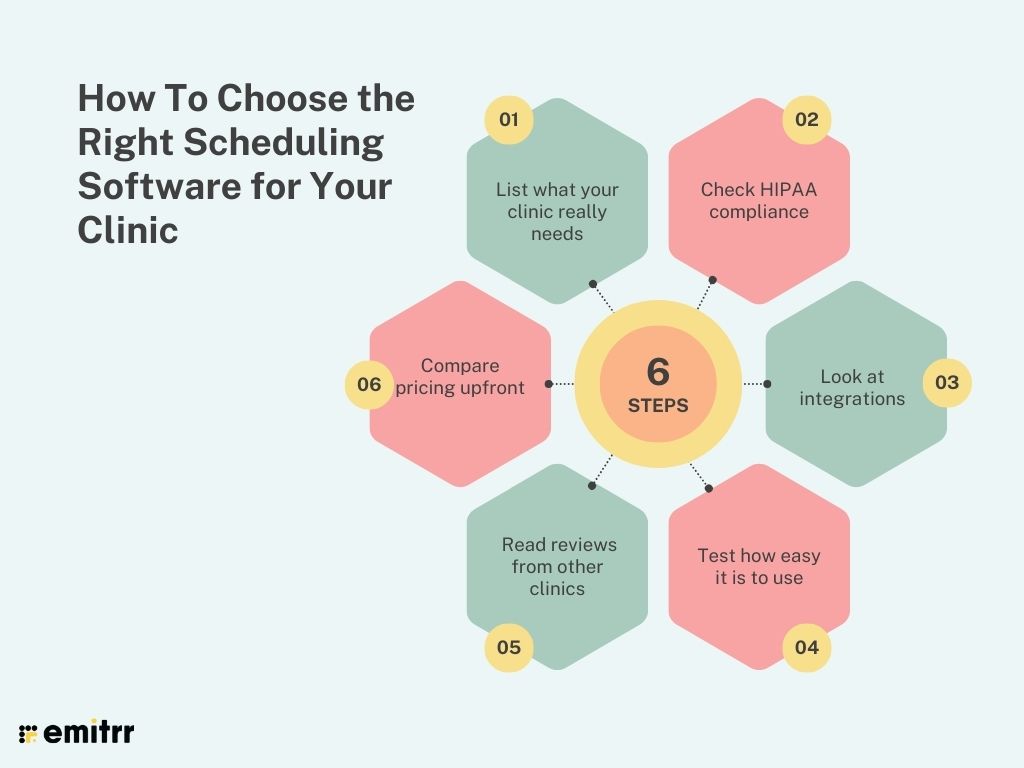
Step 1: List what your clinic really needs
Do you want recurring bookings, multi-location support, or telehealth built in? Write down your must-haves before you start comparing tools. It’ll save you a ton of time.
Step 2: Check HIPAA compliance
This one’s non-negotiable. If the platform isn’t HIPAA-compliant, skip it. Protecting patient data is as important as booking the appointment itself.
Step 3: Look at integrations
Does it sync with your EHR, billing, or even Google Calendar? The right integrations make your life easier and prevent staff from entering the same data twice.
Step 4: Test how easy it is to use
If patients can’t figure it out, they won’t book. Try the booking flow yourself to see how smooth it feels. Simple beats fancy every time.
Step 5: Read reviews from other clinics
Real-world feedback is gold. See what other podiatrists say about customer support, reliability, and features before you commit.
Step 6: Compare pricing upfront
Make sure the platform fits your budget. Some charge per provider, others per location. Knowing this upfront avoids surprises later.
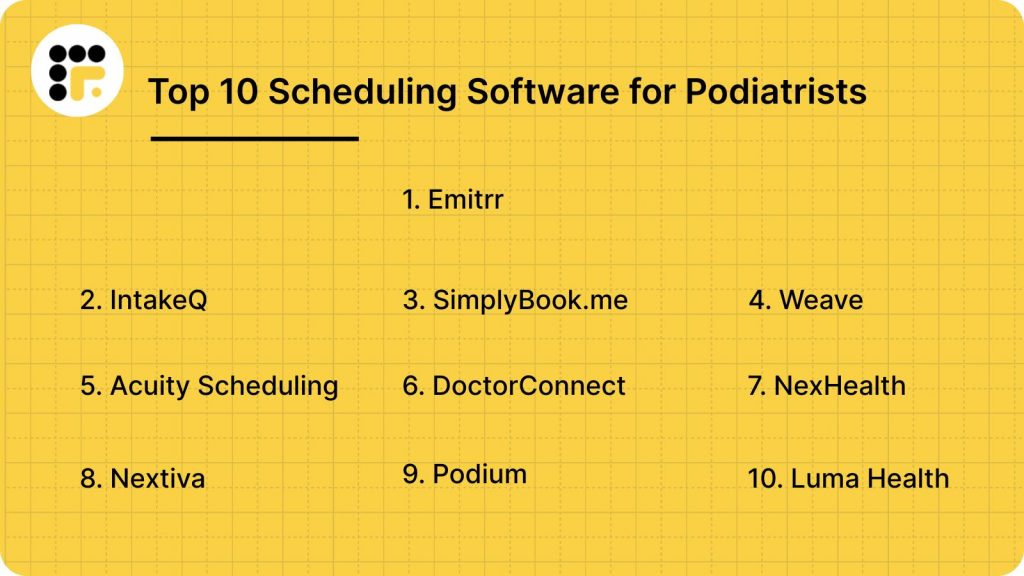
Top 10 Scheduling Software for Podiatrists
- Emitrr
- IntakeQ
- SimplyBook.me
- Weave
- Acuity Scheduling
- DoctorConnect
- NexHealth
- Nextiva
- Podium
- Luma Health
1. Emitrr
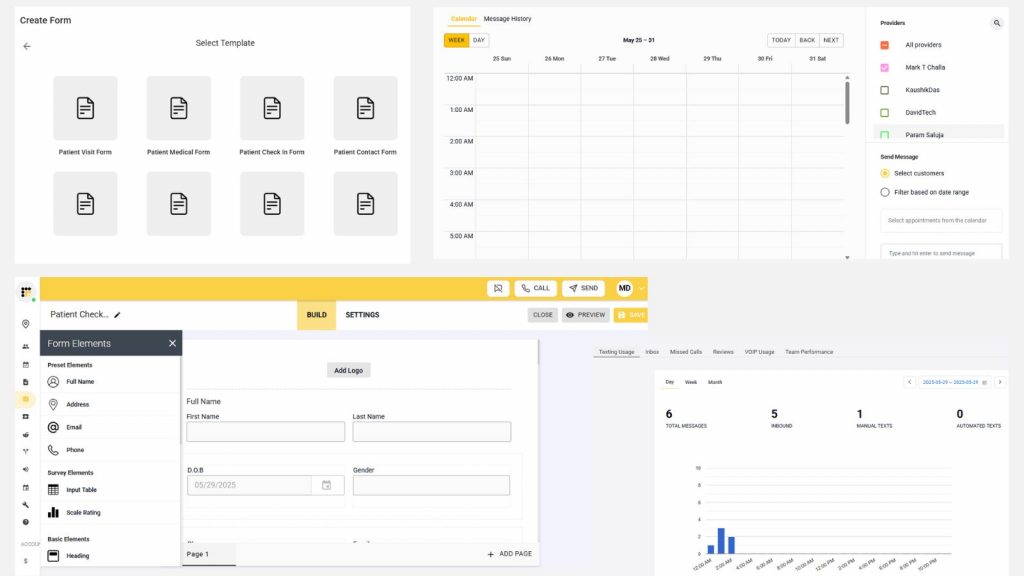
What is Emitrr?
Emitrr is a HIPAA-compliant scheduling and patient communication platform designed for healthcare practices, including podiatry clinics. It handles appointment booking, reminders, two-way texting, voicemail follow-ups, intake forms, and even telehealth, all in one place! The goal is to make scheduling simple for patients and less stressful for staff.
Key features of Emitrr
- 24/7 online scheduling: Patients can book a podiatrist appointment anytime, from any device.
- Automated reminders: Sends confirmations and reminders via text, email, or voice.
- Digital intake and consent forms: Collect forms online, no paperwork needed.
- Two-way texting: Secure texting for updates and quick questions.
- Missed-call follow-up: Automatically sends a text if the clinic misses a call.
- Telehealth support: Allows for virtual podiatrist appointments with video links built in.
- Multi-location scheduling: Manage multiple providers and clinics from one dashboard.
- Waitlist automation: Cancels? Patients on the waitlist get notified right away.
- Real-time analytics: Tracks no-shows, reminders, and appointment flow.
- Custom booking rules: Control provider availability, slot types, and time buffers.
Emitrr Pros
- Patient-friendly: Works well on mobile without requiring an app.
- Staff-saving: Cuts down calls, voicemails, and manual data entry.
- Scalable: Good for both solo podiatrists and large clinics.
- Fully HIPAA-compliant: Security and privacy built in.
- Smooth setup: Easy to implement and quick to learn.
Emitrr Cons
Some advanced automation features are still being rolled out.
Emitrr Integrations
- EHR/PMS: Epic, DrChrono, Dentrix, Athenahealth, Kareo, AdvancedMD
- Telehealth: Zoom, Doxy.me, and similar tools
- Calendars: Google Calendar, Outlook
- VoIP and communication: Emitrr voice/text system, Google Voice
- Form tools: Jotform, Typeform
- CRM/marketing: Salesforce, HubSpot for larger clinics
Emitrr Pricing
Plans start at around $30/month, with custom pricing for bigger practices.
Emitrr Ratings
- Capterra: 4.9/5
- G2: 4.7/5
Emitrr Customer reviews
“We’ve been using Emitrr for both businesses for over a year now – it’s AMAZING!! Was super easy to set-up, the few times we’ve needed customer support was quickly addressed!!”
“they are such easy people to work with, the pricing is great, and the product works seamlessly for us.”
Source: Capterra
Emitrr support channels
- Email: support@emitrr.com
- Phone: +1 (210) 941-4696
- Live chat: Available on the Emitrr website
- Knowledge base: Includes guides, FAQs, and walkthroughs
- SMS support: Text the support number for help anytime
2. IntakeQ
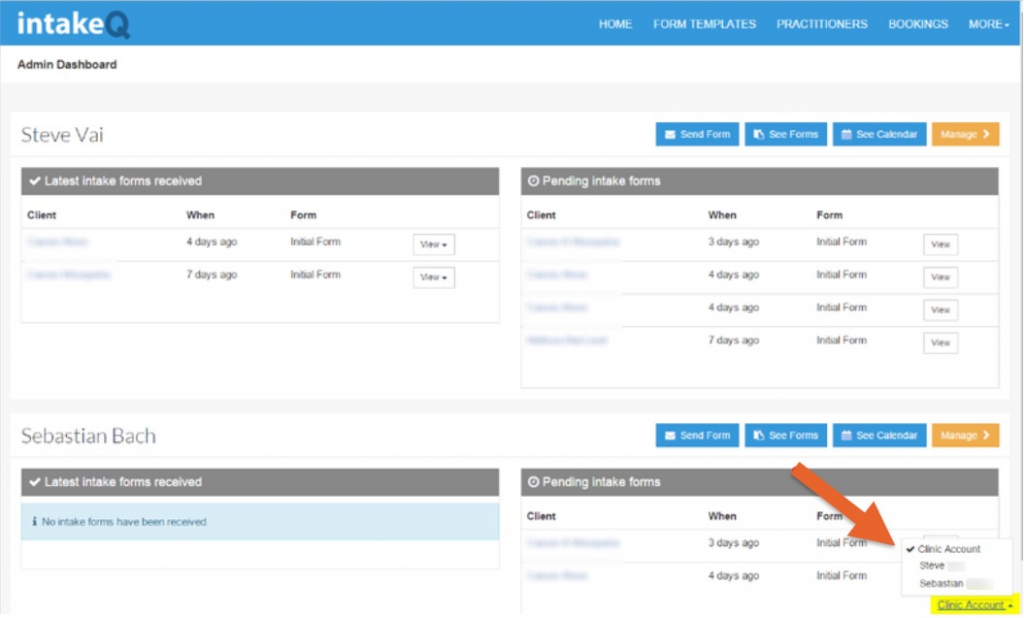
What is IntakeQ?
IntakeQ is an online scheduling and intake form platform built for healthcare providers. For podiatry clinics, it makes booking, form-filling, and patient follow-ups simple by letting patients themselves handle most tasks digitally. It’s especially useful if you want to cut down paperwork and streamline patient check-ins.
IntakeQ key features
- Custom digital intake forms: Collect patient info securely before visits.
- Online scheduling: Patients can book a podiatrist appointment directly from your website.
- Recurring appointments: Easy setup for follow-ups or long-term care.
- Telehealth support: Patients can join a virtual podiatrist appointment with one click.
IntakeQ pros
- Paperless workflow: No clipboards or piles of forms at check-in.
- Customizable forms: Tailor intake forms for different treatments.
- HIPAA-compliant: Secure storage and communication.
- Easy to set up: User-friendly for both staff and patients.
IntakeQ cons
- No built-in two-way texting: This platform lacks built-in two-way texting, unlike some competitors.
- Advanced features not included in basic plans: Some features like billing, may require add-ons.
- Form setup takes time: Some users felt the setup was a little overwhelming at first.
IntakeQ integrations
- EHR/EMR systems: Works with major platforms via API and Zapier.
- Calendars: Syncs with Google and Outlook.
- Telehealth: Zoom and Doxy.me integrations.
- Payment processors: Stripe, PayPal for online billing.
IntakeQ pricing
Plans start at $49/month with add-ons for telehealth and advanced features.
IntakeQ ratings
- Capterra: 4.7/5
- G2: 4.6/5
IntakeQ customer reviews
“It just cannot do many of the things that they promise it can do.”
“Not enough flexibility for processing intakes in bulk. Would like the ability to transfer in bulk between providers, link custom template office use fields with client custom fields so certain notes are pulled into the client’s record.”
Source: Capterra
IntakeQ support channels
- Email support
- Chat available for paid users
- Help docs and video tutorials
- Setup support included with subscription
3. SimplyBook.me
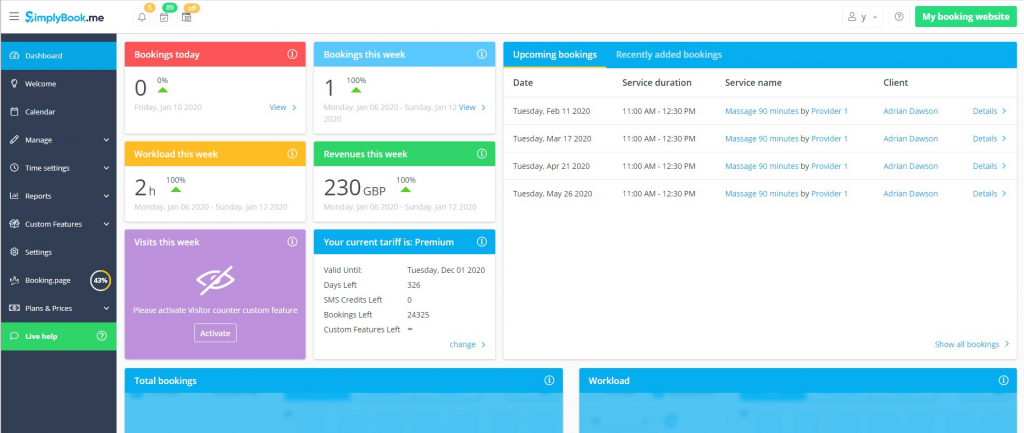
What is SimplyBook.me?
SimplyBook.me is a versatile online scheduling platform used across industries, including healthcare. For podiatry clinics, it offers customizable booking pages, patient reminders, and integrations that make scheduling seamless.
SimplyBook.me key features
- Custom booking website: Create a branded booking page for patients.
- Online scheduling: Patients book podiatrist appointments anytime, anywhere.
- Automated notifications: SMS notifications and email reminders to cut no-shows.
- Memberships and packages: Helpful if your clinic offers bundled services.
- Integration with payment gateways: Lets patients pay online at the time of booking.
SimplyBook.me pros
- Highly customizable: Great for branding your patient booking experience.
- Easy for patients: Mobile-friendly booking site.
- Supports payments: Secure, built-in payment collection.
- Affordable plans: Fits smaller practices as well as larger ones.
SimplyBook.me cons
- Add-on overload: Too many extras can make setup confusing.
- Needs customization: Some healthcare features require tweaking to fit your clinic.
SimplyBook.me integrations
- Calendars: Google, Outlook, iCal sync.
- Payment platforms: Stripe, PayPal, Square.
- Telehealth: Zoom integration for virtual podiatrist appointments.
- Social media: Facebook and Instagram booking buttons.
SimplyBook.me pricing
Offers three paid plans plus a free option. Pricing starts at $9.90 for the Basic plan, $30 for Standard, and $59 for Premium.
SimplyBook.me ratings
- Capterra: 4.6/5
- G2: 4.5/5
SimplyBook.me customer reviews
“Frustrating to not receive decent service when the app doesn’t work properly.”
“Sometimes I find it hard to navigate on the mobile app. Secondly, If I book a client for them on my booking page, not the admin side, if I go to book someone else the last person info is still there and I cant seem to get rid of it without shutting the app or desktop off and then rebooting..”
Source: Capterra
SimplyBook.me support channels
- Live chat
- Knowledge base (Tutorials and setup guides)
4. Weave
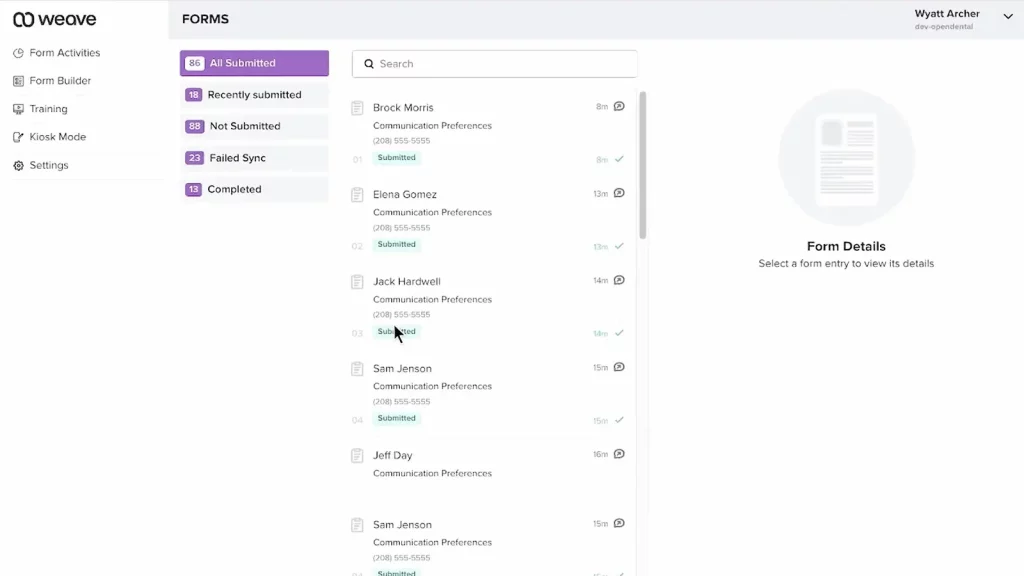
What is Weave?
Weave is a smart scheduling and communication platform built with healthcare practices in mind. Along with scheduling, it combines phones, texting, payments, and reminders into one system. For podiatry clinics, it’s great if you want a single tool for both communication and appointment management.
Weave key features
- Two-way texting: Patients can confirm or ask questions via text.
- Smart reminders: Automated texts and calls to reduce missed visits.
- Online appointment scheduling: Let patients book visits based on real-time availability.
- Payment collection: Patients can pay bills through text links.
- Patient profiles: Caller ID pops up with patient info during calls.
Weave pros
- All-in-one tool: Phones, texts, and scheduling in one place.
- Text-to-pay option: Easy for patients to handle bills.
- Strong communication features: Great for reducing missed calls.
- Good patient experience: Clear, simple reminders and updates.
Weave cons
- Not podiatry-specific: Designed for general healthcare, so it doesn’t include podiatry-focused tools out of the box.
- Learning curve: With so many options, staff may need time to adjust.
- Call quality depends: A few users note that VoIP quality can drop at times, especially with weaker internet.
Weave integrations
- EHR/EMR: Integrates with many practice management systems.
- Calendars: Syncs with Google and Outlook.
- Payment processors: Stripe and other gateways.
- VoIP and phones: Built-in with their platform.
Weave pricing
Starts at around $249/month, depending on features and clinic size.
Weave ratings
- Capterra: 4.3/5
- G2: 4.4/5
Weave customer reviews
“With Weave, it’s just a nightmare with the customer service and support. And guess what, any settings or setup you want to change, you only have to go through their customer support because whenever you make changes from their web portal, none of it gets actually reflected.”
“The customer support is lacking and the fact when you have a problem and there is no manager to talk to is not helpful.”
Source: Capterra
Weave support channels
- Phone and email support
- Live chat
- Online Help Center
- Onboarding and setup training
5. Acuity Scheduling
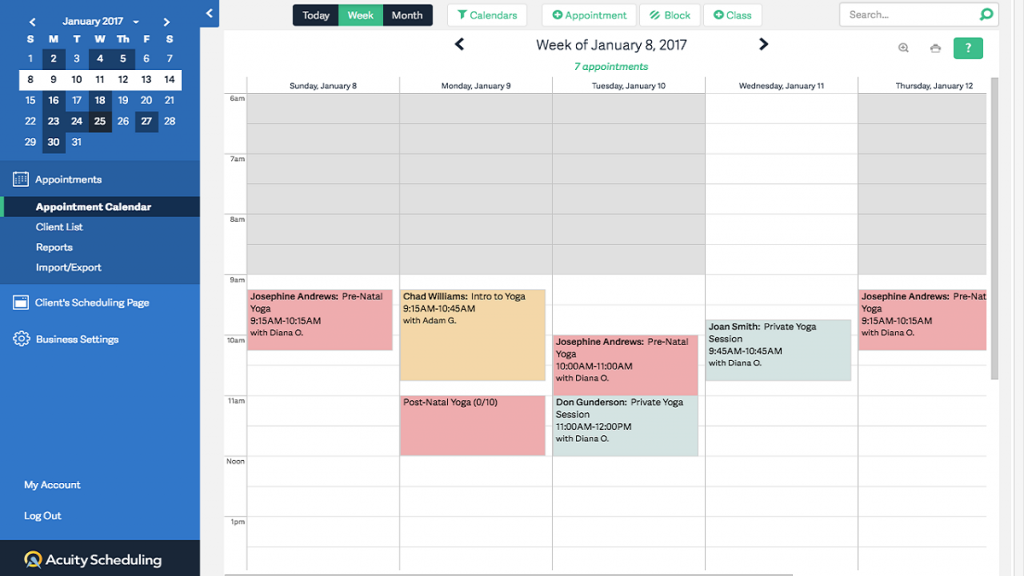
What is Acuity Scheduling?
Acuity Scheduling is a popular booking tool that works well for healthcare clinics. For podiatrists, it gives patients the flexibility to book online, fill forms in advance, and receive automated reminders, all while keeping your clinic’s branding front and center.
Acuity Scheduling key features
- Self-service booking: Patients schedule podiatrist appointments directly from your website.
- Custom intake forms: Collect details ahead of time to save check-in hassle.
- Automated reminders: Sends texts and emails so patients don’t forget.
- Time zone adjustments: Helpful for telehealth patients booking from different areas.
- Package and subscription options: Works if your clinic offers bundled services.
Acuity Scheduling pros
- User-friendly: Simple for both patients and staff.
- Affordable pricing: Great for solo providers or small practices.
- Brand customization: Booking pages match your clinic’s look.
- Strong integrations: Works with calendars and payment tools.
Acuity Scheduling cons
- Setup takes time: Some features may feel complex for solo podiatrists setting it up.
- Not podiatry-specific: Built for general healthcare, so it misses some podiatry-focused features.
- Limited texting: Doesn’t include HIPAA-compliant two-way texting or clinic integrations without add-ons.
Acuity Scheduling integrations
- Calendars: Google, Outlook, iCal.
- Payments: Stripe, PayPal, Square.
- Telehealth: Zoom integration for virtual podiatrist appointments.
- Zapier: Connects with hundreds of other apps.
Acuity Scheduling pricing
Plans start at $20 per month.
Acuity Scheduling ratings
- Capterra: 4.8/5
- G2: 4.7/5
Acuity Scheduling customer reviews
“YOU ARE ON YOUR OWN. NO PHONE SUPPORT. Not ideal for larger companies who want to do subscription memberships, it’s very limiting and messy. They only do POS with Square or Stripe which have super high CC processing fees.”
“The same applies to setting availability. It can be a bit confusing when blocking off times by day.”
Source: Capterra
Acuity Scheduling support channels
- Email support via help desk
- Help Center with guides and video tutorials
- Community forum for user questions
6. DoctorConnect
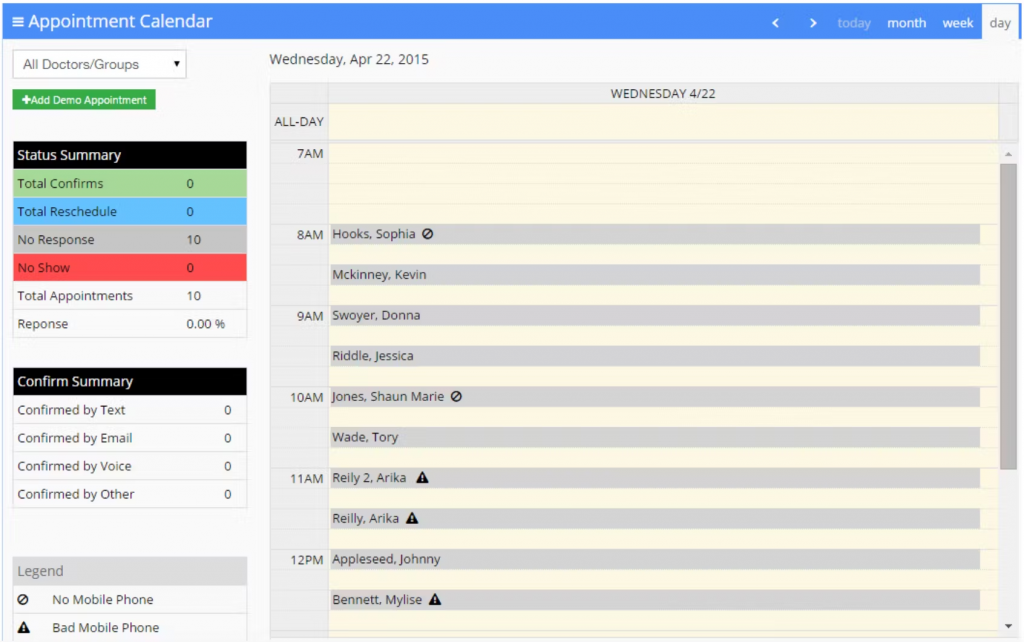
What is DoctorConnect?
DoctorConnect is a patient communication and scheduling platform designed specifically for medical practices. For podiatry clinics, it goes beyond scheduling to include reminders, recalls, and reputation management tools.
DoctorConnect key features
- Online appointment scheduling: Patients can book 24/7.
- Automated reminders: Reduces no-shows with texts, emails, and calls.
- Waitlist management: Fills cancellations automatically.
- Patient recall system: Reminds patients when it’s time for follow-ups.
- Reputation management: Collects online reviews from satisfied patients.
DoctorConnect pros
- Healthcare-focused: Tailored for medical practices.
- Review generation: Helps boost your clinic’s online presence.
- Good for follow-ups: Recalls keep patients engaged.
- Easy for staff: Simple dashboard for scheduling and messaging.
DoctorConnect cons
- Limited EHR sync: Connecting with podiatry EHRs may need manual setup or API support.
- Outdated dashboard: The interface looks a bit old compared to newer podiatry platforms.
- Higher pricing: Can feel expensive for smaller podiatry clinics.
DoctorConnect integrations
- EHR/EMR: Works with many practice management systems.
- Calendars: Google and Outlook sync.
- VoIP systems: Connects with phone services for call tracking.
- Reputation tools: Links with review sites like Google and Healthgrades.
DoctorConnect pricing
Plans start at $210, which vary based on practice size and usage.
DoctorConnect ratings
- Capterra: 4.8/5
- G2: 4.7/5
DoctorConnect customer reviews
“Did not integrate into my existing EHR, though the Sales Rep assured me it would. I have had the software for 3 days and never used it. The sales rep refuses to issue a refund. He states I am locked in a 1 year contract.”
“Patients get calls on Sunday’s after 7:00 pm Example P Ross apt 4-13-18 received two calls on a Sunday after 7:00 pm. Please remove calls after 3:00 on Sundays”
Source: Capterra
DoctorConnect support channels
- Email and phone support
- Live chat
- Help center with FAQs
- Onboarding support for new clinics
7. NexHealth
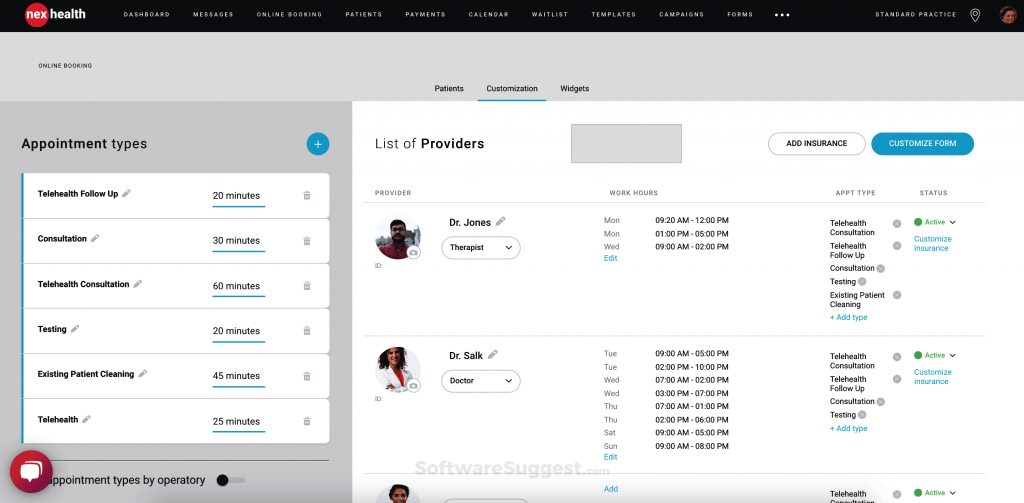
What is NexHealth?
NexHealth is a patient experience and scheduling platform built specifically for healthcare practices. For podiatrists, it simplifies scheduling, integrates with your EHR, and adds tools like recalls, reminders, and online payments. It’s designed to help clinics keep patients engaged from booking to follow-up.
NexHealth key features
- Online scheduling: Patients can instantly book podiatrist appointments from your website.
- Real-time EHR sync: Updates directly in your podiatry EHR without manual entry.
- Automated reminders: Sends texts and emails to cut down no-shows.
- Patient recall campaigns: Brings patients back for routine check-ups or follow-ups.
- Online payments: Collect payments securely before or after visits.
NexHealth pros
- Strong EHR integration: Syncs in real time with most major systems.
- Easy patient experience: Simple booking and reminders.
- All-in-one solution: Scheduling, payments, reviews, and recalls in one place.
- Good for growth: Tools to re-engage patients long-term.
NexHealth cons
- No phone features: Doesn’t include built-in calling or VoIP tools.
- Higher pricing: Can be slightly steep for smaller podiatry clinics.
- Geared to larger clinics: Best suited for mid-to-large podiatry practices, not solos.
- Limited automation: Advanced scheduling tools are only in higher-tier plans.
NexHealth integrations
- EHRs/EMRs: Epic, Dentrix, OpenDental, Eaglesoft, and more.
- Calendars: Google, Outlook.
- Payments: Stripe and other payment processors.
- Review sites: Google, Yelp, Healthgrades.
NexHealth pricing
Plans start at around $350/month, depending on features.
NexHealth ratings
- Capterra: 4.7/5
- G2: 4.6/5
NexHealth customer reviews
“I’d like patients to be able to pay partial payments without needing to go through me to resend the patient request, and some bulk options/autofilling features would make the feature even more helpful.”
“Professional front, but rigid terms and poor client handling reveal deeper issues. Moreover, we identified a major limitation in NexHealth’s software before any onboarding or integration began. Despite no services used or work performed, they refused a refund and plan to bill us twice more. This demonstrates a clear lack of professional integrity.”
Source: Capterra
NexHealth support channels
- Live chat on website
- Email support
- Help Center with articles and guides
- Dedicated onboarding assistance
8. Nextiva

What is Nextiva?
Nextiva is a VoIP and business communication platform that also offers scheduling and patient engagement tools. For podiatry clinics, it’s best suited if you want phones, messaging, and scheduling tied together in one system.
Nextiva key features
- VoIP phone system: Clinic calls routed through a secure internet-based platform.
- Appointment reminders: Automated texts and calls for upcoming visits.
- Two-way messaging: Patients can reply to reminders or ask quick questions.
- Unified communications: Combines calls, texts, and scheduling on one dashboard.
- Analytics: Tracks call volume, appointment confirmations, and response times.
Nextiva pros
- Great for communication-heavy practices: All calls and texts in one place.
- Reliable VoIP system: Clear call quality and secure connections.
- Scalable: Works for small offices and larger multi-location practices.
- Built-in reporting: Data on call and appointment flow.
Nextiva cons
- Scheduling limitations: Focuses more on communication than complete podiatry appointment management.
- Not healthcare-specific: Built for general use, so it misses podiatry-focused features and strong EHR integrations.
- Learning curve: Can feel a bit tech-heavy for smaller podiatry teams starting out.
Nextiva integrations
- Calendars: Google and Outlook sync.
- CRM systems: Salesforce, HubSpot.
- VoIP hardware: Desk phones and mobile apps.
- Analytics tools: Built into the platform.
Nextiva pricing
Starting at $25.95 per user/month.
Nextiva customer reviews
“We didn’t even let users know they could login–it’s that bad. The cost of their service just cannot compete with the rest of the market.”
“Lack of follow up for every issue. I would have to reach out to them multiple times to get a response.”
Source: Capterra
Nextiva support channels
- Phone
- Live chat
- Guides and blogs
9. Podium

What is Podium?
Podium is a patient communication and reputation management platform that also includes scheduling features. For podiatry clinics, it’s especially strong at helping patients book appointments while also boosting your clinic’s online reviews and visibility.
Podium key features
- Online scheduling: Lets patients book podiatrist appointments directly from your website or messages.
- Two-way texting: Patients can confirm, reschedule, or ask questions easily.
- Review management: Sends patients reminders to leave reviews on Google or Facebook.
- Text-to-pay option: Patients can pay their bills with a secure link sent via SMS.
- Team inbox: Central place for all patient messages across channels.
Podium pros
- Great for reviews: Helps improve your online presence.
- Strong texting features: Patients respond faster to texts than calls.
- Easy payments: Text-to-pay is simple and convenient.
- Multi-channel messaging: Handles messages from Facebook, Google, and SMS in one spot.
Podium cons
- Communication first: More geared toward messaging and reviews than full scheduling.
- Higher pricing: Costs more than simpler podiatry scheduling-only platforms.
Podium integrations
- Calendars: Google and Outlook sync.
- Payment processors: Stripe, PayPal.
- Review platforms: Google, Facebook, Yelp.
- CRM systems: Connects with Salesforce, HubSpot.
Podium pricing
Exact pricing isn’t listed. Podium works on a custom quote model, though plans are generally reported to start around $289/month, with add-ons for larger practices.
Podium ratings
- Capterra: 4.3/5
- G2: 4.2/5
Podium customer reviews
“They have a huge lack of transparancy. They are willing to lie to you to onboard and try to keep your business. They will make HUGE mistakes like porting away your personal number with NO accountability or concerns for your business. Wasted countless hours during set up and after trying use their platform all while being charged for services not used.”
“The bulk messages don’t always send to everyone on the contact list.”
Source: Capterra
Podium support channels
- Phone
- Live chat
- Help center
10. Luma Health
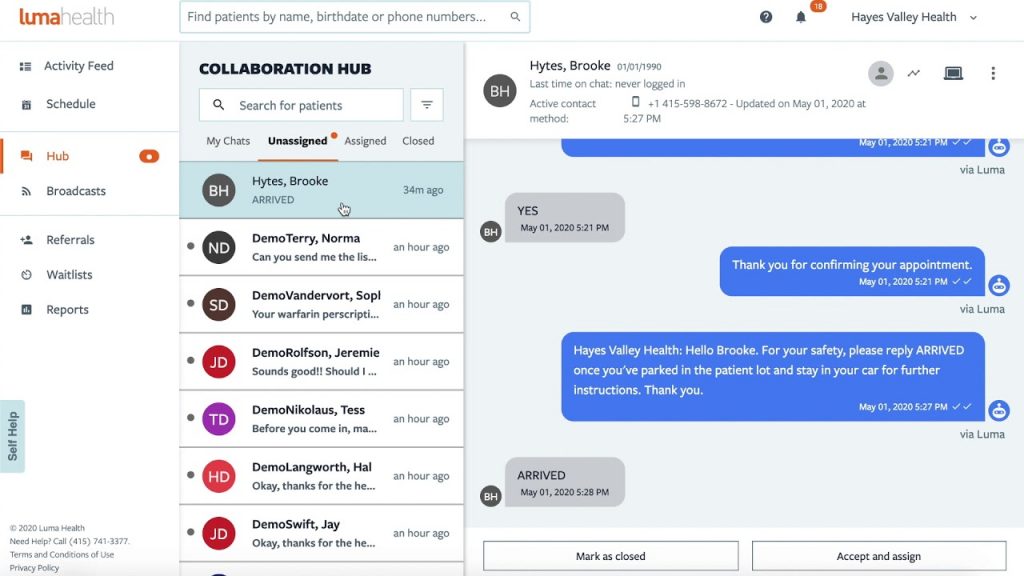
What is Luma Health?
Luma Health is a patient communication and scheduling platform designed for healthcare practices. For podiatrists, it covers everything from online booking and reminders to recalls and telehealth, with a strong focus on keeping patients engaged between visits.
Luma Health key features
- Online scheduling: Patients can book podiatrist appointments anytime.
- Smart reminders: Automated texts and emails to reduce no-shows.
- Patient recalls: Reminds patients about overdue follow-ups.
- Telehealth support: Built-in tools for virtual podiatrist appointments.
- Two-way texting: Lets patients confirm or reschedule directly.
Luma Health pros
- Healthcare-specific: Designed with medical clinics in mind.
- Good recall system: Keeps patients returning for ongoing care.
- Simple for patients: Easy-to-use mobile experience.
- Comprehensive platform: Scheduling, reminders, telehealth, and recalls in one place.
Luma Health cons
- Too much for small clinics: Works better for mid-size or large podiatry groups.
- Setup required: Needs proper onboarding before it runs smoothly.
Luma Health integrations
- EHRs/EMRs: Works with Epic, Allscripts, eClinicalWorks, and more.
- Calendars: Google and Outlook sync.
- Telehealth: Zoom and other platforms.
- Payment systems: Stripe and integrated billing tools.
Luma Health pricing
Custom pricing based on features and clinic size.
Luma Health ratings
- Capterra: 4.6/5
- G2: 4.5/5
Luma Health customer reviews
“The constant changes of my account representatives really made it difficult to build relationships. Overtime Luma’s account representatives stopped contacting the practice and as result we had to figure out solutions on our own. Additionally, they changed their payment terms to where if we didn’t pay them upfront then they would drop us as a customer.”
Source: Capterra
Luma Health support channels
- Phone
- Onboarding specialists
- Help center
Why Emitrr Is the Best Scheduling Software for Podiatrists
Emitrr is built to take the stress out of scheduling for your staff, your patients, and your clinic. Here’s why it’s such a strong fit for podiatry practices:
- 24/7 booking access: Patients can schedule anytime, even outside office hours.
- Mobile-friendly interface: Works smoothly on phones, no app download needed.
- Smart appointment reminders: Sends texts and emails at just the right time so patients don’t forget.
- Easy rescheduling: Patients can cancel or rebook with just a few taps, no phone tag.
- Telehealth visit setup: Supports virtual podiatrist appointments with automatic video link sharing.
- EHR and PMS sync: Connects with 500+ EHR systems to keep everything in sync without duplicate entry.
- HIPAA-compliant messaging: Protects patient data with encrypted communication and secure storage.
- Built-in two-way texting: Lets your team answer questions or send updates quickly.
- Custom visit types: Set different slots for orthotics checks, post-op follow-ups, diabetic foot exams, or telehealth visits.
- Digital intake and consent forms: Send and collect forms ahead of time so check-ins are faster.
- Role-based access: Control who sees what – front desk, billing, and providers only see what they need.
- Real-time calendar updates: Everyone on your team sees the same up-to-date schedule.
- Multi-location support: Manage all your clinics from one central dashboard.
- Waitlist notifications: Cancelled spot? Emitrr can notify patients on the waitlist and fill it fast.
- Recurring appointment support: Great for orthotics follow-ups, wound checks, or long-term care.
- Quick follow-up booking: Send patients a booking link right after their visit to lock in the next one.
- Custom booking rules: Control availability, buffer times, and slot lengths to match your workflow.
- Analytics and reporting: Track no-shows, busiest days, and appointment trends without spreadsheets.
- Reliable support team: Quick help via chat, phone, or email whenever you need it.
- Transparent pricing: No hidden charges, just clear, predictable costs that scale with your clinic.
Emitrr makes scheduling feel effortless, both for patients booking appointments and for clinics managing the back end.
FAQs
Yes! Emitrr is fully HIPAA-compliant and encrypts all data, keeping patient information safe.
Absolutely! Emitrr lets patients book anytime, from any device, without waiting for office hours.
It sends automated reminders by text, email, or voicemail. It also fills cancelled slots with waitlist patients, so fewer gaps in your calendar.
Yes! Emitrr integrates with all major EHR and EMR platforms so your records and schedules always stay in sync.
HIPAA compliance, automated reminders, recurring bookings, multi-location support, and smart intake forms should be some of the top features you should look for in a scheduling software for podiatrists.
Conclusion
Podiatry clinics deal with a lot, right from routine foot checks to urgent injuries. The last thing you need is a messy schedule or a phone that never stops ringing. Online scheduling software makes life easier for both patients and staff.
Among the many scheduling tools available out there, Emitrr stands out as a very practical choice for podiatry clinics. It’s secure, simple to use, and built with features that tackle everyday challenges for you, from cutting down no-shows to handling multiple providers with ease. The result is a smoother calendar and patients who find it easier to stay on track!
If you’re ready to take the stress out of scheduling and give patients the convenience they expect, Emitrr is the tool to try. Once it’s set up, you’ll wonder how you managed without it! Book a free demo to see the magic in action!


 4.9 (400+
reviews)
4.9 (400+
reviews)