
Introduction
In a world where customers expect instant and personalized communication, choosing the right messaging platform can make or break your marketing strategy. Businesses today need tools that not only send messages but truly connect, engage, and build lasting relationships.
That’s where Omnisend comes in. Known for its all-in-one approach, Omnisend helps businesses manage SMS, email, and push notifications from a single, easy-to-use platform. It simplifies communication, automates everyday tasks, and ensures every message reaches the right audience at the right time.
However, as teams grow and communication needs become more complex, many users start exploring Omnisend alternatives that offer greater flexibility, deeper personalization, and better pricing.
In this blog, we’ll dive into what makes Omnisend stand out, explore its features, pros, and cons, and highlight some of the best Omnisend competitors available today to help you find the perfect fit for your business.
What is Omnisend?
Omnisend is a powerful messaging and marketing automation platform that helps businesses connect with customers through SMS, email, and push notifications. It’s built to simplify customer communication, making it easy to send targeted messages, automate follow-ups, and manage campaigns across multiple channels from one place. Designed for eCommerce and growing brands, Omnisend streamlines outreach, improves engagement, and keeps every customer conversation consistent, making it a popular choice among modern Omnisend alternatives and messaging-focused platforms.
Omnisend Features
- Multi-Channel Messaging: Omnisend helps businesses reach customers through SMS, email, and push notifications, keeping all communication consistent and connected.
- Automation Workflows: It offers ready-made automation workflows for welcome messages, abandoned carts, and re-engagement campaigns, saving time and boosting conversions.
- Audience Segmentation: Omnisend allows you to segment your audience based on behavior, purchase history, and engagement for more personalized messaging.
- Drag-and-Drop Campaign Builder: Its easy-to-use drag-and-drop builder lets you design professional messages and campaigns without any coding skills.
- SMS and Email Templates: Omnisend provides prebuilt templates for SMS and email, helping businesses launch campaigns faster while maintaining brand consistency.
- Reporting and Analytics: You can track performance with real-time analytics on opens, clicks, sales, and engagement to measure campaign success.
- Integrations and App Connections: Omnisend integrates with popular platforms like Shopify, WooCommerce, BigCommerce, and HubSpot, syncing customer data across tools.
- Smart Triggers and Conditional Messaging: Send automated messages triggered by customer actions, ensuring your communication is timely and relevant.
- Customizable Forms and Popups: Create and use custom signup forms and popups to capture leads and grow your subscriber list directly within your campaigns.
Omnisend Pros
- User-Friendly Interface: Omnisend’s clean and intuitive dashboard makes it easy for anyone to create and manage campaigns, even without technical experience.
- Multi-Channel Communication: It allows you to connect with customers through SMS, email, and push notifications, keeping all your marketing in one place.
- Powerful Automation Tools: Omnisend offers robust automation workflows for onboarding, abandoned carts, and re-engagement, helping businesses save time and increase conversions.
- Customizable Templates: The platform includes ready-to-use email and SMS templates that make campaign creation quick, consistent, and visually appealing.
- Advanced Segmentation: Omnisend’s segmentation options help you target customers based on their behavior, purchase history, or engagement levels for more personalized communication.
Omnisend Cons
- Limited Customization in Free Plan: While Omnisend’s free plan is helpful for beginners, it offers limited customization options and feature access compared to paid tiers.
- Pricing Increases with Contact Growth: As your subscriber list grows, the monthly cost can rise quickly, making Omnisend less affordable for small or scaling businesses.
- Basic SMS Functionality in Lower Plans: SMS features are restricted on lower plans, requiring upgrades for higher message volumes or international texting.
- Limited Design Flexibility: Although the email builder is easy to use, it lacks some advanced design customization options found in other Omnisend alternatives.
- Occasional Deliverability Issues: Some users have reported inconsistent deliverability rates, especially when sending bulk emails during peak times.
- Learning Curve for Automation Setup: The automation tools are powerful but can feel a bit complex to new users who aren’t familiar with workflow-based marketing.
- Integration Limitations: While Omnisend connects with major platforms, it offers fewer third-party integrations compared to leading Omnisend competitors.
- Customer Support Availability: Email and chat support are responsive, but live assistance is limited for users on lower-tier plans.
Omnisend Pricing
Here are Omnisend pricing plans:
- Free Plan: $0/month
- Standard Plan: Starts at $16/month
- Pro Plan: Starts at $59/month
Omnisend Integrations
- Shopify
- WooCommerce
- BigCommerce
- Magento
- Wix
- Squarespace
- PrestaShop
- Zapier
- HubSpot
- Klaviyo
Omnisend Customer Support Channels
- Email Support
- Live Chat Support
- Help Center / Knowledge Base
- Community Forum
- Onboarding Assistance
- Dedicated Account Manager
Omnisend Ratings
Omnisend has a 4.7/5 rating on Capterra.
Omnisend Reviews
“My experience with omnisend is good. I’m able to reach and interact with my audience while also getting the data I need to continue to improve my content.”
“I have been with omnisend for years now. It’s a great service and even prefer it over the more popular Klayiyo because they are more cost effective overall.”
Source: Capterra

Why Do Businesses Seek an Omnisend Alternative?
Many businesses love what Omnisend brings to the table, but it’s not the perfect fit for everyone. As businesses grow, they often look for a better than Omnisend platform that’s easier to scale, more affordable, and packed with the tools today’s marketers actually need.
High Costs That Challenge Small Teams
Many small businesses find Omnisend’s pricing difficult to sustain as they grow. Paying higher rates for limited usage often puts pressure on tight marketing budgets. This is why many teams explore a more affordable Omnisend alternative with flexible plans that allow them to scale comfortably without compromising features.
Personalization Tools That Fall Short
While Omnisend’s features include decent automation, its personalization options can feel limited for brands craving deeper customization. Businesses searching for an Omnisend competitor often prefer tools that offer more control over dynamic content and segmentation, allowing campaigns to feel genuinely personal and customer-focused.
Difficulty Scaling with Business Growth
As businesses expand, some find it challenging to scale efficiently with Omnisend. Automation can feel restrictive and performance inconsistent at higher volumes. That’s where a platform that is better than Omnisend stands out, offering more powerful automation, better performance, and the flexibility to support long-term growth.
Lacking Key Features for Modern Marketing
Omnisend covers the basics well, but certain advanced tools, like predictive analytics, deeper integrations, or AI-driven insights, are limited. Marketers searching for a replacement for Omnisend want all-in-one solutions that eliminate the need for juggling multiple tools and keep their workflows unified.
Interface Design That Slows Productivity
While Omnisend’s interface is clean, some users find it less intuitive as their marketing efforts become more complex. The learning curve can slow down productivity for small teams. In contrast, the best Omnisend alternative focuses on a simple, intuitive dashboard that helps teams save time and work more efficiently.
Integration Gaps That Disrupt Workflow
Omnisend integrates with many e-commerce platforms, but data syncing can sometimes feel limited or clunky. Businesses often move to an Omnisend alternative similar to Omnisend that offers stronger third-party integrations, connecting CRMs, stores, and marketing tools effortlessly for a smoother, data-driven workflow.
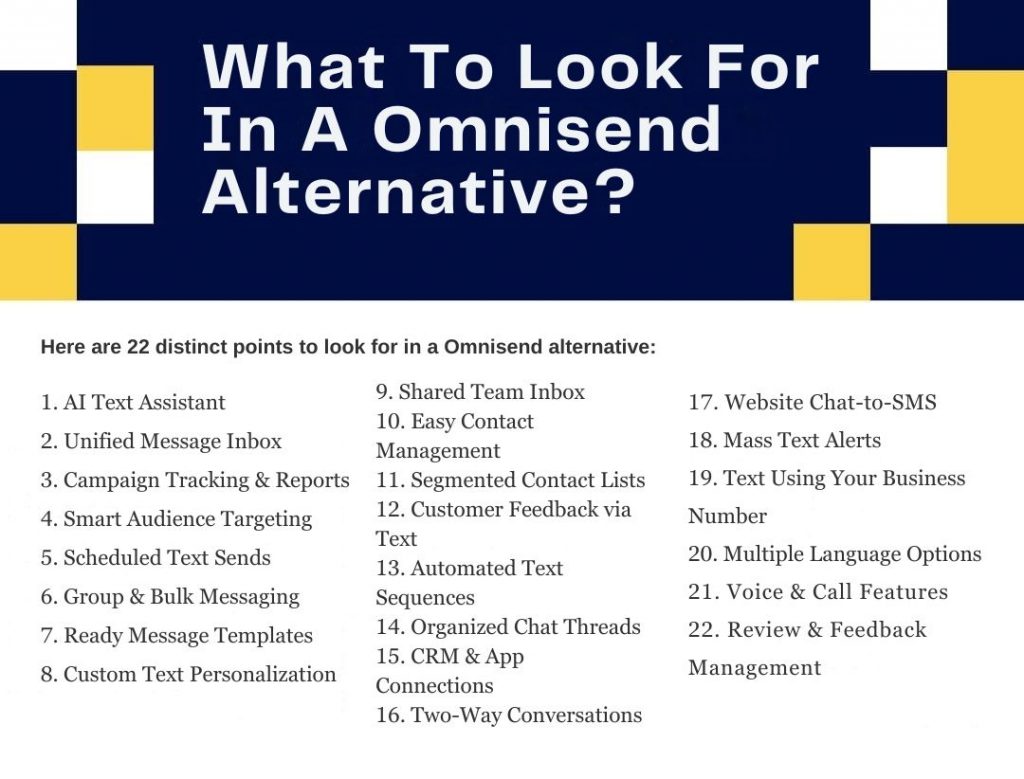
What Features To Look For In An Omnisend Alternative?
When exploring an Omnisend alternative, it’s important to know which features truly make a difference. The right platform should not only match Omnisend’s features but also go beyond them, offering smarter automation, deeper personalization, and a smoother experience for growing teams.
AI Text Assistant
Your ideal Omnisend replacement should come equipped with an AI text messaging assistant that helps you draft subject lines, body text, or replies quickly. It can suggest tone, length, or alternative phrasing, making it easier for teams without strong copy skills. This feature can put the tool ahead of lesser Omnisend competitors when speed and creativity matter.
Unified Message Inbox
A strong alternative to Omnisend consolidates all incoming messages, SMS, chat, email into a single unified message inbox. No more toggling between platforms or losing customer context. This makes team collaboration smoother and visibility better.
Campaign Tracking & Reports
Look for comprehensive campaign tracking & reports, opens, clicks, conversions, and delivery rates, all in real time. A better than Omnisend tool will let you drill down into each SMS or email campaign’s performance so you can optimize and justify your marketing spend.
Smart Audience Targeting
Choose a platform offering smart audience targeting so you can tailor messages based on behavior, purchase history, or engagement. Unlike generic mass blasts, this capability makes your outreach feel personal and relevant, something many Omnisend alternatives fall short on.
Scheduled Text Sends
Scheduling messages in advance (with precise dates and times) is a must in any Omnisend competitor you consider. It ensures your texts hit inboxes when your audience is most receptive, improving open and response rates.
Group & Bulk Messaging
A top Omnisend alternative shouldn’t falter when it comes to sending messages to large groups. Group & bulk messaging with built-in opt-out management and rate limiting ensures you can scale responsibly and compliantly.
Ready Message Templates
When you’re running tight on time, pre-built templates save the day. A good replacement for Omnisend offers prebuilt SMS and MMS layouts you can tweak instead of starting from scratch. It makes campaign launches faster and less error-prone.
Custom Text Personalization
To go beyond basic blasts, your tool should allow custom text personalization, inserting names, product names, locations, or past behavior dynamically. This boosts engagement and makes texts feel like a one-to-one conversation.
Shared Team Inbox
A shared team inbox enables marketing, support, and sales to access the same message threads. With proper role permissions and message assignment, no reply slips through the cracks. This kind of collaboration often separates a strong Omnisend alternative from weaker ones.
Easy Contact Management
Managing your contacts shouldn’t be a headache. A robust Omnisend competitor offers an intuitive contact Management with tagging, suppression lists, and easy import/export. Clean, organized contact data leads to better deliverability and campaign precision.
Segmented Contact Lists
Separate from just managing contacts, segmented contact lists allow dynamic grouping based on behavior, demographics, or campaign responses. The more granular your segmentation, the more relevant your outreach feels, something serious marketers expect in a replacement for Omnisend.
Customer Feedback via Text
A standout Omnisend alternative lets you gather customer feedback via text, short SMS surveys, NPS polls, or star ratings. This tight integration of feedback into your messaging workflow accelerates insights without needing a separate tool.
Instant Auto Replies
Your platform should allow instant auto replies triggered by keywords (like “HELP” or “STOP”) or certain behaviors. This adds responsiveness, builds trust, and keeps your compliance in check, all qualities that distinguish a good Omnisend competitor.
Automated Text Sequences
Automated text sequences (or drip campaigns) allow you to schedule follow-ups or triggered texts based on customer actions. Whether it’s post-purchase upsell or re-engagement, this automation is vital and often what makes a tool better than Omnisend for growing businesses.
Organized Chat Threads
Messages to and from a contact should appear in organized chat threads, like a conversation timeline. This gives context at a glance, especially when your team is collaborating across channels or departments.
CRM & App Connections
A genuine Omnisend replacement integrates seamlessly with your CRM, eCommerce tools, and third-party platforms (like Shopify, HubSpot, or Zapier). This lets you sync data, trigger automations, and keep all channels aligned.
Two-Way Conversations
Not just broadcast: a real tool, similar to Omnisend tool, should enable two-way conversations. Recipients should reply, and your team should respond, all within the same platform. That conversational capability is critical for engagement.
Website Chat-to-SMS
Many alternatives to Omnisend include chat-to-SMS features, letting website visitors continue conversations via text. This boosts lead capture and ensures no inquiry gets lost after they leave your site.
Mass Text Alerts
Whether for marketing or operational updates, you want a tool that supports mass text alerts, urgent notifications, system outages, or timely promotions. A versatile Omnisend alternative handles both promotional and transactional messaging.
Text Using Your Business Number
No need for a new number, many alternatives to Omnisend let you use your existing landline or VoIP number for texting, keeping communication simple and consistent.
Multiple Language Options
If you operate across regions or have multilingual customers, multiple language options and Unicode support are essential. A competitive Omnisend competitor should let you send messages in local scripts or multiple languages seamlessly.
Voice & Call Features
Some Omnisend competitors combine SMS with advanced VoIP tools like call routing, call recording, and call transfers. This creates a unified system that saves costs and improves efficiency.
Review & Feedback Management
Finally, incorporate review requests and feedback management, the ability to request, collect, display, and respond to positive reviews from within the messaging tool. This blends marketing and online reputation, which a powerful Omnisend alternative should facilitate.
10 Best Omnisend Alternatives
1. Emitrr
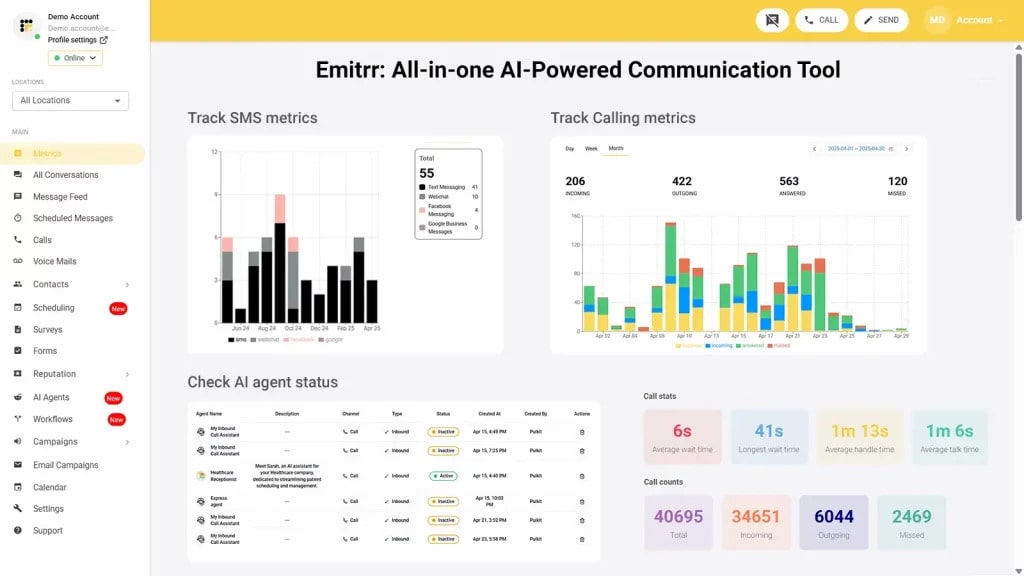
Emitrr Overview
Emitrr is a top-rated messaging and automation platform widely recognized as one of the best Omnisend alternatives. More than just a marketing tool, Emitrr serves as an advanced AI-powered business communication platform, offering features like two-way messaging, bulk announcements, automated campaigns, and omnichannel customer support. With flexible and transparent pricing, it’s built to scale seamlessly with businesses of all sizes.
Emitrr integrates effortlessly with over 1,000+ CRM, PMS software, and EHR systems, ensuring smooth data flow across all tools. It’s also HIPAA and TCPA-compliant, providing secure and reliable data management for every message sent. Backed by highly responsive customer support, Emitrr stands out as a leading Omnisend competitor, helping teams simplify communication, enhance engagement, and keep every customer interaction connected and meaningful.
Emitrr Features
AI-Powered Tools That Make Communication Smarter
- Custom AI SMS Agent: Create a personalized AI SMS agent by setting its name, image, role, and description, or choose from ready-made templates.
- Automated Responses: Keep prospects engaged with instant, automated text replies.
- AI-Generated Replies: Let Emitrr’s AI craft context-aware responses in the right tone, saving you from typing.
- AI Message Enhancer: Enhance the tone and clarity of your messages with AI-powered suggestions.
- AI Rule Engine: Automatically filter and route customer messages to the appropriate team member.
- AI-Powered Campaigns: Generate complete SMS campaigns in seconds by simply providing a prompt.
- Knowledge-Based Training: Train your AI agent using existing data, knowledge bases, or website content.
- Self-Learning AI Agent: The AI continuously improves, learning from each interaction to become smarter over time.
Texting Features
- SMS Marketing Tools: SMS marketing tools give you access to drip campaigns, templates, and scheduled sends, ideal for healthcare and service-driven businesses.
- Contact Management: Contact management keeps your database organized with import/export options and integrations with 500+ platforms.
- Bulk Messaging: Bulk messaging makes it easy to send appointment updates, promotions, or alerts to your entire contact list in one go.
- Chrome Extension: With the Chrome extension, you can manage calls, texts, and updates right from your browser without switching tabs.
- Two-Way Text Messaging: With two-way text messaging, customers can reply directly to your messages, making conversations quick, natural, and seamless.
- Webchat Widget: The webchat widget adds live chat to your website so visitors can reach out instantly without needing to call or email.
- Shared SMS Inbox: A shared SMS inbox lets your whole team view, assign, and manage conversations together, complete with notes and faster replies.
- Group Chat Functionality: Group chat functionality allows you to start group conversations where participants can respond publicly or privately.
- CRM Integration: Connect Emitrr with your CRM to sync customer data, giving you more personalized and efficient review follow-ups.
- Customer Feedback Tools: Want direct insights? Use built-in tools like surveys and quick forms to gather helpful feedback from your clients.
- Live Chat: Be there when customers need you most. With real-time chat support, you can answer questions instantly and boost satisfaction.
- Automated Reminders: With every automated reminder, you reduce no-shows and help clients stay on schedule without needing to follow up manually.
- No-Show Follow-Ups: If someone misses an appointment, Emitrr automatically follows up to rebook or reconnect, helping you turn missed chances into new ones.
Emitrr Pros
- Outstanding Customer Support: Consistently receives 5/5 stars on review platforms like Capterra.
- Wide Range of Features: Offers secure messaging, advanced campaign tools, and more.
- Affordable Pricing: Transparent, pay-as-you-go pricing with no hidden costs.
- Seamless Integration: Works smoothly with popular CRMs, EHRs, and productivity tools, ensuring uninterrupted workflows.
- Suitable For smaller teams: Designed with simplicity and scalability in mind, offering all essential features without unnecessary complexity.
Emitrr Cons
- Continuous Improvements: Emitrr regularly rolls out new features, and no major issues have been reported.
Emitrr Pricing
Emitrr keeps things transparent. To help you make an informed choice, here’s a full breakdown of what Emitrr charges:
| Name of the Plan | Price if Paid Monthly | Price if Paid Annually |
| Standard | $45 per month | $495 annually |
| Pro | $64 per month | $704 annually |
Note:
- You only pay for what you use. This pricing is based on the number of messages that you want to send out per month. You can contact sales if you are a large enterprise and want a personalized quote based on your use case.
- If you’re a healthcare business, then you need to pay an additional $200 fee that will give you access to all the advanced automation capabilities you require.
- If you require AI capabilities, you can upgrade from the Standard to the Pro plan.
Emitrr Integrations
Emitrr offers 500+ integrations across different industries, such as dental, recruiting, real estate, etc., with tools like:
- MailChimp
- Denticon
- AthenaHealth
- Zapier
- Salesforce
- HubSpot
- HouseCall Pro
- And more!
Emitrr Support Channels
- Live chat: Chat with Emitrr’s live representatives
- Phone: Call Emitrr at +1 (210) 941-4696
- Email: Send email to Emitrr’s support team at support@emitrr.com
- Knowledge base
- FAQs/forum
- SMS
Emitrr Ratings
Emitrr has a solid 5/5 star rating on Capterra.
Emitrr Reviews
“You have it all integrated into one platform, the signatures, the amount of characters, you can attach files, send photos. You are able to create and send forms. Unlimited amount of things we can use and take advantage of.”
“I LOVE Emitrr. The support you get is wonderful, the app is easy to use and they have been incredibly responsive. As a small business, we needed a messaging platform that wouldn’t break the bank and this meets all our needs (and then some) without making us feel overwhelmed.”
Source: Capterra
2. Chiirp

Chiirp Overview
Chiirp is a powerful customer communication platform designed to help businesses manage SMS and email marketing, nurture leads, and strengthen their brand reputation. Its clean, intuitive interface and responsive customer support make it a strong Omnisend competitor for growing companies..
Chiirp Features
- 2-Way Texting: Engage customers through real-time, one-on-one text conversations for more meaningful interactions.
- Broadcast Messaging: Instantly send bulk SMS messages to your entire contact list, streamlining communication and saving time.
- Personalized Messaging: Use merge fields to tailor each message, adding a personalized touch that enhances customer connection.
- Tags: Organize and categorize conversations with tags to improve collaboration and workflow efficiency across your team.
Chiirp Pros
- Excellent Customer Support: Users consistently praise Chiirp’s support team for being responsive, knowledgeable, and dependable.
- User-Friendly Mobile App: Chiirp’s intuitive mobile app allows users to effortlessly manage SMS automation and key tasks anytime, anywhere.
Chiirp Cons
- Expensive Pricing: Starting at $350 per month with an additional $1,000 setup fee, Chiirp’s pricing may be challenging for small businesses to justify.
- Limited Integrations: As Chiirp continues to expand, its current integration options with third-party tools remain relatively limited.
Chiirp Pricing
Chiirp offers two kinds of pricing plans:
- Freedom: $350 per month + $200 set up fees
- Partner: $650 per month + $1000 set up fees
Chiirp Integrations
- ServiceMonster
- Service Titan
- HouseCall Pro
- Zapier
- Jobber
Chiirp Support Channels
- Phone
- Chat
Chiirp Ratings
Chiirp has a rating of 4.3/5 on Capterra.
Chiirp Reviews
“We didn’t like the entire experience. I am not sure if they were just having a bad couple weeks but nothing worked properly when we set it up. And again we had zero support setting it up. Basically they would blame the software we were using instead of trying to help. Terrible experience.”
“Chirrp is very easy to use vs other comparable software! Customer support is amazing and timely! They even have a library of training videos so you can easily navigate and implement the software with virtually no help at all!”
Source: Capterra
3. SimpleTexting
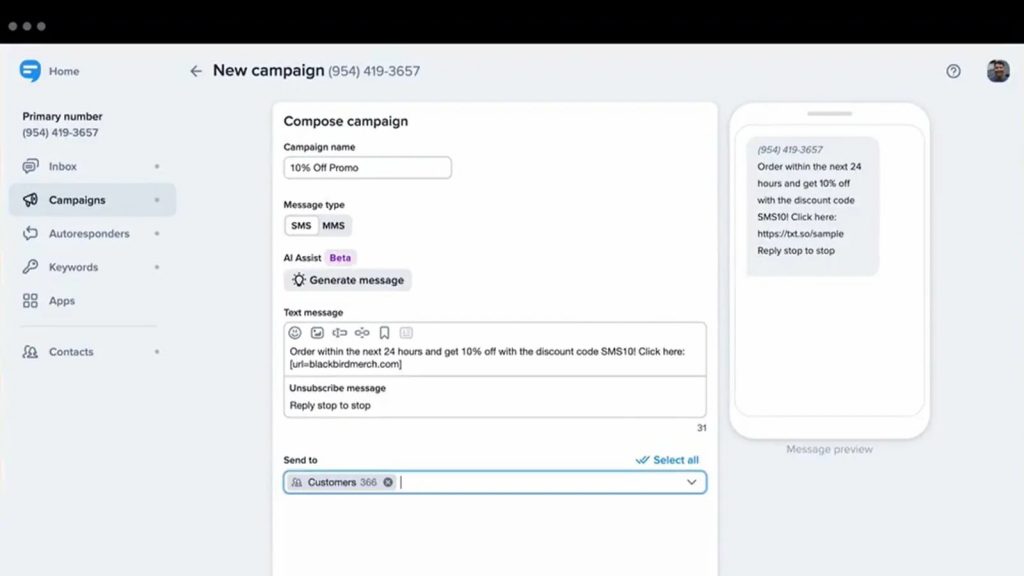
SimpleTexting Overview
SimpleTexting is a cloud-based SMS marketing and messaging platform that many businesses consider a reliable Omnisend alternative. It helps brands strengthen customer engagement through two-way communication, scheduled texts, automation, and bulk messaging. With its simple design and seamless send-and-receive functionality, SimpleTexting stands out as a trusted Omnisend competitor for businesses focused on effective customer outreach and long-term retention.
SimpleTexting Features
- Two-Way Texting: Communicate seamlessly with customers through real-time, personalized text conversations.
- MMS Messaging: Send engaging photos, videos, and other media directly via text to capture attention.
- Bulk SMS Messaging: Instantly connect with large groups through mass text campaigns that save time and boost outreach.
- Scheduled Messages: Automate and schedule messages to reach customers at the most effective moments.
- Text-to-Join Keywords: Use custom keywords to let customers easily opt in and join your contact list
SimpleTexting Pros
- Feature-Rich Platform: Equipped with robust tools like two-way texting, automation, drip campaigns, MMS messaging, and advanced contact segmentation.
- Seamless Integrations: Effortlessly connects with over 1,000 apps, including popular platforms such as Zapier, Mailchimp, Salesforce, Shopify, and HubSpot.
- Ease of Use: Designed with an intuitive interface that’s easy to navigate, perfect for beginners, while offering efficiency for experienced users.
SimpleTexting Cons
- High Pricing: Subscription plans can be costly, making them less suitable for small businesses with limited budgets.
- Limited Global Availability: Currently focused on the US and Canada, which limits its use for international messaging campaigns.
- Lack of HIPAA Compliance: Not ideal for healthcare organizations, as the platform does not adhere to HIPAA requirements.
- Billing Concerns: Some users report confusion around automatic renewals and billing procedures.
SimpleTexting Pricing
SimpleTexting pricing plans range from $39 to $909 per month.
SimpleTexting Integrations
SimpleTexting integrates with 1000+ third-party CRM/EHR/social media apps and tools, including, but not limited to:
- MailChimp
- Salesforce
- Slack
- Hubspot
- Zapier
- Podio
- WordPress
- Pabbly
- Amplifier
- Integrately
- And much more!
SimpleTexting Customer Support Channels
Here is a list of SimpleTexting customer support channels that you can find:
- Phone
- Chat
- FAQs
- Knowledge base
SimpleTexting Ratings
SimpleTexting has over 200 customer reviews and a rating of 4.7/5 on Capterra.
SimpleTexting Reviews
“SimpleTexting is a great option if you are looking to reach a larger audience than traditional email. The user interface is clear and straightforward and texts are sent reliably.”
“The app is a bit glitchy, and it does get pretty expensive when you have a decent amount of people on your list since you are charged based on sent messages. Eventually I may be priced out if I keep building.”
Source: Capterra
4. Sender
Sender Overview
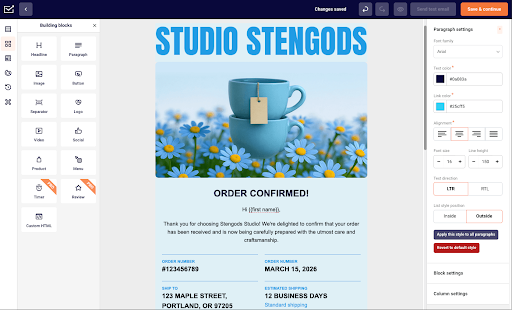
Sender is a feature-rich email marketing platform built for small and growing businesses. It combines newsletter creation, bulk emailing, automation, segmentation, transactional emails, and SMS marketing in a user-friendly interface. Its free plan and affordable paid tiers make it a practical Omnisend alternative for teams that want strong functionality without enterprise-level complexity.
Sender Features
- Email Campaign Creation: Create newsletters and bulk email campaigns using a drag-and-drop editor, responsive templates, or an HTML builder.
- Marketing Automation: Build trigger-based workflows with Custom Events, behavioral targeting, time delays, conditional logic, and email or SMS steps.
- Transactional Emails: Send password resets, order confirmations, shipping notifications, and other system emails through REST API or SMTP relay.
- Subscriber Management: Organize contacts using custom fields, tags, segmentation, automated list cleaning, and CSV or API imports.
- Reporting and Analytics: Track opens, clicks, bounces, unsubscribes, ecommerce sales, and link engagement through real-time reports and heatmaps.
Sender Pros
- Affordable Pricing: Offers a free plan for up to 2,500 subscribers and paid plans starting at $7 per month.
- Easy-to-Use Interface: The intuitive dashboard and visual editors make campaign creation accessible to beginners.
- Advanced Automation: Supports custom events, behavioral triggers, conditional logic, and combined email and SMS workflows.
- Responsive Customer Support: Provides round-the-clock assistance through email and live chat.
Sender Cons
- Sender Branding on Free Plan: Emails created on the free tier include Sender branding.
- Fewer Direct Integrations: The selection of native third-party integrations is smaller than those of some enterprise platforms.
- No Built-In CRM: Businesses that need sales pipelines must connect an external CRM.
Sender Pricing
Sender offers four pricing options:
- Free Forever Plan: $0/month for up to 2,500 subscribers and 15,000 emails per month, transactional emails, automation, landing pages, and 24/7 support included.
- Standard Plan: Starts at $7/month for up to 1,000 subscribers and 12,000 emails per month
- Professional Plan: Starts at $14/month for up to 1,000 subscribers and 24,000 emails per month
- Enterprise Plan: Custom pricing
Sender Integrations
- WordPress
- WooCommerce
- PrestaShop
- Zapier
- Google Analytics
- REST API
- Webhooks
Sender Customer support
- 24/7 Live Chat
- Email Support
- Help Center
- Training Videos
- Migration Assistance
Sender Ratings
Sender has over 200 customer reviews and a rating of4.7/5 on Capterra.
Sender Reviews
“It’s reliable, easy to learn, and has everything I need to run successful email campaigns for my business. I’ve saved both time and money since switching over.”
“I switched from Mailchimp three years ago and honestly can’t believe I waited so long. What was costing me $20 a month there? I get it free with Sender. The whole thing took maybe 20 minutes to set up – no joke. Everything just works the way you’d expect it to. And they recently added a landing page builder, which means I ditched another subscription I was paying for.”
Source: Capterra
5. EZ Texting

EZ Texting Overview
EZ Texting is a popular text marketing platform that helps small businesses create and manage SMS campaigns with ease. Its intuitive dashboard, quick setup, and user-friendly tools make communication simple and efficient for growing teams. However, some users find its pricing slightly on the higher side and wish for more flexibility. Still, EZ Texting remains a reliable and capable Omnisend alternative, ideal for businesses looking for streamlined, text-based customer engagement and retention.
EZ Texting Features
- Two-Way Messaging: Chat with customers in real time via SMS.
- Contact Management: Organize and segment your audience for more targeted messaging.
- Custom Keywords: Create unlimited keywords to personalize and focus your campaigns.
- Bulk Messaging: Send mass texts effortlessly for promotions, updates, or announcements.
EZ Texting Pros
- Responsive Support: Provides fast and helpful assistance whenever you need it.
- Easy Onboarding: Simple setup with an intuitive interface that’s accessible to all users.
- AI-Powered Campaigns: Leverage AI tools to create personalized and engaging campaigns efficiently.
EZ Texting Cons
- High Costs: May be pricey for small businesses compared to other options.
- Technical Glitches: Occasional bugs can interfere with campaign setup.
- Delivery Inconsistencies: SMS delivery may sometimes be unreliable, impacting communication.
Ez Texting Pricing
There are four EZ texting pricing options available:
- Launch: $20/month for up to 500 contacts
- Boost: $60/ month for 500-2,000 contacts
- Scale: $100/month for 2,000-50,000 contacts
- Enterprise: $3000 a month for 50,000+ contacts
Ez Texting Integrations
Ez Texting offers integrations with a wide list of software and tools, including:
- HubSpot
- Zapier
- SquareSpace
- Mailchimp
- Salesforce
Ez Texting Support Channels
- Chat
- Phone
- Faqs
- Knowledge Base
Ez Texting Ratings
Ez Texting customer rating on Capterra is 4.3/5 and on g2 is 4.5/5.
Ez Texting Reviews
“The ease of use for training less technical people on how to buy keywords is excellent. The API is great to work with as well.“
“The platform is constantly pushing for increasing expenses. And pricing displays are misleading to say the least.“
Source: Capterra
6. Text Request

Text Request Overview
Text Request is a user-friendly business texting platform widely recognized as a strong Omnisend alternative. It offers powerful features like SMS marketing campaigns, review requests, appointment reminders, and a flexible SMS API for seamless automation. With smooth integrations into popular third-party apps, Text Request makes it easy for businesses to handle customer communication, lead generation, and marketing, all from one intuitive dashboard.
Text Request Features
- SMS Chat: Engage website visitors directly through a live chat widget while capturing their contact information for future follow-ups.
- API & Integrations: Utilize ready-made integrations or create custom connections using APIs and webhooks.
- Reviews: Connect with Google and Facebook to request, monitor, and respond to reviews, enhancing credibility and attracting new customers.
- Message Templates: Save commonly used messages for faster and more consistent communication.
Text Request Pros
- HIPAA-Compliant: Perfect for healthcare providers, offering secure texting that meets HIPAA standards.
- Comprehensive Features: Includes robust tools like message scheduling, contact management, downloadable reports, SMS, MMS, and more.
- Excellent Customer Support: Known for fast, responsive, and dependable assistance.
Text Request Cons
- Rigid Pricing: Users often find the pricing inflexible, paying full subscription fees even when using only a few features, prompting some to seek alternatives.
- Inconsistent Messaging: Issues such as altered text formatting, delayed notifications, and occasional delivery lags have been reported.
- Software Bugs: The platform can experience glitches, lag, or crashes, especially during heavy usage.
- Limited Integrations: Although integrations exist, connecting the software with other essential tools can be challenging for users.
Text Request Pricing
There are four Text Request pricing options available:
- Basic: $59 a month
- Starter: $139 a month
- Corporate: $279 a month
- Enterprise: $549 a month
Text Request Integrations
- Clio
- Angi
- HubSpot
- Help Scout
- FranConnect
- Pipedrive
- Mindbody
- Square
- And more..
Text Request Support Channels
- Phone
- Chat
- Knowledge Base
Text Request Ratings
Text Request customer rating on Capterra is 4.6/5.
Text Request Reviews
“Ease of use and great customer service! from customer communications to reservations it helps us in all aspects of our communications.”
“It glitches sometimes. I hit send on a message and I get an error that says failed to send. I have to hit send again and it will go. This does not happen all the time, but it can be annoying.”
Source: Capterra
7. Heymarket

Heymarket is an easy-to-use business texting platform that many companies see as a great Omnisend alternative. It helps teams improve SMS communication, manage customer conversations, and build stronger relationships. The platform connects smoothly with tools like Salesforce, HubSpot, and Zapier, making it simple to keep everything in sync.
Heymarket Features
- Opt-in Confirmations: Automatically send a text when customers sign up using specific keywords.
- Mass Alerts: Quickly broadcast updates like announcements, policy changes, or business hours.
- Appointment Reminders: Automate text reminders to help reduce no-shows for scheduled appointments.
- Auto-Replies: Provide instant responses to common customer questions.
- Survey Requests: Automatically send surveys after deliveries or issue resolutions to gather feedback.
Heymarket Pros
- Streamlined Communication: Simplifies interaction with two-way texting, drip campaigns, and follow-ups.
- Intuitive Interface: User-friendly design ensures easy navigation.
- Advanced Automation: Features like email workflows, CRM-triggered SMS, and auto-replies boost productivity.
- Robust Compliance: TCPA, HIPAA compliance, and SOC 2 Type 2 certification provide secure communication.
Heymarket Cons
- Expensive Pricing: Plans cost $19 to $59 per user/month, with basic plans lacking features like HubSpot integration.
- Limited Support Options: Email support is standard; live chat is available only on premium plans.
- No Real-Time Delivery Tracking: The platform does not offer instant tracking for sent messages.
- Technical Issues: Users report frequent glitches and platform outages, affecting reliability.
Heymarket Pricing
Heymarket offers four kinds of pricing plans, including:
- Standard: $19/user/month
- Plus: $39/user/month
- Pro: $59/user/month
- Enterprise: Custom
Heymarket Integrations
Here’s a bunch of Heymarket integrations that you can find:
- Hubspot
- Salesforce
- Shopify
- Zapier
- Aircall
- Clio
- And more.
Heymarket Support Channels
- Chat
- Phone support
- Knowledge base
Heymarket Ratings
Heymarket’s customer rating on Capterra is 4.5/5.
Heymarket Reviews
“The customer service lacks a bit; it seems they use the same product to communicate/resolve technical issues, and the software is not capable of handling it. Issues get lost and sometimes unanswered.”
“My overall experience has been good because again, they have great customer service.”
Source: Capterra
8. Intercom

Intercom Overview
Intercom is a popular customer communication platform that many businesses consider a top Omnisend alternative. It helps brands connect with customers through personalized messaging, live chat, and smart automation that keeps conversations flowing. With its built-in customer data tools and intuitive workflows, Intercom makes it easy to engage visitors, onboard new users, and deliver seamless support, helping businesses build lasting relationships and provide a better than Omnisend experience overall.
Intercom Features
- Live Chat: Engage visitors instantly on your website or app with real-time support.
- Automated Messaging: Send personalized, automated messages triggered by user behavior to boost engagement.
- Help Center: Provide self-service articles, FAQs, and guides to help customers solve issues faster.
- Interactive Product Tours: Guide new users through onboarding with step-by-step, interactive walkthroughs.
Intercom Pros
- All-in-One Communication: Integrates live chat, automated messaging, and customer insights into a single platform to enhance engagement and streamline support.
- User-Friendly Design: Offers a clean, intuitive interface that’s easy for anyone to use, requiring no technical expertise.
Intercom Cons
- High Cost for Small Teams: The pricing may be too expensive for smaller businesses or teams with tight budgets.
Intercom Pricing
Intercom pricing are as follows:
- Essentials: Starts at $74/month
- Pro: Starts at $153/month
- Premium: Custom pricing for larger businesses needing advanced customization, data analytics, and dedicated support.
Intercom Integrations
- Salesforce
- Slack
- HubSpot
- Shopify
- Google Analytics
- Zendesk
Intercom Support Channels
- Live Chat
- Email Support
- Help Center
- Community Forum
Intercom Ratings
According to Capterra, Intercom has 4.5/5 customer ratings out of 500 reviews.
Intercom Reviews
“Better and more convenient contact between us and our customers is always appreciated. Easy history tracking is made possible by this intuitive tool. It’s simple to record my conversations and analyze them afterwards for development purposes.”
“Quickly and simply, I can access the Macros and write/update the articles in the assistance center. Streamlining the process of submitting tickets to the correct division for handling user concerns. It’s a time saver for all teams because they can deal with it themselves.”
Source: Capterra
9. TextUs

TextUs Overview
TextUs is a real-time business texting platform built to make communication faster and more personal across sales, support, and marketing teams. It focuses on quick, two-way conversations that help businesses connect with customers in a genuine and efficient way. With its intuitive interface and dependable customer support, TextUs stands out as a trusted Omnisend alternative, giving teams a simpler, more human approach to customer engagement and follow-ups.
TextUs Features
- Two-Way Texting: Chat in real time with customers and team members.
- Bulk Messaging: Quickly and efficiently send mass SMS to targeted groups.
- Message Templates: Create reusable templates to save time and ensure consistent communication.
- Scheduled Texts: Plan and automate messages for optimal delivery timing.
- Contact Management: Organize and segment contacts to enable more personalized communication.
TextUs Pros
- Intuitive Interface: Simple and easy to navigate, perfect for new users.
- Real-Time Conversations: Supports immediate, two-way interactions to enhance customer relationships.
- Seamless Integrations: Connects with top CRM tools for efficient data handling.
- Excellent Customer Support: Known for its prompt and helpful assistance.
TextUs Cons
- Expensive Pricing: May be too costly for small businesses or startups.
- Limited Marketing Features: Lacks advanced options like drip campaigns, MMS, and comprehensive list segmentation.
- No Message Rollovers: Unused message credits don’t carry over to the next billing cycle.
TextUs Pricing Plans
TextUs pricing plans include:
- Standard Plan: Includes basic two-way texting features.
- Pro Plan: Advanced features with additional integrations.
- Enterprise Plan: Custom features and scalability for large businesses.
Exact pricing details are available upon request.
TextUs Integrations
- HubSpot
- Salesforce
- Zapier
- Bullhorn
- Greenhouse
TextUs Support Channels
- Chat
- Phone support
- Knowledge base
- FAQs
TextUs Ratings
TextUs customer ratings on Capterra is 4.7/5.
TextUs Reviews
“Business problems i am able to solve is getting in touch with individual quicker than sending a email most of the time.”
“I think it’s an easy platform to use but it is not something I would use for my day to day mass messaging.”
Source: Capterra
10. SlickText

SlickText Overview
SlickText is a popular mass texting and mobile marketing platform that many businesses see as a dependable Omnisend alternative. It helps teams send up to 50,000 messages per month, manage SMS campaigns, and track performance effortlessly through its user-friendly dashboard.
SlickText Features
- Mass Text Messaging: Send texts to your entire contact list or specific segments, including multimedia, emojis, and trackable links.
- MMS Messaging: Boost engagement by sending images, videos, and rich media within your messages.
- Text-to-Join: Easily grow your SMS list through simple keyword-based subscriptions.
- Text Surveys: Gather feedback with interactive SMS surveys sent to your subscribers.
- Automated Workflows: Automatically trigger personalized SMS sequences based on subscriber actions.
SlickText Pros
- Engagement Tools: Utilize features like text-to-join, contests, and mobile coupons to attract and re-engage customers.
- Simple Automation: Drag-and-drop tools make creating automated campaigns quick and easy.
- List-Building Made Easy: Expand your SMS list with opt-in forms, pop-ups, and QR codes.
- User-Friendly Interface: Intuitive design allows anyone to navigate and use the platform effortlessly.
SlickText Cons
- No Credit Rollover: Unused message credits expire, potentially causing inefficiencies.
- Limited Integrations: Supports only 14 integrations, which may not cover all business software needs.
- Complex Dashboard Navigation: Some users find the interface challenging to navigate.
- Basic Analytics: Reporting is limited to essential metrics like open and click-through rates, lacking deeper insights.
SlickText Pricing
SlickText pricing offers a free plan and eight different kinds of pricing options ranging from $29 per month for 500 texts to $1250 per month for 50,000 texts per month.
SlickText Integrations
SlickText offers only 14+ native integrations and the rest through Zapier. The list of native integrations offered by SlickText includes:
- HubSpot
- Slack
- Shopify
- Salesforce
- Zapier
- Mailchimp
- GetResponse
- ActiveCampaign
- And more..
SlickText Support Channels
- Phone Support
- Live Chat
- Email Support
- Help Center
SlickText Ratings
SlickText customer rating on Capterra is 4.8/5.
SlickText Reviews
“We sent a cancellation request over a year ago. They didn’t cancel our account and continued to bill us for 12 months. When we called to cancel for the second time they argued with us and refused to hear our complaint. The employee said (direct quote) “I’m not talking to you about this and there’s no management for you to talk to.”
“I love how easy it is to use and costs much less than competitors. The customer service is also fabulous.”
Source: Capterra
What Makes Emitrr The Best Omnisend Alternative?
If you’re looking for a better than Omnisend platform that feels built for modern businesses, Emitrr checks every box. It blends AI innovation, smart texting tools, and effortless communication features that help teams save time while keeping every conversation personal and engaging. Here’s how:
AI Agent & AI SMS Generator
Emitrr takes automation to the next level with its AI Agent and AI SMS Generator, helping businesses craft personalized, on-brand messages in seconds. Unlike many Omnisend alternatives, it doesn’t just send texts; it understands context, tone, and intent, ensuring every conversation feels authentic and human. The AI assistant also helps optimize timing, suggest replies, and generate campaign ideas, making communication faster, smarter, and more effective for busy teams.
Advanced Texting Capabilities for Modern Businesses
Emitrr stands out as a powerful Omnisend alternative with advanced texting capabilities that go beyond simple SMS. From automated campaigns and scheduled reminders to two-way conversations, it makes communication seamless and personal. Businesses love how easy it is to manage real-time engagement without the complexity that often comes with larger platforms.
Unified Inbox for Effortless Customer Conversations
Keeping every message in one place, Emitrr’s unified inbox helps teams manage customer chats, emails, and texts with complete clarity. Unlike some Omnisend competitors, it eliminates the need to switch between apps, letting businesses respond faster and more effectively. This streamlined setup improves collaboration and ensures no customer message slips through the cracks.
Multi-Channel Communication Made Simple: SMS, Email, and More
With Emitrr, you can easily reach customers through multiple channels like SMS, email, and voice, all from one dashboard. This Omnisend replacement helps businesses create consistent, personalized communication without juggling multiple tools. Whether it’s marketing, customer support, or appointment reminders, everything flows together effortlessly.
Affordable Pricing Designed for Every Business Size
Many users consider Emitrr a better than Omnisend solution because of its transparent and flexible pricing. It’s built to fit businesses of all sizes, from startups to large enterprises, without hidden costs or confusing tiers. You get access to premium features without overspending, making it a smart, budget-friendly choice.
Deeper Personalization and Smarter Automation Tools
Emitrr takes personalization to the next level with AI-powered automation and customizable workflows. Messages feel authentic and tailored, not robotic or repetitive. This makes Emitrr a strong Omnisend competitor for brands that want smarter customer journeys driven by data and real interactions.
Reliable Customer Support That Truly Cares
One of Emitrr’s biggest strengths is its exceptional customer support. Businesses often highlight how quick and proactive the support team is, ensuring every issue is resolved smoothly. Compared to other Omnisend alternatives, Emitrr delivers a hands-on, people-first experience that builds long-term trust and confidence.
Which Industries are catered by Emitrr?
Emitrr enhances communication for businesses in various industries, helping them stay connected and organized:
Healthcare
Emitrr is designed for healthcare providers, offering HIPAA-compliant SMS, VoIP, and appointment reminders. It integrates with systems like Denticon and Dentrix, making follow-ups, billing, and reputation management easier while boosting patient engagement and simplifying operations.
Wellness
Wellness businesses, such as spas, salons, and gyms, use Emitrr to automate bookings, send reminders, and collect feedback via SMS and email. This helps reduce no-shows, engage clients with personalized offers, and ensure smooth operations.
Education
For schools and colleges, Emitrr simplifies communication with bulk SMS, two-way texting, and automated reminders. It keeps students, parents, and staff informed about schedules, events, and important announcements.
Legal Services
Law firms rely on Emitrr for secure messaging, appointment reminders, and VoIP services. It streamlines communication, reduces administrative tasks, ensures confidentiality, and enhances client satisfaction.
Real Estate
Emitrr helps real estate agents and property managers automate scheduling, send reminders, and collect feedback. It keeps communication smooth and ensures a seamless experience for clients.
Home Services
Home Service providers like plumbers, HVAC technicians, and cleaning companies benefit from Emitrr’s automation for scheduling jobs, sending reminders, and following up. This ensures timely service and efficient communication with customers.
Retail
Retail businesses use Emitrr to automate order confirmations, shipping updates, and promotional messages. It helps increase sales, strengthen loyalty programs, and streamline daily operations.
Automotive
Automotive dealerships and service centers use Emitrr to schedule test drives, send service reminders, and follow up with customers. It helps keep operations organized and boosts customer satisfaction and retention.
Insurance
Insurance agencies utilize Emitrr to automate policy renewal reminders, claims updates, and bulk messaging. Two-way texting personalizes interactions, saves time, and strengthens client relationships.
Frequently Asked Questions
Omnisend is a marketing and messaging automation platform that helps businesses send SMS, emails, and push notifications to engage customers, automate campaigns, and drive conversions, all from one dashboard.
Many businesses explore Omnisend alternatives due to pricing limitations, restricted SMS features, or integration needs. Alternatives often offer better automation, AI-powered tools, and flexible pricing that fit different business sizes and goals.
Some popular Omnisend competitors include Emitrr, SimpleTexting, Salesmsg, EZ Texting, Heymarket, Text Request, and SlickText. These platforms provide multi-channel messaging, automation, and more affordable pricing plans.
Conclusion
While Omnisend offers solid marketing automation, today’s businesses need more than basic email and SMS tools. They need intelligent, real-time communication that adapts and scales with their growth.
Emitrr delivers exactly that, an AI-powered messaging platform built for modern customer engagement. With advanced texting, multi-channel communication, seamless integrations, and transparent pricing, Emitrr stands out as the most versatile and forward-thinking Omnisend alternative. It helps teams connect faster, respond smarter, and communicate better, all in one powerful platform. Book a demo today and get started!
| Criteria | Emitrr | Omnisend |
|---|---|---|
| Best Suited For |
• Businesses that manage high texting volume and need automation |
• Small to medium e-commerce businesses focusing on email marketing with supplementary SMS |
| Integration |
Connects with 500+ CRM, EHR, and PMS systems |
• Integrates with popular e-commerce and marketing platforms but offers fewer CRM and healthcare integrations |
| Pricing |
• Starts at $45/month for 500 message credits, with Standard, Pro, and Enterprise tiers priced based on message volume. |
• Pricing starts higher with email-focused packages; SMS features incur additional costs; free trial available but SMS limits apply |
| Security & Compliance |
• HIPAA-compliant and secure platform |
• Provides standard security measures; not HIPAA-compliant and does not offer BAA |
| Support |
• Reliable business-hour support |
• Email and chat support with limited availability; phone support not generally included |
| Texting Capabilities |
• AI-powered texting platform with two-way texting, bulk SMS, voicemail-to-text, shared inbox, group messaging, webchat, and missed-call-to-text |
• Primarily an email marketing platform with SMS capabilities limited to basic promotional texting; lacks AI features, shared inbox, and advanced messaging options |


 4.9 (400+
reviews)
4.9 (400+
reviews)