
Introduction
Faxing is still a critical part of healthcare operations, from transmitting lab reports to receiving referrals and authorizations. Athenahealth simplifies this old-school process through athenaFax, its secure, cloud-based faxing system built inside Athena EHR.
If you’ve ever wondered “How does Athena fax work?”, this detailed guide breaks down inbound faxing, outbound faxing, forwarding configurations, requirements, best practices, and everything your medical practice needs to know.
What Is Athena Fax?
Athena Fax, also referred to as athenaFax within the athenaOne EHR, is a cloud-based faxing solution integrated directly into Athenahealth’s clinical and administrative workflows.
Instead of using a traditional fax machine, Athena routes incoming and outgoing faxes through its secure servers. Documents are then delivered directly into the appropriate patient chart or clinical inbox.
With athenaFax, practices can:
- Receive digital faxes sent to toll-free Athena fax numbers
- Forward their existing local fax numbers to Athena’s fax servers
- Send outbound faxes directly from the EHR
- Automatically classify, label, and match fax documents using AI
- Maintain HIPAA-compliant storage and HIPAA audit trails
This eliminates the inefficiencies of paper faxing, manual tasks, reduces errors, and ensures every fax is accurately routed to the correct patient chart, leveraging Athenahealth’s automation, rules engine, and secure fax servers. Apart from this, it also supports secure communication across labs, imaging centers, pharmacies, and referral partners.
How Athena Fax Works: Step-by-Step Workflow
Inbound Faxing (Inbound Fax Workflow)
Inbound faxing is one of the strongest parts of the Athenahealth faxing system. It drastically reduces manual scanning, filing, charting, lost paperwork, and administrative workload. Here is the complete workflow:
Step 1: The Sender faxes to your Athenahealth toll-free number. Every practice is assigned a unique AthenaFax toll-free fax number. External senders use this number to transmit documents.
Step 2: The Fax is received by Athena’s secure cloud fax servers. Athenahealth stores and processes the document in a HIPAA-compliant environment.
Step 3: Automatic categorization & routing begins: Athenah uses caller ID, remote ID, patient data matching, document content recognition, and AI-assisted routing, which helps in accurately matching the fax to the correct patient, the correct provider, as well as the correct workflow queue.
Step 4: Documents flow into the appropriate chart or queue. Incoming faxes are placed:
- Into the patient’s chart
- Into a queue for physician review
- Into a specialty worklist (referrals, labs, insurance, etc.)
Outgoing Fax (Outbound Fax Workflow)
Outbound faxing through Athena EHR is equally automated.
Step 1: Provider selects the document: Users choose documents directly from athenaOne, hence no printing or scanning is needed.
Step 2: Athena fax servers transmit the file. Outgoing files are routed securely through the Athenahealth cloud fax infrastructure.
Step 3: Delivery reports & error alerts appear in the EHR, and Athenahealth automatically provides delivery receipts, failed fax notifications, and transmission logs.
Important Note About Forwarding
If your clinic forwards its local fax number using telecom providers, outbound faxing may not work through that forwarded line. This is why Athena recommends using the athenaFax number only for sending faxes.
Athena Fax Forwarding Requirements & Recommendations
This section uses the official Athenahealth fax forwarding guidelines. Forwarding is one of the most misunderstood areas of the Athenahealth faxing system, so let’s break it down clearly.
Athenahealth has specific guidelines for forwarding your old fax number into the athenaFax system. This ensures maximum reliability and HIPAA-compliant fax delivery.
AthenaFax Numbers Assigned per Practice
- Athena provides one or more toll-free fax numbers.
- These numbers are the official receiving points for all inbound faxes.
- They connect directly to Athenahealth’s secure fax servers.
Forwarding Your Local Fax Number to Athena
If your practice wants to keep using a local fax number (for business cards, websites, insurance profiles, etc.), your telecom provider can forward it to your athenaFax toll-free number.
Important rules:
- Only external senders should dial your local fax number.
- Your staff must send outbound faxes through the athenaFax number, not via the forwarded line. This avoids transmission failures and keeps workflows consistent.
Recommended Setup: Remote Call Forwarding (RCF)
Athena strongly recommends RCF (Remote Call Forwarding) for the best reliability, as it is extremely stable fax forwarding, has fewer transmission errors, fewer busy signals, offers multiple routing paths, and also has a higher delivery success rate and consistent fax quality

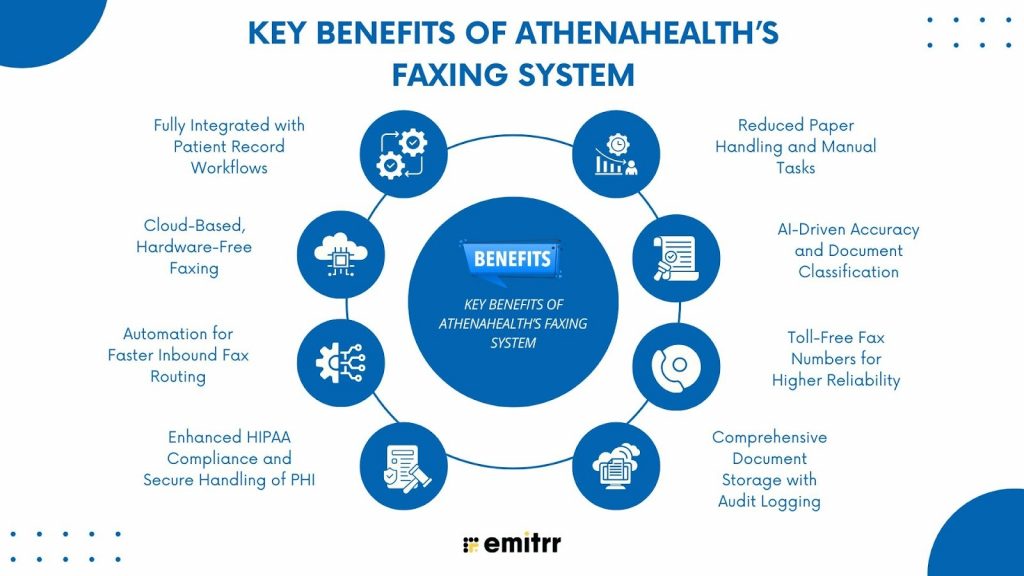
Key Benefits of Athenahealth’s Faxing System
Fully Integrated with Patient Record Workflows
One of the strongest advantages of Athena fax is its seamless integration with patient records inside athenaOne. Every incoming fax is automatically analyzed, matched, and delivered to the appropriate patient chart or clinical inbox. This eliminates the need for staff to manually print, scan, label, or upload documents.
Cloud-Based, Hardware-Free Faxing
One of the biggest advantages of the Athenahealth faxing system is that it operates entirely through secure cloud fax servers and entirely eliminates the need for traditional fax machines, analog modems, toner, or paper. Because AthenaFax is fully cloud-based, clinics can actually avoid hardware breakdowns and maintenance issues that typically interrupt workflow, which makes the Athena fax workflow more scalable, reliable, and easier to manage.
Automation for Faster Inbound Fax Routing
The Athena incoming fax workflow is built to automate the entire process of receiving documents. When a fax arrives via the assigned Athenahealth fax toll-free number, Athenahealth’s fax server captures it securely and uses Caller ID, Remote ID, and AI-driven content recognition to match the fax to the correct patient record. This level of automation eliminates manual scanning and filing, dramatically reducing administrative workload.
Learn more about how you can automate smart fax routing in Athenahealth.
Enhanced HIPAA-Compliance and Secure Handling of PHI
Security is a core advantage of the Athenahealth faxing system. All inbound and outbound fax transmissions are encrypted and processed through HIPAA-compliant fax servers, ensuring maximum protection of PHI. Since the documents never touch a physical fax machine, the risk of unauthorized access is eliminated.
Learn more about how you can fax securely in Athenahealth with HIPAA Compliance.
Reduced Paper Handling and Manual Tasks
Because all faxes are delivered digitally into athenaOne, practices no longer need to print, scan, or manually file incoming documents. This reduces clutter, saves time, and eliminates the common issues associated with paper-based workflows.
AI-Driven Accuracy and Document Classification
Athenahealth uses advanced AI-powered logic to identify document types, match patient data, and route faxes to the correct location. This greatly improves the accuracy of the Athena fax workflow, reducing errors such as misfiled documents or incorrect patient matches. The system intelligently recognizes whether a fax is a referral, lab result, or insurance document and sends it to the appropriate work queue.
Toll-Free Fax Numbers for Higher Reliability
Athena also assigns toll-free fax numbers to each practice, which significantly improves fax deliverability and reduces transmission failures. Toll-free numbers typically offer better routing stability than local numbers, especially when faxes are sent from hospitals, labs, or pharmacies.
Comprehensive Document Storage with Audit Logging
Every fax processed through Athena’s system is automatically stored with a corresponding audit trail, which helps practices maintain strict compliance with HIPAA recordkeeping standards. This secure architecture makes Athena fax far more reliable than traditional office fax machines.
For specific medical specialties and reporting needs, these HIPAA-compliant templates help protect patient data:
HIPAA Ophthalmology Fax Cover Sheet
Radiology Report Fax Cover Sheet
Best Practices for Athena Fax
Use Assigned AthenaFax Numbers for Outbound Faxing
To ensure maximum accuracy and reliability, practices should always use their assigned athenaFax number for outbound faxing rather than relying on a forwarded local line. Using the official Athenahealth fax number ensures that Athenahealth’s fax server can correctly authenticate the sender, maintain complete audit logs, and prevent transmission errors.
Forward Existing Fax Numbers Using Remote Call Forwarding (RCF)
Remote Call Forwarding is the recommended method for forwarding an existing local fax line to the Athena fax number. RCF provides a more stable and high-quality forwarding method compared to traditional call forwarding and also ensures uninterrupted signal transmission, supports multiple routing paths for redundancy, along with minimizing issues of busy signals or incomplete transmissions.
Use Analog Lines Instead of VoIP for Fax Forwarding
VoIP lines are known to create problems with fax communication because they compress audio signals, which interferes with fax tone transmission. This often results in dropped pages, burst errors, and high failure rates. Athenahealth strongly recommends using analog phone lines for fax forwarding to ensure better signal quality and stability.
Maintain Accurate Caller ID for Better Routing
Accurate Caller ID and Remote ID information help Athenahealth’s AI-driven fax routing identify the sender and match documents to the correct patient chart. When Caller ID is missing or inaccurate, inbound faxes may require manual review by staff, slowing down the workflow.
Ensure Outbound Documents Are Clear and High-Quality
Before sending documents through the Athena outbound fax, staff should ensure that files are clean, readable, and not corrupted. Poor-quality scans, handwritten notes, or low-resolution PDFs can lead to transmission issues or unreadable documents on the recipient’s end.
Monitor Fax Logs and Error Reports Regularly
The Athenahealth fax server generates detailed logs for every incoming and outgoing fax. Regularly reviewing these logs helps practices identify issues such as repeated failures, routing problems, or telecom line disruptions.
Optimized Performance Through Proper Machine Specs & Settings on Local Devices
Athena faxing also performs more reliably when practices maintain proper machine specifications and device settings on their local systems. Ensuring that computers, scanners, and connected fax devices meet Athena’s recommended technical requirements helps prevent transmission delays, formatting issues, and failed conversions.
Train Staff Properly on Faxing Procedures
For the Athena faxing system to work smoothly, all staff members must be trained on the correct procedures for sending, receiving, and managing faxes within AthenaOne. Proper training ensures that employees use the correct fax numbers, follow established workflows, and know how to interpret transmission logs or handle failed faxes.
Test Your Fax Forwarding Setup Regularly
Regular testing of your fax forwarding setup, especially if you are using RCF, ensures that forwarding remains functional and that telecom routing has not been altered. Periodic tests help identify any issues early, such as misconfigurations, line instability, or forwarding failures.
Comparison: Athena Fax vs Traditional Fax
| Feature | Athena Fax | Traditional Fax |
| Cloud-based management | ✅ | ❌ |
| EHR linkage | ✅ | ❌ |
| Toll-free forwarding | ✅ | ❌ |
| Requires an analog line | Optional | ✅ |
| AI categorization | ✅ | ❌ |
| HIPAA security controls | ✅ | Limited |
How Emitrr Complements Athenahealth Faxing
When we talk about faxing, Athenahealth indeed excels as it efficiently handles secure document transmission, routing, and storage. However, many healthcare practices still face challenges with communicating with patients, like sending follow-ups, reminders, and coordinating administrative tasks. Emitrr, powered with AI, complements Athenahealth by automating these steps, reducing manual work, and creating seamless workflows.
AI-Powered Patient Communication for Fax-Triggered Workflows
Faxed referrals, lab orders, and insurance requests often require immediate patient outreach. Emitrr’s AI-driven system automatically identifies the next step for each patient and triggers appropriate messages such as appointment confirmations and reminders, pre-visit instructions, and requests for missing insurance or referral information. By integrating AI with fax-triggered events from Athena, Emitrr ensures no patient is overlooked, reducing delays and improving workflow efficiency.
Seamless Athenahealth Integration
Emitrr provides seamless integration with athenahealth, allowing healthcare practices to sync patient data, appointment reminders, and communication workflows without any manual effort. By combining athenahealth’s robust practice management system with Emitrr’s AI-driven communication platform, healthcare businesses can automate routine tasks, reduce no-shows, improve patient engagement, and deliver a smoother overall patient experience.
HIPAA-Compliant AI-Assisted 2-Way Messaging
Fax-based communications frequently need clarification, missing forms, incorrect DOB, or incomplete referrals. Emitrr uses AI-assisted, HIPAA-compliant 2-way messaging to automatically categorize patient responses, prioritize urgent replies, and deliver actionable notifications to staff.
Want to see how Athenahealth and Emitrr work together to create seamless patient communication? Healthcare teams can send texts directly from Athena. Curious how? Watch our YouTube video.
AI-Driven Task Automation and Follow-Ups
Even though Athena routes documents accurately, staff still need to follow up on referrals, appointments, or missing paperwork. Emitrr’s AI can automatically assign, track, and follow up on these tasks, ensuring that every fax-triggered action is completed on time. This minimizes human error and streamlines administrative operations.
Multi-Channel Communication Beyond Faxing
Where Athena focuses on secure document transmission, Emitrr offers multiple channels for communication, such as SMS, calls, and more, which help the team manage everything that’s not handled through the fax line but is still necessary for smooth clinical operations.
Reducing Administrative Time Around Faxed Documents
Even with AI-assisted routing, many practices spend time notifying patients about referrals, collecting missing details, and coordinating next steps. Emitrr reduces admin work by automating:
- Referral updates
- Insurance follow-ups
- No-show re-engagement
- Pre-appointment paperwork reminders
Together, this results in faster resolution of fax-driven workflows.
Improved Patient Experience Across Fax-Enabled Workflows
Patients often don’t know when their referral was received or when it’s safe to schedule their appointment. Emitrr enables practices to send instant confirmation texts, status updates, and preparation guidance. It also helps in building trust and reduces confusion, complementing Athenahealth’s faxing capabilities with a modern, patient-friendly communication channel.
FAQs
Yes. Athenahealth offers a fully built-in cloud faxing system that gives practices the capability to send and receive faxes directly within the EHR.
Yes. Athena faxing system is HIPAA-compliant for secure transmission, storage, and handling of PHI.
In many cases, yes. Athenahealth allows practices to port their existing fax number into the system. If porting isn’t possible, Athenahealth will provide you with a new dedicated fax number so your faxing workflow continues smoothly.
Athena’s fax engine supports common medical formats such as PDF, TIFF, and standard printed documents generated from within the EHR. Documents are automatically converted into fax-ready formats for smooth transmission.
Common reasons include incorrect numbers, incompatible receiving fax machines, or local hardware issues on the recipient’s end. Ensuring proper device specs, resolution settings, and network stability improves deliverability.
No. Athena fax is cloud-managed and does not require traditional fax machines or modems. Practices only need internet access and devices that meet basic system requirements for scanning and uploading documents.
Yes. Outbound faxes include detailed delivery tracking, timestamps, and error messages . Incoming faxes are logged with sender information and audit trails for compliance.
Yes. Athena’s fax functionality integrates with its EHR workflows, patient charts, orders, referrals, and third-party labs or imaging centers, ensuring a fully connected clinical communication ecosystem.
Clinics typically fax referrals, lab results, imaging reports, insurance authorizations, patient summaries, prescriptions, and care coordination records. All of these are supported by Athena’s automated routing system.
VoIP lines typically do not work reliably with AthenaFax, because the Athena faxing system is designed to operate through cloud-managed toll-free fax numbers, not traditional analog or VoIP phone lines.
To ensure PHI compliance when faxing through Athena, practices must follow HIPAA-secure workflows. This includes using Athena’s encrypted cloud fax numbers, avoiding VoIP fax lines, and ensuring that faxed documents are never stored on unsecured devices.
Conclusion
The Athenahealth faxing system, powered by athenaFax, is designed to simplify fax workflows, reduce manual tasks, and keep all patient documents organized and secure. By understanding how Athena’s incoming fax, outbound fax, and fax forwarding work, your practice can set up a smooth, reliable, and efficient document workflow.
However, while AthenaFax streamlines document transmission and routing, practices still need a reliable way to communicate with patients, send reminders, handle follow-ups, and manage conversations outside of the EHR, and that’s where Emitrr becomes the perfect companion to Athenahealth. Emitrr’s AI-powered, HIPAA-compliant texting, automation, and patient communication workflows fill the gaps that faxing cannot solve to ensure that every referral, appointment, update, or clinical instruction reaches the patient instantly.
If your practice wants to enhance Athenahealth with faster communication, automated follow-ups, and AI-driven patient engagement, book a demo with Emitrr today and transform how your clinic communicates.


 4.9 (400+
reviews)
4.9 (400+
reviews)