
 4.9 (400+
reviews)
4.9 (400+
reviews)
Introduction
Have you ever seen your team jumping between portals, inboxes, and half-finished forms just to get one patient ready? You already know the issue. It is not that you need another tool. It is that everything you use does not really work together.
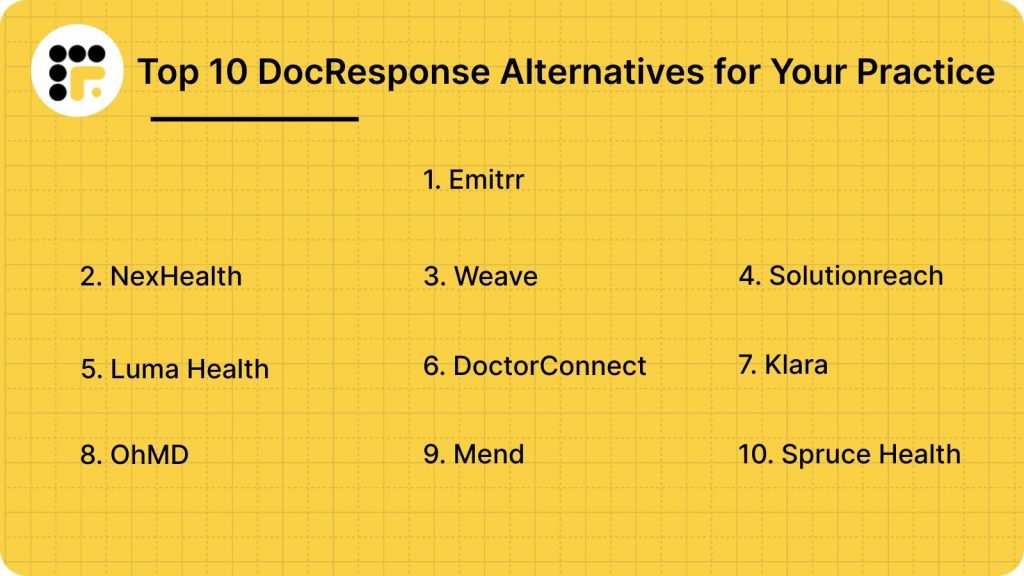
DocResponse helped many clinics move past clipboards and waiting-room paperwork. But as your practice gets busier and patients expect faster digital experiences, it is normal to look around and wonder if there is something smoother. Something quicker. Something your team does not have to fight with every day. So if you are exploring options, here is a list of 10 DocResponse alternatives that can make your workflow feel a whole lot lighter!
What Is DocResponse?
DocResponse is a tool that helps clinics move all their patient paperwork online. Instead of handing people a clipboard and a stack of forms, you can send them a quick link to fill everything out on their phone or laptop before they even show up! Demographics, medical history, consents – all done ahead of time.
Once patients submit their info, DocResponse sends it into your EHR so your team is not stuck retyping the same details over and over. Some practices also use it for longer clinical questionnaires, so providers walk into the room already knowing what to expect.
In a nutshell, DocResponse can be your virtual assistant or digital front desk: patients fill things out online, your team sees cleaner data, and appointments start on time without the usual check-in chaos.
DocResponse Features
- Digital intake forms: Patients can fill out demographics, medical history, and consents right from their phone, so your team is not waiting on paperwork when they arrive.
- Clinical questionnaires: DocResponse includes symptom checkers and condition-specific forms that help providers walk into the room with more context.
- EHR syncing: Submitted data can be pushed into the EHR, cutting down on double entry and the risk of transcription errors.
- Telehealth tools: Video visit options allow teams to handle follow-ups or consultations securely inside the same platform.
- Automated check-in workflows: Patients can check in online before they get to the clinic, which helps reduce patient wait times and speeds up front-desk tasks.
- Payment collection: Some clinics use DocResponse to collect co-pays or outstanding balances during check-in.
- Patient updates: Practices can send reminders or form links by text or email, making it easier for people to complete everything on time.
DocResponse Pros
- Cleaner, more complete forms: Patients fill out everything on their own time, so the data is usually more accurate and more detailed before the visit even starts.
- Less waiting-room chaos: Pre-visit check-in means fewer clipboards and shorter front-desk lines, especially during morning rush hours.
- Good EHR syncing: The ability to push form data directly into the chart saves teams a lot of retyping and corrections.
- Solid clinical questionnaires: Many providers like the depth of the clinical intake tools because they help guide conversations during the visit.
- Reduces paperwork for providers: With forms done in advance, providers can jump straight to care instead of starting with basic questions.
DocResponse Cons
- Limited messaging tools: It handles forms well, but two-way texting and real-time communication feel more restrictive compared to modern patient engagement platforms.
- Workflows can feel rigid: Some teams say it is tough to customise the exact flow they want, especially when trying to automate multi-step processes.
- Learning curve for staff: The platform is feature-rich, which is great, but it means onboarding and setup can take longer than expected.
- Mobile experience varies: Many patients complete forms smoothly, others have reported occasional load issues or longer forms feeling a bit overwhelming on mobile.
- Pricing grows with usage: Adding more features, locations, or advanced intake tools can make the cost feel higher than some alternatives.
DocResponse Integrations
- EHR/EMR Systems: Connects with Athenahealth, Epic, and Veradigm so patient intake data flows directly into the chart.
- Practice Management Software: Syncs basic details like demographics, insurance, and appointments with scheduling and billing tools.
- Telehealth Platforms: Works with video visit tools so patients can move from online check-in to virtual care smoothly.
- Payment Processors: Supports digital co-pay collection and outstanding balance payments during online check-in.
- Secure File Sharing: Allows staff to safely share forms and documents within the team for charting or review.
DocResponse Pricing
DocResponse does not share pricing on its website. Everything is custom, so you need to contact their sales team for a quote. The cost usually depends on your practice size, number of providers, and the features you want.
DocResponse Ratings
DocResponse is not rated on review sites like G2 or Capterra. Most feedback available online is from individual practices.
DocResponse Reviews
There are limited public reviews for DocResponse.
DocResponse Customer Support Channels
- Email support: For general questions, troubleshooting, or day-to-day issues.
- In-app or ticket-based help: Used to submit requests or report technical problems.
- Training resources: Onboarding guidance and training sessions during setup.
- Documentation: Help blogs for common tasks and features.
Why Do Practices Seek A DocResponse Alternative?
Many clinics like DocResponse, but a few ongoing frustrations push teams to explore other options.
Workflows feel too rigid
A lot of teams say DocResponse works well for basic patient intake, but struggles with anything custom or multi-step. When forms can’t match how your practice actually works, staff end up patching things together manually. Over time, that extra effort starts to feel tiring for everyone on the front desk.
Limited messaging and engagement tools
DocResponse is great for collecting forms, but clinics say it falls short on texting, reminders, or fast patient conversations. Patients prefer quick texts instead of portals or emails, so teams need tools that support that. When messaging feels outdated, call volumes creep right back up.
Mobile experience varies for patients
Longer forms can feel heavy or slow on mobile, which leads to incomplete submissions and delays before the visit. Patients expect a smooth, tap-and-go experience, not something that feels like a long homework assignment. When the mobile flow is clunky, the whole check-in process gets affected.
Support response times can feel slow
Some users say getting help from support takes longer than expected, especially during setup or troubleshooting. When your schedule is full, delays like that can throw off your whole day. It makes clinics lean toward platforms with quicker, more hands-on support teams.
What Features To Look For In A DocResponse Alternative?
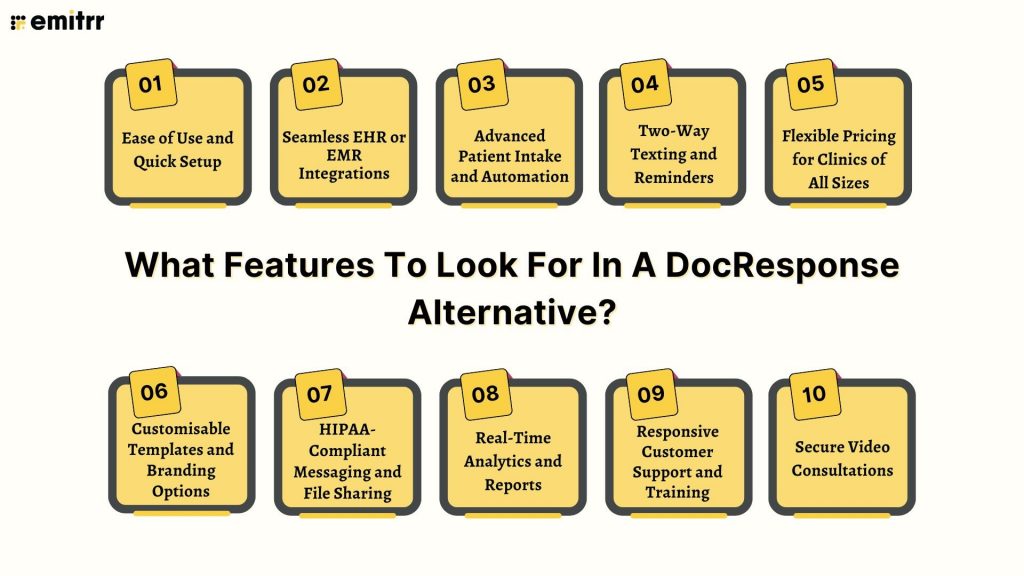
Here are the qualities that actually make a platform easier for your team and smoother for your patients.
Ease of Use and Quick Setup
When your team logs in for the first time, the tool should feel familiar, not overwhelming. A great alternative lets you build forms, send reminders, and manage messages within minutes, without digging through complicated menus. Your staff should not need a training week just to get started. The more intuitive the platform is, the faster your practice can adopt it. And when software feels simple, your team naturally stays consistent with it.
Seamless EHR or EMR Integrations
A strong platform should connect to your EHR so smoothly that staff forget the integration even exists. When demographic data, consents, and medical history flow into charts automatically, your team saves hours every week. It also reduces errors that come from retyping information under pressure. Providers appreciate walking into the exam room with complete, up-to-date details already in the chart. The right integration turns intake from a chore into a fully streamlined process.
Advanced Patient Intake and Automation
Your next platform should help your team do more with less manual work. Smart forms with conditional logic make the experience easier for patients by showing only the questions that apply to them. Automated routing, reminders, and follow-ups cut out repetitive tasks for staff. Instead of babysitting paperwork, your team can focus on real interactions. Strong automation feels like having an extra pair of hands behind the scenes. Quiet but incredibly helpful.
Two-Way Texting and Reminders
Patients respond fastest when they can just text back, not hunt for a portal link. Two-way SMS lets them confirm appointments, ask questions, and send updates in seconds. This reduces high call volumes for your front desk and cuts no-shows significantly. Your staff can see all conversations in one place instead of juggling voicemail and email. The right texting feature becomes the heartbeat of your daily communication flow.
Secure Video Consultations
If your practice offers virtual care, your tool should make video visits feel as natural as a phone call. Patients should join with one tap – no apps, no downloads, no complicated logins. A secure, stable video experience builds confidence and reduces confusion for older or less tech-savvy patients. Providers also benefit from a smoother workflow during remote consultations. With the right platform, telehealth becomes an effortless extension of your care.
Flexible Pricing for Clinics of All Sizes
A good alternative should fit your budget today and still make sense as you grow. Smaller clinics should have access to essential features without being pushed into expensive, enterprise-level tiers. Larger practices should be able to scale without unpredictable add-on fees. Transparent pricing builds trust and helps you plan long-term.
Customisable Templates and Branding Options
Your online forms should look and feel like they came from your practice. When patients see your logo, colours, and style, it instantly feels more familiar and trustworthy. Clean, branded forms also make the whole experience smoother. And with ready-made templates, your team does not have to rebuild the same thing every time.
HIPAA-Compliant Messaging and File Sharing
Security should be a built-in promise, not something hidden behind a premium add-on. Patients trust you with sensitive information, and the software you choose should protect it through encrypted messaging, secure uploads, and role-based access. HIPAA compliance ensures that everything, right from a quick text clarification to a clinical document, is handled safely. This gives both your staff and your patients peace of mind.
Real-Time Analytics and Reports
Analytics give you a clear look at what’s happening behind the scenes. You can see where patients drop off, which reminders work better, or how many forms get completed on time. These insights help you improve processes with real data, not just guesswork. When reports are clear and easy to understand, your team can make changes quickly. A good analytics dashboard can become like your roadmap for continuous improvement.
Responsive Customer Support and Training
Great software is only as good as the help you get when something goes wrong. Responsive support means your team is never stuck waiting on answers while patients are standing at the front desk. Onboarding should feel smooth and supportive, not stressful. The right platform will feel like a partner, not just a software tool or vendor!
10 Best DocResponse Alternatives
Here are some of the top platforms you can explore for smoother workflows and better day-to-day operations.
Let’s look at each option in detail so you can see which one fits your practice best.
1. Emitrr | Best DocResponse Alternative
Emitrr Overview
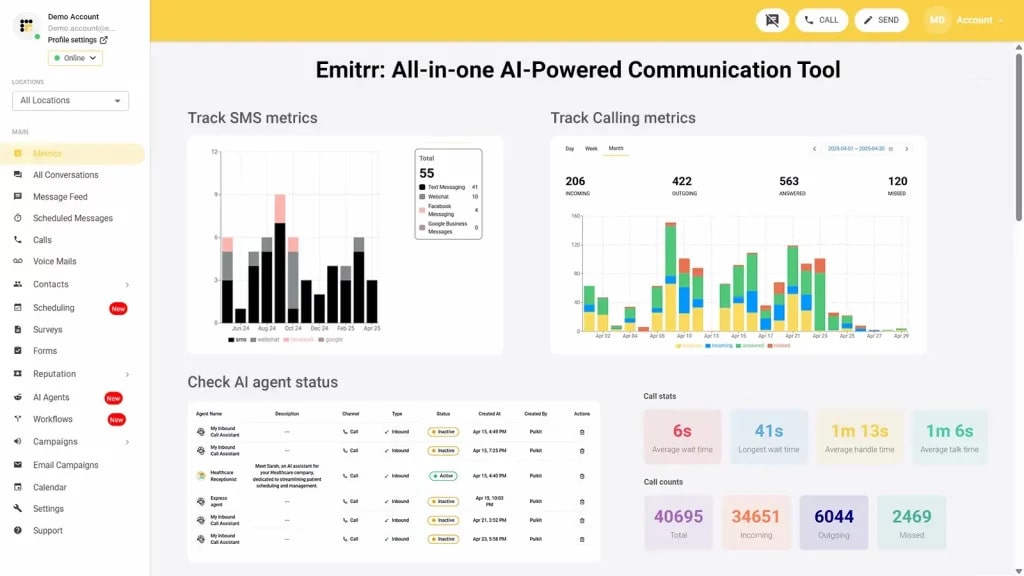
Emitrr is an all-in-one platform that makes patient communication and intake way easier. Instead of juggling separate tools for texting, forms, reminders, and missed calls, everything runs from one simple dashboard. It is HIPAA-ready, works across healthcare and service businesses, and syncs with major EHRs. If DocResponse feels too rigid, Emitrr offers a smoother, more flexible setup that saves your team a lot of time.
Emitrr Key Features
- Unified Intake + Messaging Hub: Collect patient paperwork, insurance, and consents, then continue the conversation via text without switching tools.
- Automation Playbooks: Trigger reminders, patient recalls, form requests, and follow-ups automatically based on rules you set.
- Shared Two-Way SMS Inbox: Teams can respond to patients from one place, assign conversations, and track who handled what.
- Digital Forms & Mobile-Friendly Intake: Patients complete intake packets from their phones with minimal friction.
- Smart Call Handling: Convert missed calls to text messages so you never lose a potential patient.
- EHR Syncing: Push completed forms, demographics, and notes directly into supported EHR/EMR systems.
- Text-to-Pay & Payment Links: Collect balances, deposits, or overdue payments instantly.
- Team Permissions & Audit Trails: Manage access levels across users and locations while keeping logs for compliance.
- Broadcast Messaging: Send mass texts, weather closures, or follow-up instructions to selected patients.
Emitrr Pros
- Built for High-Volume Communication: Handles intake, texting, and automation more smoothly than DocResponse.
- Fast Patient Response Rates: Text-first workflows lead to quicker confirmations and fewer no-shows.
- Easy to Use for Staff: Even non-technical teams pick it up in a day.
- Deep Automation: Reduces repetitive tasks that clinics often do manually on DocResponse.
- Flexible Across Industries: Works not just for medical practices but also for dental, wellness, legal, and home services.
Emitrr Cons
- Some advanced AI automation modules are still being rolled out.
Emitrr Integrations
- EHR & EMR Systems: Athenahealth, DrChrono, Epic, Dentrix, Eaglesoft
- CRM Tools: Salesforce, HubSpot, Zoho
- Payments: Stripe, PayPal, QuickBooks
- Productivity Tools: Google Workspace, Outlook, Office 365
- Automation Tools: Zapier, Make
- Marketing Tools: Mailchimp, ActiveCampaign
Emitrr Pricing
Plans usually start around $30 per month.
Emitrr Ratings
- Capterra: 4.9/5
- G2: 4.7/5
Emitrr Customer Reviews
“Ease of texting to my customers, sending and receiving is fast and stable Easy template build outs for quick texting.”
“They are such easy people to work with, the pricing is great, and the product works seamlessly for us.”
Source: Capterra
Emitrr Support Channels
- Email: support@emitrr.com
- Phone: +1 (210) 941-4696
- Live chat: Available directly on the Emitrr website
- Knowledge base: Includes extensive documentation, FAQs, and troubleshooting guides
- SMS support: Text for help
Check out Emitrr’ AI agent Sarah:
2. NexHealth | NexHealth vs DocResponse
NexHealth Overview
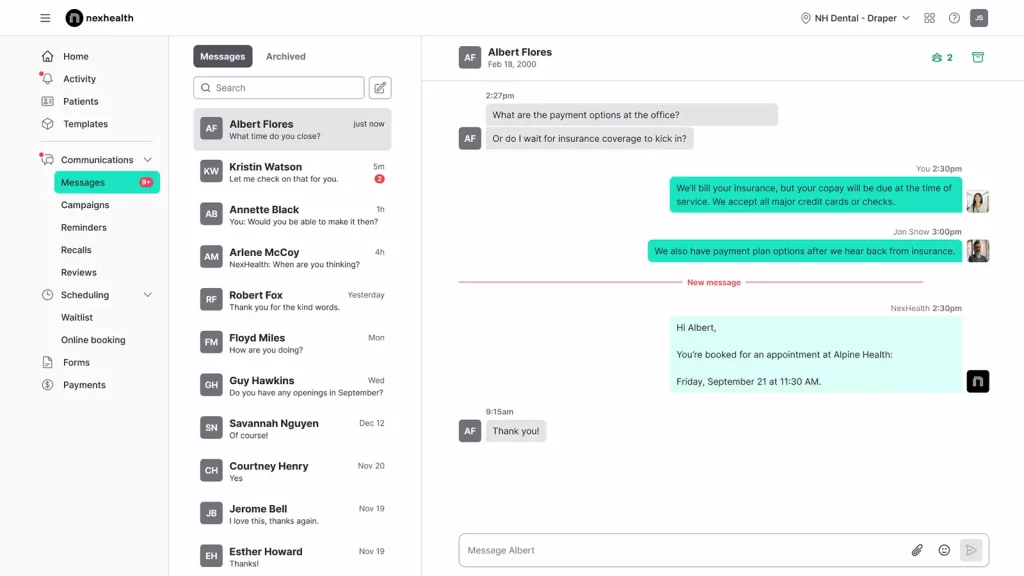
NexHealth is a clean, modern platform that helps clinics move most of their front-desk tasks online. Patients can book in real time, fill out forms, and get reminders without any back-and-forth. It is especially loved by dental and medical practices for its smart scheduling tools.
NexHealth Key Features
- Real-Time Online Booking: Patients choose appointments based on live availability without calling the clinic.
- Automated Digital Intake: Send forms automatically before visits, complete with e-signatures.
- Two-Way Messaging: HIPAA-secure chats keep communication quick and organised.
- Bi-Directional EHR Syncing: Updates flow between NexHealth and your EHR without manual effort.
- Smart Recalls & Reminders: Automated reminders help reduce no-shows and keep schedules full.
NexHealth Pros
- Excellent Scheduling Tools: Top-tier real-time booking functionality.
- Clean, Modern Interface: Easy for both patients and staff to navigate.
- Automation Strength: Recalls and reminders run consistently without staff involvement.
- Solid EHR Sync: Great for reducing admin work.
- Quick Setup: Practices often launch within days.
NexHealth Cons
- Higher Pricing: Can feel expensive for small or single-provider clinics.
- Limited Flexibility: Not as customisable for complex workflows.
- Basic Messaging: Offers texting, but not many advanced communication features.
NexHealth Integrations
- EHR/EMR: Open Dental, Denticon, Curve Dental, ModMed
- CRM Tools: Pipedrive, Freshsales, Keap
- Productivity: Google Calendar, Apple Calendar
- Marketing: ActiveCampaign, SendGrid
- Automation: Workato, Integrately
- Payments: Square, Authorize.net
NexHealth Pricing
There’s no free version available, and paid plans usually start around $350/month.
NexHealth Ratings
- Capterra: 4.7/5
- G2: 4.6/5
NexHealth Customer Reviews
“Professional front, but rigid terms and poor client handling reveal deeper issues. Moreover, we identified a major limitation in NexHealth’s software before any onboarding or integration began. Despite no services used or work performed, they refused a refund and plan to bill us twice more. This demonstrates a clear lack of professional integrity. NexHealth not a company we can recommend.”
“Way to expensive. It was also hard to get in touch with tech support once we were an established customer”
Source: Capterra
NexHealth Support Channels
- Email support
- Phone support
- Knowledge base
- Dedicated customer success team
3. Weave | Weave vs DocResponse
Weave Overview
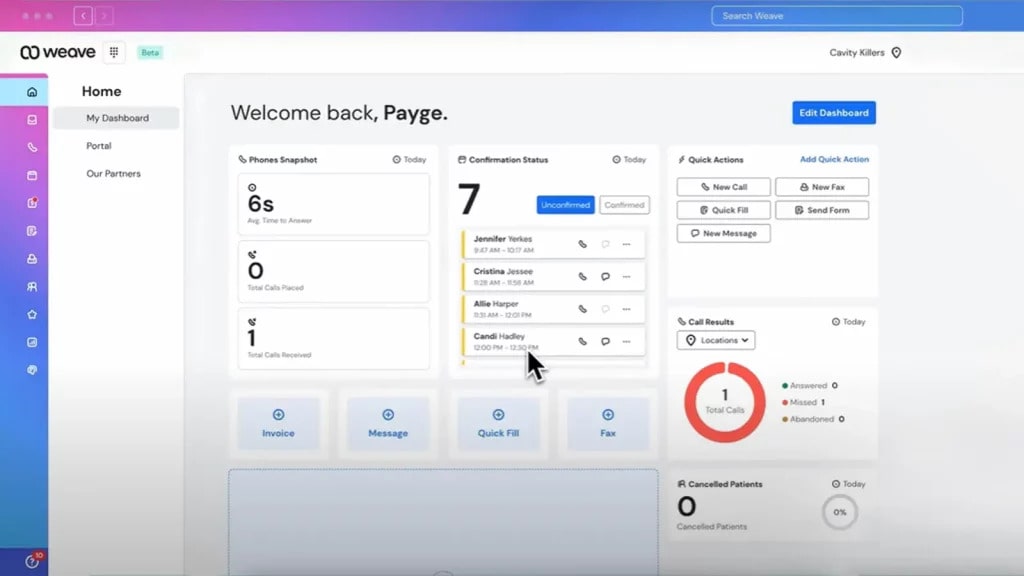
Weave is a pretty well-known patient communication software. It pulls calling, texting, reminders, reviews, and even payments into one place. Weave has smooth front-desk communication than detailed intake. It is a great fit for practices that handle a lot of phone calls and need fast, simple texting with patients.
Weave Key Features
- Unified Phone & Text System: Manage calls, voicemails, and two-way texting inside a single inbox.
- Text-to-Pay: Send payment links by SMS and collect balances instantly.
- Review Generation Tools: Request Google and Facebook reviews with one-tap text prompts.
- Caller ID Pop-Ups: View patient info, upcoming appointments, and notes as soon as someone calls.
- Automated Appointment Reminders: Reduce no-shows with scheduled texts and confirmations.
Weave Pros
- Easy to Learn: Simple, intuitive interface for front-desk teams.
- Improves Phone Efficiency: Great for busy offices with heavy call volumes.
- Stronger Patient Engagement: Text tools help boost confirmations and reviews.
- Fast Onboarding: Most clinics get up and running quickly.
Weave Cons
- Higher Cost: Can feel pricey for smaller practices.
- Minimal Intake Tools: Not built for detailed digital workflows.
- Basic Reporting: Analytics are simpler than many other platforms.
Weave Integrations
- Practice Management & EHR: Dentrix, Oryx Dental, Fuse, Patterson Fuse
- CRM Systems: Copper CRM, Insightly
- Productivity: Microsoft 365, Dropbox
- Marketing Tools: Emma, Campaign Monitor
- Automation: Automate.io, Pabbly Connect
- Payments: Weave Payments, GoCardless
Weave Pricing
Plans start at $249 per month per user.
Weave Ratings
- Capterra: 4.3/5
- G2: 4.2/5
Weave Customer Reviews
“Everything. Multiple people lied about being integrated with my software. They didn’t tell me there were additional charges that i would need to pay. They stated it would be much more user friendly”
“Software features that never worked for me. They increaed my billing fee without any prior notice or my approval.”
Source: Capterra
Weave Support Channels
- Phone
- Live chat
- Online help center
- Training resources
4. Solutionreach | Solutionreach vs DocResponse
Solutionreach Overview
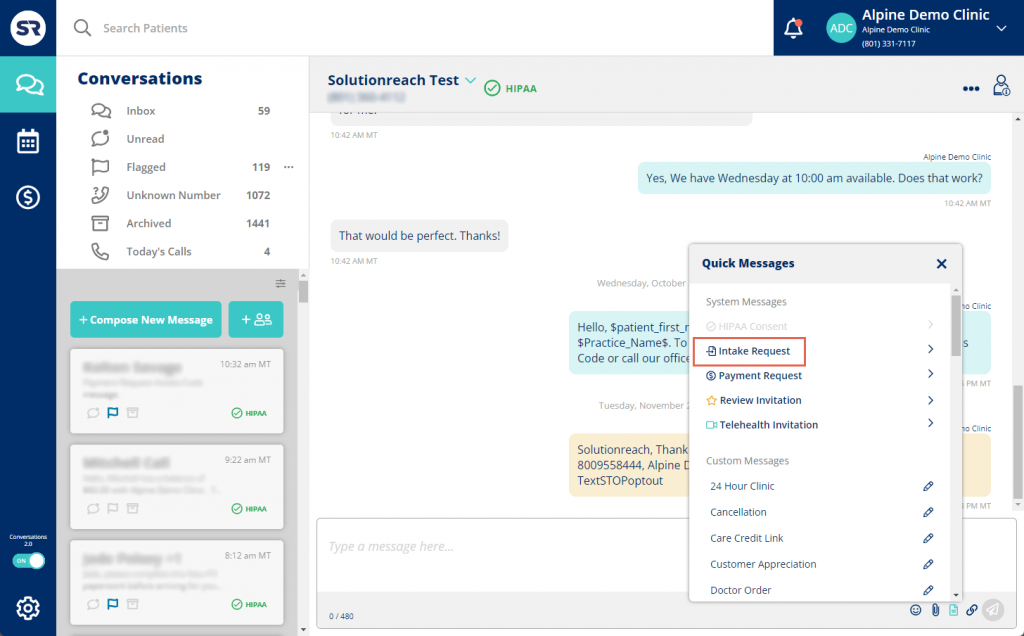
Solutionreach is a communication and patient-relationship tool used by dental, medical, and vision practices that want better reminders, recalls, and outreach. It helps keep schedules full and patients digitally engaged with texts, emails, and newsletters. Solutionreach is stronger on communication and retention but lighter on digital intake and automation.
Solutionreach Key Features
- Automated Reminders & Recalls: Keep schedules full with text, email, and voice reminders.
- Patient Newsletters & Outreach: Send newsletters and mass updates to maintain patient engagement.
- Two-Way Texting: HIPAA-secure messaging for questions, confirmations, and follow-ups.
- Online Scheduling Tools: Let patients request or schedule appointments digitally.
- Reputation Management: Collect and publish reviews to improve online presence.
Solutionreach Pros
- Great for Patient Retention: Strong recall and outreach tools compared to DocResponse.
- Good for Larger Practices: Scales well for multispecialty or multi-location groups.
- Robust Communication Suite: Handles texting, emails, and phone reminders in one place.
- Longstanding Industry Presence: Trusted by many practices for over a decade.
Solutionreach Cons
- Higher Pricing: Can feel expensive for smaller practices.
- Dated Interface: Not as modern as newer communication tools.
- Longer Setup: Onboarding may take more time for small teams.
Solutionreach Integrations
- EHR/EMR: Dentrix, Open Dental, Eaglesoft, NextGen
- CRM Tools: Salesforce
- Productivity: Google Workspace, Outlook
- Marketing Tools: Mailchimp
- Automation: Zapier
- Payments: Stripe (limited integrations)
Solutionreach Pricing
Starts around $329/month. Costs increase as more features or locations are added.
Solutionreach Ratings
- Capterra: 3.8/5
- G2: 3.7/5
Solutionreach Customer Reviews
“Occasional errors on sending messages and occasional system issues created problems.”
“It is very glitchy, you cannot get the system issues resolved, they claim that they have no issues of file for you, or records of you calling in to get tech support.”
Source: Capterra
Solutionreach Support Channels
- Email support
- Phone support
- Knowledge base
- Live chat for limited hours
5. Luma Health | Luma Health vs DocResponse

Luma Health Overview
Luma Health is a patient engagement and communication platform built to simplify scheduling, referrals, reminders, and follow-ups. It is widely used by multi-speciality clinics and larger healthcare groups that need smarter, automated communication across the entire patient journey.
Luma Health Key Features
- Smart Scheduling: Patients get self-scheduling options with real-time availability.
- Referral Management: Automate referral outreach to reduce leakage and improve conversions.
- Broadcast Messaging: Send updates, instructions, or alerts to selected patient groups.
- Two-Way Conversational Texting: Keep patients engaged with natural SMS conversations.
- Automated Workflows: Build journeys for recalls, follow-ups, education, and pre-visit prep.
Luma Health Pros
- Strong Enterprise Automation: Great for larger practices needing multi-step workflows.
- Engaging Texting Tools: Patients respond quickly and stay informed.
- Robust Scheduling Features: Better than DocResponse for multi-location needs.
- Customisable Workflows: Tailor communication paths to each specialty.
Luma Health Cons
- Complex Setup: Onboarding may feel a bit heavy if your team is small.
- Basic Form Options: Does not offer deep customisation for advanced intake needs.
- Higher Cost: Pricing can feel steep for smaller or single-provider clinics.
Luma Health Integrations
- EHR/EMR: NextGen, Greenway Health, eClinicalWorks, Kareo
- CRM Tools: Freshsales, Pipedrive
- Productivity: Slack, Notion
- Marketing Tools: ActiveCampaign, Sendinblue
- Automation: Workato, Integrately
- Payments: Square, Authorize.net
Luma Health Pricing
Pricing is custom-only. Typically perfect for mid-size to enterprise-level healthcare groups.
Luma Health Ratings
- Capterra: 4.7/5
- G2: 4.6/5
Luma Health Customer Reviews
“The fact that the team hid from us the lack of integration with our EMR until very late in the process.”
“The constant changes of my account representatives really made it difficult to build relationships. Overtime Luma’s account representatives stopped contacting the practice and as result we had to figure out solutions on our own. Additionally, they changed their payment terms to where if we didn’t pay them upfront then they would drop us as a customer.”
Source: Capterra
Luma Health Support Channels
- Email Support
- Phone Support
- Dedicated Success Manager
- Live Chat (depending on plan)
6. DoctorConnect | DoctorConnect vs DocResponse
DoctorConnect Overview
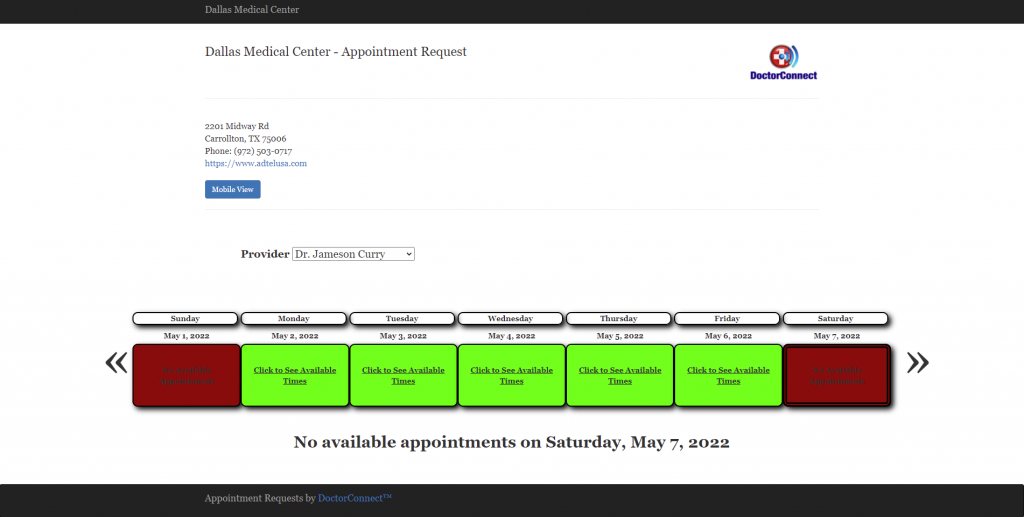
DoctorConnect is a simple communication and reminder tool that helps clinics cut no-shows and stay connected with patients. It is popular with dental, medical, and wellness practices that want something easy to use without a complicated setup. It handles recalls and multi-channel reminders really well, though it is lighter when it comes to digital intake and custom form options.
DoctorConnect Key Features
- Automated Appointment Reminders: Send text, email, and voice reminders to cut down on missed visits.
- Two-Way Texting: Communicate with patients easily through a central messaging dashboard.
- Recall Campaigns: Bring patients back with automated recall messages and overdue reminders.
- Online Scheduling Requests: Patients can request appointments, and staff can confirm with one click.
- Reputation Management: Request reviews and monitor feedback across Google and Facebook.
DoctorConnect Pros
- Excellent No-Show Reduction: Strong reminder and recall features.
- Great for Patient Outreach: Bulk messaging helps deliver updates fast.
- Multi-Channel Options: Phone, text, and email reminders are all included.
- Cost-Effective: More affordable than many larger platforms.
DoctorConnect Cons
- Basic Intake Tools: Does not offer much flexibility for detailed or multi-step digital forms.
- Older Interface: The design feels a bit dated compared to newer communication platforms.
- Limited Integrations: Connects with fewer external systems, which can restrict workflow options.
DoctorConnect Integrations
- Practice Management & EHR: Dentrix, Open Dental, Eaglesoft, DrChrono
- CRM Tools: Salesforce
- Productivity: Google Workspace, Outlook
- Marketing: Mailchimp
- Automation: Zapier
- Payments: Limited payment integrations
DoctorConnect Pricing
Plans start at $210, which varies based on practice size and usage.
DoctorConnect Ratings
- Capterra: 4.7/5
- G2: 4.6/5
DoctorConnect Customer Reviews
“When I went to cancel as we were changing software systems which had a “built-in” reminder system, I sent the 90 day notification AS PER OUR CONTRACT to cancel and was told it doesn’t matter and we would be billed until the end of the contract. So why put a cancellation clause in the contract? Very unhappy with the customer service account representative. Would not recommend this system.”
“Did not integrate into my existing EHR, though the Sales Rep assured me it would. I have had the software for 3 days and never used it. The sales rep refuses to issue a refund. He states I am locked in a 1 year contract.”
Source: Capterra
DoctorConnect Support Channels
- Email and phone support
- Live chat
- Help center with FAQs
- Onboarding support for new clinics
7. Klara | Klara vs DocResponse

Klara Overview
Klara is a simple, text-first communication platform that helps clinics cut phone calls and talk to patients faster. Everything runs through secure messaging, making it easy for staff to triage questions, share updates, and stay organised. It is a great fit for practices that want quick, app-free texting rather than heavy intake tools.
Klara Key Features
- Secure Two-Way Messaging: Patients can text the clinic directly, and staff reply from a central inbox.
- Team Collaboration Tools: Assign messages, add notes, and tag staff within team chats.
- Automated Workflows: Send reminders, updates, and follow-ups without manual steps.
- Broadcast Messaging: Notify groups of patients about closures, instructions, or promotions.
- App-Free Patient Experience: Patients text through their regular phone, no app required.
Klara Pros
- Excellent Messaging Experience: Patients reply faster through text.
- Reduces Call Pressure: Minimises hold times and phone workload.
- Easy for Patients: No portals or apps needed, just simple SMS.
- Great for Multi-Location Teams: Centralised inbox makes coordination easier.
- Good Automation Tools: Helpful for routine reminders and instructions.
Klara Cons
- Basic Intake Tools: Not built for advanced or highly customised forms.
- Higher Costs: Pricing can feel heavy for smaller clinics.
- Fewer Integrations: Limited EHR connections compared to larger platforms.
Klara Integrations
- Practice Management & EHR: DrChrono, Athenahealth, AdvancedMD
- CRM Tools: Salesforce
- Productivity: Google Workspace, Outlook
- Marketing: Mailchimp
- Automation: Zapier
- Payments: No native payment tools
Klara Pricing
Follows a custom pricing model, which eventually will depend on the features and integrations you choose.
Klara Ratings
- Capterra: 4.6/5
- G2: 4.4/5
Klara Customer Reviews
“The online booking feature is a complete failure. The customer care between Klara and our practice was practically non existent. The AI aspect was not very accurate or helpful.”
“Can become confusing at times with all the messages in several different mailboxes at the same time. And I wish we could update our own messages to patients.”
Source: Capterra
Klara Support Channels
- Help center
- Live chat support
- Training during onboarding
8. OhMD | OhMD vs DocResponse
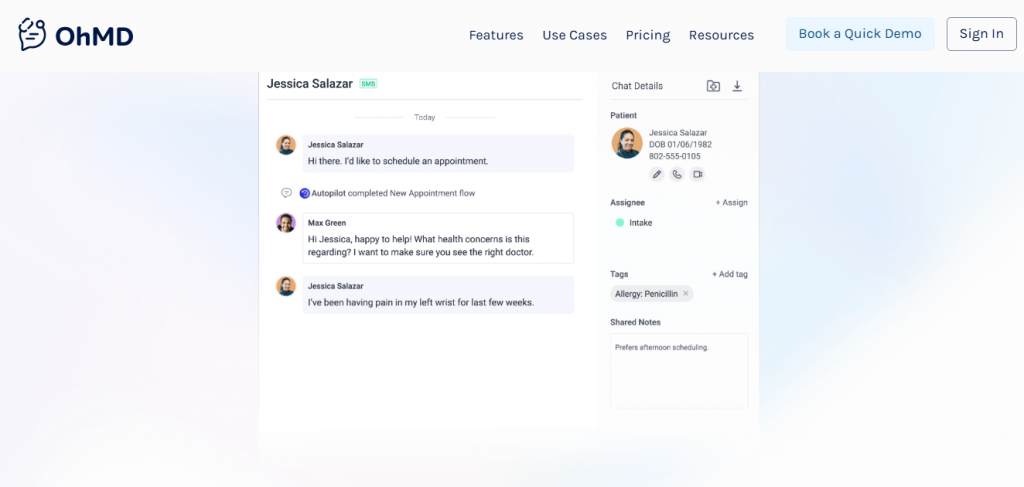
OhMD Overview
OhMD is a simple, text-first communication tool that helps clinics cut down phone calls and talk to patients faster. It makes texting, quick replies, and video conferencing easy for both staff and patients, with no apps or portals to worry about. It is great for clinics that want smooth messaging and telehealth without a complicated setup.
OhMD Key Features
- Telehealth Video Visits: Secure, app-free video calls for quick virtual consults.
- Digital Intake Forms: Send forms via text and collect responses easily.
- Broadcast Messaging: Send mass messages for updates, reminders, or instructions.
- Quick Responses & Templates: Speed up conversations with pre-written replies.
OhMD Pros
- Great for Virtual Care: One-click telehealth makes it easy for clinicians and patients.
- Simple for Patients: No downloads or logins, just text and click.
- Strong Messaging Tools: Helps reduce call volume significantly.
- Easy Setup: Fast onboarding and intuitive interface.
OhMD Cons
- Basic Intake Forms: Not built for deep or highly custom workflows.
- Limited Integrations: Fewer connections to EHR and external systems.
- Workflow Gaps: Not ideal for multi-step or advanced automation needs.
OhMD Integrations
- EHR/EMR: Practice Fusion, Elation Health, Office Ally
- CRM Tools: Copper CRM, Freshsales
- Productivity: Slack, Notion
- Marketing: SendGrid, ActiveCampaign
- Automation: Pabbly Connect, Automate.io
OhMD Pricing
Offers a free basic version. The paid plans start around $7/month per provider.
OhMD Ratings
- Capterra: 3.3/5
- G2: 3.3/5
OhMD Reviews
“Some users do not like it because it is a separate app. I can’t figure out a way to delete old clients from my records. At times it seems to freeze. I then just sign out and sign back in which fixes it. I was told that I need to upgrade to a newer version, so that may be my problem.”
“Mostly the cost. There were some features we were looking for that were not offered by OhMD. We were able to get more features for less cost with another company.”
Source: Capterra
OhMD Support Channels
- Email support
- Live chat
- Knowledge base with guides
- Onboarding and training help
9. Mend | Mend vs DocResponse

Mend Overview
Mend is a telehealth-focused platform that makes virtual visits and digital check-ins super easy for patients. It is known for smooth video calls, mobile-friendly intake forms, and smart tools that fix connection issues before an appointment even starts. It is a great pick for clinics that rely heavily on virtual care and want digital forms that patients can complete in a few taps.
Mend Key Features
- High-Quality Telehealth: Secure HD video visits without requiring patients to install an app.
- Digital Forms & E-Check-In: Send pre-visit forms, insurance uploads, and consents directly to patients’ phones.
- Automated Reminders: Text, email, and voice reminders to reduce no-shows.
- Real-Time Troubleshooting: AI-assisted connectivity checks help prevent failed video visits.
- Broadcast Messaging: Send practice-wide updates or targeted communication to patients.
Mend Pros
- Strongest Telehealth Tools: Reliable and smooth virtual visits compared to most platforms.
- Patient-Friendly Intake: Mobile-first experience makes pre-visit prep easy.
- Great for Large Practices: Scales well for multispecialty groups.
- Automation Strength: Takes over many repetitive communication tasks.
Mend Cons
- Higher Pricing: Can feel expensive for small clinics or solo providers.
- Messaging Is Basic: Not built for heavy texting or advanced communication flows.
- Steeper Learning Curve: Some teams may need time to adjust to all the features.
Mend Integrations
- EHR/EMR: Epic, Athenahealth, Cerner, DrChrono
- CRM Tools: Salesforce
- Productivity: Google Workspace, Outlook
- Marketing: Mailchimp
- Automation: Zapier
- Payments: Stripe (limited modules)
Mend Pricing
Mend offers custom pricing that varies by telehealth usage, seat count, and the intake tools selected.
Mend Ratings
- Capterra: 4.6/5
- G2: 4.4/5
Mend Customer Reviews
“Getting clocked out of registering and needing chat assistance”
“Had some problem with audio dropouts. Had to ask the nurse to repeat herself several times because of the audio quality issues.”
Source: Capterra
Mend Support Channels
- Email Support
- Phone Support
- Live Chat (select plans)
- Help Center
10. Spruce Health | Spruce Health vs DocResponse
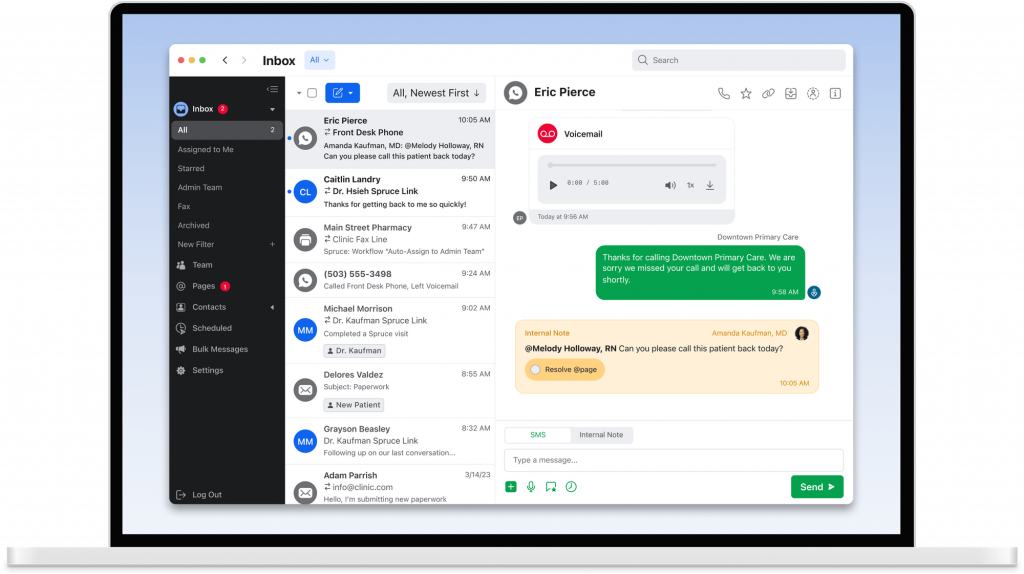
Spruce Health Overview
Spruce Health is a unified communication platform designed for clinics that want secure messaging, telehealth, and shared team inboxes in one place. It’s widely used by small and mid-sized practices that need a flexible, mobile-friendly communication tool without complex setup.
Spruce Health Key Features
- Shared Team Inbox: Route, assign, and organise conversations across your team.
- Telehealth Video Visits: Simple, app-free video sessions for virtual care.
- VoIP Calling & Phone Tools: Make and receive clinic calls directly through Spruce.
- Automated Workflows: Set up auto-replies, routing rules, and custom flows.
Spruce Health Pros
- Great for Communication: Messaging and team inbox tools are some of the strongest in the industry.
- Mobile-First Design: Easy for clinicians to manage communication on the go.
- Flexible for Many Specialties: Works well for medical, dental, mental health, and wellness clinics.
- All-in-One Communication Suite: Calls, texts, voicemail, and telehealth in one dashboard.
- Affordable Pricing: More budget-friendly than many competitors.
Spruce Health Cons
- Basic intake tools: Forms are simpler and not suited for complex workflows.
- Feature limits on lower plans: Some useful tools unlock only on higher tiers.
- Telehealth has limits: Great for everyday virtual visits but not built for large enterprise-level volume.
Spruce Health Integrations
- Practice Management / EHR: Athenahealth, DrChrono, AdvancedMD
- CRM Tools: Salesforce
- Productivity: Google Workspace, Outlook
- Marketing: Mailchimp
- Automation: Zapier
- Payments: Integrated billing tools (varies by plan)
Spruce Health Pricing
The plans start around $24 per user/month.
Spruce Health Ratings
- Capterra: 4.5/5
- G2: 4.5/5
Spruce Health customer reviews
“Very confusing to start – no personal connection or onboarding that is not in a group setting. They say they do not have the manpower to work with small businesses. They do not offer 24-hour help.”
“Sometimes, the notifications do not come through as a push notification on my device. I have had a couple instances where I had new messages and I had to open the app to find out. I wish there was an easy way to search the messages and files received.”
Source: Capterra
Spruce Health support channels
- Email support
- In-app live chat
- Setup help for new users
- Online help center
Why Emitrr Is The Best DocResponse Alternative?
Here’s a closer look at the features that make Emitrr stand out for clinics and service-based businesses looking for something simpler and faster:
HIPAA-Compliant Chat and File Sharing
Emitrr is fully HIPAA-compliant, so patients can safely text documents, updates, or questions without portals or logins. Everything stays encrypted and secure from end to end. This gives patients confidence that their information is protected. Staff get a fast, modern chat experience without worrying about compliance. It keeps communication simple, safe, and practical for everyday use.
All-in-One Communication and Intake Dashboard
Emitrr brings forms, messages, payments, scheduling, and reminders into one clean dashboard so your team is not jumping between tools all day. Everything shows up in a single view, making it easier to stay organised. Staff no longer need to switch tabs or manually move information around. Patients also get faster responses because the whole workflow is centralised. It feels like finally having a command centre that keeps your entire day on track.
AI-Driven Patient Data Capture and Validation
Emitrr’s AI captures and validates patient details automatically, flagging incomplete or unclear submissions before they reach your team. It can also route requests or qualify leads based on rules you set. This reduces back-and-forth with patients and cuts tedious manual sorting. Providers get cleaner, more accurate information from the start. AI quietly handles the repetitive work so your staff can focus on care instead of data correction.
Automated Texts, Reminders, and Follow-Ups
Emitrr automates confirmations, reminders, follow-ups, and review requests so your team does not have to send them manually. These messages go out at the perfect time, helping reduce no-shows and keeping schedules full. Patients appreciate the gentle reminders and respond quickly. Your staff gets hours back every week without lifting a finger. It is like having a reliable assistant who never forgets.
Smart Call Handling and Missed-Call Text-Backs
If a patient calls and your team cannot pick up, Emitrr instantly sends a text to keep the conversation going. This simple feature recovers lost leads and makes patients feel acknowledged right away. It is especially useful during rush hours or after-hours when phones get busy. Staff can reply when they are free without losing momentum. Fewer calls end up in voicemail, and more patients stay connected.
Review Generation and Feedback Tracking
Emitrr automatically sends review requests after visits, helping practices grow their online presence without extra effort. You can monitor ratings and track patient feedback in real time. This strengthens trust and brings in more new patients. Review generation becomes a smooth part of your workflow instead of a manual task. It keeps your reputation strong and visible where it matters.
Customisable Intake and Consent Forms
Emitrr lets you build forms that actually match your workflow instead of relying on rigid templates. You can customise sections, logic, branding, and e-signature fields in minutes. Patients can complete forms easily on any device, reducing errors and delays. Staff receive cleaner, more reliable information without hunting for missing details. It is a huge upgrade from generic, one-size-fits-all forms.
Integration with Major EHRs and CRMs
Emitrr connects with major EHRs, CRMs, and scheduling systems, so data moves seamlessly between platforms. This eliminates double entry and reduces errors. Staff stay aligned, and providers always see the most accurate information. The integrations are stable and designed to run quietly in the background. Everything stays in sync without extra work.
Mobile App for On-the-Go Access
With Emitrr’s mobile app, staff can respond to messages, check forms, and manage tasks from anywhere. This is perfect for teams working across locations or stepping away from the desk. Real-time notifications ensure nothing gets missed. Providers can stay connected without being tied to the office computer. It keeps the workflow moving smoothly, even on busy days.
Real-Time Analytics and Campaign Insights
Emitrr gives you clear dashboards showing form completion rates, message performance, campaign results, and patient engagement. This helps you understand what is working and what needs improvement. You can make adjustments quickly based on real-world data. Insight becomes part of your everyday workflow instead of something you guess at. Better data leads to better decisions across your entire practice.
Built-In Payment and Scheduling Tools
Emitrr lets patients schedule appointments and pay balances in just a few taps. Text-to-pay links and automated reminders help reduce missed payments and simplify billing. Your front desk stays organised with fewer phone calls and less manual chasing. Patients appreciate the convenience of handling everything from their phone. It makes scheduling and payment processing feel modern and effortless.
24/7 Customer Support for Clinics
Emitrr’s support team is known for fast, friendly, hands-on help. Whether you are setting up forms or solving an issue, someone is always available. Clinics often highlight how personalised and responsive the support feels. Onboarding becomes smoother because real people walk you through each step. It is support that feels like a partner, not a ticketing system.
Which Industries Are Catered By Emitrr?
Emitrr is built to be flexible, so a wide range of industries benefit from its mix of forms, messaging, scheduling, and automation tools.
Healthcare and Dental Practices
Healthcare teams handle a constant rush of intake forms, reminders, patient follow-ups, and patient questions. Emitrr helps simplify all of it with HIPAA-safe texting, digital forms, appointment scheduling, and automated reminders. Clinics see fewer no-shows, faster responses, and smoother workflows across front-desk and clinical staff. It takes a lot of the daily pressure off your team so they can focus on patient care.
Veterinary Clinics
Vet clinics deal with busy phones, last-minute questions, and pet parents who prefer quick updates. Emitrr makes communication easier with two-way texting for reminders, estimates, post-op check-ins, and follow-up care. Digital forms help streamline new patient registration and consent. It keeps your team organised and your clients reassured.
Wellness and Aesthetics Centres
Spas, med spas, and wellness clinics rely on smooth scheduling and great communication. Emitrr helps clients book appointments online, receive automated prep instructions, and complete consent forms before their visit. It also handles reminders and follow-ups without staff needing to call repeatedly. The result is a more polished, seamless client experience.
Legal and Financial Services
Law firms and financial advisors often chase documents, signatures, and clarifications. Emitrr brings everything into one place with secure forms, e-signatures, and real-time messaging. Clients can send documents or sign agreements right from their phone, and your team saves hours of back-and-forth. It makes onboarding and case management significantly smoother.
Real Estate and Property Management
Agents and property managers juggle showings, inquiries, maintenance requests, and contracts. Emitrr helps you send instant responses, collect details through digital forms, and share agreements via e-signature. Missed-call text-back ensures no leads slip through the cracks. It keeps communication fast, organised, and tenant-friendly.
Education and Tutoring Services
Schools, academies, and tutors use Emitrr to manage admissions, attendance reminders, feedback surveys, and parent communication. Forms make it easy to handle registrations or permission slips, and two-way texts help keep parents updated. Everything feels simpler for busy families and administrators. It cuts down delays and keeps communication clean.
Automotive and Service-Based Businesses
Dealerships, repair shops, and service centres often deal with nonstop calls and status checks. Emitrr automates updates, sends appointment reminders, collects feedback, and handles service authorizations through text. Customers stay informed without repeated phone calls. It improves trust and keeps service bays running smoothly.
Home Services and Contractors
Plumbers, electricians, cleaners, and contractors rely heavily on fast communication and clear scheduling. Emitrr lets you send estimates, gather job details, and confirm appointments instantly. Automated reminders cut down cancellations, and text-to-pay helps you get paid faster. It keeps your field teams efficient and your customers informed.
Retail and Local Businesses
Local shops use Emitrr to manage orders, send promotions, handle customer questions, and gather reviews. Forms help with special requests or custom orders, while two-way texting keeps communication quick and friendly. It helps you stay top-of-mind without overwhelming your team. Customers appreciate the faster, more personal support.
Frequently Asked Questions
Many clinics say DocResponse can feel a bit rigid when customising forms or automations. Some also struggle with slow support responses and limited flexibility in intake workflows. As your practice grows, these small issues can start to feel like daily roadblocks.
Emitrr brings texting, calls, reminders, digital forms, and follow-ups into one simple dashboard. Patients get quick responses without waiting on hold, and your team handles everything faster with smarter automations!
Yes! Emitrr is one of the most budget-friendly platforms for clinics that want automation without enterprise pricing. You only pay for what you need, and smaller teams start seeing value from day one.
Absolutely! Emitrr is designed with HIPAA-ready security, encrypted messaging, and audit logs. From intake forms to file sharing, every interaction stays protected so your team can communicate with confidence.
Yes, Emitrr supports secure video sessions to help clinics offer virtual care. Patients can join appointments through simple links sent via text, without downloading anything. It keeps your telehealth workflow effortless and flexible!
You can easily export existing data from DocResponse and bring it into Emitrr. And if you need help, Emitrr’s onboarding team guides you through the setup so nothing gets lost!
Conclusion
Switching from DocResponse isn’t just about finding another intake tool. It is about choosing a platform that actually makes your day lighter. Emitrr pulls everything together into one easy space, from messaging and reminders to forms, payments, and scheduling. It helps your practice communicate faster, stay organised, and give patients the kind of experience they genuinely appreciate.
If you’re ready to simplify your workflow, reduce admin stress, and build a smoother patient experience, Emitrr is worth a closer look. Book a demo with Emitrr AI today and see how it fits your practice in just a few minutes!