

Introduction
A patient books an appointment and fills out a health history form on their phone. At check-in, the front desk hands them the same form again. The appointment was booked, the form was completed, and the front desk followed its usual process. So why does the patient have to start over? The information never reached the team that needed it. To the practice, these may look like separate tasks. To the patient, they are all part of one healthcare patient journey.
That journey can begin with an online search, a referral, or a phone call. It runs through scheduling, preparation, the visit, follow-up, and future care. A missed callback can stop a patient before they book; an unanswered question can leave them unsure what to do after the visit. This blog walks through seven patient journey stages, the touchpoints that connect them, an orthopedic consultation example, and practical ways to make the whole experience easier to navigate.
AI Summary
- The patient journey covers every interaction a person has with a healthcare practice, from finding care to follow-up and future visits.
- A practical seven-stage framework is discovery, scheduling, pre-visit preparation, appointment, post-visit follow-up, ongoing care, and retention.
- Gaps often arise when required information is missing, nobody owns the next action, or an update does not reach the next team or system.
- A patient journey map shows what patients do, what happens behind the scenes, and where they get stuck.
- Emitrr supports phone, texting, forms, scheduling communication, follow-up, and recall workflows; actions within an electronic health record depend on the specific integration.
What is the Patient Journey
The patient journey is the sequence of steps and interactions a person goes through while seeking, receiving, and continuing healthcare. It includes what patients see, such as calling a practice or attending an appointment, and the work behind the scenes that moves their request to the right person or system.
For example, a patient may text to change an appointment. Their visible action is the message. Behind it, someone must receive the request, update the schedule, and make sure reminders and instructions reflect the new date. The interaction is complete only when the next step is clear to the patient and the team.
A referred patient may enter the journey through referral intake rather than a website search. A returning patient may start with a recall notice. Stages can overlap, repeat, or be skipped depending on the visit. They are a way to understand the patient care journey, not a fixed clinical pathway.

Patient Journey vs. Patient Experience vs. Patient Lifecycle
The patient journey, patient experience, and patient lifecycle are closely related. Let’s look at how each describes a different part of the same patient’s care.
| Term | What it Describes | Healthcare Example | Question it Answers |
| Patient Journey | The steps and interactions involved in getting and continuing care | A patient calls, books, completes forms, attends a visit, and schedules follow-up | What happened, in what order, and where did the patient get stuck? |
| Patient Experience | How the patient perceives those interactions | A quick answer feels reassuring, but repeating a history at check-in feels frustrating | What was it like for the patient? |
| Patient Lifecycle | The relationship across multiple visits and periods of care | A new patient returns for check-ups and responds to a later recall | How does the relationship continue over time? |
Why Does the Patient Journey Matter in Healthcare
For patients, a well-connected journey makes it easier to access care, prepare for a visit, get an answer, and understand what happens next. It can also spare them repeated requests for information they have already provided. For practices, seeing the whole journey reveals patient access problems: inquiries that never became appointments, incomplete preparation that creates day-of work, and follow-up requests that lack an owner.
The handoff matters as much as the touchpoint itself. Sending an appointment reminder is one action; getting a patient’s rescheduling reply to the scheduler and updating the appointment is the next. Sending a referral is another action; helping the patient understand who will contact them is the handoff that follows. This distinction also matters for continuity of care when patients need a return visit or help acting on a care plan.
For example, if a patient calls about a referral and the call ends with “someone will get back to you,” the practice still has work to do. The referral team needs the request, and the patient needs to know what to expect. Clear communication supports access and follow-through. Clinical decisions and treatment outcomes depend on more than the communication workflow.
Looking at the whole journey helps a practice:
- Make access easier: Give new inquiries and missed calls a clear path to an answer or appointment.
- Help patients arrive prepared: Send the right forms and instructions, then address missing items before check-in.
- Cut down on repeated work: Carry appointment changes and submitted information to the next team.
- Support the next care step: Give post-visit questions, referrals, and return visits a clear owner.
- Spot where patients get stuck: Use patient feedback and unresolved requests to find steps that need attention.

What are the Stages of the Patient Journey
The seven stages below provide a practical framework for following a patient from first contact through future care. A particular visit may use only some of them, and a patient may return to an earlier stage.
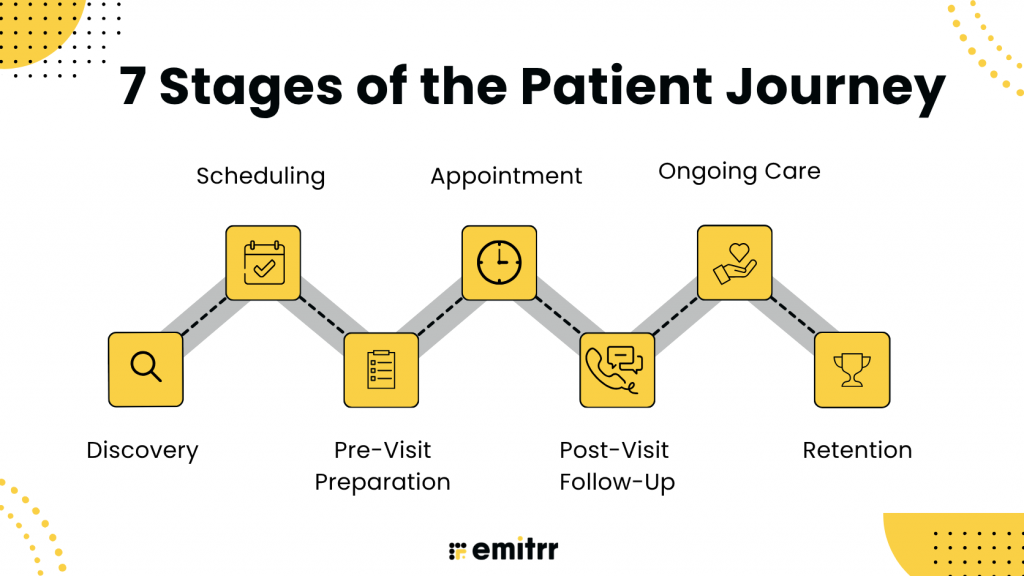
Patients may enter at different points, repeat a stage, or skip one entirely. A referral can start at scheduling; a returning patient may begin with ongoing-care outreach.
1. Discovery
The patient wants to find a provider who seems appropriate and reachable. Search results, a practice website, reviews, a provider profile, referral information, a phone call, or webchat may all shape that first impression.
When someone contacts the practice, staff need enough information to respond: how to reach the person, the reason for the inquiry, a location preference, and a referral source when relevant. The practice should also handle communication preferences and consent appropriately. The next action may be an answer, a route to the right team, or a clear booking option. An inquiry that is logged but never answered has not moved forward.
2. Scheduling
The patient wants the right visit without unnecessary phone tag. They may book with staff, use patient self-scheduling, or respond to a referral team’s outreach. The practice needs to confirm the visit type, provider, location, date, time, and any eligibility or preparation requirements.
Routine requests can follow a standard booking path. Urgent or complex requests need staff review under the practice’s established process. Once the appointment is booked, its details must reach the scheduling system and start the appropriate preparation steps.
3. Pre-Visit Preparation
Before the visit, patients need to know what to bring, complete, and expect. Touchpoints can include patient intake forms, document requests, consent, directions, a telehealth link, patient appointment reminders, and replies to those reminders. Teams may need health history, insurance information, and visit-specific preparation completed in advance. For a new patient, this is also part of new patient onboarding: the information collected must reach the team preparing for the visit.
Patients also need a way to say that they cannot attend or are having trouble with a form. If a visit moves, its reminders and instructions must reflect the new date. The next team should be able to see both the current appointment and which preparation items are outstanding.
4. Appointment
At the appointment, the patient wants to arrive prepared, receive care, and leave knowing the next step. Arrival instructions, check-in, a front desk conversation, wait-time updates, and the provider conversation are all touchpoints.
Staff needs access to submitted forms, relevant prior messages, appointment changes, language preferences, and unanswered questions. Before the encounter closes, the team should identify who will handle any return appointment, referral, test, results-related contact, or callback. The clinician remains responsible for clinical decisions and instructions.
5. Post-Visit Follow-Up
After the visit, the patient may need written instructions, a return appointment, help with a referral, results-related contact, or an answer to a new question. Every outstanding communication or coordination step needs an owner and a way to tell whether it was completed.
Imaging, referrals, refills, and prior authorization can each introduce another handoff. Their detailed workflows vary by practice, but the patient still needs to know who is coordinating the next step and where to direct questions. Closed-loop referral management addresses one such handoff by tracking a referral beyond its initial transmission. A sent message does not settle a request that is waiting for staff or clinical review.
6. Ongoing Care
Patients may need a follow-up visit, preventive service, or condition-specific check-in after the immediate post-visit period. The practice must identify who is due for an appropriate next step, explain why they are being contacted, and give them a useful way to respond or schedule.
When outreach concerns an overdue screening or follow-up, care gap management helps the team check whether the need is still open, decide who should act, and track what happens after the patient responds. The clinical need should be confirmed before outreach begins.
7. Retention
Retention reflects whether patients can return for relevant care and whether earlier concerns were addressed. Touchpoints include recall, reactivation, feedback requests, service recovery, and return booking. A patient’s reply to patient recall outreach should lead to a useful action, such as an answered question or an appointment.
Patient retention depends on more than the number of reminders sent. What matters is whether patients can take the appropriate next step when they need care again and whether the practice addresses questions or problems from earlier visits.
What are Patient Journey Touchpoints
A patient journey touchpoint is an interaction with a practice, its people, or its information. It can happen online, by phone, through patient texting, or in person. The digital patient journey may start with a website inquiry and move to a phone call or an in-person visit. Problems appear when a patient switches channels and the context of an earlier interaction does not follow them.
| Patient Touchpoint | What the Patient Expects | Internal Handoff Required | What Happens When it Fails |
| Website Form or Web Chat Inquiry | An answer or a clear way to book | Contact details and reason for the visit reach a named staff member or booking workflow | The patient repeats the inquiry or looks elsewhere |
| Phone Call or Missed Call | Someone answers or follows up | Call details and a callback request reach the right team | A call is logged without a completed response |
| Appointment Confirmation | The practice knows whether the patient will attend | A reply reaches scheduling or updates appointment status where supported | A change goes unnoticed or the visit still appears unconfirmed |
| Intake Form Submission | Staff have the information before arrival | Completion status and documents reach the appropriate staff view or electronic health record (EHR) workflow | The patient repeats information at check-in |
| Post-Visit Question | The right person responds | The message reaches administrative staff or a clinical reviewer according to its content | The question stays in a general inbox |
| Recall Response | Help booking the next visit | The reply reaches a scheduler or valid booking path | Outreach receives a response but no next appointment |
What Does a Patient Journey Look Like in Practice
Let’s take an example of an orthopedic consultation. A patient calls about persistent knee pain. The practice records why they called and books the appropriate consultation. Before the visit, the patient receives a health history form, an insurance request, and instructions.
The patient then asks to reschedule. A scheduler receives that request, changes the appointment, and confirms the new date. The preparation messages now refer to the new visit, and staff check whether forms already submitted remain valid. When the patient arrives, the team can see the updated booking and submitted information. The patient does not have to explain the date change or complete the same paperwork again.
After the consultation, the provider recommends imaging and a return visit. The practice tells the patient who will coordinate each action and how to ask questions. If the return visit remains unbooked, the team sends a relevant reminder with a way to reply or schedule. When future orthopedic care is due, outreach offers a clear path back.
Three handoffs hold this journey together:
- the rescheduling reply reaches the scheduler,
- preparation follows the new appointment, and
- the post-visit plan has a named owner.
Without those connections, each team could complete its individual task while the patient remains stuck.
How Do You Map the Patient Journey at Your Practice
Start with one patient group and one visit type. A map of every patient and appointment will be too broad to show where people get stuck. For the orthopedic consultation above, begin with the patient’s first call and end when the imaging and return visit have been arranged.
- List the patient’s steps: Record how they book, complete forms, change the appointment, attend the visit, and arrange follow-up.
- Add the touchpoints: Note each call, text, form, reminder, and in-person conversation.
- Name the next owner: Show who receives each request and what they need to do with it.
- Mark the gaps: Look for repeated questions, missing information, long waits, or requests that receive no answer.
- Check what happened: Compare the map with booking records, messages, staff observations, and patient feedback.
In this example, the key question is whether the patient’s rescheduling text reaches the scheduler and changes the next reminder. A patient journey map makes that handoff visible so the practice can fix it.
Where Does the Patient Journey Break Down
Journey problems often happen between tasks rather than inside a single interaction. Look for requests without an owner, information unavailable at the next step, and conversations that stop before the patient gets an answer.
Requests Are Captured, but Nobody Acts on Them
A missed call, after-hours inquiry, web form, or incoming referral may appear in a system without reaching a scheduler. An automatic acknowledgment tells the patient the practice received the request, but someone still needs to answer it, book the visit, or route it for review. A missed call to text workflow gives a caller a way to respond, provided someone follows through on that reply.
Want to see what happens after a patient call goes unanswered? Watch this YouTube video about turning missed calls into conversations:
Information Does Not Follow the Patient
The patient submits a form, but it is unavailable at check-in. They reply to a confirmation, but the schedule does not show their changed plans. Staff handle calls and texts in separate systems and must ask the patient to repeat the same request. The fix starts with deciding which record holds the current information and who checks for changes when systems do not sync.
Follow-Up Has No Clear Owner
A referral may leave the visit without a named coordinator. A post-visit question may remain in a general inbox. A patient may reply to recall outreach but never receive booking help. Each unresolved action needs a person or team responsible for the next step, along with a way to recognize when it remains open.
Communication Does Not Fit the Patient
Instructions may be in the wrong language, arrive through a channel the patient cannot use, or fail to account for accessibility needs. Teams also need to respect communication preferences, consent, and appropriate handling of sensitive information. Ask patients how they can best receive routine updates and offer an alternative route when a digital step becomes a barrier.
How Can Healthcare Practices Improve the Patient Journey
Begin with the handoff that most often leaves a patient waiting or forces staff to recover a missed step. The following changes address common breakdowns across a practice.
Make Every New Request Visible and Owned
Bring calls, messages, web inquiries, and referrals into a process staff can monitor. Assign requests that cannot be resolved immediately, and set a follow-up rule for unanswered inquiries and those requiring prompt staff review. Measure whether the patient got a useful response, not just whether the system recorded the inquiry.
Connect Booking With Visit Preparation
Use the current appointment details to send the correct forms, instructions, and reminders. Give patients a way to reply, and identify incomplete items before arrival. When the appointment changes, verify that the schedule, reminders, and preparation instructions all reflect the updated plan.
Want to see how an AI agent can help with appointment requests while staff handle the exceptions? Watch this YouTube video:
Keep Patient Context Available Across Channels
Make earlier conversations and submitted information accessible to the appropriate team. A staff member answering a call should be able to understand a relevant prior text or pending form without asking the patient to start over. Where systems cannot sync, define who reconciles changes and how they record that the handoff is complete. The point of a patient communication platform in this workflow is to give staff useful context across supported channels.
Define What Happens After Every Visit
Record any return appointment, referral, results-related communication, or callback that remains open. Give patients clear after-visit instructions, assign an owner to unresolved actions, and set a reasonable follow-up point. Check that the patient received the answer or completed the next action rather than treating a sent message as proof of completion.
Make Outreach Easy to Act On
Send relevant recall or preventive-care reminders when a patient is due under the practice’s clinical process. Include a way to reply or book, then track what happens after the response. A patient recall campaign should define who receives outreach, what response needs staff action, and how the practice will record a booked visit. A patient who asks a question about scheduling needs an answer before an outreach campaign can be counted as successful.
How Emitrr Supports the Patient Journey
A patient may call to book, text to reschedule, submit forms before the visit, and ask a question afterward. Practices need those interactions to reach the appropriate people, with enough context to take the next action. Emitrr supports the communication and operational workflows around that journey.
Consider a rescheduling request. A patient sends a message, the scheduler receives it, and the patient gets confirmation of the new appointment. The team then checks that forms and reminders reflect the new date and routes any open questions to staff. The exact schedule updates and data exchange depend on the connected system and the practice’s configuration.
- Turn first contact into a clear next step: Missed-call text back, web chat, and an AI voice agent can give patients a way to explain why they contacted the practice. Configured workflows can handle routine requests or route others to staff with the information collected.
- Keep conversations available to the next person: A shared patient inbox brings supported interactions into a staff view. Notes, tags, assignments, and available summaries can help a colleague see whether a patient needs booking, intake help, or follow-up without restarting the conversation.
- Connect booking with preparation: Online appointment scheduling and AI-assisted conversations can support requests or bookings under configured rules and supported connections. Practices can then send digital patient intake forms, document requests, instructions, and appointment reminders. Staff can respond when a patient needs to change a visit or cannot finish a form.
- Help patients complete the next step: Two-way patient texting allows patients to ask questions or reply to return-visit outreach. Recall and reactivation workflows can help the practice provide a route back to scheduling. Clinical questions still require review by the appropriate team.
- Find where requests stall: Call, response, appointment communication, and outreach reporting can show where follow-up is slow or a response has not led to a completed action. EHR integrations may use patient and appointment data to support relevant communication. Schedule changes, form attachments, and other write-backs depend on the connected EHR and configuration.
Key Takeaways
- The patient journey starts before an appointment and continues through follow-up and future care.
- Seven stages provide a useful framework, although patients can enter, repeat, or skip stages.
- Calls, forms, reminders, check-in, and follow-up are touchpoints. The handoffs between them determine whether patients move forward.
- Breakdowns often involve missing information, unclear ownership, or updates that do not reach the next team or system.
- Map one visit type, fix its most consequential handoffs, and check whether patients complete the next step.
- Emitrr supports communication across the journey through phone, messaging, forms, scheduling, and follow-up features. EHR-dependent actions vary by integration.
FAQs
A useful framework is discovery, scheduling, pre-visit preparation, appointment, post-visit follow-up, ongoing care, and retention. Individual patients may skip or repeat stages.
Touchpoints are interactions a patient has with a practice, such as a call, website visit, booking, reminder, form, check-in conversation, or follow-up message.
The journey describes the steps and interactions involved in care. Patient experience describes how the person perceives those interactions, such as whether a booking felt easy or instructions were clear.
An orthopedic patient calls, books a consultation, submits forms, changes the appointment, attends the visit, arranges imaging, and books a return visit. Each change must reach the team handling the next step.
Choose one patient group and visit type. Record the patient’s actions and questions, add the staff and system handoffs, compare the map with real records and feedback, then prioritize the gaps.
Give every request an owner, carry current information into the next step, make it easy for patients to respond, and check whether follow-up actions were completed. Start with the handoff that causes the most friction.
Conclusion
The patient journey is only as clear as the next step. A patient can book a visit, complete a form, and respond to a reminder, but still end up repeating information or waiting for an answer when those actions do not reach the right team. Looking across the full journey helps a practice catch those gaps before they become part of the patient’s experience.
Start with one visit type. Find out where patients wait, repeat themselves, or leave without knowing what happens next. Then fix the handoff behind that problem, whether it is a missed call without a callback, a rescheduling reply that never changes the appointment, or a return visit with no owner. Check that patients can complete the next step, not just that a message was sent.
Emitrr helps practices connect calls, texts, forms, scheduling communication, and follow-up so patient requests can reach the people who need to act. If your team is piecing those conversations together across separate channels, book a demo with Emitrr and explore how it can support a clearer path from first contact to future care.

 4.9 (400+
reviews)
4.9 (400+
reviews)