
 4.9 (400+
reviews)
4.9 (400+
reviews)
Introduction
Online scheduling software for hospitals has become vital, revolutionizing how hospitals handle appointments, staff coordination, and patient engagement.
This complete guide explores the benefits of hospital scheduling software, tips for selecting the right platform, a review of top scheduling tools, and why Emitrr stands out as the leading choice for hospital scheduling solutions.
Overview of Hospital Scheduling Software
Hospital-grade patient scheduling software must handle complex workflows across multiple departments and locations. It requires strong security and regulatory compliance, real-time updates, and the flexibility to customize for outpatient, inpatient, and diagnostic patient scheduling needs.
The demand for patient scheduling platforms is growing rapidly due to digital transformation in healthcare, patient-centric care models, and the rise of telehealth services. Hospitals are investing in tools that streamline patient appointment scheduling, reduce no-shows, and support both virtual and in-person care, highlighting the critical benefits of scheduling software in modern healthcare environments.
Features To Look For In Hospital Scheduling Software
When evaluating options, ensure the software includes:
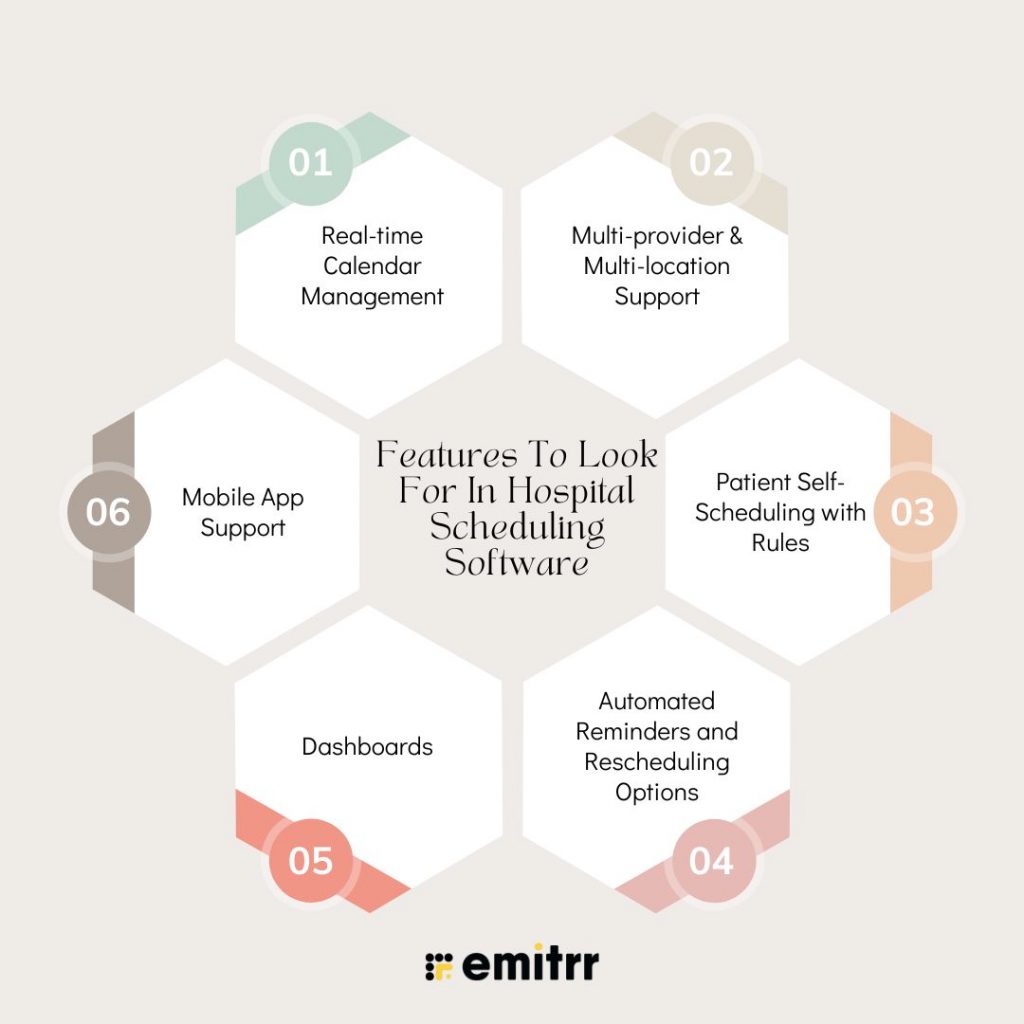
Real-time Calendar Management
Allows instant updates to patient appointment scheduling availability, preventing double-booking and scheduling conflicts. Both patients and staff see the most current calendar status, ensuring smooth and efficient booking processes across all departments.
Multi-provider & Multi-location Support
Enables management of multiple healthcare providers across various hospital branches or clinics. This patient scheduling platform centralizes scheduling, simplifies coordination, and supports seamless patient scheduling for complex hospital networks with diverse staff and locations.
Patient Self-Scheduling with Rules
Empowers patients to book appointments online within predefined guidelines like available time slots, provider specialties, or appointment types. This reduces administrative burden while ensuring bookings comply with hospital policies and resource availability. Patient self-scheduling features improve convenience and efficiency in patient scheduling.
Automated Reminders and Rescheduling Options
Sends automatic SMS, email, or app notifications to patients, reminding them of upcoming appointments, with easy options to confirm, cancel, or reschedule. This feature significantly lowers no-show rates and optimizes patient schedule utilization, enhancing the overall benefits of appointment scheduling software.
Mobile App Support
Offers scheduling access via mobile devices for both hospital staff and patients. Mobile apps enhance convenience, allowing users to book, update, or manage appointments anytime and anywhere, improving overall accessibility and engagement with online patient scheduling software and scheduling patient appointments.
Security & Compliance Requirements
For any hospital scheduling solution, compliance is non-negotiable.
HIPAA Compliance
Hospital scheduling software must strictly protect patients’ Protected Health Information (PHI) by adhering to HIPAA regulations. This ensures confidentiality, integrity, and secure handling of sensitive medical data throughout the scheduling process, which is critical for any patient scheduling platform used in healthcare settings.
Secure Data Transmission
Data exchanged between patients, staff, and systems must be encrypted end-to-end. Role-based access controls restrict sensitive information to authorized personnel only, preventing unauthorized access and ensuring secure communication across all patient appointment scheduling activities.
Audit Logs
Comprehensive audit trails document every appointment creation, modification, or cancellation within the appointment scheduling software. This transparency supports accountability, helps detect suspicious activity, and assists hospitals in meeting regulatory requirements during compliance audits or investigations.
GDPR Compliance
For hospitals operating in the EU or managing international patients, GDPR mandates strict data privacy controls. Scheduling software must provide patients’ rights over their data, including consent management, data portability, and the right to be forgotten, ensuring that online patient scheduling software complies with global privacy standards.
Integrations Required
For maximum efficiency, integrate your scheduling software with:
EHR/EMR Systems
Integrating scheduling software with EHR/EMR systems ensures that clinical and appointment data are synchronized. This alignment streamlines workflows, enhances patient record accuracy, and allows providers to effortlessly access relevant medical histories during appointments.
CRM Tools
Connecting scheduling with CRM platforms helps hospitals efficiently manage patient communication, appointment follow-ups, and engagement. This integration supports personalized outreach, improves patient relationships, and drives higher appointment adherence through targeted reminders and follow-up campaigns.
VoIP Systems
Integration with VoIP systems enables automated phone call reminders, confirmations, and two-way communication between staff and patients. This feature improves contact rates, reduces no-shows, and enhances the overall scheduling experience with reliable telephony support.
RCM/Billing Systems
Syncing scheduling with Revenue Cycle Management and billing systems ensures appointments are linked to billing workflows. This integration accelerates claims processing, reduces billing errors, and improves financial management by automating appointment-to-payment reconciliation.
Patient Communication Tools
Platforms like Emitrr enhance patient outreach through SMS, email, and other communication channels. Integrating these tools with scheduling software automates reminders, surveys, and notifications, fostering better engagement and streamlined patient communication.
How Scheduling Software Helps Hospitals
Hospital scheduling software transforms operations by streamlining tasks, enhancing patient care, and improving staff efficiency.
Lower Admin Workload
Scheduling software automates routine administrative tasks such as appointment confirmations, reminders, and follow-ups. This reduces hospital staff’s manual effort, freeing them to focus on patient care and improving overall operational efficiency.
Increased Patient Retention
Hospitals can boost patient satisfaction by offering a smooth, convenient scheduling experience and reducing wait times. Happy patients are more likely to return, enhancing loyalty and driving long-term retention for the hospital.
Higher Show-up Rates
Automated reminders via SMS, email, or calls keep patients informed and engaged, significantly reducing appointment no-shows. This helps hospitals optimize resource utilization and maintain a predictable daily schedule.
Better Staff Morale
Effective shift scheduling reduces last-minute changes and conflicts. Clear visibility of schedules minimizes stress and confusion among healthcare workers, leading to higher job satisfaction and improved team morale.
Hybrid Care Support
Modern scheduling software supports both in-person and virtual appointments, enabling hospitals to offer flexible care options. This accommodates patient preferences and expands access to healthcare services across multiple channels.

How To Choose the Right Online Scheduling Software for your Hospital
Choosing the right scheduling software is crucial for hospitals to improve efficiency and patient experience.
Ease of Use
The software should have an intuitive interface that both hospital staff and patients can navigate easily. A simple, user-friendly design reduces training time and increases adoption rates across all users.
Customizable
Hospitals need flexible scheduling solutions that adapt to their unique workflows, appointment types, and departmental needs. Customization ensures the software fits existing processes without forcing disruptive changes.
Reliable Vendor Support
Choose vendors that offer strong Service Level Agreements (SLAs), smooth onboarding, and responsive customer support. Reliable support ensures quick issue resolution and ongoing assistance as hospital needs evolve.
Strong Integrations
The scheduling solution must seamlessly integrate with your hospital’s current technology stack, including EHR, CRM, billing, and communication tools. Smooth integrations improve data flow and reduce manual work.
Top 10 Scheduling Software for Hospitals
- Emitrr
- Epic Cadence
- Acuity Scheduling
- CareCloud Centra
- Phreesia
- PracticeQ
- Skedulo
- AdvancedMD
- Setmore
- CERTIFY Health Scheduler
Here is a detailed review of 10 leading hospital scheduling software solutions.
1. Emitrr

Emitrr streamlines appointment booking with one-click scheduling, automated reminders, and real-time updates. Designed for small to mid-sized hospitals, it integrates easily with VoIP, SMS, and EHR systems, offering scalable and customizable solutions with strong customer support and affordable pricing.
Key Features:
- One-click appointment scheduling
- Automated reminders and confirmations via SMS/VoIP
- Integration with EHR systems
- Patient feedback and follow-up automation
Pros:
- Simple, user-friendly interface
- Strong automation capabilities
- Affordable and scalable pricing
- Excellent customer support and onboarding
Cons:
- May lack some advanced features of enterprise-grade systems
Pricing:
- Standard Plan – $20/user/month
This plan is perfect for teams looking for essential call management features without additional overhead. It includes 1,000 minutes per user, mobile app access, call routing, queues, call recording, and routing during business hours. - Professional Plan – $25/user/month
Ideal for healthcare providers and businesses that need enhanced communication tools and security. This plan offers everything in the Standard Plan, plus IVR (Interactive Voice Response), call transcription, auto-text responses for missed calls, conference calling, and full HIPAA compliance.
Reviews: 4.7 out of 5 stars on G2
2. Epic Cadence
Epic Cadence is part of the Epic Systems suite, widely used in large hospitals and health systems. It offers comprehensive scheduling and patient management integrated deeply with Epic’s EHR platform, facilitating coordinated care and optimized resource use.
Key Features:
- Enterprise-level EHR integration
- Multi-provider scheduling
- Resource and room management
- Automated patient notifications
Pros:
- Seamless integration with Epic EHR
- Robust enterprise functionality
- High security and compliance standards
Cons:
- Complex setup and training required
- Expensive for smaller hospitals
Pricing: Contact Epic’s sales team for customized pricing based on organizational size and needs.
Reviews: 4.2 out of 5 stars on G2
3. Acuity Scheduling
Acuity Scheduling offers an easy-to-use, cloud-based appointment system suitable for hospitals looking for quick deployment and flexibility. It supports online payments, reminders, and integrations with calendar apps.
Key Features:
- Online self-scheduling and rescheduling
- Automated reminders via email and SMS
- Payment processing support
- Integration with Google, Outlook, and iCal
Pros:
- User-friendly for both patients and staff
- Flexible scheduling options
- Affordable for smaller clinics
Cons:
- Limited EHR integration
- Not designed specifically for hospitals
Pricing:
- Emerging – $16/month: Perfect for solo users starting, includes self-scheduling, reminders, and 1 calendar.
- Growing – $27/month: Adds up to 6 calendars, SMS reminders, and client engagement tools.
- Powerhouse – $49/month: Designed for scaling practices with HIPAA compliance, API access, and multi-location support.
- Enterprise – Custom Pricing: Tailored for large organizations, includes unlimited calendars, an account manager, and advanced API access.
Reviews: 4.7 out of 5 stars on G2
4. CareCloud Central
CareCloud Central is a cloud-based platform offering end-to-end practice management, including scheduling, billing, and patient engagement. It’s designed for mid-sized hospitals and medical groups.
Key Features:
- Comprehensive practice management
- Multi-location scheduling
- Automated reminders and notifications
- Patient portal and telehealth support
Pros:
- Integrated revenue cycle management
- Scalable and customizable
- Strong patient engagement tools
Cons:
- Pricing can be high for small practices
- Learning curve for full feature use
Pricing:
- CareCloud Central offers customized pricing based on your healthcare organization’s size, specialty, and service needs. For detailed quotes, CareCloud recommends connecting directly with their sales team to build a tailored solution.
Reviews: 3.3 out of 5 stars on G2
5. Phreesia
Phreesia focuses on patient intake and scheduling automation, enabling hospitals to streamline patient check-ins along with appointment management through a mobile-friendly platform.
Key Features:
- Digital patient intake forms
- Automated appointment scheduling and reminders
- Insurance verification
- Payment collection and patient check-in
Pros:
- Reduces front desk workload
- Enhances patient experience
- Strong data security compliance
Cons:
- May require integration effort with existing systems
- Higher cost for smaller facilities
Pricing:
- Phreesia offers customizable pricing packages tailored to the specific needs of healthcare organizations, considering factors like practice size, required features, and integration complexity. To obtain a personalized quote, it’s recommended to contact Phreesia’s sales team directly.
Reviews: 4.1 out of 5 stars on G2
6. PracticeQ
PracticeQ offers a customizable scheduling and patient engagement platform designed for specialty clinics and hospitals, with a focus on workflow automation and real-time scheduling updates.
Key Features:
- Real-time scheduling and availability updates
- Automated patient communications
- Multi-provider and resource scheduling
- Reporting and analytics
Pros:
- Highly customizable workflows
- Strong patient engagement tools
- Good reporting capabilities
Cons:
- The user interface could be improved
- May need IT support for customization
Pricing:
PracticeQ offers flexible, no-contract plans:
- Standard ($79.90/mo per practitioner): Includes 500 appointments and 500 form submissions per month, 300 SMS, all core features, and 5 free assistant accounts.
- Low Volume ($54.90/mo per practitioner): For smaller practices with up to 25 appointments and 25 submissions monthly, 50 SMS, and the same robust features.
- Optional add-ons: $25/month per extra practitioner, $65/month for e-prescribing.
Reviews: 5.0 out of 5 stars on G2
7. Skedulo
Skedulo provides mobile workforce management with powerful scheduling tools that help hospitals coordinate staff and resources efficiently, especially for home healthcare and mobile medical services.
Key Features:
- Mobile-friendly scheduling app
- Resource and staff allocation
- Real-time updates and notifications
- Analytics and reporting
Pros:
- Excellent for mobile and off-site staff scheduling
- Intuitive mobile interface
- Strong analytics features
Cons:
- Less focused on patient self-scheduling
- Higher price point
Pricing:
- Skedulo follows a custom pricing model based on the number of schedulers and mobile workers. Organizations with hundreds of mobile staff can access volume-based rates. Minimum license requirements apply. Contact their sales team for a personalized quote.
Reviews: 4.1 out of 5 stars on G2
8. AdvancedMD
AdvancedMD offers a cloud-based practice management system with integrated scheduling designed for outpatient clinics and hospitals of varying sizes. It also includes telemedicine support.
Key Features:
- Online patient scheduling and check-in
- Telemedicine integration
- Automated reminders and confirmations
- Billing and claims management
Pros:
- Comprehensive all-in-one solution
- Good telehealth capabilities
- User-friendly interface
Cons:
- It can be expensive for smaller hospitals
- Customer support responsiveness varies
Pricing:
- AdvancedMD offers customizable pricing through a bundle-building tool on its website. Discounts up to 40% are available depending on the services combined and volume. Prospective customers receive tailored quotes after selecting features and specialties.
Reviews: 3.6 out of 5 stars on G2
9. Setmore
Setmore is a cost-effective, cloud-based scheduling solution with essential features for hospitals and clinics, including appointment booking, reminders, and payment integrations.
Key Features:
- Online booking via website and apps
- SMS and email reminders
- Payment processing integration
- Calendar sync with Google, Outlook, and Apple
Pros:
- Free tier available
- Easy to use and set up
- Affordable premium plans
Cons:
- Limited advanced hospital-specific features
- Integration options are basic
Pricing:
- Free: $0/user/month, up to 4 users, 200 appointments
- Pro: $5/user/month, 1-2 users, unlimited appointments
- Team: $5/user/month, unlimited users, all Pro features
- Enterprise: Custom pricing with tailored options for large organizations
Reviews: 4.5 out of 5 stars on G2
10. CERTIFY Health Scheduler
CERTIFY Health Scheduler focuses on hospital appointment scheduling with built-in compliance and security features suitable for large-scale healthcare operations.
Key Features:
- HIPAA-compliant scheduling
- Multi-department support
- Automated patient communications
- Integration with major EHR systems
Pros:
- Strong security and compliance
- Suitable for large hospitals
- Customizable workflow
Cons:
- Implementation can be complex
- Pricing not publicly disclosed
Pricing:
- Customizable packages designed to fit healthcare organizations of all sizes. Contact CertifyHealth for detailed pricing and tailored solutions.
Reviews: Not available
Why Emitrr Is The Best Scheduling Software for Hospitals
Emitrr is crafted to meet the unique demands of hospitals and clinics, offering an intuitive platform that reduces complexity while enhancing efficiency. Its robust features and adaptable design help healthcare providers deliver smoother patient experiences and optimize operational workflows.
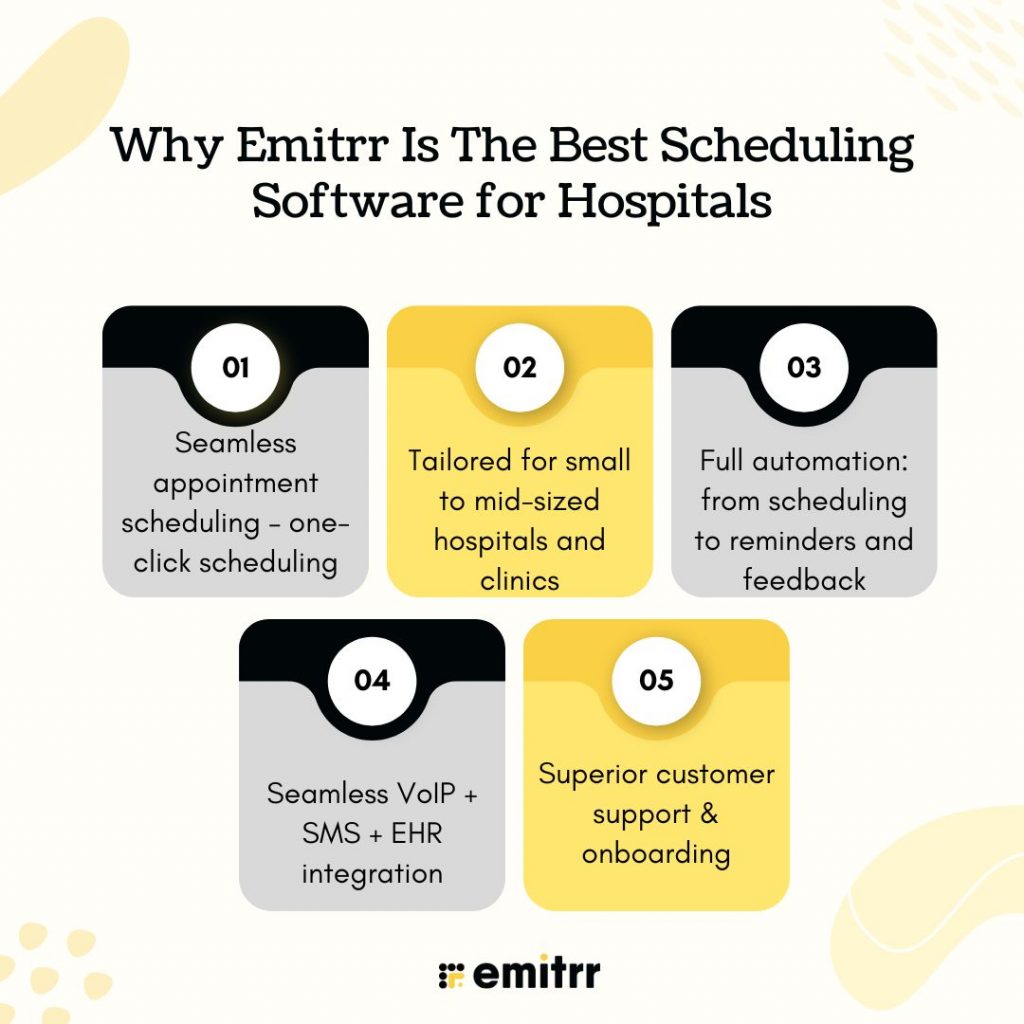
Seamless appointment scheduling – one-click scheduling
Emitrr’s one-click scheduling feature drastically reduces the time required to book appointments. Patients and staff can easily set or modify bookings with minimal steps, enhancing user experience and improving workflow efficiency in busy hospital environments.
Tailored for small to mid-sized hospitals and clinics
Designed specifically for small to mid-sized hospitals and clinics, Emitrr balances powerful functionality with simplicity. It provides an effective solution without the complexity of enterprise systems, making it accessible and practical for growing healthcare facilities.
Full automation: from scheduling to reminders and feedback
Emitrr automates the entire appointment lifecycle—from initial scheduling and automated reminders to post-visit feedback collection. This reduces manual workload, minimizes no-shows, and keeps patients engaged throughout their care journey, improving operational efficiency.
Seamless VoIP + SMS + EHR integration
The platform integrates smoothly with VoIP, SMS, and EHR systems, enabling continuous communication and data synchronization. This full-circle integration ensures appointment details, reminders, and patient records stay up-to-date and accessible across systems.
Frequently Asked Questions
Yes, automated reminders and easy rescheduling options significantly reduce no-show rates by keeping patients informed and engaged.
Most modern hospital scheduling software supports hybrid models, allowing hospitals to manage in-person, virtual, and hybrid appointments seamlessly.
Good scheduling software offers APIs or direct integrations that synchronize appointment data with your EHR, ensuring consistency and eliminating manual entry.
Advanced software includes conflict detection and alerts, allowing administrators to quickly resolve double bookings and adjust schedules dynamically.
Yes, Emitrr offers multilingual support to cater to diverse patient populations, improving accessibility and patient satisfaction.
Conclusion
Online scheduling is no longer optional for hospitals; it has become a necessity to enhance operational efficiency and patient experience. The right scheduling platform can transform hospital workflows, reduce administrative burden, and boost patient satisfaction.
Among available options, Emitrr stands out as a holistic, secure, and customizable scheduling solution designed to meet the specific needs of small to mid-sized hospitals and clinics. With its automation capabilities, seamless integrations, and superior customer support, Emitrr empowers healthcare providers to deliver exceptional care with streamlined scheduling.
Schedule your free Emitrr demo here and see how it can transform your hospital’s scheduling system.