
 4.9 (400+
reviews)
4.9 (400+
reviews)
Introduction
Running a hospital is not easy. Nurses must be there at the right time. Patients need full care every hour. If nurses are too tired or not enough in number, patient care suffers. This is why making good nurse schedules is so important.
Manual scheduling is slow, prone to errors, and leads to overlapping shifts, burnout, and wasted time. Scheduling software for healthcare eliminates guesswork, ensuring adequate staffing and better rest for staff. It improves hospital efficiency and care with staff scheduling software for healthcare, offering a seamless and fair system. Healthcare scheduling software systems make hospital management easier, reducing stress for both staff and patients.
This blog explores the role of nurse staffing software, its key features, and its importance in optimizing workforce management and maintaining the quality of patient care.

What is Nurse Scheduling Software?
Nurse scheduling software is a tool that helps hospitals plan work shifts. It replaces the old way of using paper or spreadsheets. The software works on phones or computers and gives live updates. It shows who is on duty, who is off, and who can fill in if someone is missing. It makes planning fast and simple.
Managers can make new plans in minutes. They don’t have to call each nurse to ask about timings. Nurses can also log in and check their shifts. If they want to swap or take leave, they can do it in the system.
The software makes sure no nurse is working too many hours. It follows the rules of work hours and rest time. It keeps the staff happy and less tired.
When nurses are happy, they give better care to patients. The software also helps save time and avoid mistakes. This makes the hospital run better every day.
Features of the Best Nurse Scheduling Software
The development of nurse scheduling software has changed over time as the needs of healthcare facilities have grown. The most advanced and efficient nurse scheduling solutions are packed with features that provide the most efficient and easiest experience to managers and nursing staff.

Shift Management & Flexibility
Scheduling software is designed to create, modify, and manage nurse schedules easily. The ability to manage things like shift swaps, time-off requests, and coverage ensures that there are no missed shifts and that staffing levels are optimal. The system also allows staff to request time off, change shifts, and trade shifts with other nurses, all within the same system. This also allows the healthcare facility to be flexible in the event of unforeseen situations like leave or emergency coverage.
Mobile Access & Notifications
Access to schedules via mobile devices has become a necessity in our mobile world. The top scheduling software for nursing homes will have mobile apps that let nurses check their schedules, request time off, or swap shifts from their mobile devices. Also, staff receive automated real-time notifications of any changes in their shifts, including cancellations and reminders, enhancing communication and ensuring no important information is lost.
Analytics and Reporting
“Data-driven decision making” is critical to the operation of healthcare facilities. The best nurse schedule app has advanced analytics and reporting capabilities that highlight staffing patterns, overtime, and staffing shortages. These reports enable administrators to control staffing more efficiently, decrease burnout, and allocate nurses to improve operational efficiency and patient care outcomes.
Compatibility with Other Healthcare Software
The best nurse scheduling software is compatible with other essential systems such as HR, payroll, and Electronic Health Records (EHR). It incorporates scheduling within the context of labor laws and employee data, as well as patient care. This process is streamlined to reduce errors, save time, and provide consistency across departments.
Drag-and-Drop Scheduling
Schedules are created and modified easily via drag-and-drop. Shifts can be quickly adjusted as managers simply drag and drop the names of nurses into empty slots on the schedule, eliminating the need for time spent on manual data entry. This characteristic makes scheduling faster but also more accurate by eliminating human error.
Auto-Scheduling
Even more efficiently, some scheduling software for nursing homes has auto-scheduling features. The automatic scheduling is done considering the availability, preferences, and skills of the nurses, as well as the needs of the facility. It also cuts down on admin time, helps to maintain fairness in shift distribution, and schedules according to business needs and staff preference.
HIPAA Compliance
Healthcare data is sensitive and must be HIPAA compliant. The most efficient nurse scheduling software works by making sure that all data processing is HIPAA compliant and secures patient and staff information. The software also supports the legal protection and confidentiality of sensitive information through strong encryption and secure storage of data.
All of these capabilities have made Best nurse schedule app a necessity in today’s healthcare facilities, increasing efficiency, nurse satisfaction, and ultimately patient care.
Download ready-to-use SMS templates for healthcare scheduling and reminders. Reduce no-shows and keep patients informed with timely messages.
Benefits of Nurse Scheduling Software
The market for online scheduling software for nurses is rapidly expanding, with projections indicating it will reach $1.30 billion by 2033. This growth is driven by a compound annual growth rate (CAGR) of 10.82%. It offers various advantages to the healthcare industry.
Boosted Efficiency
It is a messy process that wastes time, as missed shifts, double shifts, and perpetual rescheduling can. The process becomes much simpler when using the best nurse schedule app. This leads to a smoother operation of healthcare institutions as shifts are automatically assigned according to availability, qualifications, and demand.
More Empowered Nurses
Empowering nurses to have more control over their schedules is a revolutionary concept. The software gives them the flexibility to do things like swap shifts, schedule their shifts, and request time off easily. It is also easier for nurses to schedule their own lives to avoid burnout and have a healthy work-life balance.
Smarter Cost Management
Time is money, and manual scheduling is costing you both. Automated scheduling can help medical facilities reduce time spent on these administrative tasks and eliminate expensive mistakes such as overstaffing or unplanned overtime. This eliminates the need for last-minute repairs or emergency staffing, which can be very costly. These savings can accumulate over time and assist in operating the facility at a lower cost.
Higher Standards of Patient Care
When there are enough nurses on the floor, patients win. Nursing home scheduling software also helps to have a balanced number of nurses in each shift, including peak hours. Patients receive the attention they require, without burdening the staff. Nurses who are well rested, scheduled appropriately, are more alert, more present, more effective – all of which leads to better care outcomes and increased patient safety.
Stronger Team Communication
Communication is the foundation of any healthcare team. Rather than relying on phone calls or in-person communication, scheduling software enhances team communication with immediate notifications of shift change requests, approvals, or cancellations. No one is out of the loop – no more lost memos. Such transparency provides real-time accountability and builds trust while keeping everyone, from nurses to supervisors to HR, on the same page.

Top 10 Nurse Scheduling Software for Healthcare Providers
1. Emitrr
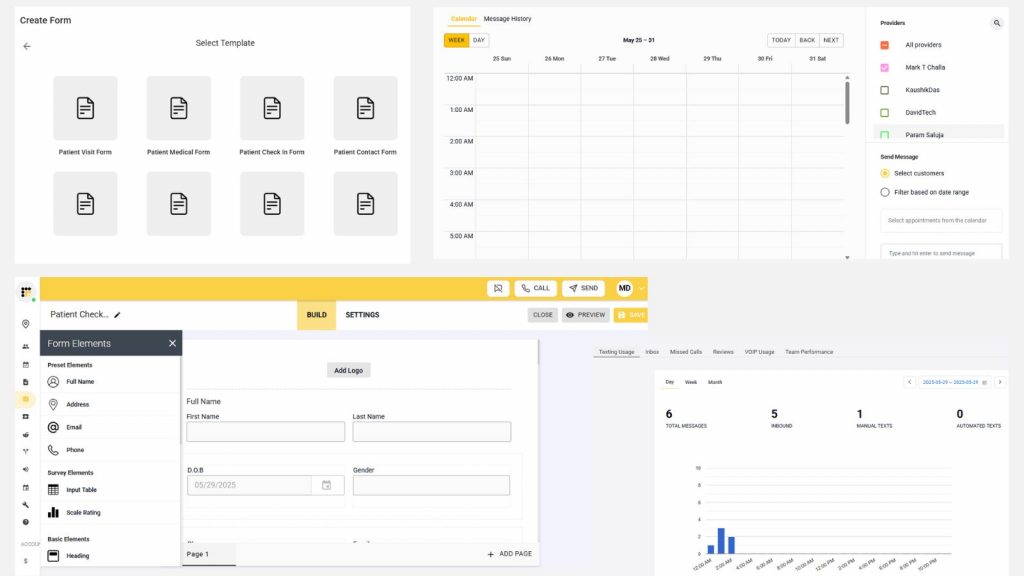
Emitrr is a trusted patient scheduling tool designed for medical practices to simplify and automate the appointment booking process. It enables patients to book appointments in real-time, reducing front desk workload and enhancing patient experience. With Emitrr, appointment management becomes hands-free, allowing staff to focus on care and critical tasks.
Key Features of Emitrr
- Easy-to-use interface for booking appointments: Intuitive design that simplifies the booking process for both clients and staff.
- Customizable scheduling (by visit type, provider, location): Easily adjust schedules based on the needs of different services and personnel.
- Instant automated appointment confirmations: Clients receive immediate confirmation emails or texts after booking.
- Seamless EHR integration: Automatically sync appointment data with electronic health records for streamlined workflows.
- Automated reminders with customizable frequency: Set and adjust reminder intervals to reduce no-shows and improve engagement.
- Smart autoresponders for common queries: Instantly respond to frequently asked questions without manual input.
- Performance tracking (appointments, conversion rates): Gain insights into appointment metrics and client conversion to optimize operations.
- Personalized message templates for reminders: Customize reminder messages to align with your brand voice and tone.
Pros of Emitrr
- User-friendly and intuitive design, ensuring a smooth experience for both new and experienced users.
- Responsive and reliable customer support, providing timely assistance whenever issues arise.
- Saves time with automation and reminders, reducing manual tasks and ensuring important actions are never missed.
Cons of Emitrr
- Limited scheduling features, as some are still in development, which may restrict users from accessing certain functionalities for efficient planning.
Emitrr Pricing
Emitrr pricing starts at $59/month, and you only pay for what you use, making it a flexible and scalable option for clinics of all sizes.
Emitrr Integrations
- Drchrono
- Denticon
- Dolphin
- AthenaHealth
- Dentrix Enterprise
- Curve Hero
- Dentrix
- Kareo
- Dentrix Ascend
- eClinicalWorks
- Orthotrac
- Eaglesoft
- OpenDental
- Practiceworks
Emitrr Customer Support Channels
- 24/7 Live Chat
- Phone Support
- Email Help Desk
- FAQs & Forum
- Knowledge Base
Emitrr Emitrr Ratings
Capterra– 4.9
Emitrr Reviews
I shopped for months for a communication system for bulk messaging & email that was HIPAA compliant that I can use for patients, clients, friends, acquaintances, etc. Emitrr was the first system that I found that was “reasonably priced” for both a small psychotherapy practice and personal use combined.
The customer service was excellent, they stepped me through setting up their system on my two websites and worked along with my marketing people. I am still learning it but it appears to be such a simple, but elegant, design that I know I am going to love it once I learn it!
Source- Capterra
2. NurseGrid
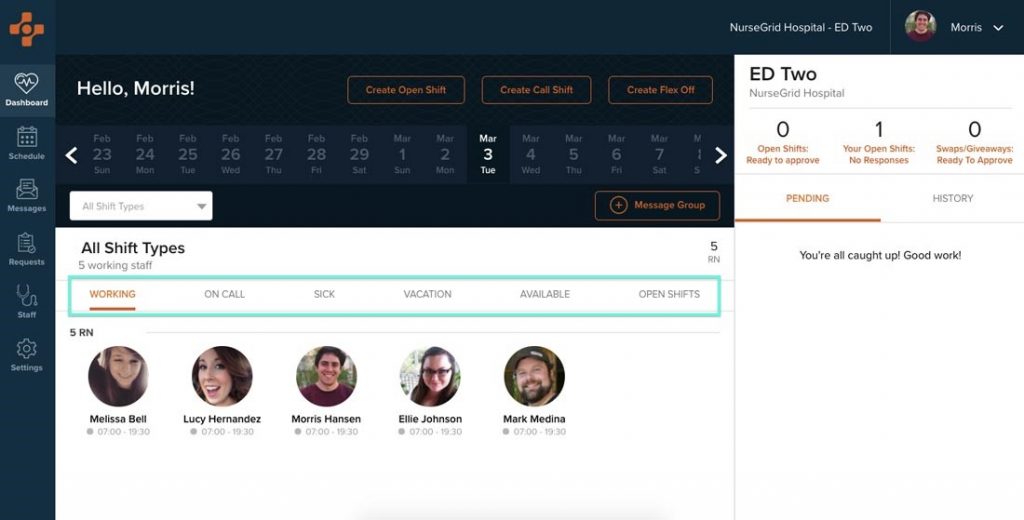
NurseGrid is a cloud-based nurse scheduling application that aims to streamline nurse shift scheduling and internal communication. It gives nurses the ability to control their own time management, swap shifts, and know who is on the team in real time.
Key Features of NurseGrid
- Easy syncing of calendars with Google, Outlook, and iPhone apps: Effortlessly sync schedules across multiple platforms, keeping everyone updated and on the same page.
- Schedule changes in real-time and the ability to swap shifts: Instantly update schedules and allow employees to swap shifts as needed, keeping operations running smoothly.
- Profiles that can be customized and scheduling across multiple locations: Personalize employee profiles and manage scheduling across different locations with ease.
- Visibility on who is working each shift: Gain clear visibility into shift assignments and staffing coverage, ensuring transparency and avoiding scheduling conflicts.
Pros of NurseGrid
- Intuitive and easy-to-use interface, ensuring users can quickly get up to speed without extensive training.
- Highly customizable for multi-site staff, allowing managers to tailor features and settings to different locations and teams.
- Seamless swap of shifts, enabling employees to easily exchange shifts with minimal administrative overhead.
- Seamless integration with calendar applications for real-time updates, ensuring schedules are always current across all platforms.
Cons of NurseGrid
- Only limited support is available, making it challenging for users to get timely assistance when needed.
- Does not have payroll management features built in, requiring integration with other systems for complete payroll processing.
- No FAQ section for immediate answers, leaving users without quick self-service options for resolving common issues.
- Users also report occasional crashes of the app, disrupting the user experience and workflow.
NurseGrid Pricing
- Starts at $349/month (subscriber-based model)
- Free version available. No free trial.
NurseGrid Integrations
- Google Calendar
- iPhone Calendar
- Outlook
Nursegrid Customer Support Channels
- Email Support
- In-app help (limited)
- No live chat or extensive support center
NurseGrid Nursegrid Ratings
G2.com– 4.9
NurseGrid Reviews
The concept of online scheduling was a good idea, unable to adjust the schedule unless you are the manager of the schedule. This is not helpful when other employees have to take calls and manage the schedule. Unable to do anything if looking at the schedule on the app…you have to be logged into the site.
3. OnShift
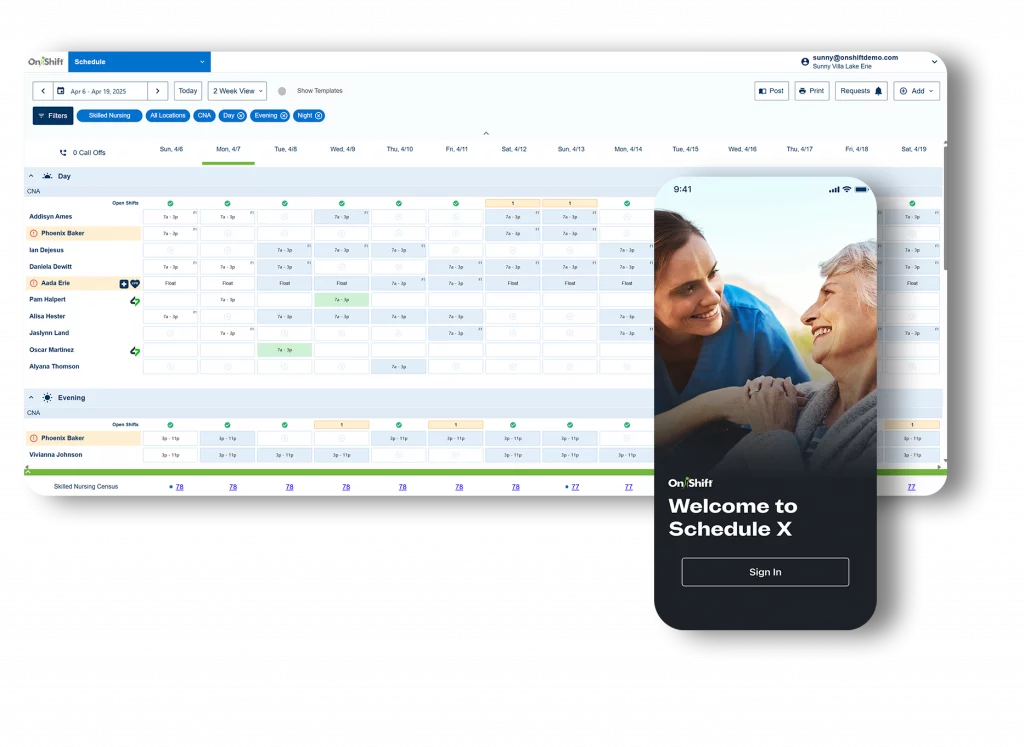
OnShift is a comprehensive workforce management and employee scheduling software tailored for long-term care and senior living facilities. It streamlines staffing, shift management, and workforce engagement to ensure smooth day-to-day operations in healthcare environments.
Key Features of OnShift
- Efficient shift and schedule management: Easily assign, adjust, and track shifts for optimal staff coverage.
- Built-in bonus and reward tracking system: Automatically track and manage employee rewards based on performance or milestones.
- Accountability tools to monitor staff performance: Real-time performance monitoring to ensure staff meet expectations and goals.
- Integration with earned wage access for employee incentives: Allow employees to access earned wages early, boosting morale and retention.
Pros of OnShift
- Multifunctional—supports shift scheduling, bonuses, and employee rewards, providing a comprehensive solution for team management.
- Helps maintain accountability and improves staff engagement by tracking performance and incentivizing achievement.
Cons of OnShift
- Real-time updates can be inconsistent, causing delays or discrepancies in the information displayed.
- It may be difficult to navigate and manage for some users, especially those unfamiliar with the platform or its features.
OnShift Pricing
Custom pricing available upon request. Tailored to organization size and needs.
OnShift Integrations
Integrates with payroll systems, HR platforms, and timekeeping solutions (specific partners may vary).
OnShift Customer Support Channels
- Email Support
- Help Desk
- Knowledge Base
- Limited live support reported by users
OnShift OnShift Ratings
Capterra 4.2
OnShift Reviews
The best part of this software is the messaging part. It is easy to mass message and get info out quickly.
We implemented this software slowly, and it has become an okay tool. I would like to see it connected to our time clocks so that we can better track our hours and punches without having to take extra steps. The time clock and OnShift never seem to match up.
Source- G2
4. Nexhealth
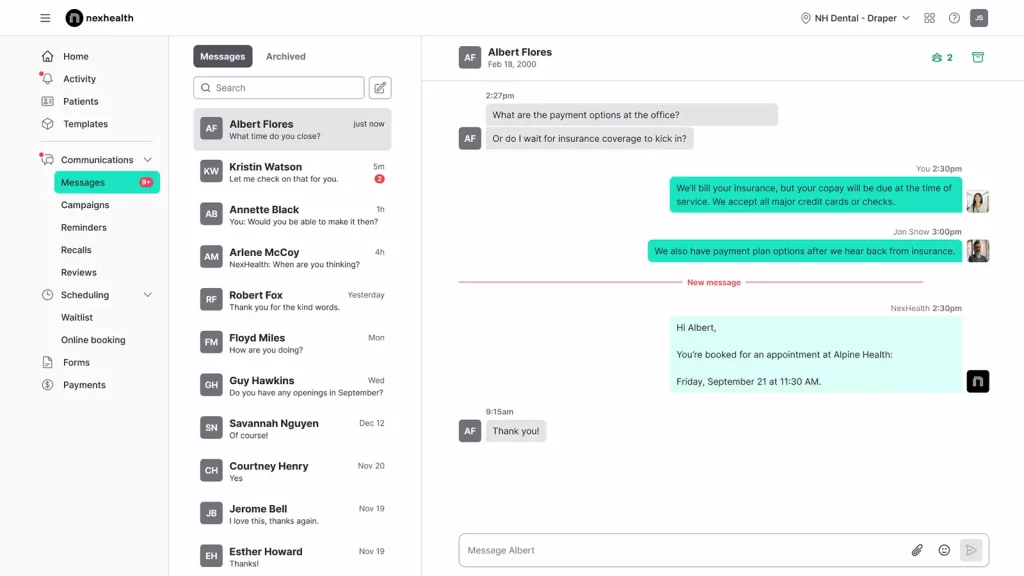
NexHealth is a leading healthcare scheduling software built for doctors and dentists. It streamlines online appointment booking with a one-click process, offering a seamless and fully digitized patient experience from scheduling to post-care engagement.
Key Features of Nexhealth
- Auto-sync with EHR systems for seamless data flow: Automatically update patient records in real-time, ensuring accurate and up-to-date information.
- Real-time appointment booking and cancellations: Allow clients to book or cancel appointments instantly, keeping schedules current and accurate.
- Multichannel booking options (email, website, SMS, etc.): Offer flexibility for clients to book appointments through their preferred communication channel.
- Fully customizable scheduling based on appointment types, provider availability, and working hours: Tailor schedules to accommodate various services, providers, and operational hours for maximum efficiency.
Pros of Nexhealth
- Automates patient engagement workflows effectively, streamlining communication and reducing manual administrative tasks.
- Integrates smoothly with most practice management systems (PMS), ensuring seamless data transfer and improved operational efficiency.
Cons of Nexhealth
- Occasional gaps in patient scheduling functionality, leading to minor inefficiencies or errors in appointment management.
- Limited support channels compared to competitors, restricting access to help and resources when users need assistance.
Nexhealth Pricing
Nexhealth pricing is available upon request. Contact NexHealth support for customized pricing.
Nexhealth Integrations
Compatible with popular EHR and PMS platforms; enables two-way syncing and real-time updates.
Nexhealth Customer Support Channels
- Email
- Phone
- Chat
NexHealth Nexhealth Ratings
Capterra– 4.9
Nexhealth Reviews
Excellent onboarding and ongoing customer service. The UI is streamlined and easy to work with. The program also integrates well with our PMS (Eaglesoft).
A few hiccups here and there, as can be expected with any new software, but all problems were addressed in a professional and timely manner. I do wish they had partnered with a phone system to have that feature integrated.
Source- Capterra
5. ShiftBoard
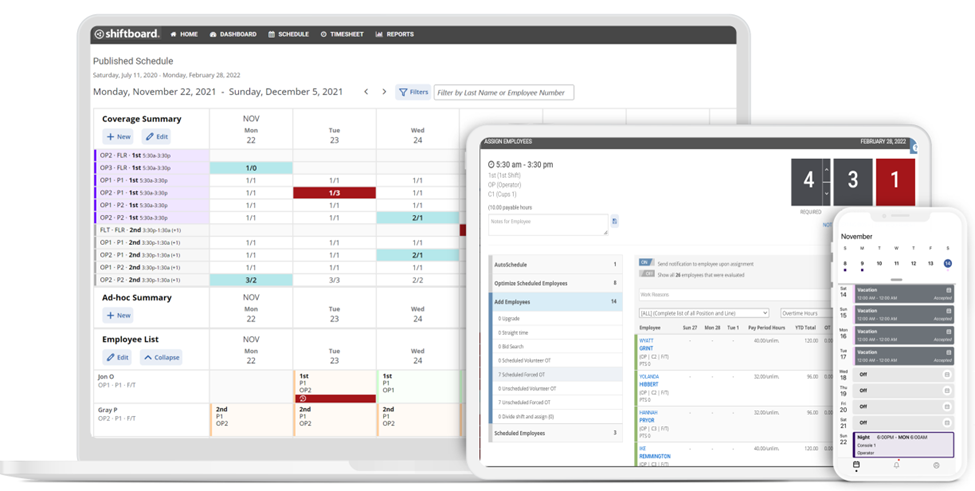
Shiftboard is a powerful employee scheduling software built to support shift-based organizations with complex staffing needs. It helps automate shift assignments, manage leave requests, and ensure compliance with labor laws. With mobile access and integration capabilities, it’s ideal for large enterprises needing scalable scheduling solutions.
Key Features of ShiftBoard
- Automated shift assignments and overtime distribution: Automatically allocate shifts and manage overtime to ensure fair distribution and compliance.
- Smart alerts via SMS, calls, email, and app notifications: Receive instant notifications across multiple channels for important updates and reminders.
- Demand-based coverage optimization using predictive analytics: Leverage data to predict staffing needs and optimize coverage during peak periods.
- Leave tracking and enforcement of custom approval rules: Easily track employee leave requests and enforce approval processes to maintain staffing levels.
- Seamless integration with tools like ADP, Workday, and Salesforce: Sync with popular HR and CRM tools to streamline workflows and data management.
Pros of ShiftBoard
- Ideal for managing large, distributed teams, providing centralized control and efficient coordination across multiple locations.
- Smooth integration with HR, payroll, and workforce systems, ensuring seamless data flow and reducing administrative overhead.
- Mobile-friendly for on-the-go access by staff and managers, enabling real-time updates and management from anywhere.
Cons of ShiftBoard
- Full functionality requires mobile app access, restricting some features to users with the app installed.
- Limited capabilities for SMS/text communications, which may be inconvenient for teams that rely heavily on messaging.
- Steep learning curve; occasional system downtime reported, leading to temporary disruptions in service or functionality.
ShiftBoard Pricing
Shiftboard is a subscription-based software. Pricing is custom and depends on features, number of users, and organization size. Contact the sales team for accurate pricing details.
ShiftBoard Integrations
- Works with major HR and payroll platforms (e.g., ADP, Workday)
- Compatible with Salesforce, ERP systems, and workforce tools
ShiftBoard Customer Support Channels
- Email Help Desk
- Phone Support
- Knowledge Base
- Ticketing System
ShiftBoard ShiftBoard Ratings
PCMag– 4.0
ShiftBoard Reviews
I like the ability to use he shared calendar function, as it comes in handy when needing to see who will be working with you that day amongst your colleagues.
Source- SaaSAdviser
6. ConnectTeam
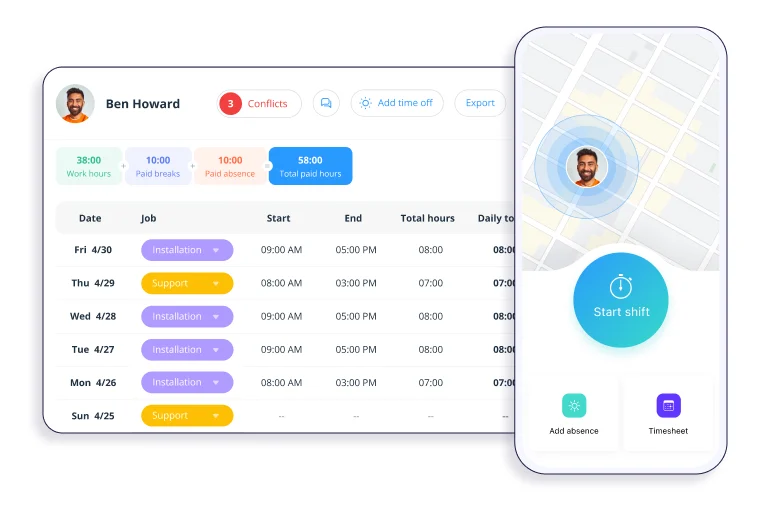
Connecteam is an all-in-one employee management software designed to streamline business operations. From team scheduling and time tracking to task management and internal communication, Connecteam empowers businesses to operate efficiently and keep their workforce organized, whether in the office or on the go.
Key Features of ConnectTeam
- Time clock with GPS tracking and job-specific logs: Track employee hours with location data and specific task logs for accuracy and accountability.
- Integrated shift scheduling with real-time updates: Instantly update shifts and notify employees of any changes or adjustments.
- Task management with checklists, deadlines, and status tracking: Manage tasks efficiently with clear deadlines, progress tracking, and actionable checklists.
- In-app chat and updates for streamlined team communication: Enable direct, real-time communication within the app for quick collaboration and updates.
- Customizable forms, surveys, and digital workflows: Create tailored forms and surveys to gather information and streamline business processes.
- Role-based permissions and admin controls: Set user permissions to ensure proper access control, maintaining data security and workflow efficiency.
Pros of ConnectTeam
- Seamless integration between the time clock and scheduler, ensuring accurate tracking of work hours and streamlined scheduling.
- Intuitive and user-friendly interface, designed for quick navigation and minimal training.
- Ideal for deskless and field teams, providing flexibility and ease of use for employees who are always on the move.
Cons of ConnectTeam
- Only employees can set unavailability; admins cannot do it on their behalf, limiting flexibility for schedule management.
ConnectTeam Pricing
- Small Business Plan Free for up to 10 users
- Basic Starts at $29/month for the first 30 users
- Advanced and Expert plans are available with additional features (Contact support for details)
ConnectTeam Integrations
- Integrates with QuickBooks Online, Gusto, and other payroll systems
- Zapier and API access for broader automation
ConnectTeam Customer Support Channels
- Live Chat
- Email Help Desk
- Knowledge Base
- Community Forum
- Phone Support (for paid plans)
ConnectTeam ConnectTeam Ratings
Capterra– 4.6
ConnectTeam Reviews
I like the ability to see employees’ hours and location in real time. I like being able to correct, add notes easily and quickly. It’s great to be able to communicate with the employee via chats to ask them questions about their hours. It’s also great to be able to get messages and notices out to everyone or a specific group of people easily.
Source- G2.com
7. Luma Health

Luma Health is a comprehensive patient engagement and scheduling platform designed to streamline healthcare appointments. It enables patients to self-book appointments in real-time, reducing front desk workload and keeping calendars full. With smart integrations and intuitive features, Luma Health helps healthcare practices improve efficiency and enhance patient satisfaction.
Key Features of Luma Health
- Real-time self-scheduling for patients: Allow patients to book, modify, or cancel their appointments at their convenience in real-time.
- EHR integration for seamless data syncing: Automatically sync appointment data with electronic health records for accurate and up-to-date patient information.
- Appointment booking links via SMS: Send patients direct booking links through SMS for easy access and quick scheduling.
- Custom fields for collecting essential patient information: Tailor forms to collect specific details from patients to ensure accurate records and preparation.
- E-signature capture functionality: Enable patients to sign forms digitally, streamlining paperwork and reducing manual effort.
Pros of Luma Health
- Intuitive and user-friendly interface, making it accessible for users with varying technical expertise.
- Easy integration with EHR systems, ensuring smooth data transfer and seamless workflow management across platforms.
Cons of Luma Health
- Limited customer support, with users sometimes facing delays or difficulty getting timely assistance.
- Occasional glitches in software performance, leading to minor interruptions in functionality and user experience.
Luma Health Pricing
Luma Health offers customized pricing based on practice needs. Contact the support team for detailed pricing information.
Luma Health Integrations
- Integrates with major EHR systems
- Syncs with communication tools for enhanced outreach
Luma Health Customer Support Channels
- Knowledge Base
- Chat
- Email Help Desk
- Phone Support
- FAQs/Forum
Luma Health Luma Health Ratings
Capterra– 4.7
Luma Health Reviews
Its ease of use, smart patient communication via text messaging, and seamless integration with EHR systems, all of which saved time and improved workflow efficiency
Source- Capterra
8. Tebra
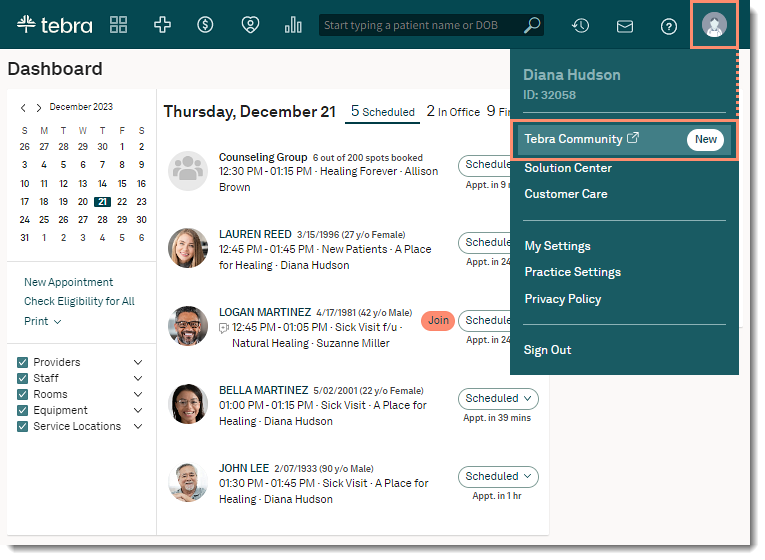
Tebra is a modern patient scheduling software designed to meet the needs of medical practices, billing companies, and patients. Branded as the “Patient Success Platform,” Tebra helps healthcare providers simplify appointment scheduling, documentation, and daily operations, ultimately enhancing patient satisfaction and staff efficiency.
Key Features of Tebra
- Patients can self-book appointments through a user-friendly interface: Patients can easily navigate and schedule appointments without assistance, enhancing convenience.
- Automated confirmations and reminders reduce no-shows: Automatic appointment confirmations and reminders keep patients informed and reduce missed appointments.
- Booking links can be shared via SMS: Conveniently share appointment booking links with patients via SMS for easy access on their mobile devices.
- Seamless integration with EHR/EMR systems: Sync appointment data directly with EHR/EMR systems to maintain accurate patient records and streamline workflows.
Pros of Tebra
- Intuitive and easy-to-use platform, designed for quick adoption and minimal training.
- Simple chart building for patient documentation, allowing healthcare professionals to create detailed records with ease and efficiency.
Cons of Tebra
- Customer support is often rated below average, with some users experiencing delays in response times and resolution.
- Occasional billing-related issues are reported, including discrepancies and confusion over charges or plan details.
Tebra Integrations
Easily integrate with major EHR systems and healthcare platforms.
Tebra Pricing
- Contact Tebra’s support team for customized pricing plans
Tebra Customer Support Channels
- Email
- Phone
- Knowledge Base
Tebra Tebra Rating
Capterra– 3.9
Tebra Reviews
Easy access to customer service at any time! Our practice uses the scheduling and billing platforms and even handles the most technical billing questions.
On the APP side, there is no way for front office staff to print an easy-to-read itemized statement for patients who have multiple procedures that are processed through insurance.
Source- Capterra
9. Deputy

Deputy is a leading cloud-based workforce management software designed for businesses that rely on hourly workers. With over 1.5 million users in 100+ countries, Deputy simplifies employee scheduling, time tracking, labor law compliance, and team communication. Its intuitive interface, mobile compatibility, and powerful integrations make it a top choice for organizations aiming to streamline operations and improve workforce efficiency.
Key Features of Deputy
- Smart employee scheduling based on labor demand and availability: Automatically optimize schedules by matching staffing levels with demand and employee availability.
- Mobile time tracking and attendance management: Allow employees to clock in and out, track hours, and manage attendance directly from their mobile devices.
- Built-in labor law compliance tools: Ensure compliance with labor laws by automatically factoring in regulations like overtime, breaks, and maximum working hours.
- Team messaging and shift notifications: Keep the team connected with instant messaging and automatic notifications about shift updates or changes.
- Advanced labor analytics and reporting: Gain insights into labor trends, performance, and efficiency through detailed reports and data analysis.
- Seamless integration with payroll, HR, and POS systems: Sync with payroll, HR, and POS systems to streamline processes like compensation, staffing, and transaction tracking.
Pros of Deputy
- Intuitive interface and mobile apps for easy use, ensuring users can navigate and manage tasks seamlessly from any device.
- Flexible pricing based on features and team size, allowing businesses to scale their plan according to their specific needs.
- High compatibility with third-party software (HR, payroll, POS), enabling smooth integration with existing systems for streamlined operations.
Cons of Deputy
- Some users report a learning curve during setup, requiring time to fully grasp all functionalities and configurations.
- Premium features may require higher-tier plans, limiting access to advanced tools unless users upgrade their subscription.
Deputy Pricing of Deputy
- Time & Attendance $4.50/user/month
- Scheduling $4.50/user/month
- Premium (includes scheduling + time tracking) $6.00/user/month
- Enterprise Contact sales for a customized quote
Deputy Deputy Integrations
Deputy offers 18+ verified integrations, including
- ADP Workforce Now
- Gusto
- Xero
- Square POS
- Salesforce Sales Cloud
- Microsoft Outlook & Power BI
- Zapier
- Apple iOS, Google Calendar, MYOB, Sage 500, and more
Deputy Customer Support Channels
- Email/Help Desk
- Live Chat
- Knowledge Base
- Community Forum
Deputy Ratings
G2.com– 4.6
Deputy Reviews
I used it operationally for a few years and found it easy and functional. Its very easy to make basic changes to scheduling and do timesheet approvals from a phone.
Detailed functionality makes it ideal for most aspects of managing staff scheduling, timekeeping, and outputting to payroll. Easy to use by employees.
Once in a while, employees would have issues with the app, but this would be temporary, possibly to do with connectivity on the devices. It’s not the cheapest option if you have a lot of staff doing a few hours, as it’s a per-user subscription, I think.
Source- Capterra
10. Mend

Mend is a patient scheduling platform designed to simplify appointment booking and streamline communication between healthcare providers and patients. Best suited for mid to large healthcare organizations, Mend improves operational efficiency and patient engagement with automation and smart integrations.
Key Features of Mend
- Patient self-scheduling with real-time availability: Allow patients to schedule appointments based on real-time availability, reducing wait times and scheduling conflicts.
- Automated appointment notifications and reminders: Send automated notifications and reminders to patients via email or SMS, minimizing no-shows and ensuring they stay informed.
- Seamless EHR integration for improved data flow: Sync appointment and patient data directly with EHR systems, ensuring accurate and up-to-date records.
- Customizable appointment types and workflows: Tailor appointment categories and workflows to fit different services, providers, and patient needs.
- Ability to send bulk messages and post-visit surveys: Easily send bulk communications to patients, including follow-up surveys, to gather feedback and improve patient care.
Pros of Mend
- User-friendly interface with intuitive navigation that ensures a seamless experience for users of all technical backgrounds.
- Supports end-to-end patient engagement features, from appointment scheduling to follow-up care, improving the overall patient experience.
Cons of Mend
- Users report occasional glitches that affect usability, leading to minor disruptions in the overall experience.
- Advanced features require plan upgrades, limiting access to certain tools unless users opt for higher-tier plans.
Mend Pricing
Starts at $49/month. Advanced features like EHR integration and workflow automation are available on higher-tier plans (contact support for full pricing).
Mend Integrations
Compatible with major EHR systems and healthcare platforms.
Mend Customer Support Channels
- Email/Help Desk
- Phone Support
- Live Chat (24/7)
- FAQs/Forum
- Knowledge Base
Mend Mend Ratings
G2.com – 4.7
Mend Reviews
The nurse practitioner, Mary Beth, was thorough and asked questions that led to helpful and informative issues that will positively affect my future health. I was lucky to have her assistance for a whole hour! Everything was fine except I had to change my browser so I could have a camera and a mic to complete the interview with the nurse. They said I can go back to my old browser.
Source- G2.com
Improve appointment adherence with simple, patient-friendly SMS reminders. Download healthcare scheduling templates instantly.
Factors to Consider When Choosing Scheduling Software for Nurses
Selecting the right nursing home scheduling software is key to maintaining smooth operations in any healthcare facility. To make a smart choice, here are some important points to keep in mind:

Budget
Cost is a major factor. Check if the pricing is a one-time fee or a subscription. Also, watch for hidden costs like future updates or support.
Scalability
As your facility grows, your scheduling software should grow with it. Choose a tool that can handle more staff or new locations without needing a full system change.
Customization
Every facility works differently. Pick a solution that lets you set your own rules, shift types, and reports to fit your specific needs.
Support & Training
Reliable customer support and proper onboarding help your team start strong. Ensure the provider offers easy-to-follow guides and ongoing help.
Shift Swaps & Time-Off Requests
A good system should let nurses request time off or swap shifts without hassle. This boosts morale and reduces scheduling conflicts.
Automation & Speed
Automated scheduling saves time and reduces errors. Look for software that assigns shifts quickly based on availability and staff skills.
Communication Tools
Built-in messaging and real-time notifications help everyone stay updated, improving coordination and reducing confusion.
Burnout Prevention
Fair shift distribution and scheduling flexibility help prevent staff burnout and improve retention.
By keeping these factors in mind, you can choose a tool that supports both your team and your patients, ensuring better care and smoother workflows.
Future Trends in Nursing Software
The technology of nurse scheduling must also evolve as healthcare does. These are the most important trends in its future-
AI and Predictive Scheduling Artificial Intelligence
(AI) Machine Learning (ML) is transforming scheduling by predicting staffing needs before issues arise.AI uses historical information such as patient traffic, seasonal trends, and staff absence to assist facilities in planning more effectively. These systems improve over time in their ability to predict and minimize understaffing and shift coverage.
Automation and Self-Scheduling
Empowering nurses with self-scheduling tools is on the rise. Through automation, nurses can request time off, trade shifts, or choose their hours without waiting for management. It allows nurses to have more control over their time, increases satisfaction, and reduces administrative work. Happier nurses equal less burnout and better retention.
Cloud-Based Access
Cloud-based software offers flexibility and real-time updates. Schedules are available remotely to nurses and managers, allowing for immediate notification of shift changes or cancellations. They also reduce IT expenses and are well-suited for multi-site healthcare organizations. Cloud platforms offer better security and scalability, and they are quickly becoming the norm.
Why Emitrr Is Considered the Best Online Scheduling Software For Nurses
Emitrr is considered to be one of the powerful and effective online scheduling platforms for nurses. It consists of powerful features that include HIPAA-grade security, smooth integrations, and a nurse-friendly design that is easy to use and adapt.
It is built for the healthcare teams that help in elevating tasks like shift scheduling, team communication, and patient coordination.
End-to-End Security: Emitrr is fully HIPAA compliant with encrypted data transmission and storage, audit trails, keeping patient and staff information secure and compliant.
Nurse-Focused Scheduling: Whether it’s a “Pediatric Night Shift,” “Wound Care Visit,” or “Home Health Check-In,” Emitrr supports granular scheduling needs tailored to nursing roles, departments, and care settings. No more confusion or double-booking.
Centralized Communication Hub: All nurse communications—calls, texts, voicemails—flow through a single, HIPAA-secure dashboard. No more scattered messages or missed updates between shifts.
Smart Automation: Automated SMS shift reminders, missed call-to-text callbacks, and live schedule syncing reduce no-shows, missed handoffs, and unfilled shifts, especially during peak demand.
1,000+ Integrations: Emitrr connects with leading healthcare systems, including Epic, PointClickCare, and scheduling tools like Kronos, ensuring real-time coordination across your nursing tech stack.
Mobile Access & Telehealth Support: Receive calls and messages on any device—ideal for home health nurses, telehealth triage, or on-the-go communication during community outreach.
Quick Deployment & Transparent Pricing: Launch in days, not weeks. Minimal IT required. Predictable, no-gimmick pricing works for single-provider home health agencies or large nursing teams in hospital systems.
AI-Powered Efficiency: AI handles incoming calls, flags likely no-shows, and optimizes shift reminders based on historical data, helping nurse managers improve staffing reliability and care delivery.
Built to Scale: With 99.99% uptime and flexible scaling, Emitrr is trusted by nurse teams of all sizes—from individual practitioners to multi-location care networks.
Frequently Asked Questions
Emitrr is ideal for nurse scheduling for small healthcare teams or clinics. Because of its ease of use, flexibility, and low cost, it is well-suited for smaller facilities with fewer staff. Emitrr also helps with managing shifts, time off requests, and internal communication amongst staff, but takes away some of the admin work from managers. It is also mobile-friendly and has user-friendly scheduling tools that are scalable to your clinic.
Of course, medical staff scheduling software can manage last-minute shift changes and emergencies. of changes to the schedule can be made and received instantly by both managers and employees, and are done via mobile technology. This software usually has a feature that allows for rapid swapping of shifts so that nurses can cover last-minute call-outs without affecting overall coverage.
The best nurse staffing software, such as Emitrr, is HIPAA compliant. These databases typically have encryption and other security features in place to protect the identities and files of patients and staff. The software must also be HIPAA compliant to protect this information and meet the legal requirements of healthcare facilities.
The use of scheduling software increases nurse satisfaction because it allows for more flexible shift management. Nurses can customize their work schedules to meet their own needs and preferences with features like self-scheduling, shift swapping, and time-off requests. This independence minimizes burnout and enhances work-life balance, both of which lead to increased job satisfaction and, in turn, retention.
Yes, many nurse scheduling tools integrate seamlessly with payroll, HR, and Electronic Health Record (EHR) systems. This integration streamlines the flow of information between departments, reducing administrative errors and saving time. By connecting these systems, scheduling software ensures that payroll is accurate, staffing complies with regulations, and nursing schedules align with patient care needs.
Conclusion
Selecting the right nurse scheduling software is crucial for improving efficiency, reducing burnout, and enhancing patient care. When choosing a system, prioritize features like flexibility, integration with other healthcare systems, and ease of use.
A tool that empowers nurses, ensures compliance, and supports real-time communication can transform your facility’s operations.
While there are many options available, the best software will be scalable, customizable, and user-friendly. Invest in a solution that not only meets your current needs but also grows with your organization, ultimately supporting both your staff and patients effectively.
Discover how Emitrr can streamline your scheduling process and improve efficiency. Book a demo now!!